How To Make Sales Calls Over The Phone That Actually Convert
A working playbook for phone sales in 2026: how to build a callable list, open the first 10 seconds, handle the four objections that kill most calls, and pick the dialer that fits your team.
TL;DR
- Phone still converts better than any other outbound channel per touch — but only against a list where the numbers are real and the person actually holds the problem you solve.
- Your first 10 seconds decide the call. Name, reason, permission — then stop talking.
- The four objections that end most calls ("not interested," "send me an email," "we already use X," "no budget") each have a mechanical response you can rehearse.
- Power dialers, parallel dialers, and manual dialing serve different motions. Picking wrong burns either connect rate or call quality.
- Track connect rate, conversation rate, and meetings-per-hour separately. One number hides the other two.
Cold calling did not die. What died is the version where you dialed 200 unqualified numbers from a scraped list and read a monologue. If you want to know how to make sales calls over the phone in 2026, the honest answer is that the call itself is maybe 40% of the outcome. The list, the timing, and the pre-call research carry the rest.
This is the working version of that playbook — data prep, the opener, objection mechanics, tooling comparison, and the metrics that tell you what to fix next.
Why does phone still work when everyone says it's dead?#
Because inboxes got harder and phones did not. Google and Yahoo's bulk-sender requirements tightened what lands in a primary inbox, and every prospect you want to reach is getting 40+ cold emails a week. Meanwhile their mobile rings maybe twice a day from a number they don't recognize.
Three structural reasons the channel holds up:
- Synchronous objection handling. On email, an objection ends the thread silently. On a call, you hear it and answer it in the same 30 seconds.
- Disqualification speed. You learn in 90 seconds that a prospect has no budget. Email takes three weeks of follow-up to teach you the same thing.
- Signal density. Tone, hesitation, background noise, who they mention — a call gives you qualitative context no email sequence produces.
The catch: connect rates on cold mobile dials typically land somewhere in the 4–12% range depending on industry and list quality, and most reps quit before the volume math works out.

What do you do before you dial?#
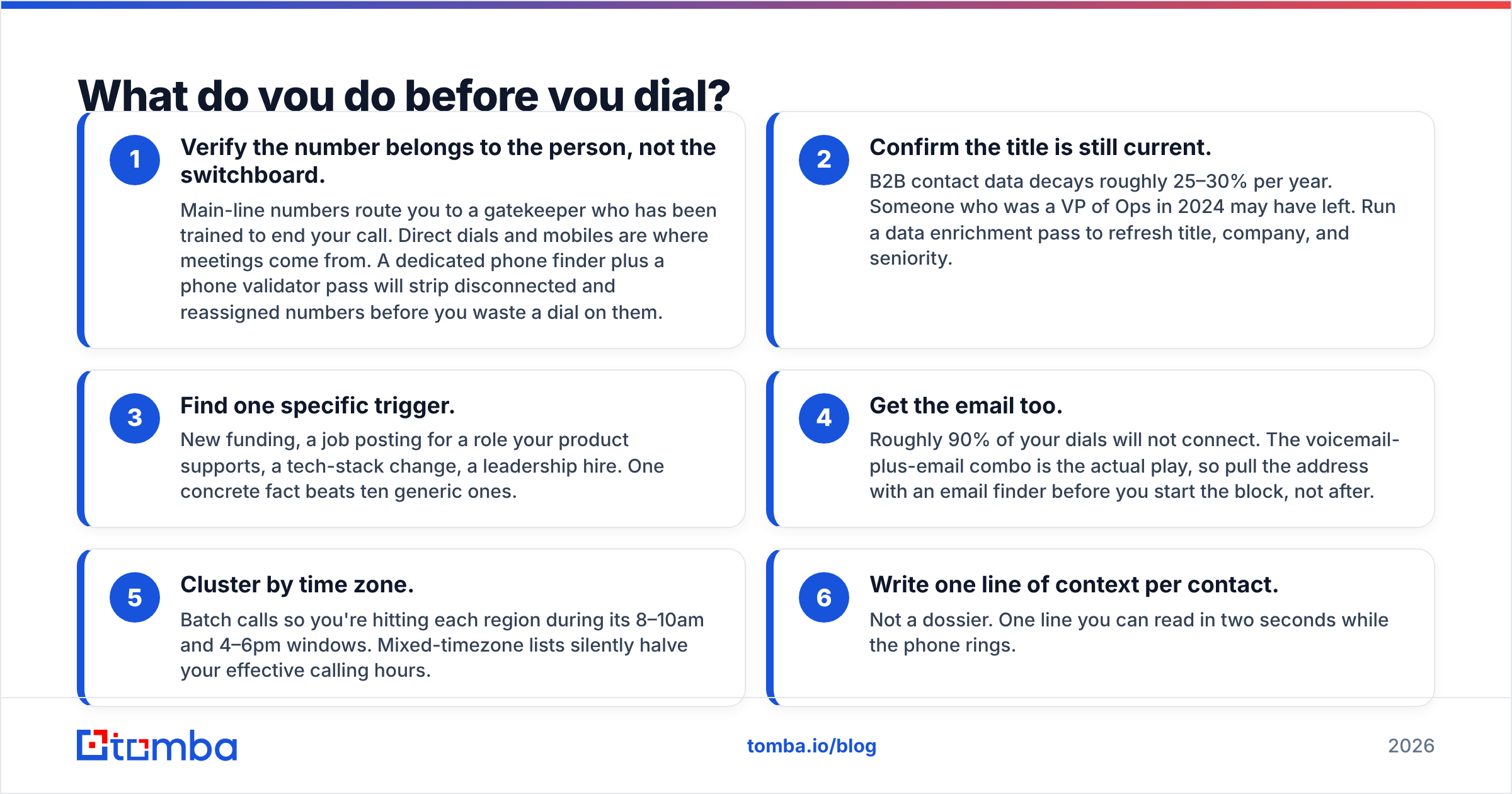
Most "bad calling" is actually bad list building. Fix this layer and your connect rate roughly doubles without changing a word of your script.
The pre-call checklist:
- Verify the number belongs to the person, not the switchboard. Main-line numbers route you to a gatekeeper who has been trained to end your call. Direct dials and mobiles are where meetings come from. A dedicated phone finder plus a phone validator pass will strip disconnected and reassigned numbers before you waste a dial on them.
- Confirm the title is still current. B2B contact data decays roughly 25–30% per year. Someone who was a VP of Ops in 2024 may have left. Run a data enrichment pass to refresh title, company, and seniority.
- Find one specific trigger. New funding, a job posting for a role your product supports, a tech-stack change, a leadership hire. One concrete fact beats ten generic ones.
- Get the email too. Roughly 90% of your dials will not connect. The voicemail-plus-email combo is the actual play, so pull the address with an email finder before you start the block, not after.
- Cluster by time zone. Batch calls so you're hitting each region during its 8–10am and 4–6pm windows. Mixed-timezone lists silently halve your effective calling hours.
- Write one line of context per contact. Not a dossier. One line you can read in two seconds while the phone rings.
If your CRM already holds the accounts, a HubSpot integration or Salesforce integration can push refreshed numbers and emails straight into the records your dialer reads from, so nobody is copy-pasting between tabs.
What should the first 10 seconds sound like?#
Three components, in this order: who you are, why you're calling them specifically, and a permission ask. Then silence.
"Hi Marcus, it's Dana from Tomba. I know I'm an interruption — I called because I saw you're hiring three SDRs this quarter. Can I take 30 seconds to explain why, and you can tell me to go away?"
Why each piece matters:
- Your name and company, plainly. Mumbling your company name signals you expect rejection.
- "I know I'm an interruption." Naming the awkwardness defuses it. It's the single highest-leverage phrase in cold calling and it costs you two seconds.
- A specific reason. "I saw you're hiring three SDRs" proves you did work. "I wanted to talk about your sales process" proves you did not.
- Permission with an escape hatch. Giving them explicit permission to end the call makes them far less likely to use it.
Then stop. The silence after the permission ask does more work than anything you could say into it. Reps who fill that gap lose the call.
What not to do in the opener#
- "How are you today?" — Everyone knows this is a cold call. It reads as a script.
- "Did I catch you at a bad time?" — You handed them a scripted exit.
- Two full sentences of company boilerplate before you say why you called.
- Uptalk on your own name. Say it like a fact.
How do you handle the four objections that kill calls?#
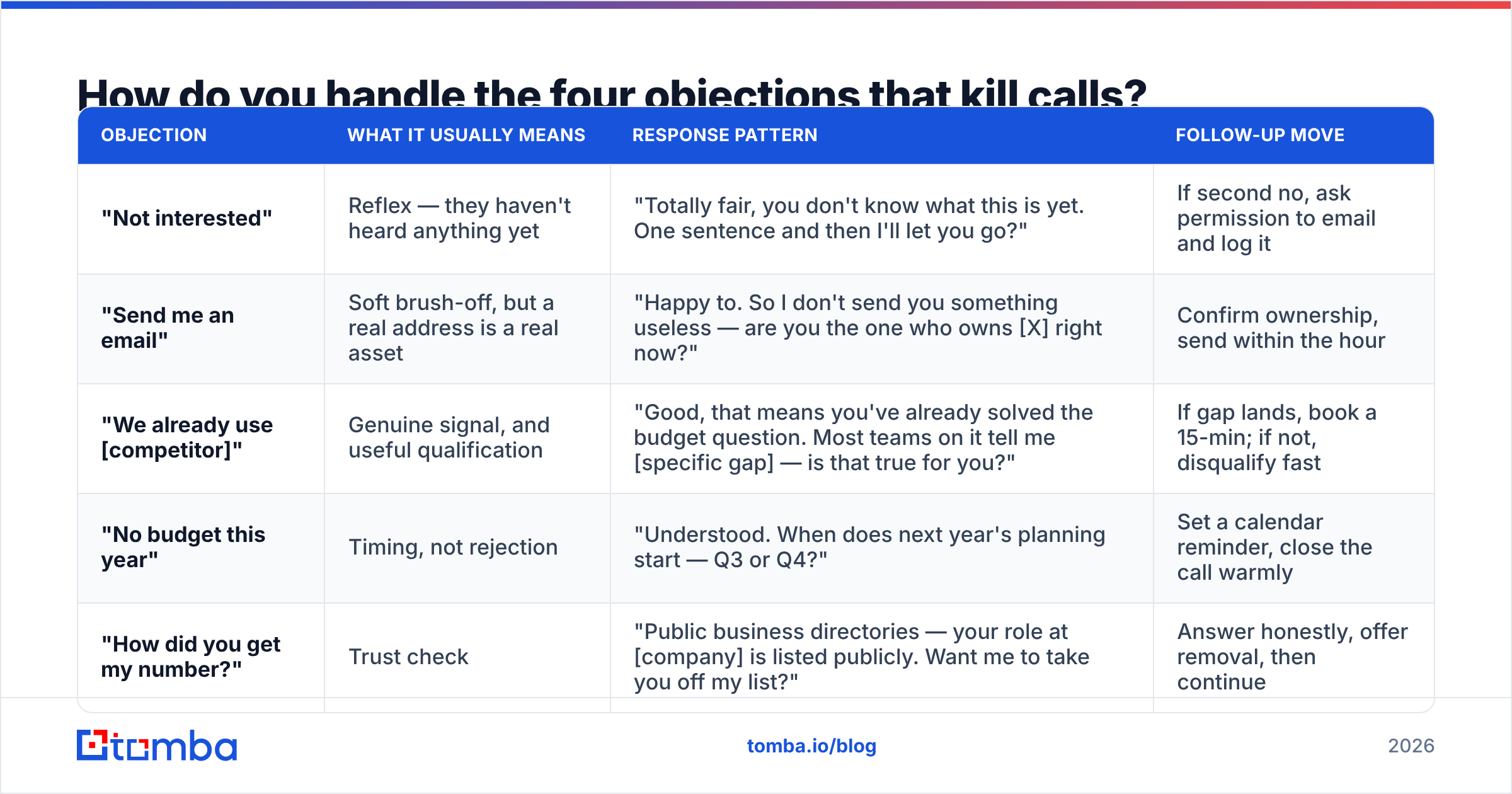
Objections in the first 30 seconds are reflexes, not decisions. Treat them as reflexes.
| Objection | What it usually means | Response pattern | Follow-up move |
|---|---|---|---|
| "Not interested" | Reflex — they haven't heard anything yet | "Totally fair, you don't know what this is yet. One sentence and then I'll let you go?" | If second no, ask permission to email and log it |
| "Send me an email" | Soft brush-off, but a real address is a real asset | "Happy to. So I don't send you something useless — are you the one who owns [X] right now?" | Confirm ownership, send within the hour |
| "We already use [competitor]" | Genuine signal, and useful qualification | "Good, that means you've already solved the budget question. Most teams on it tell me [specific gap] — is that true for you?" | If gap lands, book a 15-min; if not, disqualify fast |
| "No budget this year" | Timing, not rejection | "Understood. When does next year's planning start — Q3 or Q4?" | Set a calendar reminder, close the call warmly |
| "How did you get my number?" | Trust check | "Public business directories — your role at [company] is listed publicly. Want me to take you off my list?" | Answer honestly, offer removal, then continue |
The rule underneath all five: never argue, always ask one more question. An objection you answer with a statement ends the call. An objection you answer with a question keeps it alive.
Which dialer setup should you use?#
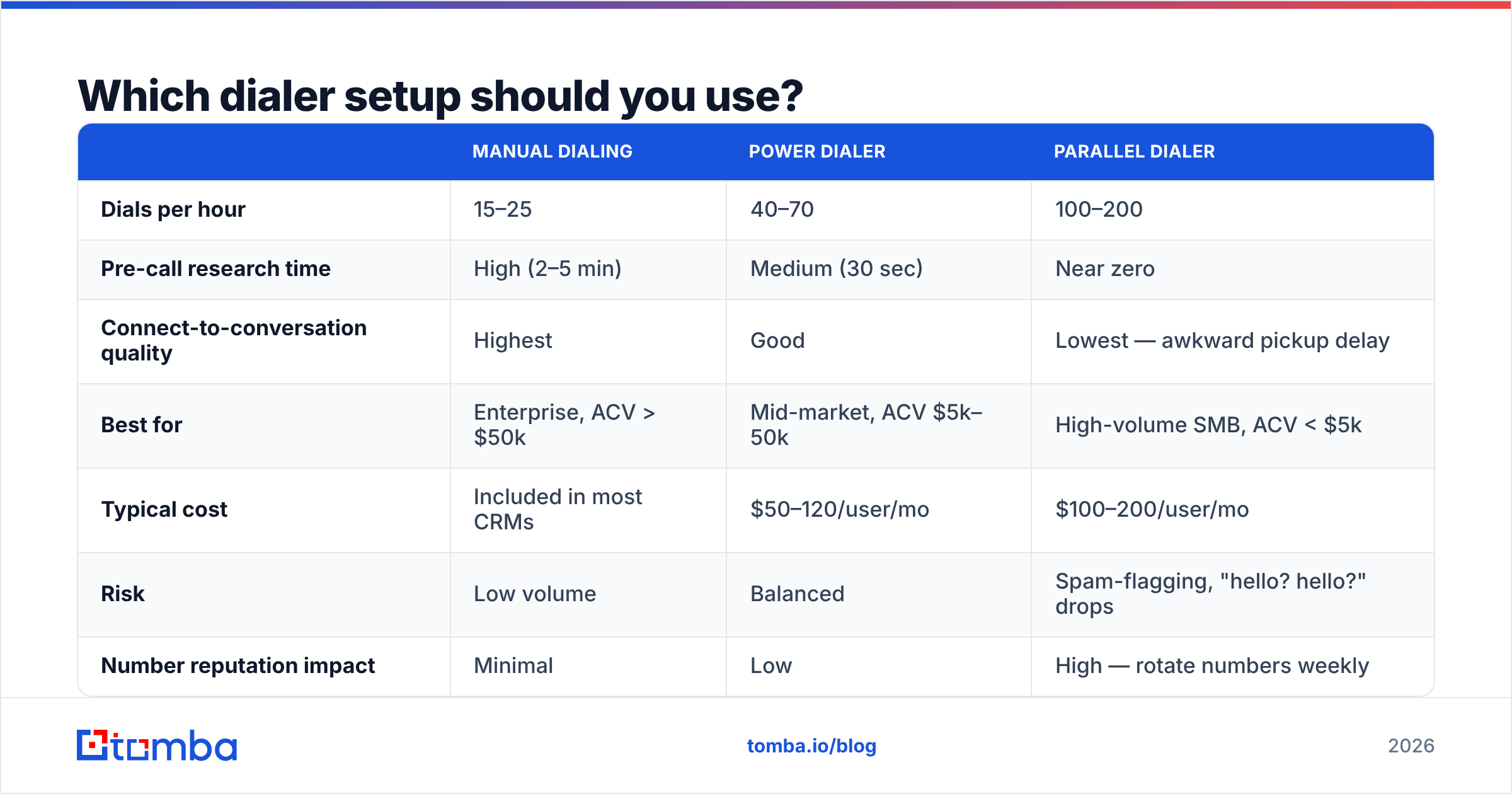
The tooling choice depends on your average deal size and how much context each call needs. High-ACV enterprise calls and $500/month SMB calls are not the same motion.
| Manual dialing | Power dialer | Parallel dialer | |
|---|---|---|---|
| Dials per hour | 15–25 | 40–70 | 100–200 |
| Pre-call research time | High (2–5 min) | Medium (30 sec) | Near zero |
| Connect-to-conversation quality | Highest | Good | Lowest — awkward pickup delay |
| Best for | Enterprise, ACV > $50k | Mid-market, ACV $5k–50k | High-volume SMB, ACV < $5k |
| Typical cost | Included in most CRMs | $50–120/user/mo | $100–200/user/mo |
| Risk | Low volume | Balanced | Spam-flagging, "hello? hello?" drops |
| Number reputation impact | Minimal | Low | High — rotate numbers weekly |
A note on carrier spam labeling: if you dial the same number 300 times a day from one caller ID, US carriers will flag it and your connect rate collapses. Register your numbers through the STIR/SHAKEN process your provider supports, rotate local presence numbers, and keep per-number daily volume under roughly 100 dials. This is the single most-ignored cause of "my connect rate suddenly dropped."
How do you structure the middle of the call?#
You have permission and 30 seconds of attention. Spend it like this:
- One-sentence problem statement (10 sec). "Most ops leaders hiring SDRs this fast end up with reps burning half their day building lists manually."
- One qualifying question (5 sec). "Is that roughly what's happening on your side, or have you already got that solved?"
- Listen for 20–40 seconds. Do not interrupt. Write down their exact words.
- Mirror the words back, then ask the meeting. "So the list-building time is the bottleneck, not the calling itself. That's exactly the 15 minutes I'd want with you — Thursday 2pm or Friday morning?"
Two hard rules for this section. First, never demo on a cold call — the goal is a calendar slot, not a close. Second, offer two specific times, not "does next week work?" Open-ended scheduling gets open-ended non-answers.
If a call runs long and turns into a real discovery conversation, let it. But the default target is a booked meeting in under four minutes.
What about voicemail and the follow-up?#
Nine of ten dials go to voicemail. That's not failure, that's the channel. Treat voicemail as the setup for the email that lands 10 minutes later.
Voicemail template (under 20 seconds):
"Marcus, Dana from Tomba. Calling about the three SDR roles you posted — I've got a specific thought on the ramp time. Sending it by email now so you don't have to call back. Talk soon."
Then send an email whose subject line references the voicemail: "Following my voicemail — SDR ramp." The pairing lifts reply rates substantially versus either channel alone, because you've now had two touches from a named human in fifteen minutes.
Make sure that email actually lands. A bounced follow-up damages your domain's sender reputation and wastes the voicemail entirely — run addresses through an email verifier before the send. If you want the full mechanics of inbox placement, HubSpot's sales statistics research and the peer reviews on G2's sales engagement category are both worth reading before you commit to a stack.

What metrics should you actually track?#
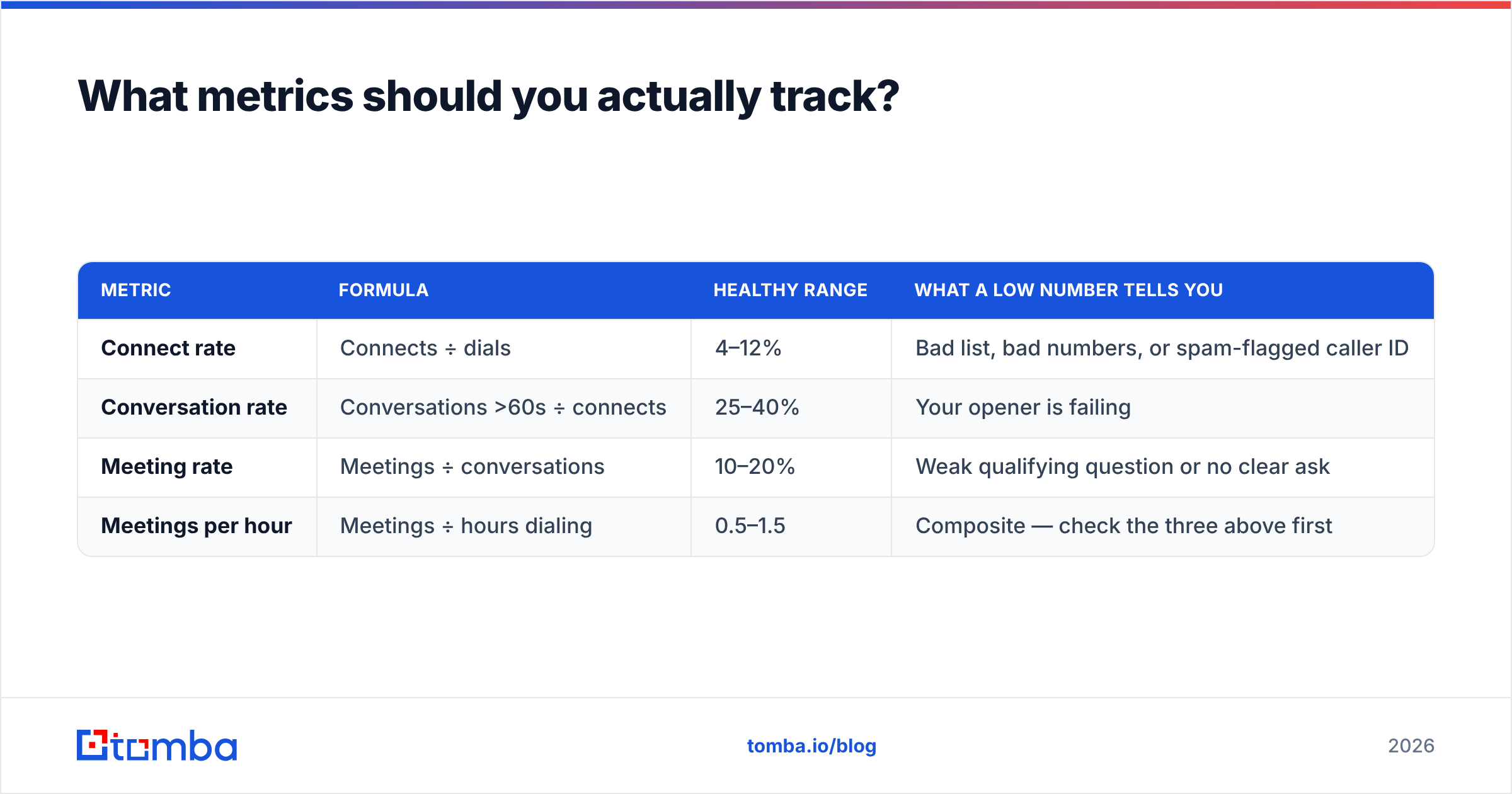
Most teams track "calls made," which measures effort, not outcome. Track these four instead:
| Metric | Formula | Healthy range | What a low number tells you |
|---|---|---|---|
| Connect rate | Connects ÷ dials | 4–12% | Bad list, bad numbers, or spam-flagged caller ID |
| Conversation rate | Conversations >60s ÷ connects | 25–40% | Your opener is failing |
| Meeting rate | Meetings ÷ conversations | 10–20% | Weak qualifying question or no clear ask |
| Meetings per hour | Meetings ÷ hours dialing | 0.5–1.5 | Composite — check the three above first |
Diagnose in order. A rep with a 3% connect rate does not have a script problem, they have a data problem — no amount of coaching fixes a list of disconnected switchboard numbers. A rep with a 10% connect rate and a 12% conversation rate has the opposite issue: good data, broken opener.
Review recorded calls weekly, but only the first 30 seconds of ten calls rather than one call end to end. The opener is where variance lives.
How do you build a calling list that's worth dialing?#
Working backwards from a target of two meetings a day at a 1.0 meetings-per-hour rate, you need roughly 250–400 verified direct dials per rep per month. Building that by hand is not viable.
The practical assembly line:
- Define the account list. Firmographics first — industry, headcount, tech stack, funding stage. Narrow beats broad.
- Pull contacts by role, not by name. Use domain search to surface everyone at a target company, then filter to the two or three titles that own your problem.
- Enrich with phone and email together. You need both, because the follow-up is half the play.
- Validate before import. Dead numbers and bouncing emails both cost you — one in dial time, one in domain reputation.
- Push to the dialer with the trigger field populated. The rep should see the "why I'm calling" line on screen when the phone rings.
For teams doing this at scale, a bulk email finder run once a week beats ad-hoc lookups mid-call. And if you're buying rather than building, established providers like BookYourData offer pay-as-you-go verified B2B lists that pair well with an enrichment layer on top — a reasonable option when you need volume fast and don't want to run the discovery process yourself.
What separates reps who hit quota on the phone?#
Three habits, consistently reported by managers who track this:
- They block time. Two 90-minute calling blocks, calendar-protected, no Slack. Calling in the gaps between other tasks produces neither volume nor rhythm.
- They rehearse the first 30 seconds out loud. Not the whole script — just the opener and the top three objection responses, five minutes before the block starts.
- They log the reason for every no. Over a month, the pattern in those reasons is the most valuable market research your company gets for free.
The tactical stuff matters, but the compounding advantage is repetition against a list that's actually accurate. A great script against a stale list loses to a mediocre script against a fresh one, every single time.
Where should you start tomorrow?#
Pick 40 accounts. Enrich them properly — current title, direct dial, verified email, one trigger fact each. Block 90 minutes. Use the opener above verbatim for the first ten calls, then adjust based on what you hear. Log connect rate, conversation rate, and meeting rate separately. Repeat for a week before you change anything.
That single week of clean data will tell you more about your phone motion than a quarter of guessing.
Start with the list. Tomba's Email Finder pulls verified professional emails by name, company, or domain — and pairs with phone lookup and enrichment so every record in your calling block has both a number to dial and an address for the follow-up. The free tier gives you 25 searches a month to test the workflow; paid plans start at $49/month on Starter, with Growth at $99/month for teams running full outbound motions. Check current Tomba pricing for the full breakdown, or plug it into your existing stack through the Tomba API.
Related guides#
// get started
Find, verify and enrich your first contacts today
Start on the free plan with 25 searches a month, then scale when your team is ready.
Free plan · No credit card required · GDPR & CCPA
// about the author