How to Measure CRM Success: 12 Metrics That Prove ROI
Most CRM reports measure activity, not outcomes. Here are the 12 metrics, the 30-day measurement plan, and the data-quality checks that separate a CRM that pays for itself from one that just stores notes.
TL;DR
- CRM success is not adoption. Adoption is an input. Measure the four outcome families instead: revenue impact, pipeline health, data quality, and cost-to-serve.
- Pick a baseline before you change anything. Without 90 days of "before" numbers, every improvement you report is a guess.
- The single most under-measured metric is CRM data decay — roughly 25-30% of B2B contact data goes stale each year, and a CRM full of dead records quietly inflates every other number you track.
- Run the measurement on a fixed cadence: weekly for leading indicators, monthly for pipeline, quarterly for ROI. Anything more frequent becomes noise.
- Build the scorecard once, in a table, and share the same table every quarter. Changing the metric set every review is how CRM programs lose executive support.
Why do most CRM success reports measure the wrong thing?#
Because they measure what the CRM can count easily, not what the business cares about.
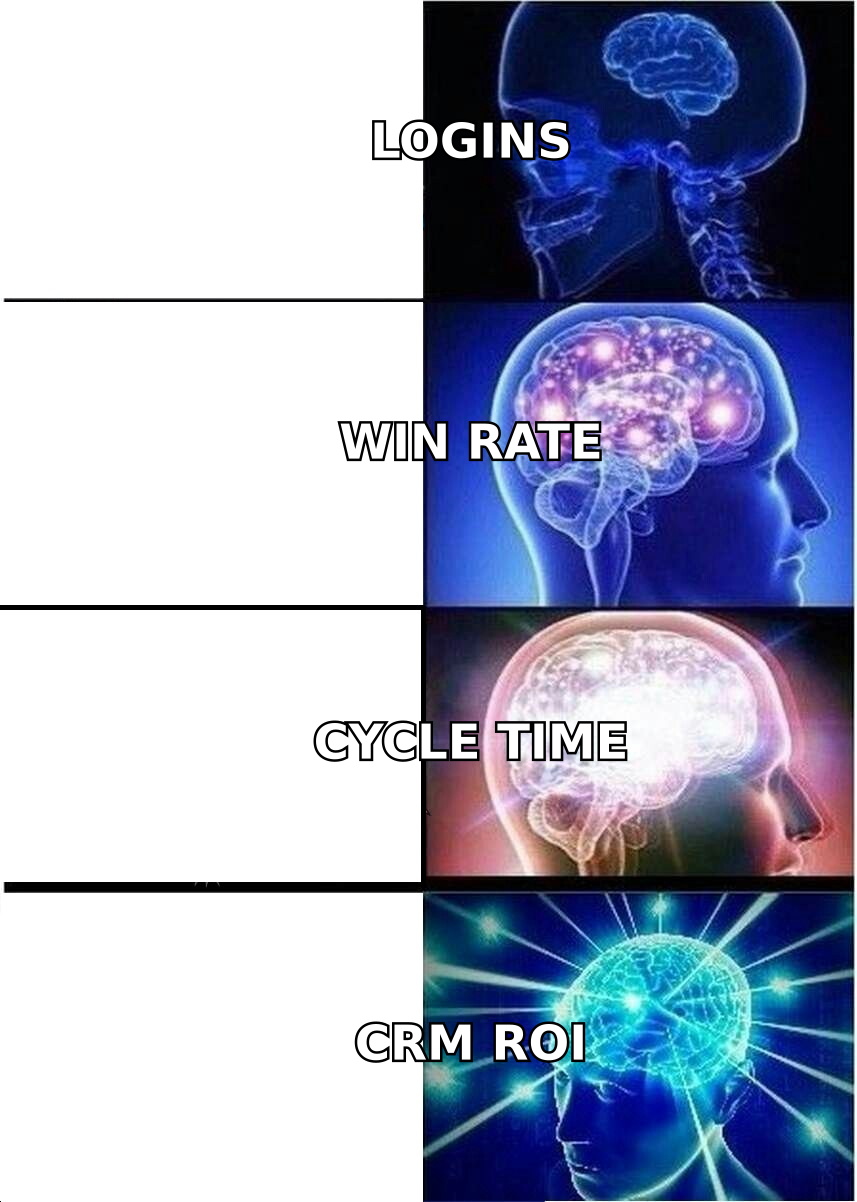
Open almost any default CRM dashboard and you will find logins, activities logged, records created, and emails sent. Those are inputs. A rep can hit every one of those numbers while closing nothing. It is like grading a restaurant on how many times the kitchen door swings open — high traffic, zero information about whether anyone enjoyed the meal.
The fix is to separate three layers and never mix them in the same chart:
- Usage metrics — logins, records touched, fields completed. These tell you whether the tool is being used at all. They are a health check, not a result.
- Process metrics — stage conversion, cycle time, follow-up latency. These tell you whether the CRM is changing how selling happens.
- Outcome metrics — win rate, revenue per rep, forecast accuracy, cost per closed deal. These are what "success" means to the person who signed the contract.
A CRM program that reports only layer 1 gets defunded at renewal. A program that reports layer 3 without layers 1 and 2 can't explain why the number moved. You need all three, weighted toward the bottom.
What is a CRM success metric, exactly?#
A CRM success metric is any number that changes measurably because the CRM exists — and that you can attribute with a before/after baseline.
That last clause does most of the work. "Revenue grew 18%" is not a CRM metric if you also hired four reps and launched a new product in the same quarter. "Median time from lead created to first touch dropped from 31 hours to 4 hours after we turned on assignment rules" is a CRM metric, because the mechanism is traceable.
Practical test before you add anything to your scorecard:
- Is it attributable? Can you name the CRM feature or workflow that moves it?
- Is it baselined? Do you have at least 90 days of pre-change data?
- Is it defended against gaming? If a rep can hit the number without helping a customer, it will be gamed.
- Is it stable enough to trend? Metrics on fewer than ~30 deals per period swing wildly and teach you nothing.
- Does someone own it? An unowned metric is decoration.
Which 12 metrics actually prove CRM ROI?#
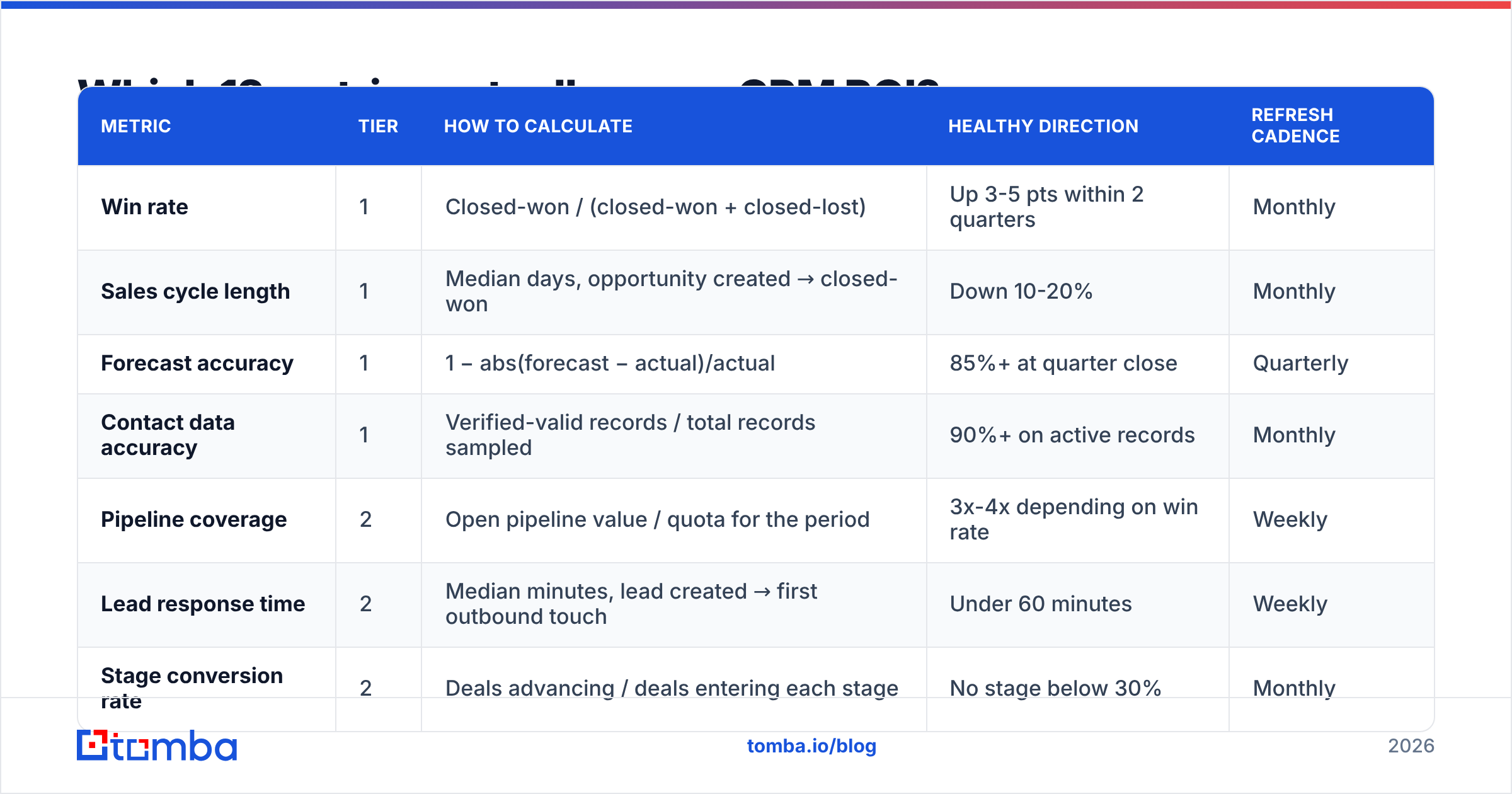
Here is the working set. You do not need all twelve on day one — start with the four in the "Tier 1" rows and expand as your data matures.
| Metric | Tier | How to calculate | Healthy direction | Refresh cadence |
|---|---|---|---|---|
| Win rate | 1 | Closed-won / (closed-won + closed-lost) | Up 3-5 pts within 2 quarters | Monthly |
| Sales cycle length | 1 | Median days, opportunity created → closed-won | Down 10-20% | Monthly |
| Forecast accuracy | 1 | 1 − abs(forecast − actual)/actual | 85%+ at quarter close | Quarterly |
| Contact data accuracy | 1 | Verified-valid records / total records sampled | 90%+ on active records | Monthly |
| Pipeline coverage | 2 | Open pipeline value / quota for the period | 3x-4x depending on win rate | Weekly |
| Lead response time | 2 | Median minutes, lead created → first outbound touch | Under 60 minutes | Weekly |
| Stage conversion rate | 2 | Deals advancing / deals entering each stage | No stage below 30% | Monthly |
| Activity-to-opportunity ratio | 2 | Logged touches / opportunities created | Trending down as targeting improves | Monthly |
| CRM adoption (weighted) | 3 | % of deals with complete required fields, not logins | 90%+ of open deals | Weekly |
| Customer retention / churn | 3 | Retained accounts / accounts at period start | Up quarter over quarter | Quarterly |
| Revenue per rep | 3 | Closed-won revenue / ramped reps | Up, independent of headcount | Quarterly |
| Cost per closed deal | 3 | (CRM + data + tooling spend) / closed-won deals | Down as volume scales | Quarterly |
Two notes on the table. First, weighted adoption beats login counts — a rep who logs in daily and leaves the amount field blank is worse for your forecast than a rep who logs in twice a week and fills everything. Second, cost per closed deal is the number your CFO will ask for. Have it ready before the renewal conversation, not during it.
How do you build a CRM baseline before you measure anything?#
Freeze a 90-day "before" snapshot and store it outside the CRM.
That last part matters. If your baseline lives in a CRM report, it will silently recalculate when someone edits a deal record retroactively, and your before/after comparison quietly dissolves. Export to a spreadsheet, date it, and don't touch it.
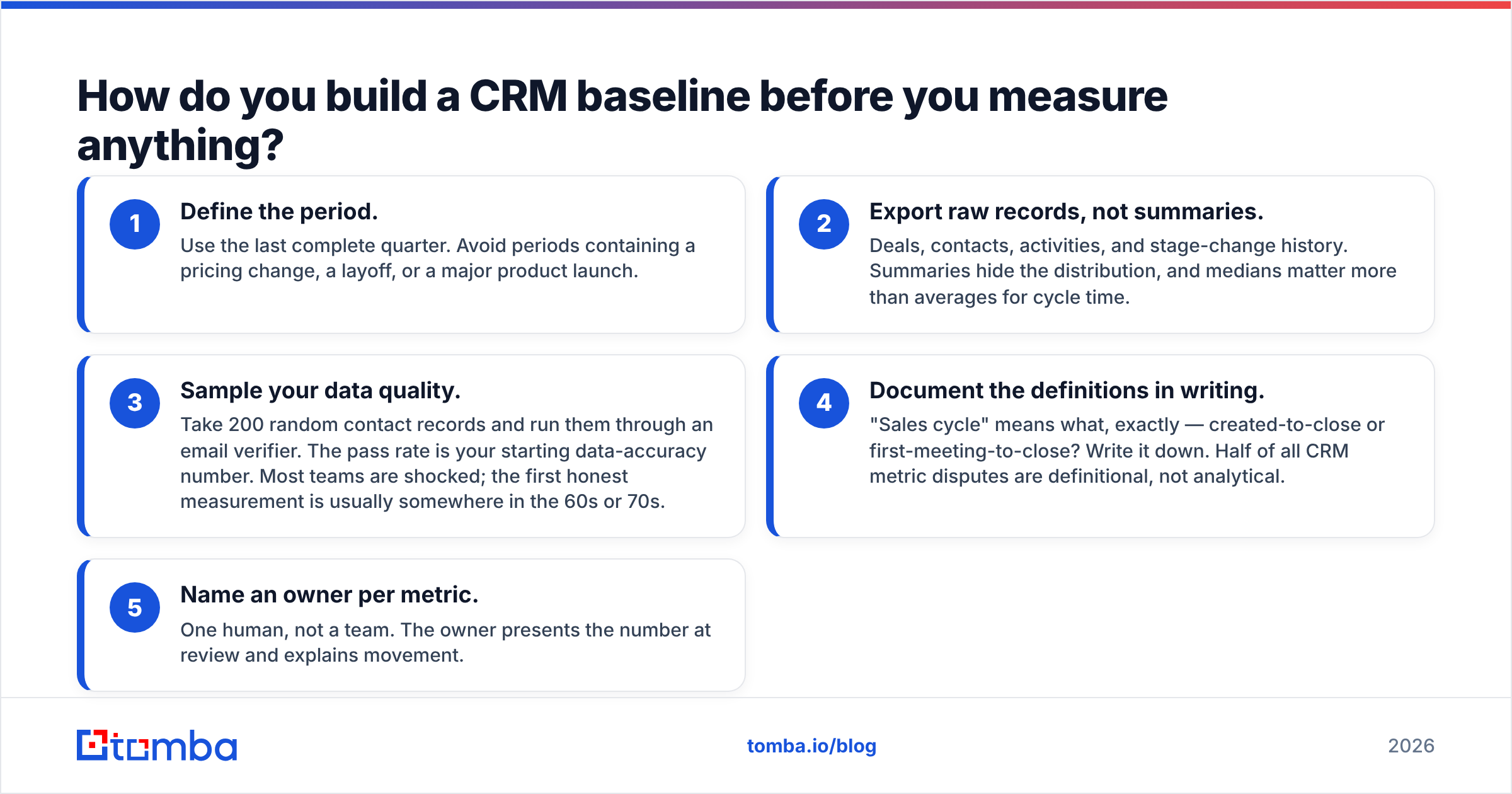
The five-step baseline process:
- Define the period. Use the last complete quarter. Avoid periods containing a pricing change, a layoff, or a major product launch.
- Export raw records, not summaries. Deals, contacts, activities, and stage-change history. Summaries hide the distribution, and medians matter more than averages for cycle time.
- Sample your data quality. Take 200 random contact records and run them through an email verifier. The pass rate is your starting data-accuracy number. Most teams are shocked; the first honest measurement is usually somewhere in the 60s or 70s.
- Document the definitions in writing. "Sales cycle" means what, exactly — created-to-close or first-meeting-to-close? Write it down. Half of all CRM metric disputes are definitional, not analytical.
- Name an owner per metric. One human, not a team. The owner presents the number at review and explains movement.
Then, and only then, change something.
Why does data quality decide every other CRM number?#
Because every metric on your scorecard is a fraction, and bad records corrupt both the numerator and the denominator.
Consider a concrete failure. Your CRM holds 40,000 contacts. Roughly a quarter of them have gone stale over the past year through job changes, domain migrations, and company shutdowns — that decay rate is broadly consistent with what analysts like Gartner and CRM vendors have long reported for B2B databases. Now:
- Your email deliverability collapses because you're mailing dead addresses, which drags sender reputation down and suppresses replies to your good contacts too.
- Your response rate looks like a messaging problem when it is actually a list problem, so you rewrite copy that was never broken.
- Your pipeline coverage looks healthy because 10,000 zombie records inflate the top of funnel.
- Your cost per closed deal looks worse than reality because you're paying seat and credit costs for records that can never convert.
Fix the inputs first. A practical hygiene loop that fits inside a monthly close:
- Sample 200 records monthly and verify them. Track the pass rate as a trended metric, not a one-off audit.
- Verify at the point of entry. Any form, import, or enrichment job should validate the address before the record is created. Retroactive cleanup is 10x the work.
- Handle catch-all domains explicitly. Catch-all servers accept everything, so standard verification returns "unknown." A dedicated catch-all verifier is what separates "we don't know" from "this is deliverable."
- Re-enrich on a schedule. Job changes are the single largest decay driver. Quarterly contact enrichment on your active accounts keeps titles and companies current.
- Kill records, don't hoard them. A contact that has failed verification twice and never engaged is a liability in every report you run.
What does a real CRM measurement cadence look like?#
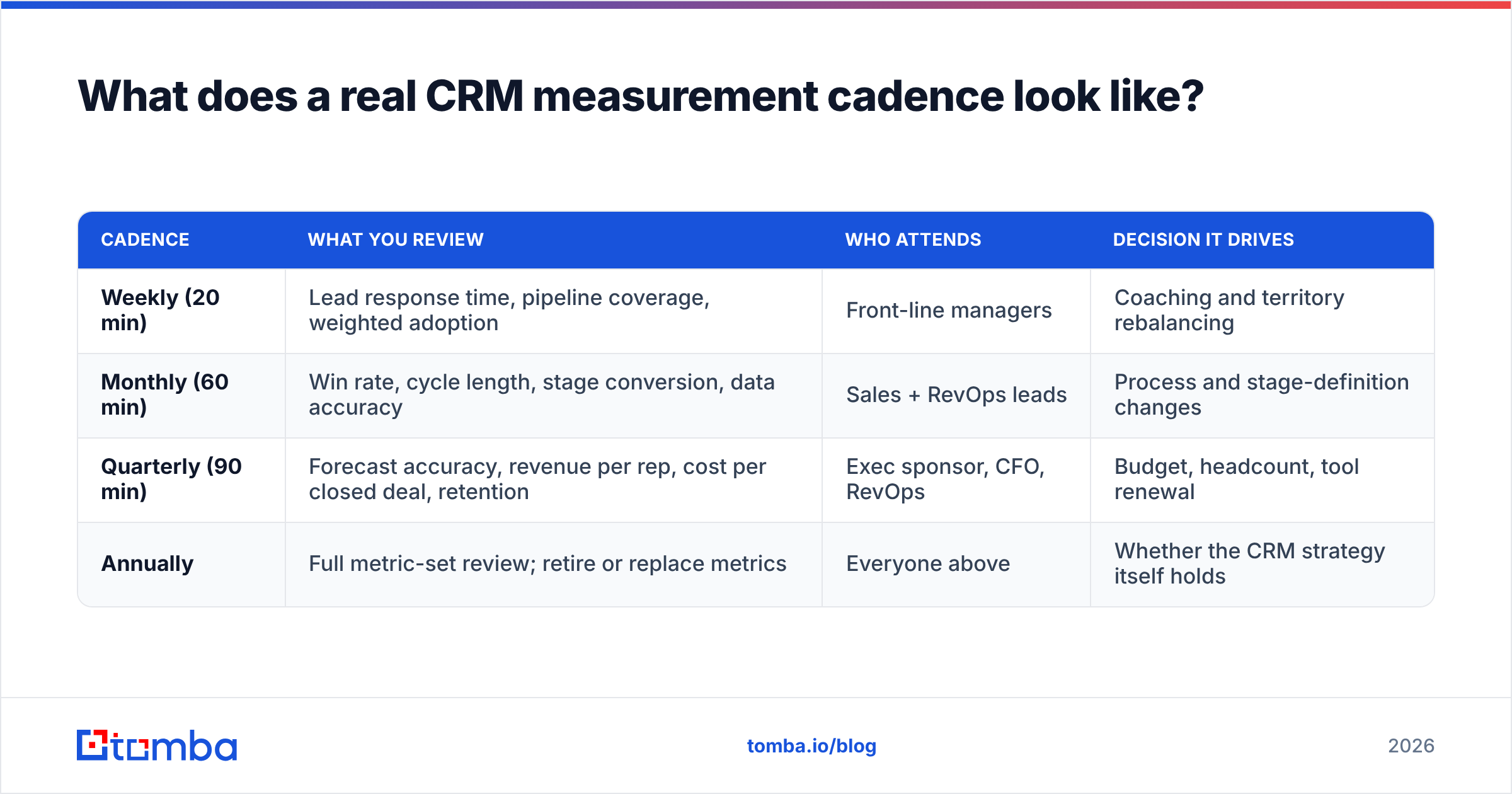
Different metrics move at different speeds, and reviewing them all weekly is how teams burn out on reporting.
| Cadence | What you review | Who attends | Decision it drives |
|---|---|---|---|
| Weekly (20 min) | Lead response time, pipeline coverage, weighted adoption | Front-line managers | Coaching and territory rebalancing |
| Monthly (60 min) | Win rate, cycle length, stage conversion, data accuracy | Sales + RevOps leads | Process and stage-definition changes |
| Quarterly (90 min) | Forecast accuracy, revenue per rep, cost per closed deal, retention | Exec sponsor, CFO, RevOps | Budget, headcount, tool renewal |
| Annually | Full metric-set review; retire or replace metrics | Everyone above | Whether the CRM strategy itself holds |
The annual review is the one most teams skip and the one that matters most. Metrics decay like data does. A stage-conversion metric built around a 2024 sales motion tells you very little about a 2026 one where a chunk of qualification happens in product.
How do you attribute results to the CRM and not to luck?#
Use a comparison group. It is the only honest method available to most sales teams.
Three approaches, in descending order of rigor:
- Staged rollout (best). Turn the new workflow on for one team or region and leave a comparable team on the old process for a full quarter. Compare the deltas, not the absolute numbers. This is the closest thing to a controlled experiment you'll get in a sales org.
- Pre/post with controls (good). Compare the same team before and after, then explicitly list every confounder — headcount changes, seasonality, pricing moves, marketing spend — and state which ones you cannot rule out. Honesty here buys credibility later.
- Cohort comparison (acceptable). Compare deals that used the new workflow against deals in the same period that didn't. Weaker, because reps who adopt fastest are often your best reps anyway. Note that selection bias out loud.
Whatever you pick, write down the expected effect size before you run it. "We expect lead response time to fall below one hour and win rate to rise 2-4 points" is a prediction you can be wrong about. That is what makes it useful. Independent review sites like G2 are full of CRM case studies with no baseline and no control — treat those as marketing, not evidence.
How do CRM tools compare on measurement capability?#
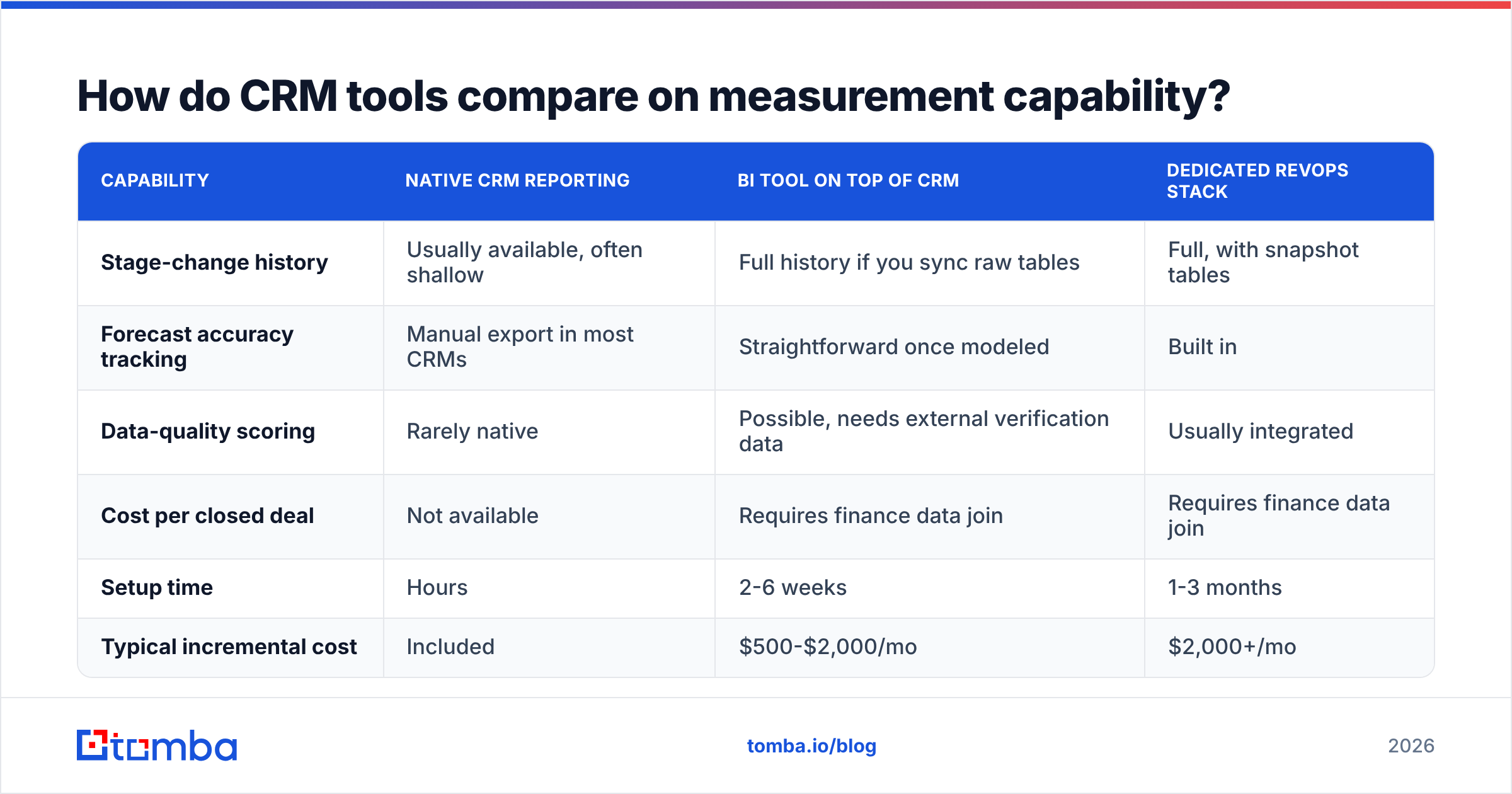
Not every CRM makes the metrics above easy to pull. Here's the practical landscape by measurement need.
| Capability | Native CRM reporting | BI tool on top of CRM | Dedicated RevOps stack |
|---|---|---|---|
| Stage-change history | Usually available, often shallow | Full history if you sync raw tables | Full, with snapshot tables |
| Forecast accuracy tracking | Manual export in most CRMs | Straightforward once modeled | Built in |
| Data-quality scoring | Rarely native | Possible, needs external verification data | Usually integrated |
| Cost per closed deal | Not available | Requires finance data join | Requires finance data join |
| Setup time | Hours | 2-6 weeks | 1-3 months |
| Typical incremental cost | Included | $500-$2,000/mo | $2,000+/mo |
Most teams under 30 reps should stay in column one, export monthly to a spreadsheet, and spend the saved budget on data quality instead of dashboards. A beautiful dashboard on top of a 68%-accurate contact database is an expensive way to be confidently wrong. HubSpot and Salesforce both publish reasonable native reporting docs — start there before you buy a layer on top.
If your CRM is the system of record but your contact data comes from elsewhere, pipe verification into the entry point. A Tomba HubSpot integration or Salesforce integration that verifies on create is worth more to your metrics than another chart.
What are the most common CRM measurement mistakes?#
Five patterns show up over and over:
- Averaging instead of using medians. One 400-day enterprise deal will drag your average cycle length into fiction. Report the median and the 90th percentile.
- Counting adoption as success. High usage of a badly configured CRM produces high-quality records of a broken process.
- Changing definitions mid-year. If you redefine "qualified" in Q3, your year-over-year trend is meaningless. Version your definitions like code.
- Ignoring the denominator. Win rate rises automatically if you simply stop creating marginal opportunities. Always pair win rate with opportunity volume.
- Measuring only closed-won. Loss reasons are the highest-signal, lowest-cost data in the CRM, and almost nobody enforces the field.
One more, less obvious: reporting only to the sales team. CRM ROI lands in a finance conversation eventually. Format at least the quarterly view for someone who has never opened the CRM.
How do you present CRM ROI to an executive sponsor?#
Lead with the money, then show the mechanism. Three slides, no more.
Slide 1 — the result. Cost per closed deal, revenue per rep, forecast accuracy. Before and after, with the baseline date visible.
Slide 2 — the mechanism. Two or three process metrics that explain the result. "Lead response time fell from 31 hours to 47 minutes; stage-two conversion rose 11 points."
Slide 3 — the risk. What would undo this. Usually data decay, usually with a number attached: "24% of our contact records failed verification last quarter; here's the remediation plan and its cost."
That third slide is what earns you budget. Executives fund risks they can see far more readily than improvements they have to take on trust.
Where should you start this week?#
Pick four metrics: win rate, cycle length, lead response time, and contact data accuracy. Export a 90-day baseline. Assign one owner each. Review them monthly for a quarter before adding anything else.
And fix the data underneath them first, because a CRM measurement program built on stale records measures your database, not your sales team. Run a sample of your contact list through Tomba's Email Finder and email verifier to see your real accuracy number — the free tier covers 25 searches a month, and paid plans start at $49/mo on Tomba pricing if you need bulk verification across a full database. Get the accuracy number first; every other metric on your scorecard depends on it.
Related guides#
// get started
Find, verify and enrich your first contacts today
Start on the free plan with 25 searches a month, then scale when your team is ready.
Free plan · No credit card required · GDPR & CCPA
// about the author