How to Nurture Leads in 2026: A Practical B2B Playbook
Most B2B leads are not ready to buy the week they convert. Here is a concrete lead nurturing playbook — timing, channels, scoring thresholds, and the data hygiene that keeps it out of spam.
TL;DR
- Most B2B leads convert 30–90 days after first contact, not in week one. Nurturing is the system that keeps you in the conversation until then.
- Segment by intent signal, not by job title alone. A pricing-page visitor and an ebook downloader need different sequences.
- Use a scoring threshold (not a gut feel) to decide when a lead moves from marketing nurture to a live sales touch.
- Multi-channel beats email-only: email + LinkedIn + a well-timed call lifts reply rates far more than adding another email.
- Bad contact data ruins the best sequence. Verify before you send — bounces above 3% start damaging your sending domain.
What does "nurturing leads" actually mean in 2026?#
Lead nurturing is the process of staying useful to a prospect during the gap between "interested" and "ready to buy." That gap is the whole game. A signup who downloaded your comparison guide is not rejecting you when they ignore your first email — they are usually 60 days from a budget cycle, or three internal conversations away from having a mandate.
The old definition of nurturing was a drip campaign: five emails, one per week, all pointing to the same demo booking link. That model still exists, and it still underperforms. What works now is a system with three moving parts:
- Segmentation — grouping leads by the signal that produced them, not just firmographics.
- Sequencing — a channel plan and cadence per segment, with defined exit conditions.
- Scoring and handoff — an explicit threshold that decides when a human takes over.
If any one of those three is missing, the other two leak. Perfect segments feeding a generic sequence produce generic replies. A brilliant sequence with no handoff rule means your best-fit leads sit in an automation while a competitor calls them.

Why do most lead nurture programs fail?#
Three failure modes account for the majority of dead nurture programs, and none of them are about copywriting.
Failure 1: Nurturing everyone the same way. If your only segment is "lead," your content has to be broad enough to fit everyone, which means it is specific enough for no one. A director of RevOps at a 900-person company and a solo founder both downloaded the same PDF. They should not receive the same follow-up.
Failure 2: No exit conditions. Sequences that keep firing after someone books a call, replies, or unsubscribes-in-spirit (opens nothing for 45 days) burn goodwill and inflate your complaint rate. Every sequence needs a stop rule.
Failure 3: Decayed data. B2B contact data degrades roughly 25–30% per year as people change roles. A nurture list built 14 months ago is a bounce farm. That is not a copy problem — it is a hygiene problem, and it silently caps everything downstream. Run the list through an email verifier before a re-engagement push, not after.
How do you segment leads for nurturing?#
Segment by the action that created the lead, then layer firmographics on top. Action tells you intent; firmographics tell you effort budget.
Here is a workable four-tier model most B2B teams can implement in a week:
- High-intent inbound — pricing page visits, demo requests, free-trial signups, competitor comparison page views. These get a same-day human touch, not a drip.
- Mid-intent content — case study downloads, webinar attendance, product tour completions. Two-week nurture with a soft handoff at the end.
- Low-intent content — top-of-funnel blog subscribers, glossary readers, tool users. Monthly newsletter cadence; promote on behavior change.
- Cold outbound — leads you sourced, who never raised a hand. Different rules entirely: shorter, sharper, permission-aware, and never mixed into your inbound sending domain.
Layer firmographics as an effort multiplier. A tier-2 lead at a 2,000-employee target account deserves a manually written note; a tier-2 lead at a five-person shop gets the automated version. That is how you spend a finite sales team on an infinite list.
What does a good nurture cadence look like?#
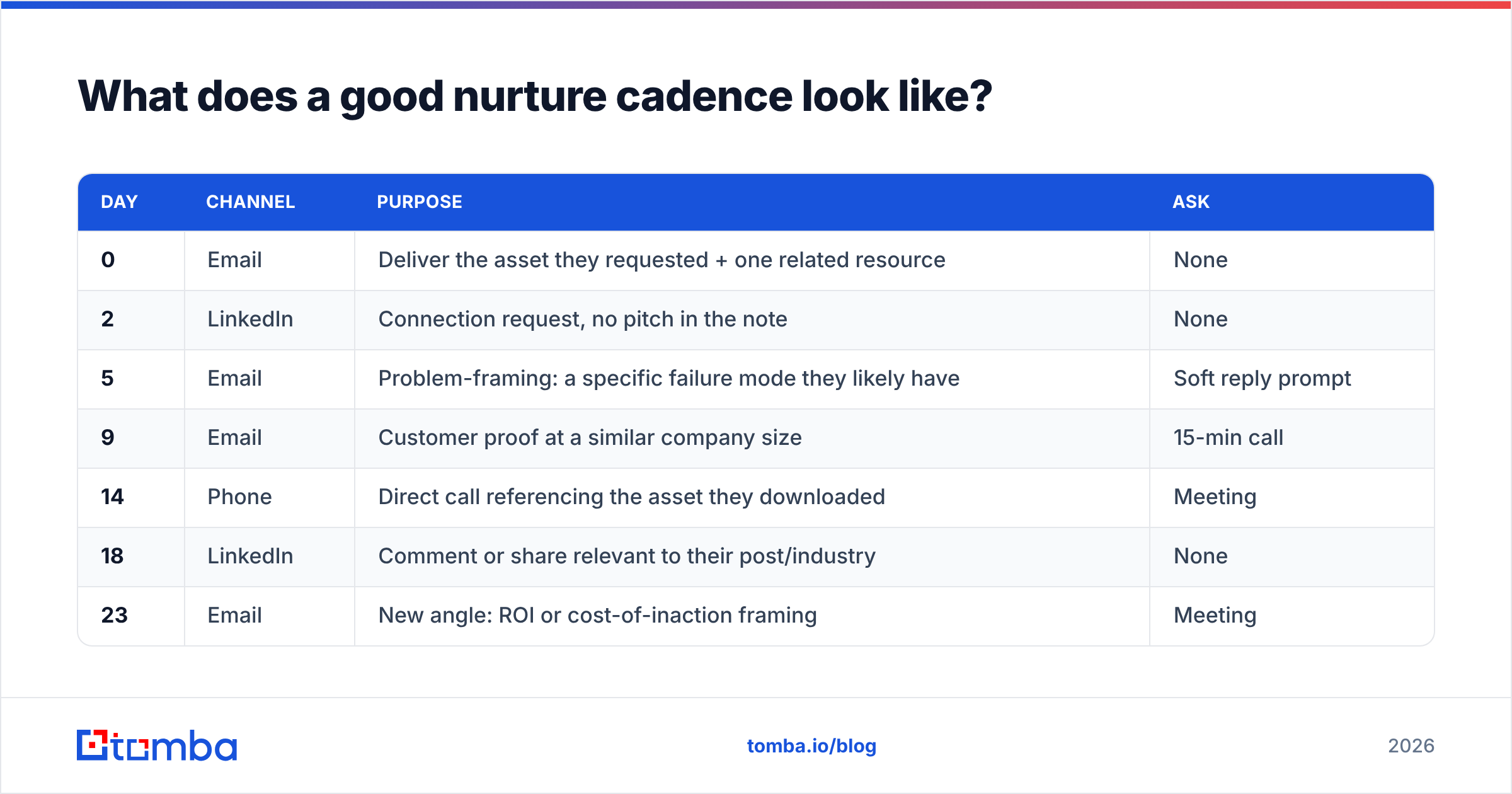
The single biggest mistake is treating cadence as "how often do I email." Cadence is a channel plan across time, and email is only one lane. Here is a realistic 30-day structure for a mid-intent B2B lead.
| Day | Channel | Purpose | Ask |
|---|---|---|---|
| 0 | Deliver the asset they requested + one related resource | None | |
| 2 | Connection request, no pitch in the note | None | |
| 5 | Problem-framing: a specific failure mode they likely have | Soft reply prompt | |
| 9 | Customer proof at a similar company size | 15-min call | |
| 14 | Phone | Direct call referencing the asset they downloaded | Meeting |
| 18 | Comment or share relevant to their post/industry | None | |
| 23 | New angle: ROI or cost-of-inaction framing | Meeting | |
| 30 | Breakup / "should I close the file?" | Yes-or-no reply |
Notice the ratio: eight touches, four asks. Half the touches deliver something without requesting anything. That ratio is what separates nurturing from pestering. Also notice the phone touch on day 14 — by then they have seen your name four times, so the call is warm rather than cold.
For low-intent leads, stretch the same eight touches across 90 days and cut the phone touch entirely. For high-intent leads, compress the first three touches into 72 hours. HubSpot's research on response timing has consistently shown that speed on inbound requests matters far more than polish.
How should you score leads and hand them to sales?#
Scoring exists to answer one question: is this person worth a rep's hour right now? Keep it simple enough that a rep can explain the score without opening a spreadsheet.
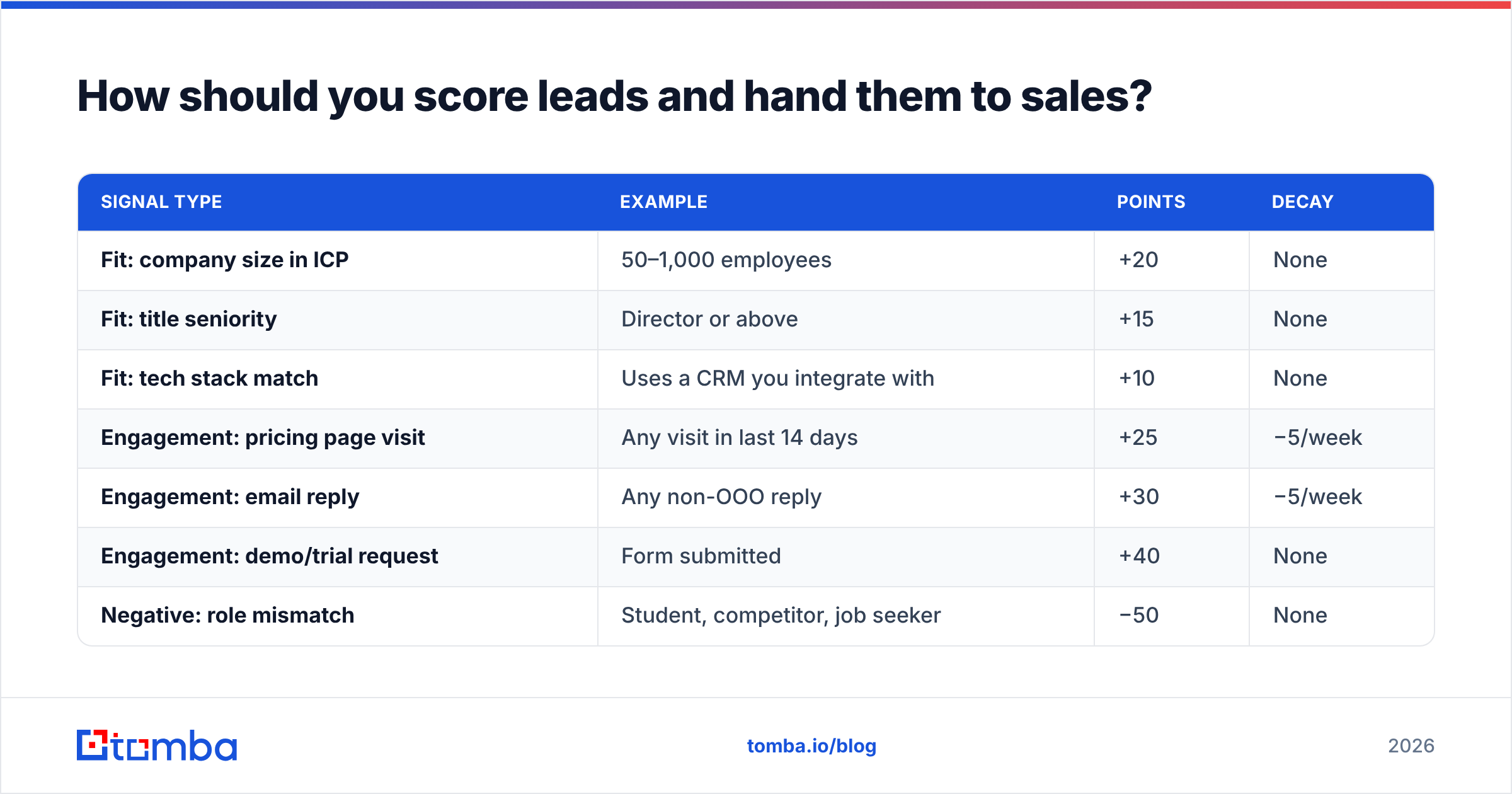
A workable model uses two axes — fit and engagement — and hands over only when both clear a bar.
| Signal type | Example | Points | Decay |
|---|---|---|---|
| Fit: company size in ICP | 50–1,000 employees | +20 | None |
| Fit: title seniority | Director or above | +15 | None |
| Fit: tech stack match | Uses a CRM you integrate with | +10 | None |
| Engagement: pricing page visit | Any visit in last 14 days | +25 | −5/week |
| Engagement: email reply | Any non-OOO reply | +30 | −5/week |
| Engagement: demo/trial request | Form submitted | +40 | None |
| Negative: role mismatch | Student, competitor, job seeker | −50 | None |
| Negative: dormant | No activity 45 days | −20 | Repeats |
Set the handoff threshold at a number that produces roughly the volume your team can actually work — if two reps can handle 40 conversations a week, tune the threshold until it produces ~40 marketing qualified leads a week. A threshold that produces 300 is not a scoring model; it is a list.
Two rules keep this honest. First, engagement points must decay. A pricing-page visit from March tells you nothing in September. Second, fit alone never triggers handoff. A perfect-ICP company that has never engaged is an outbound target, not a nurture graduate — and it should be routed to a prospecting sequence instead.
What data do you need before nurturing works?#
You need three things per lead, and most CRMs have only the first.
- A verified work email. Not the Gmail address from the webinar form. Personal-domain leads convert at a fraction of work-domain leads because you cannot tie them to an account.
- Company context. Employee count, industry, funding stage, tech stack — the fields that decide which segment they belong in.
- A second channel. LinkedIn URL at minimum, direct phone for tier-1 accounts. Single-channel nurture caps your reachable audience at whoever opens email.
This is where enrichment does the heavy lifting. A form with three fields converts far better than a form with eleven; you collect email and company, then fill the rest programmatically. Tools like Tomba's data enrichment and domain search let you take a bare email or company domain and return the firmographic fields your segmentation model needs, plus additional contacts at the same account — useful when your original lead leaves the company mid-sequence.
The hygiene rule to write on the wall: verify before every major send, not once at import. Bounce rates above 3% start visibly damaging sender reputation, and a damaged domain means even your perfectly nurtured leads never see the email. Google's bulk sender requirements make this explicit — spam complaint rates above 0.3% get you throttled regardless of how relevant your content is.

Nurture vs. blast vs. outbound: which does what?#
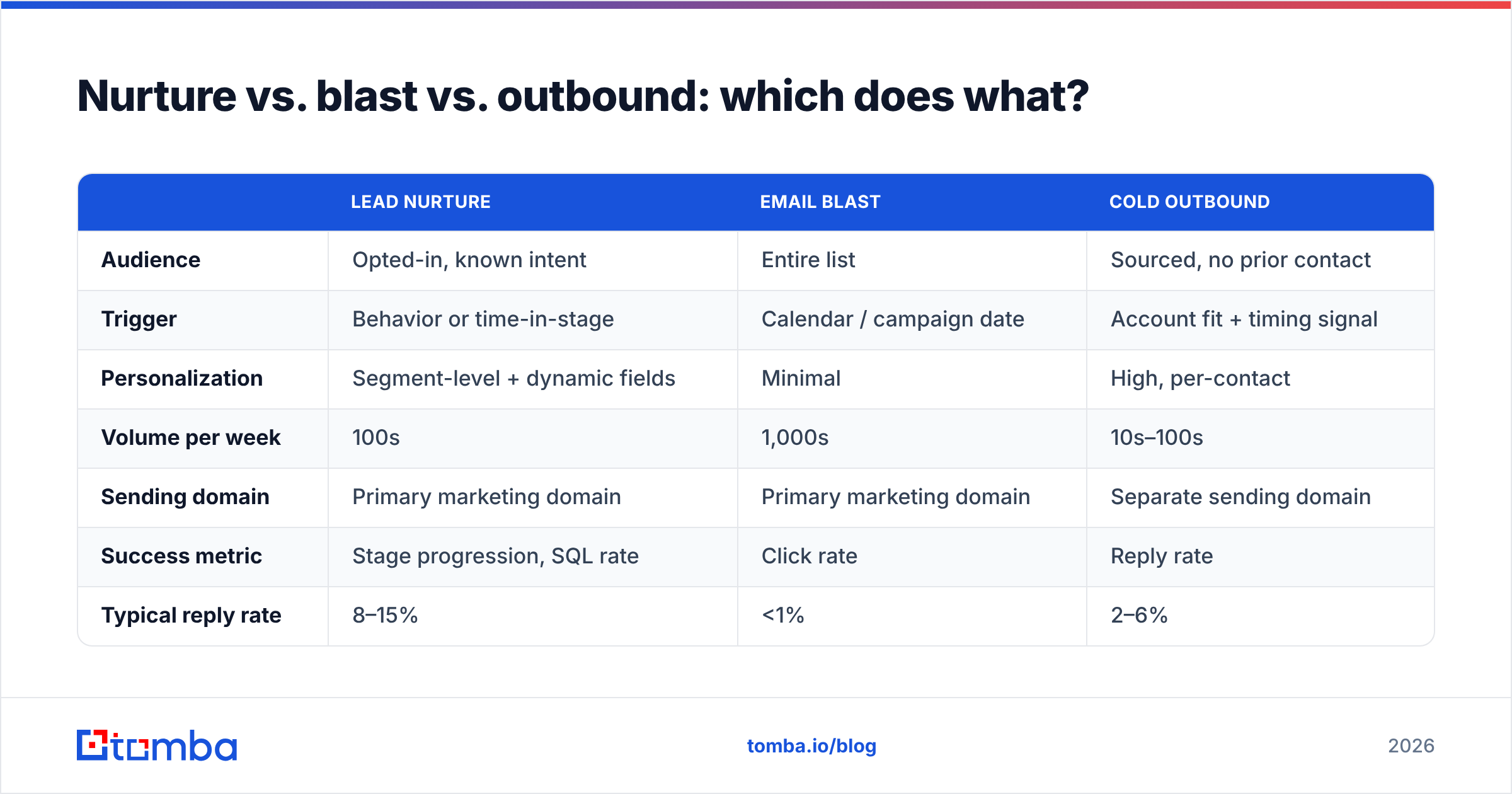
These three motions get conflated constantly, and mixing them is how teams end up with a 12% open rate and no idea why.
| Lead nurture | Email blast | Cold outbound | |
|---|---|---|---|
| Audience | Opted-in, known intent | Entire list | Sourced, no prior contact |
| Trigger | Behavior or time-in-stage | Calendar / campaign date | Account fit + timing signal |
| Personalization | Segment-level + dynamic fields | Minimal | High, per-contact |
| Volume per week | 100s | 1,000s | 10s–100s |
| Sending domain | Primary marketing domain | Primary marketing domain | Separate sending domain |
| Success metric | Stage progression, SQL rate | Click rate | Reply rate |
| Typical reply rate | 8–15% | <1% | 2–6% |
| Main failure mode | No exit conditions | List fatigue | Bad data, no relevance |
The practical takeaway: never run cold outbound from the domain that carries your nurture program. One aggressive outbound test can poison deliverability for a nurture list you spent a year building. Separate domains, separate warmup, separate metrics.
How do you measure whether nurturing is working?#
Open rates are close to useless in 2026 — Apple Mail Privacy Protection and similar features inflate them arbitrarily. Track these instead:
- Stage progression rate. What percentage of leads entering nurture reach sales-qualified within 90 days? This is the headline number. Anything under 5% means your segmentation is wrong, not your copy.
- Reply rate per segment. Segment-level, never aggregate. Aggregate reply rate hides that your tier-1 sequence works at 18% and your tier-3 sequence works at 1%.
- Time-to-SQL. Median days from lead creation to sales-qualified. If this is stable at 70 days, you can forecast pipeline from lead volume. If it swings wildly, your handoff threshold is inconsistent.
- Bounce and complaint rate. Leading indicators of deliverability collapse. Watch weekly, not quarterly.
- Nurture-attributed pipeline. Dollar value of opportunities where a nurture touch preceded the first sales conversation. This is the number that defends the program's budget.
Run one structural experiment per quarter, not five copy experiments per month. Testing subject lines when your segmentation is broken is rearranging deck chairs. Test the cadence shape, the handoff threshold, or the channel mix — those move the stage progression rate.
What tools do you need to run this?#
You need less than the vendor landscape suggests. The minimum viable stack is four layers:
- A CRM as the system of record. HubSpot, Salesforce, or Pipedrive. Whatever you pick, one system holds lead status — not a spreadsheet and not the sequencing tool.
- A sequencing tool that supports multi-channel steps and behavior-based exits. This is where the cadence table above gets implemented.
- A data layer for verification and enrichment. This is the part teams skip and then blame the sequencer when reply rates crater.
- A reporting view that shows stage progression by segment. A saved CRM report is fine; you do not need a BI tool on day one.
On the data layer, cost matters because it scales with volume. Tomba's pricing runs from a free tier at 25 searches per month through Starter at $49/mo, Growth at $99/mo, and Pro at $249/mo, with Enterprise custom — see Tomba pricing for the current credit allocations per tier. For teams already running lists in a spreadsheet, the bulk email finder handles verification and lookup in batches rather than one row at a time. Peers like BookYourData take a different route — selling verified contact lists outright — which suits teams who want a ready-made list rather than an enrichment API sitting behind their forms. Both models work; pick based on whether your bottleneck is list volume or data freshness inside an existing workflow.
What should you do in the next 30 days?#
If you are starting from nothing, this sequence gets you a working program without a six-month project:
- Week 1 — Define four segments and write the exit conditions for each. No copy yet.
- Week 2 — Verify and enrich your existing list. Expect to delete 10–20% of it; that is a good outcome, not a bad one.
- Week 3 — Build one sequence for your highest-intent segment only. Eight touches, four asks, one clear handoff threshold.
- Week 4 — Ship it, then measure stage progression at day 30, 60, and 90. Do not touch the copy for 30 days.
Then repeat for segment two. Teams that build all four sequences before shipping any of them typically ship none.
Ready to fix the data layer first?#
Nurturing fails on data before it fails on copy. If your list is full of role-changed contacts, catch-all domains, and personal Gmail addresses with no company attached, no cadence will save it. Start with Tomba Email Finder to get verified work emails tied to real companies, then layer segmentation and sequencing on top of contacts you can actually reach. The free tier gives you 25 searches a month to test the accuracy against your own list before you commit to a plan — which is the honest way to evaluate any data vendor.
Related guides#
// get started
Find, verify and enrich your first contacts today
Start on the free plan with 25 searches a month, then scale when your team is ready.
Free plan · No credit card required · GDPR & CCPA
// about the author