How to Personalize Sales Emails at Scale in 2026
Most personalization is a first-name merge tag and a compliment about the prospect's website. Here is a repeatable system for personalizing sales emails at scale, with the research inputs, tiers, and time budgets that actually move reply rates.
TL;DR
- Personalization is not a compliment about someone's blog post. It is proof you understand a problem the prospect already has, written in one sentence.
- Run a three-tier system: Tier 1 (deep, 5-10 min) for named accounts, Tier 2 (90 seconds) for the bulk of your list, Tier 3 (segment-level, 0 seconds per lead) for volume plays.
- Budget your research time before you write. If a lead is worth less than $2,000 in pipeline, Tier 1 research loses money.
- Data quality gates everything. A perfectly personalized email to a bounced address is worth zero, and bounces above 3% start damaging your sending domain.
- The highest-leverage personalization variables are trigger events, tech stack, headcount changes, and role-specific pain — not hobbies, hometowns, or podcast appearances.
What does "personalized" actually mean in a sales email?#
Personalization means the email could not have been sent to anyone else on your list without being wrong.
That is the whole test. Swap the company name out and paste in a different prospect. If the email still makes sense, it was not personalized — it was merge-tagged. "Hi {{first_name}}, I loved what you're doing at {{company}}" passes the merge-tag test and fails the personalization test, because it is true of literally every company in your CRM.
Real personalization anchors to something specific and consequential:
- A trigger event. They hired three SDRs last month, closed a Series B, opened a London office, or announced a new product line. Something changed, and change creates budget.
- An observable operational fact. They run HubSpot but no enrichment tool. Their careers page lists a "Revenue Operations Manager" opening. Their pricing page just added a usage-based tier.
- A role-specific pain you can name precisely. A VP of Sales at a 40-person company with a 6-person SDR team has a very different problem than one at a 400-person company with an outbound agency.
- A shared, verifiable context. Same customer, same investor, same competitor they just lost a deal to.
Everything else — birthday months, marathon times, alma maters — is rapport-building filler that reads as surveillance when it comes from a stranger. HubSpot's sales research has consistently found relevance, not familiarity, drives reply rate.
Why do most personalization attempts fail?#
Three reasons, and none of them are effort.
You personalize the opener but not the offer. A custom first line stapled to a generic pitch is a bait-and-switch the prospect notices in half a second. The personalization has to change what you are asking for, not just how you say hello.
You research the person when you should research the problem. Someone's LinkedIn "About" section tells you how they want to be perceived. Their job postings, tech stack, and org chart tell you what is actually broken. The second set predicts buying.
You spend Tier 1 effort on Tier 3 accounts. Deep research on a 12-person startup with a $500 annual contract value is a losing trade even when the email lands perfectly. Time is the scarce resource, so match the depth to the deal size.
There is also a mechanical failure mode people ignore: sending personalized emails to addresses that do not exist. Every bounce is a wasted research hour plus a small hit to sender reputation. Google and Yahoo's bulk-sender rules make this expensive — sustained bounce and complaint rates now route mail to spam regardless of how thoughtful the copy is. Run your list through an email verifier before you invest research time, not after.
What are the three tiers of sales email personalization?#
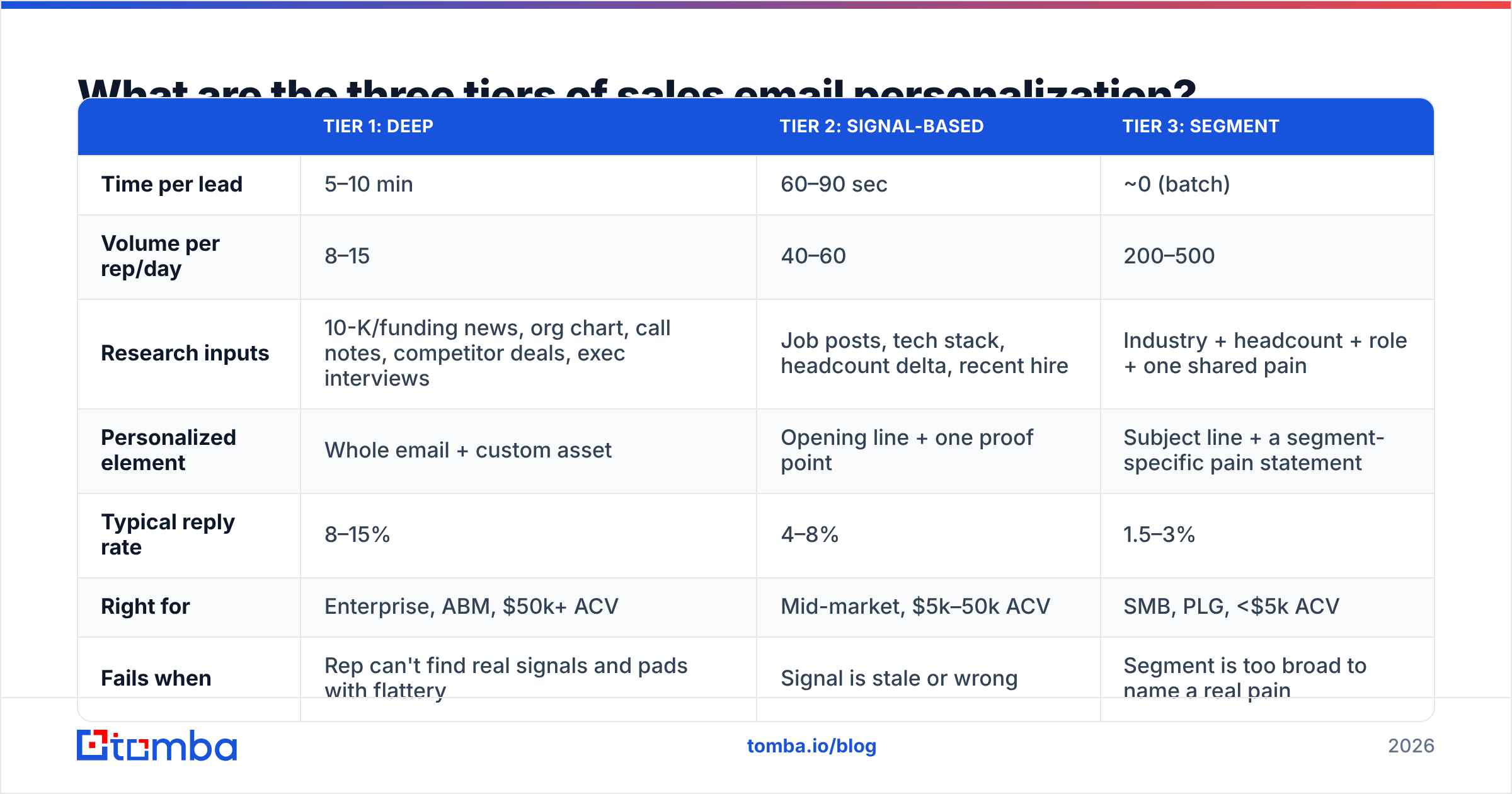
Pick a tier per segment, not per email. Deciding lead-by-lead is how reps burn a whole morning on four emails.
| Tier 1: Deep | Tier 2: Signal-based | Tier 3: Segment | |
|---|---|---|---|
| Time per lead | 5–10 min | 60–90 sec | ~0 (batch) |
| Volume per rep/day | 8–15 | 40–60 | 200–500 |
| Research inputs | 10-K/funding news, org chart, call notes, competitor deals, exec interviews | Job posts, tech stack, headcount delta, recent hire | Industry + headcount + role + one shared pain |
| Personalized element | Whole email + custom asset | Opening line + one proof point | Subject line + a segment-specific pain statement |
| Typical reply rate | 8–15% | 4–8% | 1.5–3% |
| Right for | Enterprise, ABM, $50k+ ACV | Mid-market, $5k–50k ACV | SMB, PLG, <$5k ACV |
| Fails when | Rep can't find real signals and pads with flattery | Signal is stale or wrong | Segment is too broad to name a real pain |
Two rules make this work. First, never mix tiers inside a single sequence — if email 1 is deeply personalized and email 3 is a template, the drop-off reads as disinterest. Second, Tier 3 is not "no personalization." A segment email written for "RevOps leaders at 50–200 person B2B SaaS companies who just added a second CRM admin" is far more specific than a Tier 1 email full of compliments.
How do you personalize a sales email in 90 seconds?#
This is the Tier 2 workflow, and it is where most teams should spend most of their time. Five steps, hard-capped at 90 seconds.
- Confirm the contact is real (10 sec). Name, current title, current company. Titles go stale fast — roughly a quarter of B2B contact data decays annually. Pull the verified address with an email finder rather than guessing at a pattern, and use domain search when you need the rest of the buying committee at the same account.
- Scan the careers page (20 sec). Open roles are the cheapest, most reliable intent signal in B2B. Three open SDR seats means the outbound motion is being rebuilt right now. A first-ever "Head of Data" listing means someone just lost an argument about reporting.
- Check the tech stack (20 sec). Use a website tech stack lookup. Knowing they run Salesforce and Outreach but nothing for contact data tells you exactly which gap to name.
- Find one recent change (20 sec). Funding, an acquisition, a new pricing page, a product launch, a leadership hire. The company's LinkedIn page and newsroom cover 90% of cases.
- Write one sentence that connects the signal to the problem (20 sec). Not "congrats on the raise." Instead: "Three open AE roles and no SDR listings usually means the pipeline gap lands on the AEs — that is the exact situation where our customers start looking at us."
That last sentence is the entire email's value. The rest is a short context line and one clear ask.
What does the finished email look like?#
Here is a Tier 2 email built from the workflow above, roughly 90 words:
Subject: 3 open AE roles, no SDRs
Priya — saw the three AE openings on your careers page and no SDR listings alongside them. Usually that means reps end up self-sourcing about 40% of their own pipeline, which is when ramp time doubles.
We handle the sourcing layer for teams in exactly that shape — verified contact data flowing straight into Outreach, so AEs work a list instead of building one.
Worth 15 minutes to see whether the numbers hold for your team?
— Sam
Note what is missing: no "hope this finds you well," no company mission statement, no three-paragraph feature list, no calendar link dump. The personalization is structural — remove the careers-page observation and the email collapses.
If you want a starting frame before you customize, the cold email templates library covers common shapes, but treat any template as scaffolding you tear down.
Which personalization variables actually correlate with replies?#
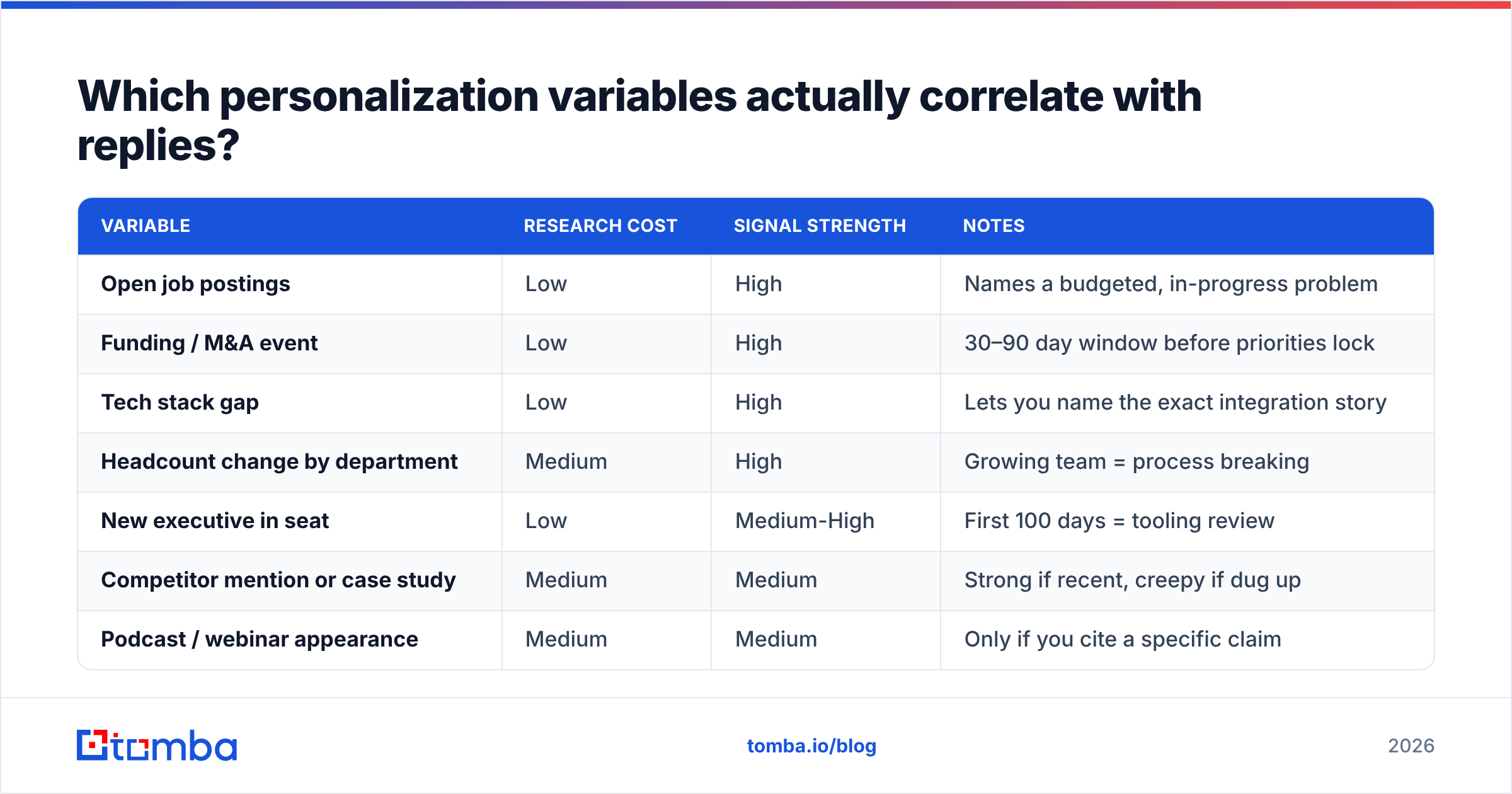
Not all signals carry the same weight. Ranked by how much they move reply rate relative to how long they take to find:
| Variable | Research cost | Signal strength | Notes |
|---|---|---|---|
| Open job postings | Low | High | Names a budgeted, in-progress problem |
| Funding / M&A event | Low | High | 30–90 day window before priorities lock |
| Tech stack gap | Low | High | Lets you name the exact integration story |
| Headcount change by department | Medium | High | Growing team = process breaking |
| New executive in seat | Low | Medium-High | First 100 days = tooling review |
| Competitor mention or case study | Medium | Medium | Strong if recent, creepy if dug up |
| Podcast / webinar appearance | Medium | Medium | Only if you cite a specific claim |
| Recent LinkedIn post | Low | Low-Medium | Over-used; reads as automated now |
| Personal interests / sports | Low | Very Low | Reads as surveillance from a stranger |
| Company anniversary | Low | Very Low | Zero connection to a buying problem |
The pattern is obvious once you see it: signals about organizational change beat signals about individual identity. Companies buy when something breaks or changes. People do not buy because you both like trail running.

Can you personalize at scale without sounding like a robot?#
Yes, but only if you fix the data layer first and accept a hard ceiling on volume.
Fix the data layer. Personalization that references the wrong company, an old job title, or a product they sunset is worse than no personalization — it proves you did not look. Enrichment at the list level is cheaper and more accurate than per-lead scrambling. Run bulk email finder jobs over your target account list, then enrich leads with role, seniority, and company attributes so your merge fields have something true to pull from. Teams that skip this step end up with sequences that silently degrade over months.
Use AI for drafting, never for deciding. LLMs are good at turning a research note into a sentence. They are bad at deciding which signal matters. The workflow that holds up: a human or a data source supplies the signal, the model drafts the connective sentence, a human approves. The inverse — asking a model to "research and personalize" end-to-end — produces the flattery emails everyone deletes. G2's buyer research consistently shows relevance mattering more than volume, and G2's software reviews for this category reflect the same split.
Accept the ceiling. A rep doing genuine Tier 2 personalization tops out around 50–60 emails a day including follow-ups. Anyone promising 500 deeply personalized emails a day is describing Tier 3 with better adjectives. That is fine — just price the expectations accordingly.
Watch the deliverability floor. Volume plus personalization only works if the mail arrives. Keep bounce rate under 2%, run domains through a blacklist checker monthly, and treat email deliverability as a prerequisite rather than an afterthought. Personalized copy cannot rescue a burnt domain.
How should you personalize follow-ups differently?#
The follow-up is where nearly every sequence turns generic, which is backwards — by email three you know something new: they did not reply to your first angle.
Use each follow-up to change the angle, not repeat it:
- Follow-up 1 (day 3): Add one new proof point tied to the original signal. A customer in the same shape, one number.
- Follow-up 2 (day 7): Switch personas. Same problem, framed from the CFO's or the ops lead's view. Often it gets forwarded.
- Follow-up 3 (day 12): Change the ask. Instead of a meeting, offer a two-line answer to one question, or a teardown they can read alone.
- Follow-up 4 (day 20): Break-up email with a genuinely useful asset attached and no ask.
Never send "just bumping this to the top of your inbox." It contains zero information and trains the prospect that your emails are safe to ignore. If you have nothing new to say, do not send.
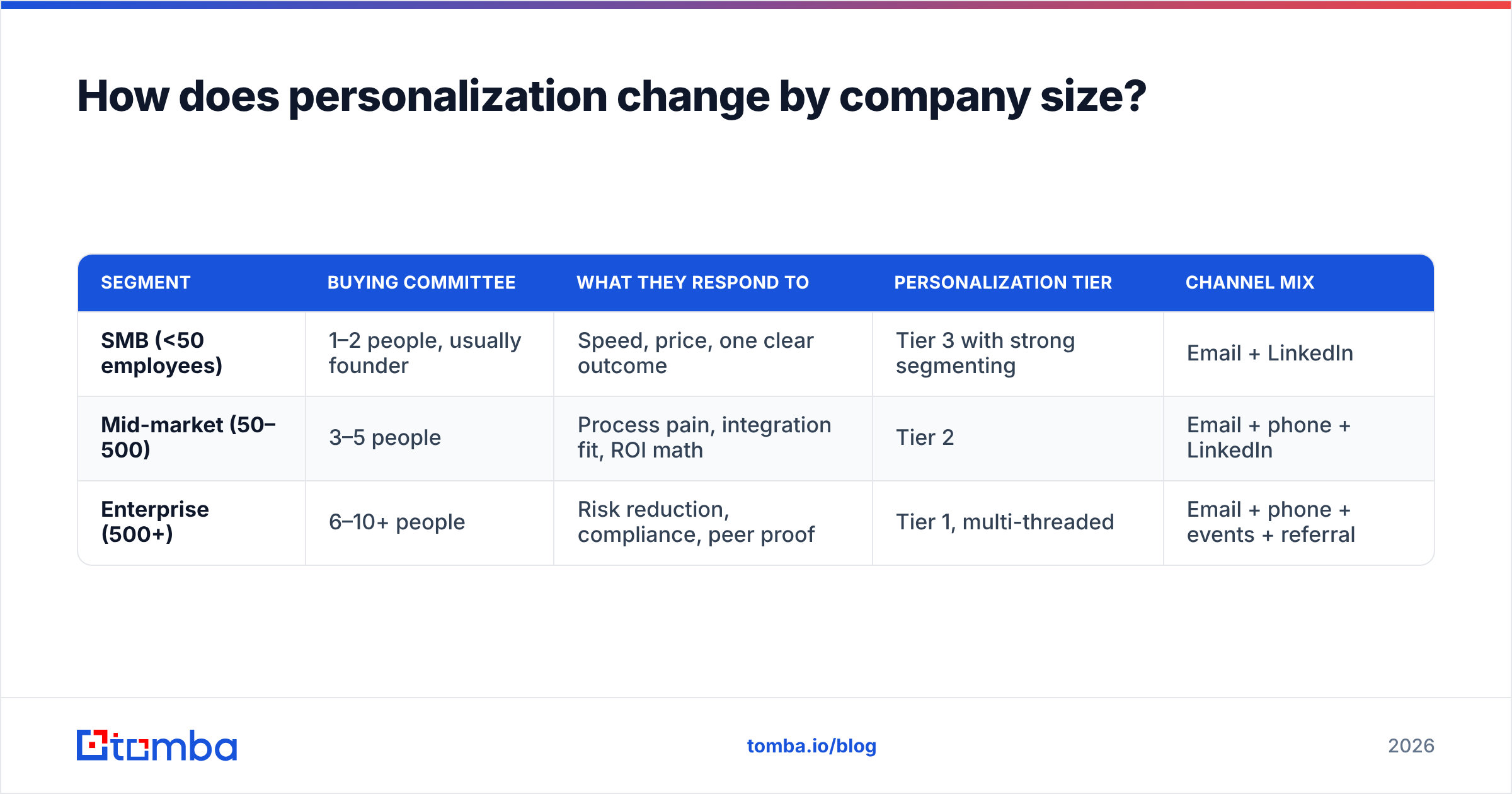
How does personalization change by company size?#
| Segment | Buying committee | What they respond to | Personalization tier | Channel mix |
|---|---|---|---|---|
| SMB (<50 employees) | 1–2 people, usually founder | Speed, price, one clear outcome | Tier 3 with strong segmenting | Email + LinkedIn |
| Mid-market (50–500) | 3–5 people | Process pain, integration fit, ROI math | Tier 2 | Email + phone + LinkedIn |
| Enterprise (500+) | 6–10+ people | Risk reduction, compliance, peer proof | Tier 1, multi-threaded | Email + phone + events + referral |
Multi-threading is itself a form of personalization at the enterprise end: the same account, four different emails, each written to a different function's problem. That requires knowing who sits where, which is why account-level contact mapping matters more than individual lead lists once deal sizes cross five figures.
What should you stop doing immediately?#
A short list of patterns that reliably lower reply rates in 2026:
- "I noticed you're the {{title}} at {{company}}" — states a fact they already know and proves nothing.
- "Congrats on the funding!" — every vendor sent this the same week. If you use the funding signal, connect it to a specific spending decision instead.
- Fake first-name informality with a 400-word pitch underneath. The mismatch is the tell.
- Personalized images with the prospect's logo photoshopped in. These read as gimmicky and often trip image-blocking filters.
- Referencing a LinkedIn post from 14 months ago. Recency is part of the signal.
- Any variant of "quick question" as a subject line when the email is not a quick question.
Replace all of them with one sentence that names a problem the prospect would recognize as theirs. That is the whole craft.
How do you measure whether personalization is working?#
Track reply rate by tier, not by campaign. Aggregate campaign numbers hide the fact that your Tier 1 emails might be carrying a Tier 3 disaster.
The four numbers worth watching weekly:
- Positive reply rate by tier — not total replies. "Not interested" is a reply and tells you the targeting is off, not the copy.
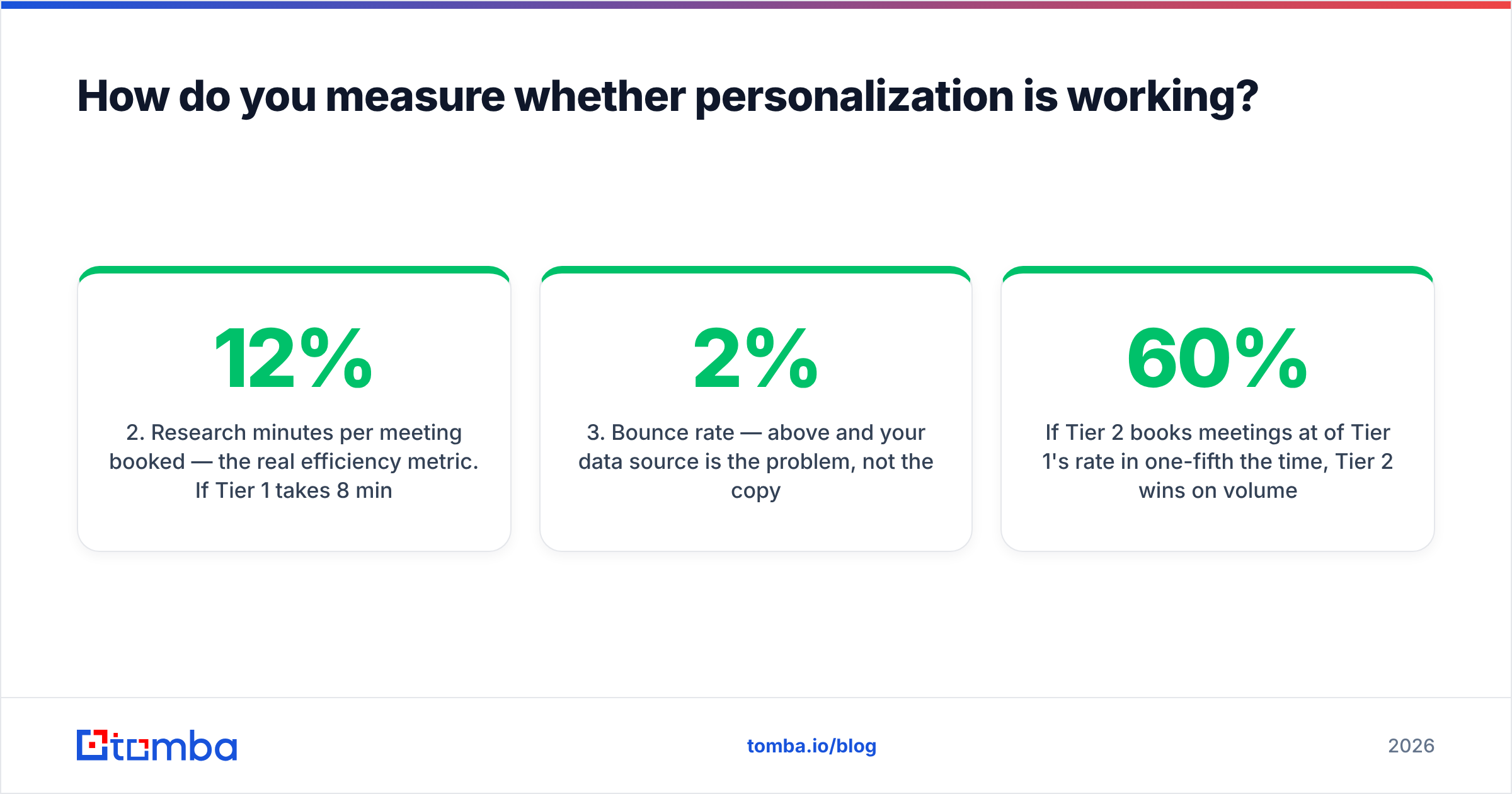
- Research minutes per meeting booked — the real efficiency metric. If Tier 1 takes 8 minutes per lead and books at 12%, that is 67 minutes of research per meeting. Compare against Tier 2's number honestly.
- Bounce rate — above 2% and your data source is the problem, not the copy.
- Meeting-to-opportunity conversion by tier — deeply personalized emails often produce better meetings, not just more of them. That difference only shows up here.
If Tier 2 books meetings at 60% of Tier 1's rate in one-fifth the time, Tier 2 wins on volume economics and you should shift the ratio. Let the numbers decide, and revisit quarterly since response rate benchmarks drift as inbox behavior changes. For teams tracking this in a shared system, Salesforce's sales analytics documentation covers how to structure the reporting side.
Where should you start this week?#
Pick your top 50 accounts. Verify every contact address. Assign each account a tier based on deal size. Then run the 90-second workflow on the Tier 2 group and write four Tier 1 emails by hand. Compare reply rates in two weeks. That single experiment will tell you more about your market than any benchmark report.
The one thing that has to be right before any of it works is the underlying contact data — a great email to a dead address is a rounding error in your pipeline. Tomba's Email Finder returns verified, source-cited professional addresses by name or domain, with a free tier of 25 searches a month to test it against your own list and paid plans starting at $49/mo. Check current Tomba pricing if you need bulk volume, or wire it into your sequencer directly through the Tomba API. Get the data right, then spend your research minutes where they actually pay.
Related guides#
// get started
Find, verify and enrich your first contacts today
Start on the free plan with 25 searches a month, then scale when your team is ready.
Free plan · No credit card required · GDPR & CCPA
// about the author