How to Prevent Churn: A 2026 Playbook for B2B Teams
Most churn is decided in the first 60 days, not at renewal. Here are the signals that predict cancellation, the metrics worth tracking, and a 30-day sprint to stop revenue leaking.
TL;DR
- Churn is rarely a renewal-day problem. Most cancellations are decided in the first 60 days, when a customer either reaches value or quietly stops logging in.
- Track three numbers, not one: logo churn, gross revenue churn, and net revenue retention. They tell three different stories and only one of them protects your forecast.
- The strongest early-warning signals are behavioral (usage decay, single-user dependency, support silence), not sentiment scores.
- A surprising share of "product churn" is actually contact-data churn: your champion left, your emails bounced, and nobody noticed until the auto-renew failed.
- You can run a useful churn-prevention sprint in 30 days with the CRM and data tools you already own.
What actually causes churn in B2B SaaS?#
Churn is a lagging indicator of a decision the customer made weeks or months earlier. By the time someone clicks cancel, the internal conversation is over — you are being told, not consulted.
When you break down real cancellation reasons across B2B accounts, four patterns dominate:
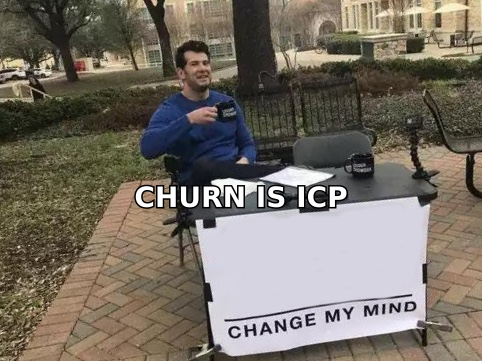
- Wrong-fit acquisition. The account never matched your ICP. Sales closed it, onboarding fought it, and no amount of customer success saved it. This is the cheapest churn to fix because you fix it upstream.
- No time-to-value. The customer bought an outcome and got a login. If they haven't hit the first meaningful result within their evaluation window, the renewal is already at risk.
- Champion turnover. The person who bought you left. The replacement inherited a line item they didn't choose and can't defend.
- Silent dissatisfaction. Usage decayed, tickets stopped, and everyone on your side read the quiet as contentment.
Notice how few of those are "the product is bad." That is the uncomfortable part of learning how to prevent churn: most of the levers sit in go-to-market and revenue operations, not engineering.
Which churn metrics should you actually track?#
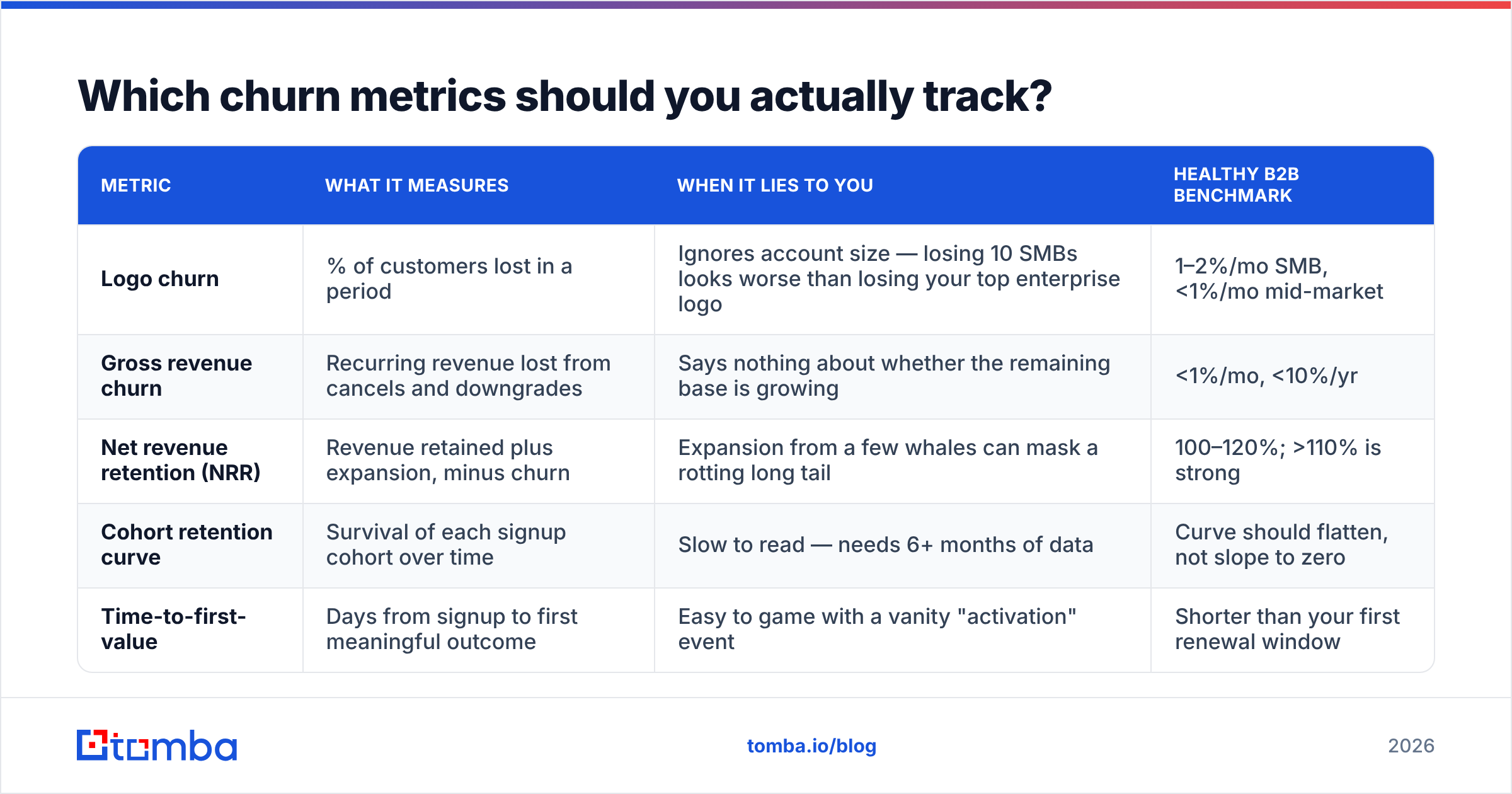
One churn number hides more than it reveals. A team with 4% monthly logo churn but 108% net revenue retention is in a completely different position than a team with 4% logo churn and 88% NRR — but a single dashboard tile makes them look identical.
| Metric | What it measures | When it lies to you | Healthy B2B benchmark |
|---|---|---|---|
| Logo churn | % of customers lost in a period | Ignores account size — losing 10 SMBs looks worse than losing your top enterprise logo | 1–2%/mo SMB, <1%/mo mid-market |
| Gross revenue churn | Recurring revenue lost from cancels and downgrades | Says nothing about whether the remaining base is growing | <1%/mo, <10%/yr |
| Net revenue retention (NRR) | Revenue retained plus expansion, minus churn | Expansion from a few whales can mask a rotting long tail | 100–120%; >110% is strong |
| Cohort retention curve | Survival of each signup cohort over time | Slow to read — needs 6+ months of data | Curve should flatten, not slope to zero |
| Time-to-first-value | Days from signup to first meaningful outcome | Easy to game with a vanity "activation" event | Shorter than your first renewal window |
Track logo churn for CS capacity planning, gross revenue churn for the forecast, and NRR for the board. If you only have bandwidth for one, use NRR — it is the metric Gartner and most growth-stage investors anchor on, because it captures churn and expansion in the same figure.
What are the earliest warning signs of churn?#
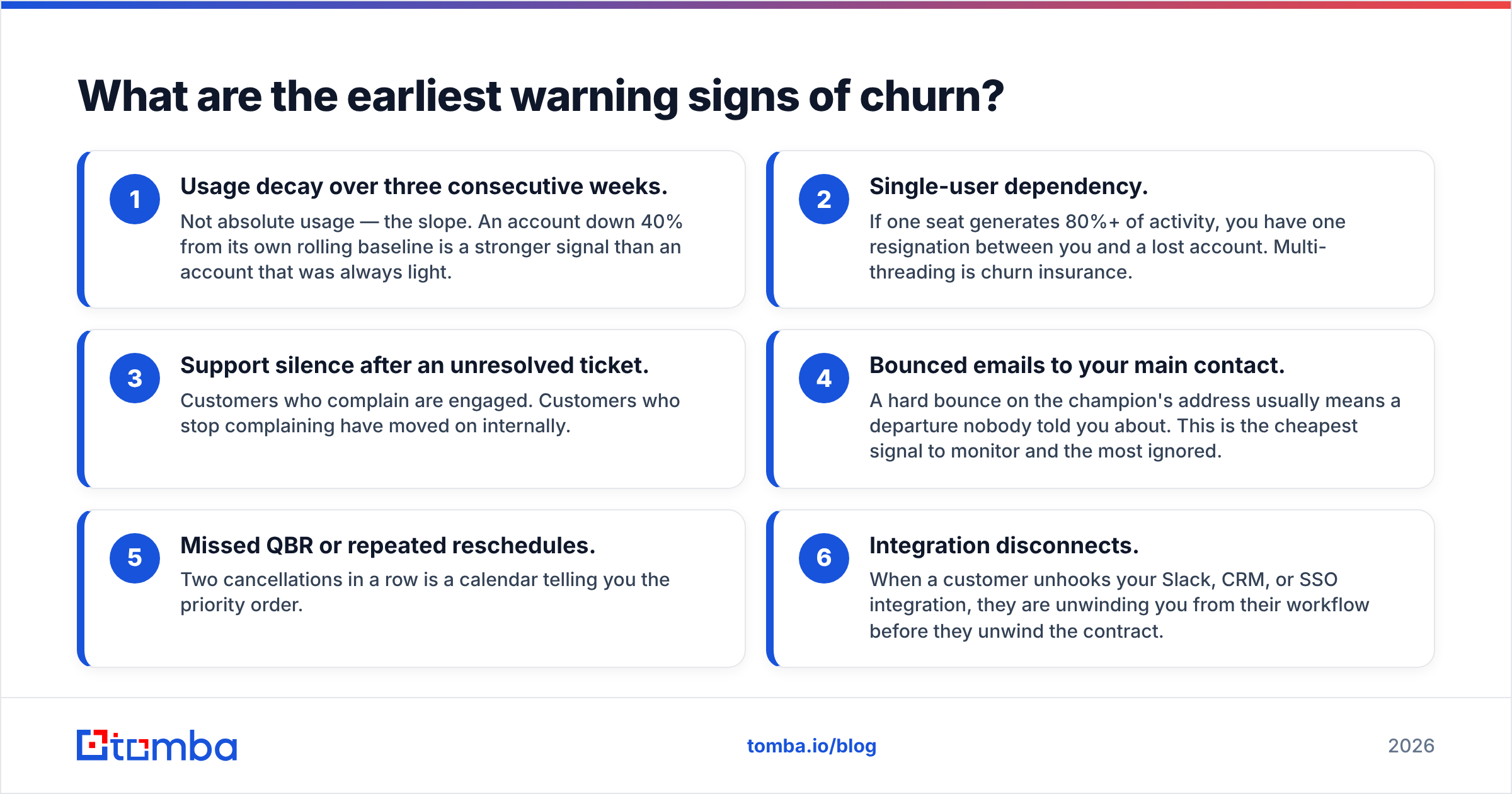
Sentiment surveys arrive too late and are answered by the wrong people. Behavior is faster and harder to fake. These are the six signals worth wiring into a health score, ordered by how reliably they predict cancellation:
- Usage decay over three consecutive weeks. Not absolute usage — the slope. An account down 40% from its own rolling baseline is a stronger signal than an account that was always light.
- Single-user dependency. If one seat generates 80%+ of activity, you have one resignation between you and a lost account. Multi-threading is churn insurance.
- Support silence after an unresolved ticket. Customers who complain are engaged. Customers who stop complaining have moved on internally.
- Bounced emails to your main contact. A hard bounce on the champion's address usually means a departure nobody told you about. This is the cheapest signal to monitor and the most ignored.
- Missed QBR or repeated reschedules. Two cancellations in a row is a calendar telling you the priority order.
- Integration disconnects. When a customer unhooks your Slack, CRM, or SSO integration, they are unwinding you from their workflow before they unwind the contract.
Score these, weight them, and route the top decile to a human. Do not let a health score sit in a dashboard nobody opens; it should create a task in your CRM with an owner and a due date.
How do you prevent churn in the first 90 days?#
The first 90 days set the ceiling for the entire relationship. Three moves matter more than everything else combined.
Define one activation event and obsess over it. Not five. One measurable action that correlates with retention in your historical data — the first campaign sent, the first report shared, the fifth seat invited. Every onboarding email, call, and in-app nudge points at that event. Everything else is decoration.
Multi-thread from day one. Contractual buyers churn; embedded teams don't. Aim for three active users and one executive sponsor inside 60 days. If your onboarding plan doesn't have a named step for "introduce a second team," you are building a single point of failure.
Set a mutual success plan with dates. HubSpot's customer teams popularize this pattern for a reason: a shared document with milestones, owners, and target dates turns a vague relationship into a project with a scoreboard. It also gives you a legitimate reason to escalate when the customer slips, without sounding like you're chasing a renewal.
For a fuller framework on the account-management side of this, HubSpot's customer retention resources are a solid free reference — the plays translate cleanly to smaller teams.
Is bad contact data causing churn you blame on the product?#
This is the most under-diagnosed churn cause in B2B, and it is entirely fixable.
Roughly a quarter to a third of B2B contact records decay every year. People change jobs, companies rebrand, domains migrate, and mailboxes become catch-alls. Inside a customer base that decay looks like this:
- Your renewal notice goes to an address that no longer exists.
- Your product-update emails stop reaching the person who actually uses the tool.
- Your CS manager keeps "checking in" with a contact who left eight months ago.
- Your invoice bounces at a billing address nobody monitors.
None of that is a product failure, but all of it shows up in the churn column. The fix is boring and cheap: run your customer contact list through an email verifier on a quarterly cadence, flag the hard bounces, and treat every bounce as a churn ticket rather than a data-hygiene chore. When a champion's address dies, you have roughly one quarter to find and win their replacement before the renewal conversation happens without you in the room.
Then close the loop with data enrichment: re-resolve the account's current decision-maker, pull the new title and department, and push it back into the CRM record. A domain search across the customer's company will surface who else on that team you should be talking to — the second and third threads you failed to build during onboarding.
Which tools help you prevent churn?#
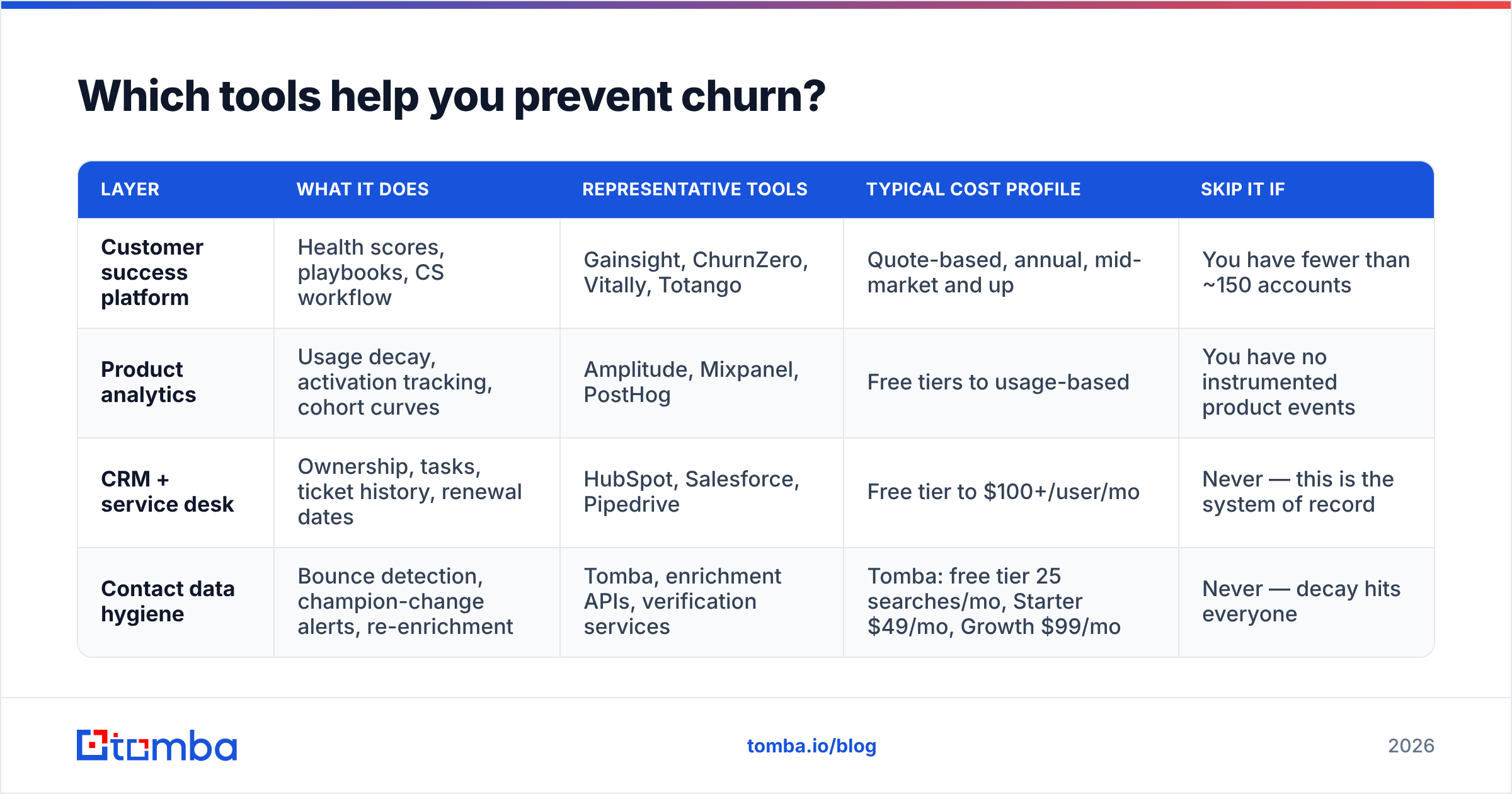
There is no single "churn tool." The stack splits into four jobs, and most teams over-invest in the first one and skip the others.
| Layer | What it does | Representative tools | Typical cost profile | Skip it if |
|---|---|---|---|---|
| Customer success platform | Health scores, playbooks, CS workflow | Gainsight, ChurnZero, Vitally, Totango | Quote-based, annual, mid-market and up | You have fewer than ~150 accounts |
| Product analytics | Usage decay, activation tracking, cohort curves | Amplitude, Mixpanel, PostHog | Free tiers to usage-based | You have no instrumented product events |
| CRM + service desk | Ownership, tasks, ticket history, renewal dates | HubSpot, Salesforce, Pipedrive | Free tier to $100+/user/mo | Never — this is the system of record |
| Contact data hygiene | Bounce detection, champion-change alerts, re-enrichment | Tomba, enrichment APIs, verification services | Tomba: free tier 25 searches/mo, Starter $49/mo, Growth $99/mo | Never — decay hits everyone |
Two notes on picking from this list. First, a customer success platform will not save a business with fewer than a hundred or so accounts — at that scale a well-configured CRM view plus a weekly review beats a six-figure platform. Check current user reviews on G2 before committing to an annual contract; the category churns its own leaders regularly.
Second, the bottom layer is the one nearly everyone treats as optional. It is the cheapest layer and the only one that fails silently. You can see a health score go red. You cannot see an email that quietly stopped arriving.
How do you run a save play on an at-risk account?#
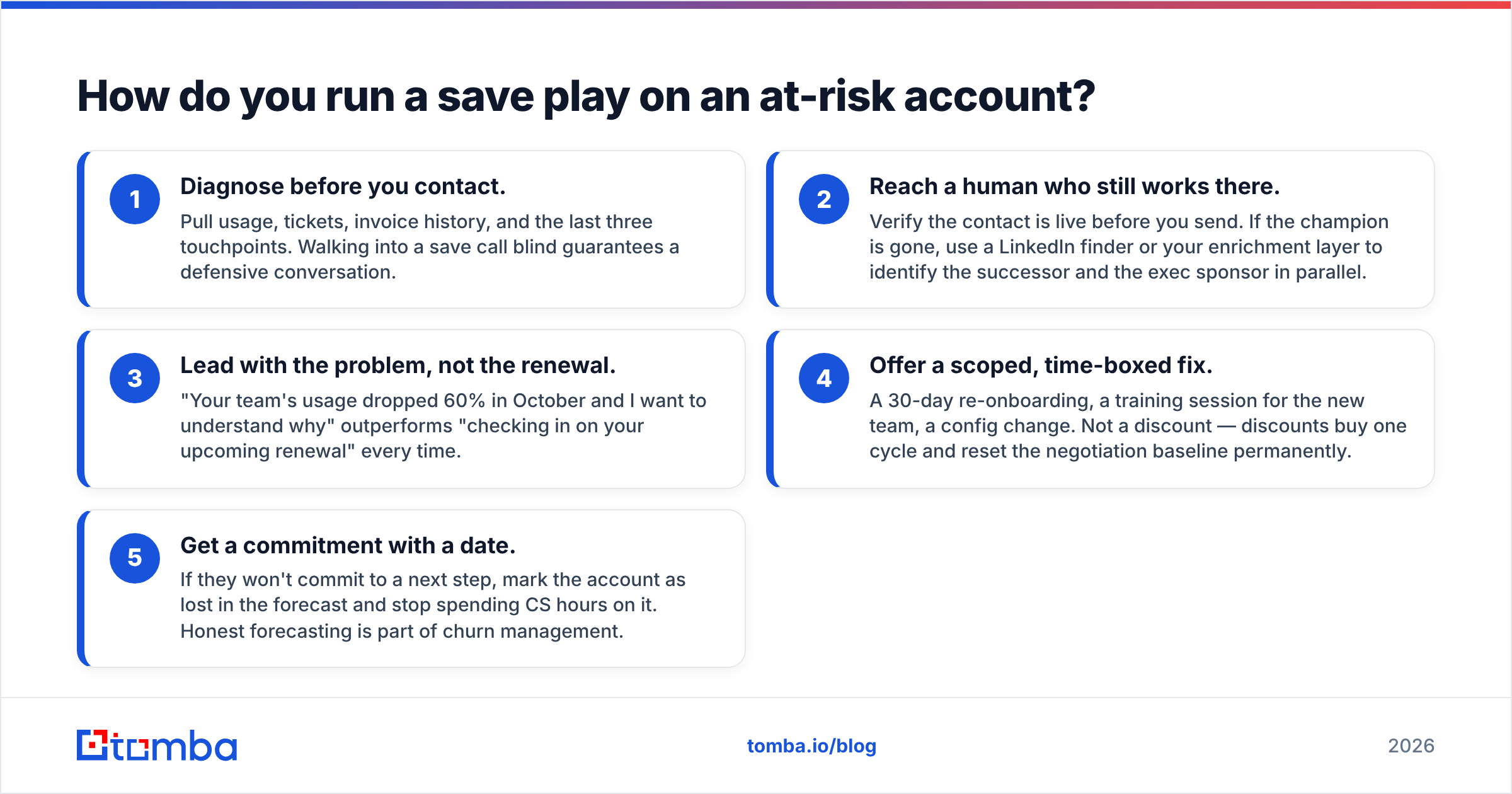
Once an account trips your warning thresholds, speed matters more than polish. A workable sequence:
- Diagnose before you contact. Pull usage, tickets, invoice history, and the last three touchpoints. Walking into a save call blind guarantees a defensive conversation.
- Reach a human who still works there. Verify the contact is live before you send. If the champion is gone, use a LinkedIn finder or your enrichment layer to identify the successor and the exec sponsor in parallel.
- Lead with the problem, not the renewal. "Your team's usage dropped 60% in October and I want to understand why" outperforms "checking in on your upcoming renewal" every time.
- Offer a scoped, time-boxed fix. A 30-day re-onboarding, a training session for the new team, a config change. Not a discount — discounts buy one cycle and reset the negotiation baseline permanently.
- Get a commitment with a date. If they won't commit to a next step, mark the account as lost in the forecast and stop spending CS hours on it. Honest forecasting is part of churn management.
Discounting deserves a specific warning. A price concession converts a churn event into a margin event and teaches the customer that threatening to leave produces a discount. Use it once, at the very end, and only when the account's logo or expansion potential justifies it.
What does a 30-day churn-prevention sprint look like?#
If you want a concrete starting point rather than a strategy deck, run this:
- Week 1 — Measure. Calculate logo churn, gross revenue churn, and NRR for the last four quarters. Build a cohort retention curve. Identify the month where the curve drops hardest.
- Week 2 — Clean. Export every customer contact and run it through verification. Flag bounces, catch-all domains, and role addresses. Every hard bounce becomes a task.
- Week 3 — Signal. Build a crude health score from three inputs you already have: usage trend, active seat count, and days since last support contact. Crude and shipped beats sophisticated and theoretical.
- Week 4 — Act. Take the bottom decile of accounts by health score and run the save sequence above. Log the outcomes. Feed the reasons back into your ICP definition so sales stops buying the same churn next quarter.
Repeat quarterly. The compounding effect is real: a two-point improvement in monthly gross revenue churn changes the shape of an ARR curve more than most acquisition experiments ever will.
Where should you start?#
Start with the data layer, because it is the fastest to fix and it feeds everything above it. Verify your customer contacts, catch the champion changes before the renewal notice bounces, and re-enrich the accounts where your only thread has gone dark.
The Tomba Email Finder does exactly that job: find the current decision-maker at a customer account by domain or name, verify the address before you send, and re-thread the relationship while there is still time to save it. The free tier gives you 25 searches a month to test it against your riskiest accounts, and paid plans start at $49/mo if you want to run your whole customer base through it — see Tomba pricing for the full breakdown. Fix the bounces first, then go build the health score.
Related guides#
// get started
Find, verify and enrich your first contacts today
Start on the free plan with 25 searches a month, then scale when your team is ready.
Free plan · No credit card required · GDPR & CCPA
// about the author