How to Professionally Follow Up on an Unanswered Email
Most replies come from follow-ups, not first sends. Here is the exact cadence, timing, and copy to follow up on an unanswered email without sounding desperate or pushy.
TL;DR
- Silence usually means bad timing, wrong contact, or an email that never landed — not rejection. Diagnose before you resend.
- Send 3-5 follow-ups spaced 3, 5, 7, and 14 days apart. Roughly half of all replies to cold sequences arrive after the first message.
- Never write "just bumping this up" or "circling back." Every follow-up must add a new reason to reply: a resource, a data point, a shorter ask.
- Reply in the same thread for the first two touches, then start a fresh thread with a new subject line so the message escapes a buried conversation.
- Before you blame your copy, verify the address. A bounced or catch-all address produces the exact same symptom as being ignored.
Why did your email go unanswered in the first place?#
Start here, because the fix depends on the cause. Treating "no reply" as a single problem is how people end up sending five polite nudges to a mailbox that stopped existing in 2024.
There are five realistic reasons your message got no response:
- It never arrived. The address was wrong, the domain is catch-all, or your message landed in spam. No amount of follow-up copy fixes a delivery problem.
- It arrived and got buried. The average knowledge worker receives 100-120 emails a day. Yours competed with an internal fire drill and lost.
- It arrived, got read, and wasn't worth a reply. The ask was vague, too big, or clearly templated.
- You emailed the wrong person. They have no budget, no pain, and no reason to forward it.
- The timing is genuinely bad. They're mid-quarter-close, on leave, or the project you referenced got shelved.
Only causes 2, 3, and 5 are solved by following up. Causes 1 and 4 are data problems, and they're more common than most reps admit. Run your list through an email verifier before you assume the copy failed — if 12% of your list is invalid, your "reply rate problem" is really a "12% of your emails were never read" problem.
What is the right follow-up cadence and timing?#
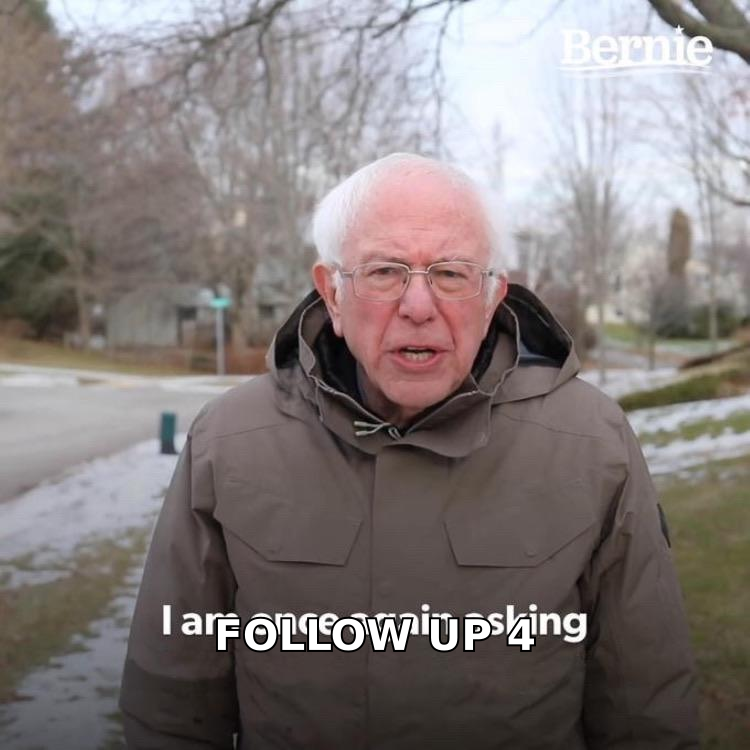
Three to five follow-ups, spaced with widening gaps. That's the shape almost every high-performing outbound team converges on, and the reasoning is mechanical: early gaps catch people who were simply busy, later gaps catch people whose situation changed.
Here's a cadence that works for cold and warm-ish outbound alike:
| Touch | Day | Thread | Angle | Ask size |
|---|---|---|---|---|
| 1 — Initial | Day 0 | New | Specific trigger + one-line value | Small (one question) |
| 2 — Nudge | Day 3 | Same thread, reply | Add one concrete proof point | Same ask, restated shorter |
| 3 — New angle | Day 8 | Same thread, reply | Different pain, different use case | Yes/no question |
| 4 — Value drop | Day 15 | New thread, new subject | Send a resource, ask nothing | None |
| 5 — Close the loop | Day 29 | New thread | Permission-to-close message | Reply with "not now" |
A few timing rules that matter more than people expect:
- Send business-hours-local, not your-hours-local. A message that lands at 8:10 a.m. in the recipient's timezone sits near the top of the inbox. One that lands at 2 a.m. is buried under overnight newsletters.
- Tuesday through Thursday outperforms Monday and Friday for reply rate in most B2B categories, though your own data beats any benchmark.
- Stop before you're annoying. Five touches over roughly a month reads as persistent. Nine touches over ten days reads as automated harassment, and it's how domains get flagged.
- Widen the gaps, don't compress them. Day 3, then 5, then 7, then 14 respects that a non-reply after four attempts means "not now," not "try harder tomorrow."
For a full breakdown of how spacing affects email response rate, the widening-gap pattern consistently beats fixed-interval sequences because it separates the "busy" cohort from the "not interested" cohort.
Should you reply in the same thread or start a new one?#
Both — in that order. Replying to your own message for touches 2 and 3 gives the recipient full context in one scroll and signals continuity. But by touch 4, that thread is 400 pixels of your own text and psychologically feels stale.
Switch to a fresh thread with a genuinely new subject line for the later touches. Not "RE: RE: Quick question" — an actual new hook tied to the new angle you're bringing.
One more mechanical detail: never send a follow-up that's only a follow-up. "Bumping this to the top of your inbox" gives the recipient nothing to react to, and it silently communicates that your first email wasn't important enough to stand on its own.
What should each follow-up actually say?#
Every touch needs a different job. Here are five that work, with the reasoning behind each.
1. The context-adder (Day 3).
Subject: RE: [original]
Hi [Name] — adding one thing I should have included: [Company similar to theirs] cut their [specific metric] by [number] using the same approach. Happy to send the two-paragraph version if useful. Worth a look?
Why it works: it adds information, not pressure. The ask is a yes/no on receiving something, not a meeting.
2. The angle-switch (Day 8).
Subject: RE: [original]
Hi [Name] — my first note focused on [problem A]. Talking to a few other [role]s this month, [problem B] came up more often. If that's closer to your world, I can send how [Customer] handled it. If neither is relevant, tell me and I'll stop.
Why it works: you're testing a second hypothesis instead of repeating a failed one, and you've explicitly given them an easy exit.
3. The value drop (Day 15).
Subject: [Specific resource] for [their team]
Hi [Name] — no ask here. We put together a breakdown of how [10 companies in their segment] structure [process]. Page 3 covers the [specific thing] question directly. Link: [url]. Use it or ignore it, either is fine.
Why it works: it's the only email in the sequence that costs them nothing. Reply rates on genuine no-ask value emails run noticeably above pure pitch touches.
4. The permission-to-close (Day 29).
Subject: Closing the loop on [topic]
Hi [Name] — I've sent a few notes about [topic] and haven't heard back, which usually means it's not a priority right now. That's a fine answer. I'll close the file unless you tell me otherwise — and if the timing changes in Q3, reply to this and I'll pick it back up.
Why it works: loss aversion plus a clean exit. This is consistently the highest-reply message in most sequences, and a meaningful share of those replies are "actually, wait."
5. The referral pivot (any time after touch 3).
Hi [Name] — if [topic] isn't yours, could you point me to whoever owns it? I'd rather ask you once than guess wrong three times.
Why it works: it converts a dead contact into a live one. Pair it with a domain search so you already know who else on the team is a plausible owner before you ask.
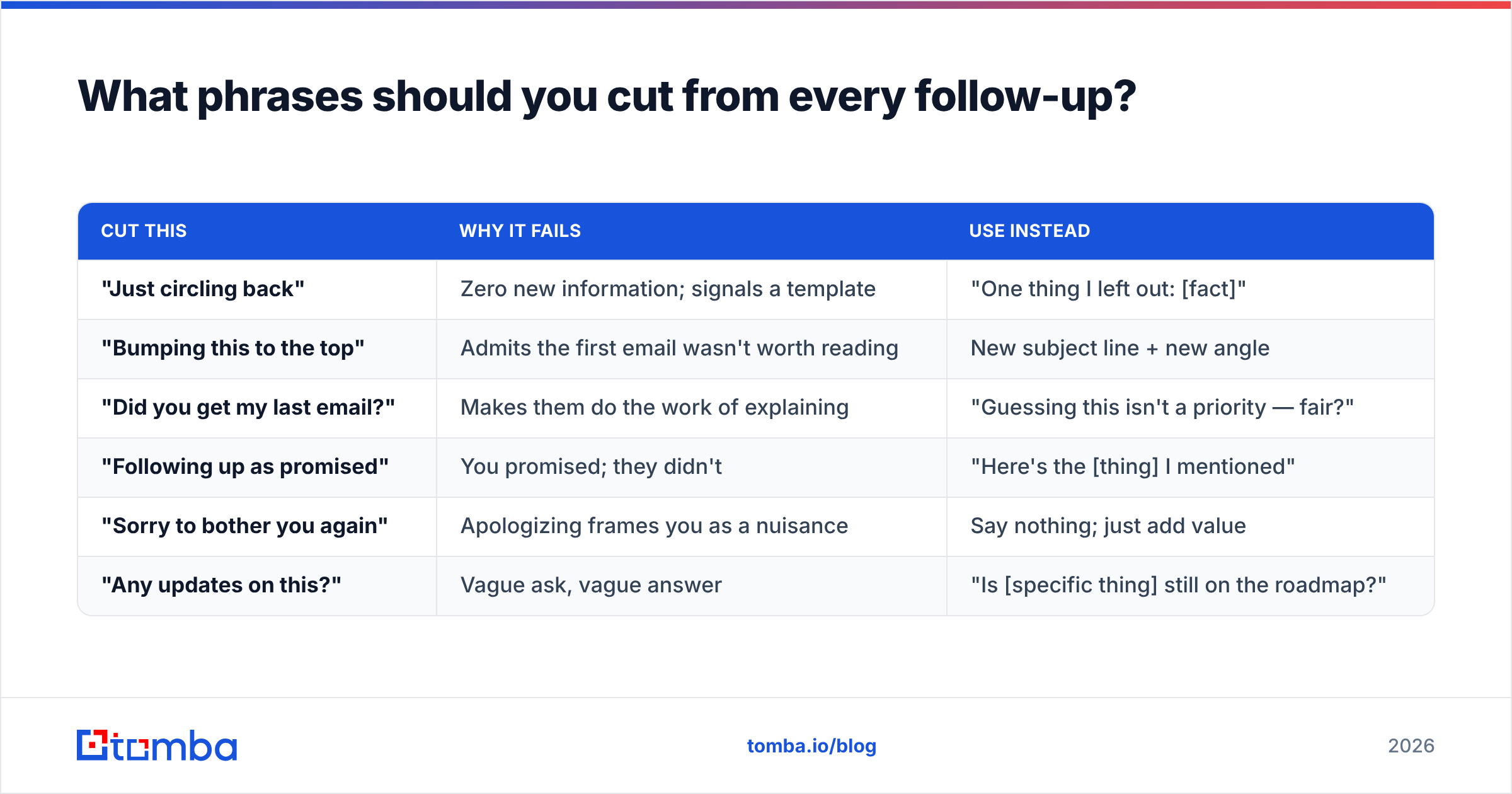
What phrases should you cut from every follow-up?#
These are the lines that make a competent email read as filler. Each one takes up space without giving the recipient a reason to act.
| Cut this | Why it fails | Use instead |
|---|---|---|
| "Just circling back" | Zero new information; signals a template | "One thing I left out: [fact]" |
| "Bumping this to the top" | Admits the first email wasn't worth reading | New subject line + new angle |
| "Did you get my last email?" | Makes them do the work of explaining | "Guessing this isn't a priority — fair?" |
| "Following up as promised" | You promised; they didn't | "Here's the [thing] I mentioned" |
| "Sorry to bother you again" | Apologizing frames you as a nuisance | Say nothing; just add value |
| "Any updates on this?" | Vague ask, vague answer | "Is [specific thing] still on the roadmap?" |
Also cut the fake-urgency close ("Let me know by Friday") unless the deadline is real. Recipients detect manufactured scarcity instantly, and it's the fastest way to make a legitimate offer look like spam. HubSpot's sales email research has documented the same pattern repeatedly: specificity beats urgency in cold and warm follow-up alike.
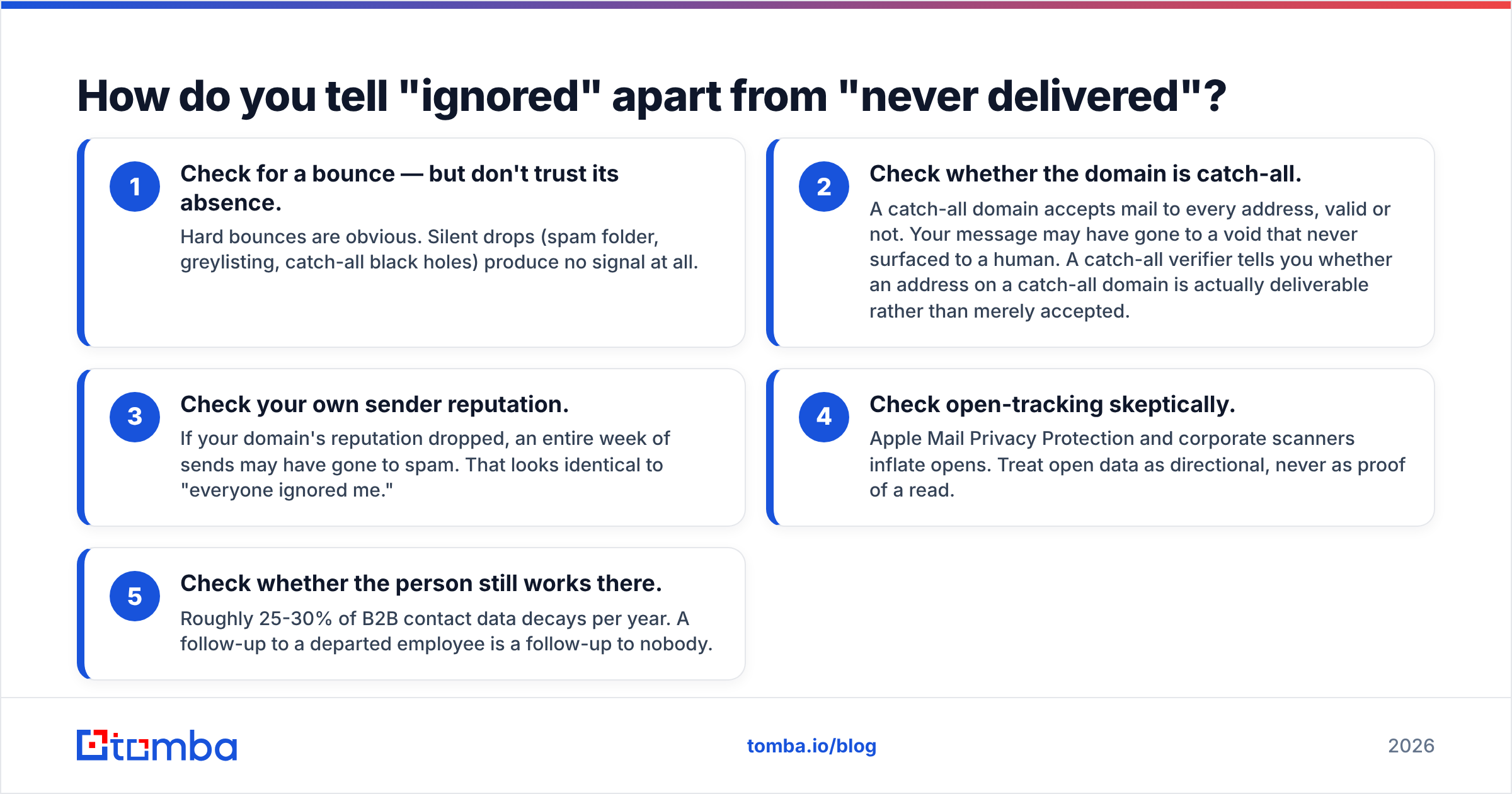
How do you tell "ignored" apart from "never delivered"?#
This is the diagnostic step most teams skip, and it distorts everything downstream. If you can't separate delivery failures from genuine non-responses, you'll rewrite copy that was fine and keep emailing addresses that don't exist.
Work through these signals in order:
- Check for a bounce — but don't trust its absence. Hard bounces are obvious. Silent drops (spam folder, greylisting, catch-all black holes) produce no signal at all.
- Check whether the domain is catch-all. A catch-all domain accepts mail to every address, valid or not. Your message may have gone to a void that never surfaced to a human. A catch-all verifier tells you whether an address on a catch-all domain is actually deliverable rather than merely accepted.
- Check your own sender reputation. If your domain's reputation dropped, an entire week of sends may have gone to spam. That looks identical to "everyone ignored me."
- Check open-tracking skeptically. Apple Mail Privacy Protection and corporate scanners inflate opens. Treat open data as directional, never as proof of a read.
- Check whether the person still works there. Roughly 25-30% of B2B contact data decays per year. A follow-up to a departed employee is a follow-up to nobody.
If diagnosis points to the data rather than the copy, fix the data. Building your list from a verified source — rather than a scraped CSV of guesses — removes the largest single source of unexplained silence. Tomba's data sources and verification step exist for exactly this reason.
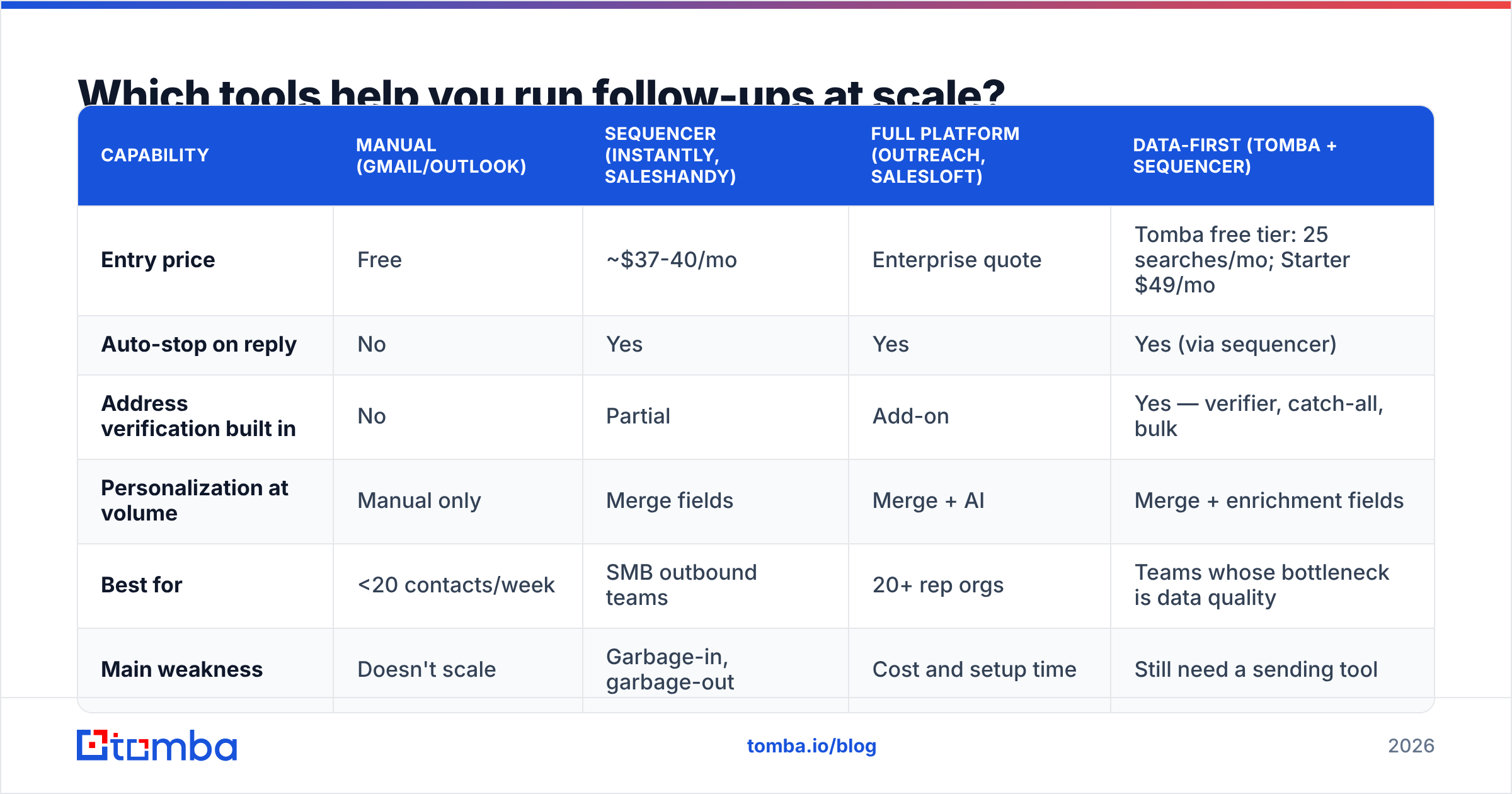
Which tools help you run follow-ups at scale?#
Once you're sending more than a handful of sequences, the question shifts from "what do I write" to "what do I automate without sounding automated." Here's how the common categories compare.
| Capability | Manual (Gmail/Outlook) | Sequencer (Instantly, Saleshandy) | Full platform (Outreach, Salesloft) | Data-first (Tomba + sequencer) |
|---|---|---|---|---|
| Entry price | Free | ~$37-40/mo | Enterprise quote | Tomba free tier: 25 searches/mo; Starter $49/mo |
| Auto-stop on reply | No | Yes | Yes | Yes (via sequencer) |
| Address verification built in | No | Partial | Add-on | Yes — verifier, catch-all, bulk |
| Personalization at volume | Manual only | Merge fields | Merge + AI | Merge + enrichment fields |
| Best for | <20 contacts/week | SMB outbound teams | 20+ rep orgs | Teams whose bottleneck is data quality |
| Main weakness | Doesn't scale | Garbage-in, garbage-out | Cost and setup time | Still need a sending tool |
Two practical notes. First, whatever you use must auto-stop the sequence the moment someone replies — a follow-up sent after a reply is the single most damaging automation failure, and it's entirely preventable. Second, don't buy a platform to fix a list problem. If your bounce rate is above 3%, a better sequencer will just deliver bad emails faster. Peer reviews on G2 make the same point in aggregate: teams that rate their sequencer poorly usually describe a data issue, not a software issue.
For teams building lists rather than buying them, pairing a bulk email finder with your sequencer of choice keeps the two jobs separate — find and verify in one place, send and follow up in another.
How many follow-ups is too many?#
Stop at five touches, or at the first genuine signal of disinterest — whichever comes first.
Signals that mean stop immediately:
- An explicit "no" or "not interested." Respect it. Log it, set a 6-month recheck, move on.
- An unsubscribe or spam complaint. Non-negotiable, and in many jurisdictions a legal obligation under CAN-SPAM and GDPR.
- A bounce on any touch. Remove the address and re-find it rather than retrying.
- An out-of-office with a departure notice. That's a referral opportunity, not a follow-up target.
Signals that mean keep going:
- Opens with no reply across multiple touches — interest exists, your ask is wrong.
- A "not right now, try Q4" — that's a scheduled opportunity, not a rejection.
- A forward to a colleague — you found the wrong person but the right company.
The honest math: if five well-differentiated emails over a month produce nothing, a sixth won't change the outcome. Your time is better spent finding a second contact at the same account than squeezing the same one. Persistence has a ceiling, and past it you're only damaging your domain reputation and your brand.
What does a good follow-up system look like end to end?#
Put together, the workflow is short:
- Verify before you send. Every address checked, catch-all domains flagged, invalid rows removed.
- Write one strong first email. Follow-ups amplify a good first email; they can't rescue a bad one.
- Plan all five touches before touch one goes out. Each with a distinct angle written in advance, so you never improvise a "just checking in."
- Widen the intervals. 3, 5, 7, 14 days.
- Switch threads at touch 4. Fresh subject, fresh hook.
- Close the loop explicitly. The permission-to-close email is your highest-yield message — never skip it.
- Review reply rate by touch, not in aggregate. If touch 1 outperforms touches 2-5 combined, your follow-up copy is the problem. If touches 2-5 carry the sequence, your first email needs work.
That last step is where most teams find their real bottleneck. Reply data broken out per touch tells you exactly which message to rewrite — an aggregate number tells you nothing actionable.
Fix the input before you rewrite the output. Most "they ignored me" problems are really "the address was wrong" problems, and no follow-up sequence survives a bad list. Start with Tomba Email Finder to find and verify professional addresses by name, domain, or company — the free tier gives you 25 searches a month to test your list quality before you commit, and paid plans start at $49/mo on Tomba pricing. Get the contact right, and your follow-ups start doing the job they were written to do.
Related guides#
// get started
Find, verify and enrich your first contacts today
Start on the free plan with 25 searches a month, then scale when your team is ready.
Free plan · No credit card required · GDPR & CCPA
// about the author