How to Prospect in 2026: A Practical 7-Step Playbook
Prospecting is not a numbers game anymore — it is a data-quality game. Here is the 7-step process top B2B reps use to build lists, verify contacts, and book meetings without burning their domain.
TL;DR
- Prospecting in 2026 is a filtering problem, not a volume problem. The winning sequence is: define the trigger, build a small list, verify every contact, personalize on one real fact, then follow up five times.
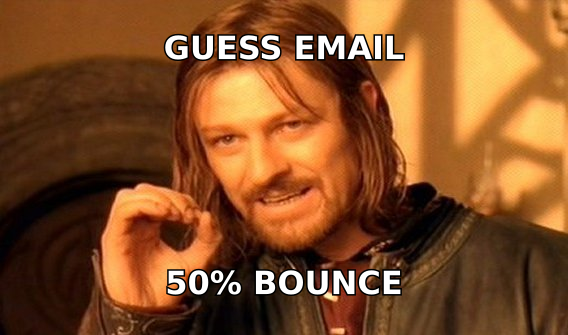
- Bad data is the single biggest killer of outbound. A 15% bounce rate can take your domain out of the inbox in under two weeks, and no subject line rescues that.
- A 200-contact list where every address is verified beats a 5,000-contact scraped dump on reply rate, cost per meeting, and sender reputation.
- Multichannel is now the baseline: email plus LinkedIn plus a phone touch roughly doubles connect rates versus email alone.
- Budget roughly 60% of your prospecting hours to research and list building, 40% to actual outreach. Most reps invert that and wonder why nothing lands.
What does "prospecting" actually mean in 2026?#
Prospecting is the work you do before selling: identifying accounts that plausibly need what you sell, finding the specific humans inside those accounts who own the problem, confirming you can actually reach them, and opening a conversation.
That is it. It is not sending emails. Sending is the last 20% of the job.
The reason this distinction matters more now than it did five years ago is that the cost of getting it wrong has gone up. Google and Yahoo's bulk-sender requirements pushed spam-complaint thresholds down to 0.3%, and both providers now enforce authentication on any domain sending meaningful volume. Meanwhile buyers have been trained by three years of AI-generated outreach to delete anything that smells templated within about two seconds.
So the old playbook — buy a big list, blast it, iterate on copy — now fails at step one. The list poisons the domain before the copy ever gets a chance.
What are the seven steps of a modern prospecting process?#
Here is the sequence that consistently works, in order. Skipping a step does not save time; it just moves the failure downstream.
- Define a trigger, not a persona. "VP of Engineering at a Series B SaaS company" is a persona. "VP of Engineering at a Series B SaaS company who posted a job req for a platform engineer in the last 21 days" is a trigger. Triggers cut list size by 80% and raise reply rate by more than that.
- Build the account list before the contact list. Pick 50–150 accounts that match the trigger. Rank them. You are looking for a list small enough that you could name every company from memory by Friday.
- Map the buying group. Modern B2B deals involve 6–10 stakeholders on average, per Gartner's buying-group research. Find at least two contacts per account: the person with the pain and the person with the budget.
- Find and verify contact data. This is where most pipelines quietly die. Guessed email patterns bounce. Use a real email finder and run every address through an email verifier before it enters your sequence.
- Find one true thing about each contact. A funding round, a conference talk, a product changelog entry, a podcast appearance. One specific fact per prospect is the entire personalization budget you need.
- Sequence across channels. Email opener, LinkedIn view plus connect, second email, phone touch, breakup email. Spread across 14–18 days.
- Measure at the meeting, not the open. Open rates are noise now that privacy proxies pre-fetch images. Track replies, positive replies, and meetings booked per 100 verified contacts.
How do you build a prospect list that does not bounce?#
Start narrow. The instinct to build a 10,000-row list comes from thinking prospecting is a conversion funnel where volume compensates for quality. It is not — at least not any more, because deliverability penalties compound.
A working list build looks like this:
Source your accounts. Job boards, funding announcements, G2 category pages, conference speaker lists, and your own closed-lost pipeline from 9–18 months ago. That last one is the most underrated source in B2B; champions change jobs and take vendors with them.
Find contacts by domain. Once you have company domains, a domain search returns the people and email patterns at each one in bulk rather than one lookup at a time. This is the step that turns a spreadsheet of URLs into a spreadsheet of humans.
Verify before you sequence — every time. Roughly 22–30% of B2B contact data decays per year through job changes alone. A list you built in March is measurably worse in September. Verification is not a one-time gate; it is a recurring maintenance job.
Handle catch-all domains deliberately. A large share of enterprise domains accept all mail at the SMTP layer, which means standard verification returns "unknown" rather than valid or invalid. Do not just delete these — they include some of your best accounts. Route them through a catch-all verifier that uses pattern confidence and secondary signals instead.
Deduplicate against your CRM. Nothing tanks credibility like emailing an existing customer as a cold prospect. Run the list against closed-won and open opportunities before it ships.

Which prospecting approach actually performs better?#
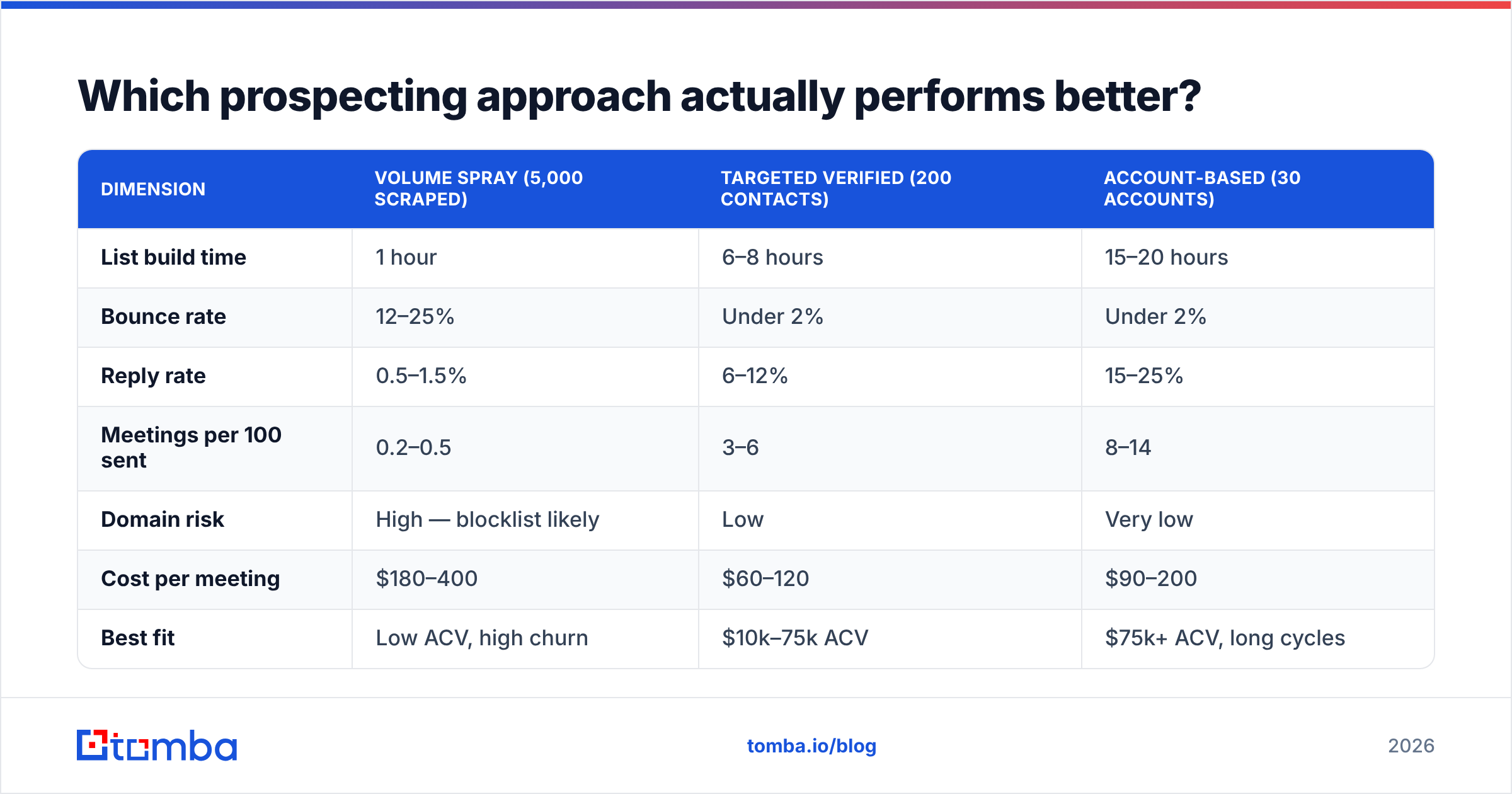
The honest answer depends on your motion, but the data pattern across most B2B teams is consistent. Here is how the three common approaches compare on the metrics that matter:
| Dimension | Volume spray (5,000 scraped) | Targeted verified (200 contacts) | Account-based (30 accounts) |
|---|---|---|---|
| List build time | 1 hour | 6–8 hours | 15–20 hours |
| Bounce rate | 12–25% | Under 2% | Under 2% |
| Reply rate | 0.5–1.5% | 6–12% | 15–25% |
| Meetings per 100 sent | 0.2–0.5 | 3–6 | 8–14 |
| Domain risk | High — blocklist likely | Low | Very low |
| Cost per meeting | $180–400 | $60–120 | $90–200 |
| Best fit | Low ACV, high churn | $10k–75k ACV | $75k+ ACV, long cycles |
| Scales to | Anyone with a card | 1–2 reps per segment | 1 rep per 30 accounts |
Two things stand out. First, the volume approach is not cheaper per meeting — it is more expensive, because you pay for the sends, the tooling, the burned domains, and the replacement domains. Second, account-based prospecting costs more per meeting than targeted verified but wins on deal size, which is why it only makes sense above a certain ACV.
The middle column is where most teams should live. It is the approach with the best ratio of effort to booked pipeline for typical mid-market B2B.
What tools do you actually need to prospect?#
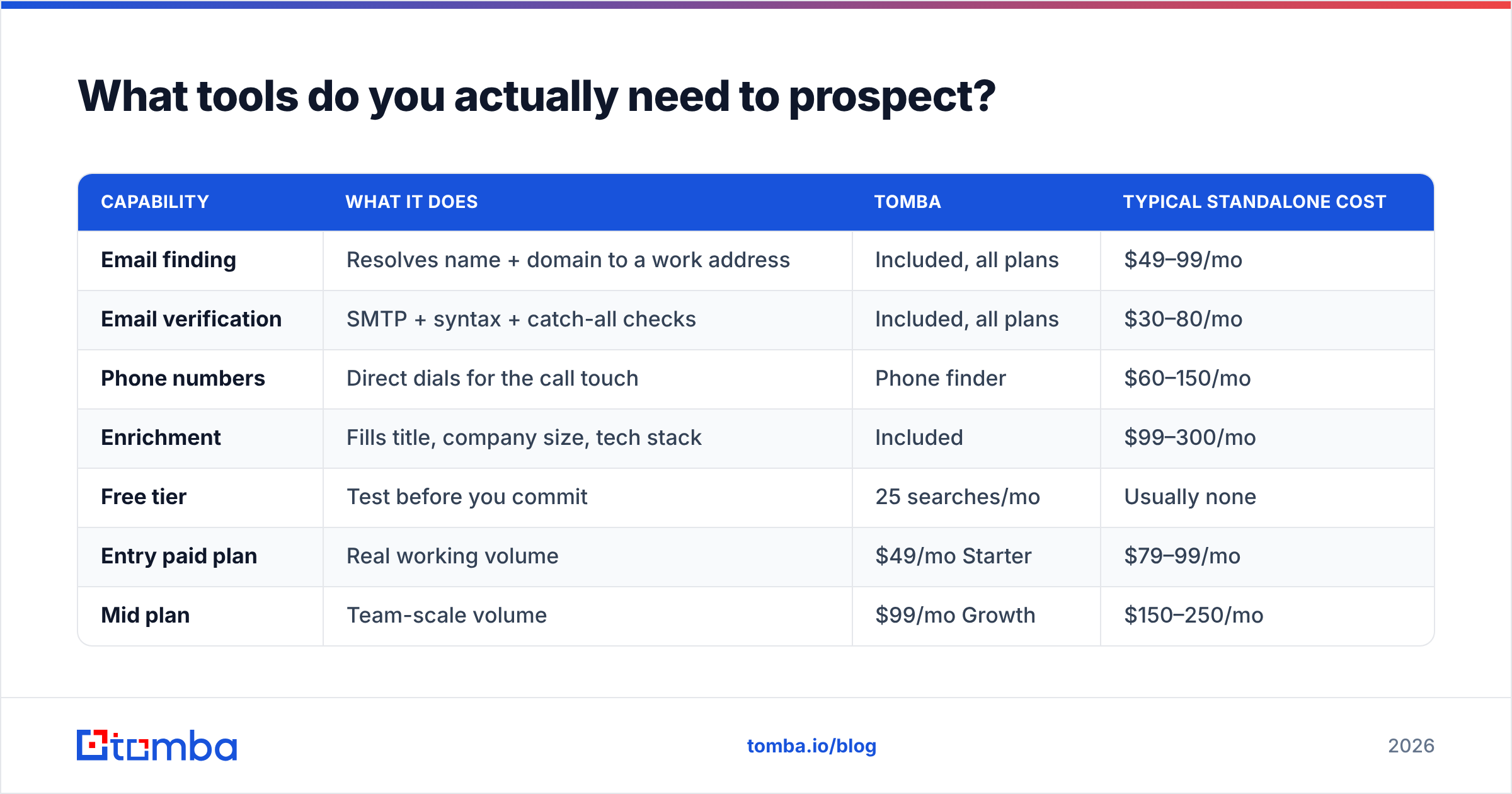
You need four capabilities, not fourteen tools. Many platforms bundle several.
| Capability | What it does | Tomba | Typical standalone cost |
|---|---|---|---|
| Email finding | Resolves name + domain to a work address | Included, all plans | $49–99/mo |
| Email verification | SMTP + syntax + catch-all checks | Included, all plans | $30–80/mo |
| Phone numbers | Direct dials for the call touch | Phone finder | $60–150/mo |
| Enrichment | Fills title, company size, tech stack | Included | $99–300/mo |
| Free tier | Test before you commit | 25 searches/mo | Usually none |
| Entry paid plan | Real working volume | $49/mo Starter | $79–99/mo |
| Mid plan | Team-scale volume | $99/mo Growth | $150–250/mo |
| API access | Enrich inside your own stack | Tomba API on paid plans | Often enterprise-only |
For teams that want a large pre-built contact database rather than on-demand lookup, BookYourData is a solid option with pay-as-you-go credits and no subscription lock-in — a genuinely different model that suits one-off campaign builds. Compare it against G2's category listings before committing to either approach; the right answer depends on whether your prospecting is continuous or campaign-based.
Full Tomba pricing starts free at 25 searches per month, then $49/mo for Starter, $99/mo for Growth, and $249/mo for Pro.
How do you personalize without spending 20 minutes per email?#
The trap is thinking personalization means writing a bespoke essay. It does not. It means proving in one sentence that you did not send this to 4,000 people.
A workable structure:
- Line 1 — the observation. Something specific and recent. "Saw you're hiring three platform engineers in Austin."
- Line 2 — the inference. What that probably means for them. "Usually means the on-call rotation is getting painful."
- Line 3 — the relevance. One sentence on what you do about that, with a number if you have one.
- Line 4 — the ask. Small. "Worth 12 minutes next week?"
Four lines. Under 90 words. The research for line 1 should take under three minutes per prospect — if it takes longer, your trigger is not specific enough.
HubSpot's sales research has consistently found that short, question-ended emails outperform long pitch emails on reply rate. If you want to pressure-test structure, HubSpot's sales blog publishes benchmark data most quarters worth reading against your own numbers.
Do not personalize the subject line with their company name. Everyone does it, and buyers now read it as an automation tell. Use a plain, lowercase, colleague-style subject: "quick question re: on-call" beats "Acme Corp — Transform Your Engineering Efficiency."

How many touches does prospecting actually take?#
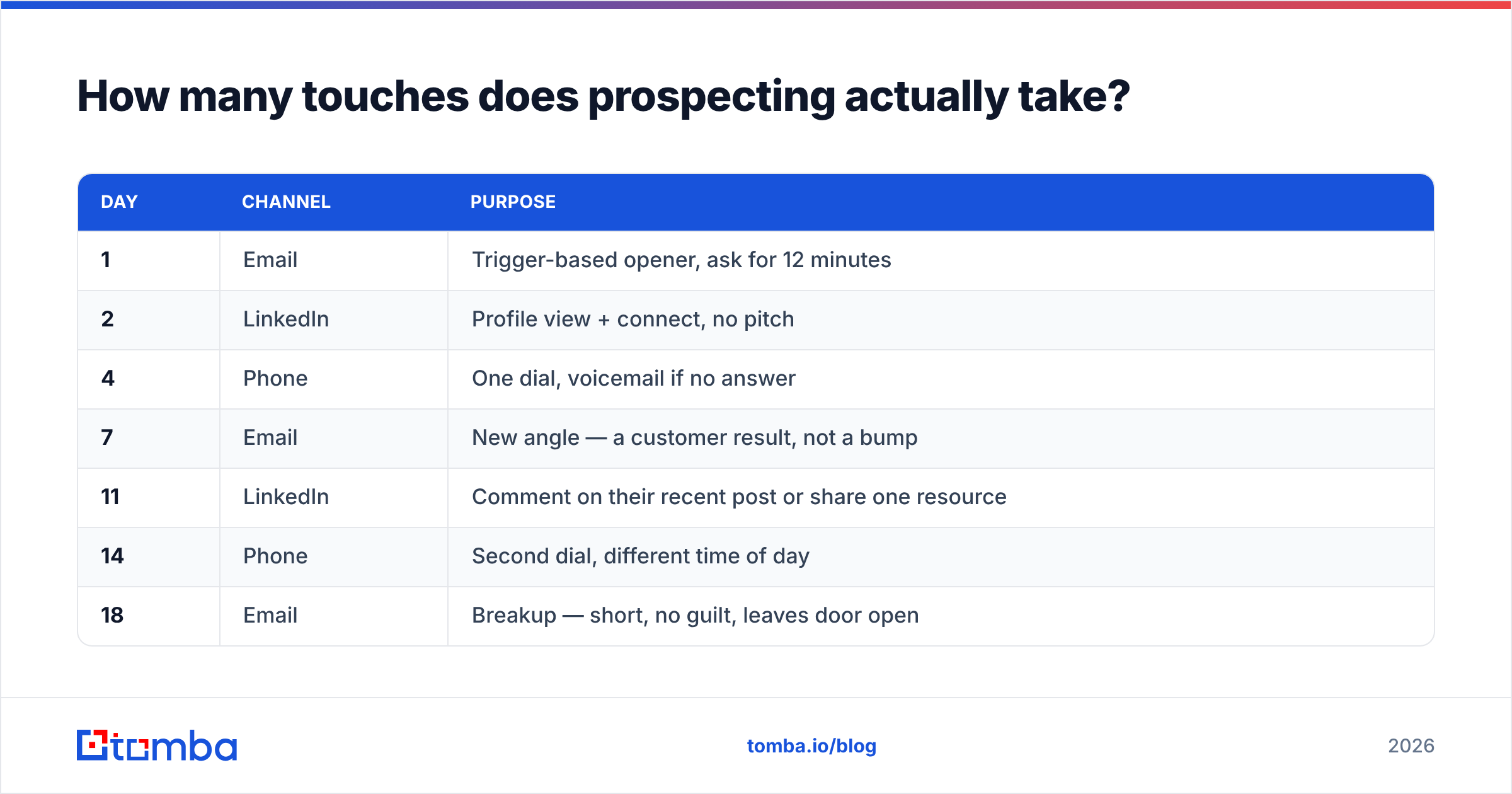
More than you are doing. The most common failure mode among reps who have decent lists and decent copy is quitting at touch two.
A reasonable default cadence over 18 days:
| Day | Channel | Purpose |
|---|---|---|
| 1 | Trigger-based opener, ask for 12 minutes | |
| 2 | Profile view + connect, no pitch | |
| 4 | Phone | One dial, voicemail if no answer |
| 7 | New angle — a customer result, not a bump | |
| 11 | Comment on their recent post or share one resource | |
| 14 | Phone | Second dial, different time of day |
| 18 | Breakup — short, no guilt, leaves door open |
Seven touches, four of them email. If your response rate is under 4% on a verified list with this cadence, the problem is your trigger or your offer, not your follow-up count.
Two operational notes. Keep per-mailbox volume under about 40 cold sends a day and use a separate sending domain from your primary — this protects email deliverability on the domain your invoices and contracts go out from. And log everything to your CRM the same day; prospecting data that lives only in a sequencing tool is data you lose when you switch tools.
What are the most common prospecting mistakes?#
Buying a list instead of building one. Purchased lists are usually stale, often shared with your competitors, and frequently non-compliant with GDPR's legitimate-interest requirements. If you must buy, buy from a vendor that lets you verify before you commit credits.
Verifying once and never again. Data decays continuously. Re-verify any list older than 60 days before reusing it, and re-verify your CRM's core contacts at least twice a year using a bulk verify run.
Optimizing copy before fixing data. A/B testing subject lines on a list with a 14% bounce rate is arranging chairs on a sinking ship. Fix bounce first, then test copy.
Confusing activity with progress. 500 sends a day feels productive. Three conversations a day with people who match your trigger is productive. These are not the same thing and the first one costs you your domain.
Prospecting only net-new. Your existing customer base, your closed-lost list, and your champions' new employers are the three warmest sources in your CRM and almost nobody works them systematically.
No disqualification criteria. Knowing who you will not sell to is as valuable as knowing who you will. Write down three disqualifiers and enforce them at list-build time, not on the discovery call.
How do you know if your prospecting is working?#
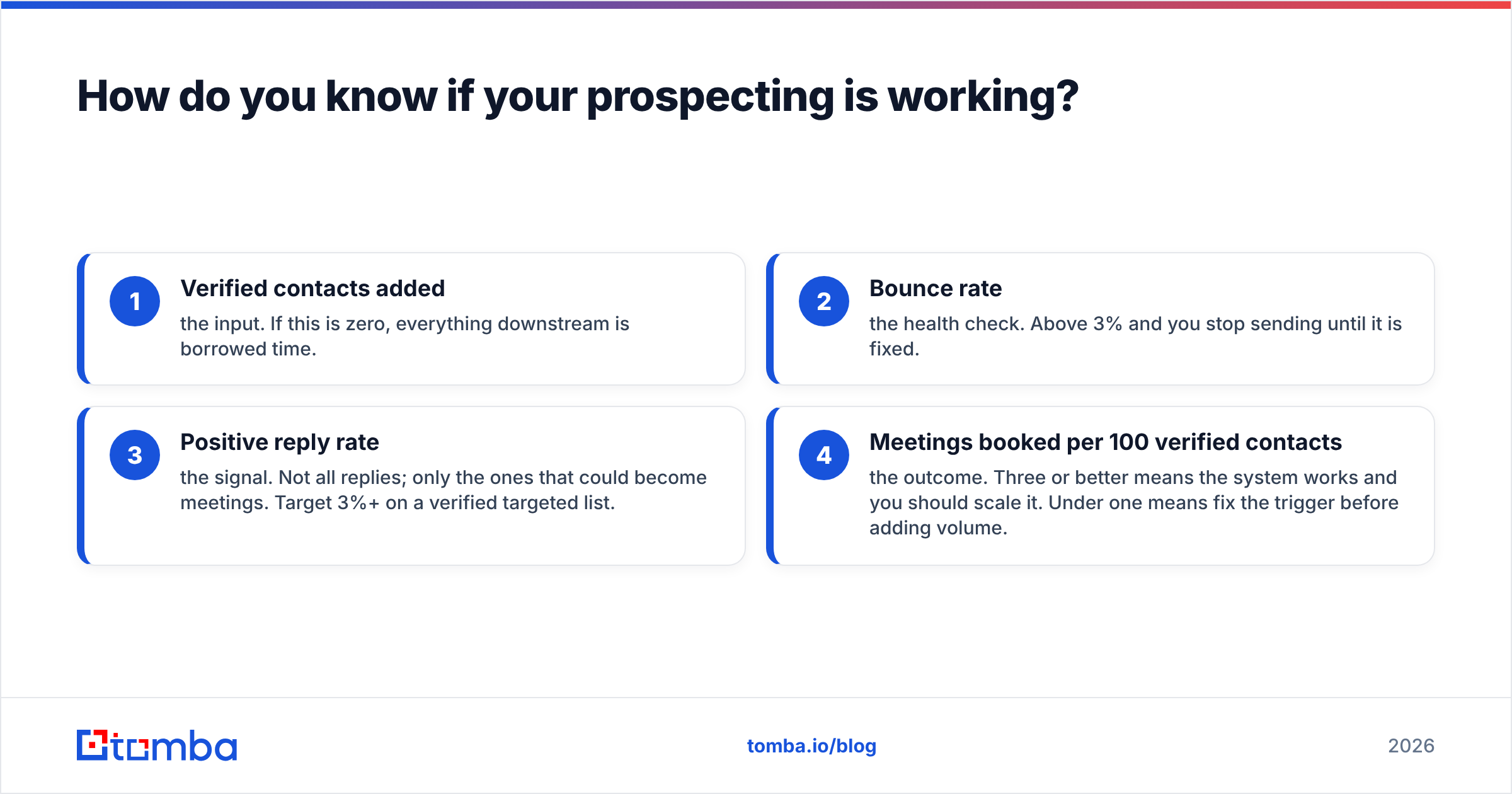
Track four numbers weekly, per rep:
- Verified contacts added — the input. If this is zero, everything downstream is borrowed time.
- Bounce rate — the health check. Above 3% and you stop sending until it is fixed.
- Positive reply rate — the signal. Not all replies; only the ones that could become meetings. Target 3%+ on a verified targeted list.
- Meetings booked per 100 verified contacts — the outcome. Three or better means the system works and you should scale it. Under one means fix the trigger before adding volume.
Review those four every Monday. Everything else — opens, sequence completion rate, LinkedIn accepts — is diagnostic detail you look at only when one of the four core numbers moves the wrong way.
If you want a deeper background on how contact records are sourced and scored before they reach you, Tomba publishes its data sources methodology openly, which is worth reading before you trust any vendor's accuracy claim — including ours.

Start with the list, not the sequence#
Everything in this playbook collapses back to one point: prospecting outcomes are set at list-build time. Copy, cadence, and channel mix can move your reply rate by a few points. Data quality moves it by a multiple.
If you are rebuilding your prospecting motion this quarter, start by fixing the input. Run your next 200 target accounts through the Tomba Email Finder — it resolves work emails from a name and domain, verifies them in the same pass, and flags catch-all domains instead of silently passing them into your sequence. The free tier gives you 25 searches a month to test accuracy against contacts you already know, and Starter is $49/mo when you are ready to run real volume.
Build the small list. Verify it. Then send.
Related guides#
// get started
Find, verify and enrich your first contacts today
Start on the free plan with 25 searches a month, then scale when your team is ready.
Free plan · No credit card required · GDPR & CCPA
// about the author