How to Purchase Data: A 2026 Buyer's Guide to B2B Lists
Buying B2B data is easy. Buying B2B data that still works six months later is not. Here is what vendors charge in 2026, how to vet them, and the verification step most buyers skip.
TL;DR
- There are four ways to purchase data — one-off list, database subscription, credit-based lookup, and enrichment API. Each has a different failure mode, and the cheapest option per record is rarely the cheapest per meeting booked.
- Real 2026 pricing runs roughly $0.02–$0.10 per record for self-serve credits, $0.15–$0.60 for curated verified lists, and $8,000–$30,000/year for seat-based database platforms.
- Never pay before you run a sample. Ask for 100 records, verify them yourself, and measure the real hit rate — not the vendor's marketing number.
- Legality depends on how the data was collected and where your recipient lives. B2B contact data is workable under GDPR legitimate interest; consumer data usually is not.
- Buy narrow, verify hard, refresh quarterly. Contact data decays around 2–3% per month, so a list you bought last year is roughly a third wrong today.
What does it actually mean to purchase data?#
"Purchasing data" covers three very different transactions that get lumped together, and confusing them is how teams end up with a $12,000 invoice and a 38% bounce rate.
The first is buying a static file — a CSV of 10,000 contacts, delivered once, yours forever. The second is licensing access to a database — you pay annually for the right to query someone else's contact repository, and your access dies when the contract does. The third is paying per lookup — you supply a name and a domain, the vendor returns an email or phone number, and you're billed only for the records you actually consume.
Most buyers walk in wanting option one because it feels like ownership. Most buyers should be using option three, because contact data is perishable and owning a perishable asset is a liability, not a win.
What types of B2B data can you buy?#
Vendors sell wildly different things under the same word. Know which one you're actually paying for:
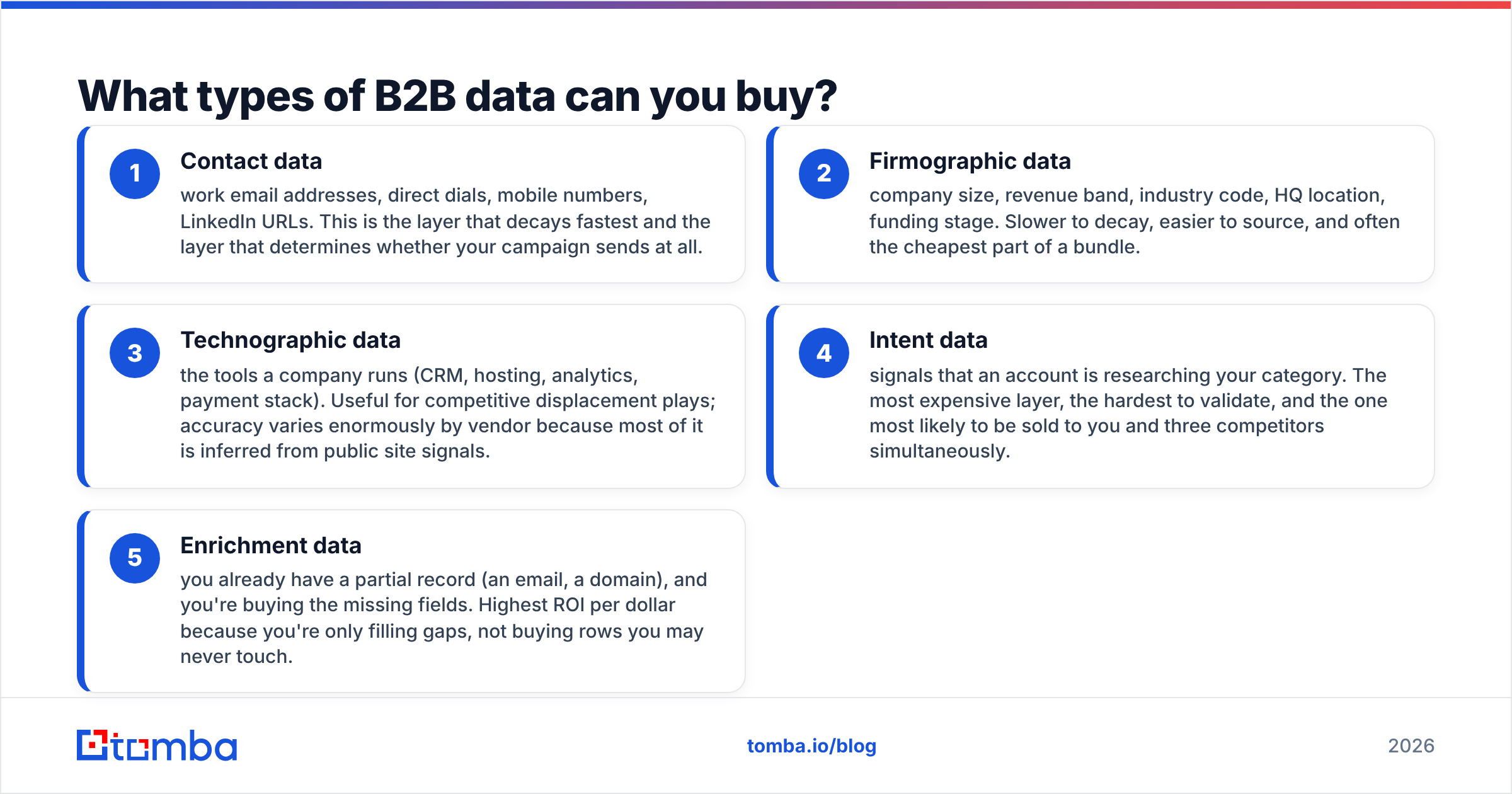
- Contact data — work email addresses, direct dials, mobile numbers, LinkedIn URLs. This is the layer that decays fastest and the layer that determines whether your campaign sends at all.
- Firmographic data — company size, revenue band, industry code, HQ location, funding stage. Slower to decay, easier to source, and often the cheapest part of a bundle.
- Technographic data — the tools a company runs (CRM, hosting, analytics, payment stack). Useful for competitive displacement plays; accuracy varies enormously by vendor because most of it is inferred from public site signals.
- Intent data — signals that an account is researching your category. The most expensive layer, the hardest to validate, and the one most likely to be sold to you and three competitors simultaneously.
- Enrichment data — you already have a partial record (an email, a domain), and you're buying the missing fields. Highest ROI per dollar because you're only filling gaps, not buying rows you may never touch.
If you're buying your first dataset, buy contact and firmographic only. Intent data on top of a broken contact layer is a very expensive way to email nobody.
How much does it cost to purchase data in 2026?#
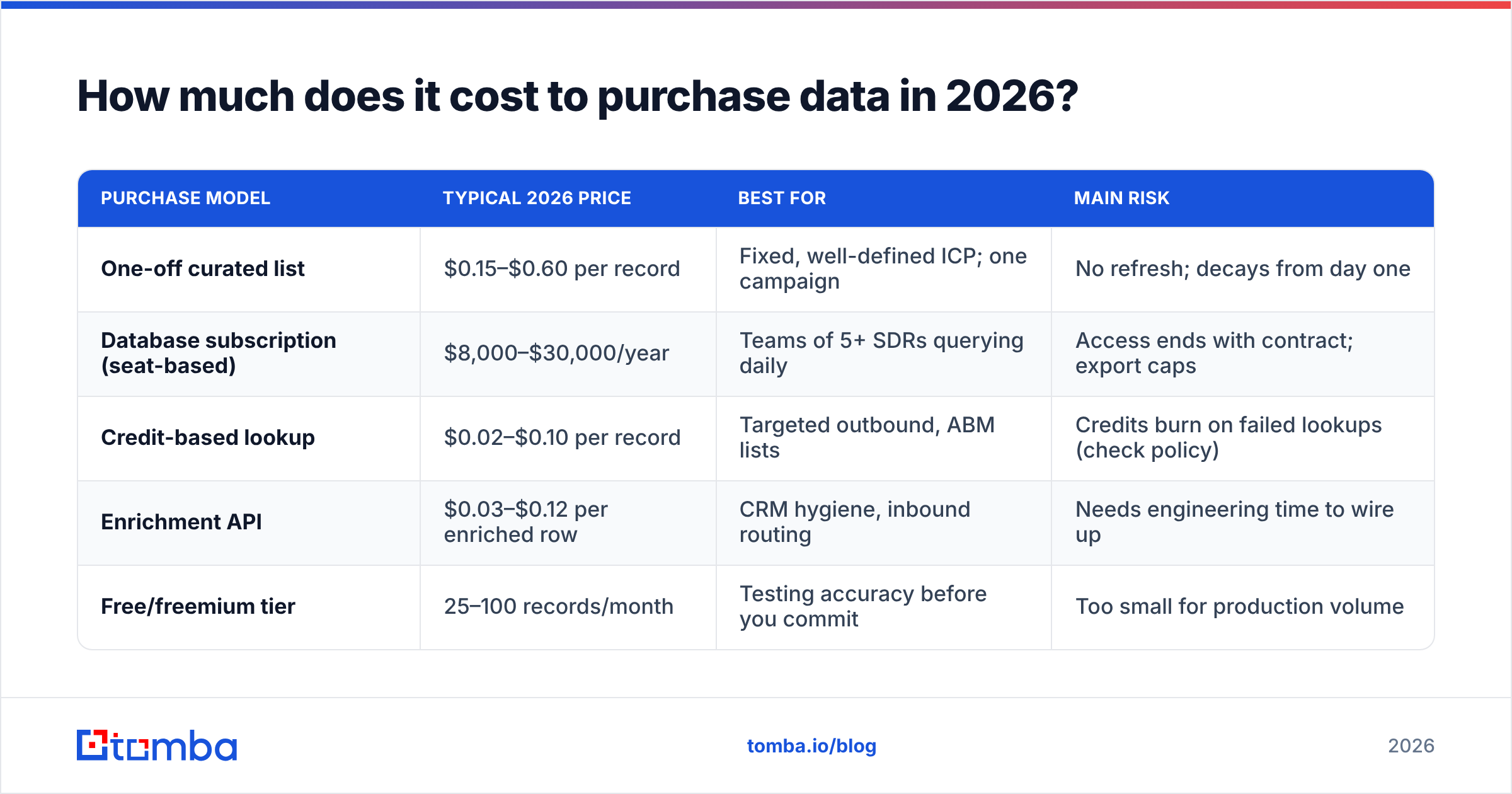
Here's what the market actually charges, based on published pricing pages and self-serve tiers you can check yourself:
| Purchase model | Typical 2026 price | Best for | Main risk |
|---|---|---|---|
| One-off curated list | $0.15–$0.60 per record | Fixed, well-defined ICP; one campaign | No refresh; decays from day one |
| Database subscription (seat-based) | $8,000–$30,000/year | Teams of 5+ SDRs querying daily | Access ends with contract; export caps |
| Credit-based lookup | $0.02–$0.10 per record | Targeted outbound, ABM lists | Credits burn on failed lookups (check policy) |
| Enrichment API | $0.03–$0.12 per enriched row | CRM hygiene, inbound routing | Needs engineering time to wire up |
| Free/freemium tier | 25–100 records/month | Testing accuracy before you commit | Too small for production volume |
Two numbers matter more than the sticker price. First, cost per usable record — if a $0.05 lookup returns a verified address 70% of the time, your true cost is $0.071. Second, whether failed lookups consume credits. A vendor that charges you for "not found" results can double your effective rate quietly. Tomba's pricing runs a free tier at 25 searches/month, Starter at $49/mo, Growth at $99/mo, and Pro at $249/mo — useful mainly as a reference point for what self-serve credit pricing looks like when it's published openly rather than quoted on a call.

Watch for the annual-contract trap. Seat-based platforms quote you a monthly number, then require twelve months upfront with export limits buried in the order form. If a vendor won't show you the export cap in writing before signing, assume it's low.
Which purchase model fits your team?#
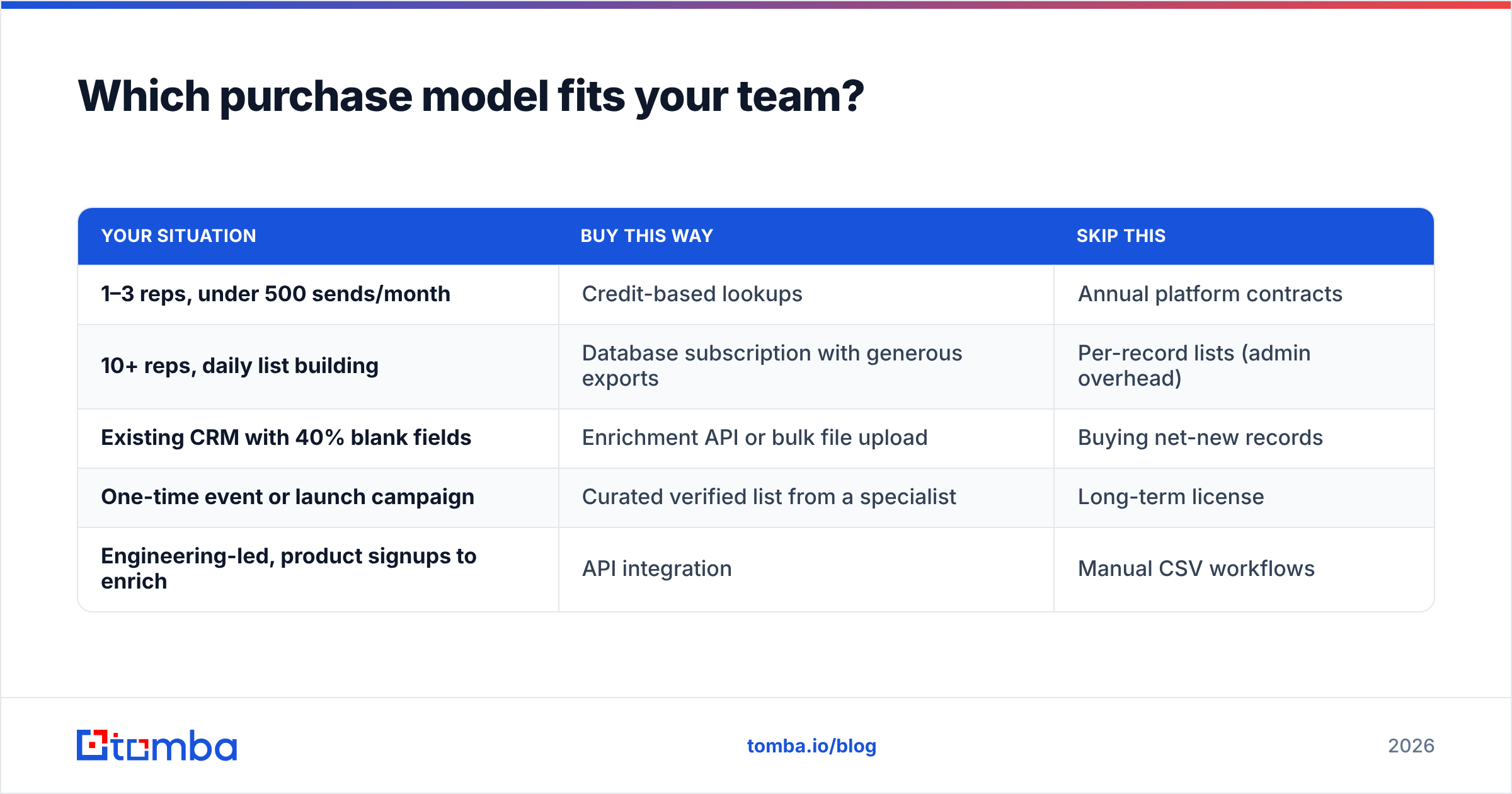
Match the model to your motion, not to your budget:
| Your situation | Buy this way | Skip this |
|---|---|---|
| 1–3 reps, under 500 sends/month | Credit-based lookups | Annual platform contracts |
| 10+ reps, daily list building | Database subscription with generous exports | Per-record lists (admin overhead) |
| Existing CRM with 40% blank fields | Enrichment API or bulk file upload | Buying net-new records |
| One-time event or launch campaign | Curated verified list from a specialist | Long-term license |
| Engineering-led, product signups to enrich | API integration | Manual CSV workflows |
A specialist worth knowing in the curated-list category is BookYourData, which sells pre-verified B2B lists with a stated bounce guarantee — a sensible fit when you want a defined slice of a market delivered once rather than an ongoing subscription. Different shape of purchase from a credit-based email finder, and worth comparing side by side rather than assuming one replaces the other.
How do you vet a data vendor before you pay?#
Run this sequence before money moves. It takes about two hours and routinely saves five figures.
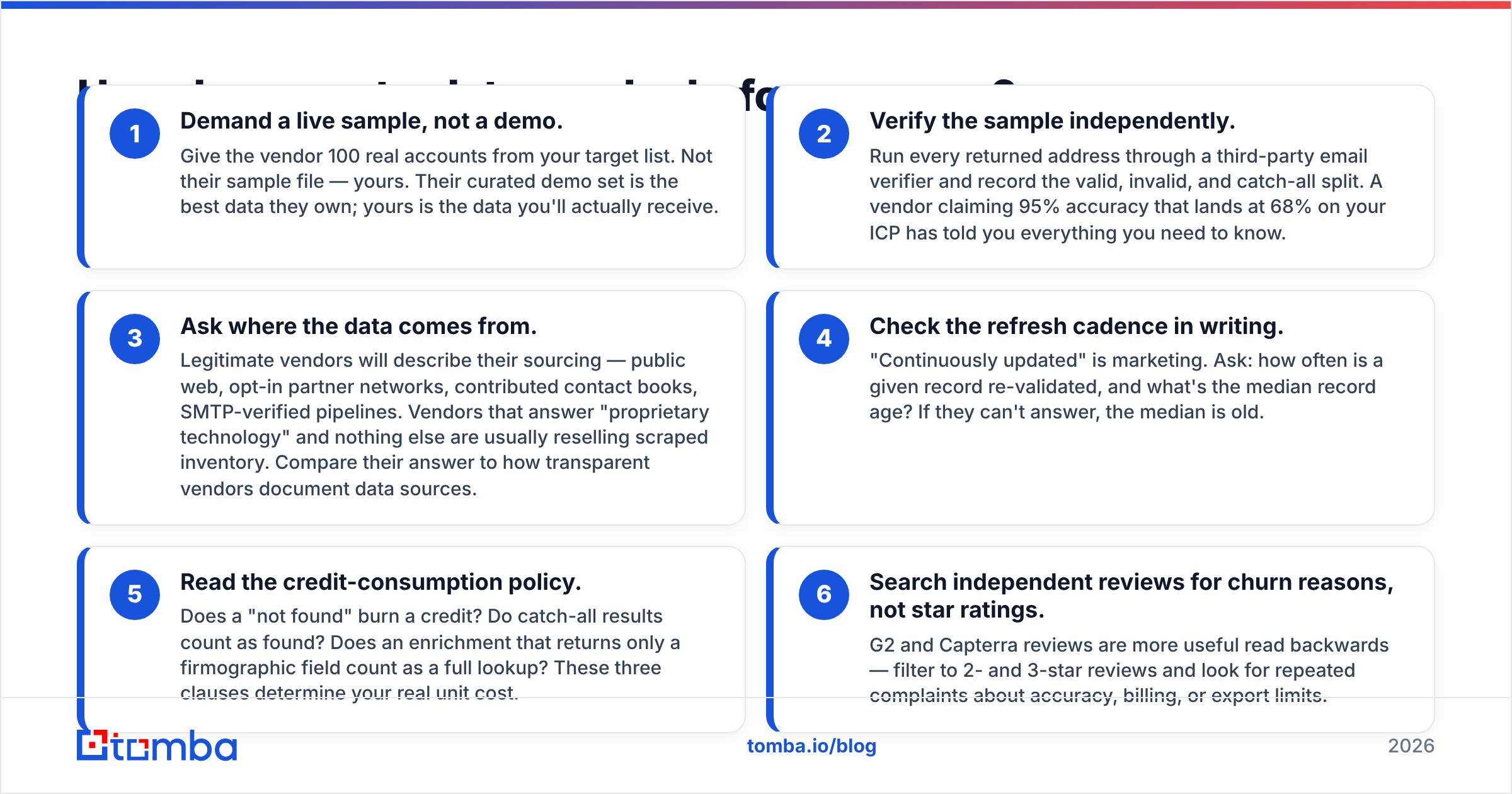
- Demand a live sample, not a demo. Give the vendor 100 real accounts from your target list. Not their sample file — yours. Their curated demo set is the best data they own; yours is the data you'll actually receive.
- Verify the sample independently. Run every returned address through a third-party email verifier and record the valid, invalid, and catch-all split. A vendor claiming 95% accuracy that lands at 68% on your ICP has told you everything you need to know.
- Ask where the data comes from. Legitimate vendors will describe their sourcing — public web, opt-in partner networks, contributed contact books, SMTP-verified pipelines. Vendors that answer "proprietary technology" and nothing else are usually reselling scraped inventory. Compare their answer to how transparent vendors document data sources.
- Check the refresh cadence in writing. "Continuously updated" is marketing. Ask: how often is a given record re-validated, and what's the median record age? If they can't answer, the median is old.
- Read the credit-consumption policy. Does a "not found" burn a credit? Do catch-all results count as found? Does an enrichment that returns only a firmographic field count as a full lookup? These three clauses determine your real unit cost.
- Search independent reviews for churn reasons, not star ratings. G2 and Capterra reviews are more useful read backwards — filter to 2- and 3-star reviews and look for repeated complaints about accuracy, billing, or export limits.
Gartner's research on data quality has consistently put the cost of bad data in the millions annually for mid-size organizations — see Gartner's data quality coverage for the underlying framing. The point isn't the exact figure; it's that the downstream cost of a bad dataset dwarfs the purchase price, so vetting time is cheap.
Is buying B2B data legal?#
Short answer: buying business contact data is legal in most jurisdictions if you handle it correctly, but "legal to buy" and "legal to email" are separate questions.
Under GDPR, a work email address tied to a named person is personal data. You can process it under legitimate interest for B2B outreach, but you must document the balancing test, disclose where you got the data on first contact, honor opt-outs immediately, and be able to delete a record on request. Some member states (Germany, Italy) apply stricter national rules on unsolicited commercial email — check before you send there.
In the US, CAN-SPAM permits cold B2B email without prior consent, but requires a valid physical address, honest headers, and a working unsubscribe. California's CCPA adds disclosure and deletion rights for California residents, including B2B contacts.
Three practical rules that keep you clean regardless of jurisdiction:
- Buy business contact data only. Personal Gmail addresses and consumer records carry a materially different risk profile.
- Keep the provenance record for every purchase — vendor, date, sourcing statement, contract. If a regulator or a prospect asks, you need an answer in under a day.
- Process deletion requests across your whole stack, not just the sending tool. A record deleted from your sequencer but still sitting in the purchased CSV isn't deleted.
How do you verify data after you buy it?#
Assume every purchased list is wrong until proven otherwise. Even honest vendors sell data that was accurate when collected and stale by delivery.
Contact data decays at roughly 2–3% per month through job changes, company renames, and domain migrations. Over a year that's about a third of your file. A list purchased in January and used in September is not the list you paid for.

Your post-purchase pipeline should look like this:
- Deduplicate first. Vendors sell the same person under two domains more often than you'd expect. Cleaning duplicates before verification saves credits.
- Verify in bulk. Run the whole file through bulk verification before it touches your sending tool. Suppress hard invalids permanently.
- Segment catch-all domains separately. Catch-all servers accept everything, so a "valid" result there means nothing. Route those through a catch-all verifier and treat the rest as a lower-confidence tier you send to at reduced volume.
- Re-verify quarterly. Not annually. Quarterly matches the decay rate.
- Track bounce rate by source. If you buy from three vendors, tag the source field. Within one quarter you'll know which one to renew and which to drop, with evidence rather than vibes.
The verification step is also what protects your email deliverability. Bounce rates above 3% start damaging sender reputation at the mailbox providers, and reputation damage costs far more to repair than the verification credits cost to spend. A cheap list that burns a sending domain is the most expensive data you will ever purchase.
What does a smart buying workflow look like end to end?#
Compressed to seven steps you can run this week:
- Define the ICP tightly enough to count. "Series A–B SaaS companies, 50–200 employees, US, using HubSpot" is buyable. "Tech companies" is not.
- Size the market before you shop. If your true addressable list is 4,000 accounts, you do not need a 200-million-record subscription. Vendors sell scale you'll never query.
- Shortlist three vendors across two models — one credit-based, one list or subscription. Comparing within a model tells you less than comparing across them.
- Run the 100-record sample test on all three simultaneously with the same input accounts.
- Score on cost per verified usable record, not per raw record. Include the verification cost in the math.
- Start on the smallest paid tier. Every vendor will upsell you after you've proven volume; almost none will refund you for over-buying.
- Instrument the outcome. Bounce rate, reply rate, and meetings booked, segmented by data source. That's your renewal decision, made with data instead of a renewal call.
Teams that buy this way typically cut spend 40–60% versus their first purchase, mostly by discovering they were paying for records they never queried.
Where should you start?#
If you're enriching a defined list of target accounts rather than shopping for volume, start with lookups instead of a license. Feed a name and a domain, pay only for what returns, verify before you send, and keep the spend proportional to the pipeline it produces.
Tomba's Email Finder is built for exactly that motion — free tier at 25 searches/month to test accuracy on your own accounts before you commit, Starter at $49/mo, and verification built into the same platform so you're not stitching two vendors together. Run your 100-record sample test against it and against whichever list vendor you're considering, then let the verified hit rate decide. That's the only vendor comparison that has ever predicted a renewal correctly.
Related guides#
// get started
Find, verify and enrich your first contacts today
Start on the free plan with 25 searches a month, then scale when your team is ready.
Free plan · No credit card required · GDPR & CCPA
// about the author