How to Qualify Sales Leads in 2026: A Practical Framework
Most reps waste half their week on leads that were never going to buy. Here is a concrete, step-by-step system for qualifying sales leads — frameworks, scoring weights, disqualification triggers, and the data checks that make it all work.
TL;DR
- Qualification is not a form field. It is a sequence: fit → data validity → intent → authority → timing → disqualify-or-advance.
- Pick one framework as your spine (BANT, MEDDPICC, CHAMP, or GPCTBA/C&I) and treat the rest as add-ons. Mixing four frameworks produces zero.
- Score fit and intent separately. A perfect-fit account with no intent is a nurture play, not a call.
- Bad contact data quietly kills qualification: you cannot judge authority or timing on a person whose email bounces. Validate before you score.
- Build explicit disqualification triggers. Reps who can say "no" fast close more than reps who hope.
What does it actually mean to qualify a sales lead?#
Qualifying a sales lead means deciding, with evidence, whether a specific person at a specific company is worth your next hour. That is the whole job. Everything else — frameworks, scoring models, MQL thresholds — is machinery built to make that decision faster and more consistently than gut feel.
Two things get confused constantly. Lead qualification is about the person and the moment: are they the right role, do they have a problem you solve, is there a reason to act now? Account qualification is about the company: size, industry, tech stack, budget reality. You need both, and they fail differently. A great account with the wrong contact wastes two weeks. A great contact at an account that can never buy wastes a quarter.
The practical definition most teams should adopt: a lead is qualified when you can write one sentence — "[Name], [title] at [company], has [problem], which costs them [impact], and they are evaluating solutions [timeframe]" — and every blank is filled with something you learned, not something you assumed.
If you cannot fill the blanks, you do not have a qualified lead. You have a name.
Which lead qualification framework should you use?#
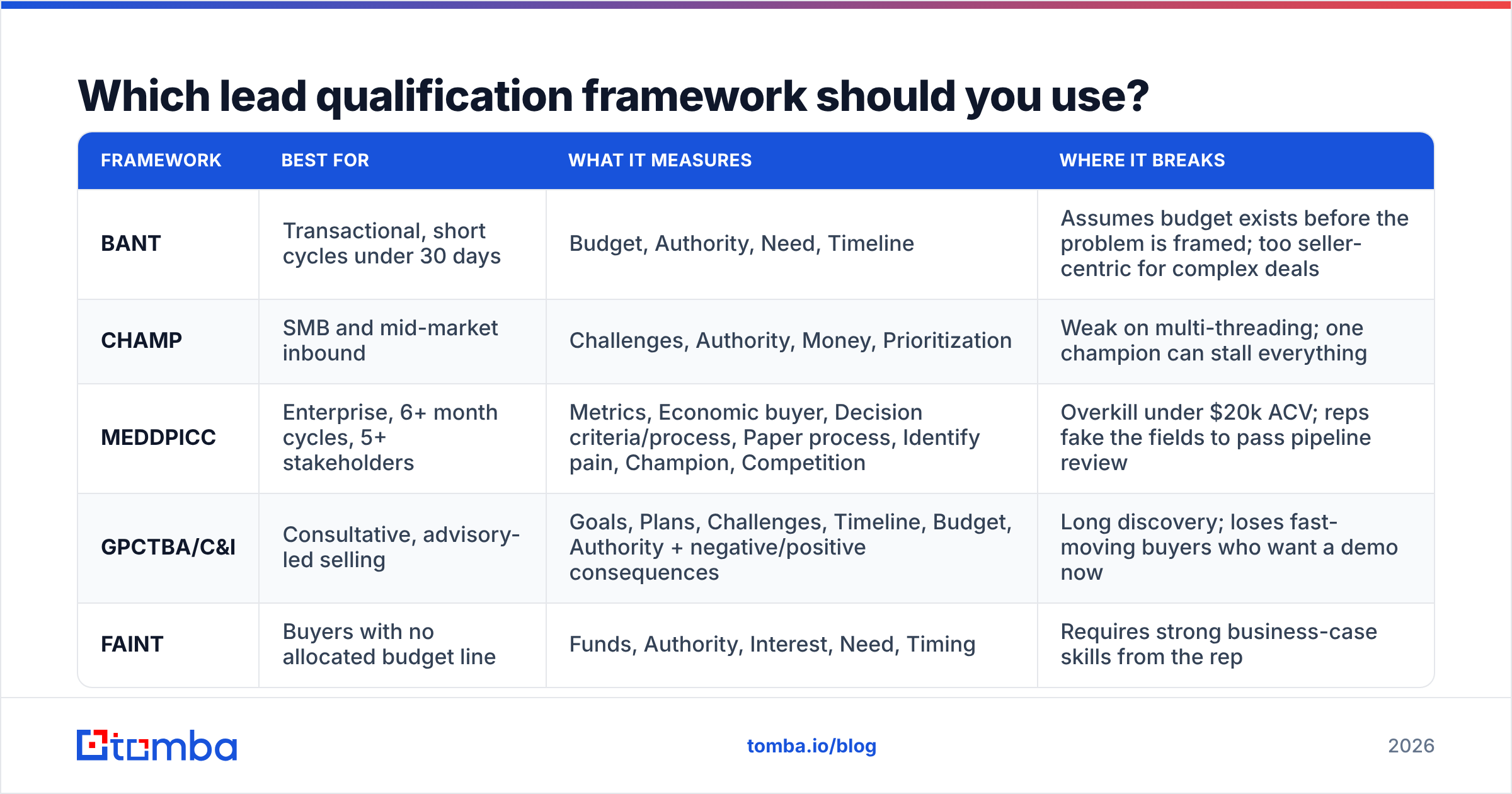
Pick one. The failure mode is not choosing the wrong framework; it is running three at once so nobody knows what "qualified" means.
| Framework | Best for | What it measures | Where it breaks |
|---|---|---|---|
| BANT | Transactional, short cycles under 30 days | Budget, Authority, Need, Timeline | Assumes budget exists before the problem is framed; too seller-centric for complex deals |
| CHAMP | SMB and mid-market inbound | Challenges, Authority, Money, Prioritization | Weak on multi-threading; one champion can stall everything |
| MEDDPICC | Enterprise, 6+ month cycles, 5+ stakeholders | Metrics, Economic buyer, Decision criteria/process, Paper process, Identify pain, Champion, Competition | Overkill under $20k ACV; reps fake the fields to pass pipeline review |
| GPCTBA/C&I | Consultative, advisory-led selling | Goals, Plans, Challenges, Timeline, Budget, Authority + negative/positive consequences | Long discovery; loses fast-moving buyers who want a demo now |
| FAINT | Buyers with no allocated budget line | Funds, Authority, Interest, Need, Timing | Requires strong business-case skills from the rep |
The rule of thumb: match framework complexity to deal complexity. A $200/month SaaS product qualified with MEDDPICC produces a 40-field CRM record and a lost deal. A $400k platform sale qualified with BANT produces a "yes" from someone who cannot sign.
HubSpot's sales qualification guidance is a reasonable starting reference if you are formalizing this for the first time, and G2's category reviews help sanity-check which tooling your peers actually use to operationalize it.

How do you qualify sales leads step by step?#
Here is the sequence that works across most B2B motions. Run it in order — each step is cheaper than the one after it, so you want the cheap filters killing bad leads first.
Check firmographic fit before anything else. Employee count, industry, region, funding stage, tech stack. This is a database query, not a conversation. If the account fails ICP, stop. No amount of intent rescues a company that cannot use your product.
Validate the contact data. Confirm the email is deliverable and the role is current. A lead that bounces is not "unqualified" — it is unknowable, and it pollutes your metrics. Run every new contact through an email verifier before it touches a sequence. If your list came from a scrape or an event, expect 15–30% rot.
Score intent signals. Pricing page visits, demo requests, repeat sessions, competitor comparison pages, job postings for roles that imply your problem, G2 category browsing. Intent is what separates "could buy" from "might buy this quarter."
Map authority and the buying committee. Identify the economic buyer, the champion, and the blocker. In 2026 the average B2B purchase involves 6–10 stakeholders, so single-threaded deals are a risk flag, not a milestone.
Test for pain and quantified impact. Ask what the problem costs. If the prospect cannot quantify it — hours, dollars, churn, headcount — the deal has no internal urgency and will slip indefinitely.
Confirm timing and compelling event. "Sometime next year" is not a timeline. A contract renewal, a compliance deadline, a funding round, a new VP with a mandate — those are compelling events. No event, no deal date.
Decide: advance, nurture, or disqualify. Write the decision in the CRM with a reason code. The reason code is what lets you improve the model next quarter.
What questions actually qualify a lead on the first call?#
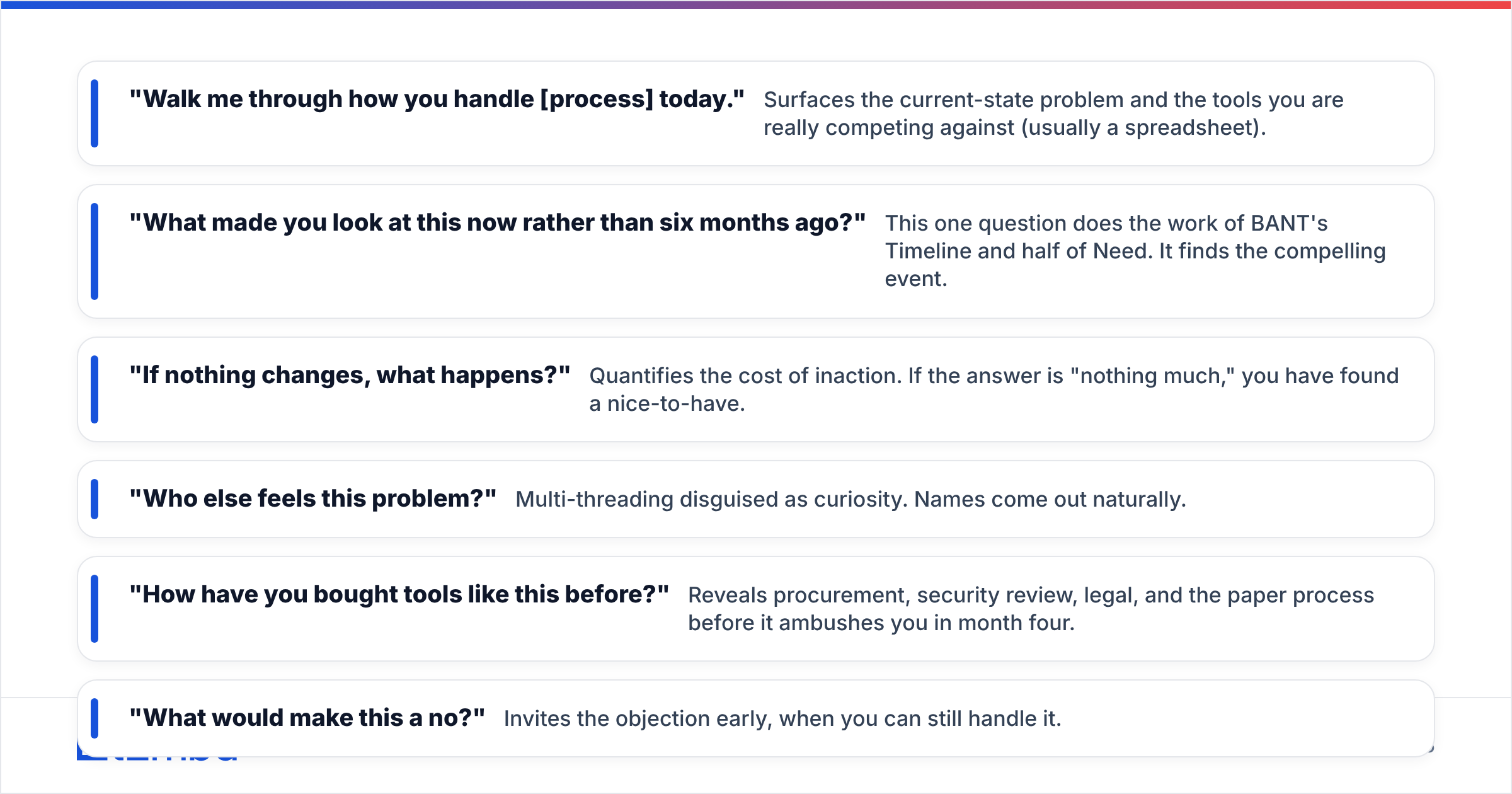
Skip the interrogation. Six questions, asked conversationally, get you 80% of what you need:
- "Walk me through how you handle [process] today." — Surfaces the current-state problem and the tools you are really competing against (usually a spreadsheet).
- "What made you look at this now rather than six months ago?" — This one question does the work of BANT's Timeline and half of Need. It finds the compelling event.
- "If nothing changes, what happens?" — Quantifies the cost of inaction. If the answer is "nothing much," you have found a nice-to-have.
- "Who else feels this problem?" — Multi-threading disguised as curiosity. Names come out naturally.
- "How have you bought tools like this before?" — Reveals procurement, security review, legal, and the paper process before it ambushes you in month four.
- "What would make this a no?" — Invites the objection early, when you can still handle it.
Notice what is missing: "Do you have budget?" Asked cold, that question gets a defensive answer. Budget surfaces on its own once impact is quantified and the buying process is mapped.
How should you score qualified leads?#
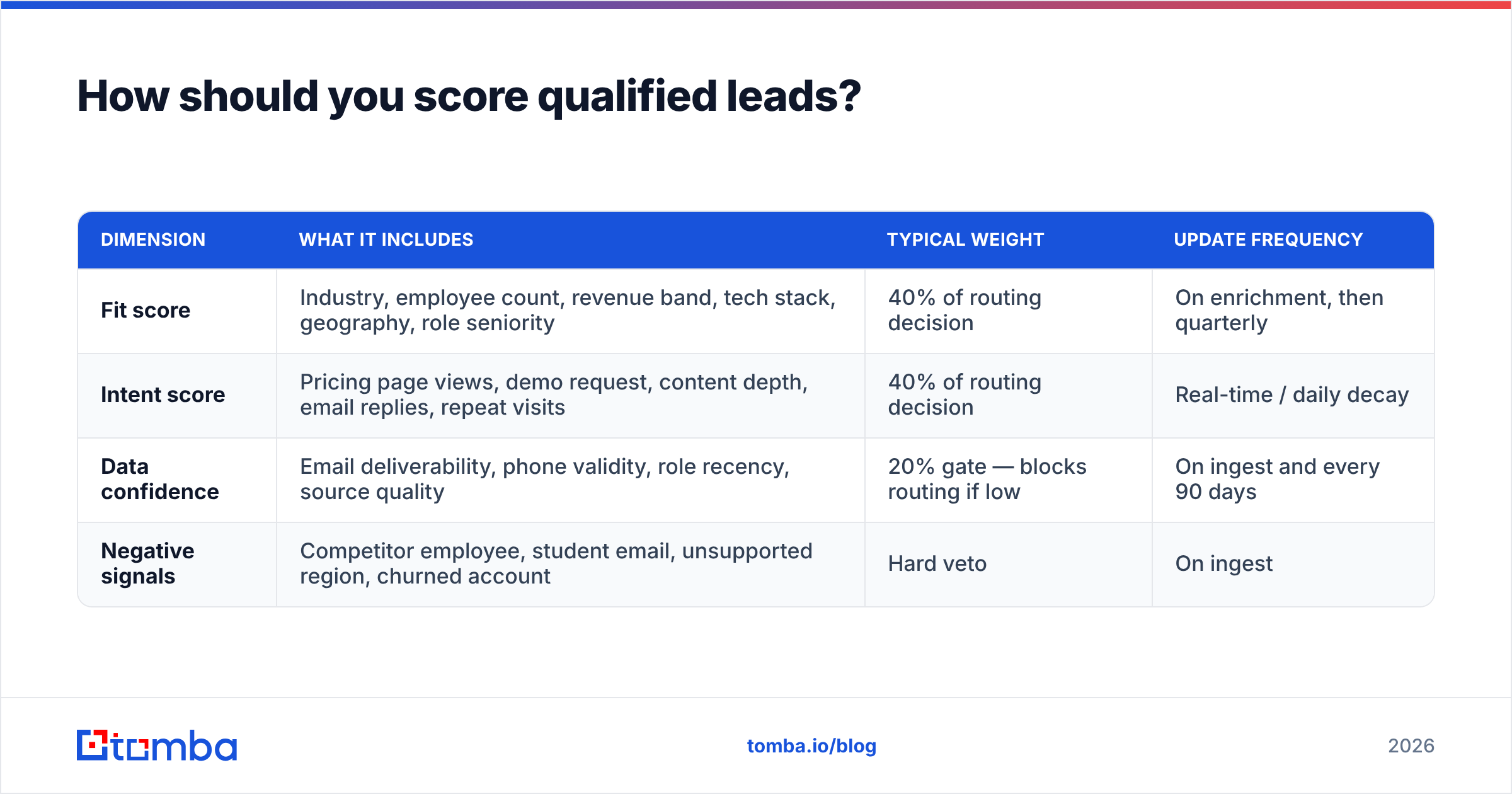
Scoring turns qualification from a judgment call into a repeatable process. The mistake most teams make is a single blended score. Use two axes instead.
| Dimension | What it includes | Typical weight | Update frequency |
|---|---|---|---|
| Fit score | Industry, employee count, revenue band, tech stack, geography, role seniority | 40% of routing decision | On enrichment, then quarterly |
| Intent score | Pricing page views, demo request, content depth, email replies, repeat visits | 40% of routing decision | Real-time / daily decay |
| Data confidence | Email deliverability, phone validity, role recency, source quality | 20% gate — blocks routing if low | On ingest and every 90 days |
| Negative signals | Competitor employee, student email, unsupported region, churned account | Hard veto | On ingest |
A lead with high fit and low intent goes to marketing nurture. High intent and low fit goes to a self-serve or partner path. High on both, with clean data, goes to a rep today. Low on both gets suppressed — and yes, suppressing leads is a valid outcome that improves everyone's numbers.
The data confidence gate is the part most teams skip and the part that costs the most. If your CRM says a VP of Engineering is interested but the email hard-bounces and the LinkedIn shows they left eight months ago, your fit and intent scores are both fiction. Enrichment at the point of scoring — refreshing the role, the email, the company size — is what keeps the model honest. Tools that handle contact enrichment in-pipeline let you gate on freshness instead of hoping the record is current.
When should you disqualify a lead?#
Fast disqualification is the highest-leverage habit in sales, and almost nobody is trained on it. Write explicit triggers so reps do not have to feel brave to say no.
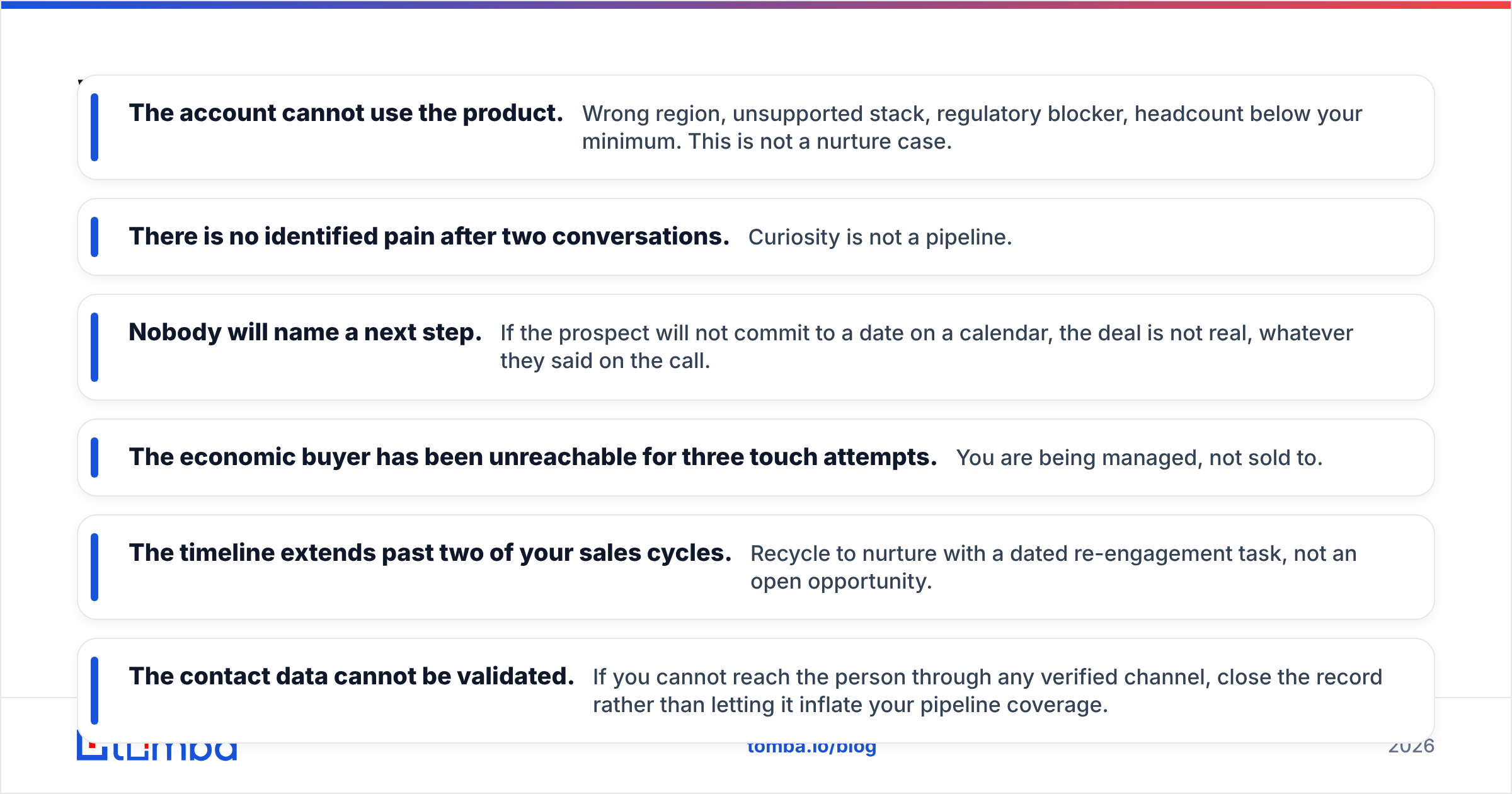
Disqualify immediately when:
- The account cannot use the product. Wrong region, unsupported stack, regulatory blocker, headcount below your minimum. This is not a nurture case.
- There is no identified pain after two conversations. Curiosity is not a pipeline.
- Nobody will name a next step. If the prospect will not commit to a date on a calendar, the deal is not real, whatever they said on the call.
- The economic buyer has been unreachable for three touch attempts. You are being managed, not sold to.
- The timeline extends past two of your sales cycles. Recycle to nurture with a dated re-engagement task, not an open opportunity.
- The contact data cannot be validated. If you cannot reach the person through any verified channel, close the record rather than letting it inflate your pipeline coverage.
Recycling matters as much as disqualifying. A lead that fails timing today but passes fit should return to marketing with a reason code and a re-entry date. That loop is where most of the value in lead management and scoring actually lives — not in the initial scoring pass.
How does data quality change your qualification results?#
Directly and brutally. Qualification is inference from evidence, and every piece of evidence in your CRM has a decay rate.
B2B contact data degrades roughly 25–30% per year through job changes, company moves, rebrands, and email format changes. That means a list you bought or scraped 18 months ago is close to half wrong. Run qualification logic on top of that and you will confidently route garbage.
Three checks, in order, before a lead enters scoring:
- Deliverability. Does the mailbox exist and accept mail? Catch-all domains need a separate verification path — a domain that accepts everything tells you nothing, which is why a dedicated catch-all verifier matters more than the raw "valid" flag most tools return.
- Role recency. Is the title current? A promoted or departed contact changes authority scoring entirely.
- Company match. Does the email domain match the company record? Mismatches usually mean a stale record or a bad merge.
There is a practical benefit beyond accuracy: verified data lets you set aggressive disqualification rules without fear. When you trust the record, a "no reply after five touches" signal means something. When you do not, reps keep working dead leads because "maybe the email was wrong." It usually was.
For teams building lists from scratch rather than cleaning existing ones, sourcing contacts by company domain — via domain search — tends to produce cleaner records than scraping, because you are pulling against a live pattern rather than a historical snapshot. Vendors in this space vary widely in how they source data; providers like BookYourData take a curated, human-verified approach that suits teams who want a pre-built list, while API-first tools suit teams enriching records inside an existing workflow. Both are legitimate paths — the wrong move is skipping validation entirely.
What does a working qualification workflow look like end to end?#
Put together, a functioning system looks like this:
Intake. Lead arrives from form fill, event, outbound list, or website reveal. Source is tagged.
Enrich and validate. Firmographics appended, email verified, role confirmed, phone validated. Records failing validation go to a repair queue, not to a rep.
Score. Fit and intent scored separately. Data confidence acts as a gate. Negative signals veto.
Route. High/high goes to sales with an SLA measured in minutes, not days. Everything else routes to nurture, self-serve, or suppression.
Qualify in conversation. Rep runs the six-question discovery, fills the framework fields, and either advances with a scheduled next step or disqualifies with a reason code.
Feed back. Closed-won and closed-lost reason codes flow back into the scoring weights every quarter. If your weights have not changed in a year, you are not learning.
The feedback loop is what separates teams that improve from teams that just have a process document. Track two numbers: what percentage of sales-accepted leads convert to opportunity, and what percentage of disqualified leads later buy from a competitor. The first tells you if your bar is too low. The second tells you if it is too high. Forrester's research on B2B buying is a useful external benchmark when you are arguing about where that bar belongs.
What should you do next?#
Qualification breaks at the data layer more often than at the framework layer. Before you redesign your scoring model or roll out MEDDPICC training, check what percentage of your leads have a verified, current email and a confirmed role. If it is under 85%, fix that first — everything downstream inherits the error.
The Tomba Email Finder is built for exactly that first step: finding and confirming the right professional email for a specific person at a specific company, so your qualification logic runs on real contacts instead of guesses. Plans start free with 25 searches per month, and the Starter plan is $49/month if you need volume; full Tomba pricing is public. Verify the contact, then qualify the lead — in that order.
Related guides#
// get started
Find, verify and enrich your first contacts today
Start on the free plan with 25 searches a month, then scale when your team is ready.
Free plan · No credit card required · GDPR & CCPA
Get the Tomba newsletter
Product and data updates
// about the author