How to Reach Decision Makers: A 2026 Playbook That Works
Gatekeepers, 11-person buying committees, and ignored InMails. Here is the concrete 2026 process for identifying, finding, and actually getting a reply from the people who sign contracts.
TL;DR
- Decision makers do not ignore you because they are busy. They ignore you because your message arrived through a channel they already filtered, addressed to a role they do not hold.
- The average B2B purchase now involves 6-11 people. Gartner's research puts the buying group at 6 to 10 stakeholders, each bringing 4-5 pieces of independently gathered information. "The decision maker" is usually a committee.
- The sequence that works: map the committee → identify the economic buyer and the champion → get a verified direct address or mobile → lead with a trigger event, not a pitch.
- Direct verified email still beats LinkedIn InMail on cost-per-reply for most teams, but multi-threading across 3+ contacts inside the same account is what actually moves deals.
- Bad contact data kills more outreach than bad copy does. Verify before you send, always.
Why is it so hard to reach decision makers in 2026?#
Because the person you want has spent a decade building defenses, and every one of them works.
Think of an enterprise VP as a house with three locked doors. The front door is their inbox, guarded by spam filters and an assistant. The side door is LinkedIn, buried under 40 unread InMails from recruiters and vendors. The back door is their mobile, which they do not answer for unknown numbers. Knocking harder does not open any of them. You need a key that fits.
Three structural shifts made this harder than it was five years ago:
- Buying committees expanded. Gartner's B2B buying research finds the typical purchase involves 6 to 10 decision makers. The "single decision maker" model died with the on-prem software license.
- Self-serve research replaced discovery calls. Buyers complete most of their evaluation before contacting a vendor. By the time they raise their hand, they have already shortlisted.
- Inbox filtering got aggressive. Google and Yahoo's bulk sender rules pushed authentication and complaint thresholds into hard requirements. Sloppy sending now costs you the whole domain, not just one email.
The upside: most competitors respond to this by sending more volume to worse data. If you go the other way — fewer, better-targeted, verified contacts — you stand out by contrast.
Who counts as a decision maker in a B2B buying committee?#
Stop saying "decision maker" and start naming roles. Every account has the same five, even when one person wears two hats.
- The economic buyer — controls the budget line. Usually VP or C-level. Signs, but rarely evaluates. Cares about risk, payback period, and what happens if this fails.
- The champion — feels the pain daily and will sell internally on your behalf. Often a director or senior manager. This is the person you actually want first.
- The technical evaluator — IT, security, or ops. Cannot say yes, but can absolutely say no. Cares about integration, SOC 2, data residency.
- The end user — will live in your product. Their objection ("this adds work to my day") kills more deals than pricing does.
- The blocker — procurement, legal, or an incumbent vendor's internal advocate. Plan for them before you meet them.
The mistake almost every rep makes is opening with the economic buyer. A cold email to a CRO who has never heard of the problem gets deleted. A cold email to a director who fights that problem weekly gets a reply — and that director walks you upstairs.
Which channel actually gets a reply from decision makers?#
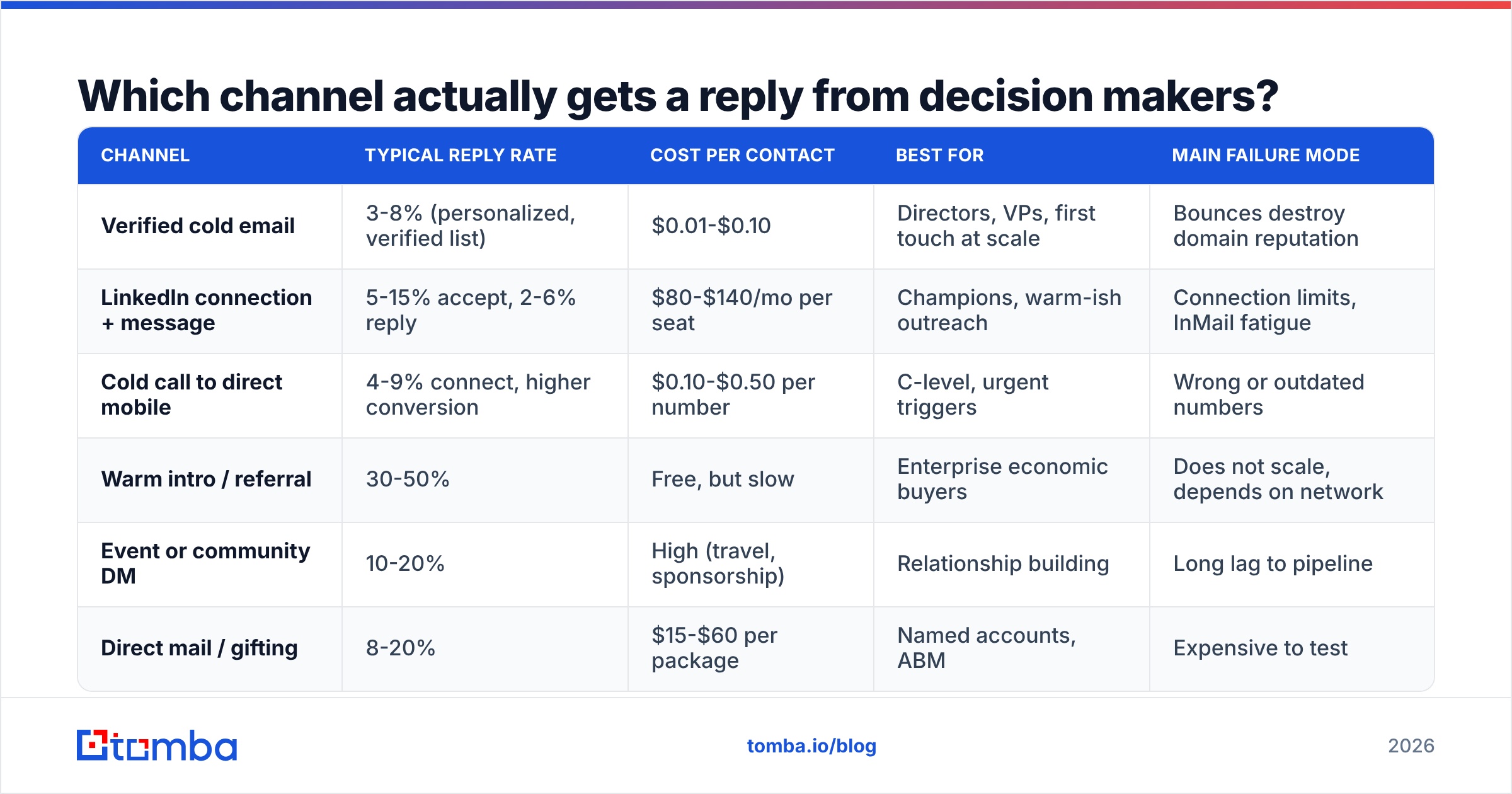
There is no single winner. There is a right channel per seniority and per stage. Here is how the main options compare on the dimensions that matter when you are choosing where to spend the next hour.
| Channel | Typical reply rate | Cost per contact | Best for | Main failure mode |
|---|---|---|---|---|
| Verified cold email | 3-8% (personalized, verified list) | $0.01-$0.10 | Directors, VPs, first touch at scale | Bounces destroy domain reputation |
| LinkedIn connection + message | 5-15% accept, 2-6% reply | $80-$140/mo per seat | Champions, warm-ish outreach | Connection limits, InMail fatigue |
| Cold call to direct mobile | 4-9% connect, higher conversion | $0.10-$0.50 per number | C-level, urgent triggers | Wrong or outdated numbers |
| Warm intro / referral | 30-50% | Free, but slow | Enterprise economic buyers | Does not scale, depends on network |
| Event or community DM | 10-20% | High (travel, sponsorship) | Relationship building | Long lag to pipeline |
| Direct mail / gifting | 8-20% | $15-$60 per package | Named accounts, ABM | Expensive to test |
The pattern in that table: as reply rate climbs, so does cost and effort. The winning play is a barbell — cheap verified email at volume for the top of your list, and expensive high-touch motion reserved for your 50 named accounts.
Multi-threading beats channel optimization. Reaching three people in one account through two channels outperforms reaching one person through five channels. When your champion goes quiet in week three, the technical evaluator you also emailed becomes your path back in.
How do you find a decision maker's actual contact details?#
This is the mechanical part, and it is where most prospecting stalls. You know you want the VP of Revenue Operations at a 400-person fintech. You do not know their email.
Step 1: Identify the human. Use LinkedIn Sales Navigator or a B2B database filtered by title, headcount, and tech stack. Write down the exact first name, last name, and company domain. Spelling matters — "Katherine Ryan" and "Kate Ryan" produce different addresses.
Step 2: Determine the company's email pattern. Most companies use one of six formats: first.last@, flast@, first@, firstl@, f.last@, or lastf@. A company email pattern check tells you which one the domain uses before you guess.
Step 3: Run the finder. Feed name + domain into an email finder and take the result with its confidence score. If you only have the company, run a domain search to pull every public address on that domain and filter by department.
Step 4: Verify before sending. This step is not optional. Run every address through an email verifier and drop anything that comes back invalid. For catch-all domains — which accept every address at the SMTP layer and tell you nothing — use a catch-all verifier that goes further than a basic SMTP ping.
Step 5: Layer in phone where the deal size justifies it. For accounts above your ACV threshold, a phone finder result plus a well-timed call converts far better than a fourth email.
Step 6: Enrich for context. Before you write anything, pull the person's role history, the company's funding stage, and their current tech stack through data enrichment. That context is your opening line.
What accuracy should you expect from contact data?#
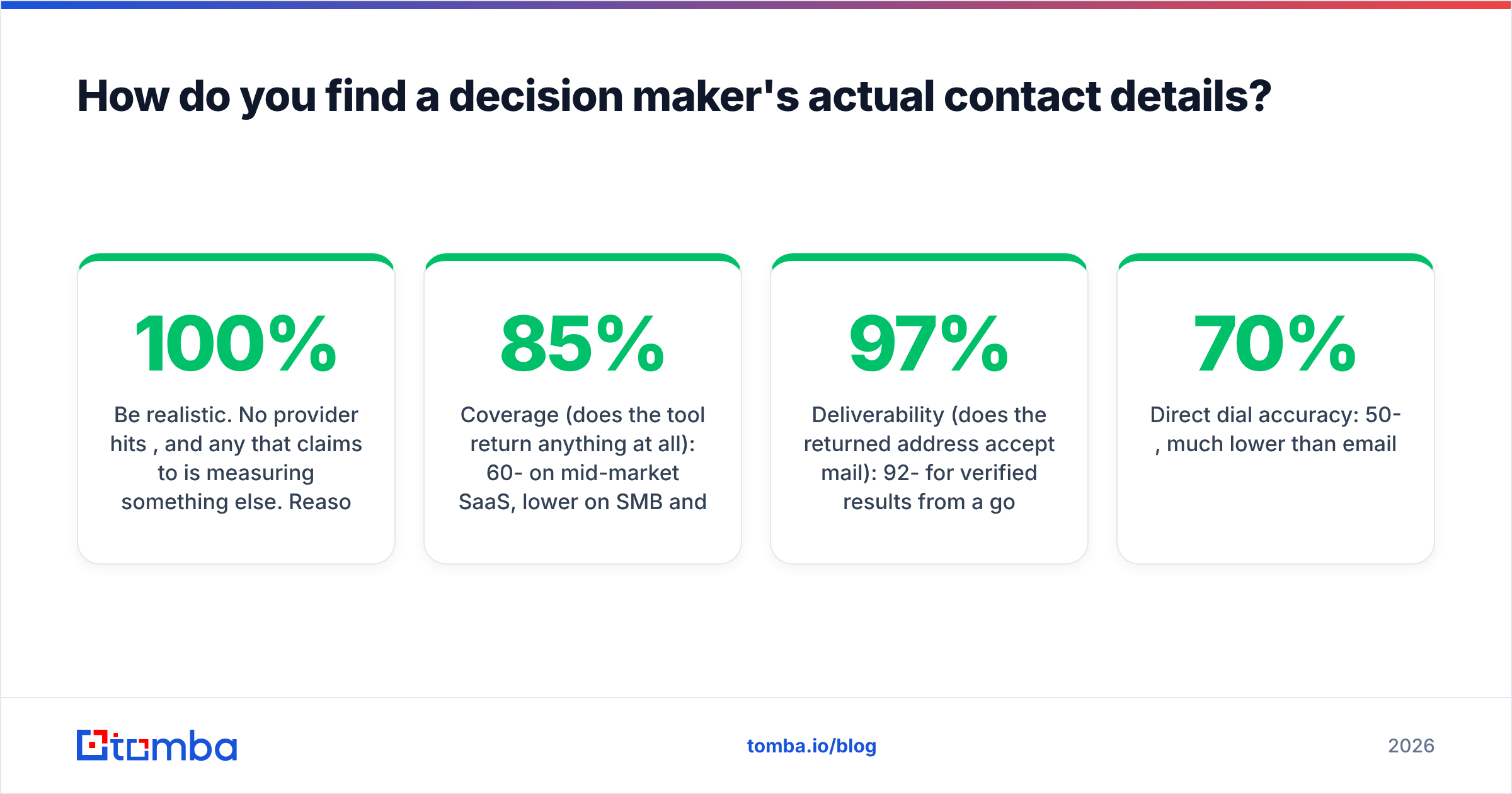
Be realistic. No provider hits 100%, and any that claims to is measuring something else. Reasonable 2026 expectations:
- Coverage (does the tool return anything at all): 60-85% on mid-market SaaS, lower on SMB and non-English markets.
- Deliverability (does the returned address accept mail): 92-97% for verified results from a good provider.
- Direct dial accuracy: 50-70%, much lower than email.
If your bounce rate exceeds 3%, stop the campaign and re-verify the list. Mailbox providers treat sustained high bounces as a spam signal, and recovering a burned sending domain takes months. Run your list through a bulk verify pass before any send above a few hundred contacts.
What do you actually say to a decision maker?#
Short version: reference something that changed at their company in the last 90 days, name the specific consequence, ask one question.
Senior people scan on mobile. They decide within about three seconds whether to keep reading. So:
The structure that works:
- Line 1 — the trigger. "Saw you're hiring three RevOps analysts this quarter." Not "Hope you're doing well." A trigger proves you looked.
- Line 2 — the consequence, in their language. "Usually that means CRM data hygiene is eating a day a week per rep." Speak about their problem, not your feature.
- Line 3 — proof, compressed. One comparable company, one number. "We cut that to two hours a week at [similar company]."
- Line 4 — one low-friction ask. "Worth a 12-minute look next Tuesday?" Not "Let me know if you'd like to explore synergies."
Keep it under 90 words. Kill every adjective. If you cut the whole email and only the first line survives, would it still earn a reply? If not, rewrite the first line.
On follow-up: three to five touches over two to three weeks, each adding new information rather than "just bumping this." A follow-up that includes a relevant benchmark, a customer story, or a competitor's move is a reason to reply. "Circling back" is not. HubSpot's sales email research covers the pattern in more depth if you want the underlying data.
Which tools help you reach decision makers, and how do they compare?#
The category splits into three jobs: find the contact, verify it, and sequence the outreach. Most teams need two of the three, and buying one platform that does all three badly is a common and expensive mistake.
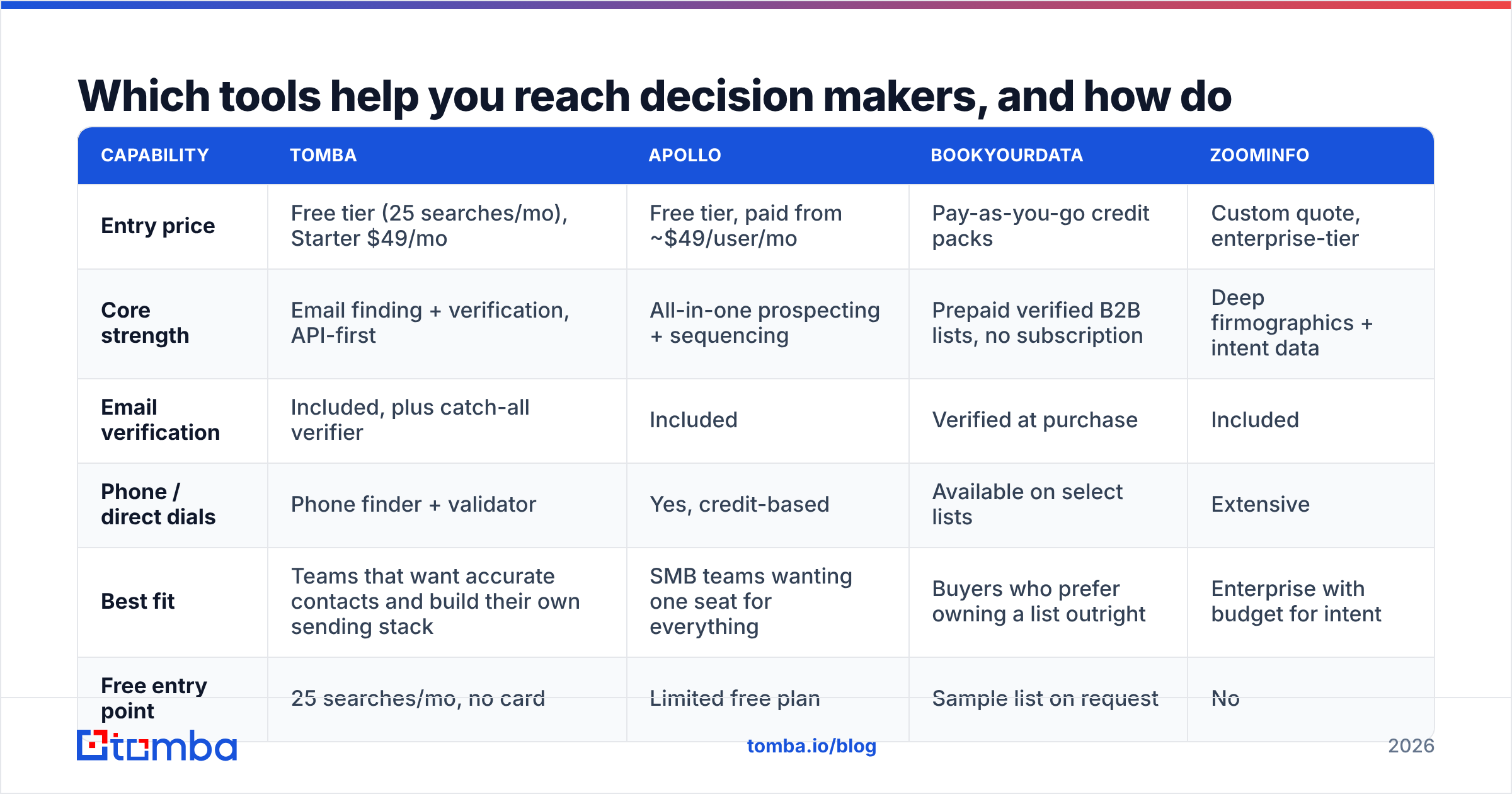
| Capability | Tomba | Apollo | BookYourData | ZoomInfo |
|---|---|---|---|---|
| Entry price | Free tier (25 searches/mo), Starter $49/mo | Free tier, paid from ~$49/user/mo | Pay-as-you-go credit packs | Custom quote, enterprise-tier |
| Core strength | Email finding + verification, API-first | All-in-one prospecting + sequencing | Prepaid verified B2B lists, no subscription | Deep firmographics + intent data |
| Email verification | Included, plus catch-all verifier | Included | Verified at purchase | Included |
| Phone / direct dials | Phone finder + validator | Yes, credit-based | Available on select lists | Extensive |
| Best fit | Teams that want accurate contacts and build their own sending stack | SMB teams wanting one seat for everything | Buyers who prefer owning a list outright | Enterprise with budget for intent |
| Free entry point | 25 searches/mo, no card | Limited free plan | Sample list on request | No |
A note on picking: if your outreach already runs through a sequencer you like, do not rip it out to consolidate. Add a data layer instead. Contact accuracy compounds across every channel you already run, while a mediocre sequencer costs you a month of migration for no lift in replies.
Check Tomba pricing against your monthly contact volume rather than your seat count — credit-based pricing usually beats per-seat once more than two people prospect. And if you want to see how the sourcing works before committing, the data sources page explains where records come from and how they are validated.
For teams running outreach inside existing systems, the Tomba API and the HubSpot integration let you enrich records at the point of creation, so a lead never enters your CRM without a verified address attached.
How do you get past a gatekeeper?#
Reframe the gatekeeper. They are not an obstacle; they are a router. Their job is to send relevant things through and stop irrelevant things. Give them something clearly routable.
What works:
- Be specific and brief. "I'm following up on the RevOps analyst roles Priya posted — is she the right person for a 10-minute conversation about the data cleanup side?" Specific, easy to route, easy to say yes to.
- Use their name and treat them as a colleague. Executive assistants remember rudeness for years and control calendars for decades.
- Do not pretend you already know the executive. It fails immediately and burns the account.
- Ask for direction, not access. "Who owns this internally?" is a question a gatekeeper can answer. "Can you put me through?" is one they are paid to decline.
- Call outside standard hours. 7:45am and 5:30pm frequently reach the executive directly, because the routing layer is off duty.
The parallel move is to make yourself findable in reverse. If a decision maker searches your name after your email lands, they should find a LinkedIn profile that reads like a domain expert, not a quota carrier. Consistent social selling activity means your cold email lands on someone who half-recognizes you — and half-recognition roughly doubles reply rates in practice.
What does a repeatable weekly process look like?#
Reaching decision makers is not a campaign. It is a cadence. Here is a workable weekly loop for a rep carrying 40-60 target accounts:
- Monday — trigger scan (60 min). Check funding announcements, job postings, leadership changes, and product launches across your account list. Every trigger becomes a first line.
- Monday — build the list (45 min). For each triggered account, identify champion + economic buyer + technical evaluator. Three contacts per account, minimum.
- Tuesday — find and verify (30 min). Run the batch through your finder, verify, drop anything below your confidence threshold. Never send to unverified addresses.
- Tuesday-Thursday — send and call (2 hrs/day). Email the champion first, connect on LinkedIn the same day, call the economic buyer only after the champion engages.
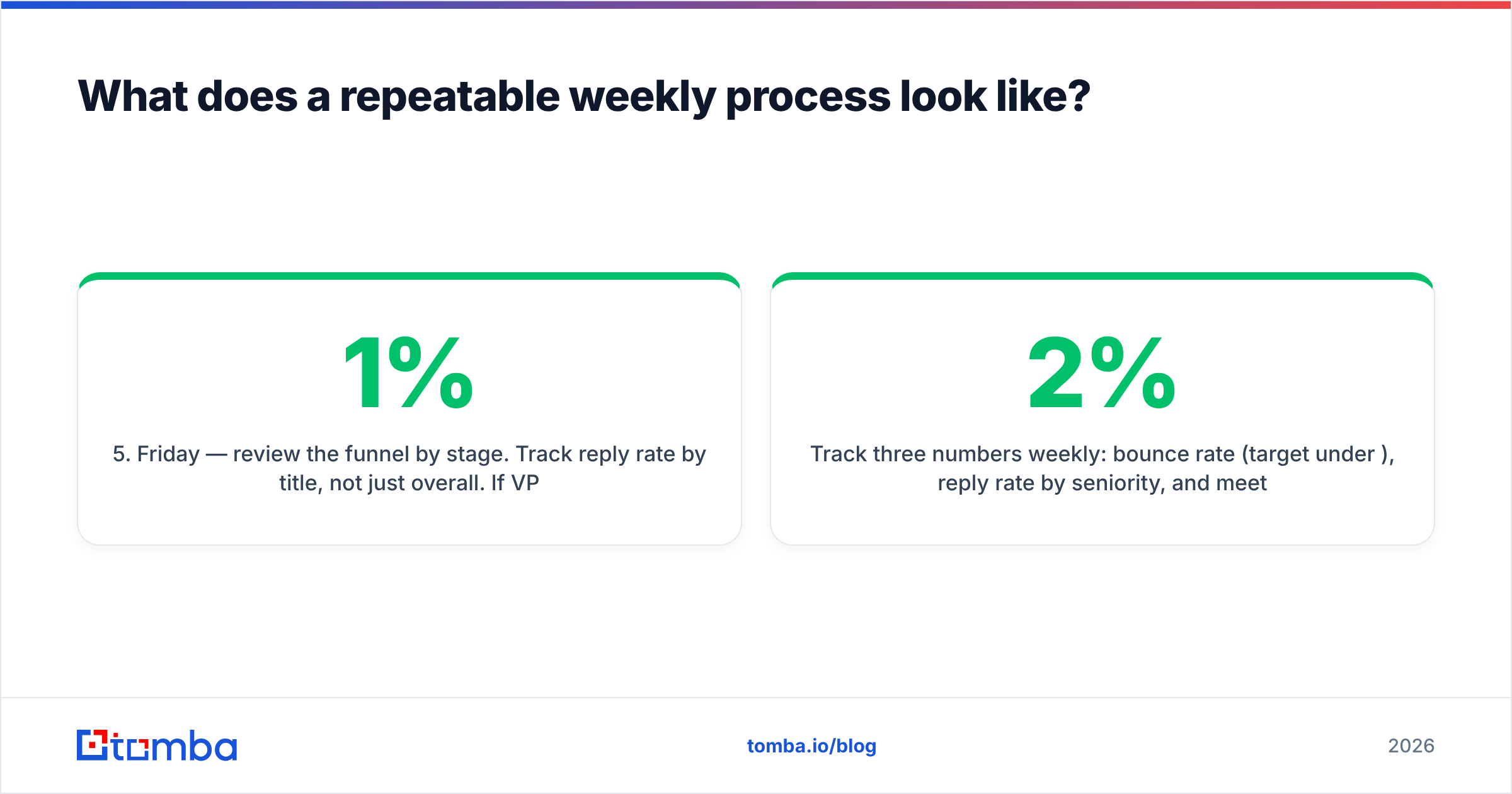
- Friday — review the funnel by stage. Track reply rate by title, not just overall. If VPs reply at 1% and directors at 7%, you have learned where to enter.
Track three numbers weekly: bounce rate (target under 2%), reply rate by seniority, and meetings booked per 100 verified contacts. If bounce rate creeps up, your data went stale — most B2B contact records decay at roughly 25-30% per year as people change jobs.
Where should you start this week?#
Pick ten accounts you genuinely want. For each, name the champion and the economic buyer. Find and verify both addresses. Write one email per account that references something real that happened at that company in the last quarter. Send it. That is 20 contacts and roughly two hours of work, and it will teach you more than 2,000 sprayed sends.
The bottleneck in that process is almost never the writing. It is having a correct, deliverable address for the exact human you named. That is the job Tomba Email Finder does — name plus domain in, verified address with a confidence score out, with catch-all handling and bulk processing when your list grows past what you can do by hand. The free tier gives you 25 searches a month with no card, which is enough to run the ten-account exercise above and see whether the reply rates hold up for your market.
Find the right person, verify you can reach them, and say something only someone who did the research could say. The rest is repetition.
Related guides#
// get started
Find, verify and enrich your first contacts today
Start on the free plan with 25 searches a month, then scale when your team is ready.
Free plan · No credit card required · GDPR & CCPA
// about the author