How To Reach Out To Potential Clients: A 2026 Playbook
Most outreach fails before the first word is read. Here is a channel-by-channel breakdown of how to reach out to potential clients in 2026, with real reply-rate benchmarks and the sequence that actually books meetings.
TL;DR
- The channel matters less than the list. A verified, tightly-targeted 200-contact list beats a scraped 5,000-contact list on every metric that counts — replies, meetings, and domain health.
- Email still produces the most booked meetings per hour of work, but only when bounce rate stays under 2%. Above 5%, your sender reputation collapses and nothing else you do matters.
- Multichannel sequences (email + LinkedIn + one call) roughly double reply rates versus email alone, at about 1.6x the effort.
- Personalization has a ceiling. Research one specific, checkable fact per prospect — anything beyond that stops paying for itself.
- Your first message should ask for a reaction, not a meeting. Meeting-first asks convert worse than opinion-first asks in nearly every test worth reading.
You already know outreach works. What you probably do not know is where yours is leaking. Most teams blame the copy when the actual failure is upstream: the wrong person, a stale email address, or a first message that asks a stranger for 30 minutes of their calendar.
This is a practical breakdown of how to reach out to potential clients in 2026 — which channels perform, what to send, when to follow up, and how to stop your emails from landing in spam before anyone reads them.
What actually determines whether outreach works?#
Four variables, in order of impact:
- List quality — Are these people plausibly in-market and reachable? This is 50% of your outcome. Everything else fights over the remaining half.
- Deliverability — Does the message physically arrive in the primary inbox? A brilliant email in the spam folder converts at exactly zero.
- Relevance of the opening line — Does the first sentence prove you know something specific about them, their company, or their role?
- Ask size — How much are you requesting in message one? Smaller asks win.
Notice what is not on that list: subject-line tricks, emoji usage, send-time optimization down to the minute. Those are rounding errors. Teams obsess over them because they are easy to change. The variables that matter are harder to fix, which is exactly why fixing them creates separation.

Which outreach channel should you use in 2026?#
There is no single answer, but there is a defensible default: lead with email, support with LinkedIn, reserve the phone for accounts worth a personal minute.
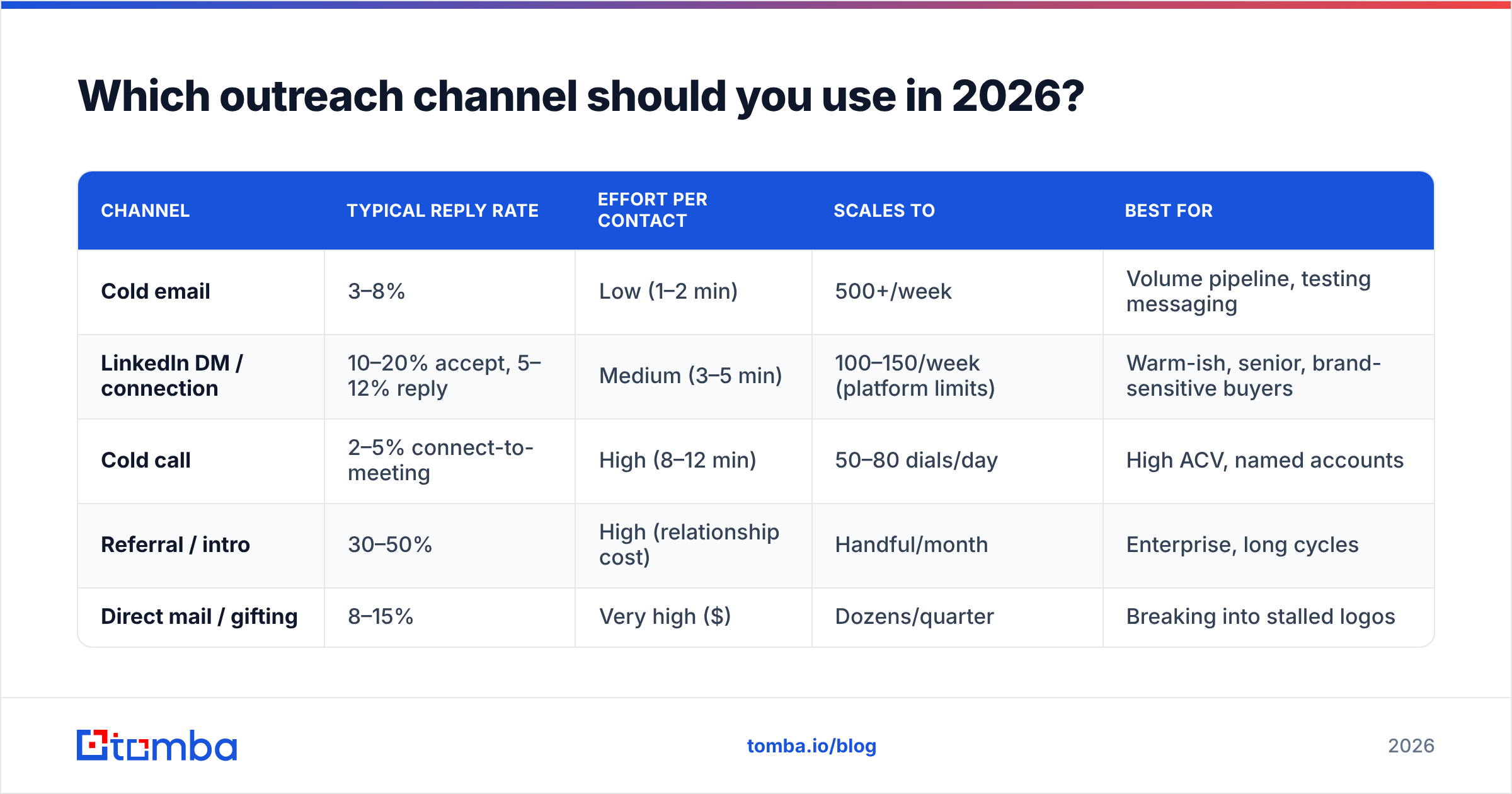
Here is how the main channels compare on the metrics that decide your quarter.
| Channel | Typical reply rate | Effort per contact | Scales to | Best for |
|---|---|---|---|---|
| Cold email | 3–8% | Low (1–2 min) | 500+/week | Volume pipeline, testing messaging |
| LinkedIn DM / connection | 10–20% accept, 5–12% reply | Medium (3–5 min) | 100–150/week (platform limits) | Warm-ish, senior, brand-sensitive buyers |
| Cold call | 2–5% connect-to-meeting | High (8–12 min) | 50–80 dials/day | High ACV, named accounts |
| Referral / intro | 30–50% | High (relationship cost) | Handful/month | Enterprise, long cycles |
| Direct mail / gifting | 8–15% | Very high ($) | Dozens/quarter | Breaking into stalled logos |
Reply rates vary wildly by industry and seniority — treat these as planning ranges, not promises. A VP of Engineering at a 5,000-person company replies to almost nothing. A founder of a 20-person agency replies to almost anything that shows real attention.
The strategic read: email is the only channel where you can run a real experiment. You need statistical volume to learn what messaging works, and only email gives you that cheaply. Use it as your learning engine, then port the winning angle to LinkedIn and calls.
How do you build a list worth emailing?#
Start narrow. The instinct to maximize list size is the single most expensive mistake in outbound.
A workable process:
- Define the trigger, not the persona. "Head of Marketing at a SaaS company" is a persona. "Head of Marketing at a SaaS company that posted a demand-gen role in the last 30 days" is a trigger. Triggers convert 3–5x better because timing is doing the work for you.
- Build the account list first. 100–300 companies that match the trigger. Filter by tech stack, headcount growth, funding stage, or hiring signals — whatever correlates with your best closed-won deals.
- Find the right human at each account. Usually one economic buyer and one champion. Two contacts per account, not eight. Blanketing an org gets you flagged internally and burns the account.
- Get the email address. Use a domain search to pull the company's verified addresses and detect its email pattern, then resolve individual names with an email finder.
- Verify before sending. Every address goes through an email verifier. No exceptions, including addresses that came from a paid database last quarter — B2B data decays roughly 2–3% per month as people change jobs.
- Enrich for personalization inputs. Job title, recent role change, company size, and tech stack give you enough to write a specific opener without an hour of manual research.
That sequence takes an afternoon for 200 contacts and will outperform a month of scraping.
Why does verification matter more than copy?#
Because mailbox providers judge you on behavior, not intent.
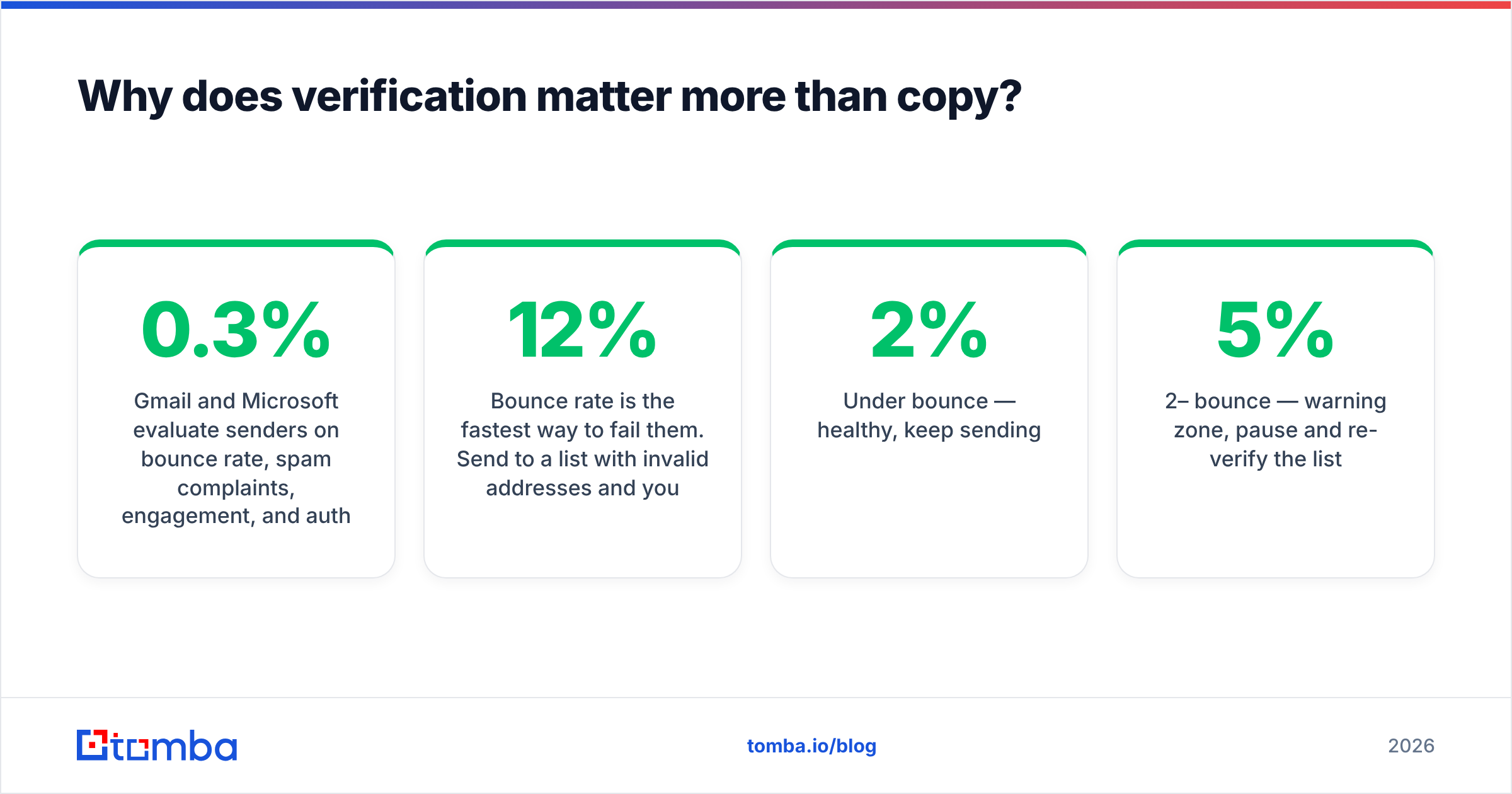
Gmail and Microsoft evaluate senders on bounce rate, spam complaints, engagement, and authentication. Both Google and Yahoo tightened bulk-sender requirements starting in 2024 — enforced SPF and DKIM, DMARC for bulk senders, one-click unsubscribe, and a spam complaint rate under 0.3%. Google's own sender guidelines spell out the thresholds. Those rules are now table stakes, not a competitive edge.
Bounce rate is the fastest way to fail them. Send to a list with 12% invalid addresses and your domain reputation drops within days. Recovery takes weeks, and during that window even your legitimate replies-to-warm-leads land in spam.
Practical thresholds worth memorizing:
- Under 2% bounce — healthy, keep sending.
- 2–5% bounce — warning zone, pause and re-verify the list.
- Over 5% bounce — stop. You are actively damaging your domain.
- Over 0.3% spam complaints — your targeting or your opt-out is broken.
Catch-all domains complicate this. Roughly 15–20% of B2B domains accept mail for any address, so standard verification returns "unknown." A dedicated catch-all verifier resolves a meaningful share of those instead of forcing you to guess or discard them. Discarding all catch-alls throws away real pipeline; sending to all of them blindly inflates your bounce rate. Resolve what you can, and segment the rest into a separate, lower-volume sending domain.

Also worth running before your first campaign: an SPF and DKIM check on your sending domain, and a warm-up period of 2–4 weeks on any new mailbox. A free email checker handles single-address spot checks; bulk lists go through bulk verify.
What should your first message actually say?#
Four sentences. Under 90 words. One idea.
The structure that holds up across industries:
- Line 1 — Proof of attention. One specific, verifiable observation. "Saw you're hiring two SDRs in EMEA" beats "I loved your company's mission."
- Line 2 — The connection. Why that observation means you might be relevant. One clause, no jargon.
- Line 3 — Evidence. A number or a named comparable. "We got Acme's connect rate from 4% to 11%" — not "we help companies scale."
- Line 4 — A small ask. "Worth a look?" or "Is this even a priority right now?" Not "Do you have 30 minutes Tuesday?"
The last line is where most sequences break. Asking for a meeting in message one requires the prospect to make a scheduling decision about a stranger. Asking for a reaction requires them to type one word. Once they reply at all, you are in a conversation, and conversations convert.
Two things to cut ruthlessly: the phrase "I hope this email finds you well," and any sentence describing your company before you have earned attention. Nobody has ever booked a meeting off a company description in the first paragraph.
Subject lines should be lowercase, 2–4 words, and read like an internal note. "quick question re: EMEA hiring" outperforms "Transform Your Sales Pipeline Today" by a wide margin, because one looks like a colleague and the other looks like a campaign.
If you want a starting point, run a few variants through a subject line tester before committing a whole sequence to one angle.
How many follow-ups, and how far apart?#
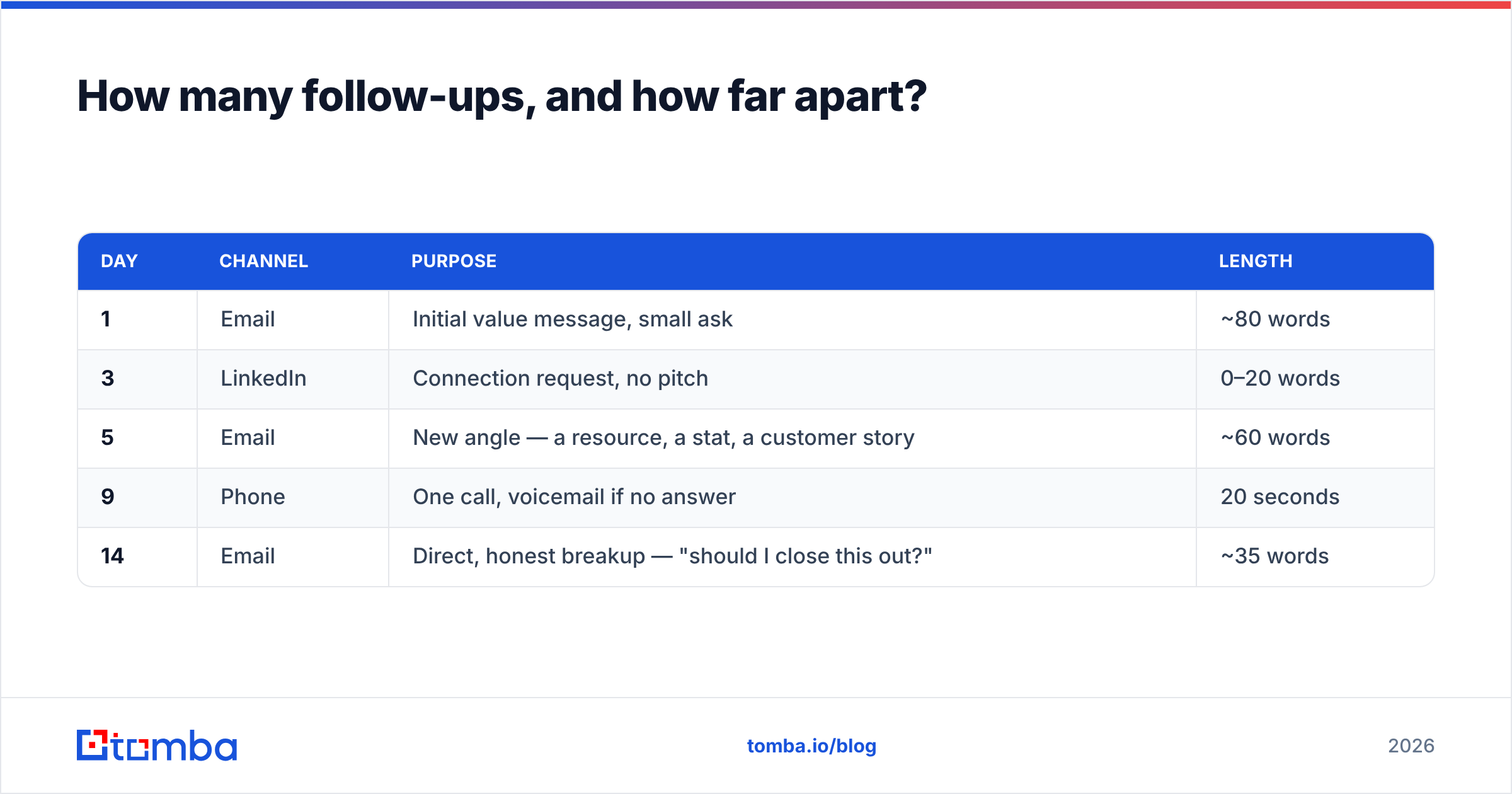
Four to five touches over 14–18 days. Then stop.
A sequence that works:
| Day | Channel | Purpose | Length |
|---|---|---|---|
| 1 | Initial value message, small ask | ~80 words | |
| 3 | Connection request, no pitch | 0–20 words | |
| 5 | New angle — a resource, a stat, a customer story | ~60 words | |
| 9 | Phone | One call, voicemail if no answer | 20 seconds |
| 14 | Direct, honest breakup — "should I close this out?" | ~35 words |
Two rules make this work. First, never resend the same idea louder. Each touch introduces a genuinely new angle; a follow-up that says "just bumping this" wastes a touch and signals you have nothing to add. Second, the breakup email is your highest-reply message in the sequence — often 2–3x the opener. People respond to a clean exit because it costs them nothing and relieves an open loop.
Beyond five touches, reply rates drop to near-zero and complaint rates climb. Move the account to a nurture list and re-approach in a quarter with a new trigger.

How much personalization is worth the time?#
One researched fact per prospect. That is the efficient frontier.
The research on this is consistently misread. Heavily personalized emails do outperform templated ones — but the gain flattens fast. Going from zero personalization to one specific detail is a large lift. Going from one detail to four is a small lift that costs 4x the time. At scale, the one-detail approach wins on total meetings booked per rep-hour, which is the metric your board actually cares about.
What counts as a usable personalization input:
- A recent job change — someone 30–90 days into a new role is buying tools to make a mark.
- An open job posting — reveals budget, priorities, and gaps in one artifact.
- A funding round — new capital means new spend, typically within two quarters.
- A tech stack change — adopting or dropping a tool signals an active evaluation window.
- A published piece of content — a post, a talk, or a podcast gives you a genuine, non-creepy hook.
Contact enrichment pulls most of these automatically, which is the difference between 200 personalized emails a week and 40. For content-based hooks, an author finder gets you straight from an article byline to a verified address.
What does not count: their alma mater, their dog's name in a LinkedIn photo, or the weather in their city. Fake intimacy reads worse than an honest, plainly-relevant template.
What tools do you actually need?#
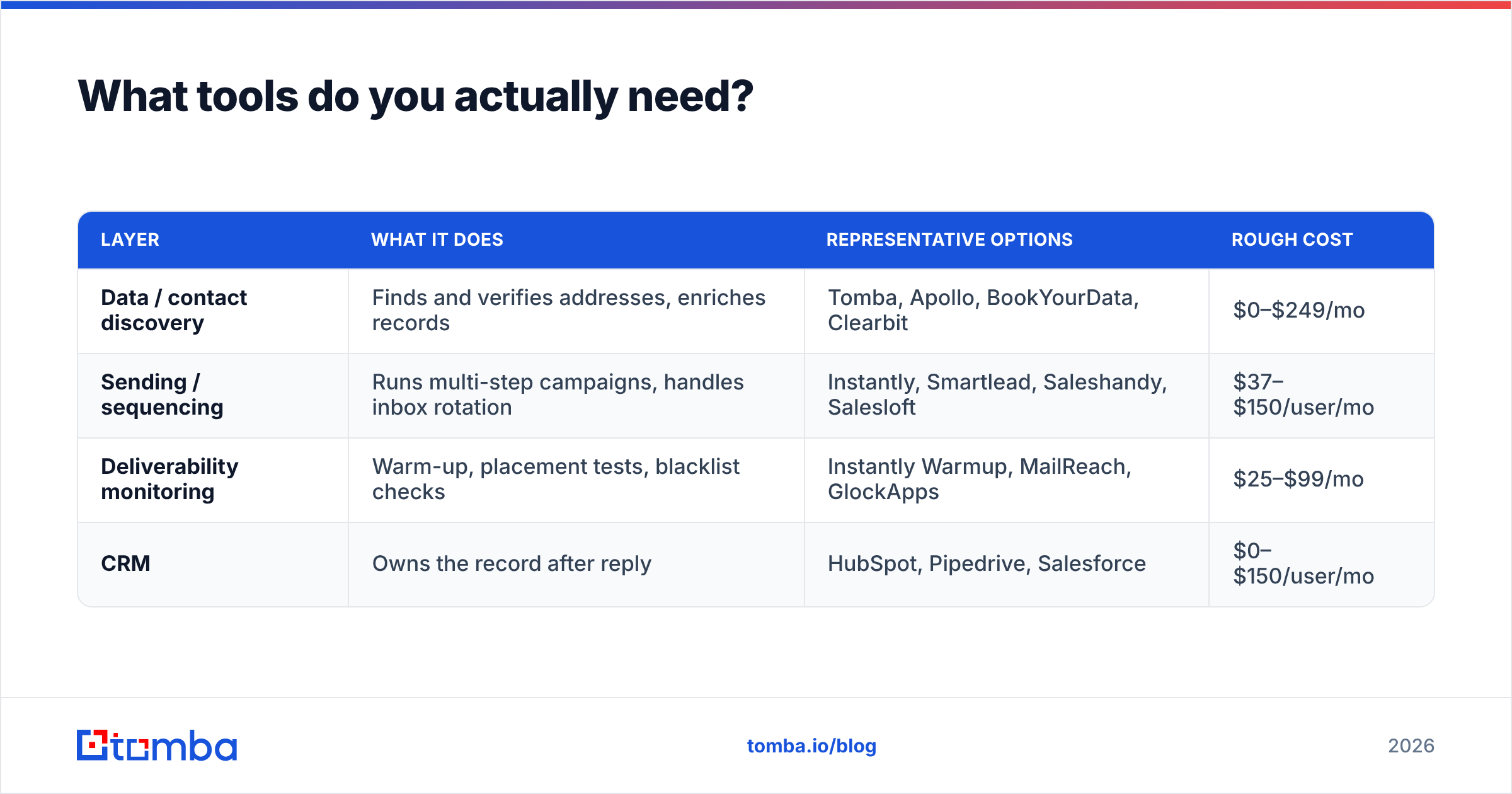
Fewer than vendors would like you to believe. A functional outbound stack has four layers.
| Layer | What it does | Representative options | Rough cost |
|---|---|---|---|
| Data / contact discovery | Finds and verifies addresses, enriches records | Tomba, Apollo, BookYourData, Clearbit | $0–$249/mo |
| Sending / sequencing | Runs multi-step campaigns, handles inbox rotation | Instantly, Smartlead, Saleshandy, Salesloft | $37–$150/user/mo |
| Deliverability monitoring | Warm-up, placement tests, blacklist checks | Instantly Warmup, MailReach, GlockApps | $25–$99/mo |
| CRM | Owns the record after reply | HubSpot, Pipedrive, Salesforce | $0–$150/user/mo |
Where the layers blur is where budgets get wasted. All-in-one platforms bundle data with sending, which is convenient until you discover the bundled data is the weak link and you cannot swap it out without replacing the sequencer too. Buying data and sending separately costs slightly more in line items and considerably less in wasted sends.
On the data layer specifically, the differentiators are verification depth, catch-all handling, and price per verified contact — not raw database size. A 700-million-record database with 60% accuracy is worse than a smaller one at 95%, because you pay for the bad records twice: once in credits, once in bounces. BookYourData, for instance, competes on human-verified accuracy rather than sheer volume, which is a defensible trade for teams sending low-volume, high-value campaigns. Check independent reviews on G2 rather than vendor-published accuracy claims, which are almost never audited.

Compare Tomba pricing against your current per-verified-contact cost: the Free tier gives 25 searches a month, Starter is $49/mo, Growth $99/mo, and Pro $249/mo. The relevant math is not the sticker price — it is credits spent divided by contacts that actually landed.
How do you measure whether it is working?#
Track five numbers, weekly:
- Bounce rate — target under 2%. This is your early-warning system for list quality.
- Open rate — 40–60% is normal for verified B2B lists. Below 25% usually means deliverability, not copy. (Apple Mail Privacy Protection inflates this metric, so treat trends as more meaningful than absolute values.)
- Reply rate — 3–8% for cold email. This is your copy and targeting score.
- Positive reply rate — replies that are not "no." Target 30–40% of total replies. If replies are high but positives are low, your targeting is off, not your writing.
- Meetings per 100 contacts — the only number that ties to revenue. One to three is a working campaign.
Diagnose in that order. A team fixing copy when the real problem is a 9% bounce rate will iterate forever without improving. HubSpot publishes useful benchmark ranges in its sales statistics research if you want external comparison points, though segment-specific medians from your own history are always more reliable.
What are the most common mistakes?#
- Sending before warming the domain. A brand-new domain sending 300 emails on day one is a spam signal regardless of content.
- One mailbox, high volume. Cap at 30–50 cold emails per mailbox per day. Need more volume? Add mailboxes, not throughput.
- Skipping verification on "fresh" data. Fresh from the vendor is not fresh in reality. Verify at send time, not purchase time.
- Pitching in the LinkedIn connection request. Accept rates drop by half. Connect first, add value, then ask.
- Treating a no-reply as a no. Roughly a third of eventual replies come from touch three or later.
- Running the same sequence for six months. Angles fatigue. Refresh the opening hook quarterly.
Where should you start this week?#
Pick 100 accounts that match one clear trigger. Find two contacts at each. Verify every address. Write one four-line email and one three-touch follow-up. Send 30 a day. Measure the five numbers above after two weeks, and change exactly one variable.
That is a complete outbound motion, and it is roughly a day and a half of setup. The teams that struggle are almost never the ones doing too little — they are the ones doing too much, too broadly, to addresses that were never valid.
Start with the list. Tomba's Email Finder resolves names and domains into verified professional addresses, with catch-all handling and enrichment built in, so the 100 contacts you send to on Monday are 100 contacts that actually exist. The free tier covers 25 searches a month — enough to test your first trigger list before you commit a budget to it.
Related guides#
// get started
Find, verify and enrich your first contacts today
Start on the free plan with 25 searches a month, then scale when your team is ready.
Free plan · No credit card required · GDPR & CCPA
// about the author