How to Read a Sales Report: The 8 Numbers That Matter
Most sales reports get skimmed, not read. Here is a repeatable way to read one in ten minutes: which numbers to check first, which averages lie, and how to tell a data problem from a selling problem.
TL;DR
- A sales report answers one question at a time. Decide which question you are asking before you open it, or you will read the whole thing and learn nothing.
- Read in this order: volume, conversion, velocity, value. Anything else is decoration.
- Averages hide the story. Always ask for the median and the distribution before you act on a mean.
- Most "pipeline collapsed" panics are data problems — stale contacts, duplicate records, bad email addresses — not selling problems. Check data quality before you change strategy.
- Ten minutes a week, done the same way each time, beats a two-hour deep dive once a quarter.
What is a sales report, actually?#
A sales report is a snapshot of activity and outcomes over a fixed window. That is it. It is not a diagnosis, it is not a forecast, and it is not an opinion — it is a set of counts and ratios that hint at where the problem lives.
Think of it like a car dashboard. The fuel gauge does not tell you whether you will make it to Denver. It tells you how much fuel is in the tank right now, and you supply the reasoning. Reports that try to do your reasoning for you — the ones with a big green "HEALTHY" badge at the top — are usually the ones hiding the most.
The practical consequence: every sales report has a scope (which deals), a window (which dates), and a snapshot rule (values as of when). Two reports that disagree are usually not contradicting each other. They are answering different questions. Before you argue with a number, find those three properties. They are almost always in the report header or the filter panel, and they explain 80% of the disagreements between sales, marketing, and finance.
Which numbers should you read first?#
Read in a fixed order every time. The order matters because each layer explains the one after it — if volume is down, a lower win count is expected and not interesting.
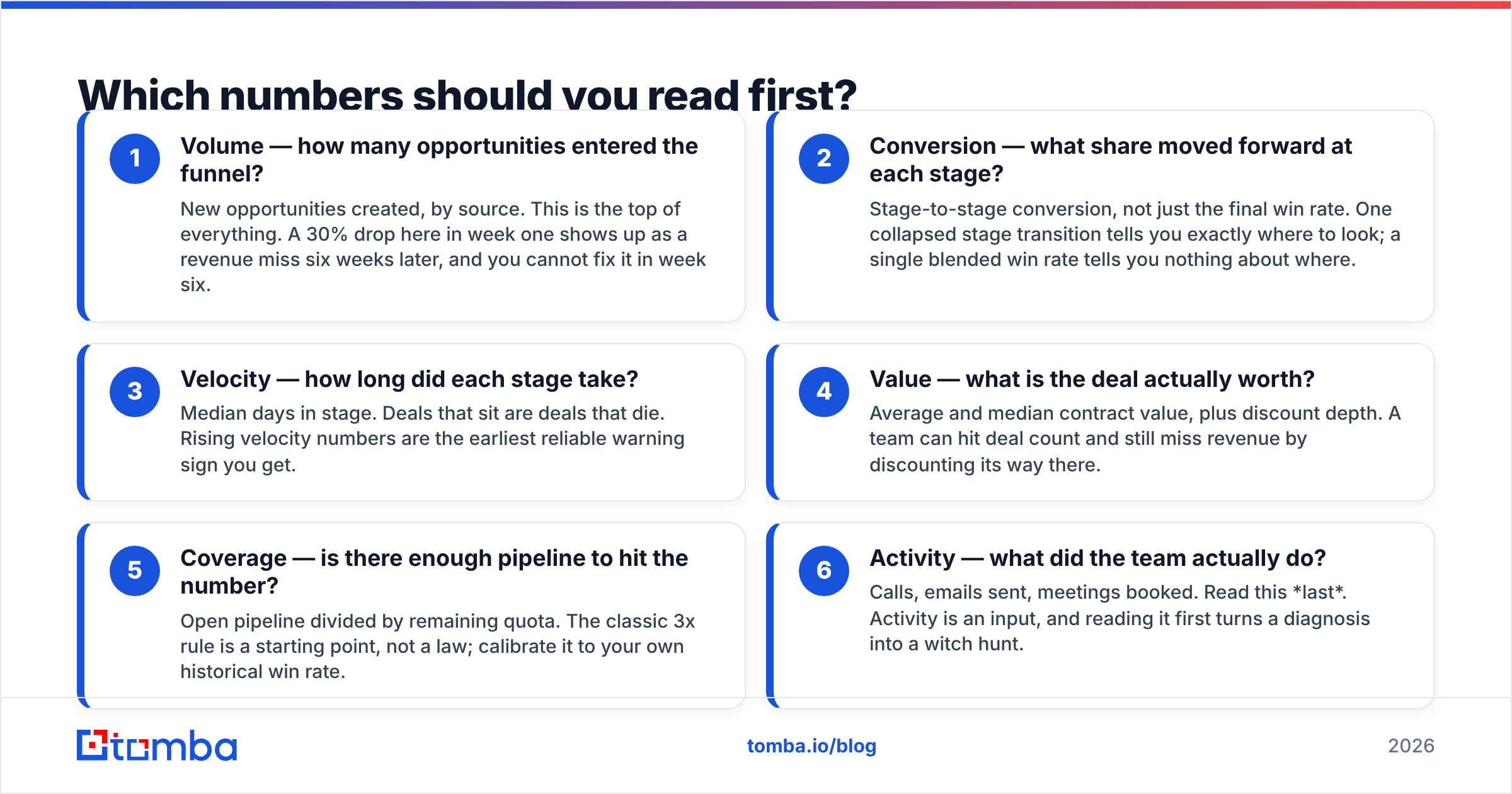
- Volume — how many opportunities entered the funnel? New opportunities created, by source. This is the top of everything. A 30% drop here in week one shows up as a revenue miss six weeks later, and you cannot fix it in week six.
- Conversion — what share moved forward at each stage? Stage-to-stage conversion, not just the final win rate. One collapsed stage transition tells you exactly where to look; a single blended win rate tells you nothing about where.
- Velocity — how long did each stage take? Median days in stage. Deals that sit are deals that die. Rising velocity numbers are the earliest reliable warning sign you get.
- Value — what is the deal actually worth? Average and median contract value, plus discount depth. A team can hit deal count and still miss revenue by discounting its way there.
- Coverage — is there enough pipeline to hit the number? Open pipeline divided by remaining quota. The classic 3x rule is a starting point, not a law; calibrate it to your own historical win rate.
- Activity — what did the team actually do? Calls, emails sent, meetings booked. Read this last. Activity is an input, and reading it first turns a diagnosis into a witch hunt.
If you only have ten minutes, numbers one through four are the whole job. Coverage and activity are for the week you already know something is wrong and need to narrow it down.

What do the standard report types tell you?#
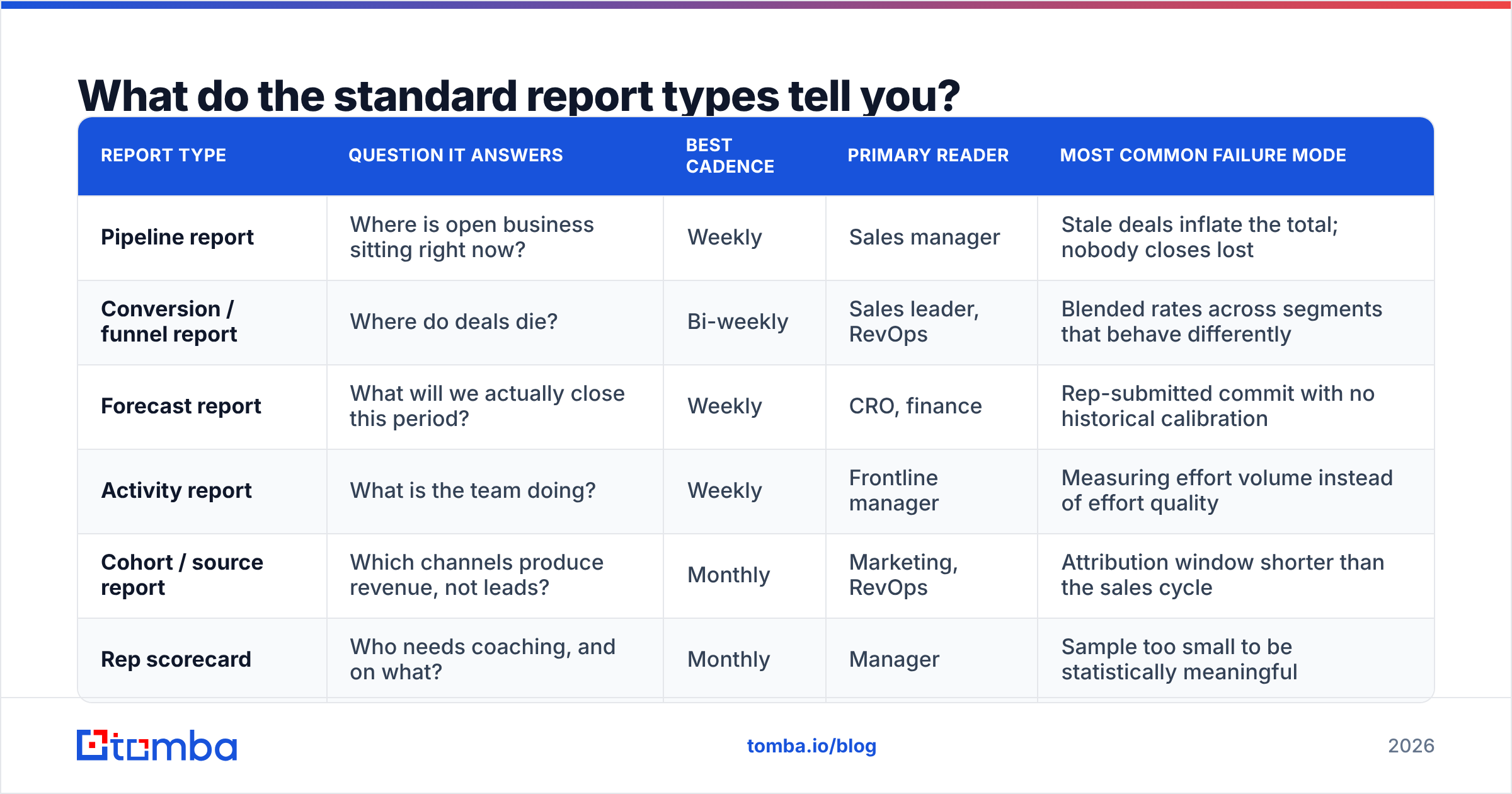
Most CRMs ship four or five canned reports and then a hundred variations of them. Knowing which one answers which question saves you from opening all hundred.
| Report type | Question it answers | Best cadence | Primary reader | Most common failure mode |
|---|---|---|---|---|
| Pipeline report | Where is open business sitting right now? | Weekly | Sales manager | Stale deals inflate the total; nobody closes lost |
| Conversion / funnel report | Where do deals die? | Bi-weekly | Sales leader, RevOps | Blended rates across segments that behave differently |
| Forecast report | What will we actually close this period? | Weekly | CRO, finance | Rep-submitted commit with no historical calibration |
| Activity report | What is the team doing? | Weekly | Frontline manager | Measuring effort volume instead of effort quality |
| Cohort / source report | Which channels produce revenue, not leads? | Monthly | Marketing, RevOps | Attribution window shorter than the sales cycle |
| Rep scorecard | Who needs coaching, and on what? | Monthly | Manager | Sample too small to be statistically meaningful |
The last column is where most reading errors happen. A pipeline report with 40% stale deals is not a report — it is a wish list. Before trusting any pipeline total, filter to deals with activity in the last 30 days and see what survives. If the number drops by a third, you just found your real pipeline.
How do you read a pipeline report without fooling yourself?#
Pipeline reports are the most-read and least-trusted document in sales, and for good reason: they are the easiest to inflate. Nobody is lying. Deals just accumulate, because closing something as Lost feels like an admission and pushing the close date feels like optimism.
Apply three filters before you read a single total:
Filter by recency. Any deal with no logged activity in 30 days is presumed dead until a human says otherwise. Run the report both ways and compare. The gap between "total pipeline" and "active pipeline" is your inflation rate. Under 15% is healthy. Over 40% means your forecast is fiction.
Filter by close-date sanity. Count deals whose close date has been pushed twice or more. In most teams, a deal that slips twice closes at a fraction of the rate of one that never slipped. Those deals should not carry full weight in coverage math.
Filter by stage evidence. Every stage should have an objective exit criterion — a demo delivered, a proposal sent, a security review opened. Deals sitting in "Negotiation" with no proposal attached are in the wrong stage. Salesforce and HubSpot both let you enforce required fields per stage; if yours does not, a manual audit once a month works.
After those three filters, the pipeline number you are left with is boring, smaller, and actually usable. That is the point.
Why does your sales report disagree with your CRM?#
Because they are measuring different things at different moments, almost every time. Here are the four culprits, in order of frequency:
Snapshot timing. A report built on "as of last night's sync" will not match a live CRM view. If someone closed a deal at 9am, the live view knows and the report does not.
Ownership vs. attribution. Revenue credited to the rep who owns the account is a different number from revenue credited to the rep who sourced it. Both are legitimate. They are not the same report.
Currency and date conventions. Multi-currency teams get bitten by conversion-rate-at-close vs. conversion-rate-today. Fiscal quarters that do not match calendar quarters do the rest of the damage.
Record quality. Duplicates double-count pipeline. Merged accounts orphan opportunities. Contacts who left the company eighteen months ago still sit on open deals, quietly guaranteeing those deals never move.
That last one is the expensive one, and it is the one nobody puts in the report. If 30% of the contacts attached to your open opportunities are unreachable, your conversion rates are not measuring your team's selling ability — they are measuring your CRM hygiene. Running your contact list through an email verifier before a quarterly review costs an hour and reframes half the conversation. A funnel that looks broken at the top often turns out to be a list where four in ten addresses were never deliverable.

How do you spot a lying average?#
Averages lie in three specific, recognizable ways. Learn the tells and you will catch most of them in seconds.
The whale. One enormous deal drags the mean up. Average deal size reads $48,000; the median is $19,000. Everything you conclude about "our typical customer" from the mean is wrong. Fix: always ask for the median next to the mean. If they differ by more than about 25%, the mean is being pulled by outliers and the median is the honest number.
The tiny sample. A rep with 9 closed deals shows a 67% win rate. Move two deals and it becomes 44%. At small n, win rate is noise wearing a suit. Gartner and most sales-analytics literature converge on the same practical rule: below roughly 30 closed opportunities, treat a rate as directional at best, and never as the basis for a performance conversation.
The blended segment. Enterprise and SMB have different cycles, different win rates, and different values. Blending them produces an average that describes no customer you have ever sold to. Any report that mixes segments should be split before it is read. If the split changes the story, the blended version was never valid.
There is a fourth, subtler one: the survivorship average. "Average time to close" computed only on closed-won deals excludes every deal still rotting in stage 3, which makes your cycle look shorter than it is. Ask whether the denominator includes open and lost deals. Usually it does not.
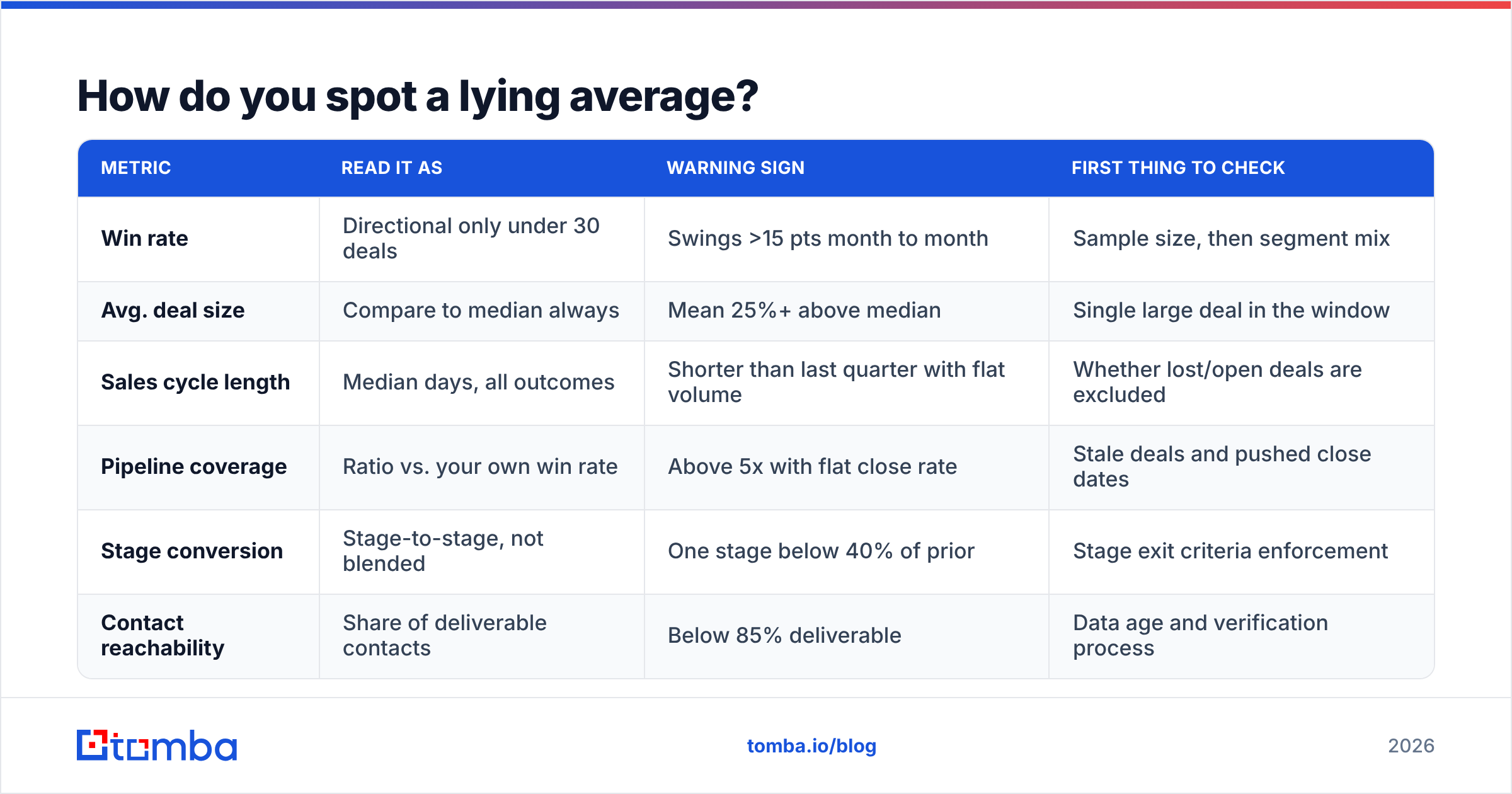
| Metric | Read it as | Warning sign | First thing to check |
|---|---|---|---|
| Win rate | Directional only under 30 deals | Swings >15 pts month to month | Sample size, then segment mix |
| Avg. deal size | Compare to median always | Mean 25%+ above median | Single large deal in the window |
| Sales cycle length | Median days, all outcomes | Shorter than last quarter with flat volume | Whether lost/open deals are excluded |
| Pipeline coverage | Ratio vs. your own win rate | Above 5x with flat close rate | Stale deals and pushed close dates |
| Stage conversion | Stage-to-stage, not blended | One stage below 40% of prior | Stage exit criteria enforcement |
| Contact reachability | Share of deliverable contacts | Below 85% deliverable | Data age and verification process |
What is a ten-minute weekly reading routine?#
Consistency beats depth. Run the same sequence every week so that changes stand out against your own memory rather than against a benchmark you half-remember.
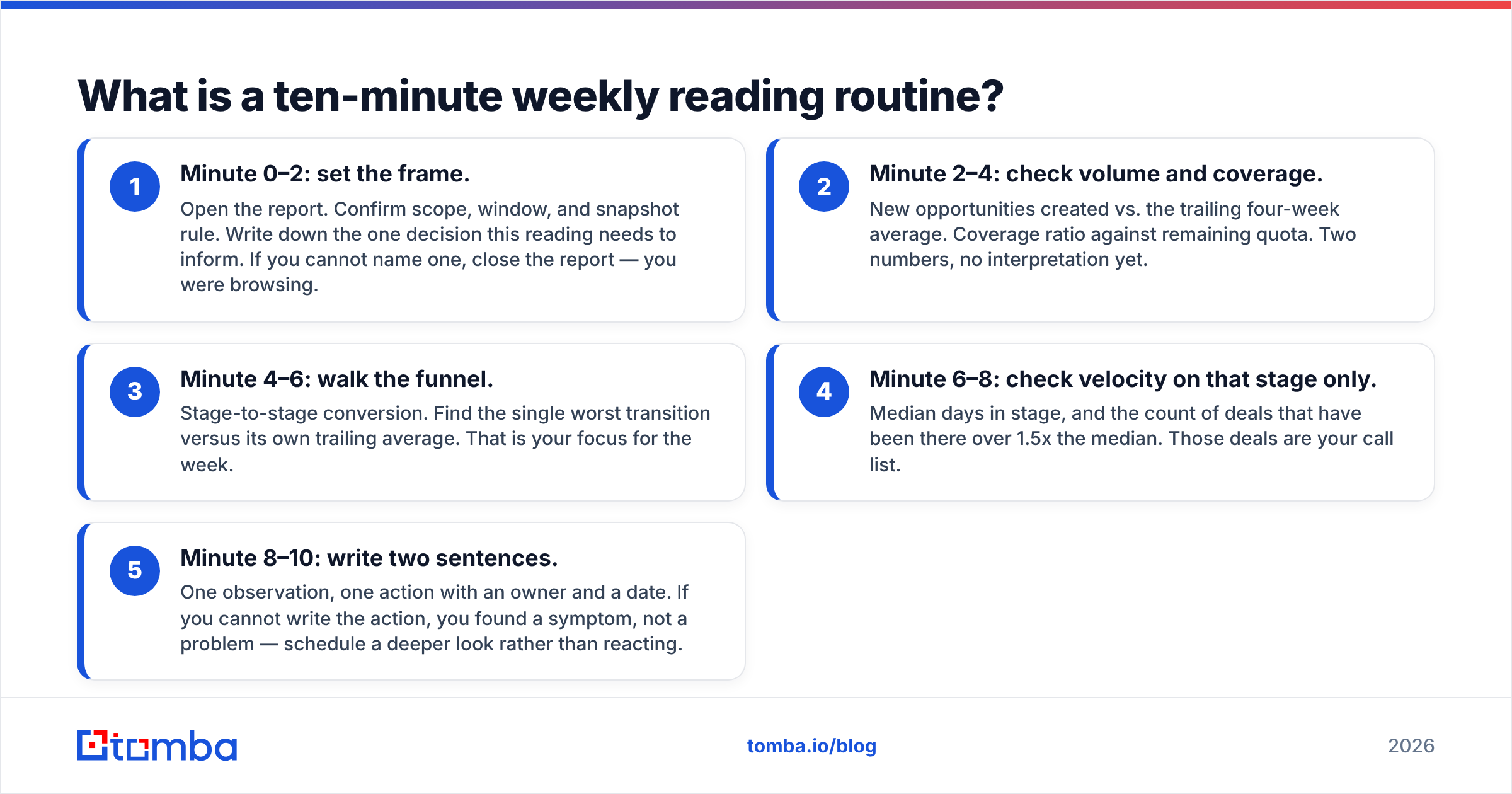
- Minute 0–2: set the frame. Open the report. Confirm scope, window, and snapshot rule. Write down the one decision this reading needs to inform. If you cannot name one, close the report — you were browsing.
- Minute 2–4: check volume and coverage. New opportunities created vs. the trailing four-week average. Coverage ratio against remaining quota. Two numbers, no interpretation yet.
- Minute 4–6: walk the funnel. Stage-to-stage conversion. Find the single worst transition versus its own trailing average. That is your focus for the week.
- Minute 6–8: check velocity on that stage only. Median days in stage, and the count of deals that have been there over 1.5x the median. Those deals are your call list.
- Minute 8–10: write two sentences. One observation, one action with an owner and a date. If you cannot write the action, you found a symptom, not a problem — schedule a deeper look rather than reacting.
Anything that does not fit in those ten minutes belongs in a monthly review, not a weekly one. The weekly read exists to catch drift early. Monthly reviews exist to change strategy. Mixing them produces reactive whiplash: teams that reorganize territories because of one slow week.
What separates reading a report from acting on one?#
A number becomes a decision only when you can state the mechanism. "Stage 3 conversion dropped from 58% to 39%" is an observation. "Stage 3 conversion dropped because our last three weeks of inbound came from a campaign targeting practitioners instead of buyers, and practitioners cannot approve budget" is a mechanism. Only the second one tells you what to change.
So for every number that moved, ask three questions in order:
- Is it real? Sample size, segment mix, and data quality. Rule out the boring explanations first.
- Is it new? Compare to the trailing average, not to last week. Single-period comparisons manufacture drama.
- Is it mine? Some drops are market conditions. Reorganizing a team in response to a macro shift is expensive and pointless.
Only after all three come back "yes" does a report justify a change in behavior. Most weeks, the honest answer is that nothing meaningful moved — and recognizing that quickly is the actual skill.
One durable upgrade: the quality of every conversion metric depends on whether the contacts in your CRM are real and current. Before the next quarterly review, take your open-opportunity contact list, run it through data enrichment to fill in missing roles and companies, and confirm which addresses are still deliverable. Teams that do this routinely stop having the "is our funnel broken or is our data broken?" argument, because they already know the answer.
Where should you start this week?#
Pick your pipeline report, apply the three filters — recency, close-date sanity, stage evidence — and write down the difference between the headline number and what survives. That single number is the most useful thing you will learn about your sales process this month, and it takes about fifteen minutes.
Then fix the input. Reports built on stale or unreachable contacts will keep producing conversion rates that describe your data rather than your team. Tomba Email Finder finds and verifies current professional email addresses by domain, name, or company, so the contacts behind your open opportunities are people who can actually reply. The free tier covers 25 searches a month if you just want to spot-check a sample of your pipeline; Tomba pricing starts at $49/mo on Starter when you are ready to clean the whole list. Start with the deals in your worst-converting stage — that is usually where the bad data has been hiding all along.
Related guides#
// get started
Find, verify and enrich your first contacts today
Start on the free plan with 25 searches a month, then scale when your team is ready.
Free plan · No credit card required · GDPR & CCPA
// about the author