How To Remind Someone To Reply To Your Email Without Nagging
Most replies come from the follow-up, not the first send. Here are the timing rules, templates, and channel tactics that get a response without burning the relationship.
Someone read your email and moved on. Now what?
This guide covers how to remind someone to reply to your email without sounding pushy. You get the timing windows, the wording, and the point where you should stop. The short version: wait three days, give them a new reason to answer, and cap it at three reminders.
TL;DR
- Most replies to cold and warm B2B email arrive after the first message, not on it — the reminder is where the deal actually happens.
- Send reminder one at day 3, reminder two at day 7, reminder three at day 14, then stop or switch channels. Same-day and next-day nudges read as panic.
- Never write "just following up" or "bumping this to the top of your inbox." Add a new reason to reply in every reminder: a resource, a shorter ask, a deadline, or a graceful close.
- Reply-in-thread for warm relationships, fresh-thread with a new subject line for cold prospects who never opened.
- A large share of "they ignored me" cases are actually bad addresses or spam-foldered mail. Verify the address and check your sending setup before you blame the recipient.
Why Do People Ignore Your Email In The First Place?#
Before you write a reminder, diagnose the silence. There are five causes. Only two of them are "they don't care."
- The email never arrived. Invalid address, typo'd domain, or a catch-all server that accepted the message and quietly dropped it. This is far more common than most reps assume, especially on lists older than 90 days.
- It landed in spam or Promotions. Authentication gaps, a cold domain, or spam-trigger phrasing sent you to a folder nobody opens.
- They read it and forgot. The single most common cause. Your email arrived during a meeting, got mentally filed under "later," and later never came.
- Your ask was too big. You requested a 30-minute call from someone who has never heard of you. The cost of replying exceeded the perceived value.
- They're genuinely not interested. Real, and the reason a good reminder sequence always includes an easy exit.
Only cause 3, 4 and 5 are solved by a reminder. Causes 1 and 2 are solved by fixing your data and your infrastructure. Run the address through an email verifier and check your SPF record before you write another word — otherwise you are sending polite reminders into a void.
When Should You Send A Reminder Email?#
The timing question has a boring answer that works: wait three business days, then space each subsequent reminder wider than the last.
Three days is long enough that the inbox has turned over. Your first email is out of sight, so the reminder reads as new instead of repeat. It is also short enough that the context is still fresh.
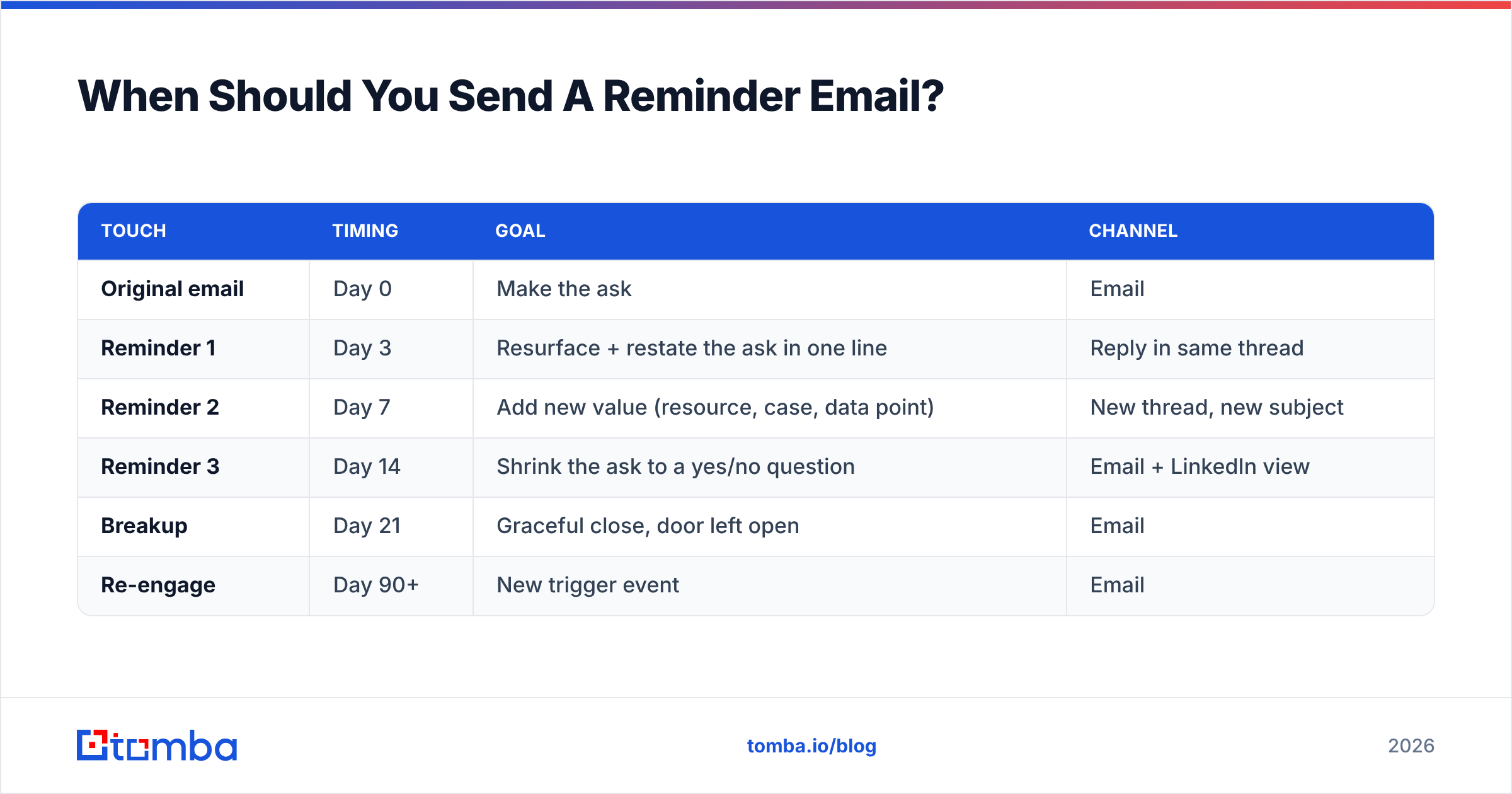
Here is the cadence that holds up across warm and cold scenarios:
| Touch | Timing | Goal | Channel |
|---|---|---|---|
| Original email | Day 0 | Make the ask | |
| Reminder 1 | Day 3 | Resurface + restate the ask in one line | Reply in same thread |
| Reminder 2 | Day 7 | Add new value (resource, case, data point) | New thread, new subject |
| Reminder 3 | Day 14 | Shrink the ask to a yes/no question | Email + LinkedIn view |
| Breakup | Day 21 | Graceful close, door left open | |
| Re-engage | Day 90+ | New trigger event |
Two timing rules that matter more than the exact days:
- Never remind on the same day or the next morning. It signals that you are watching for their reply, which puts social pressure on a stranger. Pressure is not persuasion.
- Respect the deadline you set. If your original email said "let me know by Friday," the reminder goes out Monday — not Thursday night.
For internal or client work where a deadline is real, compress the window: day 1 for anything blocking a shipment, day 2 for anything on this week's sprint. The polite-distance rule is for people who owe you nothing.
What Should A Reminder Email Actually Say?#
The core rule: every reminder must give a new reason to reply. A message whose only content is "checking in" adds work to the recipient's day and gives them nothing back. That's why it gets deleted.
Four reminder structures work. Use them in this order.
The first two put the thread back in front of them:
- The one-line resurface (day 3). Reply in-thread. Three sentences, no more. Restate the ask as a question. "Hi Dana — bumping this in case it got buried. Is a 15-minute walkthrough on Thursday or Friday easier?" No apology, no preamble.
- The value-add (day 7). New subject line, new thread. Lead with something useful: a benchmark, a competitor teardown, a short case study. Attach the ask at the end. The email should be worth opening even if they never reply.
The last two shrink the ask, then close it:
- The shrunken ask (day 14). Replace "book a call" with a question they can answer in four words. "Is pipeline coverage on your roadmap this quarter, or should I check back in Q3?" Yes/no questions get answered. Calendar links get ignored.
- The breakup (day 21). Say that you will stop. Say why you reached out. Leave one door open. Breakup emails often beat every other touch in the sequence, because they take the pressure off.
Three templates you can steal#
Day 3 — in-thread resurface
Subject: Re: [original subject]
Hi {First name},
Bumping this up in case it slipped past. One question: is {specific problem} something your team owns, or is that {other team}?
Happy to point you to the right resource either way.
Day 7 — value-add, new thread
Subject: {Competitor} just changed how they {do X}
Hi {First name},
Not a follow-up — something I thought was actually relevant to your team. {One sentence of specific insight with a source.}
If it's useful, I put together a two-page breakdown of how three companies your size handled the same shift. Want it?
Day 21 — breakup
Subject: Closing the loop
Hi {First name},
I've reached out a few times about {topic} and haven't heard back, which usually means it's not a priority right now. Completely fair.
I'll stop here. If {trigger event} changes, my inbox is open.
Write the subject lines with the same care as the body — you can pressure-test them with a subject line tester before sending, and reuse structures from a library of cold email templates instead of writing from scratch every time.
Should You Reply In The Thread Or Start A New One?#
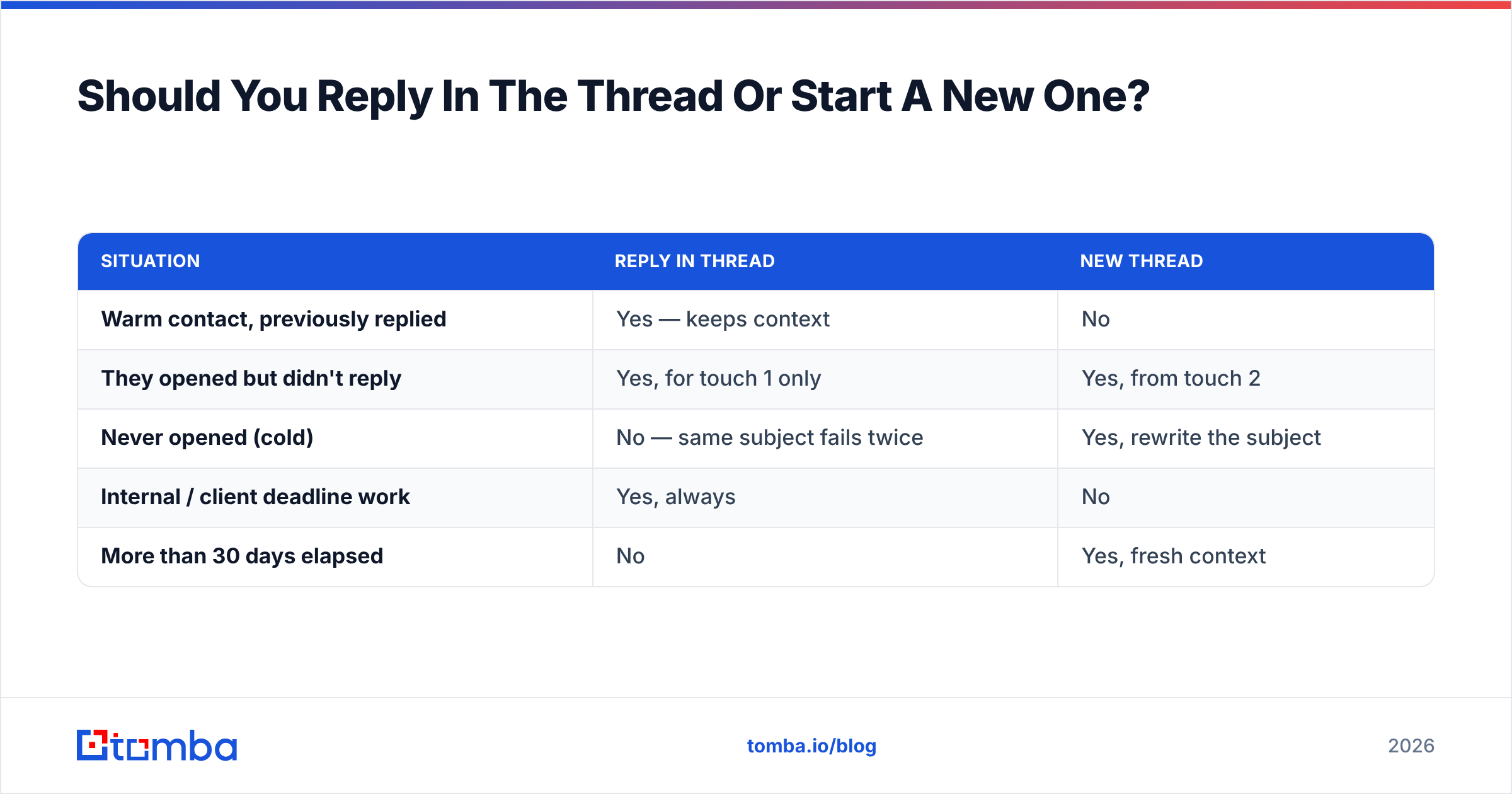
It depends entirely on whether the first email was opened.
| Situation | Reply in thread | New thread |
|---|---|---|
| Warm contact, previously replied | Yes — keeps context | No |
| They opened but didn't reply | Yes, for touch 1 only | Yes, from touch 2 |
| Never opened (cold) | No — same subject fails twice | Yes, rewrite the subject |
| Internal / client deadline work | Yes, always | No |
| More than 30 days elapsed | No | Yes, fresh context |
The logic is simple. If the first subject line failed to earn an open, a Re: prefix asks that same failed subject to do the same failed job. If the subject did earn an open, threading keeps the context. The reminder then feels like continuity, not a new demand.
One more point. Long Re: Re: Re: chains are a mild spam signal at scale, above all when the thread has no reply from the other side. Sending platforms know this, which is why most sequence tools let you toggle threading per step. Cap in-thread reminders at two.
How Many Reminders Are Too Many?#
Three reminders plus a breakup. Past that, the marginal reply rate falls to near-zero while the annoyance cost keeps climbing, and unsubscribes and spam complaints start eating your sender reputation.
Watch these thresholds:
- Spam complaint rate above 0.10% — stop the sequence immediately. Google and Yahoo both enforce this bar for bulk senders, and blowing through it damages every campaign you run from that domain.
- Open rate under 15% on touch 2 — the problem is your data or your deliverability, not your persistence. More reminders will not fix it.
- Zero replies across an entire segment — your targeting is wrong. Rewrite the list before you rewrite the email.
What Are The Alternatives To Another Email?#
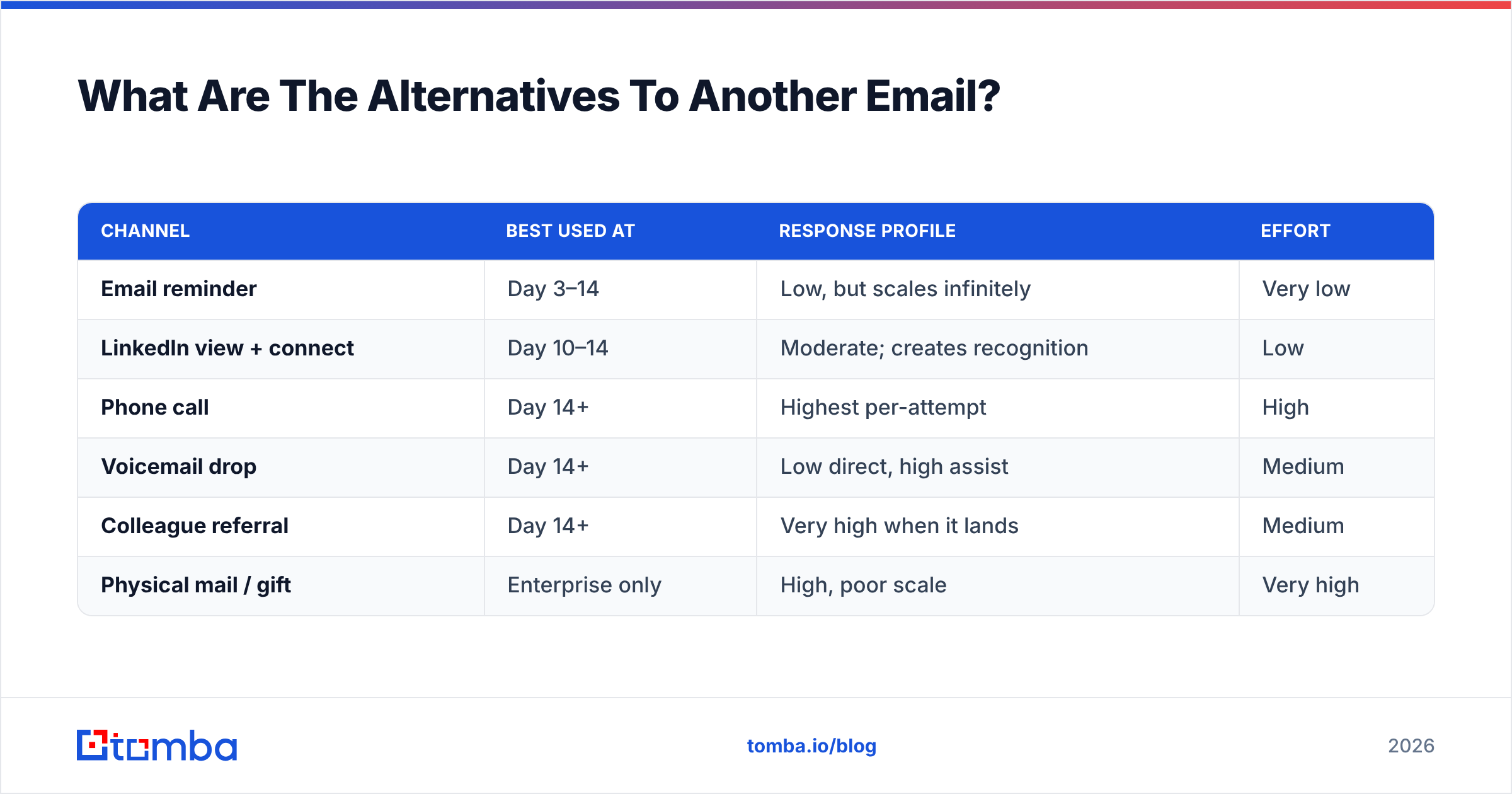
When two reminders have failed, changing the channel usually beats changing the wording.
| Channel | Best used at | Response profile | Effort |
|---|---|---|---|
| Email reminder | Day 3–14 | Low, but scales infinitely | Very low |
| LinkedIn view + connect | Day 10–14 | Moderate; creates recognition | Low |
| Phone call | Day 14+ | Highest per-attempt | High |
| Voicemail drop | Day 14+ | Low direct, high assist | Medium |
| Colleague referral | Day 14+ | Very high when it lands | Medium |
| Physical mail / gift | Enterprise only | High, poor scale | Very high |
The two moves worth prioritizing:
- The multi-channel touch. Viewing a prospect's LinkedIn profile the same day you send reminder three creates a second, passive impression. LinkedIn outreach works best as a companion to email, not a replacement.
- The lateral referral. If your contact is silent, email a peer or a direct report and ask who owns the decision. You often discover you were emailing the wrong person entirely — which explains the silence more honestly than "they're busy."
For the phone route you need a number, not just an address. A phone finder turns a verified work email into a direct dial so touch four isn't another email nobody opens.
How Do You Know The Silence Isn't A Data Problem?#
Run this four-item check before assuming the recipient chose not to reply.
- Verify the address. A bounce is obvious; a silent accept from a catch-all server is not. Catch-all domains accept everything at the gateway and discard invalid mail later, so your reminder "delivers" and vanishes. Screen those separately with a catch-all verifier.
- Confirm the pattern. If you guessed
first.last@and the company usesfinitial+last@, your entire sequence went nowhere. Check the company email pattern before touch two. - Audit authentication. SPF, DKIM and DMARC all aligned. Google's sender guidelines spell out the current bulk-sender requirements — a domain that fails them lands in spam regardless of copy quality.
- Check the copy for spam triggers. Excessive links, tracking pixels on cold traffic, and attachment-heavy first touches all cost you inbox placement.
Doing this before you write reminder two changes the whole exercise. If 20% of a list is unreachable, your "reply rate" is measuring the wrong denominator, and you'll conclude your copy is broken when your data is.
Data quality is where the tooling choice matters. Providers differ substantially on how they treat unverifiable addresses — some return a guess with high confidence, others withhold it. For prospecting at volume, a B2B database with a stated verification method beats a scraper that returns something for every query.
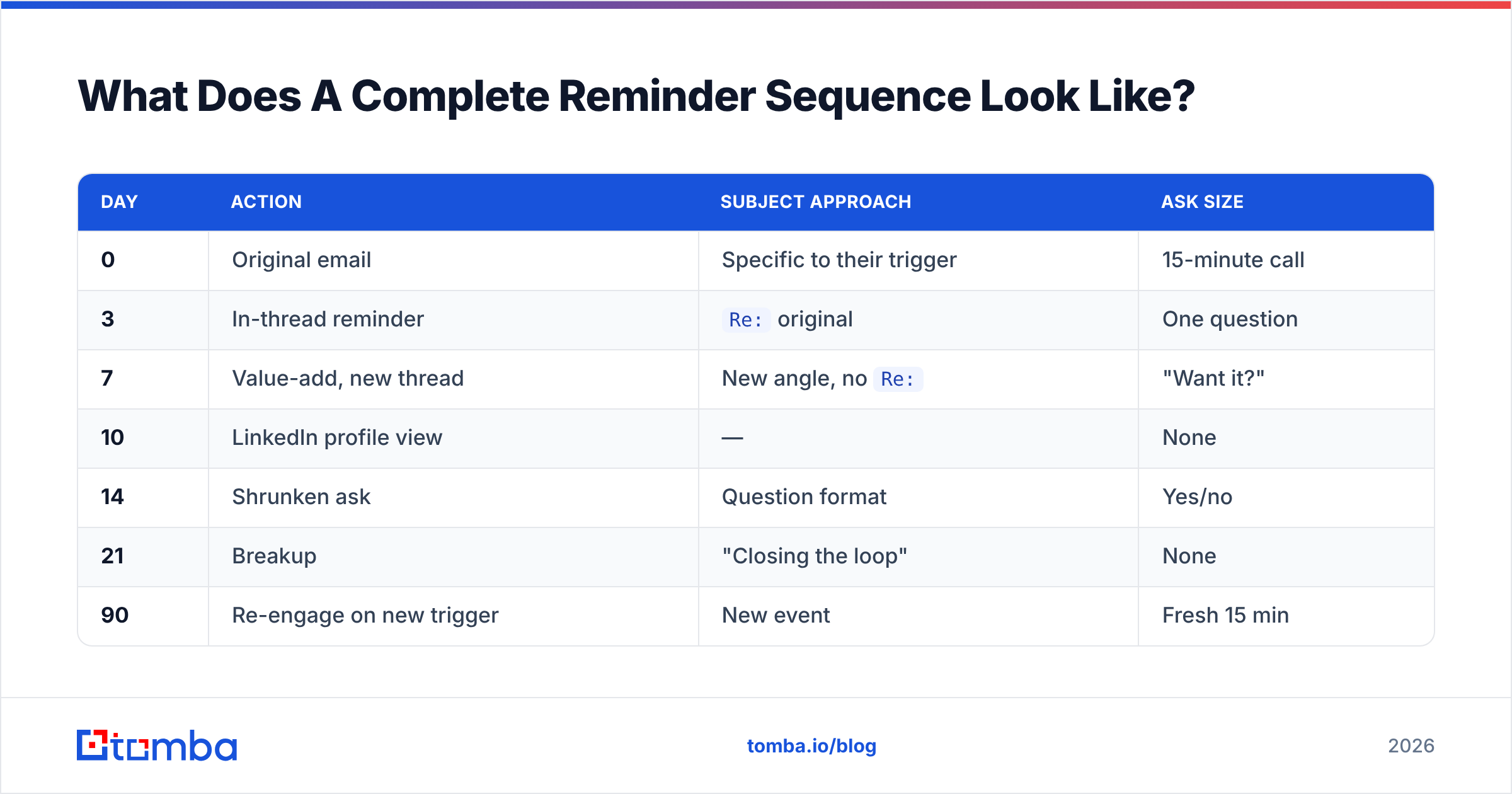
What Does A Complete Reminder Sequence Look Like?#
Putting it together for a cold B2B prospect:
| Day | Action | Subject approach | Ask size |
|---|---|---|---|
| 0 | Original email | Specific to their trigger | 15-minute call |
| 3 | In-thread reminder | Re: original |
One question |
| 7 | Value-add, new thread | New angle, no Re: |
"Want it?" |
| 10 | LinkedIn profile view | — | None |
| 14 | Shrunken ask | Question format | Yes/no |
| 21 | Breakup | "Closing the loop" | None |
| 90 | Re-engage on new trigger | New event | Fresh 15 min |
Six touches over three weeks, then a quarter of silence. That's the ceiling for cold outreach. For warm contacts — someone who has replied to you before, or a client who owes you a document — compress it to three touches over one week and be direct about the deadline. Politeness scales with distance; a colleague who missed a deliverable does not need a value-add email, they need "Can you get me the file by Thursday?"
Track response rate per touch, not just per campaign. If touch two consistently outperforms touch one, your first email is under-built and your reminder is doing the real work — that's a signal to rewrite the opener, not to add a seventh touch.
How To Remind Someone To Reply To Your Email: Start Here#
Fix the list before you fix the copy. Knowing how to remind someone to reply to your email counts for nothing if the address is dead. The best reminder ever written cannot reach an inbox that does not exist. No amount of persistence makes up for emailing someone who left the company eight months ago.
Start by rebuilding your target list against verified, current addresses with the Tomba Email Finder. Search by name and domain, get a confidence score and the sources behind it, then push straight into your sequencing tool. The free tier gives you 25 searches a month to test against a segment you already emailed; paid plans start at $49/mo. Verify first, remind second, and your follow-ups start landing where they can actually be read.
Related guides#
// get started
Find, verify and enrich your first contacts today
Start on the free plan with 25 searches a month, then scale when your team is ready.
Free plan · No credit card required · GDPR & CCPA
// about the author