How to Resend an Email That Was Not Answered (2026 Guide)
Most B2B replies come from follow-ups, not first sends. Here is the exact timing, wording, and thread structure for resending an email that was never answered — plus when to stop.
Here is how to resend an email that was not answered: wait three business days, then change one thing — the angle, the ask, or the person. Sending the same message twice is what kills reply rates.
TL;DR
- Resending is not "sending the same email again." A resend that works changes at least one of three things: the angle, the ask, or the person.
- Wait 3 business days for the first follow-up, then 5, then 7-10. Same-day and next-day bumps read as anxious and lower reply rates.
- Reply inside the original thread for follow-ups 1 and 2. Break into a fresh thread with a new subject line for follow-up 3 or later.
- Cap the sequence at 4-5 touches total, then either move the contact to a nurture list or close the loop with a permission-to-close email.
- Half of "no reply" cases are delivery or address problems, not disinterest. Verify the address and check your sending health before you blame the copy.
Why do most unanswered emails stay unanswered?#
Because the first email rarely fails for the reason you think. Before you rewrite anything, split the silence into four buckets:
- It never arrived. Bad address, hard bounce swallowed by your sending tool, or a catch-all domain that accepted then discarded the message.
- It arrived but landed in spam or Promotions. Your copy was fine. Your email deliverability was not.
- It was seen and deprioritized. The recipient read the first line, decided it was not urgent, and moved on. This is the most common bucket by a wide margin.
- It was seen and rejected. They are not a buyer, not now, not for this.
Only bucket 3 is genuinely worth a resend. Bucket 1 needs a corrected address. Bucket 2 needs infrastructure work. Bucket 4 needs you to stop.
Most people skip the diagnosis and jump straight to "just bumping this up." That is why the average bump gets ignored twice.

How do you check whether the email actually got delivered?#
Run three checks before you write a single word of follow-up.
Check 1 — the address. Typos, role accounts, and stale contacts cause a large share of silent failures. Run the address through an email verifier and look at the status, not just the score. A "risky" or "unknown" verdict on a catch-all domain is a warning sign. The gateway may have accepted your message and dropped it later. That is not a copy problem.
Check 2 — the person still works there. B2B contact data decays roughly 20-30% per year as people change jobs. If your contact left, your email sits in a dead mailbox. Or in a forwarding rule nobody reads. A quick domain search on the company shows who holds the role now.
Check 3 — your sending health. Look at your bounce rate, spam complaint rate, and authentication records. Google and Yahoo both enforce bulk-sender rules. You need SPF, DKIM, and DMARC alignment, plus a spam complaint rate under 0.3%. The details are in Google's sender guidelines. If your complaint rate is above that line, no follow-up copy will save you.
Only after all three come back clean should you treat the silence as a genuine "not interested enough yet."
How to resend an email that was not answered: the right timing#
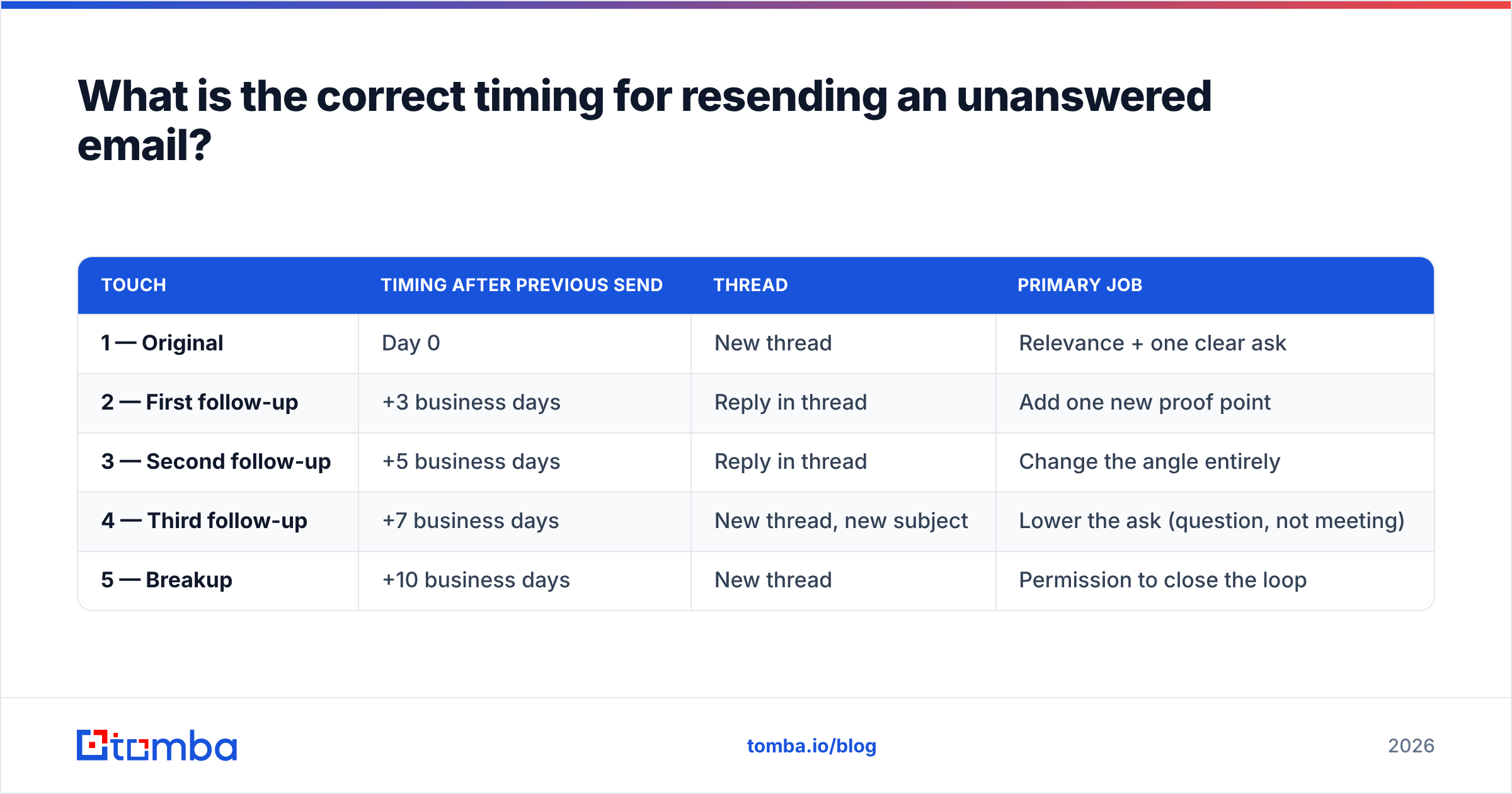
Space follow-ups on a widening interval. Tight intervals signal desperation; long intervals lose context.
| Touch | Timing after previous send | Thread | Primary job |
|---|---|---|---|
| 1 — Original | Day 0 | New thread | Relevance + one clear ask |
| 2 — First follow-up | +3 business days | Reply in thread | Add one new proof point |
| 3 — Second follow-up | +5 business days | Reply in thread | Change the angle entirely |
| 4 — Third follow-up | +7 business days | New thread, new subject | Lower the ask (question, not meeting) |
| 5 — Breakup | +10 business days | New thread | Permission to close the loop |
Two timing rules that matter more than the exact numbers:
- Never follow up in under 48 hours. You are competing with people who are simply busy, not people who are avoiding you. Two days is the floor.
- Send follow-ups at a different time of day than the original. If your first email went out at 8am and got buried under the morning flood, sending the second at 8am buries it again. Shift to early afternoon.
How should you rewrite the email so it earns a reply?#
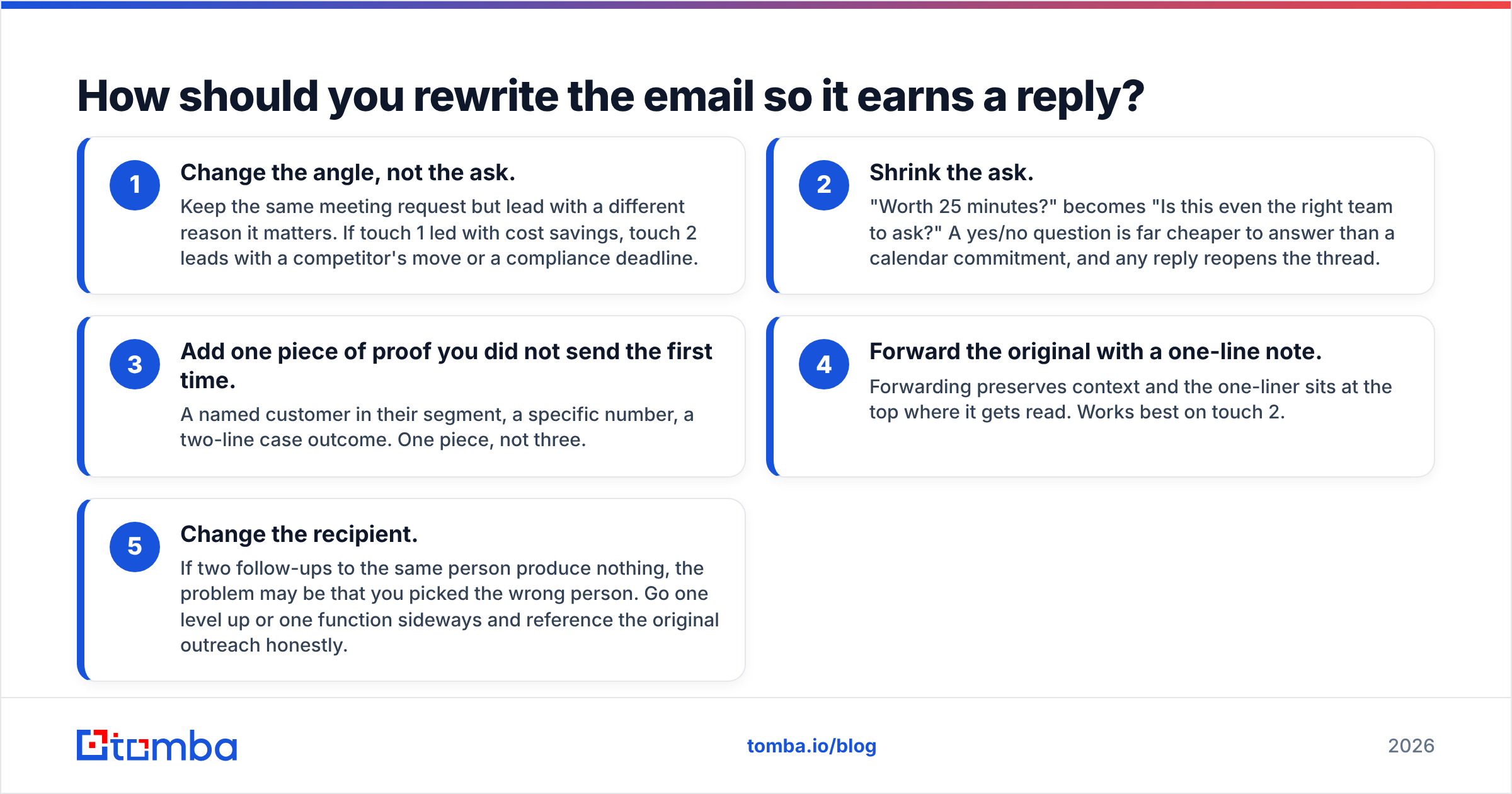
Here are the five rewrite methods, ordered by how often they work in B2B outbound. The first three change the message itself.
- Change the angle, not the ask. Keep the same meeting request but lead with a different reason it matters. If touch 1 led with cost savings, touch 2 leads with a competitor's move or a compliance deadline.
- Shrink the ask. "Worth 25 minutes?" becomes "Is this even the right team to ask?" A yes/no question is far cheaper to answer than a calendar commitment, and any reply reopens the thread.
- Add one piece of proof you did not send the first time. A named customer in their segment, a specific number, a two-line case outcome. One piece, not three.
The last two change the container rather than the message.
- Forward the original with a one-line note. Forwarding preserves context and the one-liner sits at the top where it gets read. Works best on touch 2.
- Change the recipient. If two follow-ups to the same person produce nothing, you may have picked the wrong person. Go one level up or one function sideways, and reference the original outreach honestly.
The failure mode to avoid across all five: writing "just following up," "bumping this," or "circling back" as the entire message. Those phrases add zero information and train the recipient to skim past your name.
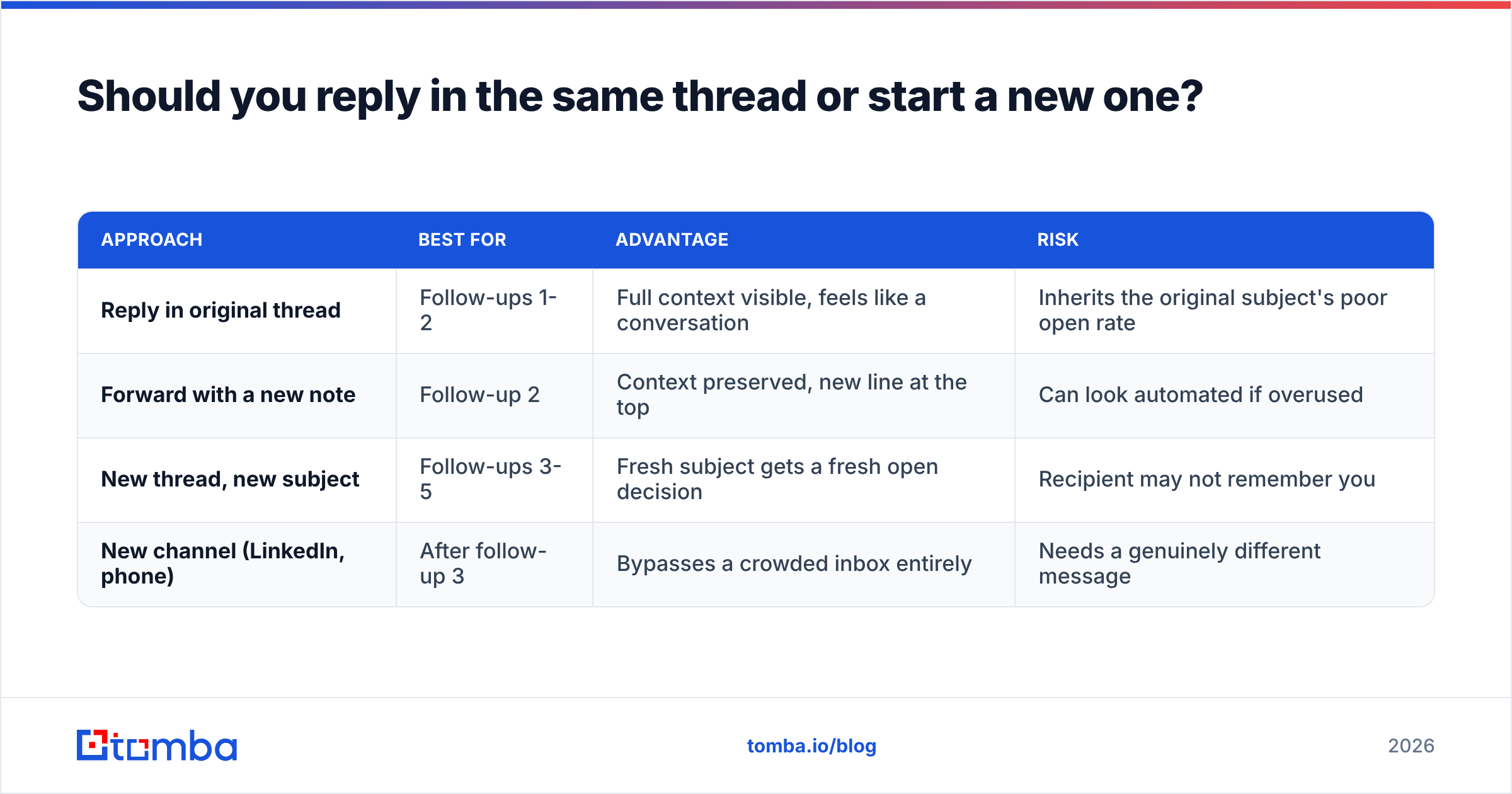
Should you reply in the same thread or start a new one?#
Both, in sequence. The rule of thumb: stay in the thread while context helps you, break out when context is working against you.
| Approach | Best for | Advantage | Risk |
|---|---|---|---|
| Reply in original thread | Follow-ups 1-2 | Full context visible, feels like a conversation | Inherits the original subject's poor open rate |
| Forward with a new note | Follow-up 2 | Context preserved, new line at the top | Can look automated if overused |
| New thread, new subject | Follow-ups 3-5 | Fresh subject gets a fresh open decision | Recipient may not remember you |
| New channel (LinkedIn, phone) | After follow-up 3 | Bypasses a crowded inbox entirely | Needs a genuinely different message |
Drawing a blank on a new subject line? A subject line generator gives you variants to test against your control. Test one variable at a time.
Two practical notes on threads:
- If your original email had an attachment, do not re-attach it on every touch. Repeated attachments raise spam-filter suspicion on cold threads.
- If your sending tool auto-inserts a full quoted history, trim it after touch 2. A wall of quoted text makes the message look like a mass sequence.
How many times should you resend before you stop?#
Four to five total touches, spread across roughly three weeks. After that, marginal reply rate approaches zero and marginal annoyance does not.
The last email in the sequence should be a clean close, not a guilt trip. Something like:
Subject: Closing the loop
I have not heard back, which usually means this is not a priority right now — completely fair. I will stop here. If the situation changes on [specific problem], my door is open.
This works for three reasons. It removes pressure, it gives a concrete trigger for them to come back to, and it often produces a reply from people who felt vaguely guilty about ignoring you. Track it as its own step. It is frequently the second-highest replying touch after the original.
What to do with the contact afterward:
- Move them to a quarterly nurture list. One useful email per quarter, no ask.
- Set a trigger-based revisit. New funding round, new hire in the relevant role, a product launch. These are far better re-entry points than "checking in again."
- Do not re-run the same sequence in 60 days. Recipients remember, and duplicate sequences are one of the fastest routes to spam complaints.
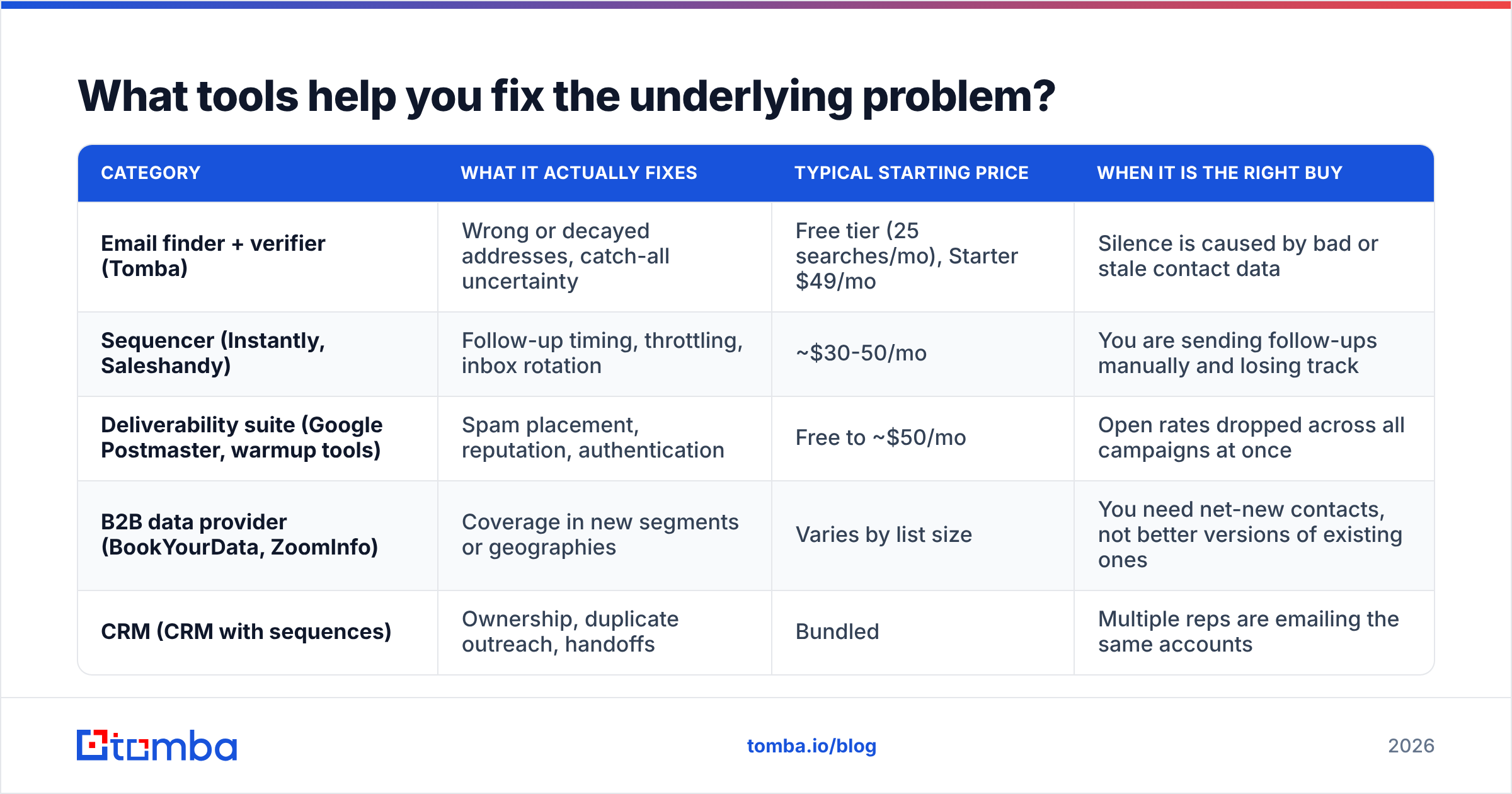
What tools help you fix the underlying problem?#
Most "no reply" problems are data problems wearing a copywriting costume. Here is how the common tool categories compare on the specific job of getting an unanswered email answered.
| Category | What it actually fixes | Typical starting price | When it is the right buy |
|---|---|---|---|
| Email finder + verifier (Tomba) | Wrong or decayed addresses, catch-all uncertainty | Free tier (25 searches/mo), Starter $49/mo | Silence is caused by bad or stale contact data |
| Sequencer (Instantly, Saleshandy) | Follow-up timing, throttling, inbox rotation | ~$30-50/mo | You are sending follow-ups manually and losing track |
| Deliverability suite (Google Postmaster, warmup tools) | Spam placement, reputation, authentication | Free to ~$50/mo | Open rates dropped across all campaigns at once |
| B2B data provider (BookYourData, ZoomInfo) | Coverage in new segments or geographies | Varies by list size | You need net-new contacts, not better versions of existing ones |
| CRM (CRM with sequences) | Ownership, duplicate outreach, handoffs | Bundled | Multiple reps are emailing the same accounts |
Two honest notes on this table. First, BookYourData is a good pick when you want prebuilt, verified lists. Searching contact by contact is a different job. Second, no sequencer fixes bad addresses. If your bounce rate is above 3%, buying more sending capacity makes the problem worse. Independent review sites like G2's email deliverability category help you check a vendor's claims against real user reports.
For teams sending at volume, the workflow that holds up is: build the list, verify it in bulk before the first send, re-verify anything older than 90 days, and only then worry about follow-up copy. A bulk email finder run takes minutes and removes an entire category of silent failure from your numbers.
What does a good resend actually look like?#
Three worked examples you can adapt.
Follow-up 1 (in-thread, +3 days) — new proof point
Adding one thing I left out: [Customer], also in [their segment], cut [metric] by [number] within [timeframe] using the same approach.
Still worth 20 minutes?
Follow-up 3 (new thread, +7 days) — smaller ask
Subject: Wrong person?
I reached out a couple of weeks ago about [topic] and did not hear back — which usually means I picked the wrong person rather than the wrong company.
Who owns [specific area] on your side?
Follow-up 5 (new thread) — close the loop
Subject: Closing the loop
I will stop reaching out. If [problem] moves up your list this year, reply to this and I will pick it back up.
Notice what none of them contain: apologies for following up, "I know you're busy," or a restatement of the original pitch. Each one gives the recipient a new, cheap reason to hit reply.
Where should you start?#
Start with the data, not the draft. Run your unanswered contacts through verification, drop the invalids, and correct the stale ones. Only then apply the timing table above to what is left. Knowing how to resend an email that was not answered is half copy and half contact data, and the data half is the one most teams skip. Teams that work in that order often find 30-40% of their "reply rate problem" was a bad-address problem.
Tomba's email finder gives you current, source-backed professional addresses. Your follow-ups reach a real inbox instead of a black hole. The free tier covers 25 searches a month, enough to test against your own dead threads, and Starter is $49/mo when you are ready to run it across a full list. See full Tomba pricing for team volumes.
Related guides#
// get started
Find, verify and enrich your first contacts today
Start on the free plan with 25 searches a month, then scale when your team is ready.
Free plan · No credit card required · GDPR & CCPA
// about the author