How to Schedule a Meeting by Email: Templates That Work
Most meeting-request emails fail because they ask for time instead of offering it. Here are the templates, timing rules, and follow-up cadence that actually get calendar slots booked in 2026.
TL;DR
- The single biggest lift in meeting-request reply rates comes from replacing open-ended asks ("let me know what works") with two specific time slots plus a booking link fallback.
- Keep the request under 90 words. Subject line names the outcome, not the meeting: "15 min on cutting your onboarding queue" beats "Quick sync."
- Send between 7–9am or 1–3pm in the recipient's timezone, Tuesday through Thursday. Monday morning and Friday afternoon are where meeting requests die.
- Follow up twice — day 3 and day 7 — then move to a different channel. A third email in the same thread rarely converts.
- Every request assumes the address is real. If your meeting emails bounce, you don't have a scheduling problem, you have a data problem.
Why do most meeting-request emails get ignored?#
Because they transfer work to the recipient. "Do you have some time next week?" forces the other person to open their calendar, guess your availability, propose a slot, and wait for you to confirm. That's four steps of unpaid labor for a meeting they haven't agreed to want yet.
The fix is structural, not stylistic. A meeting request that converts does three things in order: it states why the meeting is worth their time, it names a specific duration, and it offers a concrete slot they can accept with one word. Everything else — the pleasantries, the company boilerplate, the "hope this finds you well" — is friction.
There's a second failure mode that no template solves: the email never arrives. A meeting request sent to a stale or guessed address doesn't get ignored, it gets bounced, and repeated bounces damage your sender reputation until even your good addresses land in spam. Before you optimize copy, confirm the address exists.
What does a meeting request email actually need?#
Six components. Drop any one and the reply rate drops with it.
- A subject line naming the outcome. Not "Meeting request" or "Quick chat." Name the thing they get: "15 min on your Q1 pipeline gaps" or "Cutting your SDR ramp time — 20 min?"
- A one-sentence reason you're reaching out to them specifically. A trigger event, a mutual connection, a hiring signal, a product launch. Generic openers signal a blast.
- The value of the meeting, stated as their outcome. "So you can decide whether X is worth piloting" is a reason. "To discuss our solution" is not.
- A named duration. 15 or 20 minutes. Asking for 30 raises the perceived cost; asking for "a few minutes" sounds evasive.
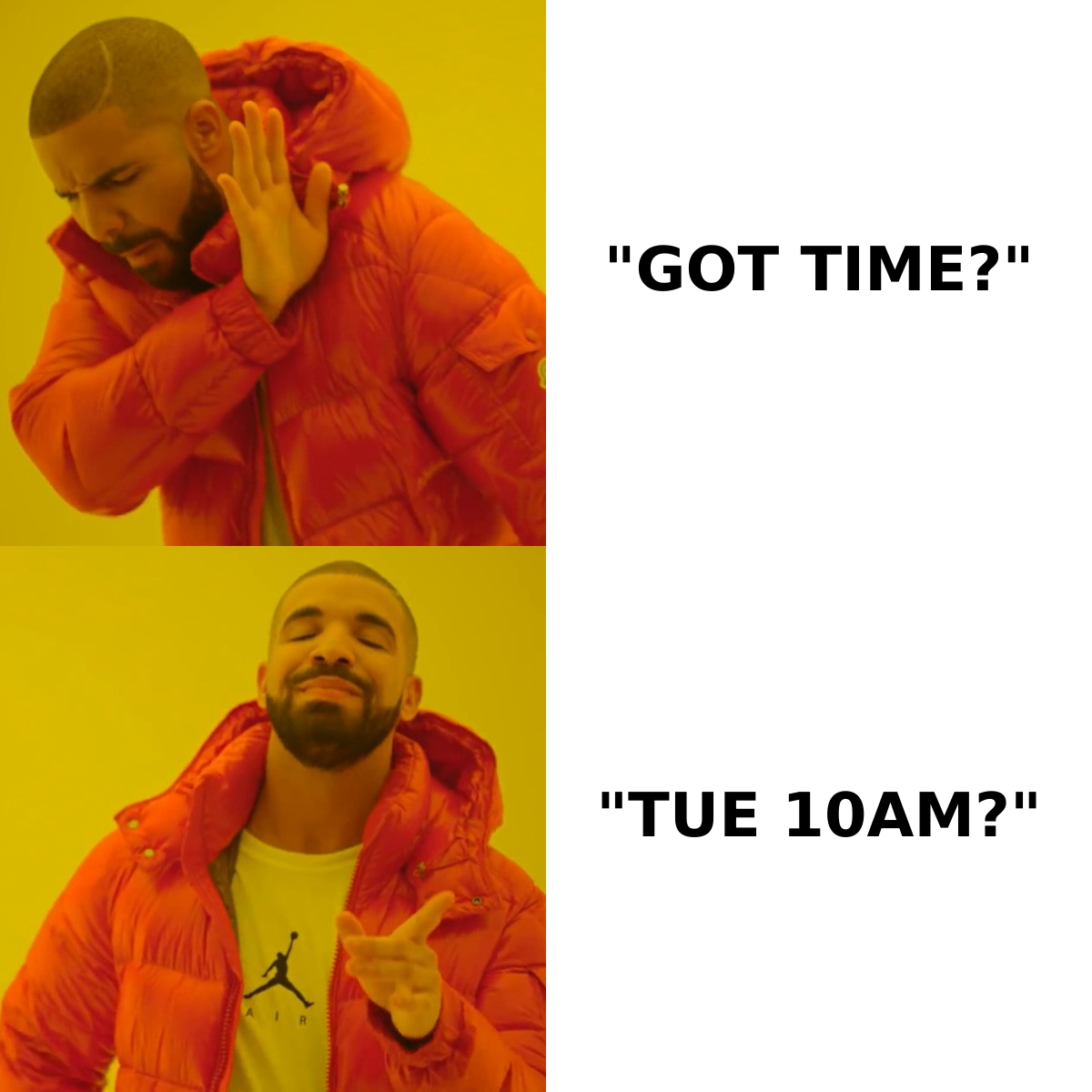
- Two concrete slots plus an escape hatch. "Tuesday 10:00am or Wednesday 2:00pm ET — or here's my calendar if neither fits."
- A single-decision close. One question, one action. Never stack "let me know your thoughts and also check out this deck and also who else should be on the call."
Word count target: 70–90 for cold requests, 40–60 for warm ones. Anything past 120 words gets skimmed and archived.
How do you write the email? (6 templates)#
1. Cold outreach, first touch#
Subject: 15 min on [specific problem]?
Hi [Name] — saw [trigger: your team's posting for three SDRs / your Series B / the launch of X].
We help [similar company type] cut [metric] by [rough number]. Whether that maps to your setup is a 15-minute conversation, not a pitch.
Tuesday 10:00am or Thursday 2:00pm ET? If neither works, my calendar's here: [link].
[Your name]
2. Warm intro follow-through#
Subject: [Referrer] suggested we talk
Hi [Name] — [Referrer] mentioned you're rebuilding the outbound motion this quarter and thought a 20-minute comparison of notes would be useful.
I've got Wednesday 11:00am or Friday 9:00am ET open. Either work?
3. Post-webinar or content download#
Subject: Your question during Thursday's session
Hi [Name] — you asked about [specific question] and I gave a two-sentence answer that didn't do it justice.
Worth 15 minutes to walk through how [company type] handle it? Monday 3:00pm or Tuesday 10:00am ET.
4. Re-engaging a stalled deal#
Subject: Closing the loop on [project]
Hi [Name] — last we spoke, [project] was waiting on budget approval. Rather than guess where it landed, I'd rather ask directly.
15 minutes Thursday to either restart or close this out cleanly? Happy with either answer.
5. Requesting time from someone senior#
Subject: 12 minutes on [their stated priority]
Hi [Name] — you said on [podcast/panel/post] that [priority] is the 2026 focus. We've run that migration with [two comparable companies] and the failure patterns are consistent.
12 minutes, this week or next, whenever suits. I'll send an agenda in advance.
6. The rescheduling email#
Subject: Rescheduling Thursday
Hi [Name] — need to move our Thursday 10:00am. Entirely on me.
Same time Monday, or Tuesday 2:00pm? Both are held on my end until you pick.
Note what none of these do: apologize for the intrusion, describe the company at length, or ask an open question. Each one ends with a binary choice. For more variations, the cold email templates library covers adjacent scenarios like pricing follow-ups and no-show recovery.
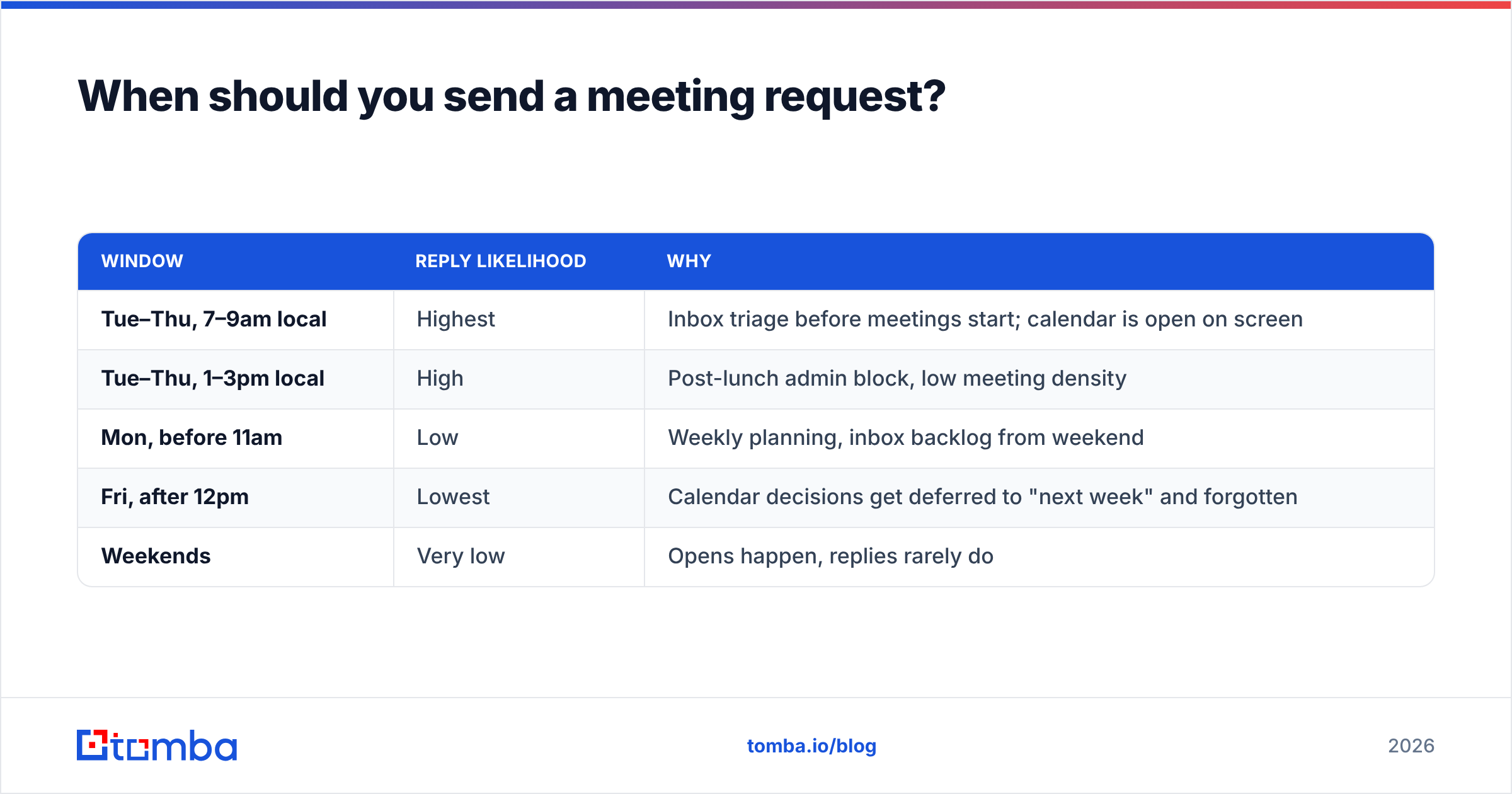
When should you send a meeting request?#
Send timing matters more for meeting requests than for most email types, because you're asking for a calendar decision — and calendar decisions get made when someone is already looking at their calendar.
| Window | Reply likelihood | Why |
|---|---|---|
| Tue–Thu, 7–9am local | Highest | Inbox triage before meetings start; calendar is open on screen |
| Tue–Thu, 1–3pm local | High | Post-lunch admin block, low meeting density |
| Mon, before 11am | Low | Weekly planning, inbox backlog from weekend |
| Fri, after 12pm | Lowest | Calendar decisions get deferred to "next week" and forgotten |
| Weekends | Very low | Opens happen, replies rarely do |
Two practical rules. First, send in the recipient's timezone, not yours — a 8:00am send from London hits a New York prospect at 3:00am and lands under 40 overnight emails. Second, when you propose slots, propose them 48–96 hours out. Same-day requests read as desperate; slots three weeks out read as low priority and get forgotten.
Should you use a booking link or propose times?#
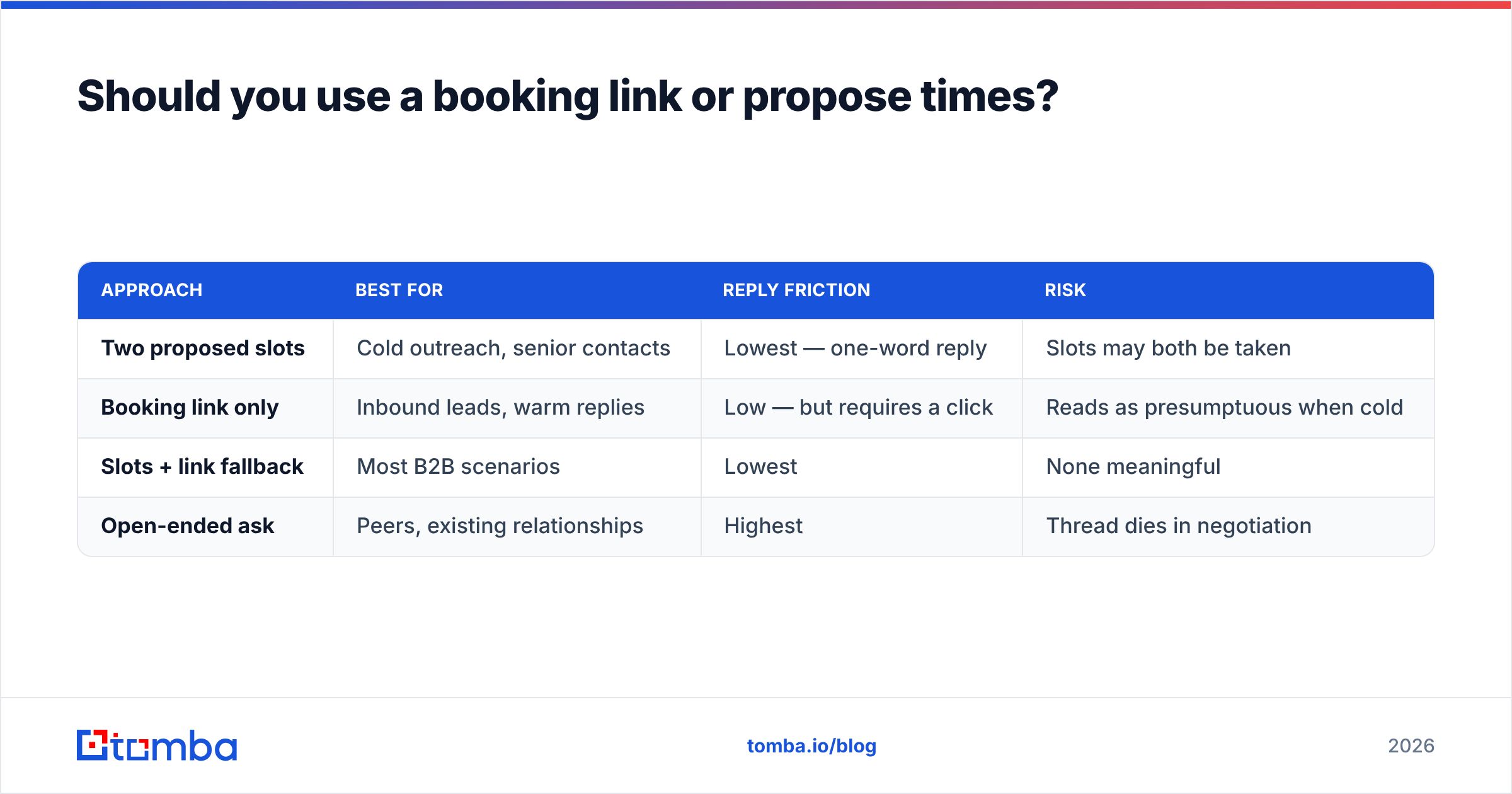
Both, in that order of preference — but the order flips depending on who has the leverage.
| Approach | Best for | Reply friction | Risk |
|---|---|---|---|
| Two proposed slots | Cold outreach, senior contacts | Lowest — one-word reply | Slots may both be taken |
| Booking link only | Inbound leads, warm replies | Low — but requires a click | Reads as presumptuous when cold |
| Slots + link fallback | Most B2B scenarios | Lowest | None meaningful |
| Open-ended ask | Peers, existing relationships | Highest | Thread dies in negotiation |
The hybrid wins in nearly every cold or semi-warm scenario: name two slots so the low-effort path exists, then add "or grab any time here" for the recipient who wants control. HubSpot's research on meeting scheduling reaches the same conclusion — reducing the number of decisions the recipient makes is what moves the metric.
One caveat on booking links in a first cold email: some senior buyers read a bare Calendly link as "my time is more valuable than yours." Lead with slots, keep the link as the fallback line.
How many times should you follow up?#
Twice inside the thread, then change channel.
- Day 0 — the original request with two slots.
- Day 3 — reply in-thread, add one new piece of value (a relevant case, a benchmark number), re-offer two fresh slots. Never re-send the same dates that have now passed.
- Day 7 — the breakup. "Assuming the timing's off — I'll stop here. If [problem] moves up the list, I'm easy to find." Breakup emails produce a meaningful share of total booked meetings precisely because they remove pressure.
- Day 10+ — different channel. LinkedIn, phone, or a colleague. Pushing a fourth email into a dead thread trains the recipient to ignore your domain.
Track response rate per template and per follow-up step, not just in aggregate. Most teams discover their day-3 follow-up outperforms their day-0 email — which means the opening copy is the thing to rewrite, not the cadence.
What kills a meeting email after it's written?#
Deliverability and data quality, in that order.
A perfectly written request to firstname.lastname@company.com when the company actually uses f.lastname@ is a bounce. String enough bounces together and your domain reputation degrades, which means your valid requests start landing in Promotions or spam. This is the failure mode that looks like a copywriting problem and isn't.
Three checks before any meeting-request send:
- Verify the address. Run it through an email verifier so you're only sending to deliverable mailboxes. Catch-all domains need their own handling — a catch-all verifier distinguishes "accepts everything" from "this specific person exists."
- Confirm the format. If you're guessing at a pattern, don't. Company email conventions vary more than people assume, and a domain search returns the verified pattern along with real addresses on that domain.
- Check authentication. SPF, DKIM, and DMARC records need to be correct on your sending domain. Google and Yahoo's bulk-sender requirements — documented in Google's sender guidelines — made this non-optional. A meeting request from an unauthenticated domain often never reaches the inbox at all.
There's a fourth, softer killer: attachments and links in a first-touch email. A cold meeting request with a PDF deck attached triggers more spam filtering than the same email with no attachment. Send the deck after they say yes.
What about the confirmation and the calendar invite?#
The meeting isn't booked when they say yes. It's booked when the invite is accepted and they show up.
Send the calendar invite within five minutes of their confirmation, while intent is still warm. The invite itself should contain:
- A clear title — "[Your company] × [Their company]: [topic]" — so it survives their weekly calendar scan.
- A three-line agenda in the description. Three bullets, not a wall of text. This is also your no-show insurance: a meeting with a visible agenda gets cancelled rather than ghosted.
- The video link in the location field, not buried in the body.
- A named duration matching what you promised. If you asked for 15 minutes, send a 15-minute invite. Sending 30 after asking for 15 is a small breach of trust that people notice.
Then send a short reminder 24 hours out — one sentence, no re-pitch, plus an easy out ("if something's come up, just say and we'll move it"). Counterintuitively, offering the easy out reduces no-shows, because the people who would have ghosted reschedule instead.
How do you scale this without sounding like a bot?#
The template is not the personalization. The first sentence is.
At volume, the structure of every meeting request you send can be identical — subject formula, value line, two slots, close. What must vary is the trigger sentence: the specific reason this person, at this company, this week. That single line is what separates a 3% reply rate from a 12% one.
Practical approach for a 200-contact list:
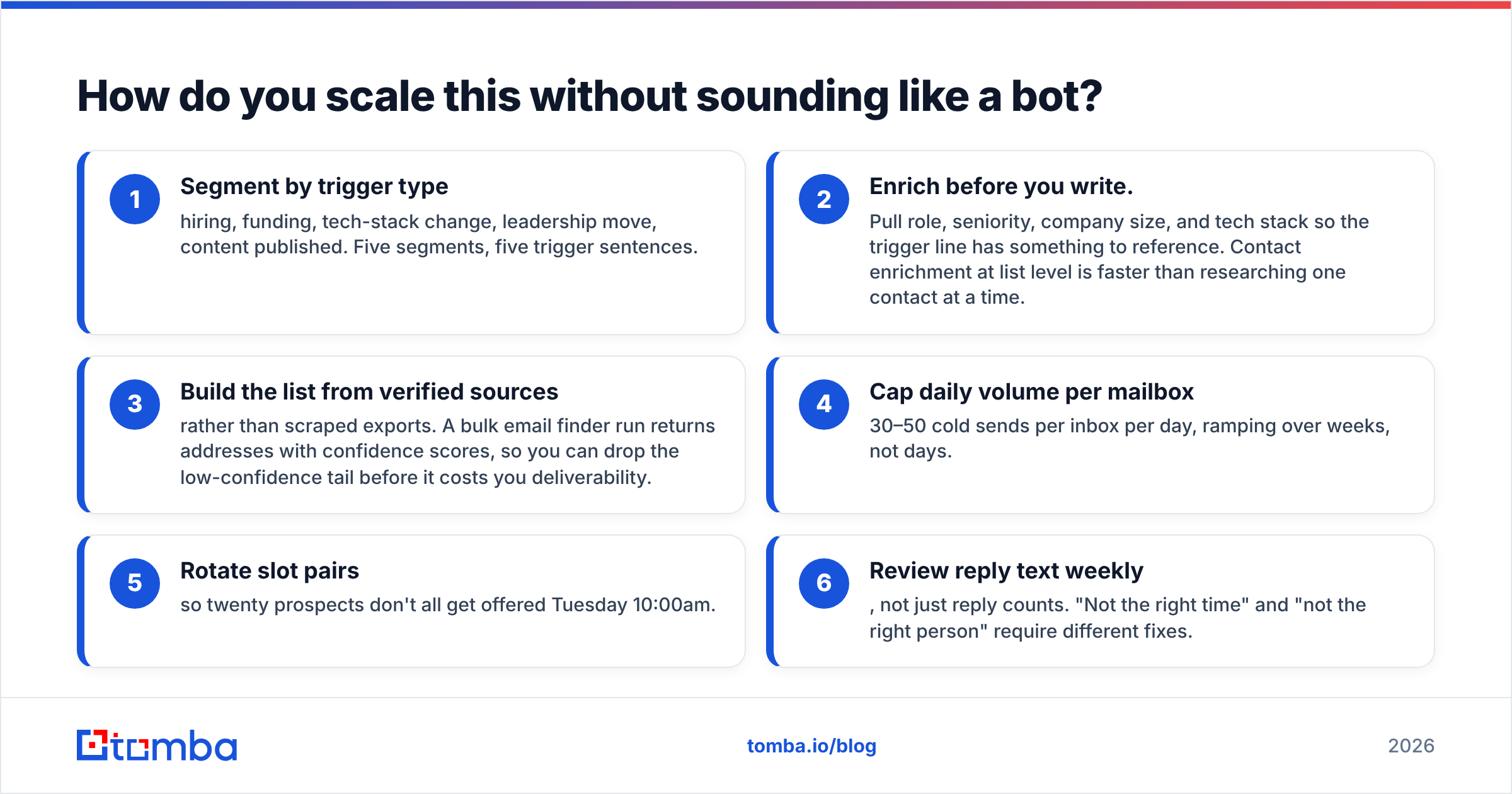
- Segment by trigger type — hiring, funding, tech-stack change, leadership move, content published. Five segments, five trigger sentences.
- Enrich before you write. Pull role, seniority, company size, and tech stack so the trigger line has something to reference. Contact enrichment at list level is faster than researching one contact at a time.
- Build the list from verified sources rather than scraped exports. A bulk email finder run returns addresses with confidence scores, so you can drop the low-confidence tail before it costs you deliverability.
- Cap daily volume per mailbox — 30–50 cold sends per inbox per day, ramping over weeks, not days.
- Rotate slot pairs so twenty prospects don't all get offered Tuesday 10:00am.
- Review reply text weekly, not just reply counts. "Not the right time" and "not the right person" require different fixes.
Peers worth knowing in this space include BookYourData for pay-as-you-go verified B2B contact lists, which suits teams that want list volume without a subscription commitment. Compare on data freshness and verification method rather than raw record counts — G2's review category for lead intelligence is a reasonable neutral starting point.
What does the whole workflow cost?#
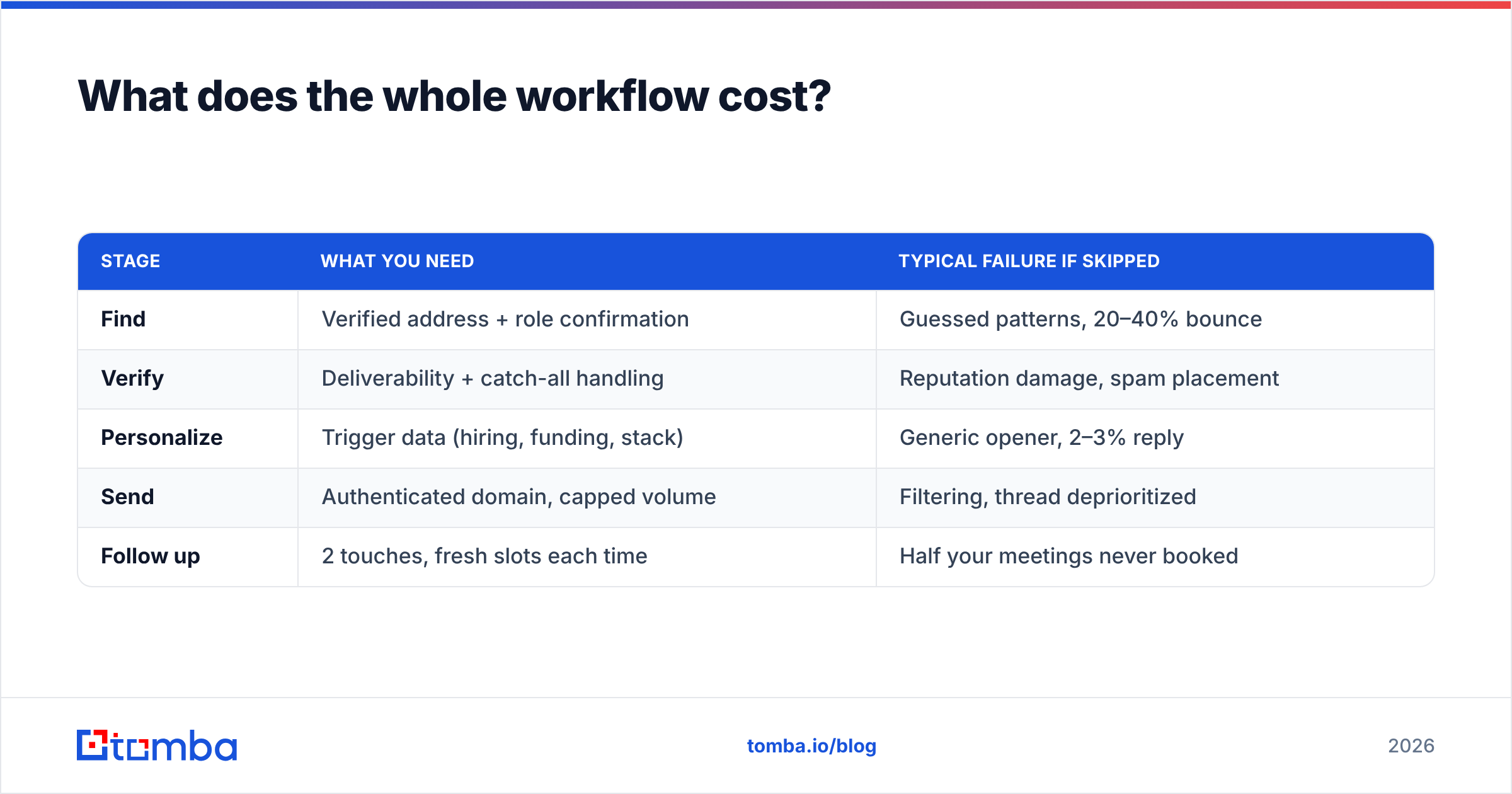
Scheduling meetings by email breaks into three cost buckets: finding the address, verifying it, and sending. Most teams overspend on the third and underspend on the first two, then wonder why open rates sag.
| Stage | What you need | Typical failure if skipped |
|---|---|---|
| Find | Verified address + role confirmation | Guessed patterns, 20–40% bounce |
| Verify | Deliverability + catch-all handling | Reputation damage, spam placement |
| Personalize | Trigger data (hiring, funding, stack) | Generic opener, 2–3% reply |
| Send | Authenticated domain, capped volume | Filtering, thread deprioritized |
| Follow up | 2 touches, fresh slots each time | Half your meetings never booked |
On the find-and-verify side, Tomba pricing starts with a free tier at 25 searches per month, then Starter at $49/mo, Growth at $99/mo, and Pro at $249/mo, with Enterprise quoted per volume. For a two-rep team sending 400 requests a month, the verify step costs less than one no-show.
Get the address right before you write the email#
Every template above assumes the message reaches a human. That assumption is the fragile part.
Start with the Tomba Email Finder to get a verified, deliverable address by name and domain — with a confidence score, so you know which contacts to send to first and which to leave out of the sequence. Free tier covers 25 searches a month, which is enough to test whether your bounce rate, not your copy, was the real problem.
Related guides#
// get started
Find, verify and enrich your first contacts today
Start on the free plan with 25 searches a month, then scale when your team is ready.
Free plan · No credit card required · GDPR & CCPA
// about the author