How To Search For Email Addresses: 7 Methods That Work in 2026
Seven tested ways to search for email addresses — from free Google operators and site footers to bulk API lookups — plus how to verify each one before you hit send.
TL;DR
- Manual methods (Google operators, site footers, WHOIS, LinkedIn) are free and work fine for 5-20 contacts. Past that, the time cost destroys them.
- Pattern guessing gets you a plausible address roughly 60-70% of the time; without verification, that's a 30-40% bounce rate and a burned domain.
- Dedicated email finders — Tomba, Hunter, Findymail, Apollo — trade cost for hit rate and add SMTP verification in the same call.
- The verification step is non-negotiable. A 3% bounce rate is the ceiling before Google and Microsoft start throttling you.
- Fastest reliable stack for most teams: domain search to map the company, email finder for named people, verifier before every send.
What does "searching for an email address" actually mean?#
There are three different jobs hiding under one phrase, and confusing them is why most guides feel useless.
- You have a name and a company. "I need Sarah Chen at Notion." This is the classic email finder problem — resolve person + domain into an address.
- You have a domain only. "Who works in marketing at stripe.com?" This is domain search: enumerate known addresses at a company and filter by role.
- You have an email and want the person. "Who is j.martinez@acme.co?" That's a reverse lookup, and it runs on completely different data.
Each job has its own tooling and its own realistic hit rate. Mixing them up is how people end up scraping LinkedIn for four hours to find twelve addresses they never verify.
The rest of this guide walks through seven methods for jobs 1 and 2, ordered from free-and-slow to paid-and-fast, then covers the verification layer that decides whether any of it was worth doing.
How do you search for email addresses for free?#
Free methods are genuinely good at small scale. Here are the four worth knowing.
1. Google search operators. The most underrated free technique. Combine a site restriction with an email pattern:
site:acme.com "@acme.com"
site:acme.com "sarah" email
"sarah chen" "@acme.com"
"sarah chen" (email OR contact OR "reach me")
Add filetype:pdf site:acme.com to catch conference decks, whitepapers, and press kits — those leak direct addresses constantly. Press releases are another rich vein: they almost always list a media contact with a real inbox.
2. The company's own site. Check /about, /team, /contact, /press, and the footer. Then check the blog — author bios frequently carry direct addresses, and if they don't, an author finder resolves the byline to a contact. Job postings sometimes include a hiring manager's address too.
3. WHOIS records. For smaller companies and independent sites, whois acme.com still returns a real registrant contact often enough to be worth the ten seconds. GDPR redaction killed this for EU domains and most registrars now proxy it, so treat it as a bonus, not a strategy.
4. Social profiles and personal sites. X/Twitter bios, GitHub commit history (git log on a public repo exposes committer emails), personal portfolio sites, Substack about pages, and conference speaker listings. GitHub in particular is a goldmine for engineering contacts and almost nobody checks it.

Free methods share one weakness: no verification. You found a string that looks like an email — you have no idea whether that mailbox still accepts mail. A contact page address from 2021 may be a dead alias. Run anything you harvest manually through a free email checker before it touches your sequence.
Can you guess an email address from a name pattern?#
Yes, and it works more often than it should — but the math is worse than it looks.
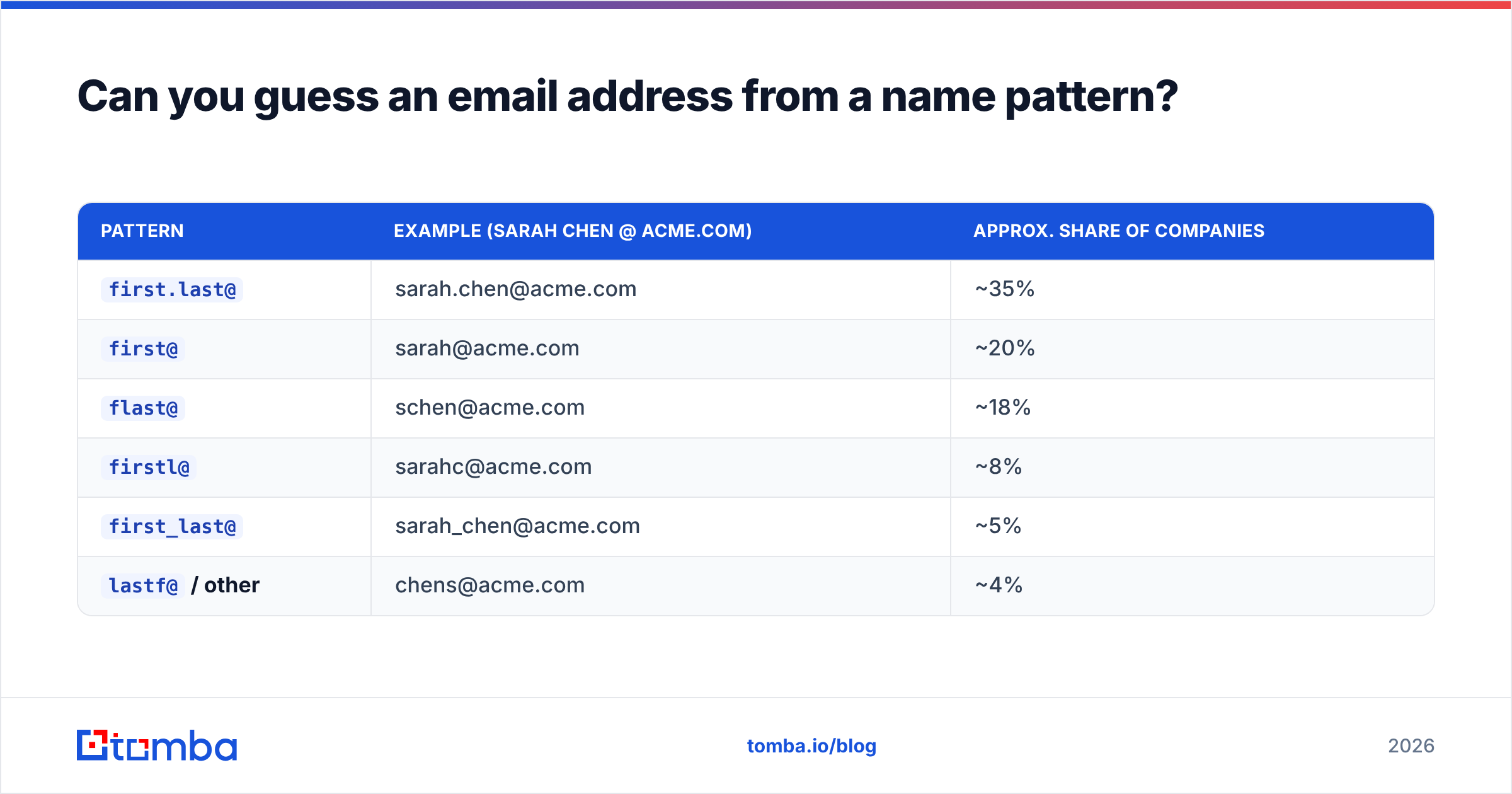
Roughly 90% of B2B companies use one of six formats:
| Pattern | Example (Sarah Chen @ acme.com) | Approx. share of companies |
|---|---|---|
first.last@ |
sarah.chen@acme.com | ~35% |
first@ |
sarah@acme.com | ~20% |
flast@ |
schen@acme.com | ~18% |
firstl@ |
sarahc@acme.com | ~8% |
first_last@ |
sarah_chen@acme.com | ~5% |
lastf@ / other |
chens@acme.com | ~4% |
So if you guess first.last@ blindly, you're right about a third of the time. Find one known address at the company — from a press release, a support reply, a Google operator hit — and you can infer the pattern for everyone else. That pushes accuracy toward 85%, minus the exceptions: name collisions (two Sarah Chens), acquired subsidiaries still on legacy domains, executives on vanity addresses, and contractors on a different tenant.
A company email pattern checker does the inference step for you, and an email permutator generates every plausible variant for a name so you can verify the batch and keep whichever one resolves.
Never send to guessed addresses unverified. Guessing produces plausible strings, not deliverable mailboxes, and the difference shows up in your bounce rate three days later.
What are the fastest methods, ranked?#
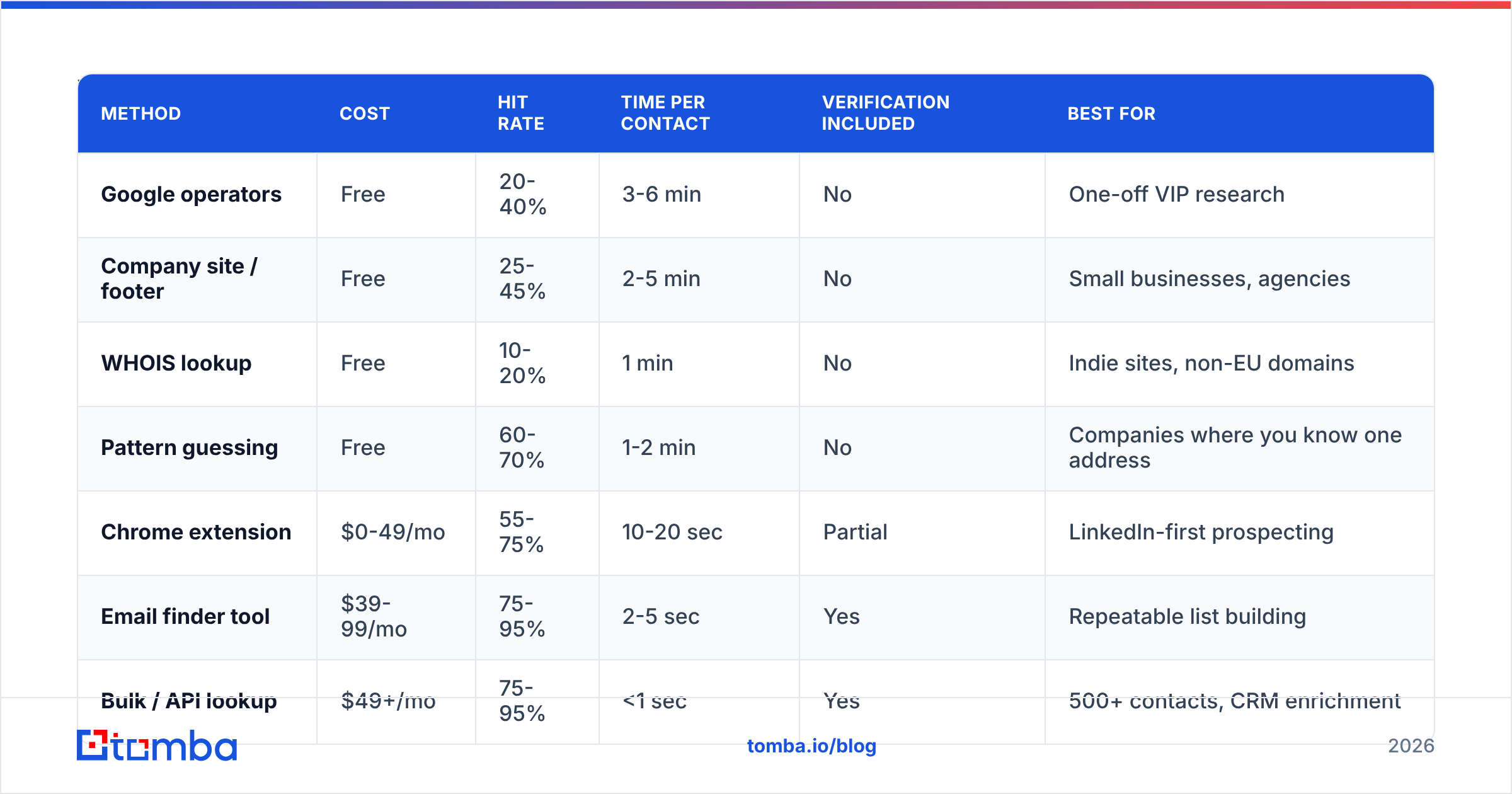
Here's how the seven methods compare on the dimensions that actually matter when you have a list to build.
| Method | Cost | Hit rate | Time per contact | Verification included | Best for |
|---|---|---|---|---|---|
| Google operators | Free | 20-40% | 3-6 min | No | One-off VIP research |
| Company site / footer | Free | 25-45% | 2-5 min | No | Small businesses, agencies |
| WHOIS lookup | Free | 10-20% | 1 min | No | Indie sites, non-EU domains |
| Pattern guessing | Free | 60-70% | 1-2 min | No | Companies where you know one address |
| Chrome extension | $0-49/mo | 55-75% | 10-20 sec | Partial | LinkedIn-first prospecting |
| Email finder tool | $39-99/mo | 75-95% | 2-5 sec | Yes | Repeatable list building |
| Bulk / API lookup | $49+/mo | 75-95% | <1 sec | Yes | 500+ contacts, CRM enrichment |
The break-even is around 20 contacts. Below that, free methods win — a paid seat isn't worth it for a handful of researched accounts. Above it, manual research costs more in salaried hours than any tool subscription. At 200 contacts, six minutes each is 20 hours of someone's week.
Which email finder tools are worth paying for?#
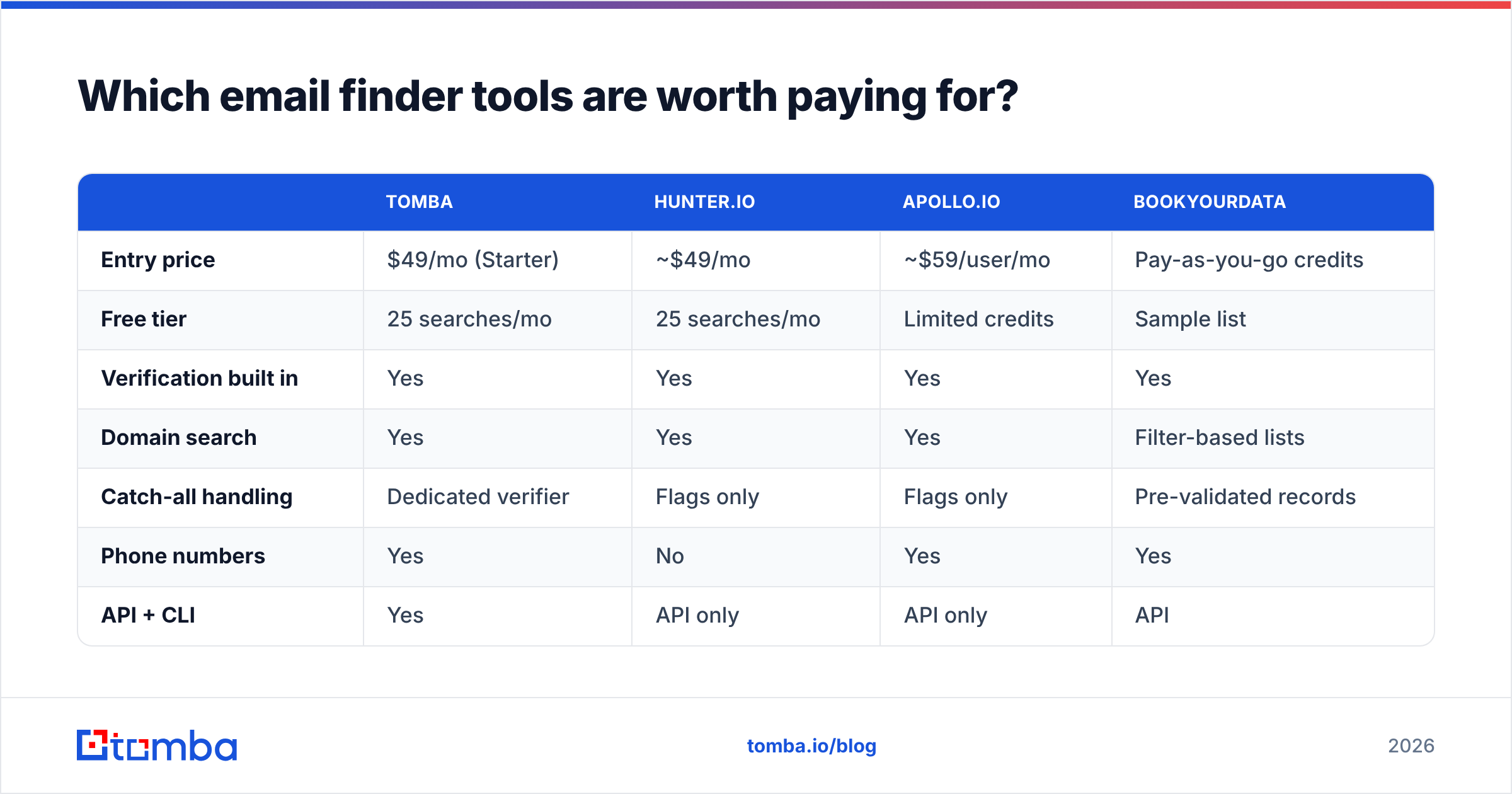
Once you're past the manual threshold, the question becomes which tool. The category has consolidated around a few real options, and they differ more in data sourcing than in UI.

Accuracy claims in this space are self-reported and mostly untestable, so treat any vendor number — including the ones below — as a starting hypothesis you validate on your own ICP. The honest test: pull 100 contacts you can independently confirm, run them through a trial of each tool, and measure real bounce rate on a live send.

| Tomba | Hunter.io | Apollo.io | BookYourData | |
|---|---|---|---|---|
| Entry price | $49/mo (Starter) | ~$49/mo | ~$59/user/mo | Pay-as-you-go credits |
| Free tier | 25 searches/mo | 25 searches/mo | Limited credits | Sample list |
| Verification built in | Yes | Yes | Yes | Yes |
| Domain search | Yes | Yes | Yes | Filter-based lists |
| Catch-all handling | Dedicated verifier | Flags only | Flags only | Pre-validated records |
| Phone numbers | Yes | No | Yes | Yes |
| API + CLI | Yes | API only | API only | API |
| Best for | Finder + verifier in one stack | Simple domain lookups | All-in-one sales platform | Buying pre-built targeted lists |
Where each one fits:
- Tomba — strongest when you want find, verify, and enrich in a single workflow rather than stitching three vendors together. The Tomba API and CLI make it the practical pick for engineering-led GTM teams, and Tomba pricing starts at $49/mo with a free tier at 25 searches.
- Hunter — the default many teams already know. Clean domain search, straightforward pricing, thinner on phone data and catch-all resolution.
- Apollo — a full sales platform where the finder is one module. Great if you want sequences and a database in the same tab; heavier and pricier if you only need addresses.
- BookYourData — a different model entirely. Rather than searching per contact, you filter a pre-verified database and buy the resulting list. Genuinely useful when you know the segment but not the individual names, and their bounce guarantee is a real differentiator for teams that want lists rather than lookups.
For LinkedIn-heavy workflows, a LinkedIn finder or browser extension collapses the whole flow into one click on the profile you're already viewing.
How do you handle catch-all domains?#
This is the failure mode nobody warns you about.
A catch-all (or accept-all) domain is configured to accept mail to any address at that domain — nonsense123@acme.com returns the same "accepted" signal as the CEO's real inbox. Standard SMTP verification can't distinguish them, so most verifiers just return "unknown" and leave you to decide.
Roughly 15-25% of B2B domains are catch-all, and they skew toward enterprise — exactly the accounts you care about. Three ways to handle it:
- Skip them. Safest, and you lose a fifth of your TAM. Fine if your list is huge.
- Send anyway and monitor. Bounces won't come back reliably, but engagement will be near zero on invalid addresses, and spam-trap risk goes up.
- Use a dedicated catch-all resolver. A catch-all verifier applies pattern intelligence, historical engagement signals, and secondary sources to give a real confidence score instead of a shrug.
Option 3 is the only one that keeps enterprise accounts in your pipeline without gambling on sender reputation.
Why does verification matter more than finding?#
Because deliverability is a hard gate, and everything upstream is wasted if you fail it.
Google and Microsoft both tightened bulk-sender requirements in 2024, and the enforcement has only gotten stricter since. Google's Email sender guidelines put the spam-complaint threshold at 0.3% and require authentication and one-click unsubscribe for bulk senders. On bounces, the practical industry consensus is that sustained rates above 3-5% start triggering throttling and filtering.
Run the numbers. Send 1,000 unverified guessed addresses at a 65% accuracy rate and you generate 350 bounces — a 35% bounce rate. That doesn't just fail one campaign; it damages the sending domain for months. Recovering a burned domain takes weeks of warmup or a new domain entirely.
The fix is cheap. Verification costs a fraction of a cent per address and takes milliseconds. A proper email verifier runs syntax checks, DNS and MX record lookups, disposable-domain detection, role-account flagging (info@, sales@), and an SMTP handshake — before you ever load the list into a sequencer.
Two practical rules:
- Verify at send time, not at build time. B2B data decays 22-30% annually as people change jobs. A list verified in March is measurably stale by September.
- Re-verify anything older than 90 days. Especially post-layoff-cycle, when address churn spikes.
What's the right workflow for building a list at scale?#
Here's the sequence that holds up from 50 contacts to 50,000.
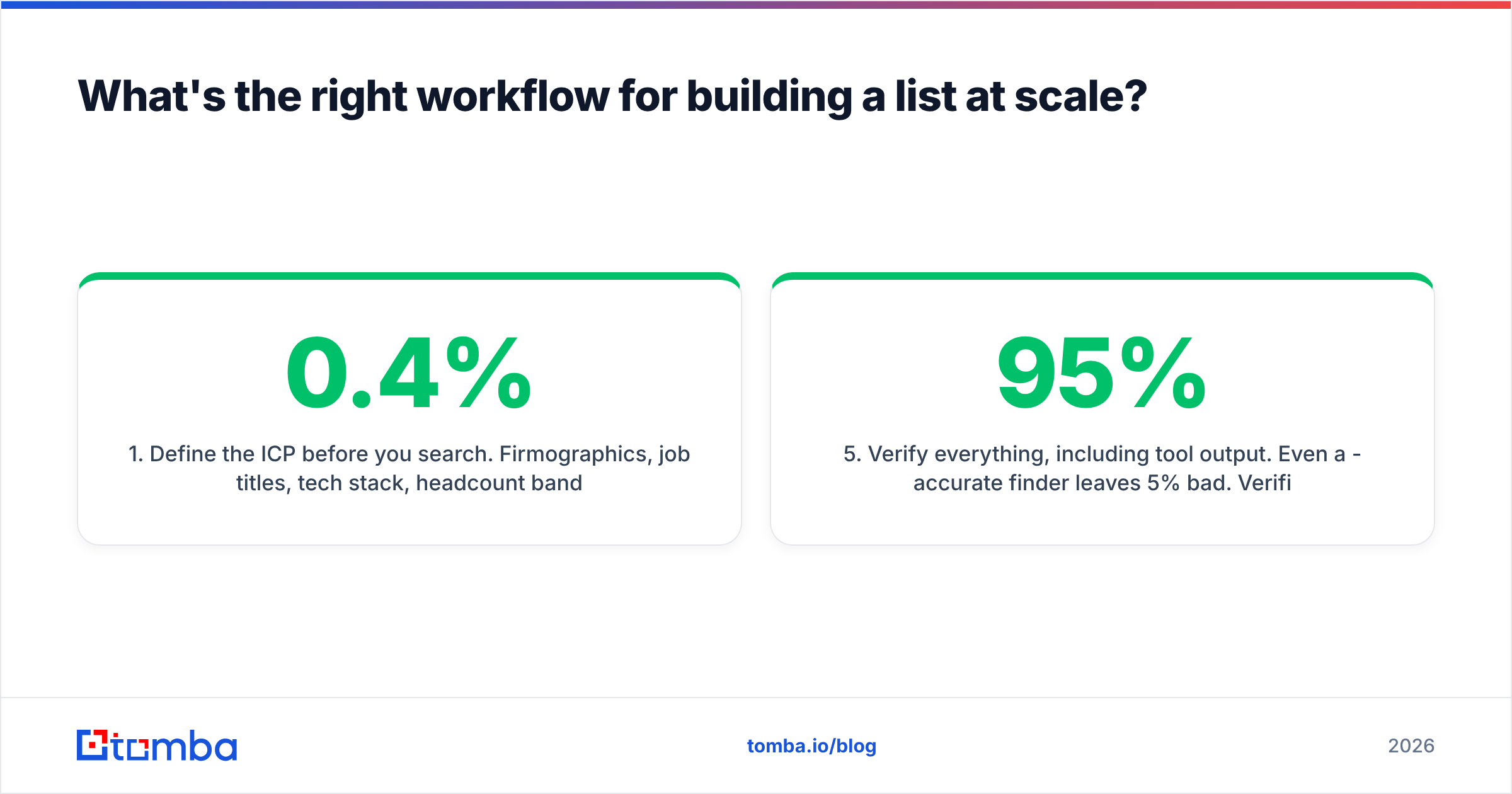
- Define the ICP before you search. Firmographics, job titles, tech stack, headcount band. Searching without this is how you end up with 4,000 addresses and a 0.4% response rate.
- Map the accounts, then the people. Use domain search to see who's already known at each target company and what the email pattern is. This is faster than person-by-person lookups and gives you org context for free.
- Resolve named contacts. Feed name + domain into the finder for the specific people your ICP calls for. Skip anyone the domain search already surfaced.
- Bulk process the remainder. For anything over ~100 rows, bulk email finder or the API beats the UI by an order of magnitude. Upload a CSV of name + company, get back verified addresses.
- Verify everything, including tool output. Even a 95%-accurate finder leaves 5% bad. Verification is the last gate before the sequencer.
- Enrich and sync. Push into your CRM with job title, company size, and LinkedIn URL attached. Data enrichment at this stage is what makes personalization possible later — and native integrations mean you're not maintaining a CSV pipeline forever.
Two things people skip that cost them real money: deduplicating before verification (you pay per credit — don't pay twice for the same address), and logging which method found each contact, so you can see after 90 days which sources actually produced replies.
What are the legal limits on searching for email addresses?#
Finding a business email address is legal in the US, EU, UK, and Canada. What you do with it is where the rules bite.
- GDPR (EU/UK) treats a work email as personal data. You need a lawful basis — legitimate interest usually covers B2B outreach — plus a clear opt-out, a privacy notice, and honest sender identification. Individual sole traders get more protection than corporate mailboxes.
- CAN-SPAM (US) requires accurate headers, a real physical address, a working unsubscribe, and no deceptive subject lines. It does not require prior consent for B2B.
- CASL (Canada) is the strict one: consent-first, with narrow exemptions for existing business relationships and publicly published addresses where the message is relevant to the recipient's role.
Practical rules that keep you clean everywhere: target business addresses, not personal ones; make relevance obvious in the first line; honor opt-outs within 24 hours; never scrape from sources whose terms explicitly forbid it. The Article 29 Working Party guidance on legitimate interests is the reference regulators actually cite if you want the source material.
Which method should you pick?#
Match the method to the volume:
- 1-5 contacts, high value. Manual research. Google operators plus the company site. Free, thorough, and you learn context you'd never get from an API response.
- 5-50 contacts. Free tier of a finder tool plus pattern inference. Tomba's free tier covers 25 searches a month, which handles a focused account list.
- 50-500 contacts/month. Paid finder with verification bundled. This is where the $49/mo tier pays for itself in the first week of saved hours.
- 500+ contacts/month or CRM enrichment. API or bulk upload, with verification in the same pipeline and automatic re-verification on a 90-day cycle.
- You know the segment but not the names. A pre-built list vendor is a legitimate shortcut — you're buying the research step rather than doing it.
The mistake that costs the most isn't picking the wrong tool. It's skipping verification because the finder "already checked." Find, verify, then send — in that order, every time.
Ready to stop guessing? Tomba Email Finder resolves name plus domain into a verified, deliverable address in under a second, with SMTP verification and catch-all resolution built into the same call — so what lands in your sequencer is a mailbox, not a plausible string. Start free with 25 searches a month, and scale to the $49/mo Starter plan when your list outgrows manual research.
Related guides#
// get started
Find, verify and enrich your first contacts today
Start on the free plan with 25 searches a month, then scale when your team is ready.
Free plan · No credit card required · GDPR & CCPA
// about the author