How To Search For Email Addresses On Google: 9 Methods
Google can surface real work emails in seconds if you know the operators. Here are 9 search strings that actually work in 2026, plus the point where manual Googling stops paying and a tool takes over.
Learning how to search for email addresses on Google comes down to operators, not questions. Here are the nine that still work in 2026.
TL;DR
- Google can find real work emails, but only through search operators. Plain-language queries like "John Smith email" almost never work.
- Four operators carry most of the load:
site:,intext:,filetype:, and the"@domain.com"quoted string. - Expect a 10-25% hit rate on cold names. Google indexes what's public, and most B2B inboxes never reach a crawlable page.
- Anything you find on Google is unverified. Run it through an email verifier before you send. If you skip that step, you gamble with your sender reputation.
- Manual Googling is worth it for 5-20 high-value targets. Past that, the math favors a dedicated email finder.
Why does Google find email addresses at all?#
Google indexes public web pages. Email addresses leak onto those pages constantly. They show up in team bios, PDF press releases, conference speaker lists, GitHub commit logs, academic papers, SEC filings, WHOIS records, and old forum posts nobody archived properly.
The catch: Google is a general-purpose index, not a contact database. It has no concept of "the CFO of Acme Corp." It only knows which strings appear on which pages. So your job is to describe the shape of the page an email would live on, not the person you want.
That is why "find email of Sarah Chen at Notion" returns nothing useful. site:notion.so "@notion.so" returns something you can work with.
How to search for email addresses on Google: 9 methods that work#
Here are the operators, ordered from highest hit rate to most specialized. Replace the bracketed parts with your target.
- Quoted domain search —
"@acmecorp.com"— the blunt instrument. Finds any indexed page with an address at that domain. Works often for companies with public-facing staff. - Site-scoped domain search —
site:acmecorp.com "@acmecorp.com"— restricts to the company's own site. Catches team pages, press kits, and support footers. - Name plus domain —
"sarah chen" "@acmecorp.com"— narrows to one person. Best single query for a named target. - Filetype hunting —
site:acmecorp.com filetype:pdf "@acmecorp.com"— press releases, annual reports, and whitepapers often list a media contact. PDFs are the most underrated email source on Google. - Intext with obfuscation —
intext:"sarah chen" intext:"at acmecorp dot com"— catches addresses written to dodge scrapers. Also try[at],(at), andATvariants.
Those five cover most targets. The next four are for narrower cases: technical hires, event speakers, and pages that have since changed.
- LinkedIn-adjacent search —
site:linkedin.com/in "sarah chen" "acmecorp"— LinkedIn rarely exposes the email. It does confirm the exact name spelling and current employer, which is what you need for the next step. - GitHub commit search —
site:github.com "acmecorp.com"— engineers' commit emails are public by default. Excellent for technical buyers, useless for VP Marketing. - Conference and speaker pages —
"sarah chen" "acmecorp" (speaker OR panelist OR keynote) email— event organizers publish contact details more often than companies do. - Cached and archived pages — search the address on
web.archive.org, or append-site:linkedin.comto strip noise from a broad query. Old "About Us" pages often still list departed staff who are still reachable.
Two operator notes for 2026: Google retired the + operator years ago, and inurl: has become unreliable on large sites. Quoted strings and site: are the two you can depend on.
How do Google operators compare to each other?#
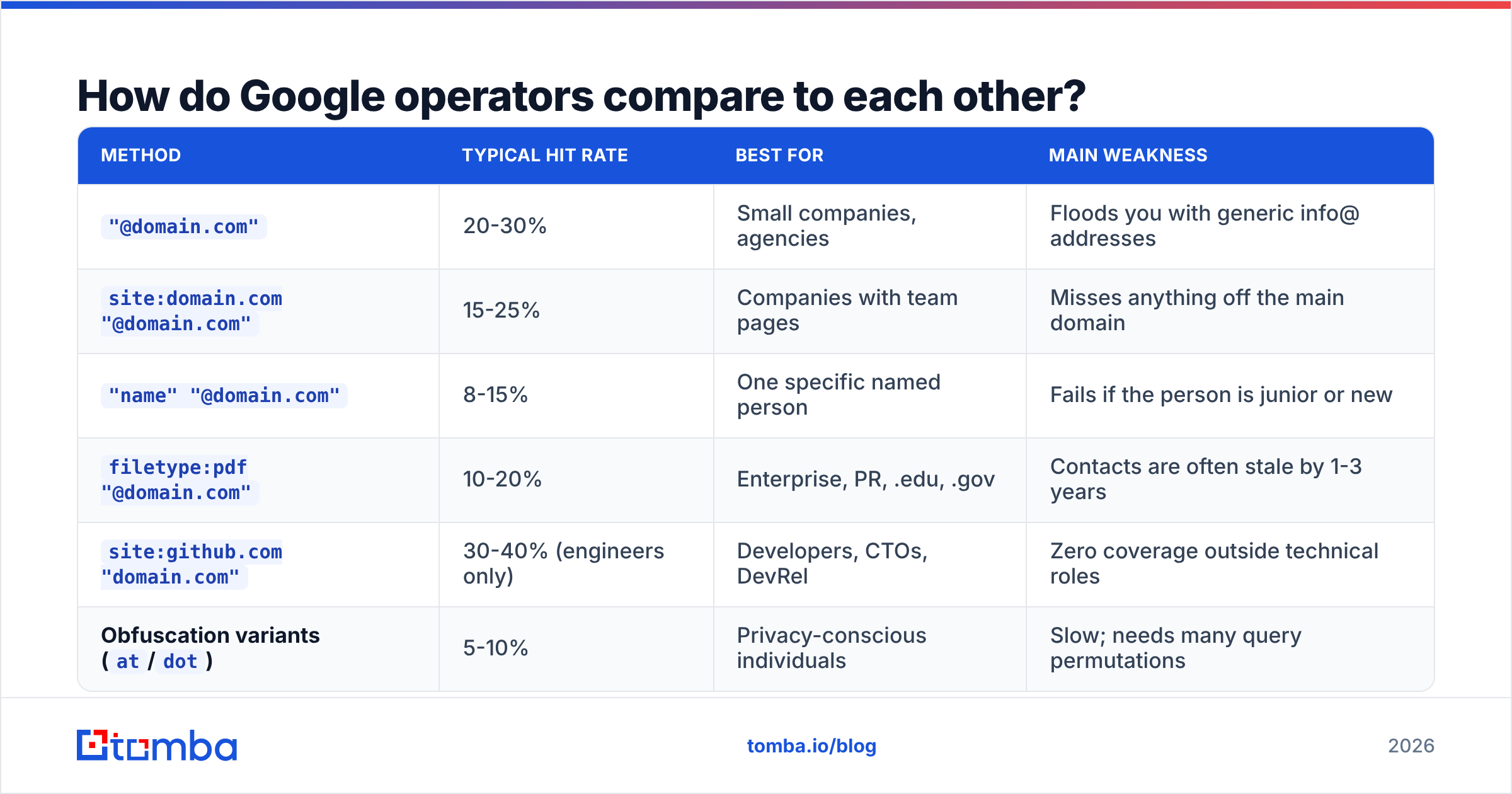
Once you know how to search for email addresses on Google, the next question is which operator earns its keystrokes. Not all of them do. Here are rough field numbers from running these across a few hundred B2B targets:
| Method | Typical hit rate | Best for | Main weakness |
|---|---|---|---|
"@domain.com" |
20-30% | Small companies, agencies | Floods you with generic info@ addresses |
site:domain.com "@domain.com" |
15-25% | Companies with team pages | Misses anything off the main domain |
"name" "@domain.com" |
8-15% | One specific named person | Fails if the person is junior or new |
filetype:pdf "@domain.com" |
10-20% | Enterprise, PR, .edu, .gov | Contacts are often stale by 1-3 years |
site:github.com "domain.com" |
30-40% (engineers only) | Developers, CTOs, DevRel | Zero coverage outside technical roles |
Obfuscation variants (at/dot) |
5-10% | Privacy-conscious individuals | Slow; needs many query permutations |
The pattern is clear. Operators that scope to a place — a site, a filetype, a platform — beat operators that scope to a person. Google indexes documents, not identities.
What are the limits of searching Google for emails?#
Four hard ceilings you'll hit fast.
Coverage. Most corporate emails are never published anywhere crawlable. Many companies now run a contact form instead of listing addresses, and then Google has nothing to show you. Expect a usable direct address for 10-25% of cold B2B targets. That number drops sharply for companies over 500 employees.
Freshness. Google's index reflects when a page was crawled, not when the person left the company. A PDF from 2023 with a media contact tells you nothing about whether that mailbox still exists. B2B contact data decays at roughly 25-30% per year, and the pages Google surfaces skew old.
Validity. Finding a string that looks like an email is not the same as finding a deliverable inbox. Addresses scraped off Google bounce at high rates, because the list fills up with role aliases, dead mailboxes, and typos from OCR'd PDFs. Every bounce chips at your sender reputation. Mailbox providers now weigh complaint and bounce signals more heavily than they did two years ago. Google's own bulk sender guidelines list the current thresholds.
Time. This is the one people underestimate. A careful manual search takes 4-8 minutes per contact: try five operators, check three results each, guess the pattern, verify. At 100 contacts that's a full working day, before you've written a single line of outreach.
When should you stop Googling and use a tool?#
The break-even is around 20 contacts.
Below that, Googling is genuinely fine. You're researching a handful of named accounts, you want the context anyway, and the operator work doubles as account research. Do it manually.
Above that, the math turns against you. Twenty contacts at six minutes each is two hours of work for maybe five usable addresses. A tool resolves the same list in under a minute, at a per-lookup cost in the single-digit cents. It also returns a confidence score for each result. Google cannot do that, because it has no idea whether a string on a page is a live mailbox.
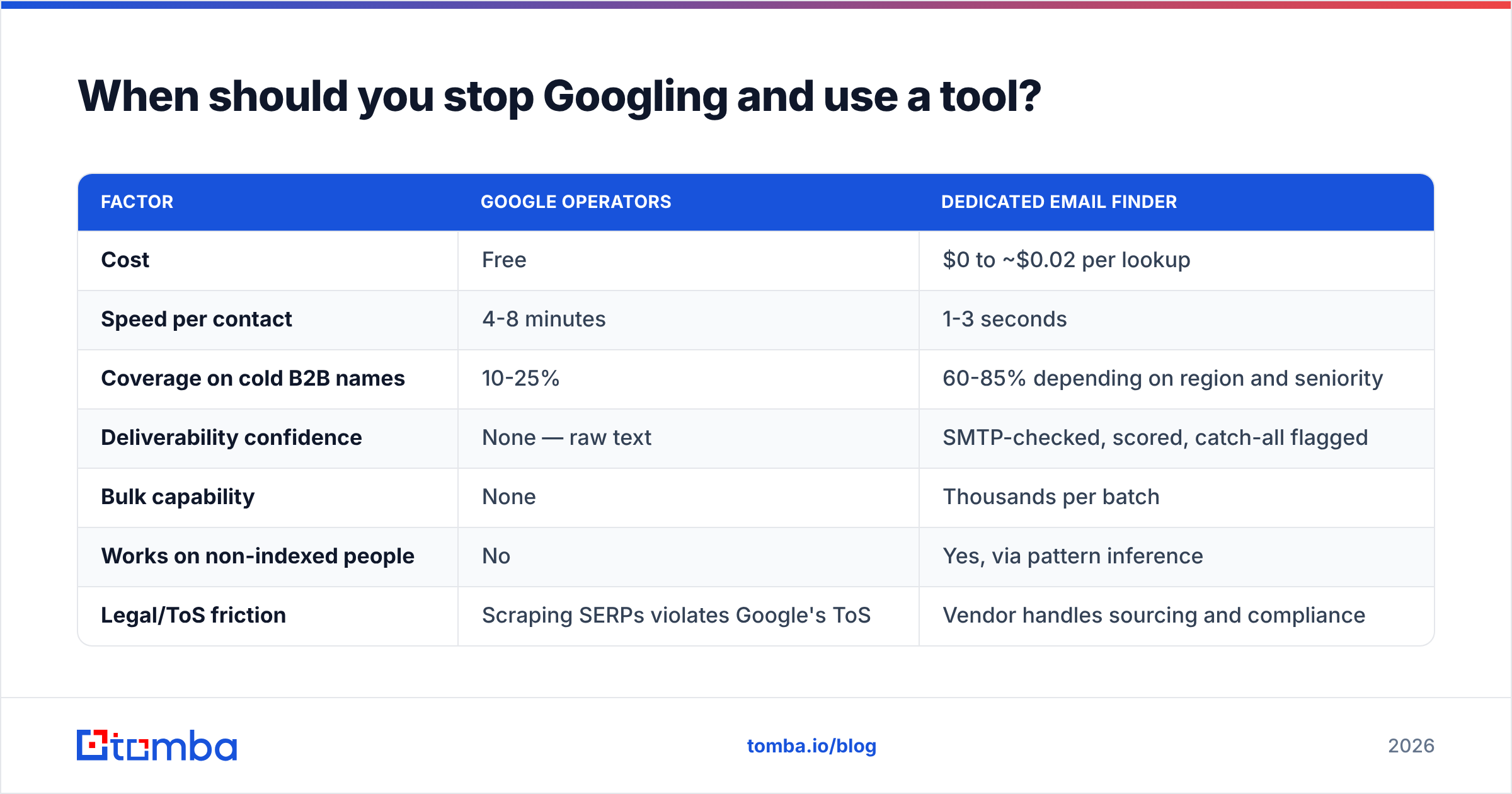
Here's the honest side-by-side:
| Factor | Google operators | Dedicated email finder |
|---|---|---|
| Cost | Free | $0 to ~$0.02 per lookup |
| Speed per contact | 4-8 minutes | 1-3 seconds |
| Coverage on cold B2B names | 10-25% | 60-85% depending on region and seniority |
| Deliverability confidence | None — raw text | SMTP-checked, scored, catch-all flagged |
| Bulk capability | None | Thousands per batch |
| Works on non-indexed people | No | Yes, via pattern inference |
| Legal/ToS friction | Scraping SERPs violates Google's ToS | Vendor handles sourcing and compliance |
| Best use case | 1-20 named, high-value targets | Any list-based outbound motion |
How do email finders actually beat Google?#
Three mechanisms, none of which Google has.
Pattern inference. Most companies use one format: first.last@, flast@, first@, or firstl@. A finder spots the dominant pattern from known addresses at that domain, then builds candidates for everyone else. That includes people who have never appeared on a public page. Test it yourself with a company email pattern lookup before you commit to a whole list.
SMTP validation. After building a candidate, the tool asks the receiving mail server whether the mailbox exists, without sending a message. That step separates "plausible string" from "deliverable address." Google offers no equivalent.
Catch-all handling. Roughly a third of business domains accept mail to any address, which defeats naive SMTP checks, since every candidate looks valid. Serious tools flag these separately and apply secondary signals. That's what a catch-all verifier is for. Counting a catch-all "valid" as a real result is one of the most common ways people quietly poison a list.
The workflow that works in practice is a hybrid. Use Google to confirm the person, the spelling, and the current employer, which is what Google is genuinely good at. Then hand the name and domain to a finder for the address, and verify before it enters your sequence.
What does a good hybrid workflow look like?#
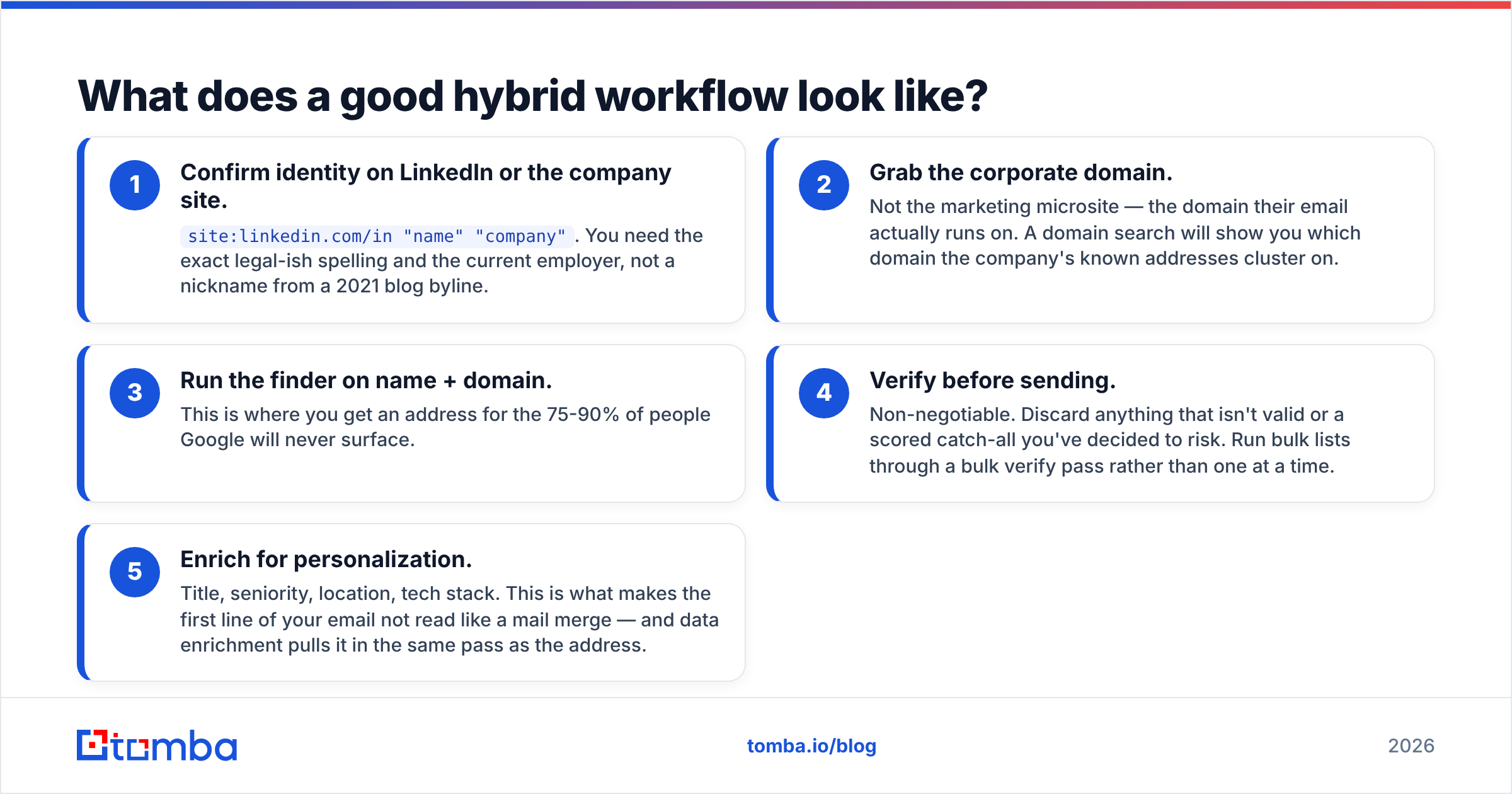
Five steps, roughly ten seconds per contact once you have a rhythm.
- Confirm identity on LinkedIn or the company site.
site:linkedin.com/in "name" "company". You need the exact spelling and the current employer, not a nickname from a 2021 blog byline. - Grab the corporate domain. Not the marketing microsite, but the domain their email actually runs on. A domain search shows you where the company's known addresses cluster.
- Run the finder on name + domain. This is where you get an address for the 75-90% of people Google will never surface.
The last two steps are what keep the list usable.
- Verify before sending. Non-negotiable. Discard anything that isn't valid, or a scored catch-all you've decided to risk. Run bulk lists through a bulk verify pass rather than one at a time.
- Enrich for personalization. Title, seniority, location, tech stack. This is what keeps the first line of your email from reading like a mail merge. Data enrichment pulls it in the same pass as the address.
Google's role in that sequence is step one, and only step one. It's a research tool that sometimes coughs up an email, not an email tool.
Is Google search for emails legal and compliant?#
Short answer: finding is generally fine. Scraping and sending are where the rules bite.
Reading a publicly published address on a webpage is not unlawful in most places. Automating queries against Google to harvest addresses at scale violates Google's Terms of Service, whatever the law says, and Google actively blocks it.
The real constraints sit downstream:
- GDPR (EU/UK) — a work email is personal data. You need a lawful basis, which for B2B outreach is usually legitimate interest. You also need a documented balancing test, a clear opt-out in every message, and a source you can name if asked. The ICO's direct marketing guidance is the practical reference.
- CAN-SPAM (US) — permits cold B2B email, but requires accurate headers, a real physical address, and a working unsubscribe honored within 10 business days.
- CASL (Canada) — the strictest of the three. Implied consent is narrow and time-limited. Don't assume a published address grants it.
Reputable data vendors document their sourcing, which matters when a prospect asks where you got their address. If you're comparing providers, check their data sources page and whether they support suppression and deletion requests. A spreadsheet of Google-scraped strings gives you no such paper trail.
Which approach should you pick?#
Pick based on list size and how much the contact is worth.
- 1-5 contacts, high value (enterprise, partnerships, press): Google manually. The research context you pick up is worth more than the address.
- 5-20 contacts: Google for identity, finder for the address. Best of both.
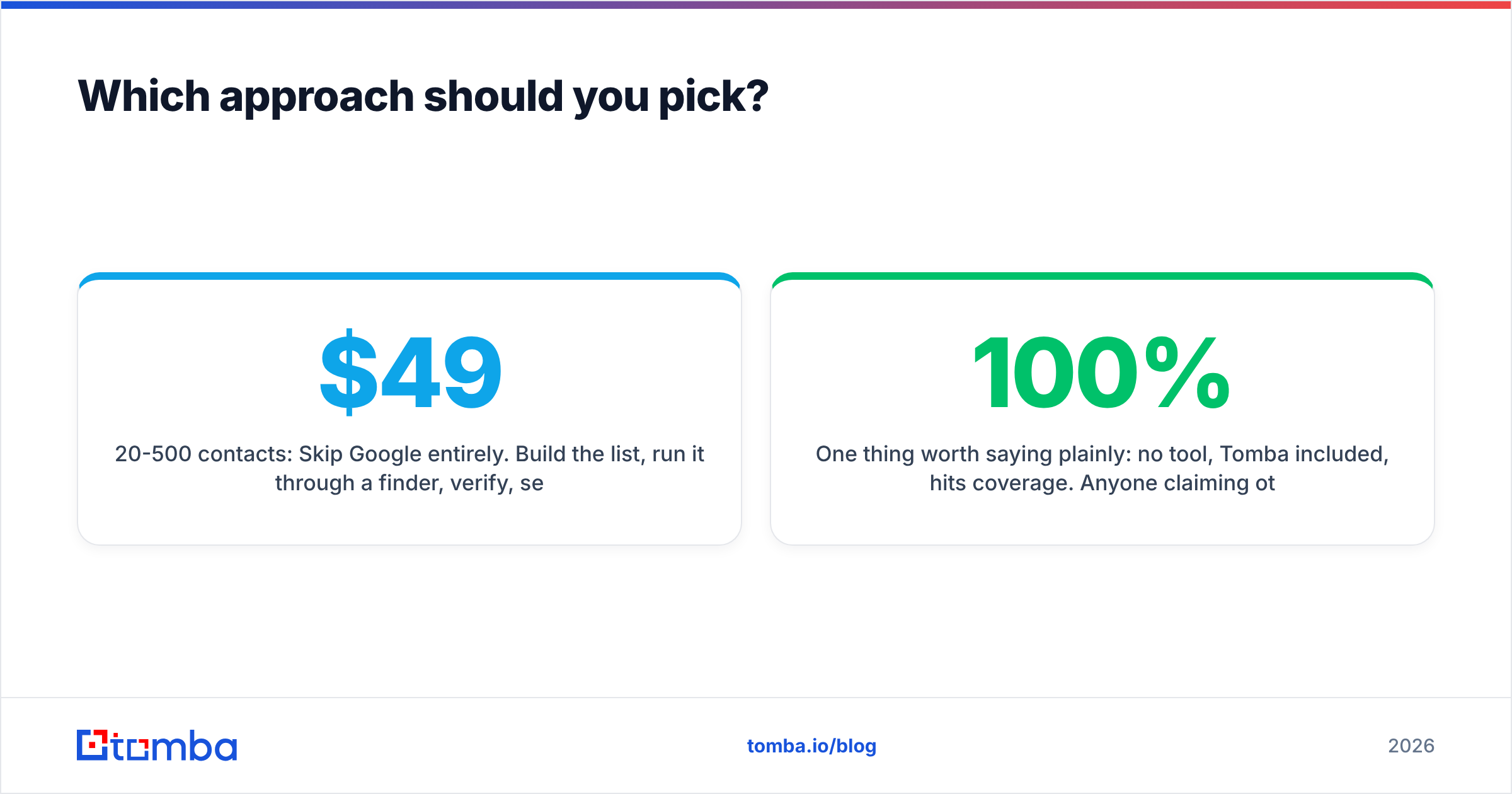
- 20-500 contacts: Skip Google entirely. Build the list, run it through a finder, verify, send. Free tiers cover this if you're careful. Tomba's free plan includes 25 searches per month, and paid plans start at $49/mo on Tomba pricing.
- 500+ contacts, recurring: Go API-first. Wire lookups into your CRM or enrichment job so addresses arrive already verified. The Tomba API and a scheduled bulk pass will do more in an hour than a week of operators.
One thing worth saying plainly: no tool, Tomba included, hits 100% coverage. Anyone who claims otherwise is counting catch-all guesses as wins. Expect 60-85% on realistic B2B lists. Treat the rest as unreachable by email and route them to LinkedIn or phone. For hard-to-reach contacts, providers like BookYourData sell pre-verified lists that complement a real-time finder well. Different tool, different job.
Start with the operators, finish with verification#
Knowing how to search for email addresses on Google is a real skill and worth learning. site:, filetype:, and quoted domain strings will earn their keep for the rest of your career. But they solve a narrow slice of the problem. They find addresses that someone already published, and the people you most want to reach usually aren't in that slice.
When Googling stops paying, and it will right around contact twenty, hand the work to something built for it. The Tomba Email Finder takes a name and a domain and returns a scored, SMTP-checked address in about a second. You get 25 free searches a month to test it. Run your last ten Google failures through it and see how many come back with an address.
Related guides#
// get started
Find, verify and enrich your first contacts today
Start on the free plan with 25 searches a month, then scale when your team is ready.
Free plan · No credit card required · GDPR & CCPA
// about the author