How to Search Someones Email: 7 Methods That Actually Work
Here is how to search someones email address in 2026: seven tested methods, from free Google operators and permutators to domain search tools, plus how to verify what you find before you send.
TL;DR
- Domain search is the fastest reliable path. Take the company domain, pull every address published on it, then match the person by name and role.
- Free methods work. Google operators, GitHub commit logs, WHOIS, and personal sites all return addresses. But the hit rate drops below 40% for anyone who is not a founder or a developer.
- Pattern guessing plus SMTP checks is the best free combo. Generate
first.last@,f.last@, andfirstl@variants, then verify each one before you send. - Never send to a guess you have not checked. A 5% bounce rate can drag your sender reputation down for weeks.
- Budget: free tools cover about 25 lookups a month. Paid plans start near $49 a month. Cost per credit matters more than the headline price.
You need one email address. Maybe it belongs to a hiring manager, a podcast guest, a prospect your CRM half-filled, or a writer you want to cite. This guide walks through how to search someones email address, method by method. The list is ranked by how often each one returns a working address — not by how clever it sounds.
How to Search Someones Email: What the Phrase Really Means#
Two problems hide under one phrase. Mixing them up is why most people waste an afternoon.
Problem one: you know the person and need the address. You have a name and a company. The address sits on a company domain, and it follows a pattern. That problem is easy to solve, and the hit rate is high.
Problem two: you have the address and need the person. That is a reverse email lookup. It runs the query backwards, against identity data.
This post covers problem one. A short section at the end covers the reverse case.
One note on scope. Everything here targets business email addresses. Those are the ones published in company directories, press pages, git commits, and WHOIS records. Personal Gmail and Yahoo addresses sit in a different legal box. Under GDPR and CAN-SPAM, business contact data used for real B2B outreach stands on firm ground. Scraping personal inboxes does not. Keep your searches on the company side of that line.
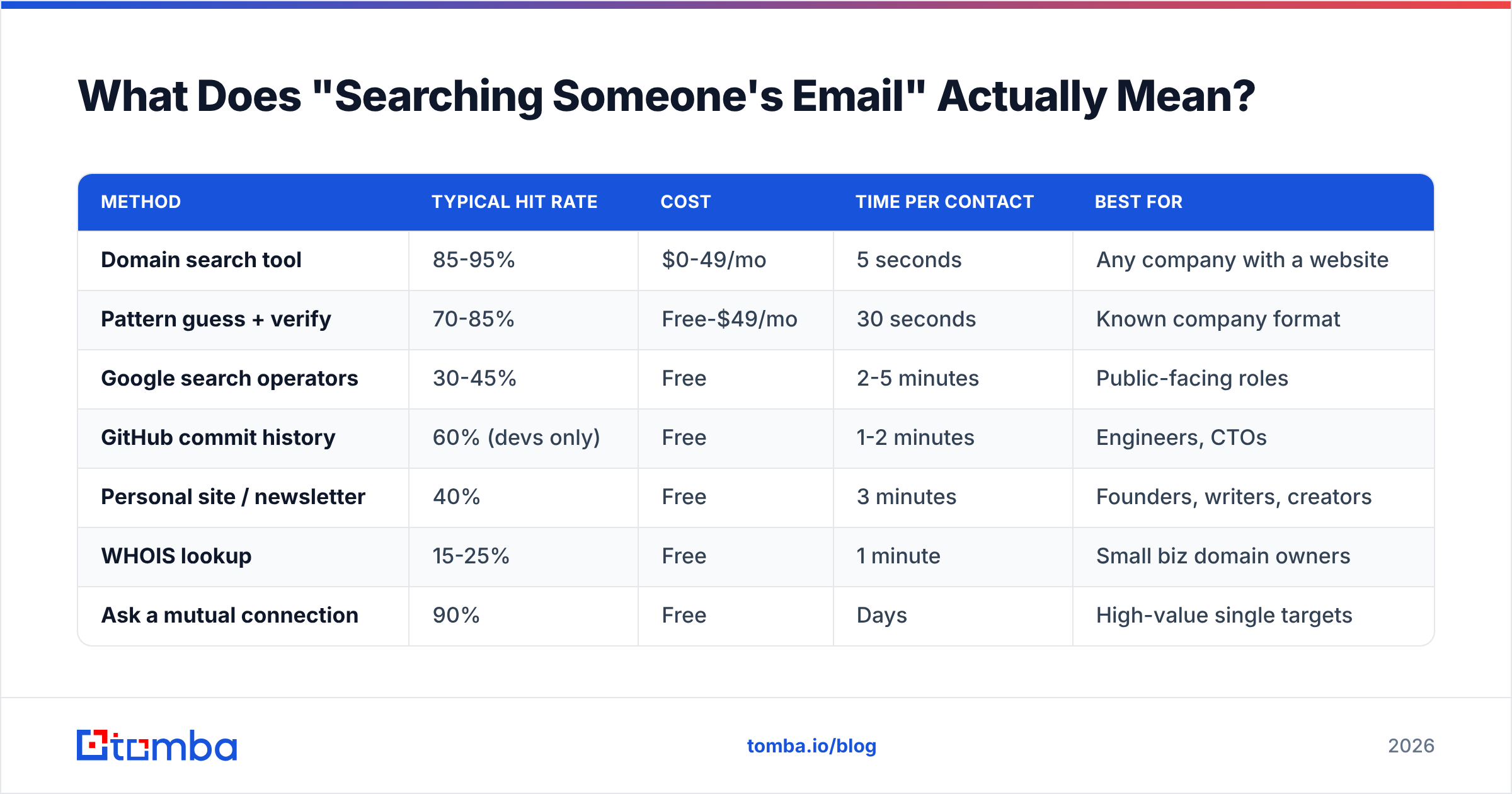
Here is how the approaches compare:
| Method | Typical hit rate | Cost | Time per contact | Best for |
|---|---|---|---|---|
| Domain search tool | 85-95% | $0-49/mo | 5 seconds | Any company with a website |
| Pattern guess + verify | 70-85% | Free-$49/mo | 30 seconds | Known company format |
| Google search operators | 30-45% | Free | 2-5 minutes | Public-facing roles |
| GitHub commit history | 60% (devs only) | Free | 1-2 minutes | Engineers, CTOs |
| Personal site / newsletter | 40% | Free | 3 minutes | Founders, writers, creators |
| WHOIS lookup | 15-25% | Free | 1 minute | Small biz domain owners |
| Ask a mutual connection | 90% | Free | Days | High-value single targets |
How Do You Find an Email With Free Google Operators?#
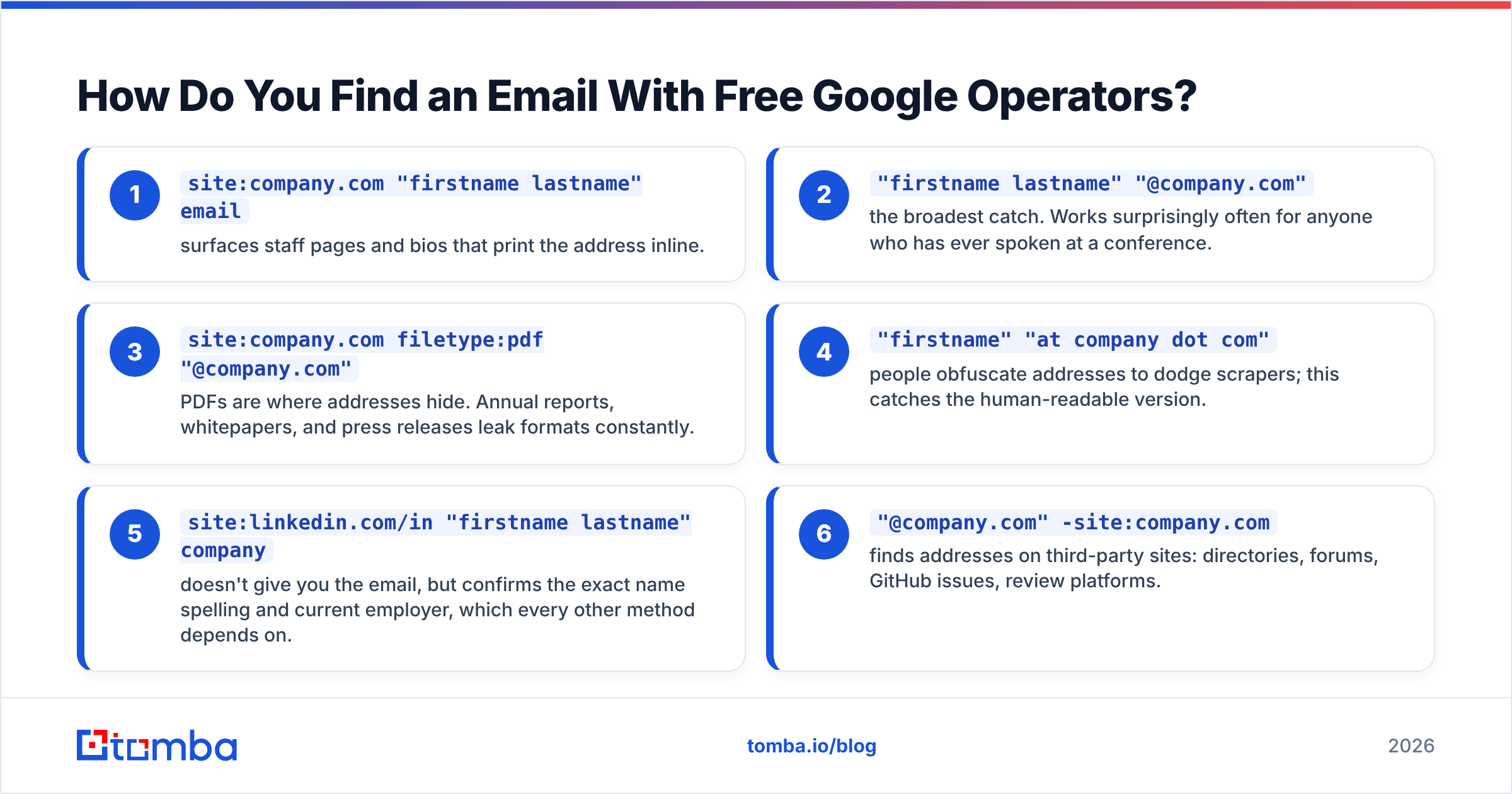
Start here if you have no budget and one or two names to find. Google indexes a lot of contact data. Think speaker lists, PDF invoices, staff directories, and press kits.
Run these queries. Swap the placeholders for real names.
site:company.com "firstname lastname" email— pulls up staff pages and bios that print the address inline."firstname lastname" "@company.com"— the broadest catch. It works often for anyone who has spoken at a conference.site:company.com filetype:pdf "@company.com"— PDFs are where addresses hide. Annual reports, whitepapers, and press releases leak formats all the time."firstname" "at company dot com"— people hide addresses from scrapers this way. This query catches the human version.site:linkedin.com/in "firstname lastname" company— it will not give you the email. It does confirm the name spelling and the current employer. Every other method depends on both."@company.com" -site:company.com— finds addresses on other sites: directories, forums, GitHub issues, review platforms.
Queries 3 and 6 are not really about the person. They are about the company email format. Find one confirmed address at that domain and you can work out the rest. If sarah.chen@acme.com shows up in a PDF, then marcus.webb@acme.com is a strong bet.

The limits show up fast. Google operators are slow and uneven. They favor people with public profiles. A VP of Engineering who never speaks at events and never commits code stays invisible here.
How Do You Guess an Email Pattern and Confirm It?#
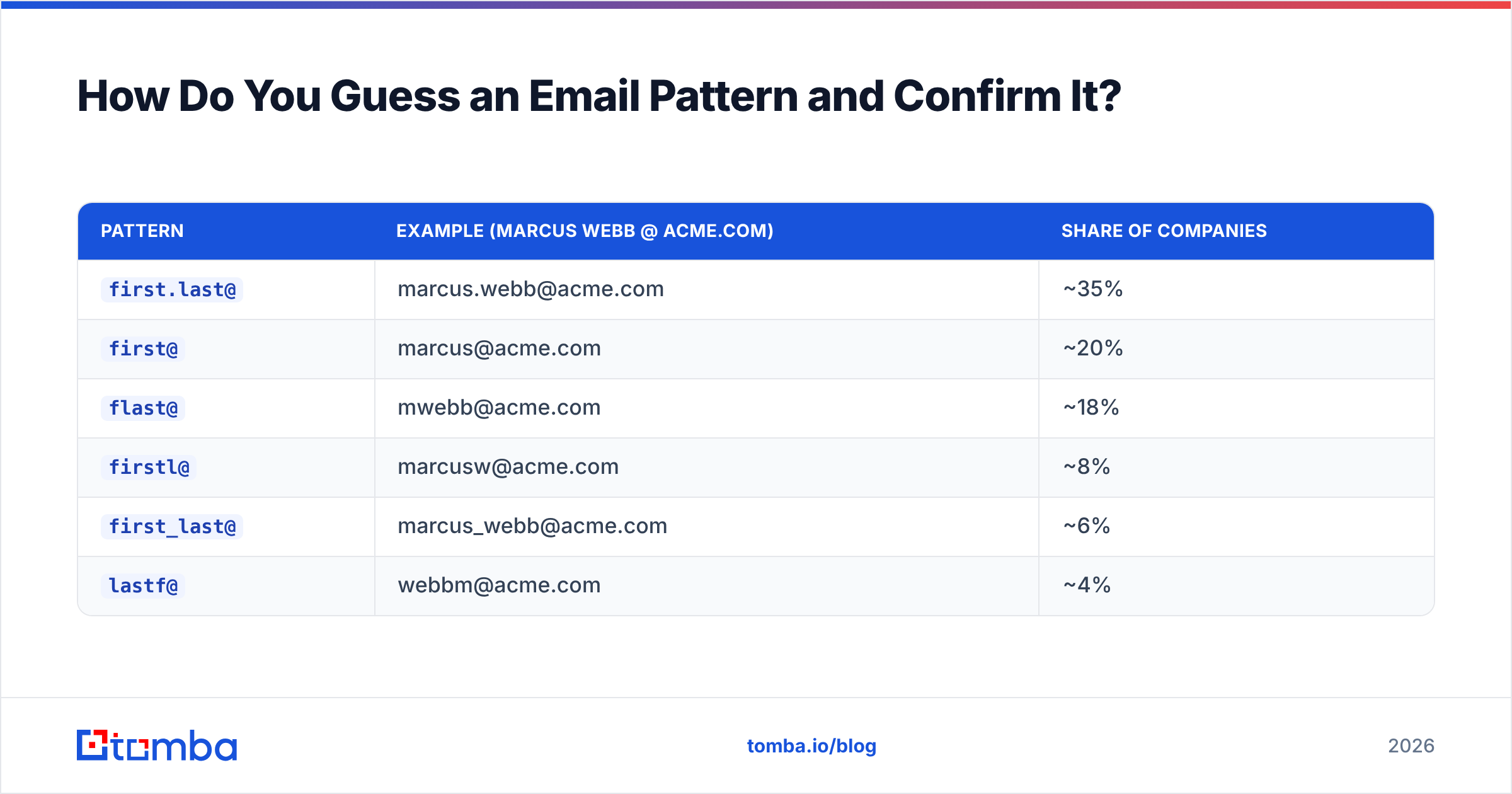
Corporate email is boring and predictable. About 90% of business domains use one of six formats.
| Pattern | Example (Marcus Webb @ acme.com) | Share of companies |
|---|---|---|
first.last@ |
marcus.webb@acme.com | ~35% |
first@ |
marcus@acme.com | ~20% |
flast@ |
mwebb@acme.com | ~18% |
firstl@ |
marcusw@acme.com | ~8% |
first_last@ |
marcus_webb@acme.com | ~6% |
lastf@ |
webbm@acme.com | ~4% |
The workflow is simple. Find the pattern from one known address. Apply it to your target. Then verify before you send. An email permutator builds every likely variant from a first name, a last name, and a domain. A company email pattern checker skips ahead to the format when the domain is already in a public dataset.
People skip the verify step, and that is the step that matters. Send to a batch of guesses and most of them bounce. Mailbox providers read bounce rate as a spam signal. Google's Postmaster Tools documentation says plainly that mail to dead addresses hurts domain reputation. One campaign at an 8% bounce rate can sink your inbox placement for weeks.
An email verifier opens an SMTP handshake with the receiving server. It checks MX records, flags throwaway domains, and returns a delivery status. Nothing is sent to the person. Feed it your list, keep the addresses that come back valid, and drop the rest.
Catch-all domains muddy this. Some servers accept mail for every address at a domain, real or not. Standard SMTP checks then return valid for asdfgh@company.com. A catch-all verifier earns its keep here. It reads signals beyond the SMTP reply to tell real mailboxes from blanket acceptance.
Is a Domain Search Tool Faster Than Manual Methods?#
Yes, by about a hundred times. Start here if you need more than three addresses.
A domain search takes a company domain. It returns every business email address tied to that domain, plus names, job titles, departments, and confidence scores. You do not hunt for one person. You get the org chart with contact data attached, then filter down to who you need.
The gap is stark. Manual Google work runs 2-5 minutes per contact, and it fails more than half the time. Domain search returns a full company roster in about five seconds. For 200 target accounts, that is the difference between a two-week project and an afternoon.
Sometimes you have names but no domains. An email finder flips the query. Give it a person and a company, and it returns the address with a confidence score.

Treat accuracy claims with care. Every vendor prints a number above 95%, and every number is measured its own way. Some count pattern-matched addresses as found. Some count only SMTP-confirmed ones. Some leave catch-all domains out of the math. The number that matters is your bounce rate on your own list. Test 50 contacts in your real market before you sign an annual plan.
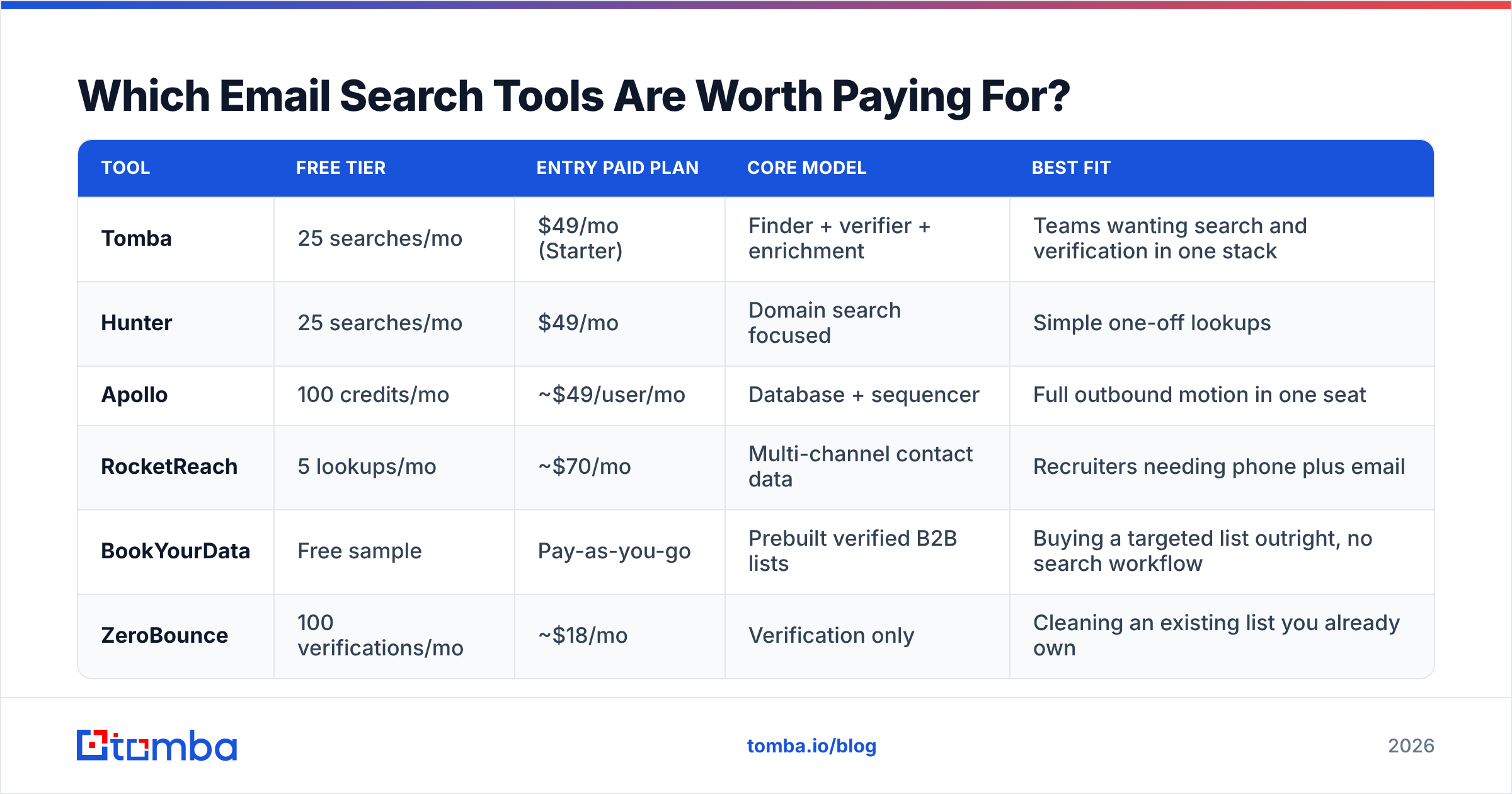
Which Email Search Tools Are Worth Paying For?#
The market has settled into three shapes: pure email finders, database-first platforms, and sales suites that bundle finding with sending.

| Tool | Free tier | Entry paid plan | Core model | Best fit |
|---|---|---|---|---|
| Tomba | 25 searches/mo | $49/mo (Starter) | Finder + verifier + enrichment | Teams wanting search and verification in one stack |
| Hunter | 25 searches/mo | $49/mo | Domain search focused | Simple one-off lookups |
| Apollo | 100 credits/mo | ~$49/user/mo | Database + sequencer | Full outbound motion in one seat |
| RocketReach | 5 lookups/mo | ~$70/mo | Multi-channel contact data | Recruiters needing phone plus email |
| BookYourData | Free sample | Pay-as-you-go | Prebuilt verified B2B lists | Buying a targeted list outright, no search workflow |
| ZeroBounce | 100 verifications/mo | ~$18/mo | Verification only | Cleaning an existing list you already own |
Read that table by use case, not by price. Already have addresses and just need them cleaned? A verification-only tool costs less than any finder. Want a list handed to you instead of building queries? BookYourData's pay-as-you-go model skips the subscription. Need to find, verify, enrich, and export to your CRM? One combined platform beats stitching three vendors together.
Tomba's pricing runs Free at 25 searches a month, Starter at $49, Growth at $99, and Pro at $249. Enterprise is negotiated. The number to compare is not the monthly fee. It is the cost per verified contact. A $49 plan with 500 credits and a 60% hit rate costs more per usable address than a $99 plan with 2,000 credits at 90%.
Review data on G2 beats vendor comparison pages here. Reviewers tend to mention bounce rates and support speed. Those are the two things that break workflows.
How Do You Find Emails at Scale Without Manual Work?#
Past a few dozen contacts, search stops being the bottleneck. Integration takes over. Three options, from easiest to hardest:
Spreadsheet add-ins. Drop names and domains into a sheet, run a formula, and read the addresses in the next column. The Google Sheets add-on and the Excel add-in both work this way. No code needed, and it matches how sales teams already keep their lists.
Browser extension. A Chrome extension shows addresses while you browse a company site or a LinkedIn profile. No tab switching. Good for one-off prospecting during research.
API and bulk processing. The Tomba API handles lookups inside your own tools. A bulk email finder chews through CSV uploads of thousands of rows. Use this layer when you enrich CRM records on a schedule, or when you build lead capture into a product.
CRM sync. Direct HubSpot and Salesforce links push verified contacts into your pipeline. No export-import cycle. HubSpot's contact data documentation explains how enrichment fields map to standard properties. Read it before you design the sync.
Whatever route you pick, hold the same order: find, verify, then send. Lists rot when people skip the middle step because a tool showed a confidence score.
What If You Have the Email but Need the Person?#
This case comes up more than you would think. A form fill with only an address. A mystery contact in an old CRM export. A reply whose signature says nothing.
A reverse email search takes the address and returns the name, company, role, and social profiles. From there, data enrichment fills in the rest: headcount, industry, funding stage, tech stack.
For content and PR work, the author finder is the specialist tool. Paste an article URL and get the writer's contact details. It beats digging through a masthead.
What Mistakes Should You Avoid?#
Five failures account for most wasted effort.
- Sending to unverified guesses. Every bounce is a hit to your reputation. Verify first, every time. Checking costs far less than repairing a burned sending domain.
- Ignoring catch-all domains. A valid reply from a catch-all server tells you nothing. Flag these apart. Use a dedicated catch-all check, or route them to a warmed backup domain.
- Using personal addresses for B2B outreach. It is legally risky, it rarely works, and it kills your reply rate. Stay on business domains.
- Buying stale lists. Contact data decays 25-30% a year as people change jobs. A list built 18 months ago is half wrong. Re-check anything you did not source this quarter.
- Chasing volume over accuracy. Two hundred verified addresses in your exact market beat 5,000 scraped ones. The math on response rate rewards precision every time.
One more, less obvious: not writing down the pattern you found. When you confirm that a company uses first.last@, save it. The next five people at that account cost you nothing.
Which Method Should You Actually Use?#
How to search someones email comes down to volume. Pick by how many contacts you need.
- One or two contacts, no budget: Google operators plus a free email checker to confirm what you find.
- Ten to fifty contacts: a permutator for the variants, then a bulk verify. A free tier covers a test batch.
- Fifty to a few hundred: domain search on each account, filtered by role. This is the sweet spot for a $49-99 plan.
- Thousands, on repeat: API or bulk upload wired into your CRM, with a re-check every quarter.
The ranking barely moves year to year. The constraints do not change. Corporate email formats stay predictable. Verification stays cheap. Guessing without verifying stays the expensive mistake.
Ready to stop digging through search results? The Tomba Email Finder returns verified business addresses from a name and a domain in seconds. Every result carries a confidence score, and SMTP verification runs in the same step. The free tier gives you 25 searches a month. That is enough to test it on contacts you already know and judge the accuracy yourself. Start there, watch your bounce rate on real sends, and scale up when the numbers earn it.
Related guides#
// get started
Find, verify and enrich your first contacts today
Start on the free plan with 25 searches a month, then scale when your team is ready.
Free plan · No credit card required · GDPR & CCPA
// about the author