How to Send a Final Follow Up Email That Gets Replies
The last email in your sequence outperforms most of the ones before it — if you write it right. Here are the templates, timing rules, and mistakes that quietly kill your reply rate.
TL;DR
- A final follow-up email should close the loop, not beg for one. The best-performing version gives the prospect an easy exit and a low-friction reason to reply.
- Send it 5–9 business days after your previous touch, as a reply in the same thread, with no new attachments and no new pitch.
- "Breakup emails" still work, but the guilt-trip version ("I guess you're not interested") is burned out. Swap it for a value drop or a routing question.
- Cap the sequence at 4–6 touches. Anything past that damages your domain reputation more than it earns replies.
- Deliverability matters more than copy at this stage — if the first five emails bounced or landed in spam, the sixth one changes nothing.
Why does the final follow-up email outperform the ones before it?#
Because it's the only email in your sequence that asks for a decision instead of attention.
Everything before it competes for a slot in a crowded inbox. The final email changes the frame: it says the thread is ending. That triggers a small loss-aversion response — the recipient now has to actively let something go instead of passively ignoring it. Internal sequence data across most cold-email tools shows the last touch pulling reply rates in the same range as touch one or two, sometimes higher, despite going out to a much colder remaining list.
There's a second reason that has nothing to do with psychology. By the time you reach the final touch, the people still on your list are the ones who didn't bounce, didn't unsubscribe, and didn't mark you as spam. It's a self-filtered audience. You're writing to a better list than you started with.
That's also why the email deserves real effort. Most reps write four thoughtful emails and then dash off "Just circling back one last time!" as the fifth. That last one is the one carrying the most qualified audience in the sequence.
What should a final follow-up email actually contain?#
Five things, in this order. Anything more and you're re-pitching.
- A same-thread reply. Do not start a new thread with a new subject line. Replying keeps the context visible, keeps the message in an existing conversation view, and signals continuity rather than a fresh cold hit.
- An acknowledgment of silence without guilt. "Haven't heard back — completely fair, timing is usually the reason." One line. No passive aggression, no "I'm assuming this isn't a priority."
- One concrete asset or insight. Not a calendar link. Something they keep whether or not they reply: a benchmark, a teardown of their current setup, a two-line observation about their hiring pattern.
- A single, binary ask. "Worth a look, or should I close this out?" Binary questions get answered because they cost the reader nothing to process.
- A stated exit. "Either way, this is my last email on it." Say it and mean it. If you send another one after promising you wouldn't, you've taught them your emails are noise.
What to leave out: attachments (they hurt inbox placement on a cold thread), new case studies, a second CTA, a third paragraph, and any sentence starting with "I just wanted to."
Which final follow-up template should you use?#
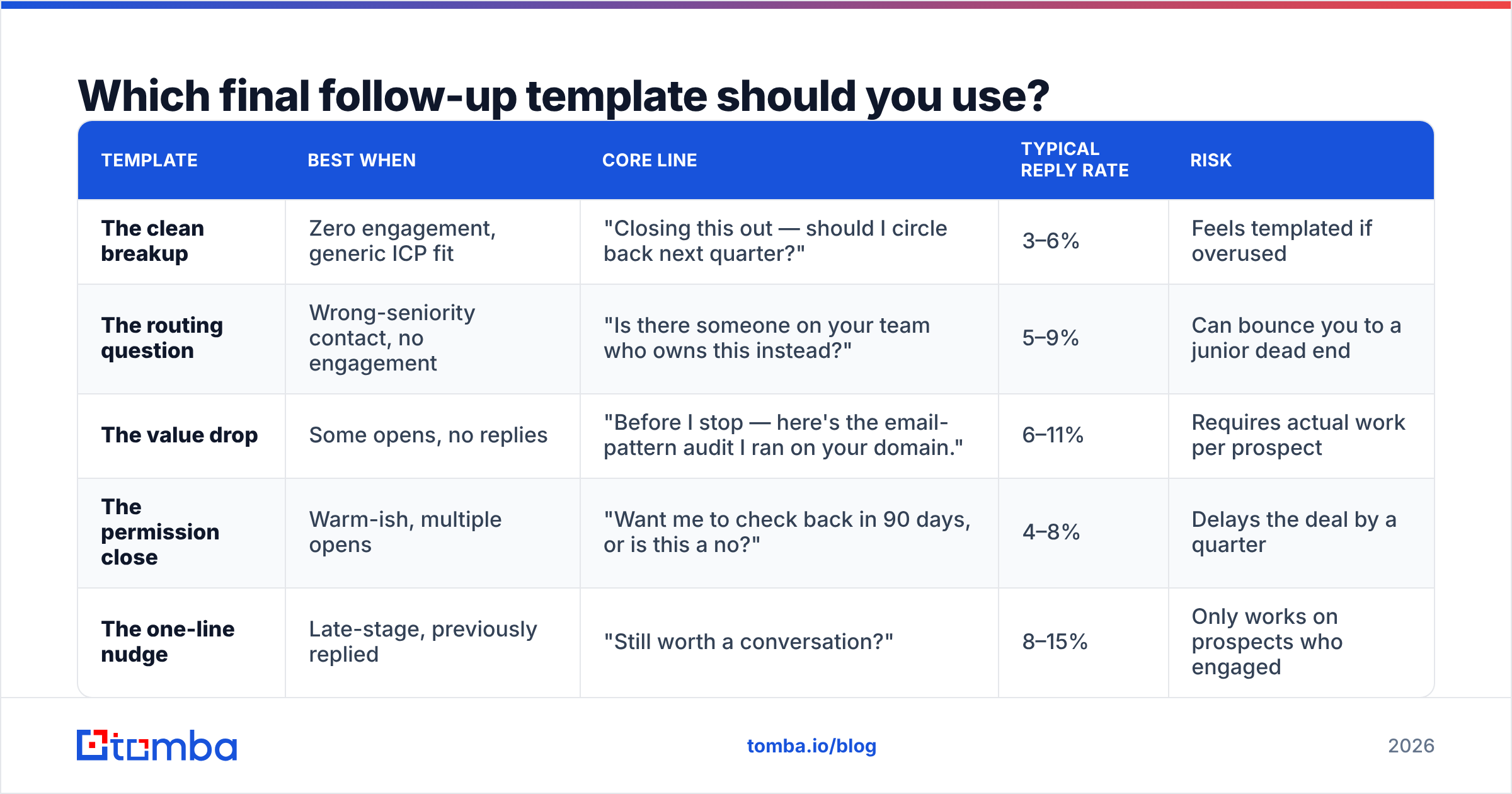
Pick based on how much signal you got earlier in the sequence. If someone opened four times and clicked twice, the breakup email is wrong — they're interested and stuck. If you got zero engagement across five touches, the routing question is the highest-value play because it might reach the right person.
| Template | Best when | Core line | Typical reply rate | Risk |
|---|---|---|---|---|
| The clean breakup | Zero engagement, generic ICP fit | "Closing this out — should I circle back next quarter?" | 3–6% | Feels templated if overused |
| The routing question | Wrong-seniority contact, no engagement | "Is there someone on your team who owns this instead?" | 5–9% | Can bounce you to a junior dead end |
| The value drop | Some opens, no replies | "Before I stop — here's the email-pattern audit I ran on your domain." | 6–11% | Requires actual work per prospect |
| The permission close | Warm-ish, multiple opens | "Want me to check back in 90 days, or is this a no?" | 4–8% | Delays the deal by a quarter |
| The one-line nudge | Late-stage, previously replied | "Still worth a conversation?" | 8–15% | Only works on prospects who engaged |
Reply-rate ranges above reflect commonly reported outbound benchmarks and will shift heavily with list quality and industry. Treat them as relative rankings, not promises.
The clean breakup#
Subject: (reply in thread)
Hi Dana — no reply, which usually means this isn't the quarter for it. Totally fair.
I'll close the loop here. If evaluating [category] moves up the list in Q1, reply to this thread and I'll pick it back up with whatever's changed by then.
Either way, good luck with the [specific initiative] rollout.
The routing question#
Hi Dana — I may have aimed this at the wrong desk. If RevOps tooling sits with someone else on your team, point me at them and I'll stop filling your inbox.
If it does sit with you and the answer is no, that's a fine answer too — just say "no" and I'll close it out.
The value drop#
Hi Dana — last one from me. I ran your domain through a pattern check before writing this: your team is on first.last@, with a catch-all configured, which means most sequencing tools are guessing on ~30% of your inbound contacts too.
That's the whole reason I reached out. If it's not a problem you have, ignore this and I'll stop.
The value drop is the only one of the five that's hard to fake, which is exactly why it works. Running a quick domain search on the prospect's company before writing gives you the email pattern, the team structure, and often a better contact than the one you've been emailing.
When should you send the final follow-up email?#
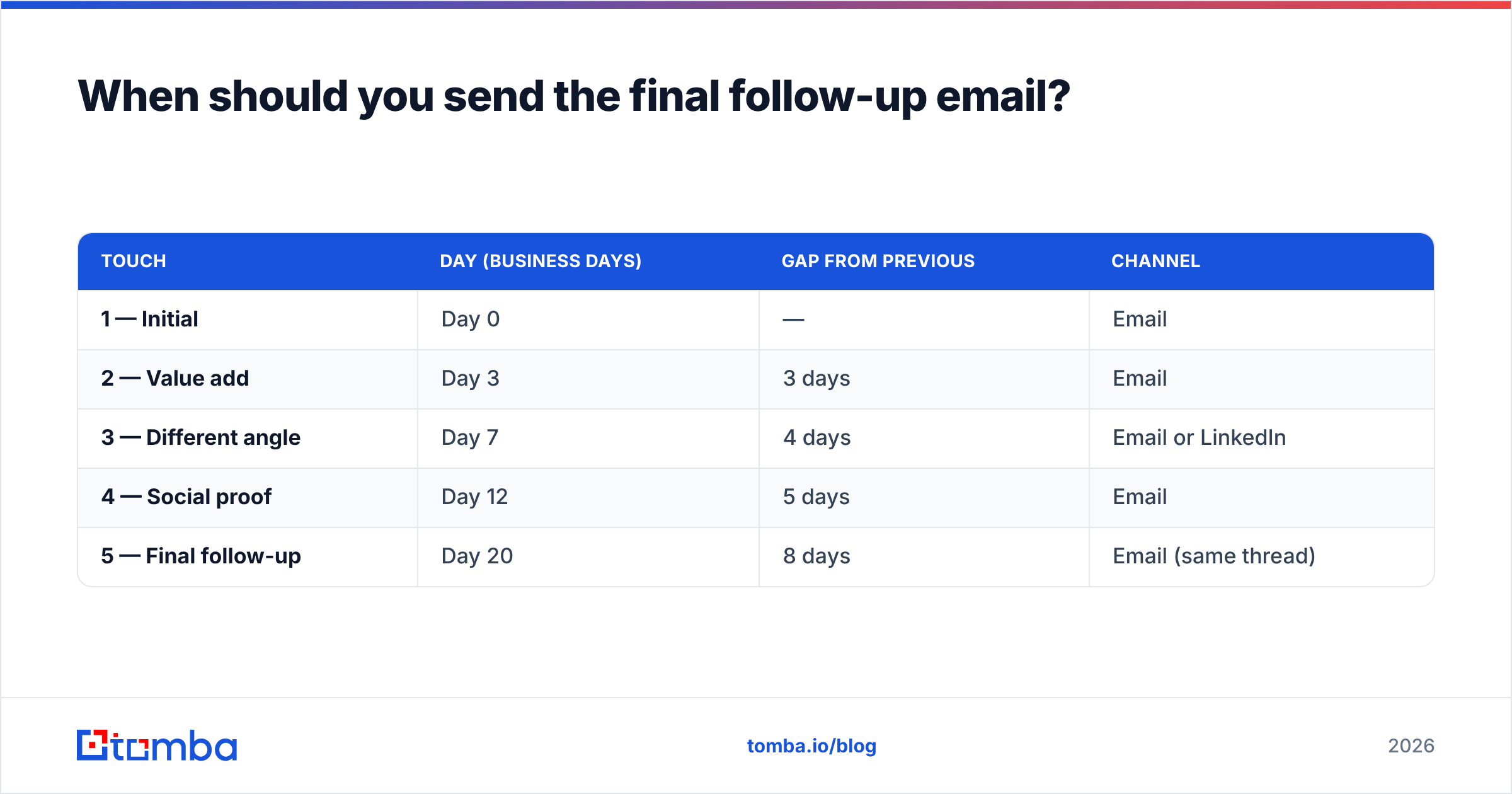
Wait longer than you think. The gap between your second-to-last and final touch should be the longest gap in the sequence.
| Touch | Day (business days) | Gap from previous | Channel |
|---|---|---|---|
| 1 — Initial | Day 0 | — | |
| 2 — Value add | Day 3 | 3 days | |
| 3 — Different angle | Day 7 | 4 days | Email or LinkedIn |
| 4 — Social proof | Day 12 | 5 days | |
| 5 — Final follow-up | Day 20 | 8 days | Email (same thread) |
Two reasons for the long gap. First, it separates the final email from the pattern of the previous four, so it doesn't read as more of the same cadence. Second, an 8-day gap often crosses a work-cycle boundary — a sprint ends, a quarter closes, a vacation ends — and reaches someone in a different state than when they ignored you on day 12.
On send time: Tuesday through Thursday, 7–9 a.m. in the recipient's timezone still holds up as the safest window for B2B. But timing effects are small compared to list quality. A perfectly timed email to an invalid address is worth exactly zero.
How many follow-ups is too many?#
Stop at 4–6 touches for cold outbound. Past that, the math turns against you.
Each additional email to a non-responder increases spam-complaint probability without meaningfully increasing reply probability. Gmail and Microsoft both weigh recipient-level engagement signals heavily, and a contact who has ignored six emails is generating a negative engagement signal every time you send. Google's bulk sender requirements put a hard spam-complaint ceiling of 0.3% on senders, and repeat-sending to non-engagers is the fastest way to breach it.
The trap is that the marginal cost is invisible. Sending touch seven costs you nothing today. It costs you inbox placement three weeks from now, on a different campaign, to a prospect who would have converted.
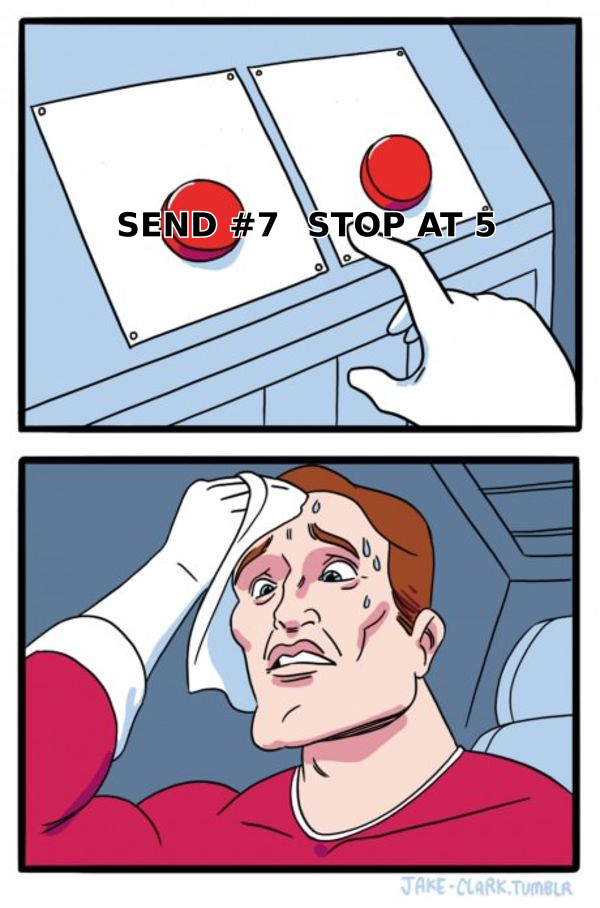
If your sequence isn't converting by touch five, the problem is upstream: wrong ICP, wrong offer, or a list full of addresses that never made it to a human. Adding touches doesn't fix any of those.
What kills a final follow-up email before it's read?#
Four things, ranked by how often they're the real culprit.
- The address was never valid. Roughly a quarter of B2B contact data decays each year through job changes alone. If your list is six months old and unverified, a meaningful slice of your sequence went nowhere. Running the list through an email verifier before the sequence starts is cheaper than any copy improvement.
- Catch-all domains masking bounces. A catch-all server accepts everything, so your bounce rate looks clean while the mail silently routes to a black hole. This is the most common reason a "healthy" sequence produces zero replies. A catch-all verifier separates the real mailboxes from the accept-all noise.
- Authentication gaps. No DKIM alignment, a broken SPF record, or a DMARC policy set to none — any of these push a cold email toward the spam folder regardless of what it says. Check your records before you rewrite your copy.
- Thread fatigue signals. Sending five emails in eight days from a fresh domain with no warmup history is a reputation problem, not a copy problem. Email deliverability degrades quietly and recovers slowly.
Fix these in order. Copy is the last lever, not the first.
Should you use AI to write the final follow-up?#
Use it for structure, not for the specific detail that makes the email work.
AI-generated closing emails converge on the same four or five phrasings, and prospects who receive a lot of outbound have started recognizing them. "I wanted to bump this to the top of your inbox" and "I'll assume this isn't a priority" are now pattern-matched as automated within about two seconds of reading.
Where AI genuinely helps: generating five subject-line variants to test, tightening a paragraph that ran long, and catching the passive-voice hedging that creeps into last-chance emails. Where it hurts: writing the one specific observation about the prospect's business that justifies the email existing at all. That has to come from a source — their job posting, their tech stack, their funding announcement, their email pattern.
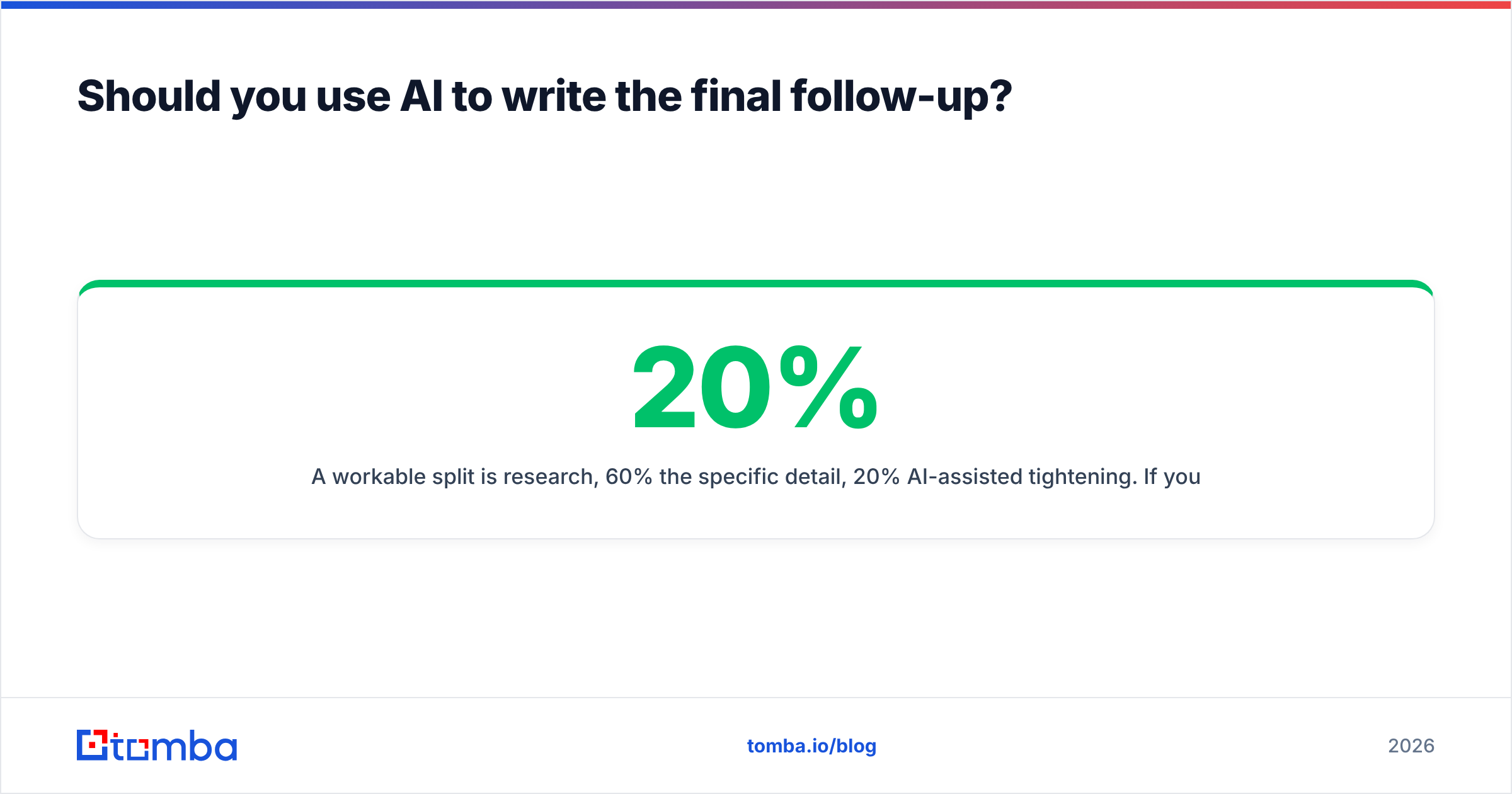
A workable split is 20% research, 60% the specific detail, 20% AI-assisted tightening. If you flip that ratio, you get an email that reads like everyone else's final follow-up, which is the same as not sending one.
How do you measure whether the final email is working?#
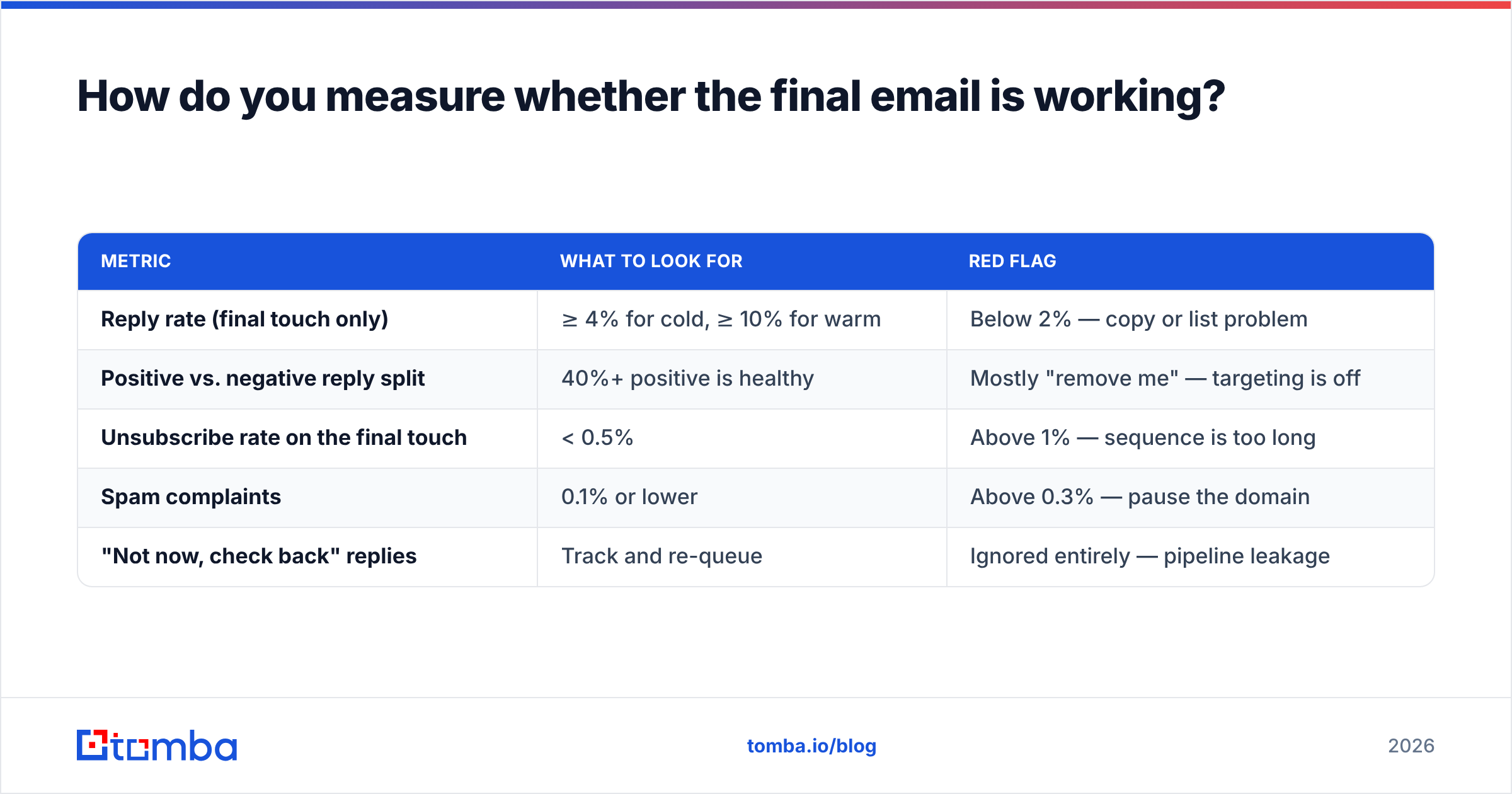
Track it separately from the rest of the sequence. Most teams roll the last touch into a single campaign-level reply rate and never learn whether it earned its place.
| Metric | What to look for | Red flag |
|---|---|---|
| Reply rate (final touch only) | ≥ 4% for cold, ≥ 10% for warm | Below 2% — copy or list problem |
| Positive vs. negative reply split | 40%+ positive is healthy | Mostly "remove me" — targeting is off |
| Unsubscribe rate on the final touch | < 0.5% | Above 1% — sequence is too long |
| Spam complaints | 0.1% or lower | Above 0.3% — pause the domain |
| "Not now, check back" replies | Track and re-queue | Ignored entirely — pipeline leakage |
That fourth-row threshold is not a soft guideline. Both Google and Yahoo's sender rules treat 0.3% as the line, and crossing it affects every campaign from that domain, not just the one that caused it.
The most-ignored row is the last one. "Check back in Q2" is a yes with a date attached, and most teams file it under "no reply" and delete the record. Build a re-queue list and the final follow-up starts generating pipeline six months out.
What does a good final follow-up sequence look like end to end?#
Here's the compressed version of the whole workflow:
- Build the list from a verified source. Pull contacts by domain and role, not from a scraped export of unknown age. Confirm the email pattern before you write anything.
- Verify before the first send. Remove hard bounces, flag catch-alls for a separate lower-volume track, deduplicate.
- Run four touches over 12 business days. Vary the angle each time — problem, proof, peer example, question. Never resend the same pitch with a new opener.
- Wait 8 days. Resist the urge to fill the gap.
- Send the final email as a thread reply. Acknowledge the silence, drop one specific thing, ask one binary question, state the exit.
- Honor the exit. Move non-responders to a 90-day suppression list. Re-queue anyone who said "later" on their stated date.
- Review the final-touch metrics separately and rewrite that one email every quarter.
Step one is where most sequences are won or lost. If you're pulling contacts from a stale CSV, no amount of closing-email craft will save the campaign — you'll be writing beautiful last-chance emails to people who left the company in 2024. Pulling fresh, verified contacts at the start of the sequence is what makes the final touch land in a real inbox. For teams doing this at volume, a bulk email finder run at list-build time removes the guesswork before it compounds across five touches.
Ready to make your last email land?#
The best final follow-up email in the world is worthless if it hits a dead mailbox. Start the sequence with contacts you can trust: use the Tomba Email Finder to pull verified, pattern-confirmed business emails by name or domain, with a free tier at 25 searches a month and paid plans starting at $49/mo. See full Tomba pricing for team volumes, or wire it into your sequencer directly with the Tomba API so every contact is verified before touch one goes out — and your final email actually gets read.
Further reading on sender standards: Google's bulk sender guidelines and HubSpot's sales follow-up research are both worth a pass before you rebuild a sequence.
Related guides#
// get started
Find, verify and enrich your first contacts today
Start on the free plan with 25 searches a month, then scale when your team is ready.
Free plan · No credit card required · GDPR & CCPA
// about the author