How to Send Personalized Emails in Bulk Without Landing in Spam
Mail merge blasts get ignored. Here are five ways to send personalized emails in bulk in 2026 — with the data hygiene, sending limits, and merge-tag rules that actually decide whether replies show up.
TL;DR
- Bulk personalization fails at the data layer, not the copy layer. If 18% of your list bounces, no merge tag saves the campaign.
- Pick your tool by volume: Gmail/Outlook mail merge under ~500/day, a dedicated cold email platform above that, an API when personalization is generated per-record.
- Three merge fields (first name, company, one observed detail) outperform ten. Fake depth reads worse than honest brevity.
- Verify every address before send. A 2% bounce rate is the ceiling before mailbox providers start throttling you.
- Warm the domain, split across inboxes, cap at 30–50 sends per inbox per day, and stagger delivery. Volume is a function of infrastructure, not ambition.
What does "personalized at scale" actually mean?#
It means every recipient gets a message that could only have been written to them — produced by a process that doesn't require you to write each one.
The gap between those two things is where most bulk campaigns die. You either write 40 genuinely tailored emails a week and cap out, or you blast 4,000 templated ones with {{first_name}} swapped in and watch reply rates sit under 1%.
The workable middle is structured personalization: you decide in advance which variables are worth merging, you source them cleanly, and you write a template with enough room that the variables carry real weight. Three good fields beat ten shallow ones every time.
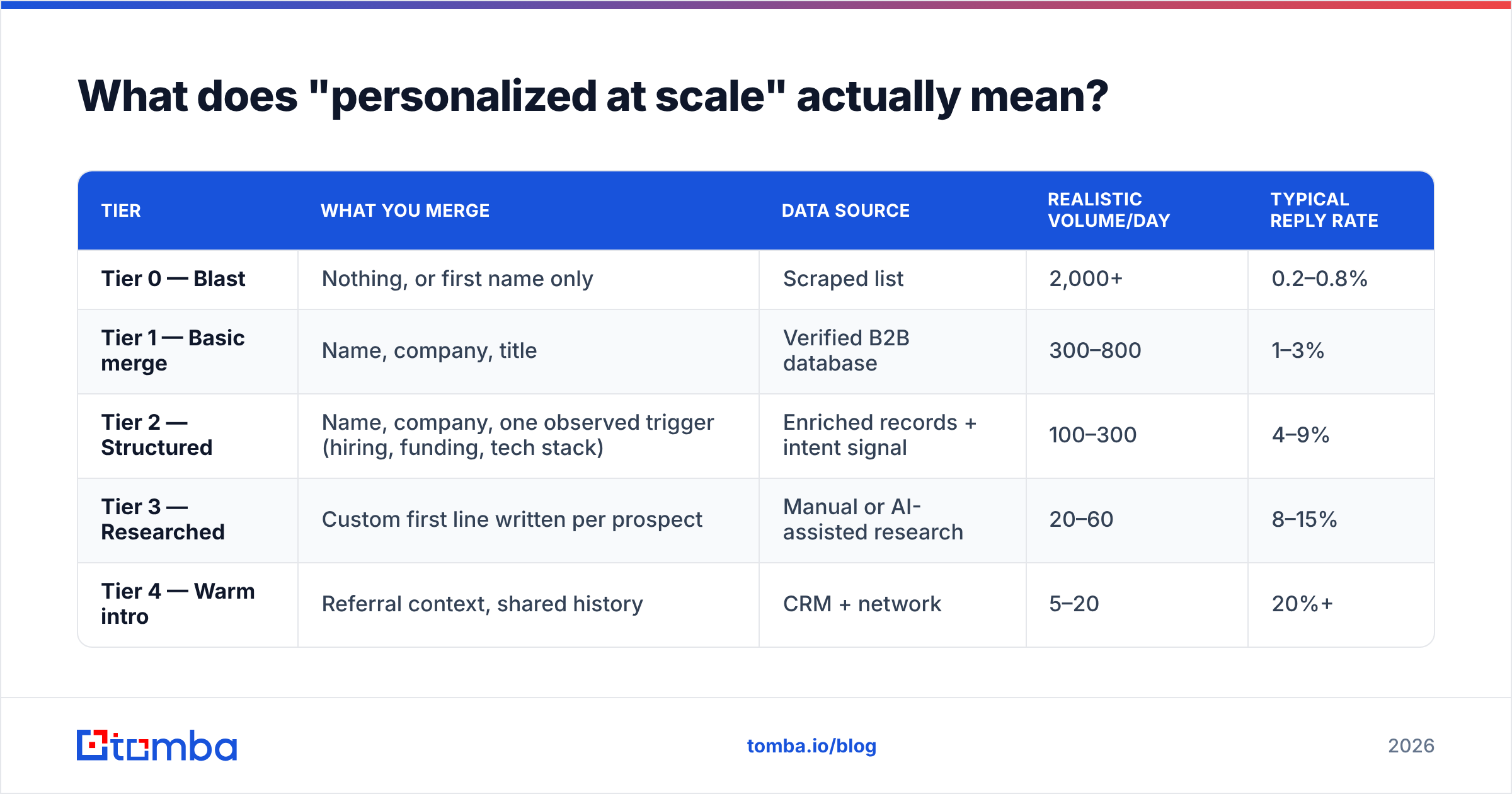
Here's the practical breakdown of personalization tiers:
| Tier | What you merge | Data source | Realistic volume/day | Typical reply rate |
|---|---|---|---|---|
| Tier 0 — Blast | Nothing, or first name only | Scraped list | 2,000+ | 0.2–0.8% |
| Tier 1 — Basic merge | Name, company, title | Verified B2B database | 300–800 | 1–3% |
| Tier 2 — Structured | Name, company, one observed trigger (hiring, funding, tech stack) | Enriched records + intent signal | 100–300 | 4–9% |
| Tier 3 — Researched | Custom first line written per prospect | Manual or AI-assisted research | 20–60 | 8–15% |
| Tier 4 — Warm intro | Referral context, shared history | CRM + network | 5–20 | 20%+ |
Most teams should live at Tier 2. It's the only tier where volume and response rate both stay usable, and it's fully automatable if your data is clean.

Why do bulk personalized emails land in spam?#
Because mailbox providers score your sending behavior, not your prose. You can write a perfect email and still get filtered.
The four things that actually move the needle:
- Bounce rate. Above 2–3%, Google and Microsoft start treating your domain as a list-quality risk. This is the single biggest lever and the easiest to fix — run every address through an email verifier before it enters a sequence.
- Authentication. SPF, DKIM, and DMARC must all pass. Since Google and Yahoo's 2024 bulk-sender requirements, DMARC is effectively mandatory for anyone sending volume. Check your SPF record before you scale, not after.
- Engagement signals. Opens matter less than they used to (Apple Mail Privacy Protection broke that metric), but replies, forwards, and "not spam" marks are strong positive signals. Deletion without reading and spam complaints are strong negatives.
- Sending pattern. A domain that sent 0 emails yesterday and 3,000 today looks like a compromised account. Ramp gradually.
Google publishes its sender requirements openly, and they're worth reading once in full rather than absorbing secondhand. The short version: keep spam complaints under 0.3%, authenticate everything, and make unsubscribe one click.
Sender reputation is cumulative and slow to repair. Damaging it takes one bad week; rebuilding takes six. Treat your sender reputation as an asset with a balance sheet.
What are the five ways to send personalized emails in bulk?#
1. Gmail or Outlook mail merge#
Native mail merge in Gmail (via the multi-send feature on Workspace) or Outlook with Word merge. Free, already in your stack, zero learning curve.
Limits: Gmail caps Workspace accounts at 2,000 recipients/day and multi-send at 1,500. In practice, staying under 500/day per inbox is the safe zone for cold outreach. No sequencing, no reply detection, no bounce handling.
Use when: you're sending under 200 emails, to a warm-ish list, and don't need follow-ups automated.
2. Google Sheets + a merge add-on#
Sheets holds the data, an add-on (Yet Another Mail Merge, GMass, Mailmeteor) does the sending. Cheap, transparent, and your merge columns are right there where you can audit them.
This is also where a Sheets email finder earns its keep — you can enrich the same spreadsheet you're sending from, so verification and personalization live in one place.
Use when: volume is 200–1,000/month and your team already lives in spreadsheets.
3. Dedicated cold email platforms#
Instantly, Smartlead, Lemlist, Saleshandy, Reply.io. These handle inbox rotation, warmup, sequencing, reply detection, and bounce suppression. This is the default answer for anyone sending 1,000+ per month.
Use when: outbound is a real motion with a real target, not an experiment.
4. Sales engagement platforms#
Outreach, Salesloft, Apollo. Heavier, CRM-native, built for teams where email is one channel among calls, LinkedIn, and tasks. Substantially more expensive per seat.
Use when: you have SDRs, a pipeline process, and management that wants activity reporting.
5. API-driven sending#
You generate the personalization programmatically and push through a transactional or SMTP provider. Full control, no per-seat pricing, and personalization can be as deep as your data allows — pull firmographics, generate a first line, verify the address, send. A Tomba API call in the enrichment step means the record is validated before it ever reaches your sender.
Use when: you have engineering resources and personalization logic that a template builder can't express.
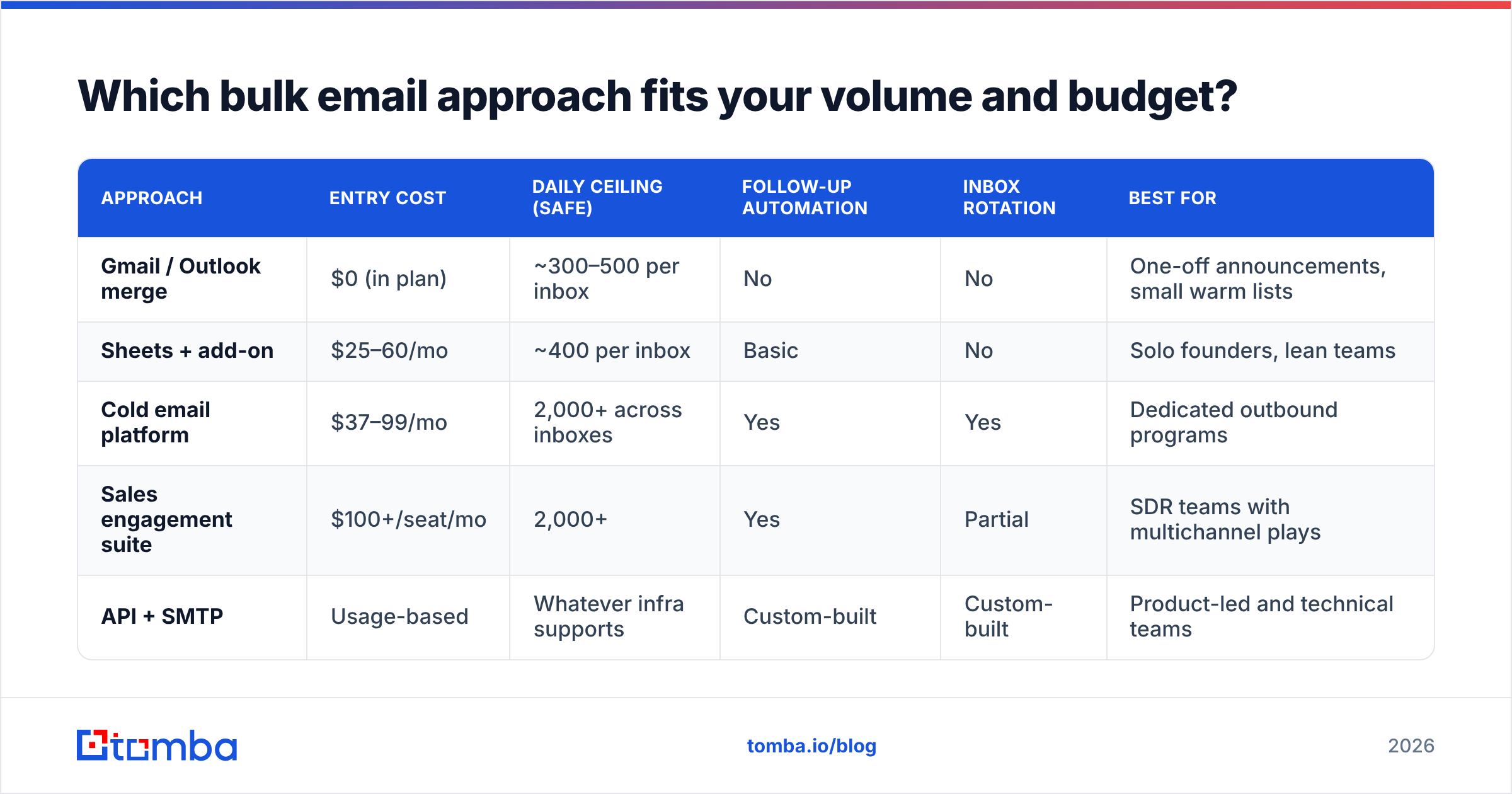
Which bulk email approach fits your volume and budget?#
| Approach | Entry cost | Daily ceiling (safe) | Follow-up automation | Inbox rotation | Best for |
|---|---|---|---|---|---|
| Gmail / Outlook merge | $0 (in plan) | ~300–500 per inbox | No | No | One-off announcements, small warm lists |
| Sheets + add-on | $25–60/mo | ~400 per inbox | Basic | No | Solo founders, lean teams |
| Cold email platform | $37–99/mo | 2,000+ across inboxes | Yes | Yes | Dedicated outbound programs |
| Sales engagement suite | $100+/seat/mo | 2,000+ | Yes | Partial | SDR teams with multichannel plays |
| API + SMTP | Usage-based | Whatever infra supports | Custom-built | Custom-built | Product-led and technical teams |
Two costs are missing from every vendor's pricing page: data and inboxes. A sending platform doesn't give you contacts, and it doesn't give you domains. Budget for both. A realistic 1,000-emails-per-day setup needs roughly 8–12 secondary domains with 2–3 inboxes each, plus a contact source.
How do you build a clean list before you send anything?#
Sequence matters. Do these in order:
- Define the segment narrowly. "VP Marketing at 50–200 person B2B SaaS companies in North America that raised a Series A in the last 18 months" is a segment. "Marketing leaders" is a mailing list.
- Source contacts. Pull from a B2B database, export from LinkedIn, or run a domain search against your target account list to surface every published address at each company.
- Verify. Every address, every time — even ones sourced two weeks ago. B2B email data decays at roughly 22–30% per year, which means a quarter of a year-old list is already dead.
- Handle catch-alls separately. Catch-all domains accept everything at the SMTP layer, so standard verification returns "unknown." Route these through a catch-all verifier instead of guessing, or segment them into a lower-volume send.
- Deduplicate across the whole database. Two SDRs emailing the same prospect in the same week is the fastest way to burn an account.
- Enrich the merge fields you'll actually use. If your template references company size and funding stage, those columns need to be populated for 95%+ of records — or your template needs a fallback that doesn't read like a broken script.
That last point deserves emphasis. A blank merge field renders as Hi , I saw that recently... and instantly identifies the email as automated. Every merge tag needs a default value, and every default value needs to make the sentence still work.

What does a good bulk-personalized email look like?#
Short. Specific in exactly one place. One ask.
Subject: {{company}} + [specific thing]

Hi {{first_name}},

Saw {{company}} is hiring three SDRs this quarter — usually means
the list-building side is about to get painful.

We give teams like yours verified contact data so reps aren't
spending their mornings guessing at email formats.

Worth 15 minutes next week?

— [Name]
What's doing the work here:
- The trigger ("hiring three SDRs") is one observed fact, not a compliment. Compliments are free; observations require attention, and the recipient can tell.
- The inference ("list-building is about to get painful") shows you understand what the trigger implies about their situation. This is the part templates usually skip.
- The ask is small. Fifteen minutes, not a demo, not a "quick call to explore synergies."
- No merge tag does heavy lifting. Swap
{{company}}for a blank and the email still parses.
If you're testing subject lines at volume, run variants through a subject line tester before committing — subject changes move open rates more than body changes move reply rates, and they're cheaper to iterate on.
How should you schedule and ramp a bulk send?#
Don't send 1,000 emails at 9:00 AM Monday from one domain. That is the pattern of a compromised account, and filters are trained on it.
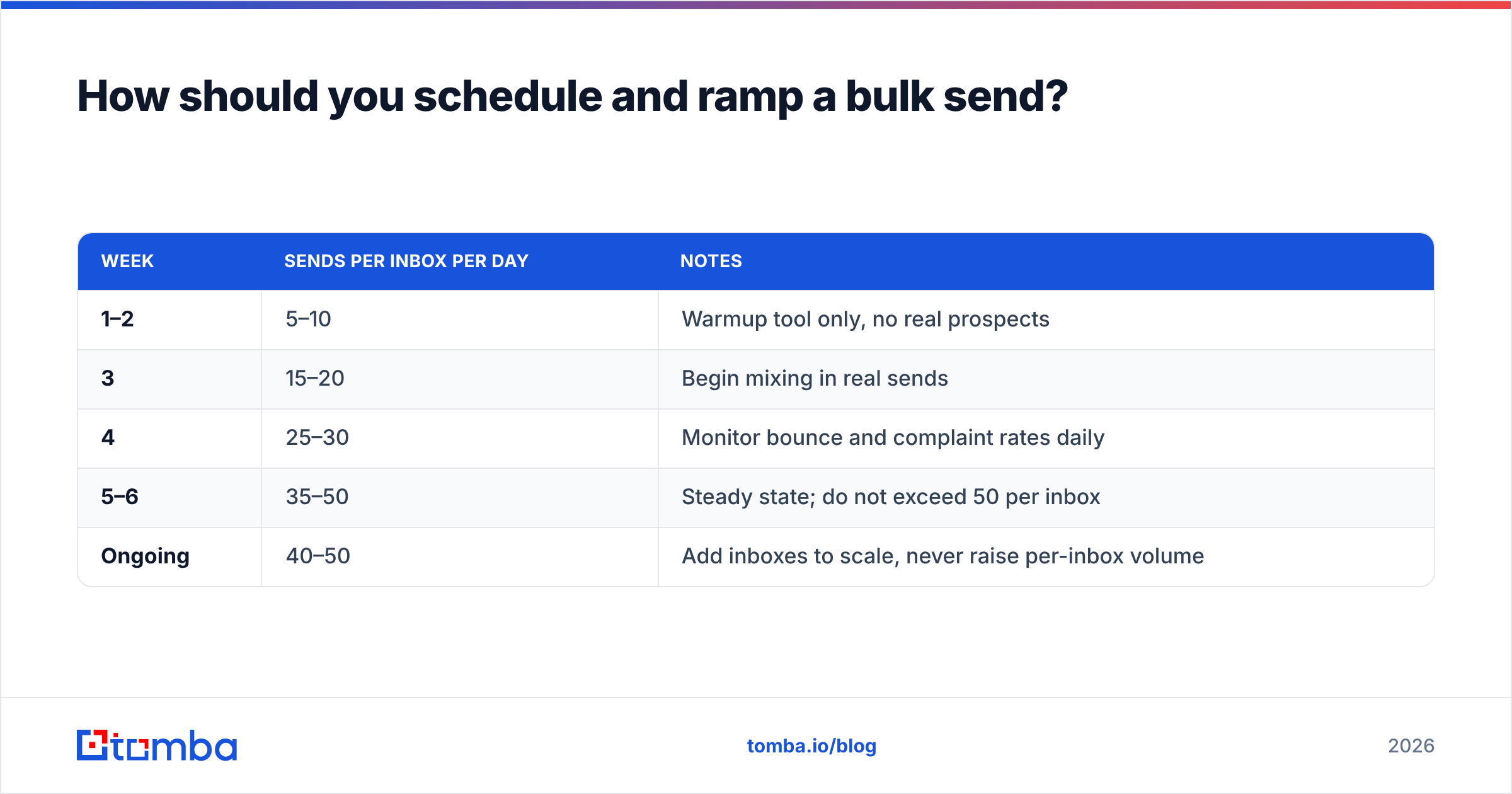
Warmup schedule for a new domain:
| Week | Sends per inbox per day | Notes |
|---|---|---|
| 1–2 | 5–10 | Warmup tool only, no real prospects |
| 3 | 15–20 | Begin mixing in real sends |
| 4 | 25–30 | Monitor bounce and complaint rates daily |
| 5–6 | 35–50 | Steady state; do not exceed 50 per inbox |
| Ongoing | 40–50 | Add inboxes to scale, never raise per-inbox volume |
Scaling means adding inboxes, not pushing existing ones harder. Ten inboxes at 40/day is 400 emails with healthy reputation. One inbox at 400/day is a burned domain within a fortnight.
Other scheduling rules that hold up:
- Stagger delivery across a 4–6 hour window with randomized intervals. Most platforms do this automatically; verify yours does.
- Send in the recipient's timezone, not yours. Tuesday–Thursday, 7–10 AM local, remains the best-tested window across most B2B datasets.
- Cap follow-ups at 3–4. Reply rates on touch five and beyond are marginal and complaint rates climb.
- Pause the sequence on any reply, including out-of-office. Nothing reads worse than a follow-up sent to someone who already answered.
Track results per segment, not in aggregate. A campaign averaging a 4% response rate is often two segments at 9% and 0.5% — and the aggregate hides which one to kill.
What mistakes kill bulk personalization campaigns?#
- Personalizing the wrong variable. Mentioning someone's city or alma mater signals scraping, not research. Mention something about their business.
- Skipping verification to save credits. Verification costs a fraction of a cent per address. A blacklisted domain costs weeks.
- Sending from your primary domain. Use secondary domains for cold outreach. If reputation tanks, your company email still works. Redirect the secondaries to your main site.
- Writing long. Under 120 words. Recipients decide in the preview pane.
- One-click unsubscribe missing. Required by Gmail and Yahoo for bulk senders, and cheaper than a spam complaint regardless.
- No suppression list. Bounced, unsubscribed, and closed-lost contacts must be permanently excluded across every tool you send from.
- Treating replies as the finish line. Response speed drives conversion more than any personalization tactic. Reply within an hour.
For a fuller view of the tooling landscape, G2's sales engagement category is a reasonable neutral starting point — filter by company size, because a tool great at 200 seats is usually miserable at two.
How do you measure whether it's working?#
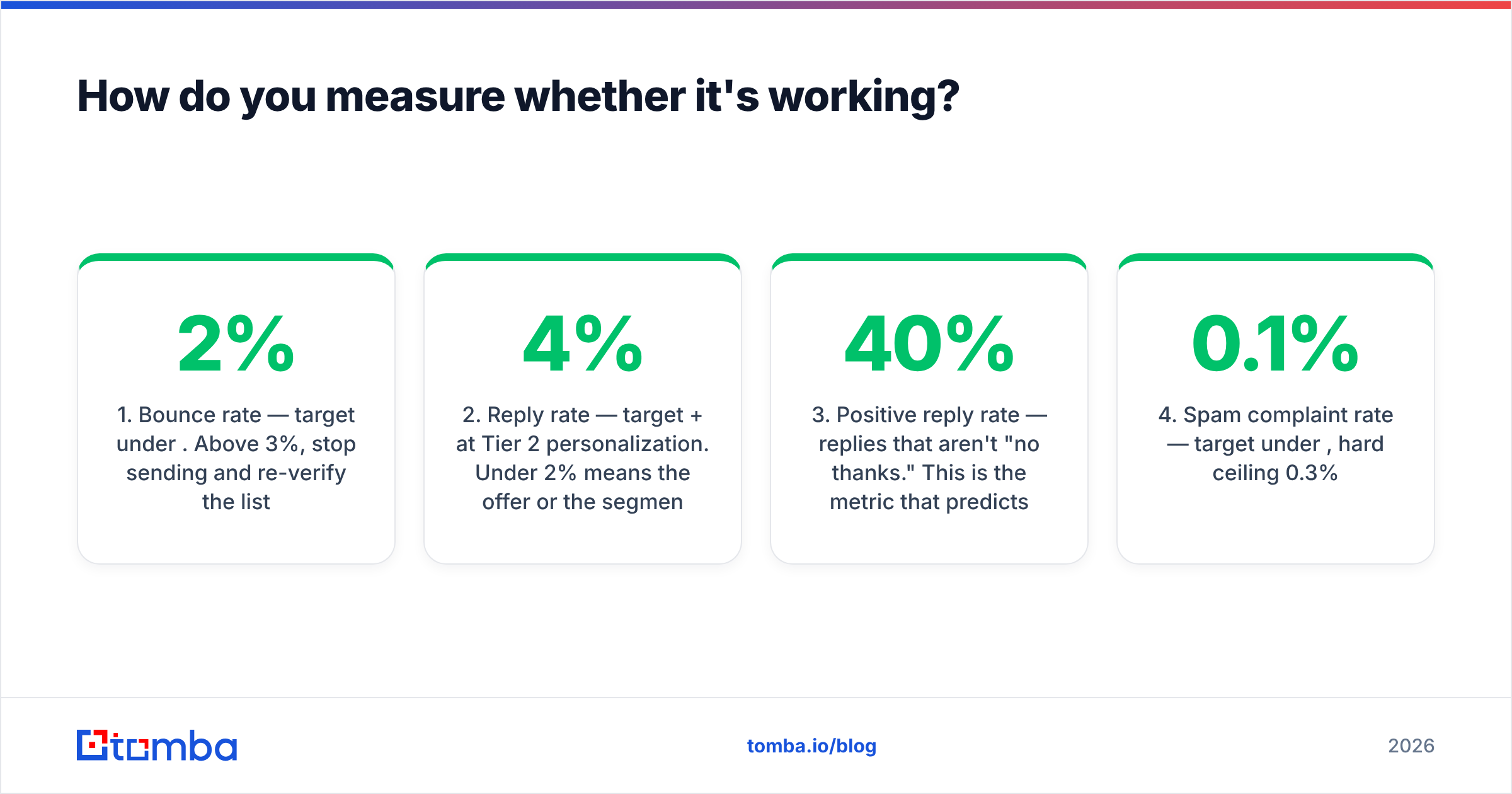
Four numbers, checked weekly:
- Bounce rate — target under 2%. Above 3%, stop sending and re-verify the list.
- Reply rate — target 4%+ at Tier 2 personalization. Under 2% means the offer or the segment is wrong, not the copy.
- Positive reply rate — replies that aren't "no thanks." This is the metric that predicts pipeline. Target 30–40% of total replies.
- Spam complaint rate — target under 0.1%, hard ceiling 0.3%.
Open rate is no longer trustworthy enough to optimize against. Use it directionally at best, and never as a campaign's primary success metric.
If bounce rate is your problem, the fix is upstream in data quality. If reply rate is the problem, the fix is usually segment definition — you're emailing people for whom the offer isn't relevant, and no amount of merge-tag depth fixes irrelevance.
Start with the data layer#
Everything above compounds off one thing: whether the addresses you're sending to are real and belong to the people you think they belong to. Personalization built on stale data is a well-written email to nobody.
Tomba's Email Finder finds verified professional addresses by name, company, or domain, with confidence scoring so you know what you're sending to before you send it. The free tier gives you 25 searches a month to test the accuracy against a list you already know; paid Tomba pricing starts at $49/mo for Starter, with Growth at $99/mo when volume picks up. Build the list clean, verify it, then let the merge tags do the small job they're actually good at.
Related guides#
// get started
Find, verify and enrich your first contacts today
Start on the free plan with 25 searches a month, then scale when your team is ready.
Free plan · No credit card required · GDPR & CCPA
// about the author