How To Tell If Someone Read Your Email: 7 Real Methods
Read receipts lie more often than they tell the truth. Here are seven ways to tell if someone read your email in 2026, what each one actually proves, and when tracking pixels quietly break.
TL;DR
- There is no reliable way to prove someone read your email. There are only signals of varying quality, and open tracking is the weakest one on the list.
- Apple Mail Privacy Protection and Gmail's image proxy pre-fetch images automatically, which means a large share of "opens" you see never involved a human eye.
- Read receipts (Outlook, MDN/DSN) are the only method that asks permission, and most recipients decline or never see the prompt.
- The strongest signals are behavioral: link clicks, document views, calendar activity, website visits, and replies. Rank them above opens every time.
- Fix your list quality before you obsess over open rates. A bounced or catch-all address never produces a real signal at all.
Why do you even want to know if someone read your email?#
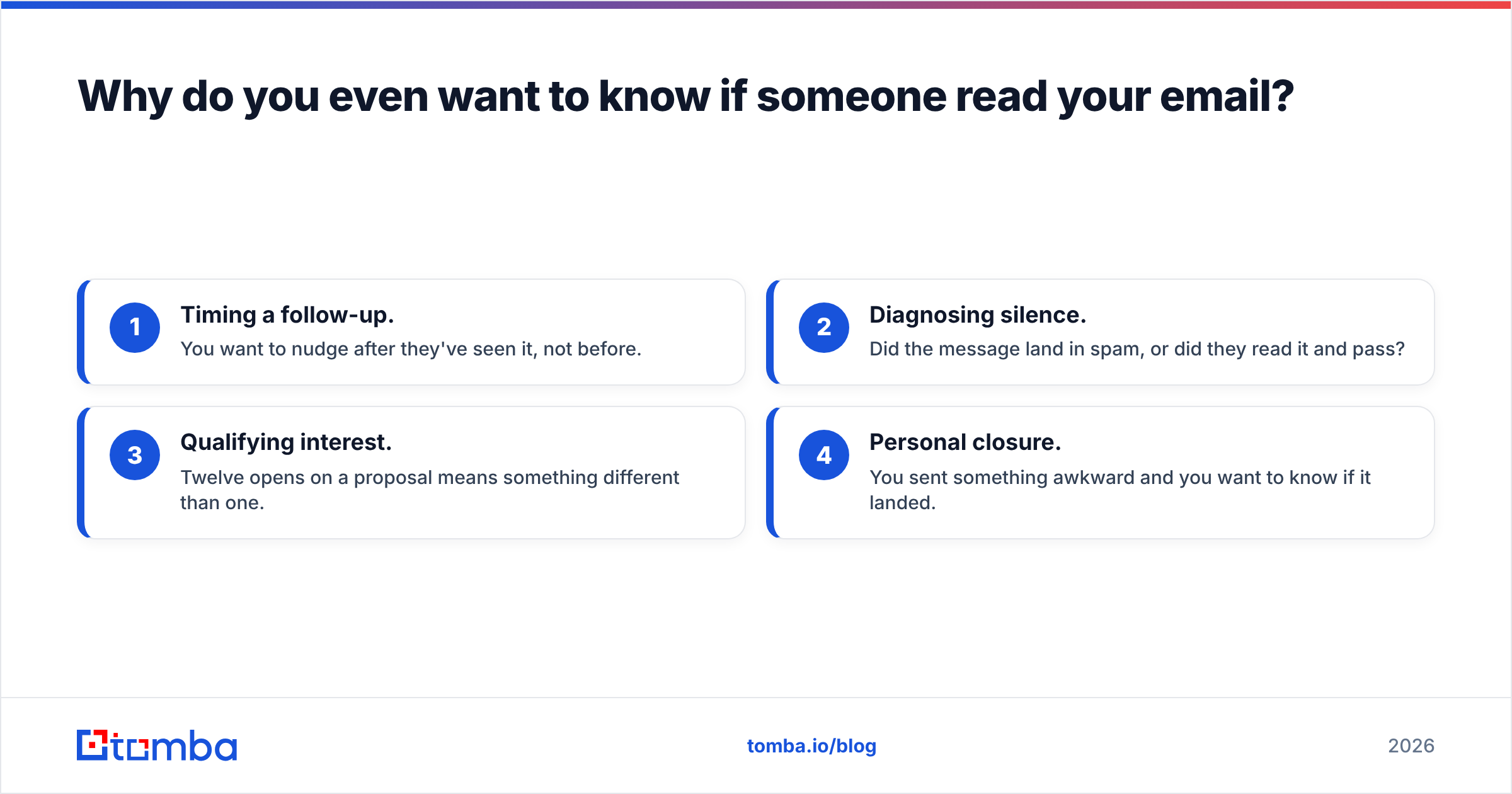
Start with the honest reason. Most people ask "how to tell if someone read your email" for one of four jobs:
- Timing a follow-up. You want to nudge after they've seen it, not before.
- Diagnosing silence. Did the message land in spam, or did they read it and pass?
- Qualifying interest. Twelve opens on a proposal means something different than one.
- Personal closure. You sent something awkward and you want to know if it landed.
Those jobs need different tools. The follow-up timing job is served fine by imperfect data. The "did it deliver at all" job is a deliverability question, not a tracking question. Knowing which one you're solving saves you from over-trusting a green checkmark in a sales tool.
Here's the uncomfortable baseline: email was designed as a fire-and-forget protocol. SMTP hands your message to a server and walks away. Everything layered on top — pixels, receipts, link redirects — is a workaround, and each one has a specific failure mode.
What are the actual methods, and what does each one prove?#
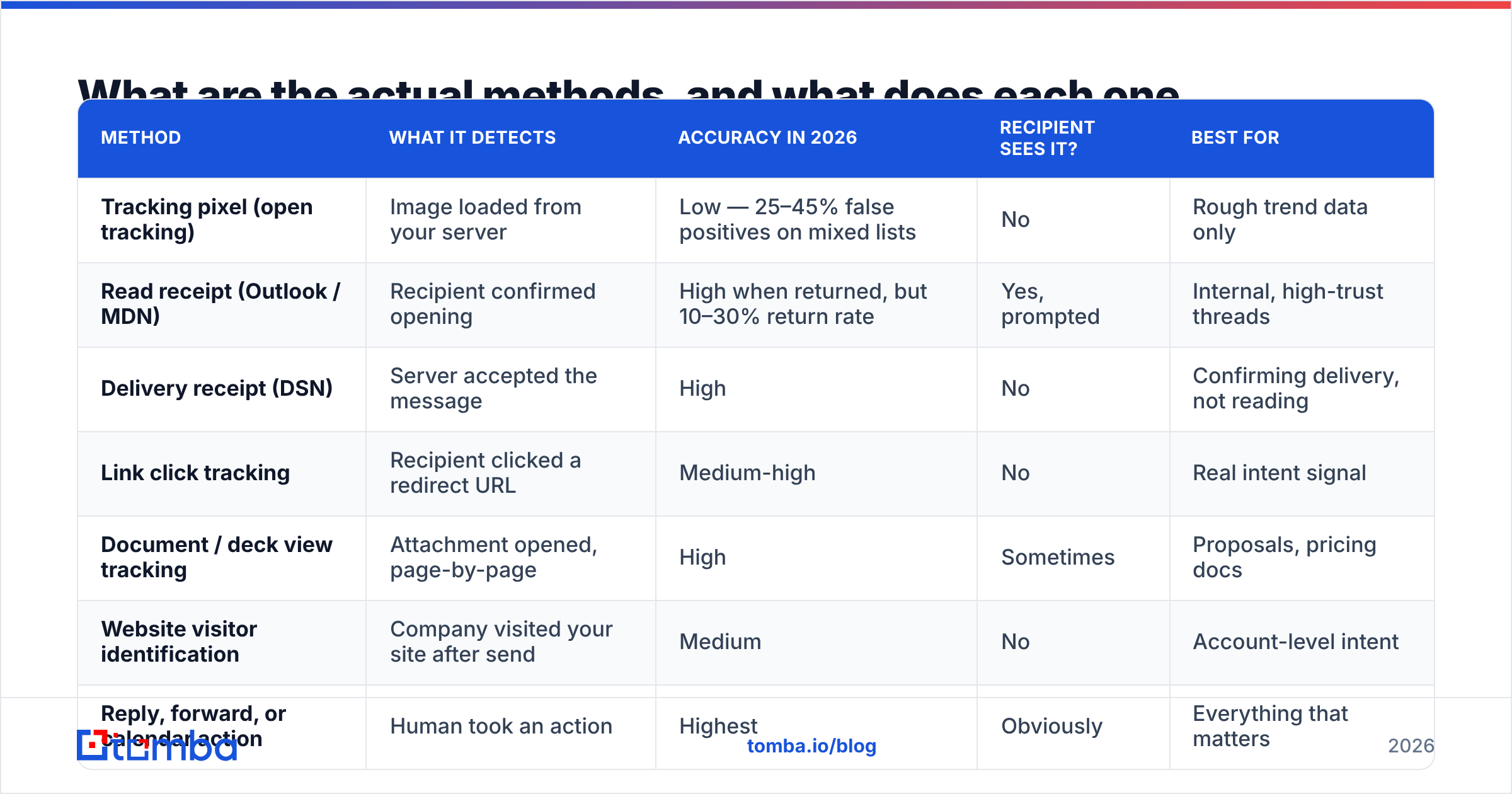
Seven approaches cover essentially everything available in 2026. They are not equal.
| Method | What it detects | Accuracy in 2026 | Recipient sees it? | Best for |
|---|---|---|---|---|
| Tracking pixel (open tracking) | Image loaded from your server | Low — 25–45% false positives on mixed lists | No | Rough trend data only |
| Read receipt (Outlook / MDN) | Recipient confirmed opening | High when returned, but 10–30% return rate | Yes, prompted | Internal, high-trust threads |
| Delivery receipt (DSN) | Server accepted the message | High | No | Confirming delivery, not reading |
| Link click tracking | Recipient clicked a redirect URL | Medium-high | No | Real intent signal |
| Document / deck view tracking | Attachment opened, page-by-page | High | Sometimes | Proposals, pricing docs |
| Website visitor identification | Company visited your site after send | Medium | No | Account-level intent |
| Reply, forward, or calendar action | Human took an action | Highest | Obviously | Everything that matters |
Read that table top to bottom and the pattern is clear: the methods that require the recipient to do something are the ones you can trust. The passive methods are the ones that break.
Method 1: Tracking pixels#
A 1×1 transparent image is embedded in your HTML email with a unique URL. When the mail client loads images, your server logs a request and calls it an "open."
This is what Mailchimp, HubSpot, Instantly, Salesloft, and every sales engagement tool use. It's cheap, invisible, and increasingly wrong.
Method 2: Read receipts#
The formal version is a Message Disposition Notification, defined in RFC 8098. Outlook exposes it as "Request a Read Receipt." Gmail exposes it only on Workspace accounts, and admins usually restrict it to internal domains.
The recipient gets a prompt: "Send a read receipt?" Many say no. Many clients suppress the prompt entirely. But when a receipt comes back, it's real — a human clicked something.
Method 3: Link click tracking#
Your links get rewritten through a redirect domain. A click means a browser opened your URL. Bots and security scanners do click links, but a click on the third link in a message, forty minutes after send, from a residential IP is a strong human signal.
Method 4: Document view tracking#
Tools like DocSend, PandaDoc, and Google Drive's activity view tell you which pages someone read and for how long. This is the highest-fidelity read data available, because you're tracking a deliberate action, not a passive image load.

Why do open rates lie so badly now?#
Three changes broke open tracking, and none of them are reversing.
Apple Mail Privacy Protection. Since iOS 15, Apple Mail pre-loads all remote images through a proxy when the app syncs — whether or not the human opens the message. Apple's own Mail Privacy Protection documentation is explicit about it. Apple Mail is roughly half of all email opens in many B2C datasets and a meaningful chunk of B2B. Every one of those recipients registers as "opened" the moment mail syncs.
Gmail image proxying. Google has cached remote images through googleusercontent.com since 2013. The open fires when Gmail fetches the image, which happens on render — usually accurate, but stripped of IP and device data.
Security scanners. Microsoft Defender for Office 365, Proofpoint, Mimecast, and Barracuda detonate links and load images in sandboxes before delivery. On enterprise domains, you can see an open timestamped seconds after send, plus two or three link clicks, from a data-center IP. No human involved.
The net effect: on a B2B list with heavy Microsoft 365 and Apple Mail presence, a meaningful share of your open events are machines. Anyone who tells you their open tracking is 95% accurate is selling something.
How should you rank the signals you do get?#
Build a hierarchy and act on it. Here's the practical ladder, weakest to strongest:
- Open with no other activity — treat as noise. Do not change your follow-up based on this alone.
- Multiple opens across several days — weak positive. Could be a forward chain, could be a syncing phone.
- Single link click — medium. Something got clicked; it might have been a scanner.
- Click on a low-priority link (footer, calendar, pricing page) — strong. Scanners hit the first link; humans hit the one they care about.
- Document view with time-on-page over 30 seconds — very strong.
- Website visit from the recipient's company domain — very strong at the account level. Tools that handle website visitor reveal surface this without needing a click.
- Reply, forward, calendar accept, or out-of-office — definitive.
Notice that an out-of-office is genuinely useful data. It confirms delivery, confirms the mailbox is monitored, often gives you a colleague's name and address, and hands you a return date to time your follow-up around.
Which tools give you the most honest read data?#
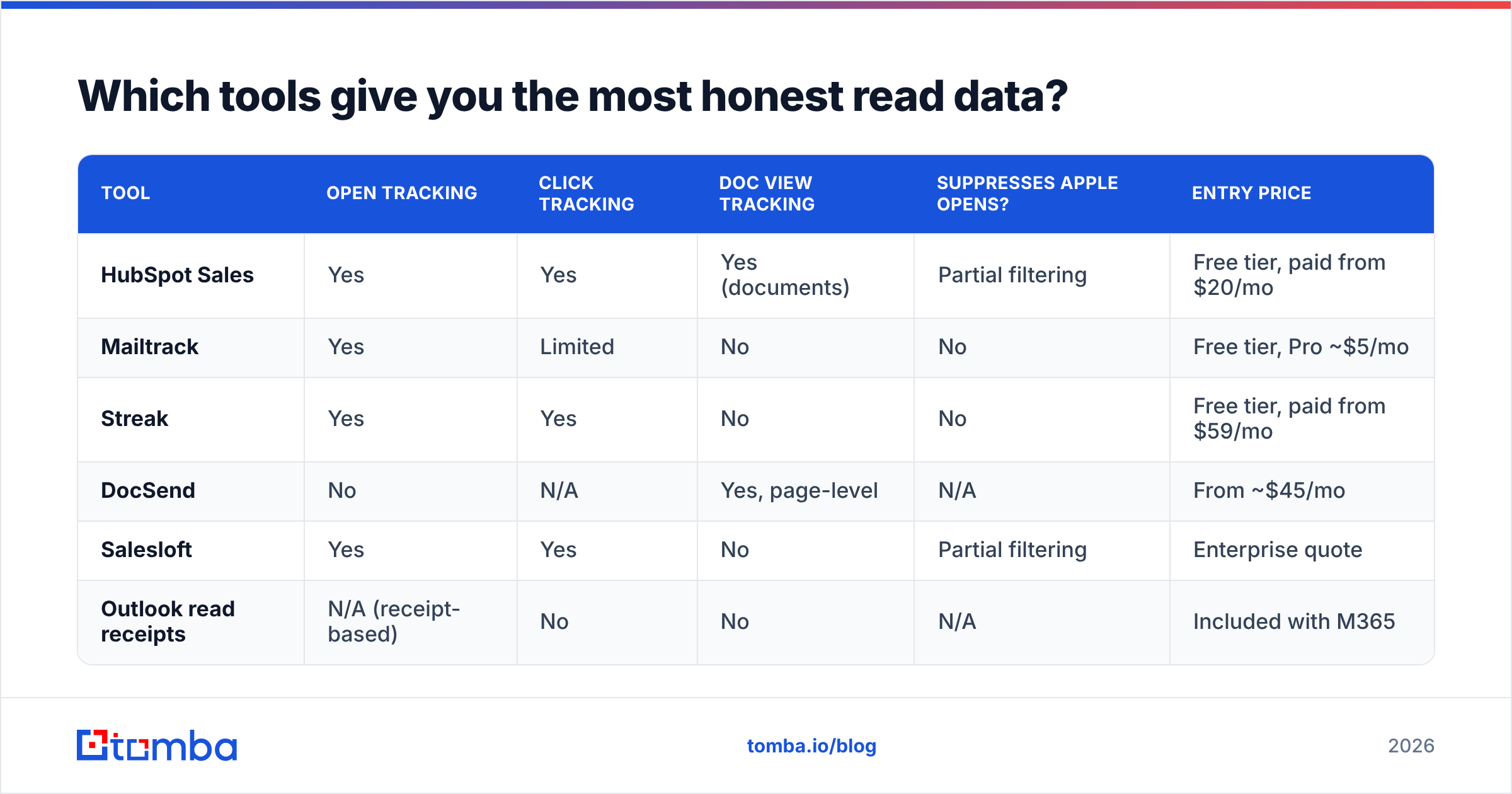
Compare on what they actually measure rather than what the dashboard headline says.
| Tool | Open tracking | Click tracking | Doc view tracking | Suppresses Apple opens? | Entry price |
|---|---|---|---|---|---|
| HubSpot Sales | Yes | Yes | Yes (documents) | Partial filtering | Free tier, paid from $20/mo |
| Mailtrack | Yes | Limited | No | No | Free tier, Pro ~$5/mo |
| Streak | Yes | Yes | No | No | Free tier, paid from $59/mo |
| DocSend | No | N/A | Yes, page-level | N/A | From ~$45/mo |
| Salesloft | Yes | Yes | No | Partial filtering | Enterprise quote |
| Outlook read receipts | N/A (receipt-based) | No | No | N/A | Included with M365 |
Two takeaways. First, the tools that suppress or flag Apple Mail Privacy Protection opens are giving you better data even though the reported numbers look worse — that's a feature, not a downgrade. Second, if the read signal genuinely matters to your deal, put the content in a tracked document instead of the email body. Page-level view data on a pricing deck beats an open pixel every time.
If you're evaluating vendors, G2's sales engagement category is a reasonable place to compare how each one reports opens, and HubSpot documents its own tracking limitations openly in its knowledge base.
Can you tell if someone read your email without any tracking tool?#
Partly. Four no-tool techniques still work.
- Ask directly, in one line. "Did this reach you okay?" gets a yes/no from more people than a tracking pixel gets real opens. It's blunt and it works.
- Request a read receipt in Outlook. File → Options → Mail → Tracking, or per-message under Options. Low return rate, but zero false positives.
- Watch for the out-of-office. Free delivery confirmation plus a timeline.
- Check for silent forwarding clues. A reply from someone you never emailed means your message was read and passed along — the best outcome you can get from a cold send.
There's also the unglamorous option: send at a time you can observe. If you email a prospect at 9:05 a.m. and they post on LinkedIn at 9:20, they were in front of a screen. That's not proof, but it beats a pixel fired by a sandbox.
What if the email never reached a human at all?#
This is the question most "read tracking" content skips, and it's usually the real problem.
An email that bounces, lands in a spam folder, or hits a catch-all address that silently discards mail will never register as read — because it wasn't. Before you spend another hour debugging your tracking setup, rule out three things:
- Address validity. Run the list through an email verifier and drop anything that isn't deliverable. Invalid addresses inflate your denominator and crater your sender reputation at the same time.
- Catch-all ambiguity. Catch-all domains accept everything at the SMTP layer and route most of it nowhere. A catch-all verifier tells you whether a specific mailbox actually exists behind the wildcard.
- Authentication and placement. Missing or misaligned SPF, DKIM, and DMARC records send you to spam on Google and Microsoft. Check your SPF record and confirm alignment before blaming the recipient.
Sequence matters here. Verification comes first, deliverability second, tracking a distant third. A 60% open rate on a list where 30% of addresses don't exist is a meaningless number.
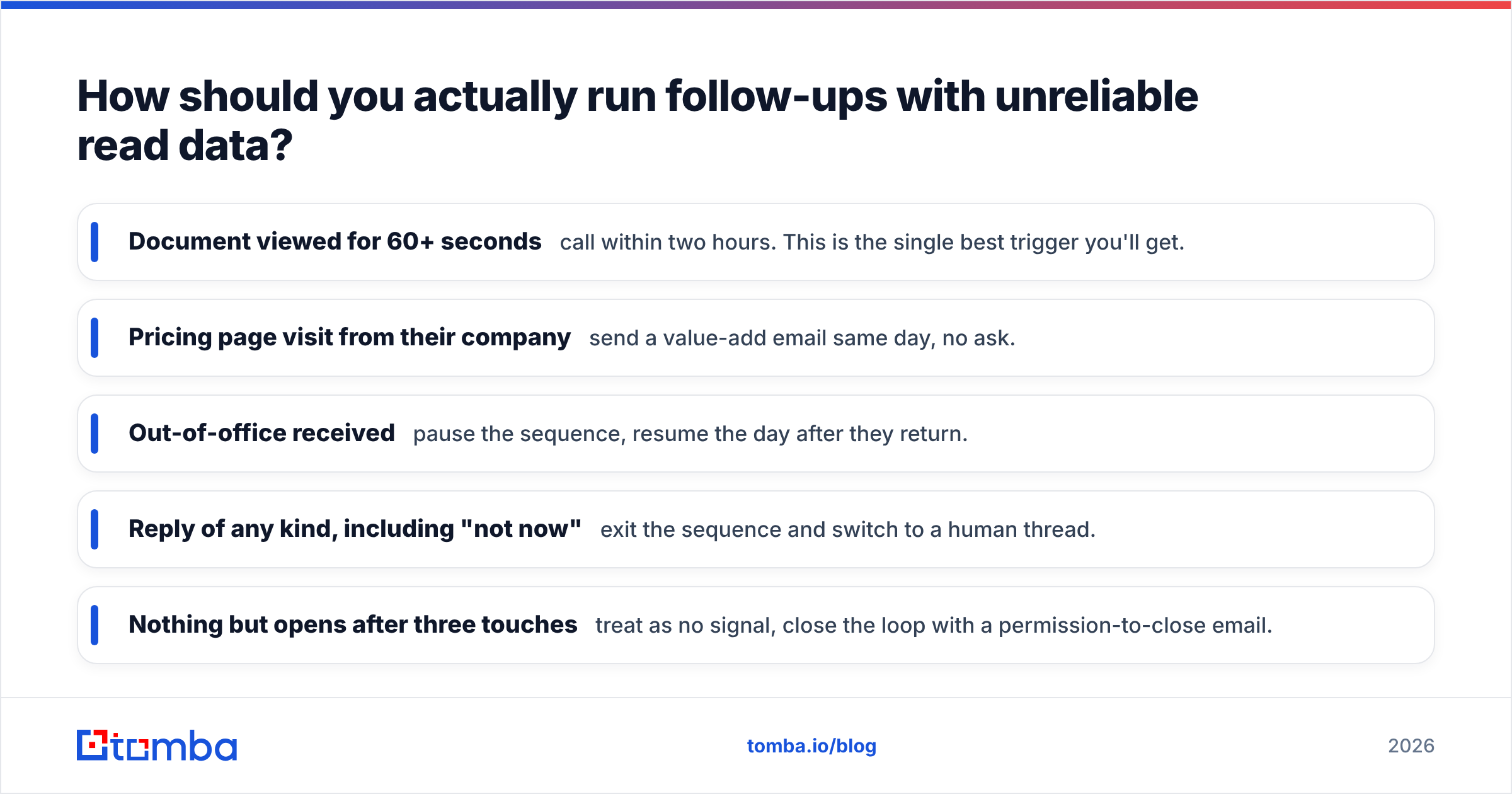
How should you actually run follow-ups with unreliable read data?#
Stop building your cadence around opens. Build it around a fixed schedule with behavioral overrides.
The default cadence. Send, then follow up on day 3, day 7, and day 14 regardless of open data. Three touches after the initial send captures most of the reply volume you're going to get.
The overrides. Escalate the moment you see a high-quality signal:
- Document viewed for 60+ seconds — call within two hours. This is the single best trigger you'll get.
- Pricing page visit from their company — send a value-add email same day, no ask.
- Out-of-office received — pause the sequence, resume the day after they return.
- Reply of any kind, including "not now" — exit the sequence and switch to a human thread.
- Nothing but opens after three touches — treat as no signal, close the loop with a permission-to-close email.
That last one matters. If your only data is opens and there's still no reply after three touches, the opens were probably machines. Send the breakup email and move on rather than convincing yourself that eight phantom opens mean interest.
One more operational note: keep your channel mix honest. If email reads are ambiguous, a call to a verified direct line resolves the question in ninety seconds. Pairing your outreach data with a phone finder turns a stalled email thread into a conversation you can actually measure.
What should you stop doing immediately?#
Three habits that waste time and occasionally get you blocked:
- Don't send follow-ups that reference the open. "I saw you opened my email twice" reads as surveillance, and about a third of the time you'll be wrong because Apple's proxy fired it. It's the fastest way to get reported.
- Don't optimize subject lines on open rate alone. With machine opens polluting the metric, you'll pick winners that aren't. Optimize on reply rate — it's the only number nobody can fake.
- Don't buy a tracking upgrade before you fix list hygiene. Better instrumentation on bad data produces confident wrong answers.
For a broader framing on how to read engagement metrics honestly, the concept of response rate is worth internalizing over open rate as your primary KPI. It's harder to move and impossible to fake, which is exactly why it's useful.
Ready to stop guessing?#
You can't reliably prove someone read your email, and the industry's most-quoted metric is quietly half-machine. What you can control is whether the message reaches a real, working inbox belonging to the person you actually meant to reach — because every read signal downstream depends on that one thing being true.
Start there. Use the Tomba Email Finder to source verified, deliverable addresses by name or domain, so the opens and clicks you do see come from humans instead of dead mailboxes and sandbox scanners. The free tier gives you 25 searches a month to test it against your current list; paid plans start at $49/mo, with full Tomba pricing laid out if you need volume. Fix the input, and the signals downstream get a lot easier to read.
Related guides#
// get started
Find, verify and enrich your first contacts today
Start on the free plan with 25 searches a month, then scale when your team is ready.
Free plan · No credit card required · GDPR & CCPA
// about the author