How to Test if an Email Address Is Valid: 7 Methods
Seven ways to test whether an email address is real — from a 10-second syntax check to SMTP handshakes and catch-all handling — plus which ones you can trust before you hit send.
TL;DR
- A valid-looking email and a deliverable email are different things. Syntax checks catch typos; only an SMTP-level check tells you whether a mailbox actually exists.
- The fastest free method is a single-address checker — paste, wait two seconds, read the verdict. Good for one-offs, useless at scale.
- For lists, use a bulk verifier and act on the tiers: send to valid, drop invalid, quarantine unknown and catch-all.
- Catch-all domains (roughly 15-20% of B2B domains) accept everything at the SMTP layer, so they need pattern-confidence scoring instead of a binary answer.
- Keep your bounce rate under 2%. Above that, mailbox providers start throttling your domain regardless of how good your copy is.
Why does testing an email address matter before you send?#
Because bounces are a reputation tax, not a rounding error.
When you send to a dead mailbox, the receiving server returns a hard bounce. Gmail, Outlook, and Yahoo all track how often your sending domain does that. Cross roughly 2% and your inbox placement starts sliding — first to spam for the marginal recipients, then for everyone. Google's own sender guidelines are explicit that bulk senders must keep spam complaints and invalid recipients low or face rate limiting.
The math is unforgiving. A 5,000-contact list with 12% dead addresses generates 600 hard bounces. That single campaign can knock a warm domain into the promotions tab for a month. Testing first costs you a few cents per address and about ten minutes.
There's a second reason that matters more for sales teams: reply-rate math. Every dead address in a sequence is a slot wasted. If your sequence sends five touches per contact, 600 dead addresses burn 3,000 sends against nothing.

What is the difference between a valid and a deliverable email address?#
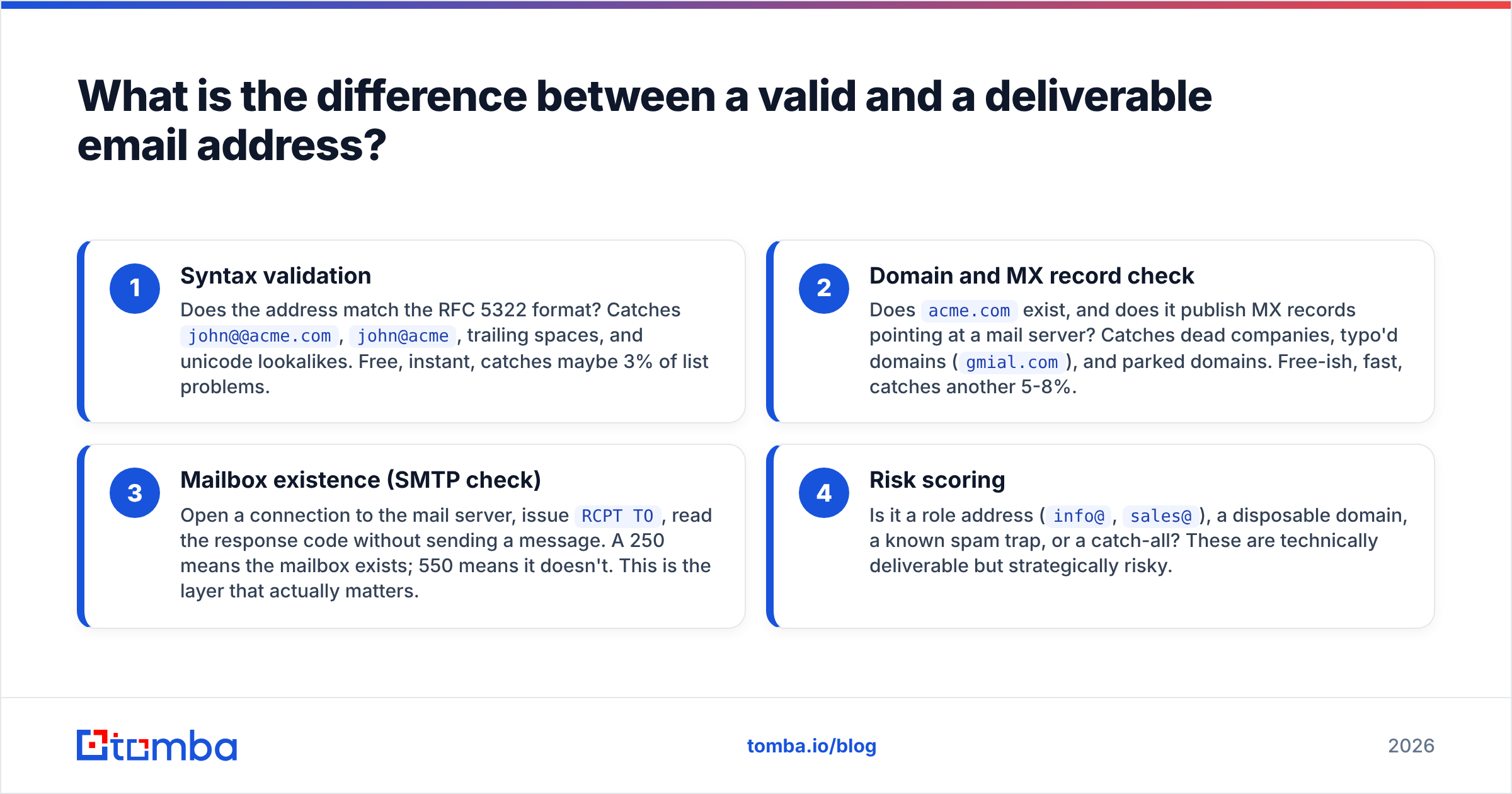
Valid means the string is well-formed and the domain can receive mail. Deliverable means a human's mailbox is sitting at that exact address, ready to accept a message.
Four layers sit between those two states, and each one filters out a different failure:
- Syntax validation — Does the address match the RFC 5322 format? Catches
john@@acme.com,john@acme, trailing spaces, and unicode lookalikes. Free, instant, catches maybe 3% of list problems. - Domain and MX record check — Does
acme.comexist, and does it publish MX records pointing at a mail server? Catches dead companies, typo'd domains (gmial.com), and parked domains. Free-ish, fast, catches another 5-8%. - Mailbox existence (SMTP check) — Open a connection to the mail server, issue
RCPT TO, read the response code without sending a message. A 250 means the mailbox exists; 550 means it doesn't. This is the layer that actually matters. - Risk scoring — Is it a role address (
info@,sales@), a disposable domain, a known spam trap, or a catch-all? These are technically deliverable but strategically risky.
A tool that only does steps 1 and 2 will happily tell you definitely.not.real@microsoft.com is "valid." That's why free regex validators feel useless in practice — they are answering a different question than the one you asked.
How do you test if an email address is valid — the 7 methods#
Ranked by effort, lowest first.
1. Run it through a free single-address checker#
Paste one address, get a verdict in under three seconds. Use a free email checker when you're about to send one important message and want to avoid an embarrassing bounce back from a prospect's assistant.
Good for: one-off checks before a high-stakes send. Bad for: anything over about 20 addresses.
2. Check the syntax manually#
If you have no tools at all, scan for the obvious breakers: exactly one @, no spaces, a dot in the domain, a TLD of two or more characters, no leading/trailing periods in the local part. This catches CRM data-entry errors, which are more common than people expect — especially addresses typed off a business card or transcribed from a call.
3. Verify the MX records#
Run dig MX acme.com or nslookup -type=mx acme.com from a terminal. No MX records means no mail server, which means every address at that domain will bounce. This one check kills entire dead-company segments in your CRM in a single pass.
4. Do an SMTP handshake#
This is the real test. Your verifier connects to the recipient's mail server, identifies itself, declares a sender, then asks about the recipient with RCPT TO. The server responds before any message body is transmitted, so nothing lands in the recipient's inbox. Doing this manually via telnet is possible but pointless at scale — and doing it from your own IP repeatedly is a good way to get that IP throttled. Use a service that rotates infrastructure. An email verifier handles this properly.
5. Bulk-verify the whole list#
Upload a CSV, get tiered results back. This is the workflow for anything over a hundred addresses. Bulk verify returns categories, not just a yes/no, and the categories are what you act on.
6. Handle catch-all domains separately#
A catch-all domain accepts mail to every address, real or not, then sorts internally. SMTP tells you nothing there. What works instead: pattern confidence. If 40 known contacts at acme.com all use first.last@, a new jane.doe@acme.com is high confidence even on a catch-all. A catch-all verifier scores that instead of shrugging.
7. Send a low-stakes test message#
The nuclear option. Send a short, plain-text, genuinely useful one-liner from a secondary domain and watch what bounces. Only do this on a warmed secondary domain — never your primary — and never at volume. It's a last resort for a handful of critical accounts, not a strategy.

Which validation method should you actually use?#
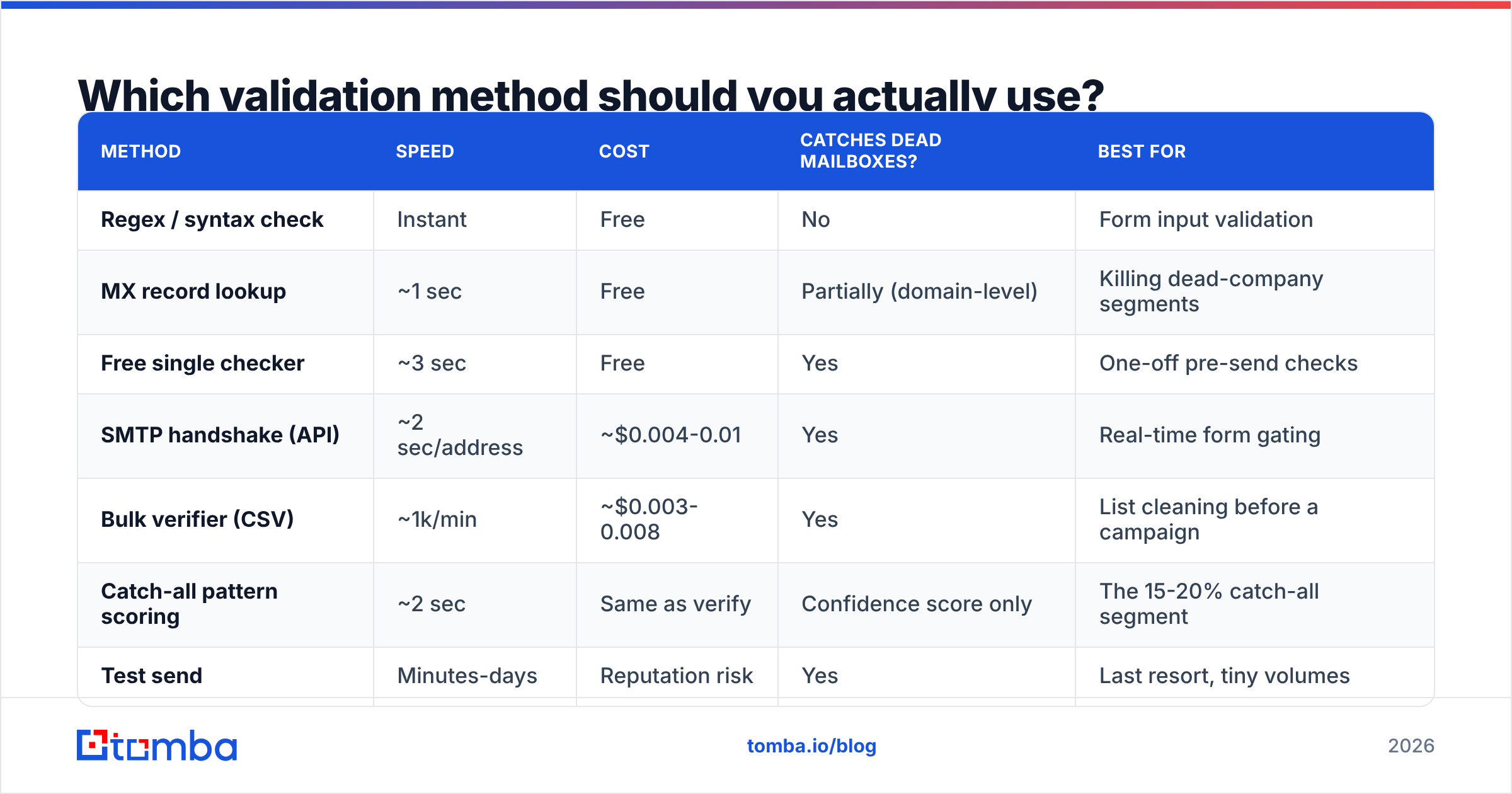
Depends entirely on volume and stakes. Here's the honest breakdown:
| Method | Speed | Cost | Catches dead mailboxes? | Best for |
|---|---|---|---|---|
| Regex / syntax check | Instant | Free | No | Form input validation |
| MX record lookup | ~1 sec | Free | Partially (domain-level) | Killing dead-company segments |
| Free single checker | ~3 sec | Free | Yes | One-off pre-send checks |
| SMTP handshake (API) | ~2 sec/address | ~$0.004-0.01 | Yes | Real-time form gating |
| Bulk verifier (CSV) | ~1k/min | ~$0.003-0.008 | Yes | List cleaning before a campaign |
| Catch-all pattern scoring | ~2 sec | Same as verify | Confidence score only | The 15-20% catch-all segment |
| Test send | Minutes-days | Reputation risk | Yes | Last resort, tiny volumes |
The practical answer for most B2B teams: MX check to prune dead domains, bulk SMTP verify everything that survives, then pattern-score the catch-alls. Three passes, and you've turned a messy list into three send-decision buckets.
What do verification results actually mean?#
Vendors use different labels for the same underlying states. Translate them before you act:
- Valid / Deliverable — SMTP confirmed the mailbox exists. Send.
- Invalid / Undeliverable — Server returned a hard rejection. Delete, don't retry, don't "try again next quarter."
- Catch-all / Accept-all — Domain accepts everything. Send only if pattern confidence is high, and cap volume.
- Unknown — Server timed out, greylisted, or blocked the check. Re-run in 48 hours; if still unknown, treat as catch-all.
- Risky / Role-based —
info@,support@,careers@. Real, but usually a shared inbox with low reply rates and high complaint rates. - Disposable — Mailinator, 10minutemail, and similar. Almost always a signup you shouldn't chase.
The bucket most people mishandle is "unknown." Deleting it throws away good contacts; sending to it blindly inflates bounce rate. Quarantine and re-check.
How do the main verification tools compare in 2026?#
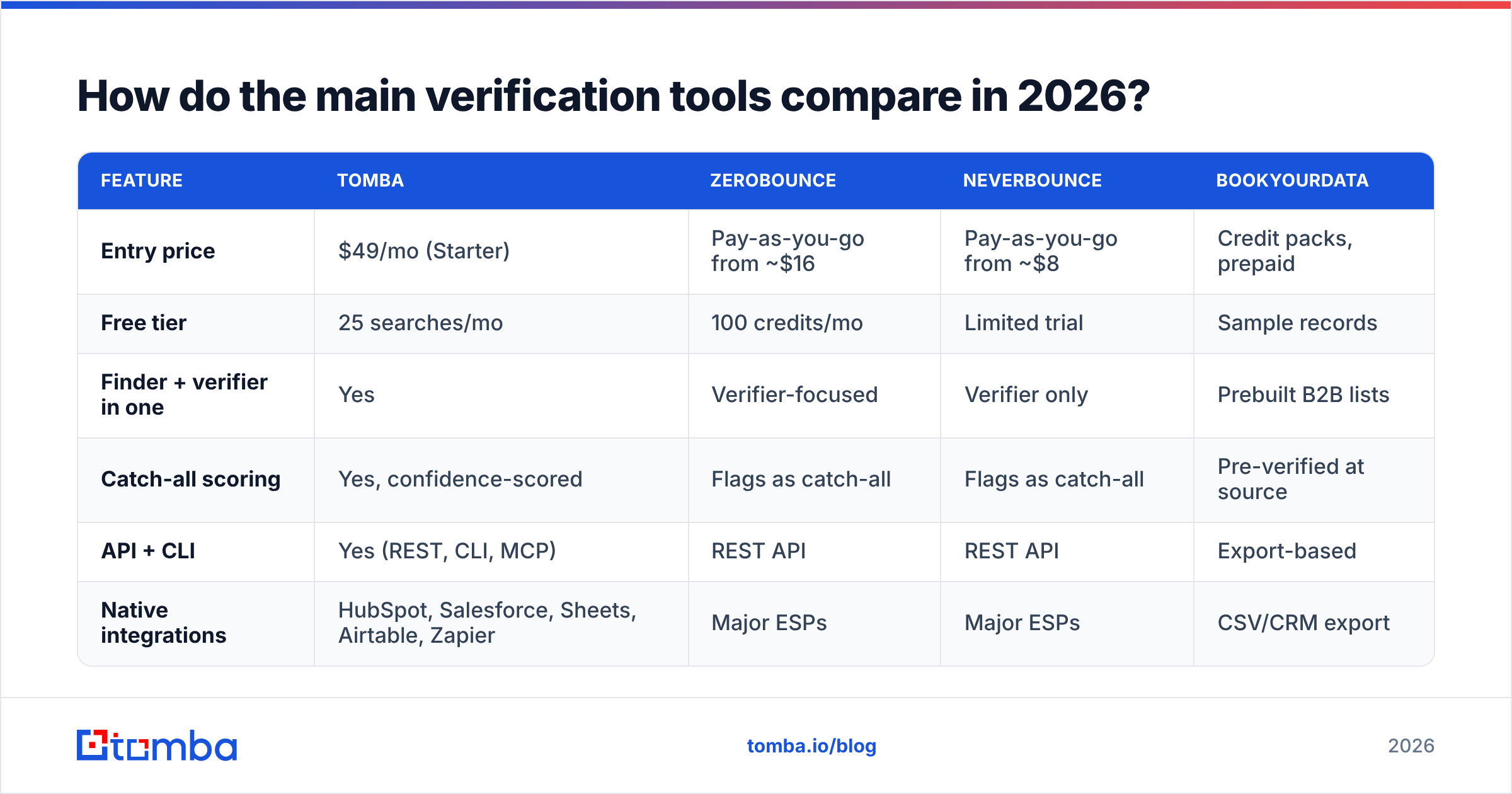
Price per verification is the headline number, but the differences that bite you are catch-all handling and API rate limits.

| Feature | Tomba | ZeroBounce | NeverBounce | BookYourData |
|---|---|---|---|---|
| Entry price | $49/mo (Starter) | Pay-as-you-go from ~$16 | Pay-as-you-go from ~$8 | Credit packs, prepaid |
| Free tier | 25 searches/mo | 100 credits/mo | Limited trial | Sample records |
| Finder + verifier in one | Yes | Verifier-focused | Verifier only | Prebuilt B2B lists |
| Catch-all scoring | Yes, confidence-scored | Flags as catch-all | Flags as catch-all | Pre-verified at source |
| API + CLI | Yes (REST, CLI, MCP) | REST API | REST API | Export-based |
| Native integrations | HubSpot, Salesforce, Sheets, Airtable, Zapier | Major ESPs | Major ESPs | CSV/CRM export |
BookYourData takes a different path worth understanding: instead of you verifying a list you already have, they sell pre-verified B2B records with an accuracy guarantee. If your problem is "my list is dirty," a verifier is the fix. If your problem is "I don't have a list yet," buying pre-verified data or building one with a finder is the faster route.
For teams that need both — find the address, then confirm it's live — a combined platform saves a data-transfer step. Tomba pricing runs Free (25 searches/mo), Starter $49/mo, Growth $99/mo, Pro $249/mo, and Enterprise custom, with finding and verification drawing from the same credit pool.

How do you validate emails automatically at scale?#
Stop treating validation as a pre-campaign chore and make it a checkpoint in the pipeline. Three places to wire it in:
At capture. Validate on your signup and demo-request forms in real time via API. A email verification API call on blur takes about two seconds and stops the bad address from ever entering your CRM. This is the highest-ROI integration because it prevents the problem instead of cleaning it up.
At enrichment. When you pull a new contact from LinkedIn or a company site, verify in the same step. Tools like the Tomba Chrome extension or a Sheets email finder add-on can find and verify in one action, so nothing unverified reaches your sequencer.
On a schedule. B2B contact data decays roughly 25-30% per year — people change jobs, companies get acquired, mailboxes get deprovisioned. G2's data quality category is full of vendors quantifying this. Re-verify any segment older than six months before you touch it again, and re-verify quarterly if it's a core account list.
For CRM-native teams, a HubSpot integration or Salesforce integration lets you run verification as a workflow step rather than an export-clean-reimport loop, which is where most teams quietly give up on hygiene.
What mistakes should you avoid when testing email validity?#
- Trusting regex alone. It confirms formatting, nothing more. A perfectly formatted address at a dead domain still bounces.
- Running SMTP checks from your own sending IP. Repeated
RCPT TOprobes from one IP look like a directory harvest attack and will get you blocked. - Deleting every "unknown." Many of those are greylisting artifacts that resolve on a second pass 48 hours later.
- Ignoring role addresses. They're deliverable, so they pass verification, but
info@inboxes generate disproportionate spam complaints — which hurt worse than bounces. - Verifying once and never again. A list verified in January is meaningfully stale by July.
- Blaming deliverability on copy. If your bounce rate is 8%, no subject line fixes that. Clean the list first, then optimize the message.
Frequently asked questions#
Can you test an email address without sending an email? Yes. The SMTP handshake opens a connection and asks the server about the recipient, then disconnects before transmitting a message body. Nothing arrives in the recipient's inbox.
Is email verification legal? Yes. You're querying a public mail server about routing, which is the same thing every sending server does. Your obligations under GDPR and CAN-SPAM concern how you obtained and use the data, not the verification check itself.
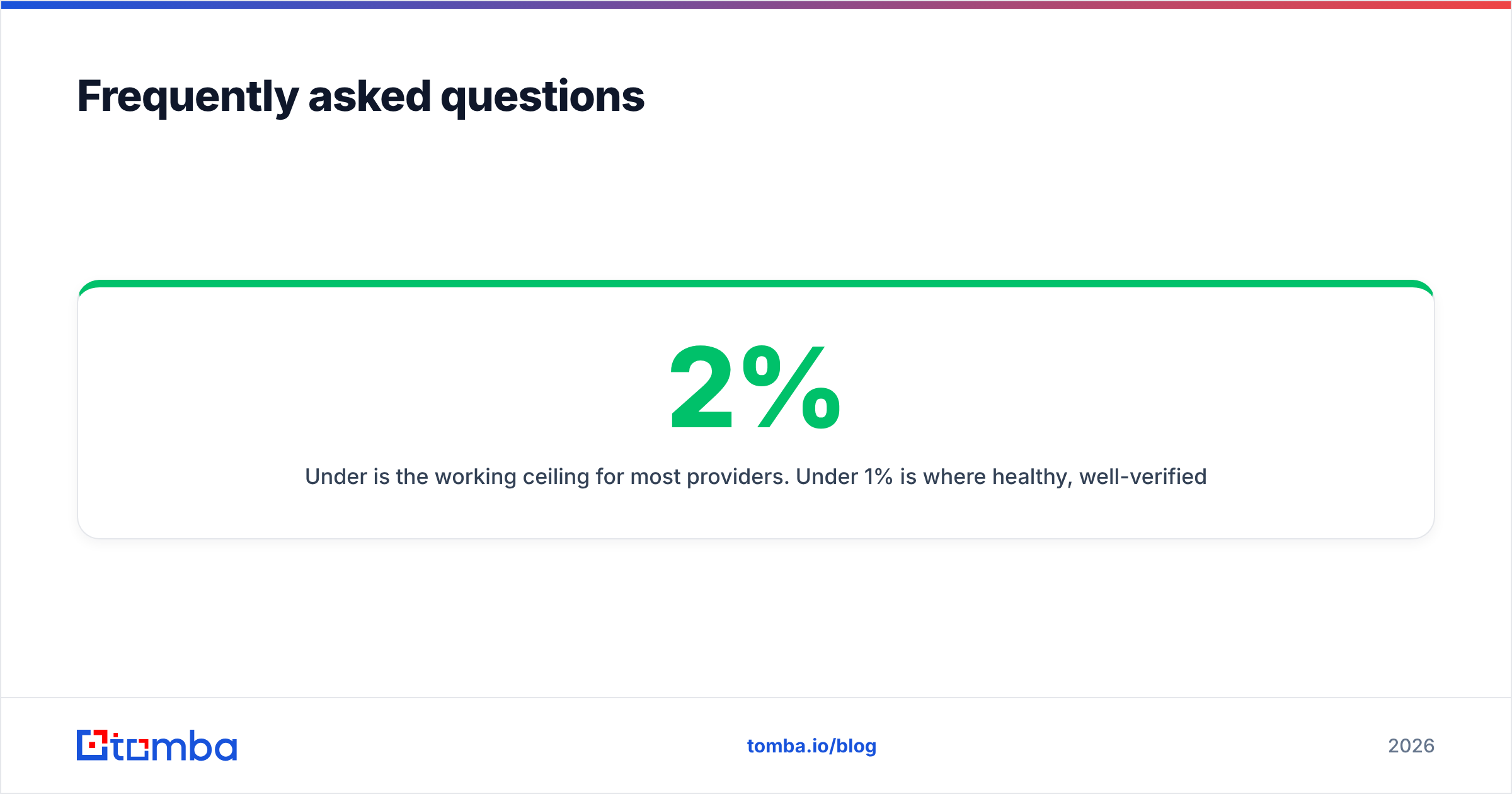
What is an acceptable bounce rate? Under 2% is the working ceiling for most providers. Under 1% is where healthy, well-verified B2B lists land. Above 5% and you should assume active throttling.
Why does the same address get different verdicts from different tools? Mostly catch-all and greylisting handling. Some vendors mark greylisted servers "unknown," others retry and return "valid." Catch-all domains produce the widest divergence because there's no definitive answer to return.
Do free email checkers work? For single addresses, yes — the good ones do a real SMTP check. They're limited by volume, not accuracy.
Clean the list before you write the sequence#
The order matters. Verification is not the last box you tick before hitting send; it's the first thing you do after building the list, and it changes what the list is worth.
If you're finding addresses and verifying them as two separate purchases, you're paying twice and moving CSVs between tools for no reason. Tomba Email Finder does both from one credit pool — search by domain, name, or company, and every address comes back with a verification status and confidence score attached. Start on the free tier with 25 searches a month, run your dirtiest segment through it, and see what the bounce rate does on the next send.
Related guides#
// get started
Find, verify and enrich your first contacts today
Start on the free plan with 25 searches a month, then scale when your team is ready.
Free plan · No credit card required · GDPR & CCPA
// about the author