How to Track Sales in 2026: A Practical 7-Step System
Most teams track sales the way they track weather: they observe it, then react. Here is a 7-step system for tracking sales activity, pipeline, and revenue so the numbers actually change what you do next week.
TL;DR
- Sales tracking breaks into three layers: activity (what your reps did), pipeline (what's in motion), and revenue (what closed). Most teams over-track layer one and under-track layer two.
- You need roughly 9 metrics, not 40. Pick a small set that you review on a fixed cadence and act on — everything else is a vanity dashboard.
- Dirty contact data quietly corrupts every number downstream. If 30% of your emails bounce, your reply rate, connect rate, and conversion rate are all measuring the wrong denominator.
- A spreadsheet works up to about 3 reps. Past that, the manual reconciliation cost exceeds the price of a CRM.
- Track leading indicators weekly, lagging indicators monthly, and never change a definition mid-quarter.
What does "tracking sales" actually mean?#
Tracking sales means recording every meaningful interaction between your team and a buyer, then rolling those records up into numbers you can compare over time.
Think of it like a restaurant kitchen. Activity tracking is knowing how many plates went out. Pipeline tracking is knowing how many tickets are on the rail right now and how long each has been sitting. Revenue tracking is the till at the end of the night. A kitchen that only counts the till finds out it had a problem three hours after the problem started.
Most teams confuse these three layers. They build a dashboard full of call counts and email volume, congratulate themselves on "data-driven sales," and still can't answer the only question that matters: which deals are going to close this quarter, and which are quietly dying?
Here's the practical split:
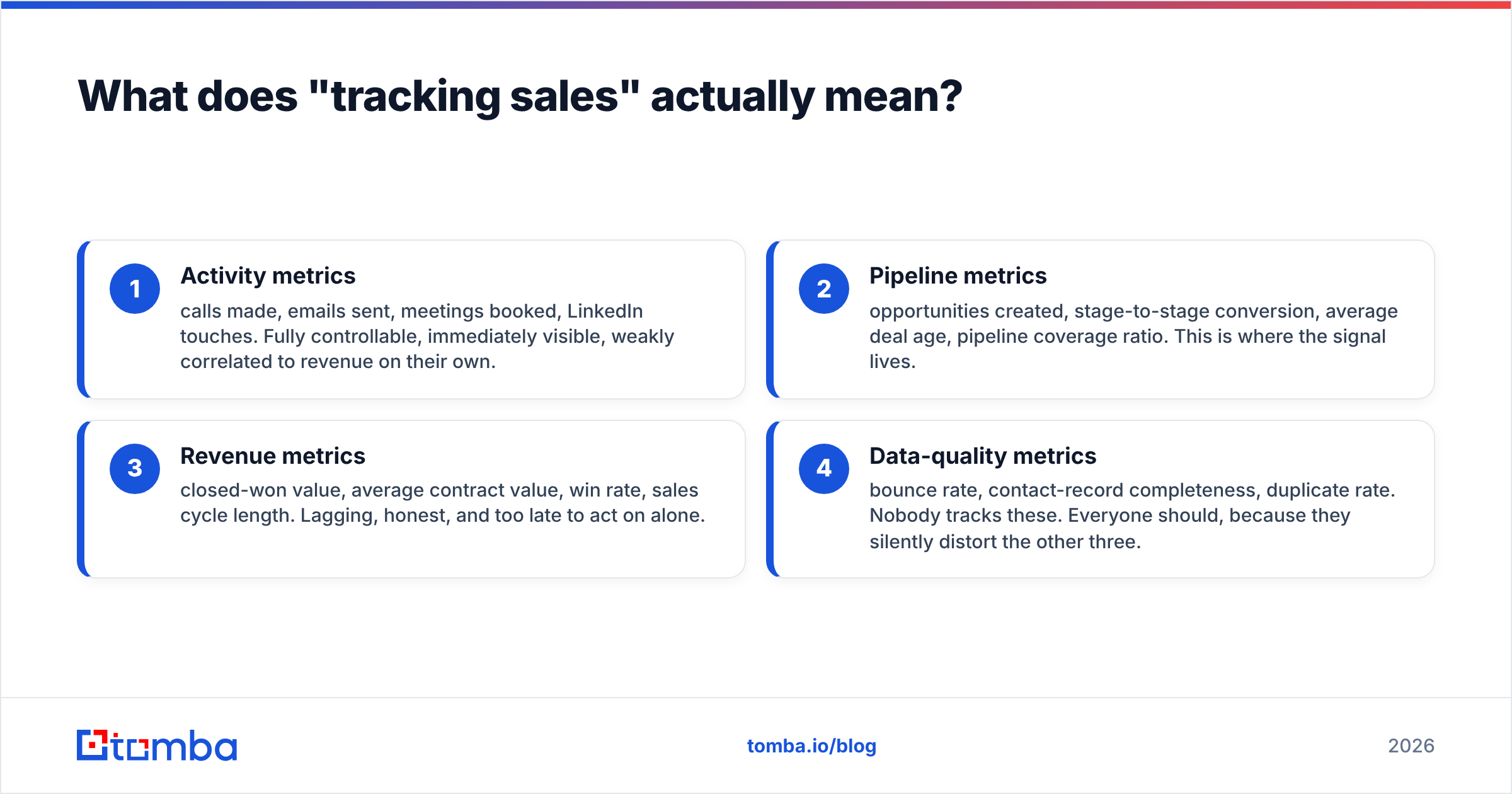
- Activity metrics — calls made, emails sent, meetings booked, LinkedIn touches. Fully controllable, immediately visible, weakly correlated to revenue on their own.
- Pipeline metrics — opportunities created, stage-to-stage conversion, average deal age, pipeline coverage ratio. This is where the signal lives.
- Revenue metrics — closed-won value, average contract value, win rate, sales cycle length. Lagging, honest, and too late to act on alone.
- Data-quality metrics — bounce rate, contact-record completeness, duplicate rate. Nobody tracks these. Everyone should, because they silently distort the other three.
The rule: activity explains pipeline, pipeline predicts revenue, data quality determines whether any of it is true.

Which sales metrics should you actually track?#
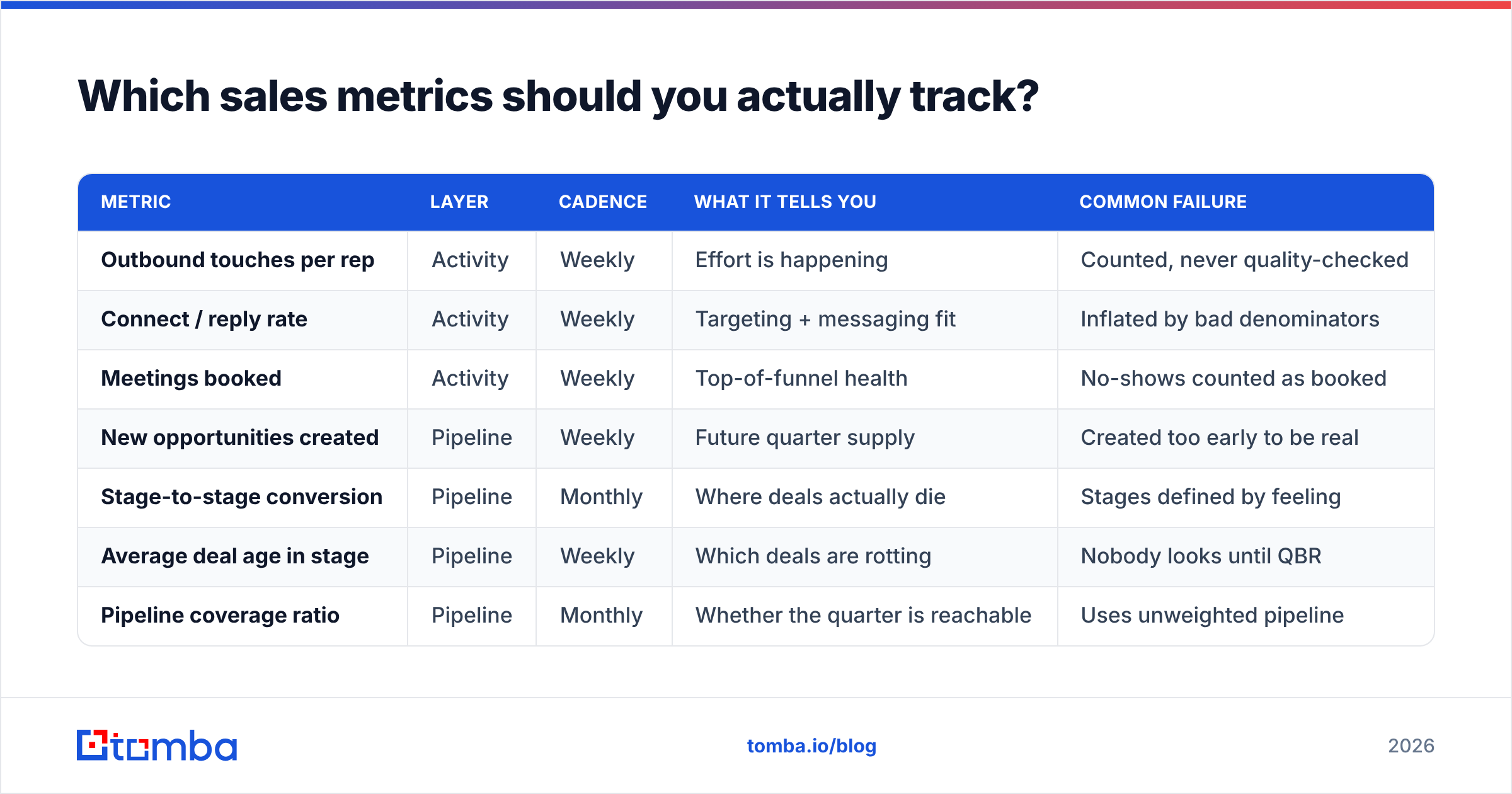
Nine. That's the working number for a team under 20 reps. Here's the set, with what each one tells you and how often to look at it.
| Metric | Layer | Cadence | What it tells you | Common failure |
|---|---|---|---|---|
| Outbound touches per rep | Activity | Weekly | Effort is happening | Counted, never quality-checked |
| Connect / reply rate | Activity | Weekly | Targeting + messaging fit | Inflated by bad denominators |
| Meetings booked | Activity | Weekly | Top-of-funnel health | No-shows counted as booked |
| New opportunities created | Pipeline | Weekly | Future quarter supply | Created too early to be real |
| Stage-to-stage conversion | Pipeline | Monthly | Where deals actually die | Stages defined by feeling |
| Average deal age in stage | Pipeline | Weekly | Which deals are rotting | Nobody looks until QBR |
| Pipeline coverage ratio | Pipeline | Monthly | Whether the quarter is reachable | Uses unweighted pipeline |
| Win rate | Revenue | Monthly | Qualification discipline | Losses marked "no decision" |
| Sales cycle length | Revenue | Quarterly | Forecast accuracy input | Averaged across mismatched segments |
The two most-neglected entries on that list are average deal age in stage and pipeline coverage ratio.
Deal age is the smoke alarm. A deal that's been in "Proposal Sent" for 41 days when your median is 12 is not a deal, it's a memory. Sorting the pipeline by days-in-stage descending, every Monday, is the single highest-leverage tracking habit a manager can build.
Pipeline coverage ratio is total open pipeline divided by the quota you need to hit. If your historical win rate is 22%, you need roughly 4.5x coverage — not the 3x that gets quoted everywhere. Compute it from your win rate, not from a blog post's.
How do you set up sales tracking from scratch?#
Seven steps. Do them in order; each one depends on the last.
Step 1 — Define your stages in observable terms. A stage change must be triggered by something the buyer did, not something the rep feels. "Discovery" isn't "we had a call," it's "buyer confirmed a problem and a rough timeline." Write one sentence per stage and pin it where reps see it. Ambiguous stage definitions are the root cause of most bad forecasts.
Step 2 — Pick your source of truth and enforce it. One system. If a deal exists in Slack, someone's notebook, and the CRM, you have three pipelines and zero visibility. Reps will resist. The counter-argument that works: "if it's not in the CRM, it doesn't count toward your number."
Step 3 — Clean the contact layer before you measure anything. This is the step everyone skips. Your reply rate is replies ÷ emails delivered. If your list has a 28% bounce rate, you're either dividing by the wrong number or your sends are hitting spam traps and depressing the real rate. Run your list through an email verifier before it enters the sequence, not after the numbers look weird.
Step 4 — Instrument activity capture automatically. Manual logging decays within three weeks. Every mainstream CRM supports email and calendar sync — HubSpot's activity tracking and Salesforce's Einstein Activity Capture both do this natively. Turn it on before you ask anyone to log anything by hand.
Step 5 — Build exactly two views. A rep view (my deals, sorted by days-in-stage) and a manager view (team pipeline by stage, with created-this-week and closed-this-week counts). Resist building a third until someone asks for it twice.
Step 6 — Fix the review cadence. Weekly: activity plus deal age. Monthly: conversion rates and win rate. Quarterly: cycle length and segment analysis. The cadence matters more than the dashboard, because a number nobody looks at on a schedule is decoration.
Step 7 — Freeze definitions for a full quarter. If you redefine "qualified" in month two, your quarter-over-quarter comparison is worthless. Change definitions at quarter boundaries only, and annotate the change so future-you knows why the line jumped.
Spreadsheet, CRM, or dedicated tool — which should you use?#
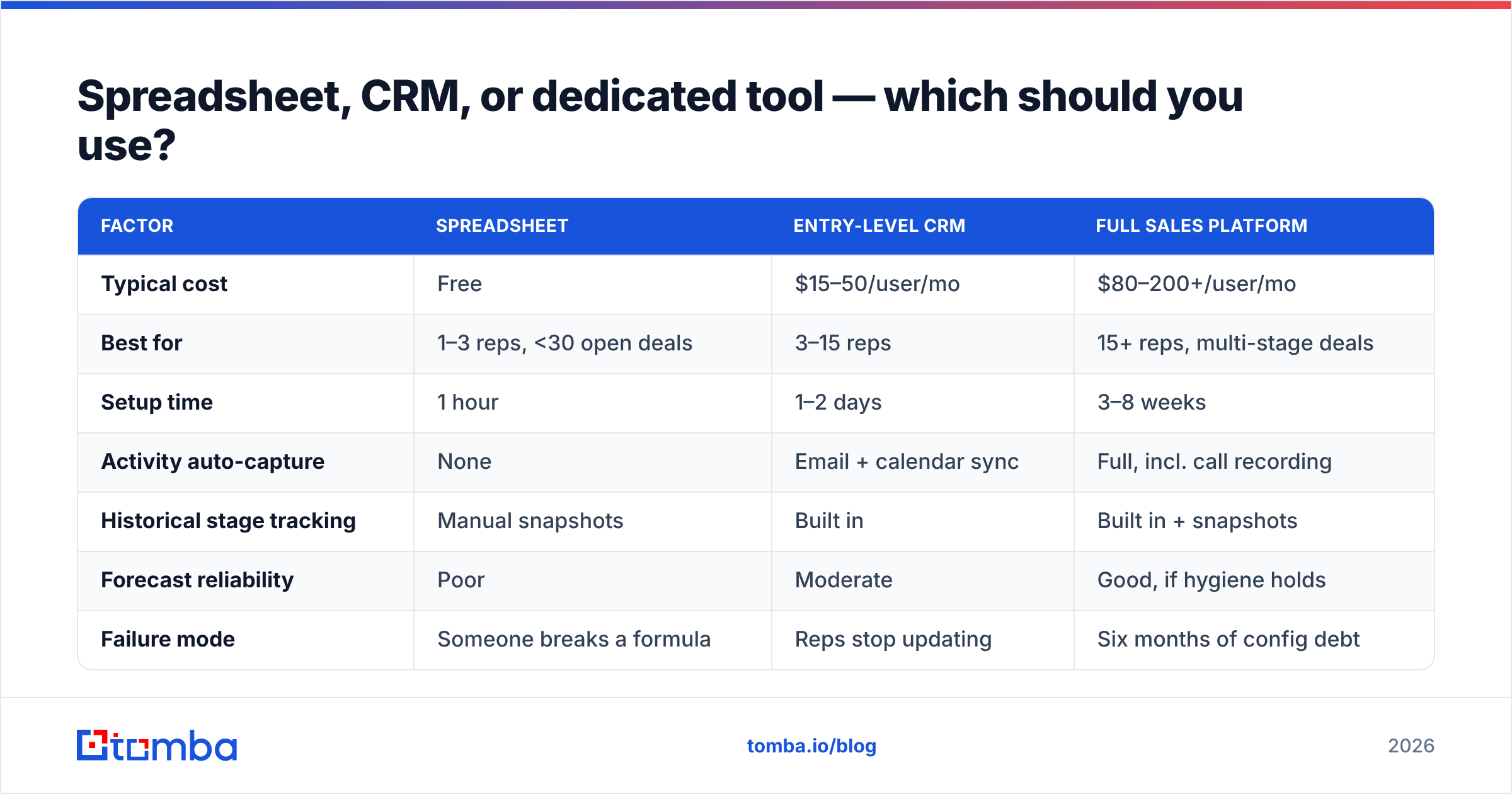
Depends almost entirely on team size and deal complexity. Here's the honest comparison:
| Factor | Spreadsheet | Entry-level CRM | Full sales platform |
|---|---|---|---|
| Typical cost | Free | $15–50/user/mo | $80–200+/user/mo |
| Best for | 1–3 reps, <30 open deals | 3–15 reps | 15+ reps, multi-stage deals |
| Setup time | 1 hour | 1–2 days | 3–8 weeks |
| Activity auto-capture | None | Email + calendar sync | Full, incl. call recording |
| Historical stage tracking | Manual snapshots | Built in | Built in + snapshots |
| Forecast reliability | Poor | Moderate | Good, if hygiene holds |
| Failure mode | Someone breaks a formula | Reps stop updating | Six months of config debt |
The crossover point sits around three reps. Below that, a well-structured sheet with one row per opportunity and a days_in_stage formula genuinely outperforms a half-adopted CRM. Above it, the reconciliation tax — the hours a manager spends chasing who changed what — exceeds the license cost.
One caveat on full platforms: they don't fix hygiene, they amplify it. A team that doesn't update deal stages in a spreadsheet won't update them in Salesforce either; they'll just do it inside a more expensive interface. Adoption is a management problem wearing a software costume. Independent review data on G2's CRM category shows adoption complaints outrank feature complaints across nearly every vendor.
Why does data quality break your sales tracking?#
Because every rate metric has contact data in its denominator, and bad data quietly moves the denominator.
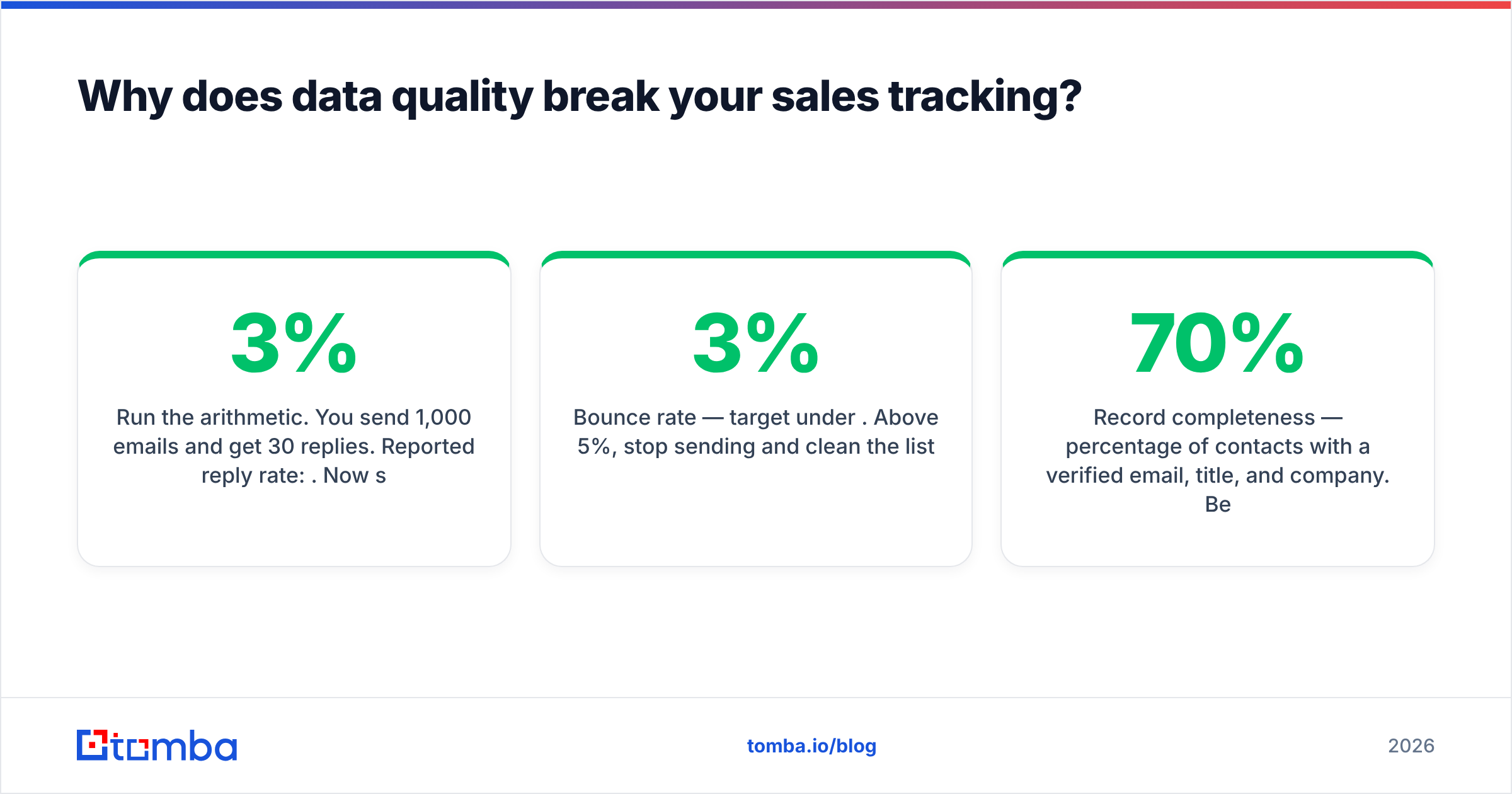
Run the arithmetic. You send 1,000 emails and get 30 replies. Reported reply rate: 3%. Now suppose 240 of those addresses were invalid. Only 760 were ever deliverable, and worse, the bounce spike pushed a chunk of the remaining 760 into spam folders. Your real reply rate against reachable humans might be 5.5% — but you're about to "fix" a messaging problem that doesn't exist, because the number said 3%.
This compounds. Bad addresses damage sender reputation, which depresses future delivery, which depresses future reply rates, which makes it look like your messaging is getting worse quarter over quarter. You end up rewriting good copy to solve an infrastructure problem.

Three data-quality metrics worth adding to the weekly view:
- Bounce rate — target under 3%. Above 5%, stop sending and clean the list.
- Record completeness — percentage of contacts with a verified email, title, and company. Below 70% and your segmentation is guesswork.
- Duplicate rate — duplicated contacts inflate pipeline count and double-count activity. Audit quarterly.
Fixing this is mechanical, not strategic. Verify addresses at the point of entry rather than after a campaign flops. If you're sourcing contacts by company, running a domain search gives you verified addresses with confidence scores attached, so the data arrives clean instead of getting cleaned later. For lists you already have sitting in a CSV, bulk verify before import so garbage never touches the CRM in the first place.
The principle: clean at ingestion, not at analysis. Every hour you spend cleaning after the fact is an hour spent on numbers you've already reported to someone.
How do you track sales without micromanaging your reps?#
Track outputs at the individual level and inputs at the team level.
The failure pattern is familiar: a manager builds an activity leaderboard, reps optimize for the leaderboard, and within a month you have 400 low-quality calls a week and the same number of meetings. You measured the thing that was easy to count instead of the thing that mattered.
A better structure:
- Individual level: meetings booked, opportunities created, closed-won. Outcomes only.
- Team level: touches per opportunity, channel mix, reply rate by segment. Diagnostic, not evaluative.
- Coaching level: call recordings and email threads for two deals per rep per month. Qualitative, and where the actual improvement happens.
The distinction matters because activity metrics are diagnostic tools, not performance grades. When a rep's meeting count drops, the activity data tells you why — fewer touches, or the same touches with a collapsing response rate. Those two diagnoses need completely different interventions. Using the same data as a scorecard destroys its diagnostic value, because reps start managing the number rather than reporting it.
One practical guardrail: never show an activity leaderboard in a team meeting. Show pipeline created and let the activity data live in the one-on-one.
What does a good weekly sales tracking review look like?#
Thirty minutes, same time every week, same four questions.
- What entered the pipeline? New opportunities created, with source. If this number drops two weeks running, your quarter-after-next is already in trouble.
- What's aging? Every deal past 1.5x the median days-in-stage. Each one gets a decision: advance, push with a date, or close-lost. No "still working it."
- What moved? Stage advances since last week. Zero advances on a 40-deal pipeline is a red flag regardless of how busy the week felt.
- What broke? Bounce rate, sync failures, deals with missing close dates. Five minutes of hygiene beats a quarterly cleanup project.
Notice what's absent: no forecast debate, no deal strategy, no pipeline review theater. Those belong in separate meetings. This one exists to keep the data honest so that the other meetings have something real to work with.
For teams running sales automation on top of this, add a fifth question: which automated sequences are still running against contacts who have already replied or converted? Sequence leakage is common and makes both your activity and reply numbers wrong.
Start with clean inputs#
Sales tracking is only as good as the contact data underneath it. Every conversion rate, connect rate, and reply rate you report is a fraction with contact data in the denominator — and a denominator built from guessed email addresses produces confident, precise, wrong numbers.
Before you rebuild your dashboard, fix the input. Tomba's Email Finder returns verified professional email addresses with confidence scores, so the contacts entering your CRM are real ones and your tracked metrics measure what you think they measure. The free tier covers 25 searches a month to test the accuracy against your own list; paid plans start at $49/mo, with full Tomba pricing laid out if you need volume. Clean inputs first, dashboards second.
Related guides#
// get started
Find, verify and enrich your first contacts today
Start on the free plan with 25 searches a month, then scale when your team is ready.
Free plan · No credit card required · GDPR & CCPA
// about the author