How to Track Sales Triggers: A 2026 Playbook for Reps
Job changes, funding rounds, and tech-stack swaps are buying signals with a shelf life of about two weeks. Here is how to track sales triggers, route them, and act before your competitors even notice.
TL;DR
- A sales trigger is a dated event that changes a buyer's priorities: a new VP, a funding round, an office opening, a competitor's tool showing up in the tech stack.
- Triggers decay fast. Most job-change and funding signals lose the bulk of their lift after roughly two weeks, so tracking speed matters more than trigger volume.
- You can build a working trigger system for $0 using Google Alerts, LinkedIn saved searches, RSS, and job-board scrapes — it just costs you 3-5 hours a week in manual review.
- Paid signal platforms buy you latency and coverage, not magic. The cheapest reliable stack is a signal source plus a contact-resolution layer that turns "Company X just raised" into a verified email in seconds.
- The step that kills most trigger programs is not detection. It is routing: a signal nobody owns within 24 hours is a signal that never converts.
What Is a Sales Trigger, Exactly?#
A sales trigger is an observable, timestamped event at a target account that raises the probability of a purchase in a defined window. That definition has three load-bearing parts.
Observable means you can detect it from public or semi-public data — a press release, a LinkedIn profile update, a job posting, a DNS record, a G2 review. If you can't detect it programmatically, it isn't a trigger; it's a hunch.
Timestamped means you know when it happened. A funding round you find six months late is trivia. The same round found in 48 hours is a reason to call.
Defined window means the signal has an expiry. A new CRO has budget authority and a mandate to change things for roughly one quarter. After that, vendors are chosen and the door closes.
Most teams confuse triggers with firmographics. "Company has 200 employees" is a filter. "Company grew from 140 to 200 employees in six months" is a trigger. The first tells you who to target; the second tells you when.

Which Sales Triggers Actually Predict Revenue?#
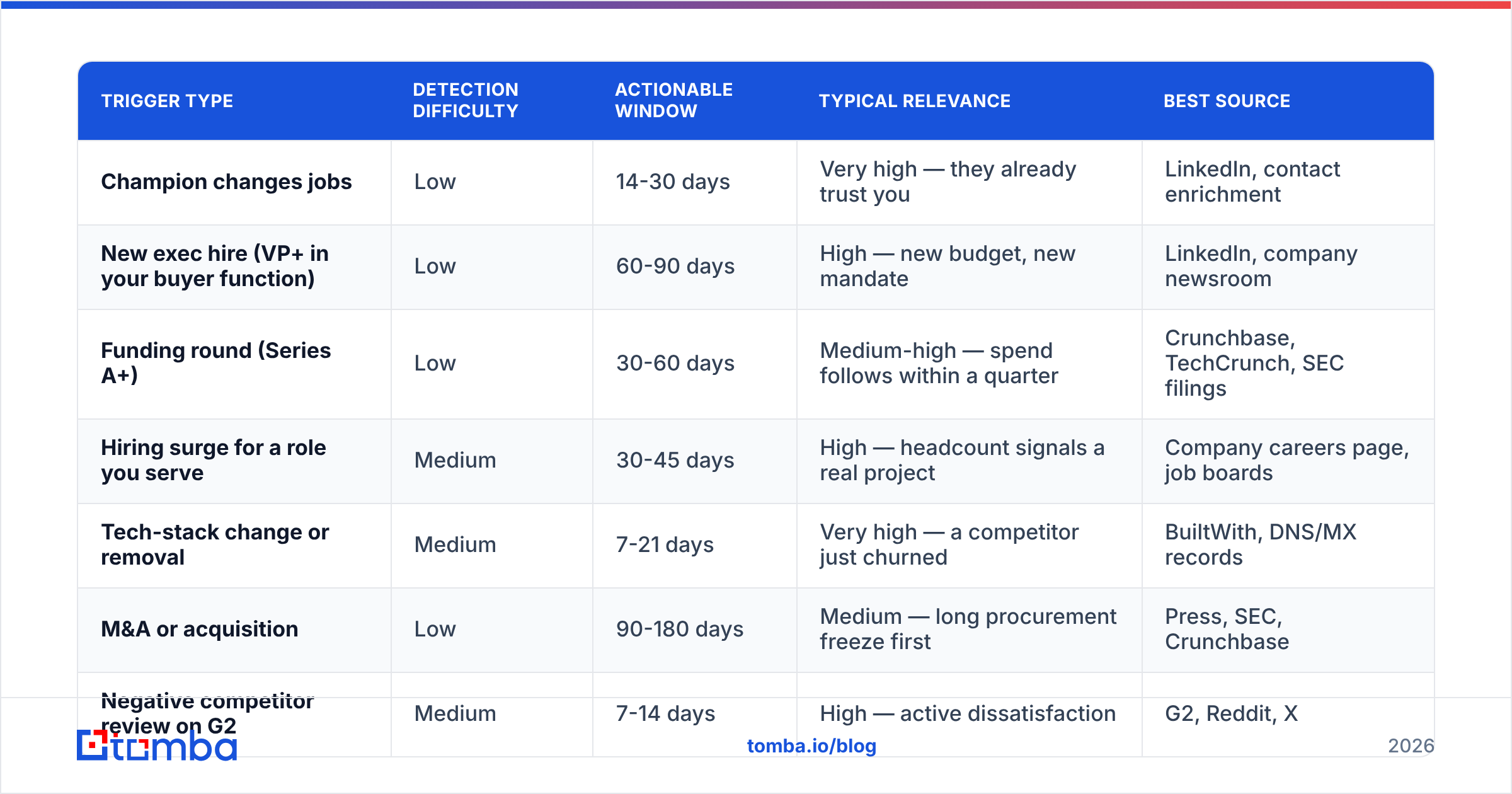
Not all signals are worth tracking. Here's how the common ones stack up on the three things that matter: how easy they are to detect, how long they stay actionable, and how strongly they correlate with a closed deal.
| Trigger type | Detection difficulty | Actionable window | Typical relevance | Best source |
|---|---|---|---|---|
| Champion changes jobs | Low | 14-30 days | Very high — they already trust you | LinkedIn, contact enrichment |
| New exec hire (VP+ in your buyer function) | Low | 60-90 days | High — new budget, new mandate | LinkedIn, company newsroom |
| Funding round (Series A+) | Low | 30-60 days | Medium-high — spend follows within a quarter | Crunchbase, TechCrunch, SEC filings |
| Hiring surge for a role you serve | Medium | 30-45 days | High — headcount signals a real project | Company careers page, job boards |
| Tech-stack change or removal | Medium | 7-21 days | Very high — a competitor just churned | BuiltWith, DNS/MX records |
| M&A or acquisition | Low | 90-180 days | Medium — long procurement freeze first | Press, SEC, Crunchbase |
| Negative competitor review on G2 | Medium | 7-14 days | High — active dissatisfaction | G2, Reddit, X |
| Office or market expansion | Low | 60-120 days | Low-medium — vague purchase intent | Press, LinkedIn company page |
The pattern is consistent: the tightest windows carry the strongest intent. A tech-stack removal is worth ten office-expansion press releases, and it's stale in three weeks.
If you only ever track one trigger, track champion job changes. When someone who bought from you at Company A shows up at Company B, you are not cold-emailing a stranger — you're following up with a customer who happens to have a new email address. Win rates on that motion routinely run several times higher than standard cold outbound, and it is the single cheapest signal to monitor.
How Do You Track Sales Triggers Without Paying for Anything?#
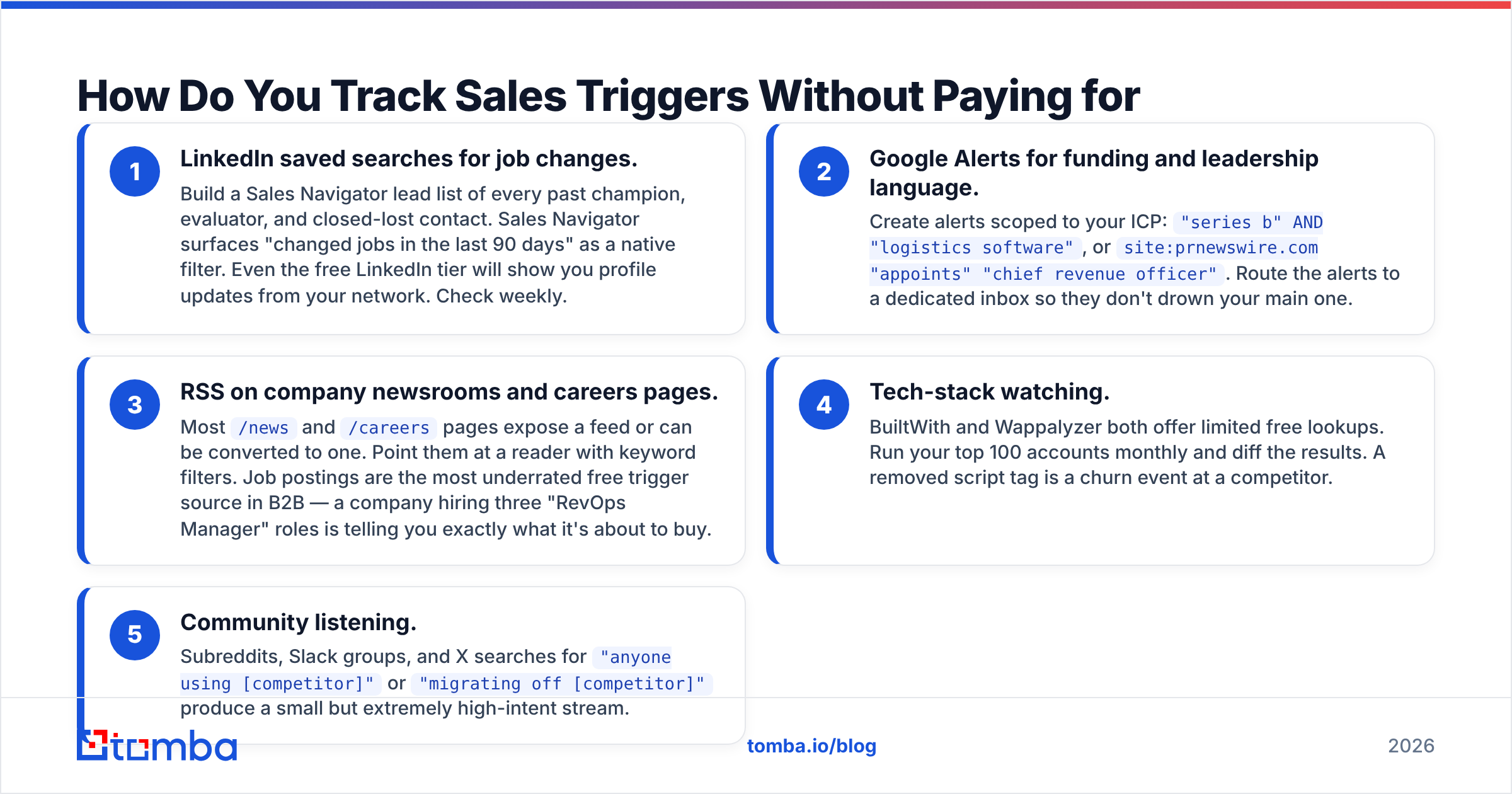
You can assemble a functional free stack in an afternoon. It will not scale past a few hundred accounts, but it will prove the motion before you spend money.
- LinkedIn saved searches for job changes. Build a Sales Navigator lead list of every past champion, evaluator, and closed-lost contact. Sales Navigator surfaces "changed jobs in the last 90 days" as a native filter. Even the free LinkedIn tier will show you profile updates from your network. Check weekly.
- Google Alerts for funding and leadership language. Create alerts scoped to your ICP:
"series b" AND "logistics software", orsite:prnewswire.com "appoints" "chief revenue officer". Route the alerts to a dedicated inbox so they don't drown your main one. - RSS on company newsrooms and careers pages. Most
/newsand/careerspages expose a feed or can be converted to one. Point them at a reader with keyword filters. Job postings are the most underrated free trigger source in B2B — a company hiring three "RevOps Manager" roles is telling you exactly what it's about to buy. - Tech-stack watching. BuiltWith and Wappalyzer both offer limited free lookups. Run your top 100 accounts monthly and diff the results. A removed script tag is a churn event at a competitor.
- Community listening. Subreddits, Slack groups, and X searches for
"anyone using [competitor]"or"migrating off [competitor]"produce a small but extremely high-intent stream.
The bottleneck with all five is the same: you end up with a company name and an event, not a person you can email. That last-mile gap — signal to verified contact — is where free stacks stall. Resolving it manually takes about four minutes per lead, which at 50 signals a week is a part-time job.
How Do You Turn a Signal Into a Verified Contact?#
This is the mechanical core of the whole system, and it's four steps.
Step 1 — Resolve the company to a domain. A press release says "Northwind Logistics raised $18M." You need northwind-logistics.com, not the trade name. A website finder or a simple search-and-verify pass handles this.
Step 2 — Find the right person, not just any person. The trigger tells you the function. A funding round means the exec who owns the new budget. A hiring surge means the hiring manager, not HR. Use domain search to pull the company's contacts filtered by department and seniority, so you're reaching the person whose problem the trigger created.
Step 3 — Get the email and verify it. Trigger-based outreach has a nasty failure mode: you move fast, guess the pattern, and torch your domain reputation on bounces. Always run addresses through an email verifier before send. For a new hire at a company you've never touched, pattern-guessing is especially risky because their address may not be provisioned in the corporate directory yet.
Step 4 — Enrich for context. Title, tenure, LinkedIn profile, previous employer. Previous employer matters enormously for job-change triggers — if the new VP used a competitor at their last company, your entire message changes.
Teams doing this at volume push steps 1-4 through an API rather than a UI. The Tomba API fits into a webhook chain: signal fires, function resolves the domain, finds and verifies the contact, and drops a task into the CRM with the trigger text attached. Total elapsed time under a minute, versus the four minutes a rep spends doing it by hand.
What Does a Paid Trigger Stack Cost?#
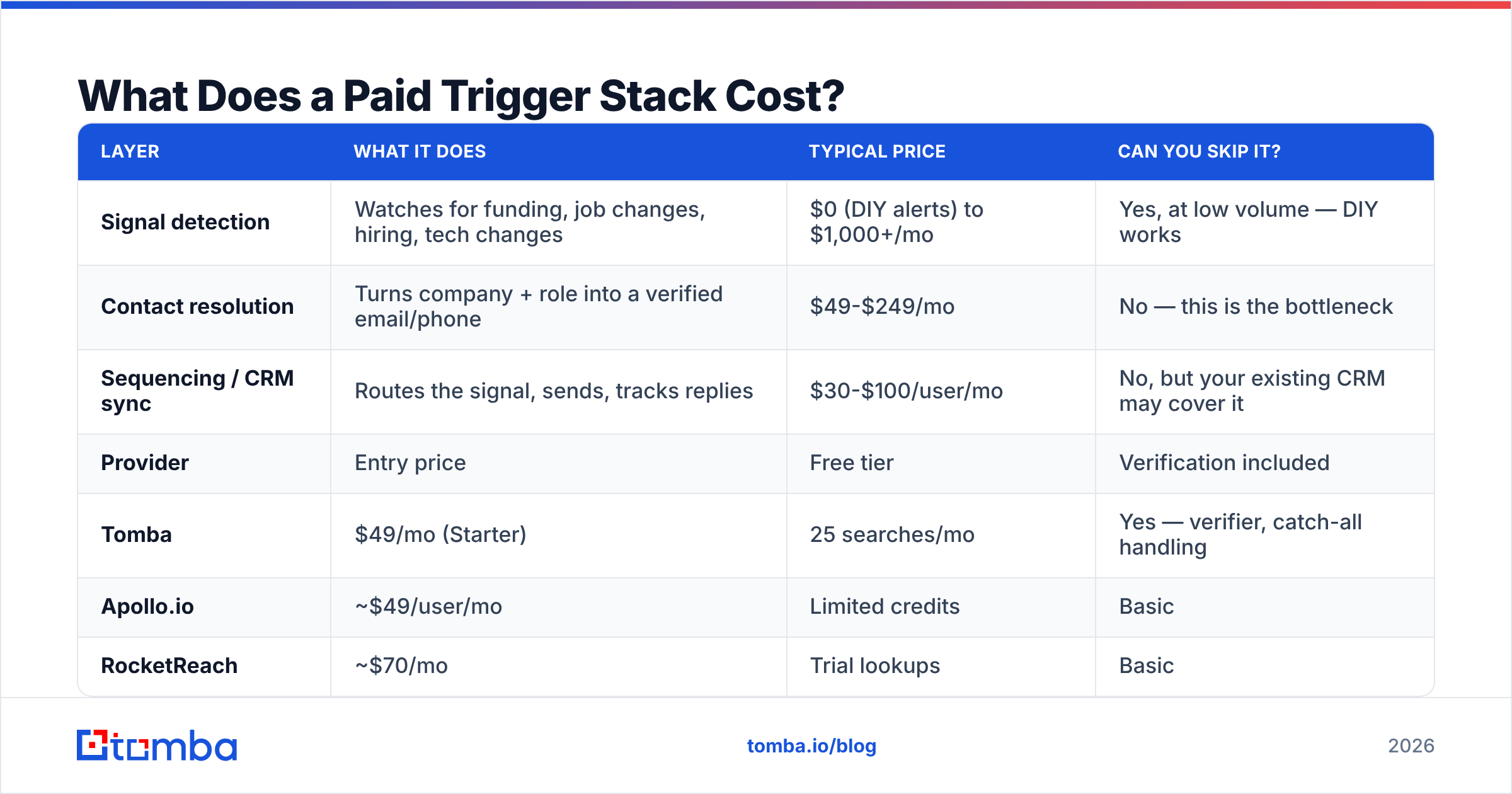
Signal tooling splits into three layers, and buyers routinely overpay by purchasing all three from one vendor when they only need two.
| Layer | What it does | Typical price | Can you skip it? |
|---|---|---|---|
| Signal detection | Watches for funding, job changes, hiring, tech changes | $0 (DIY alerts) to $1,000+/mo | Yes, at low volume — DIY works |
| Contact resolution | Turns company + role into a verified email/phone | $49-$249/mo | No — this is the bottleneck |
| Sequencing / CRM sync | Routes the signal, sends, tracks replies | $30-$100/user/mo | No, but your existing CRM may cover it |
On the contact-resolution layer, a few reference points as of 2026:
| Provider | Entry price | Free tier | Verification included | API access |
|---|---|---|---|---|
| Tomba | $49/mo (Starter) | 25 searches/mo | Yes — verifier, catch-all handling | Yes, all paid plans |
| Apollo.io | ~$49/user/mo | Limited credits | Basic | Higher tiers |
| RocketReach | ~$70/mo | Trial lookups | Basic | Add-on |
| BookYourData | Pay-as-you-go credits | Sample list | Yes, accuracy guarantee | Yes |
| ZoomInfo | Custom (annual) | No | Yes | Enterprise tiers |
Tomba's pricing runs Free (25 searches/mo), Starter $49/mo, Growth $99/mo, Pro $249/mo, and Enterprise custom — with API access on every paid tier, which matters if you plan to automate the signal-to-contact hop rather than have reps click through a UI. BookYourData is a solid fit if you'd rather buy a pre-built list against a firmographic filter than resolve contacts event-by-event; the two approaches complement each other more than they compete.
The honest math: if you're processing fewer than 200 signals a month, DIY detection plus a $49 resolution tool beats a $1,200/mo all-in-one platform on every dimension except convenience. Above ~1,000 signals a month, the platform's latency advantage starts to pay for itself.
How Fast Do You Have to Act?#
Faster than feels reasonable. Trigger value decays roughly like this:
- Days 0-2: Peak. You're likely the first vendor to mention the event. Reply rates run well above baseline cold outbound.
- Days 3-14: Good. Still relevant, but three competitors have now sent the same "congrats on the raise" email.
- Days 15-30: Marginal. The congratulations note now reads as late and generic.
- Day 30+: Dead. Referencing a month-old event signals that you found it in a stale database, which is worse than not referencing it at all.
That decay curve is why detection latency is the number one spec to evaluate in any signal tool. A vendor that finds every funding round but reports it on a weekly batch has already burned the useful half of the window.

There's a second timing failure that's subtler: sending a perfectly-timed message from a domain that isn't warmed. Trigger campaigns are bursty by nature — you might send two emails one day and forty the next when a batch of signals lands. That volume volatility is exactly what spam filters flag. Check your setup with an email warmup calculator before you turn on a trigger feed, and keep your email deliverability fundamentals — SPF, DKIM, DMARC — in place. Google and Yahoo's bulk sender requirements make authentication non-negotiable; the Google Postmaster Tools documentation spells out the current thresholds.
Screenshot placeholder: Google Postmaster Tools domain reputation graph, showing a "High" reputation line during a burst-send week — used to illustrate that trigger campaigns spike volume.
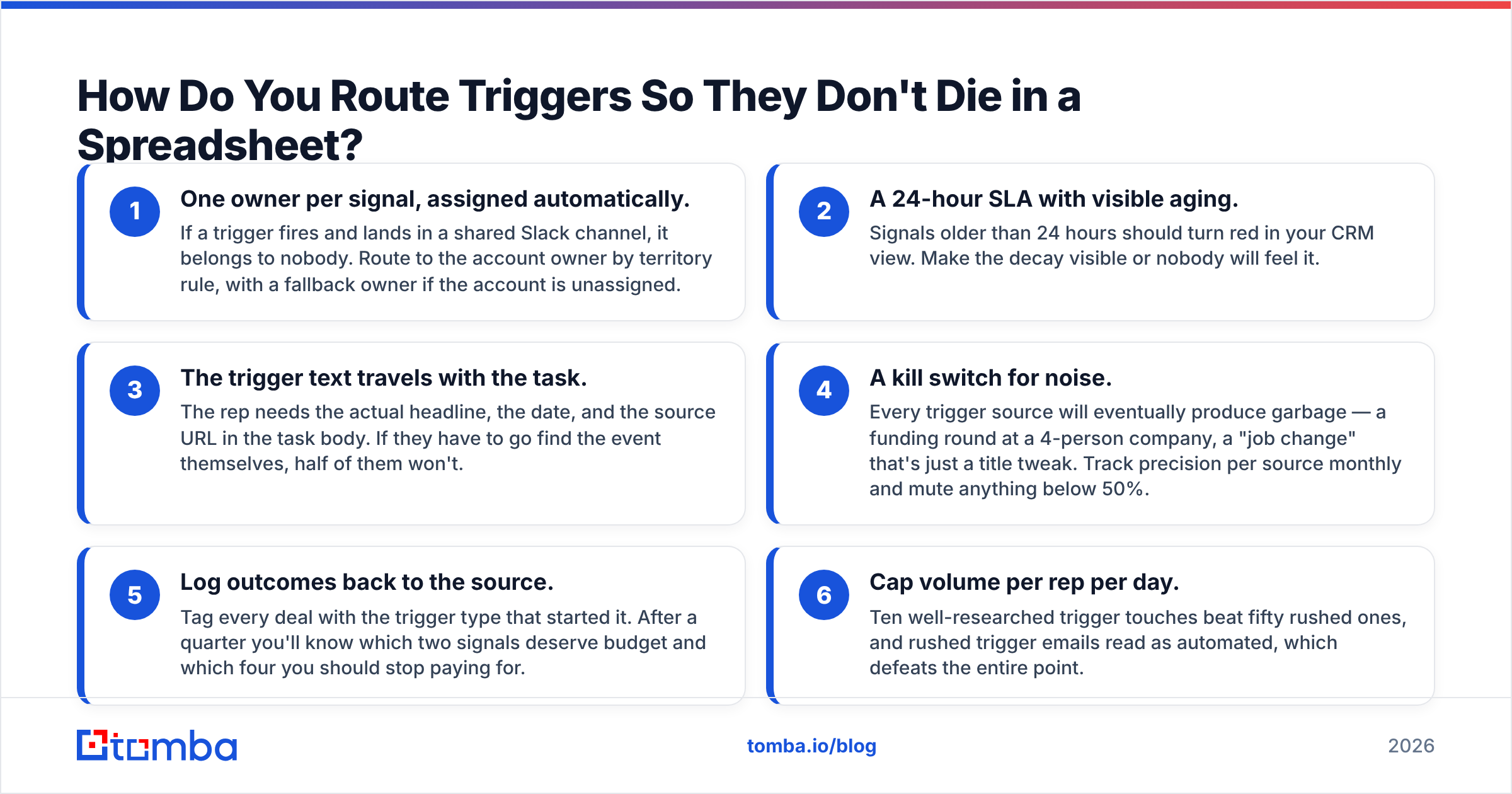
How Do You Route Triggers So They Don't Die in a Spreadsheet?#
Detection is the easy part. Most trigger programs fail at handoff. Build these four rules into the workflow before you turn anything on.
- One owner per signal, assigned automatically. If a trigger fires and lands in a shared Slack channel, it belongs to nobody. Route to the account owner by territory rule, with a fallback owner if the account is unassigned.
- A 24-hour SLA with visible aging. Signals older than 24 hours should turn red in your CRM view. Make the decay visible or nobody will feel it.
- The trigger text travels with the task. The rep needs the actual headline, the date, and the source URL in the task body. If they have to go find the event themselves, half of them won't.
- A kill switch for noise. Every trigger source will eventually produce garbage — a funding round at a 4-person company, a "job change" that's just a title tweak. Track precision per source monthly and mute anything below 50%.
- Log outcomes back to the source. Tag every deal with the trigger type that started it. After a quarter you'll know which two signals deserve budget and which four you should stop paying for.
- Cap volume per rep per day. Ten well-researched trigger touches beat fifty rushed ones, and rushed trigger emails read as automated, which defeats the entire point.
Push the enriched contact straight into your pipeline with a HubSpot integration or the equivalent for your CRM, so the rep sees the signal inside the tool they already live in. HubSpot's own workflow documentation covers building the routing rules on the CRM side.
Screenshot placeholder: CRM task view showing a trigger-sourced task with the source headline, event date, and enriched contact fields inline.
What Should the Outreach Actually Say?#
The most common mistake is making the trigger the entire message. "Congrats on the Series B!" is not a value proposition — it's a signal that you have a Google Alert.
Structure it as trigger → implication → offer:
- Trigger (one clause): "Saw you're hiring three RevOps managers in Austin."
- Implication (the part that requires thought): "That usually means the current attribution setup is breaking under new channel volume."
- Offer (specific, small): "We fixed the same thing for [comparable company] in about six weeks. Worth 15 minutes?"
The implication step is the whole game. Anyone can scrape the trigger. Only someone who understands the buyer's world can say what the trigger means for them. If you can't articulate the implication for a given trigger type, stop tracking it — you'll only produce noise.
For a starting library you can adapt to each signal type, the cold email templates collection has trigger-shaped variants worth stealing structure from. And check your subject lines against a spam checker — urgency language that works in normal outbound ("Quick question about your raise") trips filters more often than you'd expect.
What Does a Working Trigger System Look Like End to End?#
Here's the assembled version, in order:
- Define 3 trigger types tied to your ICP. Not ten. Three, each with a written implication statement.
- Pick a detection source per trigger — free or paid, but write down the expected latency.
- Automate company → domain → contact → verified email. This is the step to buy, not build.
- Route with an owner and a 24-hour SLA. Trigger text travels with the task.
- Send from a warmed domain with authentication in place and per-rep daily caps.
- Measure precision per source and win rate per trigger type. Cut sources below 50% precision after one quarter.
Run that for 90 days on a single trigger — champion job changes is the right one to start with — before adding a second. Teams that launch six trigger types at once end up with six mediocre feeds and no signal about which one worked.
Start With the Contact Layer#
Signal detection has a dozen decent free options. Contact resolution has one hard requirement: the email has to be right, and it has to be right within minutes of the trigger firing, because the window closes in days.
That's the piece to solve first. The Tomba Email Finder turns a company domain and a name into a verified professional email — with the verifier, catch-all handling, and API access included on every paid tier, so the same workflow runs whether a rep is clicking through the UI or a webhook is firing at 3 a.m. The free tier gives you 25 searches a month, which is enough to test the full signal-to-send loop on your first trigger type before committing to a plan.
Pick one trigger. Wire the contact layer. Ship it this week — the signals firing right now expire in fourteen days.
Related guides#
// get started
Find, verify and enrich your first contacts today
Start on the free plan with 25 searches a month, then scale when your team is ready.
Free plan · No credit card required · GDPR & CCPA
// about the author