How to Upsell in 2026: A Practical Framework for B2B Teams
Upselling fails when it's a pitch and works when it's a diagnosis. Here's the timing, triggers, data, and scripts B2B teams use to expand accounts without burning trust.
TL;DR
- Upselling works when it solves a problem the customer already has. It fails when it's a quota-driven pitch dropped into a renewal call.
- The three highest-converting upsell triggers are usage thresholds, new stakeholder arrival, and a documented outcome (a win you helped create).
- Time it to value, not to your fiscal calendar. The best window is 30-90 days after a customer hits their first measurable result.
- Upsell, cross-sell, and add-on expansion are different motions with different owners and different scripts — don't blend them.
- Expansion revenue is a data problem before it's a conversation problem. If you don't know who's using what, you're guessing.
What is upselling, and how is it different from cross-selling?#
Upselling means moving an existing customer to a higher-value version of what they already bought: more seats, a bigger plan, higher usage limits, a premium tier. Cross-selling means selling them a different product alongside it.
The distinction matters because the two require different evidence. An upsell is justified by consumption — they are outgrowing the thing they have. A cross-sell is justified by an unmet job — they have a problem your other product solves. Confusing them is why so many expansion conversations sound like a random pitch.
Here's the practical split:
- Upsell — Same product, higher tier. Trigger: usage limits, seat count, feature ceilings. Owner: account manager or CSM.
- Cross-sell — Adjacent product, same account. Trigger: a workflow gap you can observe. Owner: AE with product specialist support.
- Add-on expansion — Optional modules bolted onto the current plan. Trigger: a specific request or support ticket. Owner: CSM, often self-serve.
- Multi-threading expansion — Same product, new team or department inside the same company. Trigger: a champion referral or a new hire in an adjacent function. Owner: AE.
- Renewal uplift — Price or commitment increase at contract end. Trigger: contract date. Owner: renewals or finance.
Most teams call all five "upselling," report them in one number, and then can't explain why the number moved. Separate them in your CRM and the diagnosis gets easy.
Why do most upsell attempts fail?#
Because they are scheduled, not triggered.
The classic failure pattern: a rep opens their pipeline in week ten of the quarter, sees a gap, filters for accounts on the mid-tier plan, and sends fourteen "quick question about your plan" emails. Conversion is terrible, and worse, it trains customers to treat account manager outreach as noise.
The second failure is asking before delivering. Gainsight and other customer-success vendors have hammered this for a decade: expansion follows demonstrated value. If the customer cannot yet articulate what they got from the current plan, a bigger plan is a harder sell than a new logo.
The third is talking to the wrong person. The user who loves your product often has no budget. The budget holder may have never logged in. Expansion that skips the economic buyer stalls in procurement — a pattern HubSpot's sales research has documented across thousands of deals.
How do you know when an account is ready to upsell?#
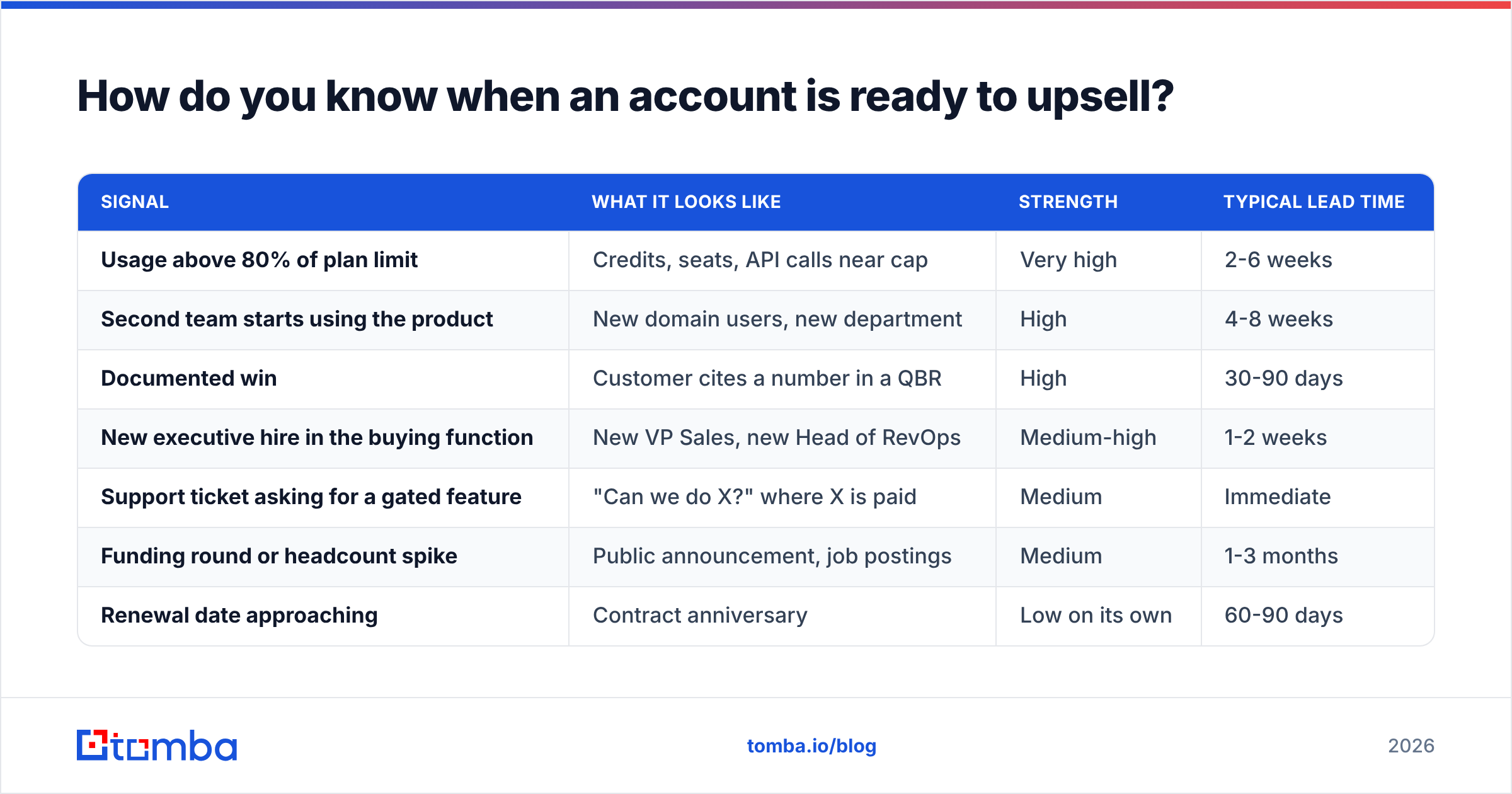
Look for signals, not calendar dates. Rank them by how strongly they predict a yes.
| Signal | What it looks like | Strength | Typical lead time |
|---|---|---|---|
| Usage above 80% of plan limit | Credits, seats, API calls near cap | Very high | 2-6 weeks |
| Second team starts using the product | New domain users, new department | High | 4-8 weeks |
| Documented win | Customer cites a number in a QBR | High | 30-90 days |
| New executive hire in the buying function | New VP Sales, new Head of RevOps | Medium-high | 1-2 weeks |
| Support ticket asking for a gated feature | "Can we do X?" where X is paid | Medium | Immediate |
| Funding round or headcount spike | Public announcement, job postings | Medium | 1-3 months |
| Renewal date approaching | Contract anniversary | Low on its own | 60-90 days |
Renewal date is at the bottom on purpose. It is a deadline, not a reason. Pair it with a real signal or you are just asking for money on a schedule.
The operational move: pipe the top three signals into a daily or weekly alert. Usage thresholds come from your product analytics. New-stakeholder alerts come from enrichment — when a new decision-maker appears at an existing account, you want to know within days, not at the next QBR. A data enrichment layer that refreshes contact records against your account list turns that from a manual LinkedIn check into a scheduled job.
How do you actually run the upsell conversation?#
Six steps. Skip none of them, and notice that the ask lands fifth, not first.
- Open with their outcome, not your product. "Your team ran 4,200 verifications last month, up from 900 in January." You are establishing that you have been paying attention.
- Name the constraint they are already feeling. "You've hit the seat cap three times since March." If they haven't felt a constraint, stop — there is no upsell here yet.
- Ask what happens next quarter. Let them describe the growth. If they say "we're hiring four more SDRs," they just sized the deal for you.
- Quantify the cost of the constraint. Time lost, deals delayed, workarounds built. Use their numbers, not yours.
- Present the tier as the fix, with the math. Price difference against the cost they just described. If the math doesn't work, say so — that credibility pays off next quarter.
- Give a downgrade path. "If usage drops, we'll move you back at renewal." Removing the risk of being stuck is often what closes it.
Step six is the one teams cut, and it's the cheapest concession in B2B. Most customers who upsell on real usage never downgrade. The ones who would have downgraded were never going to be happy at the higher tier anyway.
What does an upsell email look like that people actually reply to?#
Short, specific, and anchored to a number they recognize.
Subject: 4,200 verifications last month
Hi Dana — your team ran 4,200 verifications in August, up from 900 in January. You've hit the plan cap three times since March, which I'm guessing means someone is manually splitting lists.
The Growth plan removes that cap and adds bulk processing. Difference is about $50/month against roughly six hours of manual work I can see in the logs.
Worth 15 minutes next week, or should I just send the numbers?
— Sam
What makes it work: a fact in the subject line, an observed constraint in the body, honest math, and a low-friction alternative to a meeting. No "hope you're doing well," no "I wanted to reach out."
If you're rewriting a batch of these, a subject line tester is a faster feedback loop than sending and hoping. And if the contact you need has changed roles, verify before you send — a bounced expansion email to a stale address costs you more than a cold one, because it lands on a domain you have a real relationship with.
Which tools support an upsell motion, and where do they overlap?#
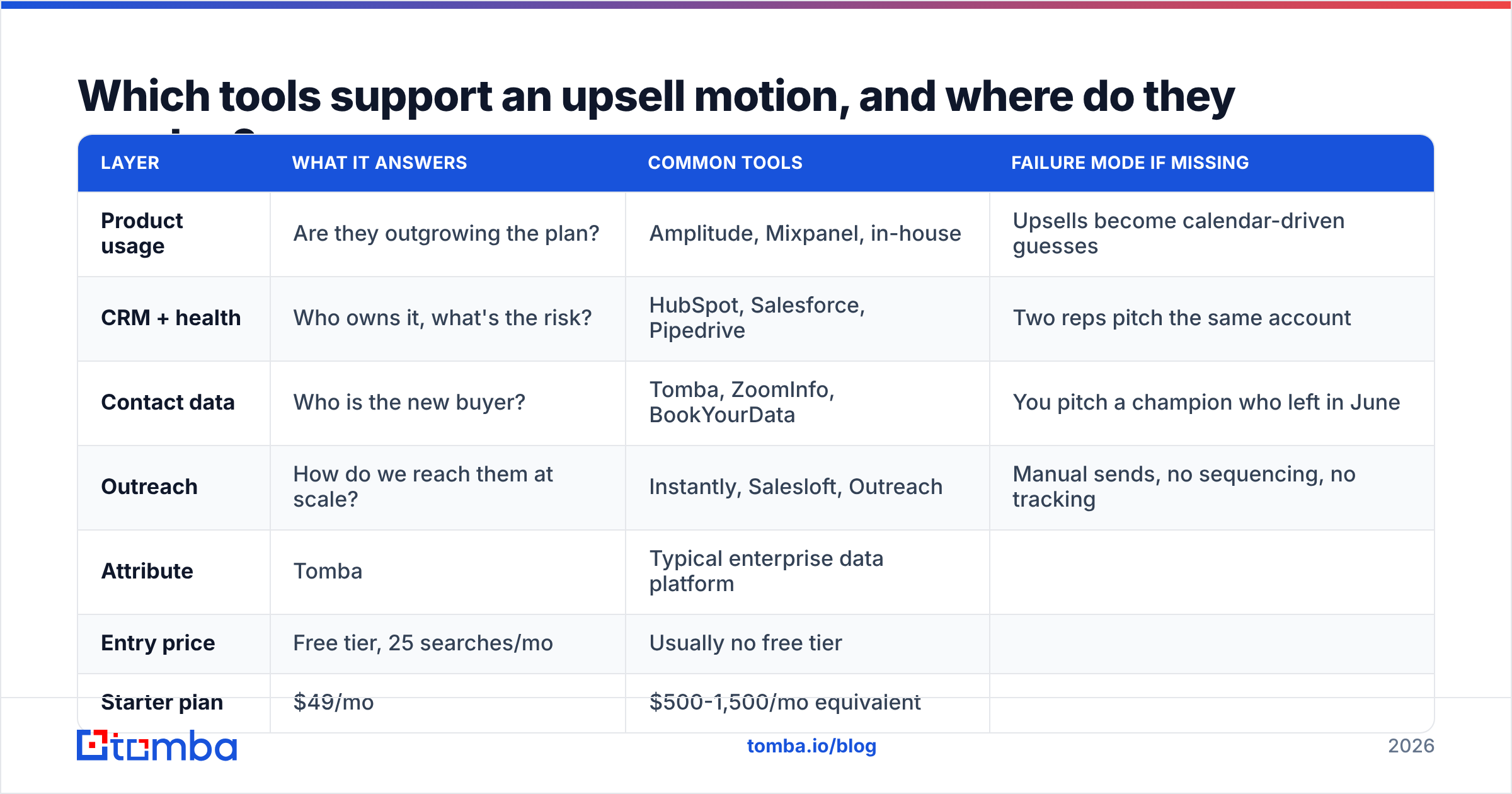
Expansion touches four systems: product analytics (who's using what), CRM (who owns the account), contact data (who to talk to now), and outreach (how you reach them). Most teams over-buy in one column and starve another.
| Layer | What it answers | Common tools | Failure mode if missing |
|---|---|---|---|
| Product usage | Are they outgrowing the plan? | Amplitude, Mixpanel, in-house | Upsells become calendar-driven guesses |
| CRM + health | Who owns it, what's the risk? | HubSpot, Salesforce, Pipedrive | Two reps pitch the same account |
| Contact data | Who is the new buyer? | Tomba, ZoomInfo, BookYourData | You pitch a champion who left in June |
| Outreach | How do we reach them at scale? | Instantly, Salesloft, Outreach | Manual sends, no sequencing, no tracking |
The gap most teams don't notice is column three. Your CRM contact records decay — B2B contact data goes stale at roughly 25-30% per year as people change roles, and that rate is higher in fast-growing accounts, which are exactly the ones worth upselling. Gartner and most RevOps practitioners treat contact hygiene as a standing operational cost, not a one-time cleanup.
For contact refresh specifically, the options split into database vendors and finder/verifier APIs. Database vendors like BookYourData sell curated, pre-built lists — strong when you want volume in a defined segment and want to buy it outright. Finder-and-verifier tools like Tomba work the other direction: you already know the account, and you need the current email for a named person at that domain right now. Both are legitimate; they solve different halves of the problem, and plenty of teams run both.
Here's how the cost side compares for a mid-size account team:
| Attribute | Tomba | Typical enterprise data platform |
|---|---|---|
| Entry price | Free tier, 25 searches/mo | Usually no free tier |
| Starter plan | $49/mo | $500-1,500/mo equivalent |
| Mid tier | Growth $99/mo | Annual contract only |
| Pro tier | $249/mo | Custom / negotiated |
| Contract | Monthly, no minimum | Annual commitment common |
| Verification included | Yes | Often a paid add-on |
| API access | All paid plans | Higher tiers only |
Full Tomba pricing is public, which is itself useful when you're building a business case for your own tooling budget.

How do you find the new decision-maker inside an existing account?#
This is the mechanical part of expansion that most playbooks skip.
Your champion gets promoted, leaves, or moves teams. The account is still healthy, still using the product, but nobody has a relationship with whoever now controls the budget. Six months later it shows up as a surprise churn.
The workflow to prevent it:
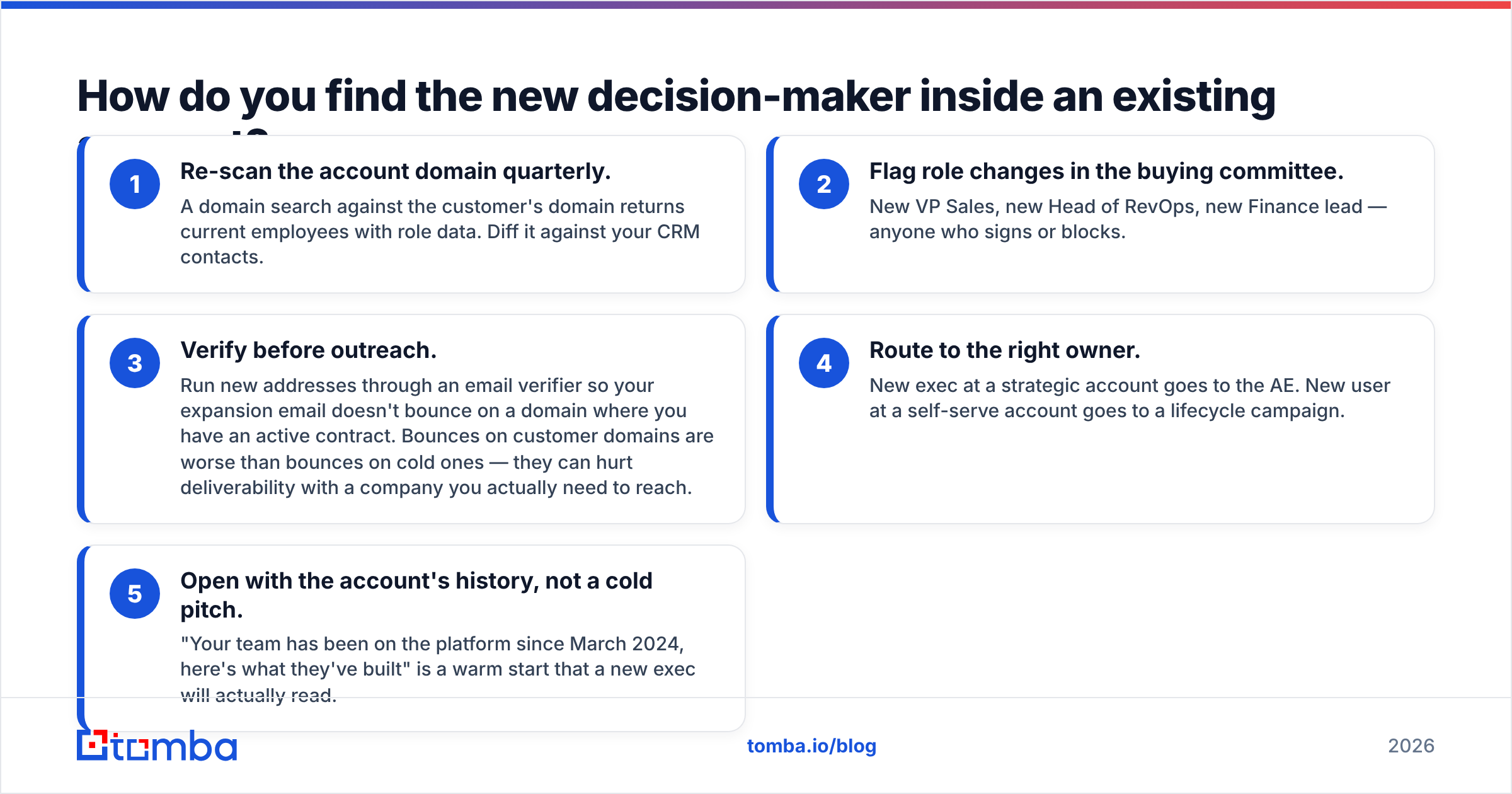
- Re-scan the account domain quarterly. A domain search against the customer's domain returns current employees with role data. Diff it against your CRM contacts.
- Flag role changes in the buying committee. New VP Sales, new Head of RevOps, new Finance lead — anyone who signs or blocks.
- Verify before outreach. Run new addresses through an email verifier so your expansion email doesn't bounce on a domain where you have an active contract. Bounces on customer domains are worse than bounces on cold ones — they can hurt deliverability with a company you actually need to reach.
- Route to the right owner. New exec at a strategic account goes to the AE. New user at a self-serve account goes to a lifecycle campaign.
- Open with the account's history, not a cold pitch. "Your team has been on the platform since March 2024, here's what they've built" is a warm start that a new exec will actually read.
Run steps one through three as a scheduled job rather than a manual task and the whole motion becomes maintenance instead of firefighting.
How do you measure whether your upsell motion is working?#
Four metrics, tracked separately from new business:
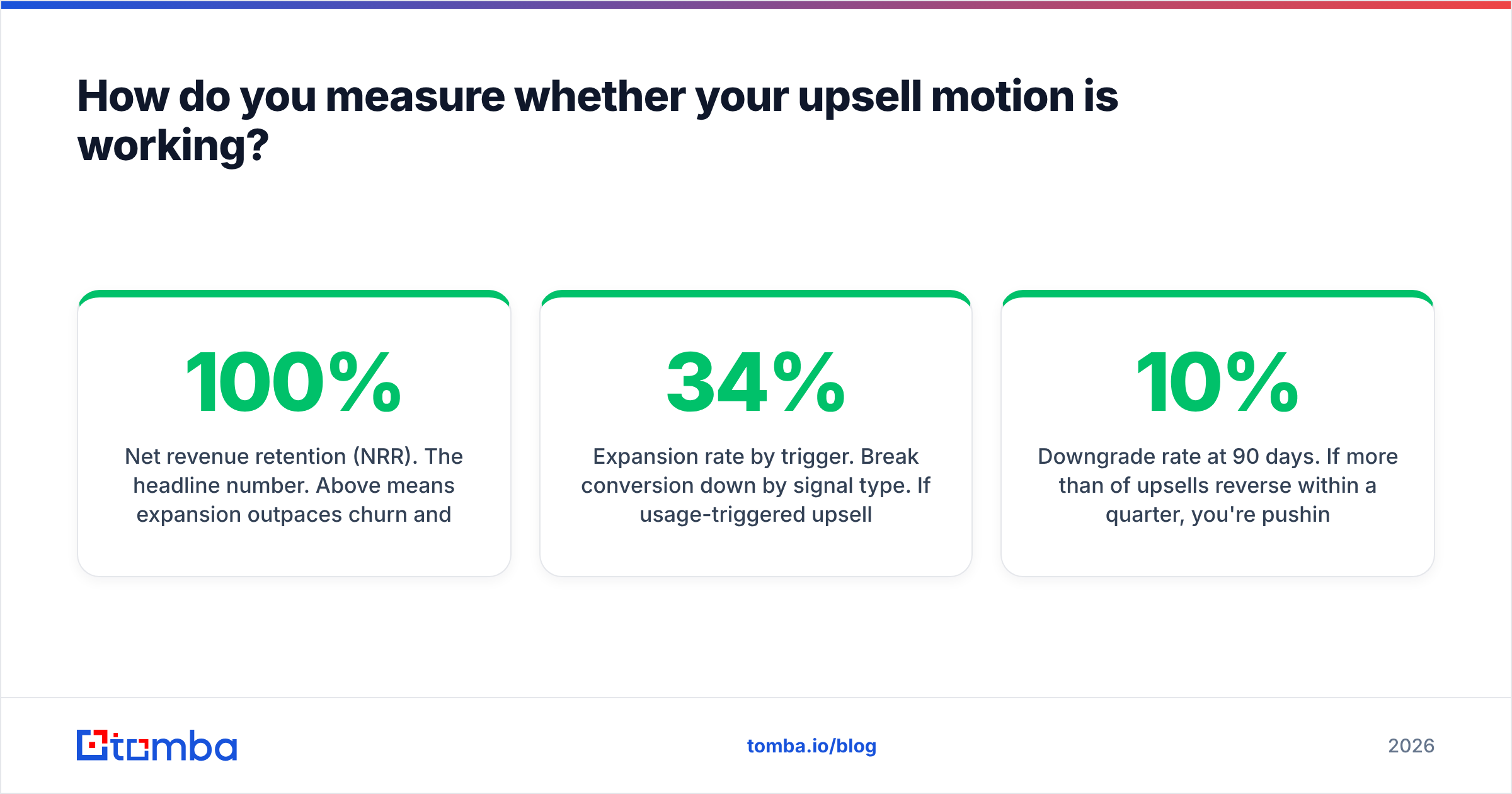
- Net revenue retention (NRR). The headline number. Above 100% means expansion outpaces churn and contraction. Best-in-class B2B SaaS sits at 110-130%.
- Expansion rate by trigger. Break conversion down by signal type. If usage-triggered upsells convert at 34% and calendar-triggered at 6%, stop doing calendar-triggered ones.
- Time from signal to conversation. If your average is 40 days, you are losing deals to the window closing. Target under 10 days for high-strength signals.
- Downgrade rate at 90 days. If more than 10% of upsells reverse within a quarter, you're pushing tiers people don't need, and it will show up in churn later.
Track the second one for a full quarter before you change anything. Most teams discover their entire expansion number comes from two or three trigger types, and everything else is activity theater.
What are the most common upselling mistakes?#
- Pitching the tier, not the constraint. Nobody buys "Growth plan." They buy "stop hitting the cap."
- Upselling an unhealthy account. If support tickets are open and the NPS is a 4, expansion outreach reads as tone-deaf. Fix first, expand second.
- Ignoring the finance calendar. Many companies can't add spend mid-year without a process. Ask when their budget cycle resets and time the ask to it.
- One-thread dependency. If your entire relationship runs through one person, you don't have an account — you have a favor. Multi-thread before you need to.
- No downgrade path. Fear of being locked in kills more expansion deals than price does.
- Stale contact data. Sending a well-crafted expansion pitch to someone who left the company in April is the most avoidable failure on this list, and it is still the most common.
Where should you start if you have no upsell motion today?#
Pick one trigger and build around it for a quarter.
Usage threshold is the easiest to instrument and the highest-converting, so start there. Define the threshold (80% of plan limit is a reasonable default), build the alert, write one email template, and assign a single owner. Measure conversion. Then add the second trigger.
Do not build a nine-stage expansion playbook before you have evidence that one trigger works. The teams with strong NRR usually run three or four well-instrumented triggers, not twenty half-implemented ones. Practitioner discussions on G2 consistently show the same pattern: depth on a few plays beats breadth across many.
And before any of it, audit your contact data for your top 50 accounts. Check whether the person listed as the primary contact still works there and still owns the budget. That audit takes an afternoon and usually finds enough decay to justify the whole project.
Ready to stop pitching people who left the company? Expansion revenue starts with knowing who actually holds the budget at your existing accounts right now. Tomba Email Finder locates current, verified email addresses for named contacts at any company domain — so when a new VP lands at one of your accounts, you can reach them in days instead of finding out at renewal. Start on the free tier with 25 searches a month, or run your full account list through the Starter plan at $49/mo.
Related guides#
// get started
Find, verify and enrich your first contacts today
Start on the free plan with 25 searches a month, then scale when your team is ready.
Free plan · No credit card required · GDPR & CCPA
// about the author