How to Use ChatGPT for Sales: 9 Workflows That Work in 2026
ChatGPT writes decent sales copy and terrible sales data. Here are nine workflows reps actually run in 2026 — with the prompts, the guardrails, and the tasks you should never hand it.
TL;DR
- ChatGPT is a strong drafting and reasoning tool for sales, and a genuinely unreliable data tool. Use it for language, research synthesis, and structure — never for contact details.
- The nine workflows below cover pre-call research, personalization at scale, objection prep, discovery question design, proposal drafting, CRM hygiene, forecasting narratives, competitive battlecards, and post-call summaries.
- The single biggest failure mode: asking it for email addresses or phone numbers. It will produce something that looks right roughly every time and is correct far less often. Pull those from a verified source instead.
- Prompt quality beats model choice. A prompt with role, context, constraints, and a worked example outperforms a vague prompt on any frontier model.
- Realistic time savings: 4–7 hours a week per rep on research and writing. Not "10x." Anyone promising 10x is selling something.
What can ChatGPT actually do for a sales rep?#
Think of ChatGPT as a very fast, very well-read junior analyst who has never met your buyers and has no access to your CRM unless you paste it in. It writes well, structures information brilliantly, and reasons through a messy account situation faster than you can. It also confidently invents facts when it doesn't know them — and a junior analyst who invents a CFO's email address is worse than no analyst at all.
That framing tells you exactly where to point it. The tasks where ChatGPT wins are the ones where you already have the facts and need them shaped: turned into a first draft, a summary, a set of questions, a rebuttal, a narrative. The tasks where it loses are the ones where the fact itself is the deliverable: a contact's email, a company's headcount, a competitor's current pricing, whether a lead is still at the company.
Here's the split, concretely:
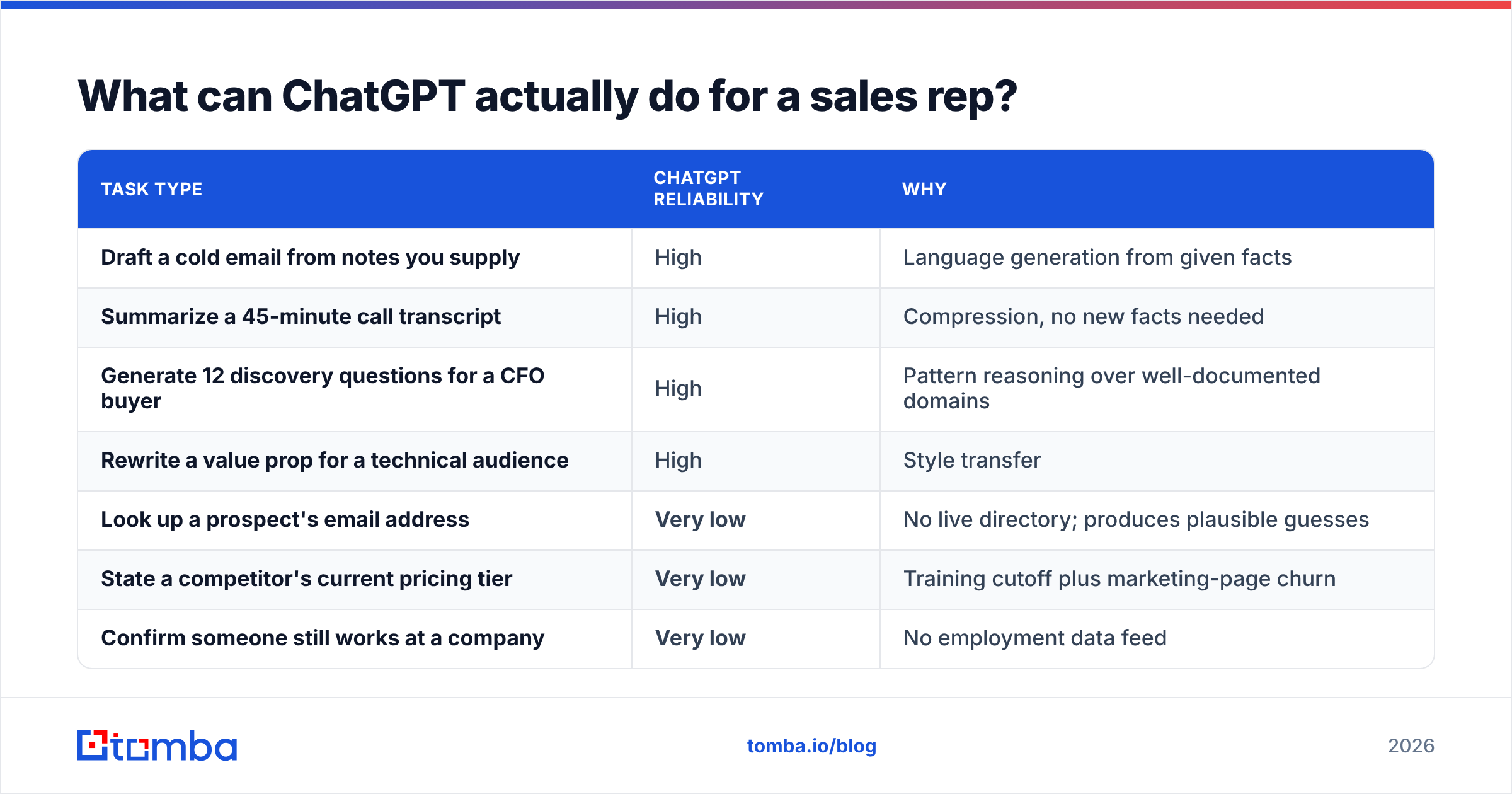
| Task type | ChatGPT reliability | Why |
|---|---|---|
| Draft a cold email from notes you supply | High | Language generation from given facts |
| Summarize a 45-minute call transcript | High | Compression, no new facts needed |
| Generate 12 discovery questions for a CFO buyer | High | Pattern reasoning over well-documented domains |
| Rewrite a value prop for a technical audience | High | Style transfer |
| Look up a prospect's email address | Very low | No live directory; produces plausible guesses |
| State a competitor's current pricing tier | Very low | Training cutoff plus marketing-page churn |
| Confirm someone still works at a company | Very low | No employment data feed |
| Score a lead against your ICP | Medium | Good if you paste the criteria and the firmographics |
Notice the pattern: everything in the "high" column is a transformation of input you provide. Everything in the "very low" column is a retrieval task pretending to be a generation task. Keep that line clean and ChatGPT becomes genuinely useful. Blur it and you'll spend more time correcting it than you saved.

How do you write a sales prompt that doesn't produce generic slop?#
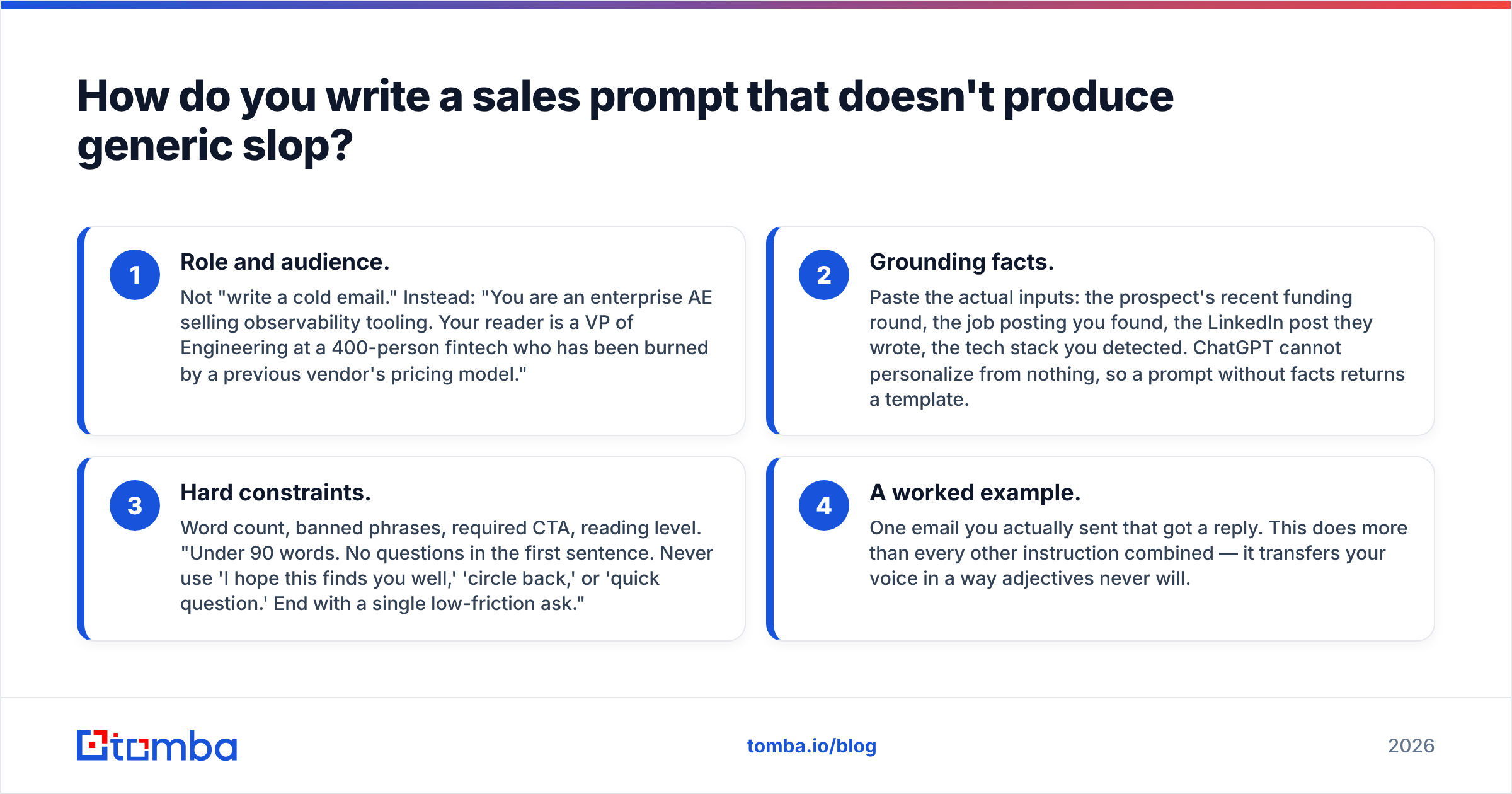
Four components. Miss any of them and you get the beige, over-enthusiastic paragraph everyone recognizes as AI output within two sentences.
- Role and audience. Not "write a cold email." Instead: "You are an enterprise AE selling observability tooling. Your reader is a VP of Engineering at a 400-person fintech who has been burned by a previous vendor's pricing model."
- Grounding facts. Paste the actual inputs: the prospect's recent funding round, the job posting you found, the LinkedIn post they wrote, the tech stack you detected. ChatGPT cannot personalize from nothing, so a prompt without facts returns a template.
- Hard constraints. Word count, banned phrases, required CTA, reading level. "Under 90 words. No questions in the first sentence. Never use 'I hope this finds you well,' 'circle back,' or 'quick question.' End with a single low-friction ask."
- A worked example. One email you actually sent that got a reply. This does more than every other instruction combined — it transfers your voice in a way adjectives never will.
A fifth optional component that punches above its weight: ask for three variants with different angles, then pick. You're a better editor than ChatGPT is a writer, and choosing among three is faster than fixing one.
Test this yourself. Run "write a cold email to a VP of Sales about our lead gen tool" and then run the four-component version. The gap isn't subtle.
What are the nine ChatGPT sales workflows worth building?#
1. Pre-call research synthesis#
Paste in the company's 10-K excerpt, recent press coverage, their careers page, and the prospect's LinkedIn summary. Ask for: three likely business priorities, two probable internal blockers, and one hypothesis about why they'd care about your category right now. Fifteen minutes of reading becomes a two-minute brief. Crucially, you supplied the source material — no hallucination surface.
2. Personalization at scale (the honest version)#
The realistic pattern: enrich your list first, then let ChatGPT write the personalized line. Pull verified contact data and firmographics with a proper data enrichment step, export a CSV with columns for company, role, recent trigger event, and tech stack, then batch the first-line generation through the API. What you get is 200 emails with genuinely specific opening lines, built on facts that came from a data source rather than a language model.
Reverse that order — ask ChatGPT to find the people first — and you'll send 200 emails to addresses that bounce.
3. Objection handling prep#
Feed it your five most common objections and your actual responses. Ask it to play a skeptical buyer and push back three levels deep on each. This is the workflow most reps underuse: it's not asking for answers, it's asking for harder questions. Do it before the call rather than discovering the third-level objection live.
4. Discovery question design#
Give it the deal stage, the buyer's role, and what you already know. Ask for questions that surface consequence rather than situation — "what happens to the Q3 launch if this stays unsolved" beats "what tools are you using now." MEDDIC, SPIN, and Challenger frameworks are all well represented in training data, so naming a framework produces materially better questions.
5. Proposal and one-pager drafting#
Paste your discovery notes and the deal structure. Ask for a one-page summary written in the buyer's language, organized around their stated priorities rather than your feature list. This is a compression task, which is the model's strongest suit. Expect to edit 20% of it.
6. CRM hygiene and note cleanup#
Dump messy call notes and ask for structured output: next steps, stakeholders mentioned, risks, stated timeline, competitive mentions. Ask for JSON if you're piping it into a CRM via automation. This is where reps recover the most hours, because everyone hates writing notes and everyone writes them badly.
7. Forecast narrative writing#
Paste your pipeline table. Ask for the three-sentence story your VP needs: what changed since last week, what's at risk, what you're doing about it. Managers don't want the spreadsheet — they want the interpretation. ChatGPT is good at interpretation when the numbers are given.
8. Competitive battlecards (with a manual verification pass)#
Ask it to structure a battlecard: positioning, common objections when facing this competitor, trap-setting questions, where you genuinely lose. Then verify every factual claim against the competitor's live site. Its structural instinct is excellent; its pricing recall is stale by definition. Use published review platforms like G2 to sanity-check claims about how buyers actually compare you.
9. Post-call summary and follow-up#
Transcript in, summary and follow-up email out, in one prompt. Ask it to explicitly quote the buyer's own phrasing back in the follow-up — buyers respond to their own words. Pair this with a subject line generator pass if open rates are your bottleneck.
Why should you never ask ChatGPT for contact data?#
Because it doesn't have any. This is the most expensive misunderstanding in AI sales tooling, and it costs teams real deliverability.
ChatGPT has no live directory of email addresses. When you ask for one, it does the only thing it can: it infers a probable pattern from what it saw during training — firstname.lastname@company.com, f.lastname@company.com, firstinitial+lastname@company.com — and returns the most statistically likely string. That's a guess wearing a confident tone. It cannot ping the mail server, it cannot check whether the mailbox exists, it cannot tell you the person left in March.
The damage compounds. Every guessed address that bounces pushes your bounce rate up, and once you cross roughly 2% sustained bounce rate, mailbox providers start throttling you. Google and Microsoft both tightened bulk-sender requirements meaningfully, and their published sender guidelines treat high bounce rates as a spam signal regardless of your content quality. You can write the best cold email of your career and still land in spam because your list came from a language model's imagination.

The fix is architectural, not prompt engineering. Split the job:
- Retrieval layer — a real data source with live verification. Use an email finder that queries actual sources and returns a confidence score, run the result through an email verifier for SMTP-level validation, and use domain search when you need everyone in a department rather than one named person.
- Generation layer — ChatGPT, working only on the verified rows the retrieval layer handed it.
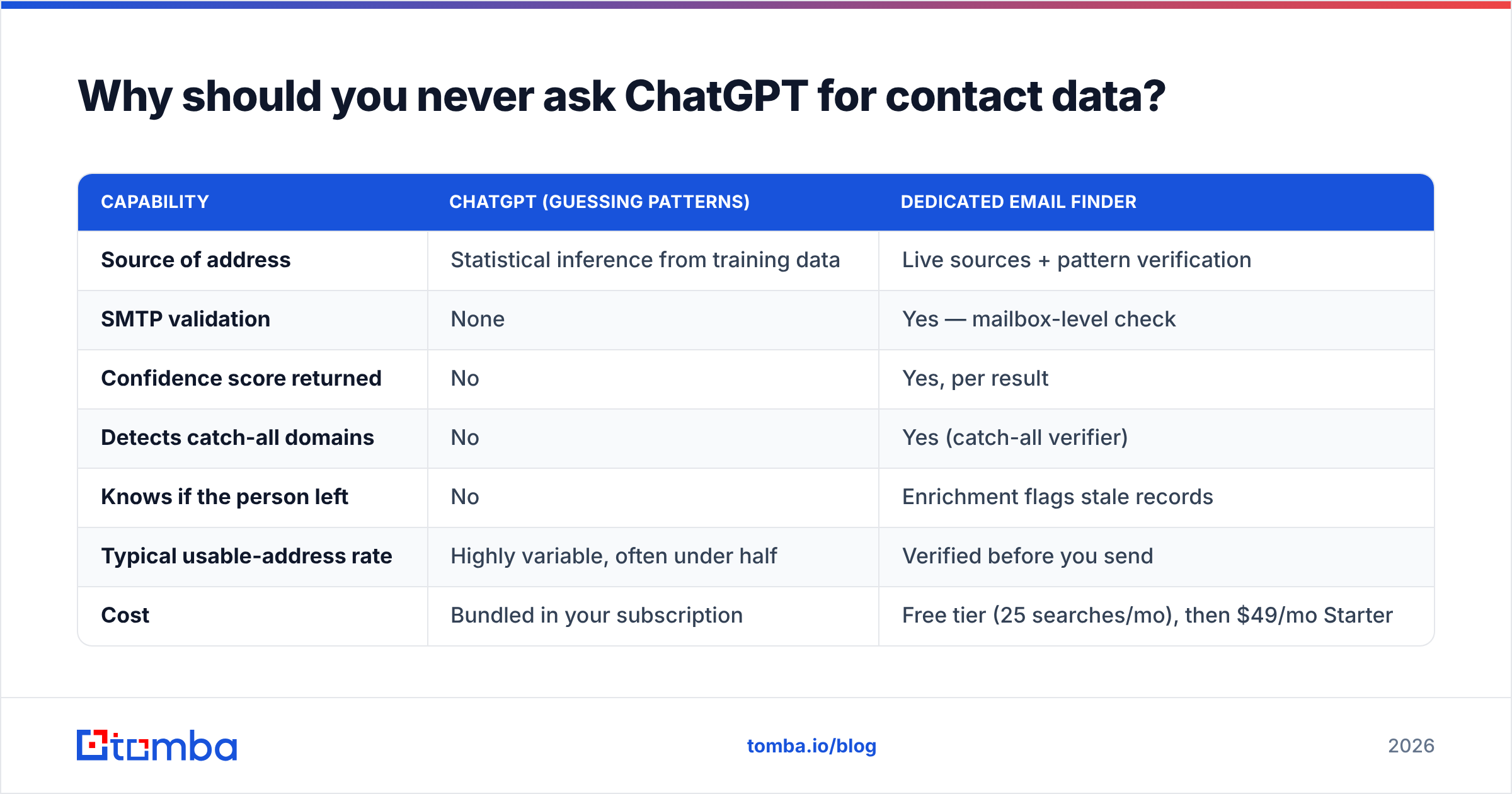
Here's how the two layers actually compare on the specific job of getting a working address:
| Capability | ChatGPT (guessing patterns) | Dedicated email finder |
|---|---|---|
| Source of address | Statistical inference from training data | Live sources + pattern verification |
| SMTP validation | None | Yes — mailbox-level check |
| Confidence score returned | No | Yes, per result |
| Detects catch-all domains | No | Yes (catch-all verifier) |
| Knows if the person left | No | Enrichment flags stale records |
| Typical usable-address rate | Highly variable, often under half | Verified before you send |
| Cost | Bundled in your subscription | Free tier (25 searches/mo), then $49/mo Starter |
That last row is the part people miss. Reps guess with ChatGPT because it feels free. But a bounced send costs you sender reputation, and sender reputation is the asset that makes every future campaign work. Tomba's pricing starts free at 25 searches a month, moves to $49/mo Starter, $99/mo Growth, and $249/mo Pro — cheaper than one blacklisting event.
Which ChatGPT setup should a sales team actually use?#
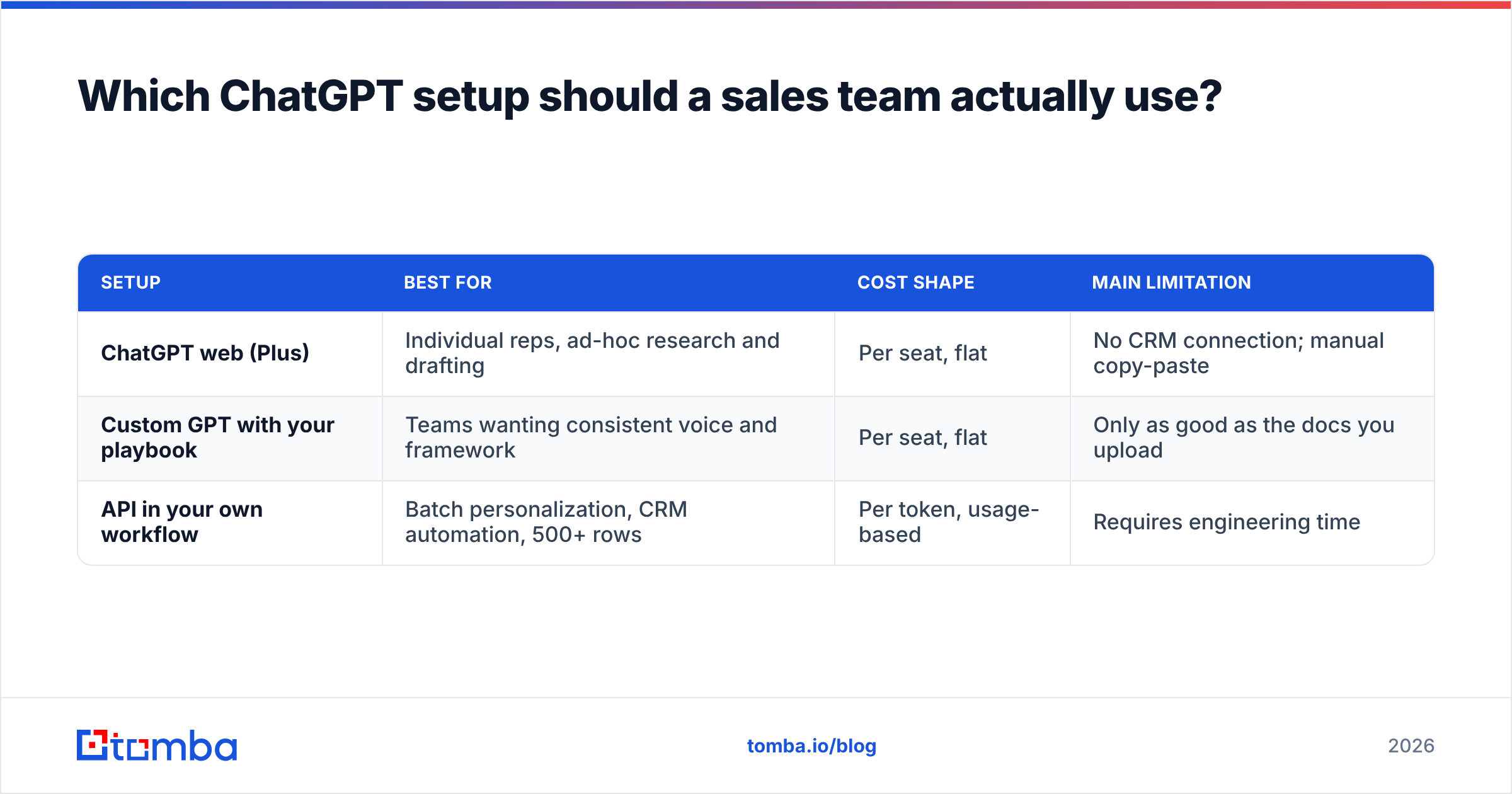
Three deployment shapes, and they're not interchangeable.
| Setup | Best for | Cost shape | Main limitation |
|---|---|---|---|
| ChatGPT web (Plus) | Individual reps, ad-hoc research and drafting | Per seat, flat | No CRM connection; manual copy-paste |
| Custom GPT with your playbook | Teams wanting consistent voice and framework | Per seat, flat | Only as good as the docs you upload |
| API in your own workflow | Batch personalization, CRM automation, 500+ rows | Per token, usage-based | Requires engineering time |
Most teams should start with a Custom GPT loaded with three documents: your ICP definition, your five best-performing emails, and your objection-handling doc. That single step eliminates most of the generic-output problem because the grounding facts are permanently in context rather than re-pasted every session.
Move to the API when you're doing volume. The economics flip fast: generating a personalized first line for 1,000 prospects through the web interface is a full day of copy-paste, while the same job through the Tomba API for enrichment plus a batch model call is a script you run once. If you're working in spreadsheets, the Google Sheets add-on covers the enrichment half without any code at all.
One thing worth checking before you scale: whether your data can legally go into the prompt at all. If you're handling EU personal data, review your provider's data-processing terms — OpenAI's enterprise privacy documentation covers what's used for training and what isn't, and the answer differs between consumer and business tiers. Pasting a customer list into a consumer account is a compliance problem, not just a bad habit.
How do you measure whether ChatGPT is actually helping?#
Track four numbers before and after. If you don't, "AI is helping" stays an unfalsifiable feeling.
- Hours per rep per week on research and writing. Self-reported is fine. Expect 4–7 hours recovered, mostly from note-taking and pre-call prep.
- Reply rate, not open rate. Open rates are noise since Apple Mail Privacy Protection. If ChatGPT personalization is working, replies move. If replies don't move, your personalization is fake-personal — the "I saw your company is growing!" variety.
- Bounce rate. This is the canary. If it climbs after you introduce AI workflows, someone on your team is asking the model for addresses. Fix the source, not the copy.
- Meetings booked per 100 sends. The only metric that survives contact with a CFO.
Set a two-week baseline first. Teams that skip the baseline always conclude the tool worked, because they wanted it to.
A caveat on expectations: the gains are real but bounded. ChatGPT does not fix a broken ICP, a weak offer, or a list of people who don't have the problem you solve. It makes a good motion faster and a bad motion faster. If your response rate is near zero today, the problem is upstream of your writing, and no prompt will rescue it.
What should you do first, this week?#
Pick one workflow, not nine. The teams that get value do a narrow thing well; the teams that don't try to AI-ify everything at once and abandon it in a month.
The highest-return starting point for most reps is post-call summaries and CRM notes — it's low-risk (no hallucination surface, since the transcript is the input), immediately time-saving, and it builds the habit of pasting real context into the prompt rather than asking the model to know things.
Second is pre-call research synthesis, for the same reason.
Save personalization at scale for after you've fixed your data layer. It's the workflow with the highest ceiling and the highest cost of getting the sequencing wrong.
Where does verified data fit in the AI sales stack?#
Underneath everything else. Every workflow above degrades to noise if the contact row is wrong — the perfect email to a dead mailbox is worth exactly zero, and it actively damages your ability to reach the mailboxes that are alive.
Start with Tomba Email Finder to build the verified list — search by domain, name, or company, get a confidence score on every result, and run SMTP verification before a single send. The free tier gives you 25 searches a month to test the accuracy against contacts you already know are good, which is the only honest way to evaluate any data vendor. Then let ChatGPT do what it's genuinely excellent at: turning those verified rows into messages people want to answer.
Get the retrieval right, and the generation takes care of itself.
Related guides#
// get started
Find, verify and enrich your first contacts today
Start on the free plan with 25 searches a month, then scale when your team is ready.
Free plan · No credit card required · GDPR & CCPA
// about the author