How To Use ChatGPT for Sales Professionals: 9 Real Workflows
ChatGPT writes decent sales copy and terrible sales strategy. Here are nine workflows that actually move pipeline — plus the three tasks you should never hand it.
Most guides on how to use ChatGPT for sales professionals stop at "write me a cold email." This one goes further. Below are nine workflows that hold up in real pipeline work, plus three jobs you should never hand to a model.
TL;DR
- ChatGPT is a drafting and research accelerator, not a data source. It has no contact database, no verified emails, and no live CRM context unless you give it one.
- The nine workflows below — pre-call research briefs, discovery question generation, objection scripting, sequence variants, call-note summarisation, proposal skeletons, competitive battlecards, forecast narrative, and territory triage — are where reps actually save hours.
- Never let it invent contact data, pricing, or customer references. Every hallucinated email address it produces looks perfectly plausible and bounces anyway.
- The winning stack is ChatGPT for language plus a verified data layer for who to contact. Draft with the model, source with an email finder.
- Time saved is real but modest: expect 4–7 hours a week per rep on admin and drafting, not a replacement for prospecting judgement.
What can ChatGPT actually do for a sales rep?#
Start with the honest version. ChatGPT is a language engine. Its general knowledge is broad but frozen, and newer versions add a browsing tool. It does not know your pipeline, your ICP, your win rates, or whether jane.doe@acme.com is a live mailbox.
That means every useful sales workflow follows the same shape. You supply the facts. It supplies the structure and the words. Invert that — you supply the structure, it supplies the facts — and you get confident nonsense.
Here is where that line actually falls in day-to-day selling:
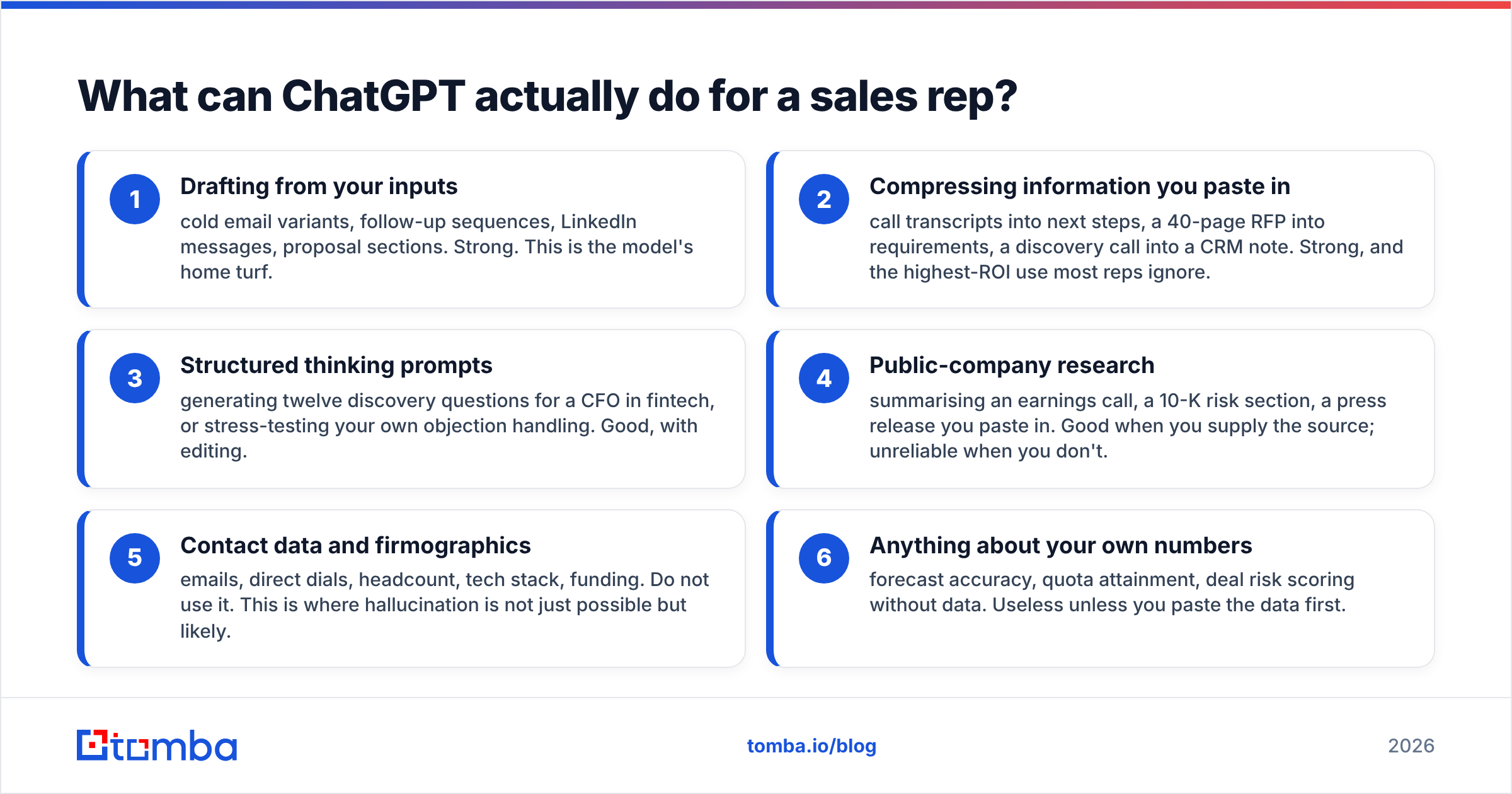
- Drafting from your inputs — cold email variants, follow-up sequences, LinkedIn messages, proposal sections. Strong. This is the model's home turf.
- Compressing information you paste in — call transcripts into next steps, a 40-page RFP into requirements, a discovery call into a CRM note. Strong, and the highest-ROI use most reps ignore.
- Structured thinking prompts — generating twelve discovery questions for a CFO in fintech, or stress-testing your own objection handling. Good, with editing.
- Public-company research — summarising an earnings call, a 10-K risk section, a press release you paste in. Good when you supply the source; unreliable when you don't.
- Contact data and firmographics — emails, direct dials, headcount, tech stack, funding. Do not use it. This is where hallucination is not just possible but likely.
- Anything about your own numbers — forecast accuracy, quota attainment, deal risk scoring without data. Useless unless you paste the data first.
The pattern: the further a task sits from "rearrange language I gave you," the worse the output gets.

How do you write a pre-call research brief with ChatGPT?#
This is the single highest-value workflow. Most reps do it wrong by asking ChatGPT to research the account. Gather the raw material yourself, then ask it to synthesise.
The working process:
Paste in the prospect's LinkedIn About section, their company's latest press release or funding announcement, their careers page job titles, and the last earnings call summary if they're public. Then prompt:
You are prepping a discovery call. Below is raw research on [Company] and [Contact Name, Title]. Produce: (1) three business priorities you can infer, with the evidence line for each; (2) two likely pain points in [your category]; (3) five discovery questions that reference specifics, not generics; (4) one thing I should NOT bring up. Flag anything you inferred rather than read directly.
The "flag anything you inferred" line matters more than the rest of the prompt. It forces the model to split what your sources said from what it filled in. That gap is what gets reps caught making a wrong claim on a live call.
A 15-minute manual brief drops to about four minutes. Across ten calls a week that's roughly two hours back.
How should you use ChatGPT for cold email — and where does it fail?#
ChatGPT writes grammatically clean cold email that reads like every other AI cold email in the inbox. That's the whole problem. Buyers have been pattern-matching "I noticed you're scaling your team" openers since 2023.
Use it for variation, not origination. Write one good email yourself: real observation, real hypothesis, real ask. Then have the model produce five rewrites at different lengths and angles so you can A/B test. That flips the usual workflow, and the output still sounds like a person.
Prompts that produce usable output:
- "Rewrite this at 55 words, keeping the specific detail about their Series B and cutting all adjectives."
- "Give me three subject lines under 40 characters that don't use the words 'quick', 'question', or the recipient's first name."
- "Here's my email. Play the recipient — a VP Ops who gets 60 cold emails a week. Tell me the exact sentence where you'd delete it."
That last one is the underrated move. The model is a mediocre copywriter but a surprisingly decent hostile reader.
What it cannot do is tell you who to send to. It has no verified contact layer. Ask it for the email address of a named person at a named company and it will pattern-match a common format: first.last@, f.last@, firstinitiallast@. It has no idea whether that mailbox exists. Roughly one in four B2B contacts changes jobs each year, and no static model tracks that.
That's a sourcing job, not a language job. Run the names through a domain search to get the company's actual pattern and confirmed addresses, then verify emails before the list touches your sequencer. Use ChatGPT for the words, verified data for the destination.

ChatGPT vs. dedicated sales tools: what belongs where?#
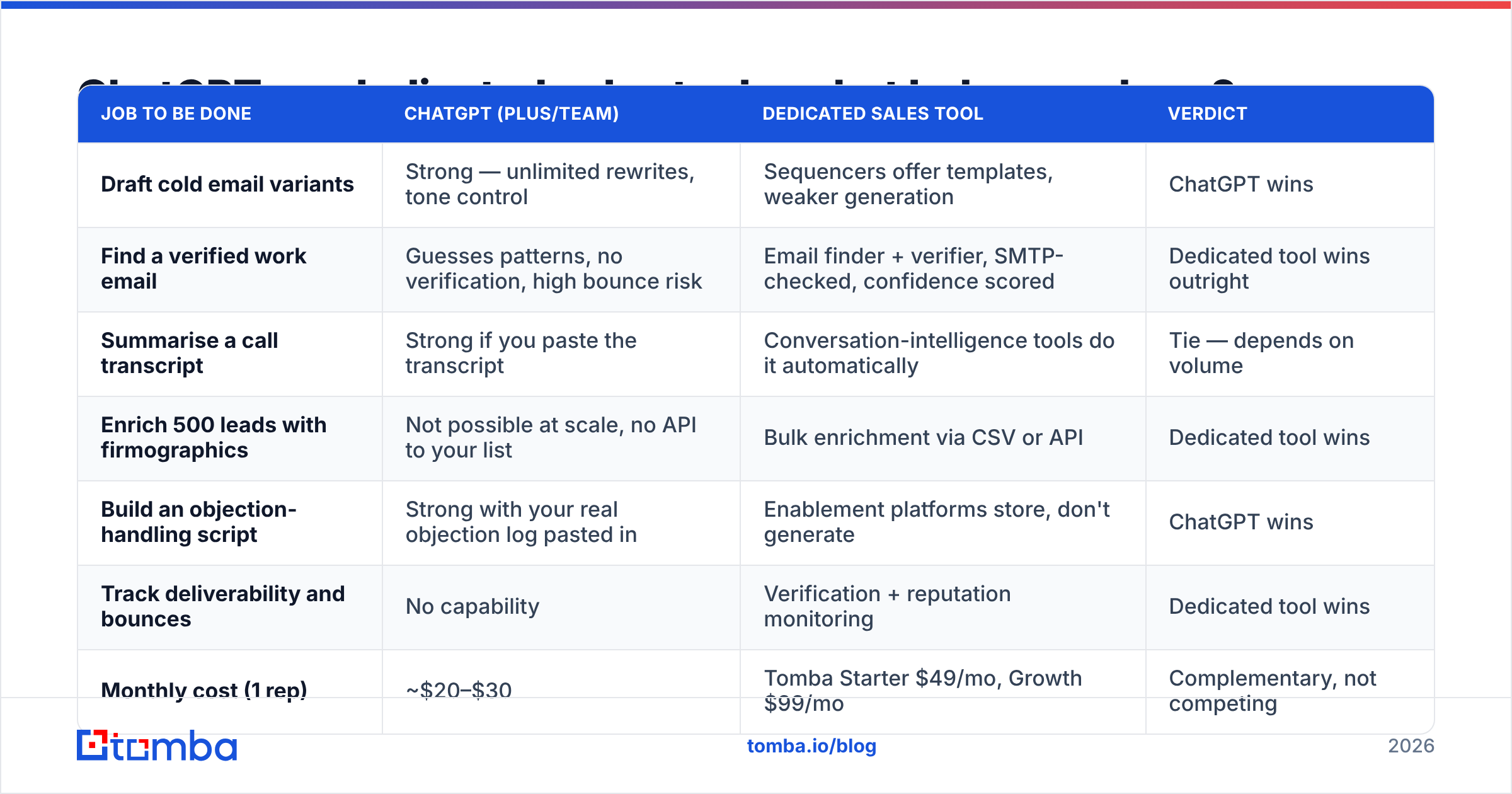
The most common budget mistake in 2026 is assuming a $20/month ChatGPT seat replaces a data or engagement tool. It replaces neither. Here's the actual division of labour:
| Job to be done | ChatGPT (Plus/Team) | Dedicated sales tool | Verdict |
|---|---|---|---|
| Draft cold email variants | Strong — unlimited rewrites, tone control | Sequencers offer templates, weaker generation | ChatGPT wins |
| Find a verified work email | Guesses patterns, no verification, high bounce risk | Email finder + verifier, SMTP-checked, confidence scored | Dedicated tool wins outright |
| Summarise a call transcript | Strong if you paste the transcript | Conversation-intelligence tools do it automatically | Tie — depends on volume |
| Enrich 500 leads with firmographics | Not possible at scale, no API to your list | Bulk enrichment via CSV or API | Dedicated tool wins |
| Build an objection-handling script | Strong with your real objection log pasted in | Enablement platforms store, don't generate | ChatGPT wins |
| Track deliverability and bounces | No capability | Verification + reputation monitoring | Dedicated tool wins |
| Monthly cost (1 rep) | ~$20–$30 | Tomba Starter $49/mo, Growth $99/mo | Complementary, not competing |
| Data freshness | Training cutoff + optional browsing | Continuously refreshed sources | Dedicated tool wins |
The read: ChatGPT is a language layer. A tool like Tomba is a data layer. Treat them as substitutes and you end up with well-written emails sent to addresses that don't exist. That is the worst case, because the bounces damage the same sending domain your good emails rely on.
Peers in the data space cover different slices of this. BookYourData, for instance, leans toward pay-as-you-go prebuilt lists. That suits teams who want a bounded one-time buy rather than an ongoing lookup workflow. Match the model to how you actually buy.
How to use ChatGPT for sales professionals: the nine workflows worth building into your week#
1. Pre-call brief. Covered above. Paste sources, get structured brief with inference flags.
2. Discovery question generation. Prompt: "Generate 12 discovery questions for a [title] at a [stage] [industry] company evaluating [category]. Four on current-state, four on cost-of-inaction, four on decision process." Cut to your best six.
3. Objection scripting from your real log. Export the last 30 objections from your CRM notes, paste them, ask for a pattern grouping and one response per group. It beats asking for "common objections," because it works from what your buyers actually say.
4. Sequence variant generation. One human-written email in, five variants out, across two lengths and three angles. Test properly — 200+ sends per variant before you call a winner.
5. Call-note summarisation. Paste transcript, get: attendees, stated pain, quantified impact, next step with owner and date, and one flag for anything ambiguous. This alone kills the "I'll update the CRM Friday" problem.
6. Proposal and SOW skeletons. Feed it your last three won proposals as structure references, then the new deal's requirements. It produces the scaffolding; you write the pricing and the differentiated sections.
7. Competitive battlecards. Paste the competitor's public pricing page and G2 review excerpts. Never let the model recall competitor facts from memory; it will state pricing from two years ago with full confidence. G2 review text is particularly good raw material here.
8. Forecast narrative. Paste your pipeline export (anonymised if policy requires), ask for a written commit/best-case narrative with the three deals most likely to slip and why, based on stage age and last-activity date.
9. Territory and list triage. Paste a list of 100 accounts with a few attributes and ask for a tiered ranking against a written ICP definition you supply. It's a reasonable first-pass sorter — treat it as a starting hypothesis, not a scoring model.
What should you never delegate to ChatGPT?#
Three hard lines, and each one has burned real teams.
Contact data. Already covered, but worth repeating because it's the most common misuse. Every fabricated address raises your bounce rate, and bounce rate directly drives email deliverability. A 5% bounce rate is roughly where mailbox providers start throttling. Two hundred guessed addresses is enough to do that to a fresh domain.
Pricing, contract terms, and commitments. The model will happily generate a discount structure or an SLA clause that your finance and legal teams have never approved. Anything a customer could hold you to needs a human author.
Customer references and case study numbers. Ask for a case study and it will produce one — plausible logo, plausible percentage lift, entirely invented. Never let generated proof points reach a buyer.
There's also a quieter risk: pasting confidential deal data into a consumer-tier account. Check whether your organisation is on a plan with data-retention controls before transcripts and pipeline exports go in. OpenAI's own documentation sets out which tiers exclude your inputs from training — read it rather than assuming.
How do you measure whether it's actually working?#
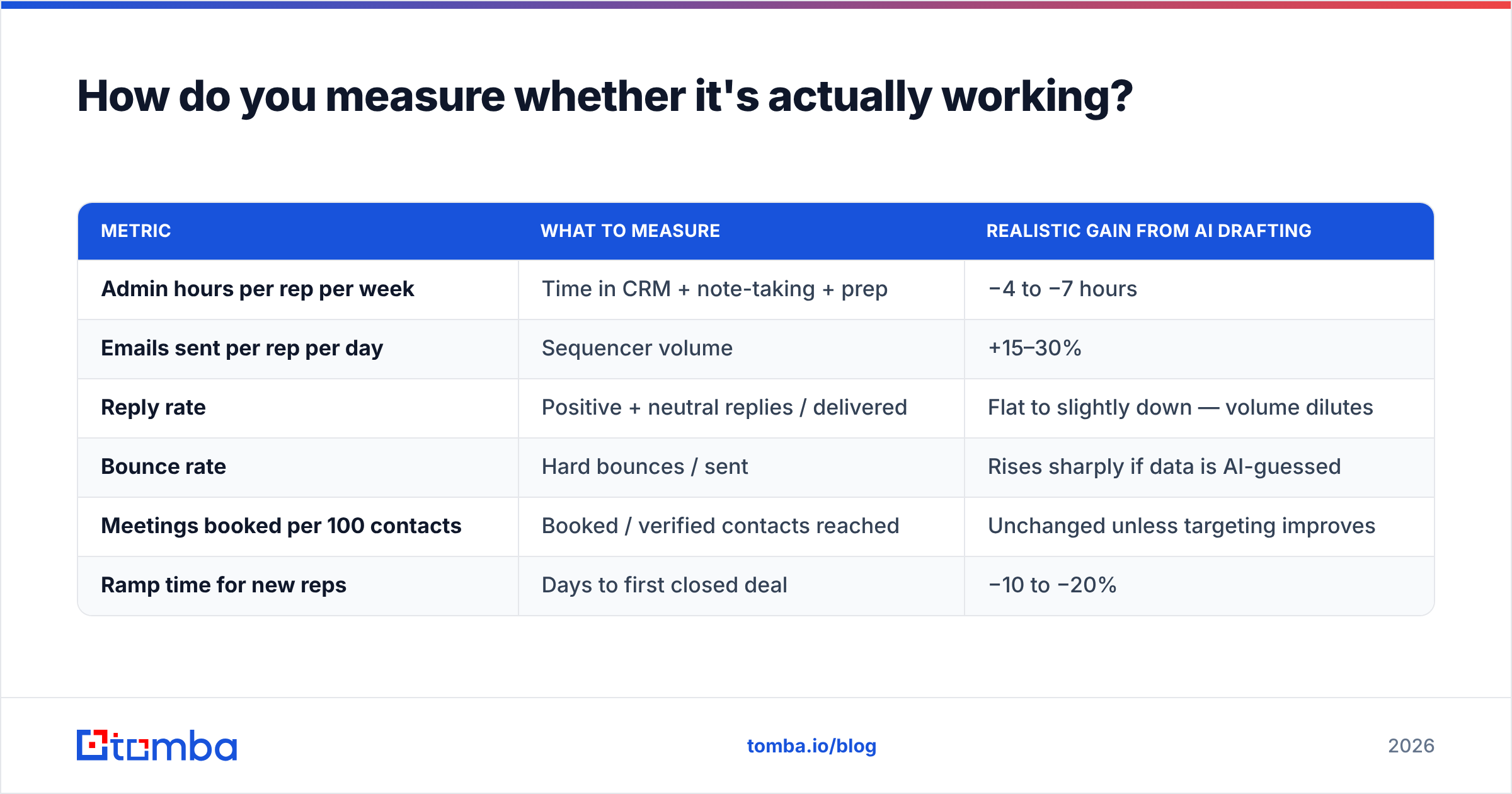
Set a baseline before you roll anything out, or you'll be arguing about vibes in three months.
| Metric | What to measure | Realistic gain from AI drafting |
|---|---|---|
| Admin hours per rep per week | Time in CRM + note-taking + prep | −4 to −7 hours |
| Emails sent per rep per day | Sequencer volume | +15–30% |
| Reply rate | Positive + neutral replies / delivered | Flat to slightly down — volume dilutes |
| Bounce rate | Hard bounces / sent | Rises sharply if data is AI-guessed |
| Meetings booked per 100 contacts | Booked / verified contacts reached | Unchanged unless targeting improves |
| Ramp time for new reps | Days to first closed deal | −10 to −20% |
Notice what does not move. Reply rate and meeting rate are functions of targeting and message relevance, not drafting speed. AI mostly buys you throughput and consistency. If your list is poor, faster drafting just gets you to a bad outcome sooner. That is why the data layer matters more than the language layer.
Track bounce rate weekly during any AI rollout. It's the earliest indicator that someone on the team started letting the model guess at addresses.
What does a sane 2026 sales AI stack look like?#
A sane stack settles most of the question of how to use ChatGPT for sales professionals. Keep it to four layers, and know which one each tool sits in:
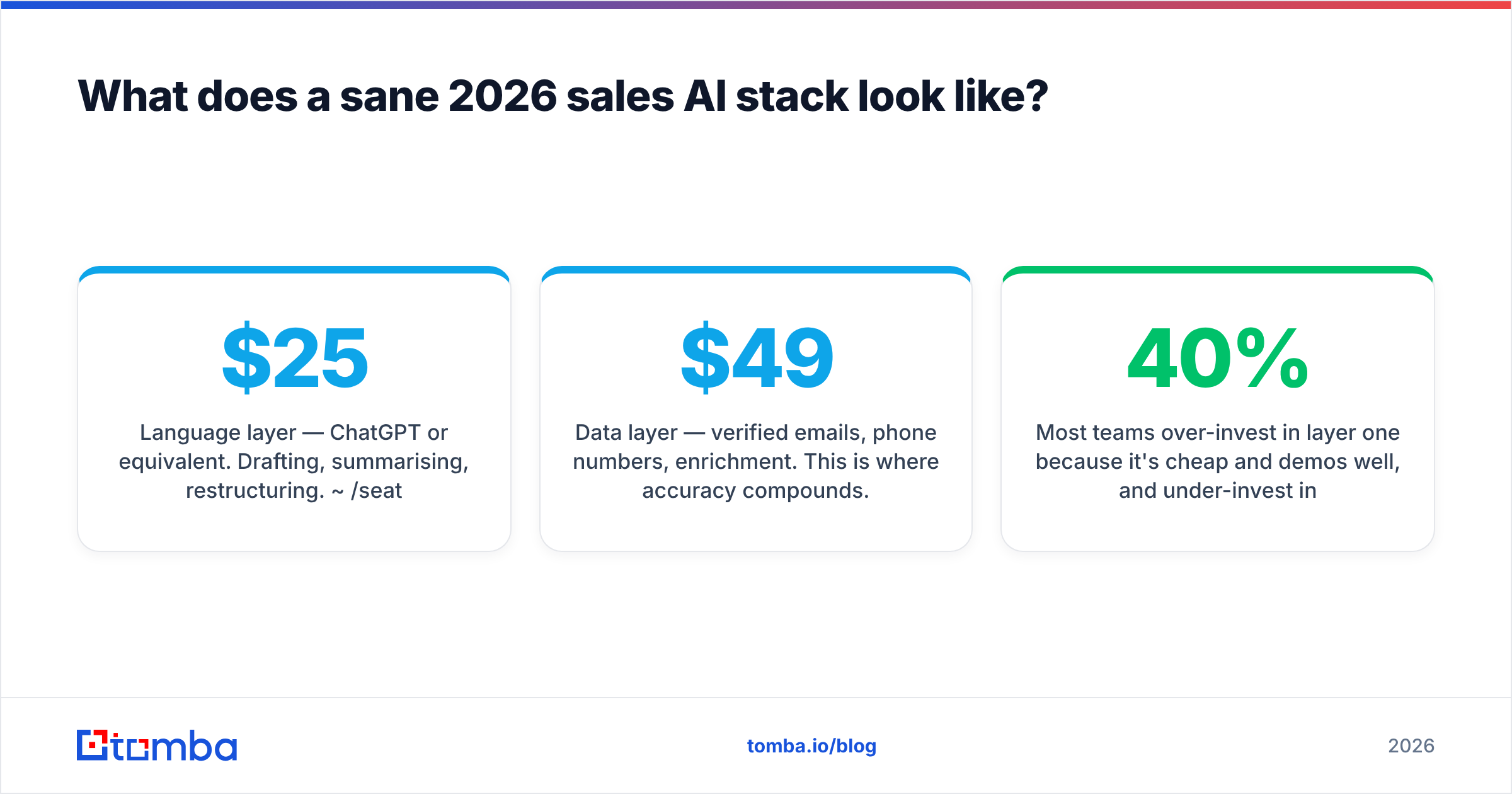
- Language layer — ChatGPT or equivalent. Drafting, summarising, restructuring. ~$25/seat.
- Data layer — verified emails, phone numbers, enrichment. This is where accuracy compounds. Tomba's Tomba pricing runs Free (25 searches/mo), Starter $49/mo, Growth $99/mo, Pro $249/mo.
- Engagement layer — sequencer or CRM-native cadences that actually send and track.
- Intelligence layer — call recording, forecasting, whatever tells you what happened.
Most teams over-invest in layer one. It's cheap and it demos well. They under-invest in layer two, because bad data fails silently. You don't get an alert saying "40% of your list was guessed." You just watch reply rates drift down and blame the copy.
If you're wiring the data layer into an AI workflow directly, the Tomba API handles lookup and verification programmatically. An enrichment step can then sit between your list build and your sequencer, with no manual CSV passing.
The bottom line#
Use ChatGPT for the nine workflows above and you'll get real hours back — mostly on prep, notes, and drafting. Ask it who to email and you'll get a plausible-looking list that quietly destroys your sending reputation.
The short answer to how to use ChatGPT for sales professionals: the model handles language, and a verified data source handles identity. Start by finding and verifying the contacts that go into your sequences with the Tomba Email Finder. The free tier gives you 25 searches a month, enough to test bounce rates against whatever you use now. Then let ChatGPT write to the people you know are actually there.
Related guides#
// get started
Find, verify and enrich your first contacts today
Start on the free plan with 25 searches a month, then scale when your team is ready.
Free plan · No credit card required · GDPR & CCPA
// about the author