How to Use CRM Software in 2026: A Practical 7-Step Guide
Most CRM rollouts fail because nobody defines what a stage means or who owns data hygiene. Here is the 7-step setup that makes a CRM useful in week one instead of month six.
TL;DR
- A CRM is a shared record of every account, contact, and deal — not a reporting tool you fill in on Friday afternoon. If reps update it only for the forecast meeting, the data is already worthless.
- The setup order that works: define the pipeline stages first, then the required fields, then the automation. Most teams do it backwards and end up with 40 custom fields nobody fills.
- Contact data decays roughly 25–30% per year. Your CRM will quietly rot unless enrichment and verification run on a schedule, not on request.
- Adoption is a process problem, not a software problem. Pick three fields that are mandatory, enforce them at stage exit, and ignore everything else for the first quarter.
- Budget realistically: usable CRM tiers start around $20–$25 per user per month and rise fast once you add automation, forecasting, and API access.
What is CRM software actually for?#
CRM software is a shared memory for your revenue team. Think of it like a restaurant's ticket rail: every order is visible to everyone, in the same place, in the same order, so nobody has to ask the waiter what table 7 wanted. A CRM does the same for deals — the last call, the objection raised, the pricing sent, the champion who left for a competitor.
That's the useful definition. The formal one — customer relationship management — describes a system of record that stores accounts, contacts, opportunities, and activity history, then exposes that history through pipelines, reports, and automation.
The distinction matters because it changes how you configure the thing. If the CRM is a system of record, every field should answer a question someone will actually ask. If you treat it as a management surveillance tool, reps will feed it the minimum and keep the real deal notes in a personal spreadsheet. That happens far more often than vendors admit.
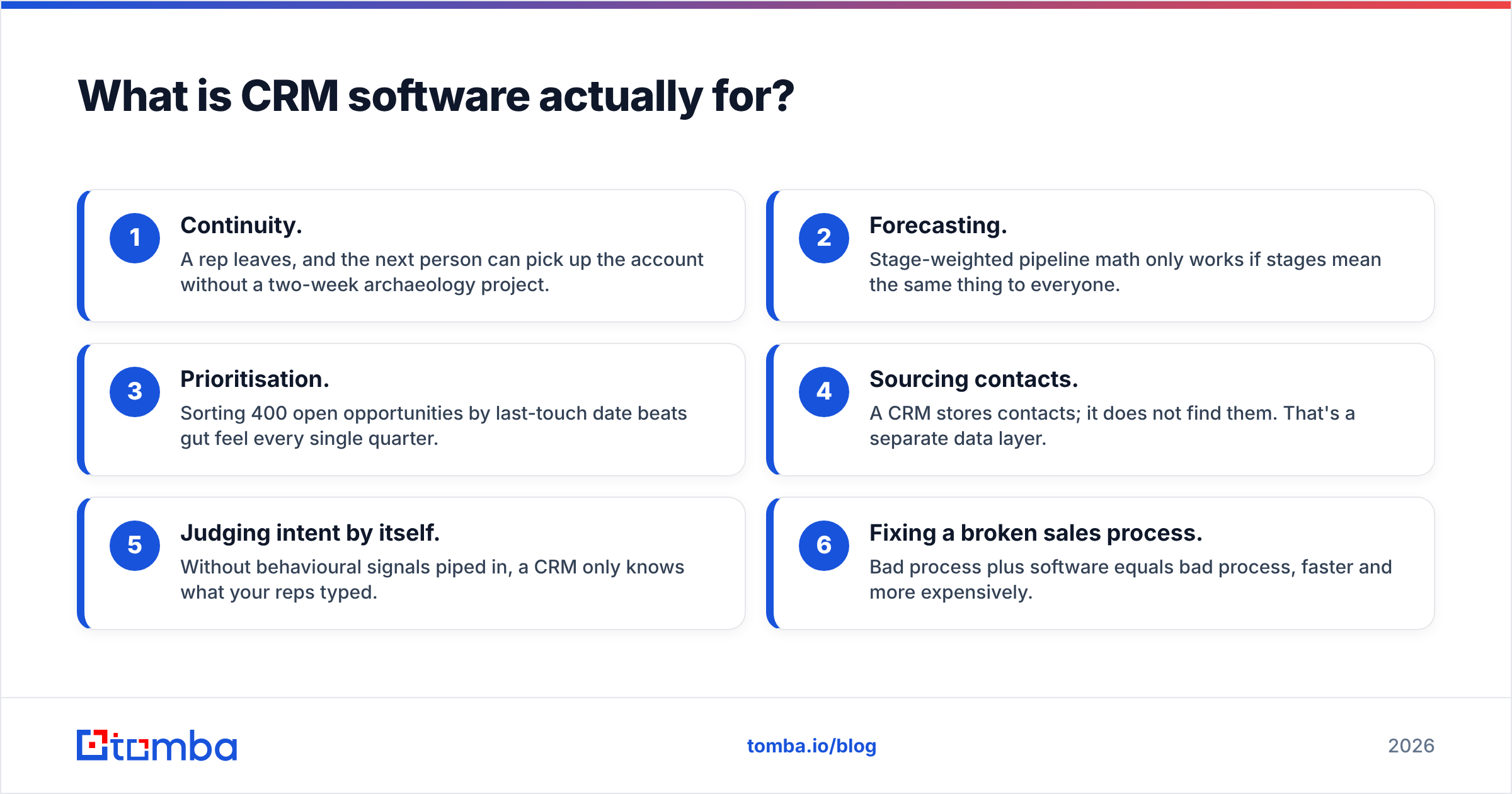
Three jobs a CRM does well:
- Continuity. A rep leaves, and the next person can pick up the account without a two-week archaeology project.
- Forecasting. Stage-weighted pipeline math only works if stages mean the same thing to everyone.
- Prioritisation. Sorting 400 open opportunities by last-touch date beats gut feel every single quarter.
Three jobs a CRM does badly, and you should stop asking it to:
- Sourcing contacts. A CRM stores contacts; it does not find them. That's a separate data layer.
- Judging intent by itself. Without behavioural signals piped in, a CRM only knows what your reps typed.
- Fixing a broken sales process. Bad process plus software equals bad process, faster and more expensively.
How do you set up CRM software step by step?#
Here is the order that survives contact with a real team. Do not skip step two — it is the one everybody skips.
Step 1 — Import a clean subset, not everything. Take the last 12 months of active accounts, not your entire historical contact dump. A 40,000-row import of dead leads makes every report unusable and every search slower. Start narrow; you can always backfill.
Step 2 — Define pipeline stages with exit criteria. A stage is not a feeling. Write one sentence per stage that describes the observable event required to leave it. "Discovery → Qualified" might mean: budget confirmed, decision-maker identified, timeline stated. If two reps would disagree about whether a deal has left a stage, the definition is too vague. This single document does more for forecast accuracy than any AI forecasting add-on.
Step 3 — Pick three mandatory fields. Only three. Typically: source, next step, and expected close date. Everything else is optional in quarter one. You can add required fields later; you cannot un-poison adoption once reps decide the CRM is paperwork.
Step 4 — Connect email and calendar. Activity logging must be automatic. Manual activity entry has roughly a 100% failure rate over a long enough timeline. Both HubSpot and Salesforce ship native mail sync — turn it on before you touch anything else in the settings panel.
Step 5 — Wire the data layer. Your CRM needs contacts flowing in from somewhere: form fills, list building, enrichment on account creation. This is where an email finder and a verification step sit in front of the CRM rather than inside it.
Step 6 — Build four reports, not forty. Pipeline by stage, activity by rep, win rate by source, and aging deals. If a fifth report gets requested in month one, ask which of the four it replaces.
Step 7 — Set a hygiene cadence. Weekly: close out deals with no next step. Monthly: re-verify contact emails on open opportunities. Quarterly: archive accounts with zero activity in 180 days.
Which CRM should you choose in 2026?#
Choose on process fit and admin overhead, not feature count. Every major CRM can store a contact; they differ in how much configuration work stands between you and a working pipeline. Independent review data on G2 consistently shows implementation effort — not features — as the top driver of satisfaction scores.
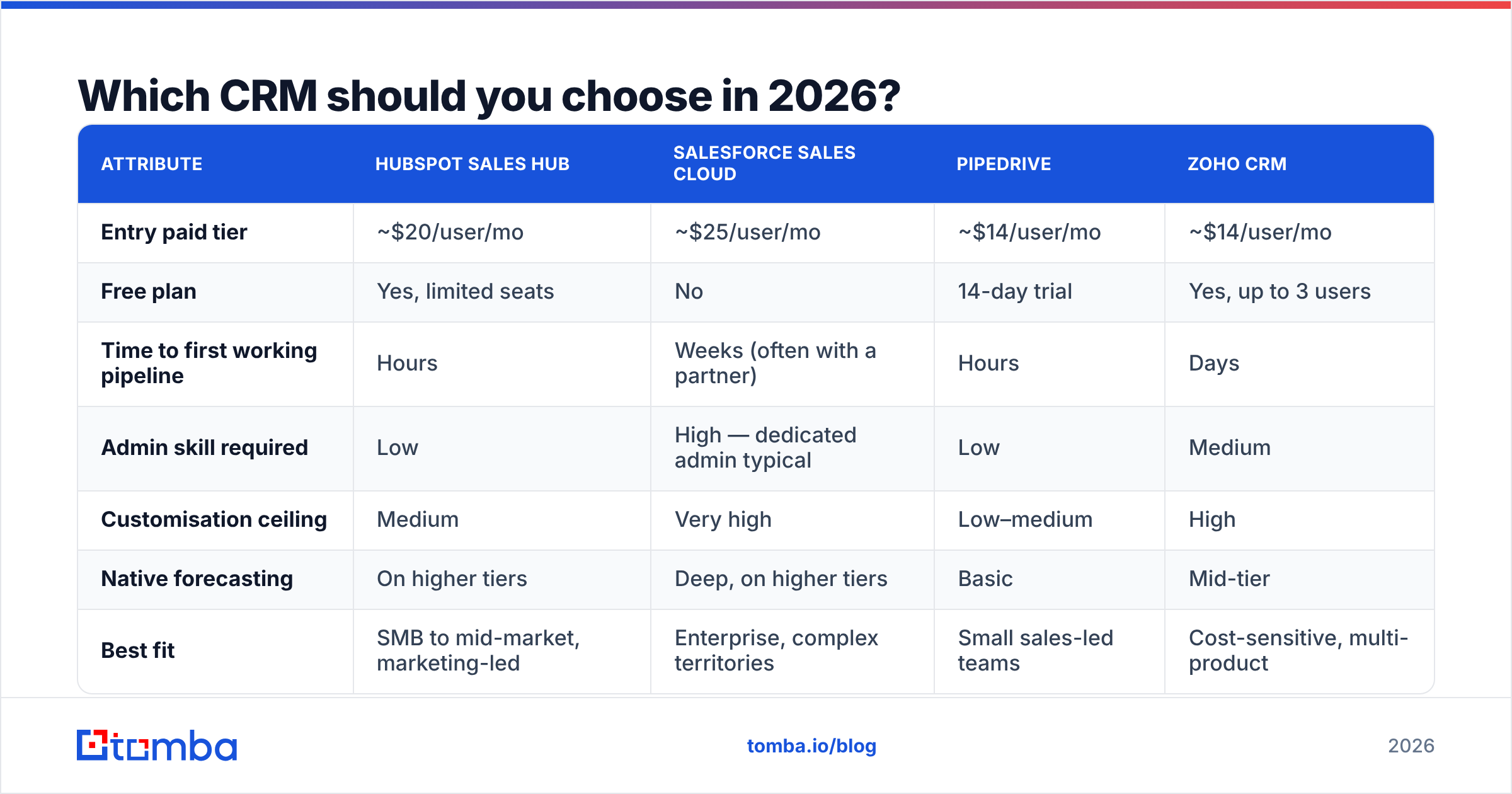
| Attribute | HubSpot Sales Hub | Salesforce Sales Cloud | Pipedrive | Zoho CRM |
|---|---|---|---|---|
| Entry paid tier | ~$20/user/mo | ~$25/user/mo | ~$14/user/mo | ~$14/user/mo |
| Free plan | Yes, limited seats | No | 14-day trial | Yes, up to 3 users |
| Time to first working pipeline | Hours | Weeks (often with a partner) | Hours | Days |
| Admin skill required | Low | High — dedicated admin typical | Low | Medium |
| Customisation ceiling | Medium | Very high | Low–medium | High |
| Native forecasting | On higher tiers | Deep, on higher tiers | Basic | Mid-tier |
| Best fit | SMB to mid-market, marketing-led | Enterprise, complex territories | Small sales-led teams | Cost-sensitive, multi-product |
| Common failure mode | Cost creep at scale | Over-configuration | Outgrown at ~30 reps | Fragmented UX across modules |
Read that table as a shortlist generator, not a verdict. Two questions decide it for most teams:
- Do you have a full-time admin? If no, Salesforce will punish you. If yes, its customisation ceiling is genuinely unmatched.
- Is your motion marketing-led or outbound-led? Marketing-led teams get more compounding value out of HubSpot's shared contact model. Pure outbound teams often prefer a lean pipeline tool plus a strong data stack.
Whatever you pick, connect it properly. A HubSpot integration that pushes verified contacts straight into the CRM removes the copy-paste step where 80% of data errors are introduced.
How do you keep CRM data from rotting?#
Assume decay. People change jobs, companies rebrand, domains get retired, and mailboxes turn into catch-alls. Industry estimates put B2B contact decay at 25–30% per year — meaning a list you imported in January is meaningfully wrong by autumn.
The fix is a schedule, not a heroic annual cleanup.
Weekly — deduplicate on entry. Duplicate records are the fastest way to lose trust in a CRM. Two reps working the same account from two records is a customer-facing embarrassment. Set a match rule on email plus domain and enforce it at import.
Monthly — verify emails on open deals. Run every contact attached to an active opportunity through an email verifier before a sequence touches them. Bouncing an active deal contact costs you both the deal and a slice of sender reputation.
Quarterly — enrich thin records. A record with a name and an email is not a record. Job title, company size, and location determine segmentation. Batch data enrichment against your CRM export, then re-import only the changed fields.
Continuously — kill zombie deals. Any opportunity with no next-step date and no activity in 45 days should be automatically flagged. Reps hate closing deals as lost; the system should do it for them.
One field discipline note that pays for itself: never let free-text company names in. "Acme Inc", "Acme, Inc.", and "acme" become three accounts, three pipelines, and three forecasts. Normalise on domain.

How do you get your team to actually use it?#
Adoption is a process problem. Software does not create habits; consequences do.
Make the CRM the only source of truth for the forecast. If a deal isn't in the CRM, it doesn't exist in the pipeline review, doesn't count toward quota attainment, and doesn't get resourced. This is the whole lever. Everything else is decoration.
Run pipeline reviews inside the tool. Not off a spreadsheet, not off a slide. Open the CRM, filter by stage, walk the deals. Reps update records before the meeting because the meeting is the record.
Remove one field for every field you add. Field creep is how CRMs die. If a VP wants a new picklist, they nominate one to retire.
Report on leading indicators, not just closed revenue. Meetings booked, new opportunities created, and response rate by segment tell you what next quarter looks like. Closed-won tells you what last quarter looked like — useful for accounting, useless for coaching.
Automate the boring half. Auto-log emails, auto-create tasks on stage change, auto-assign by territory. Every manual step is an adoption tax. Teams that lean on sales automation for record-keeping consistently show cleaner pipelines than teams relying on discipline alone.
A blunt honesty check: if your reps are quietly maintaining a personal spreadsheet, your CRM configuration is wrong. They are not lazy — the tool is failing to give them something the spreadsheet does. Find out what that is and fix it before you send another adoption reminder.
What does a working CRM workflow look like end to end?#
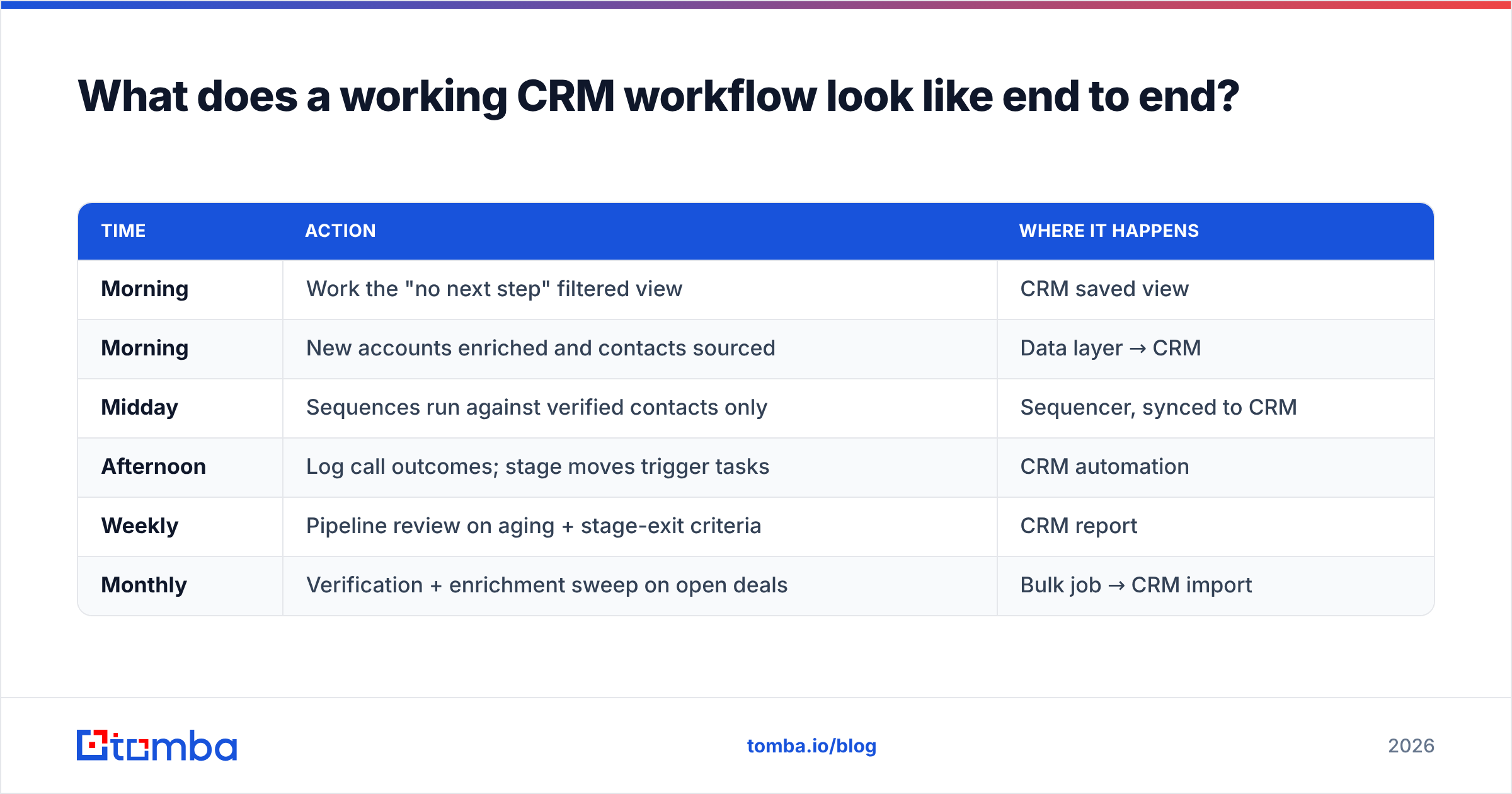
Here's a concrete daily loop for an outbound-led team of eight reps:
| Time | Action | Where it happens |
|---|---|---|
| Morning | Work the "no next step" filtered view | CRM saved view |
| Morning | New accounts enriched and contacts sourced | Data layer → CRM |
| Midday | Sequences run against verified contacts only | Sequencer, synced to CRM |
| Afternoon | Log call outcomes; stage moves trigger tasks | CRM automation |
| Weekly | Pipeline review on aging + stage-exit criteria | CRM report |
| Monthly | Verification + enrichment sweep on open deals | Bulk job → CRM import |
Notice that sourcing and verification sit outside the CRM and feed into it. That separation is deliberate. CRMs are excellent at storing relationships and terrible at discovering them. When you blur the two — buying a CRM because it bundles a contact database — you usually end up paying enterprise seat prices for mediocre data.
Keep the layers distinct: a finder and verifier for acquisition, the CRM for memory, a sequencer for execution. Each replaceable without a re-platform.
Is a CRM worth it for a small team?#
Yes, above roughly three reps or 50 active opportunities — below that, a well-structured sheet genuinely competes. The break-even isn't seat cost; it's the moment two people need the same context on the same account in the same week.
Start on a free or entry tier, resist customisation for 90 days, and measure one thing: can a manager answer "what's the state of the Acme deal?" without asking a rep? If yes, the CRM is working. If no, more fields won't help.
Feed your CRM contacts worth storing#
A CRM is only as good as what goes into it. If your records are half-empty, unverified, or duplicated across three spellings of the same company, no amount of pipeline configuration will save the forecast.
Fix the input side first. Tomba Email Finder sources professional email addresses by domain, name, or company, and verifies them before they ever reach your CRM — so your pipeline starts with contacts that resolve, not guesses that bounce. The free tier covers 25 searches a month; paid plans start at $49/mo with bulk and API access on higher tiers. Check the Tomba pricing page to match a tier to your list volume, then wire it directly into HubSpot, Pipedrive, or Salesforce so clean data lands automatically.
Build the pipeline once. Keep the data clean forever.
Related guides#
// get started
Find, verify and enrich your first contacts today
Start on the free plan with 25 searches a month, then scale when your team is ready.
Free plan · No credit card required · GDPR & CCPA
// about the author