How to Verify an Email Address in Gmail: 6 Fast Methods
Gmail has no built-in verify button, and sending a test email is the worst way to check. Here are six methods that confirm whether a Gmail address is real before you hit send.
Here is the short version of how to verify an email address in Gmail: use Google Chat or the password recovery page for one address, and a verification API for a list. Gmail has no verify button. A test send is the worst check you can run.
TL;DR
- Gmail has no built-in "verify this address" button. Anything that looks like one is the Contacts autocomplete or a third-party extension.
- Sending a test email is the slowest and riskiest check. Every bounce it creates is logged against your sender reputation.
- Google shut down the old SMTP
RCPT TOtrick for@gmail.comyears ago. Gmail's servers accept almost everything, then bounce later. - The methods that still work: Google Contacts and Chat lookup, the Google password recovery flow, and a verification API that blends MX, SMTP, and past bounce data.
- One address takes ten seconds with a free checker. A list of 5,000 needs bulk verification and a catch-all check before your first campaign.
Why doesn't Gmail have a verify button?#
Because Google took it away. Around 2019, Gmail's SMTP servers stopped giving honest answers during the RCPT TO handshake. That was the step where a mail server used to say "yes, that mailbox exists" or "no such user." Spammers used it to harvest valid Gmail addresses at scale. So Google made the server accept nearly everything and pushed the real answer into a bounce that lands later.
Think of a nightclub that used to check your name at the door. Too many people were probing the guest list. Now the bouncer waves everyone in and quietly walks the wrong people out ten minutes later. You still find out. You just find out too late.
That one change is why every "how to verify an email address in Gmail" answer that starts with "telnet into gmail-smtp-in.l.google.com" is out of date. It returns a 250 OK for notarealperson7734@gmail.com, and you will believe it.
So checking a Gmail address now means reading several weak signals instead of one strong one. Here is what those signals are, and what each one is worth.
How to verify an email address in Gmail: the 6 methods#
Ranked from fastest and weakest to slowest and strongest.
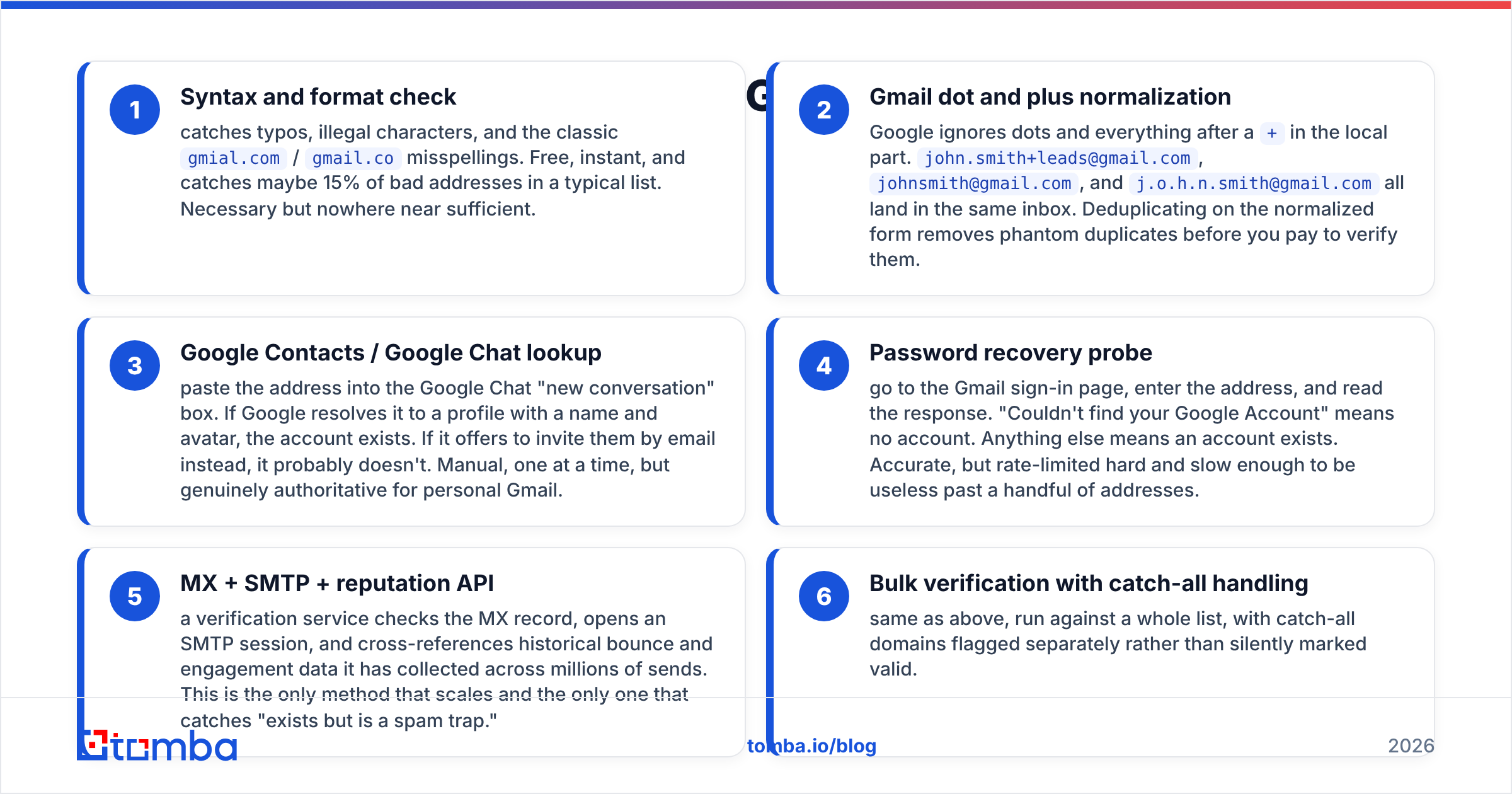
- Syntax and format check. Catches typos, illegal characters, and the classic
gmial.comandgmail.comisspellings. Free and instant. It flags maybe 15% of the bad addresses in a typical list, so it is necessary but nowhere near enough. - Gmail dot and plus cleanup. Google ignores dots and anything after a
+. Sojohn.smith+leads@gmail.com,johnsmith@gmail.com, andj.o.h.n.smith@gmail.comall land in one inbox. Dedupe on the plain form and you stop paying to verify phantom duplicates. - Google Contacts or Google Chat lookup. Paste the address into the Chat "new conversation" box. If Google shows a profile with a name and photo, the account is real. If it offers to invite them by email instead, it probably is not. Slow and manual, but hard to argue with.
Those three are cheap. The next three cost time or money, and they are where the real answers live.
- Password recovery probe. Open the Gmail sign-in page, enter the address, and read the reply. "Couldn't find your Google Account" means no account. Anything else means an account exists. It is accurate, but Google rate-limits it hard, so it only works for a handful of addresses.
- MX, SMTP, and reputation API. A verification service checks the MX record, opens an SMTP session, then compares the address against bounce and engagement data gathered across millions of sends. This is the only method that scales, and the only one that spots "real, but a spam trap."
- Bulk verification with catch-all handling. The same checks run over a whole list, with catch-all domains flagged on their own instead of quietly marked valid.
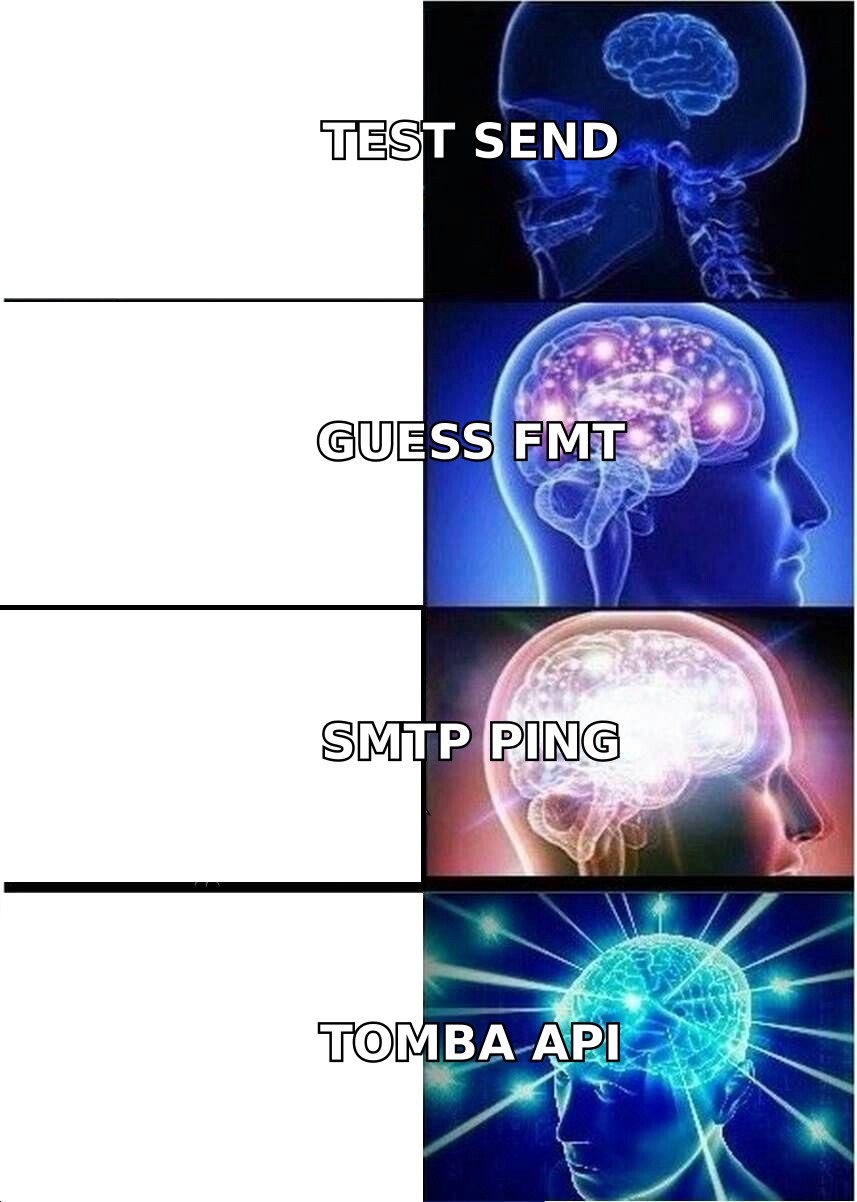
Automate methods 1 and 2 forever. Use methods 3 and 4 on the one address you really care about, like the CEO you are about to pitch. Use methods 5 and 6 on anything list-shaped.
How to verify an email address in Gmail manually#
Three manual checks, in the order that wastes the least time.
Check 1 — Google Chat. Open Google Chat, click "Start a chat," and paste the address. A profile card with a display name is a strong yes. Chat asks Google's directory, not the mail server, so Gmail's SMTP silence does not apply. One catch: people can hide themselves from search, so a blank result proves less than a hit does.
Check 2 — the recovery flow. Go to the Google sign-in page and enter the address. Google says "Couldn't find your Google Account" when no account exists. That is the closest thing to a clean no for @gmail.com. Do not run it more than a few times an hour from one IP. Google starts returning vague answers, and you will read the throttle as a signal.
Check 3 — profile picture. Many Google accounts show an avatar through public endpoints. A real photo means a live account. No photo means nothing, because most people never set one.
None of this tells you the mailbox is active. A Gmail account abandoned in 2017 still exists, still shows up in Chat, and still swallows your email into a dead inbox. Exists and engaged are two different things. That gap is what the reputation layer in a paid email verifier fills.
Which method should you actually use?#
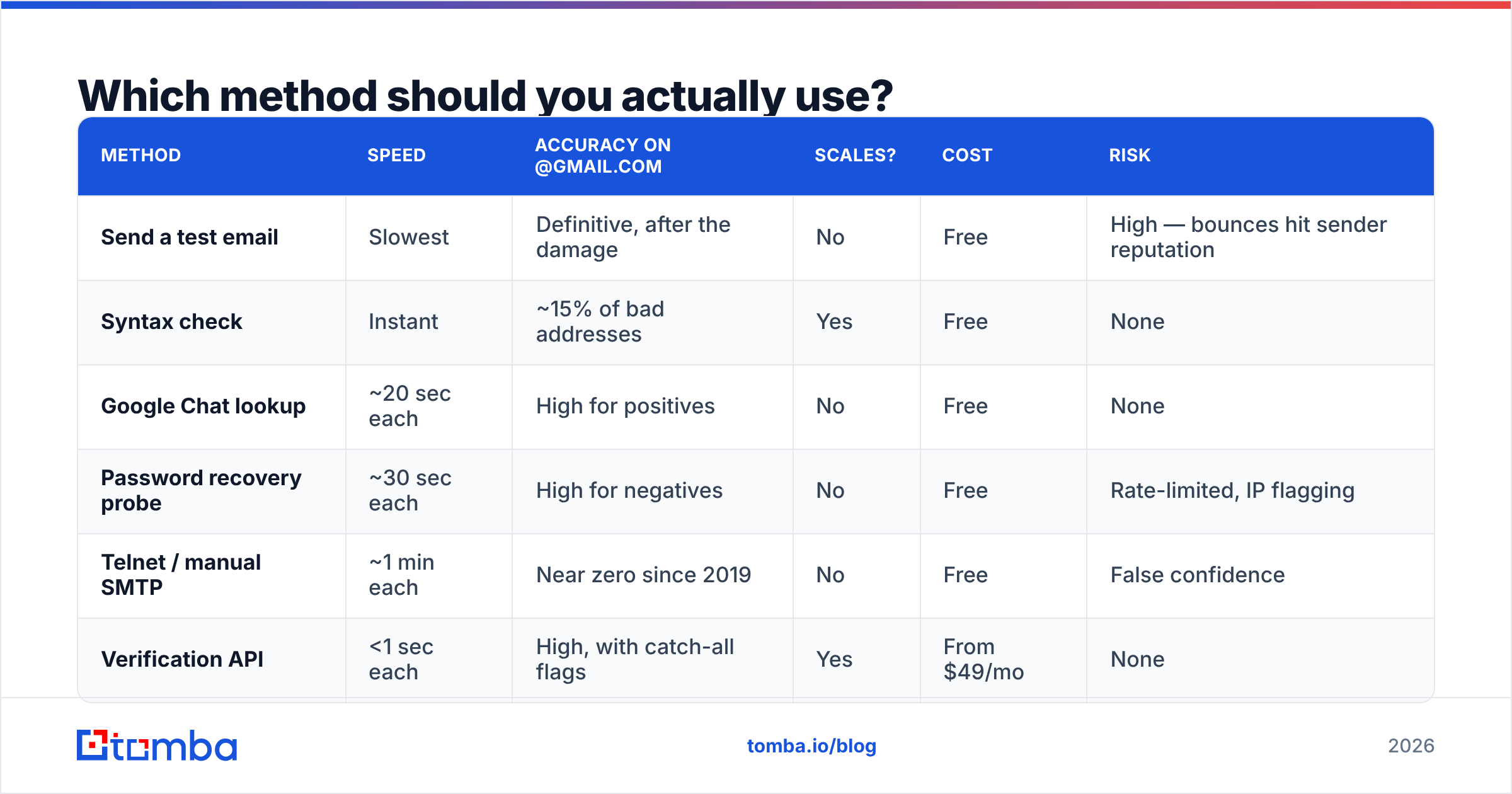
The right answer to how to verify an email address in Gmail depends on volume, and on what a wrong answer costs you.
| Method | Speed | Accuracy on @gmail.com | Scales? | Cost | Risk |
|---|---|---|---|---|---|
| Send a test email | Slowest | Definitive, after the damage | No | Free | High — bounces hit sender reputation |
| Syntax check | Instant | ~15% of bad addresses | Yes | Free | None |
| Google Chat lookup | ~20 sec each | High for positives | No | Free | None |
| Password recovery probe | ~30 sec each | High for negatives | No | Free | Rate-limited, IP flagging |
| Telnet / manual SMTP | ~1 min each | Near zero since 2019 | No | Free | False confidence |
| Verification API | <1 sec each | High, with catch-all flags | Yes | From $49/mo | None |
The first row is the one that matters. A test email feels free. It is not. Gmail's Postmaster systems record every hard bounce, and a bounce rate over roughly 2% starts pushing your real mail toward spam. You are trading deliverability for something you could have bought for a fraction of a cent. Google's own Postmaster Tools documentation explains how bounce and spam signals feed the score that decides where your next campaign lands.
How does bulk Gmail verification actually work?#
This is how to verify an email address in Gmail at list scale: a verification API runs the checks in order, cheapest first.
Step 1 — Syntax and cleanup. Parse the address, then apply Gmail's own rules. Strip the dots, cut at the +, then dedupe. On a scraped list this step alone drops 5–12% of rows for free.
Step 2 — Domain and MX check. Confirm the domain resolves and has valid MX records. That is always true for Gmail. It is also how you catch the gmai1.com and gmail.com.br lookalikes that a syntax check waves through.
Step 3 — Disposable and role detection. Flag noreply@, info@, support@, and throwaway domains. Role addresses are not invalid, but cold outreach to them kills reply rates and raises complaints.
Step 4 — SMTP handshake. Still useful on company domains, where servers answer straight. On @gmail.com, treat a 250 as a hint, not proof.
Step 5 — Reputation and history. This is the part that matters. A provider that has run billions of checks knows which addresses bounced last month, which are spam traps, and which have sat dormant for years. No protocol trick replaces that data. Check where a vendor gets it before you trust it — Tomba publishes its data sources.
Step 6 — Catch-all sorting. Gmail never acts as a catch-all, so this step is idle there. It matters the moment your list holds company domains. A catch-all verifier separates "this server accepts everything" from "this mailbox is real." Cheap tools blur the two into one misleading "valid."

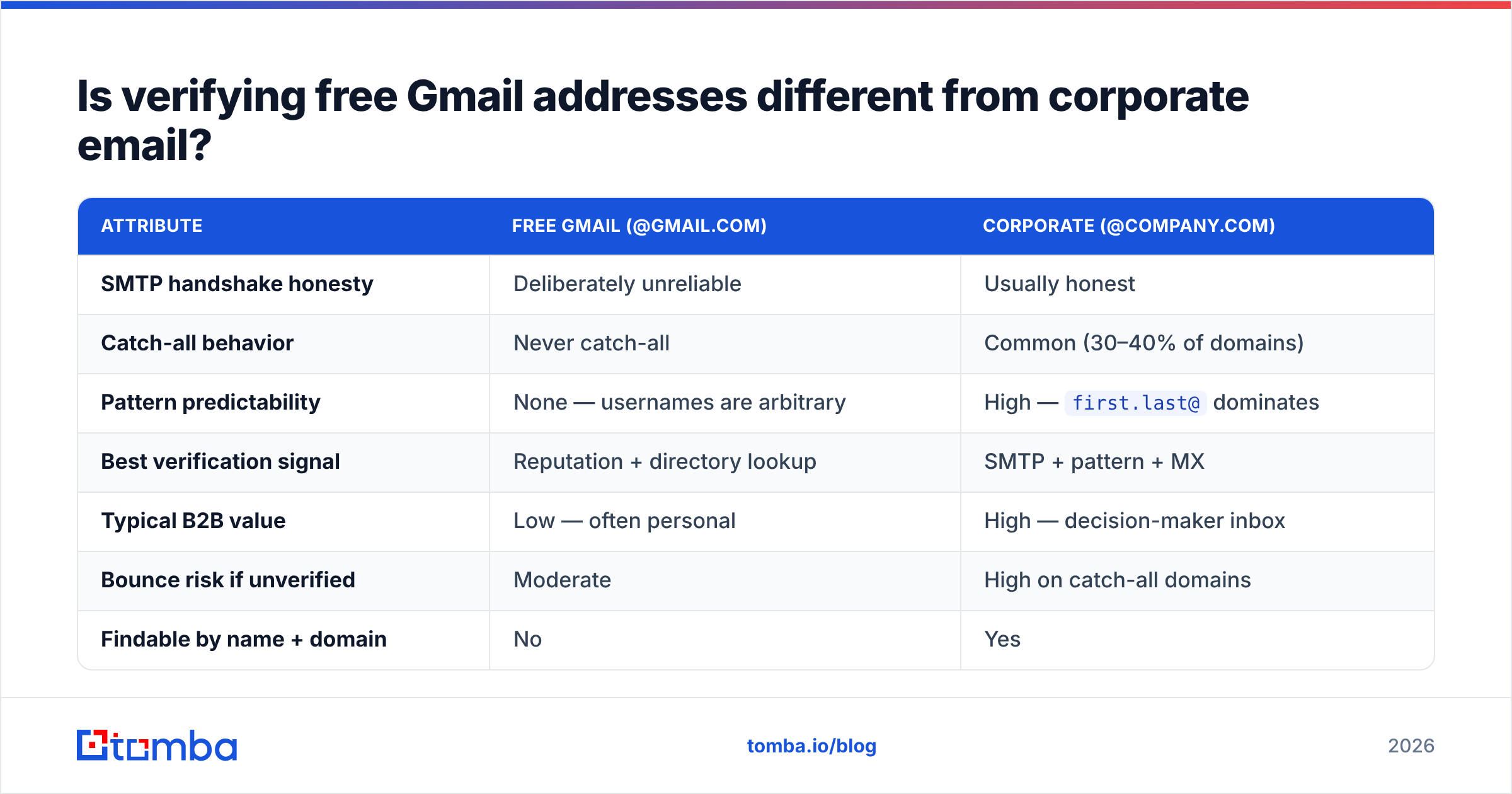
Is verifying free Gmail addresses different from corporate email?#
Yes. Mixing the two is the most common mistake in B2B list hygiene.
| Attribute | Free Gmail (@gmail.com) | Corporate (@company.com) |
|---|---|---|
| SMTP handshake honesty | Deliberately unreliable | Usually honest |
| Catch-all behavior | Never catch-all | Common (30–40% of domains) |
| Pattern predictability | None — usernames are arbitrary | High — first.last@ dominates |
| Best verification signal | Reputation + directory lookup | SMTP + pattern + MX |
| Typical B2B value | Low — often personal | High — decision-maker inbox |
| Bounce risk if unverified | Moderate | High on catch-all domains |
| Findable by name + domain | No | Yes |
The last row is the important one. You cannot guess a Gmail address. sarah@gmail.com was claimed in 2004 by someone with no link to the Sarah you want. Company addresses follow patterns, so you can build candidates and test them. That is the idea behind tools like the email permutator and domain search, which returns every known address at a company instead of making you guess one at a time.
So here is the B2B read. If your prospect list is heavy on @gmail.com, you may have the wrong list. Freelancers, consultants, and small-business owners do use Gmail for work. A VP of Engineering at a 2,000-person company almost never does. When 40% of your "decision-makers" have Gmail addresses, you are usually holding a scraped consumer list in a B2B costume.
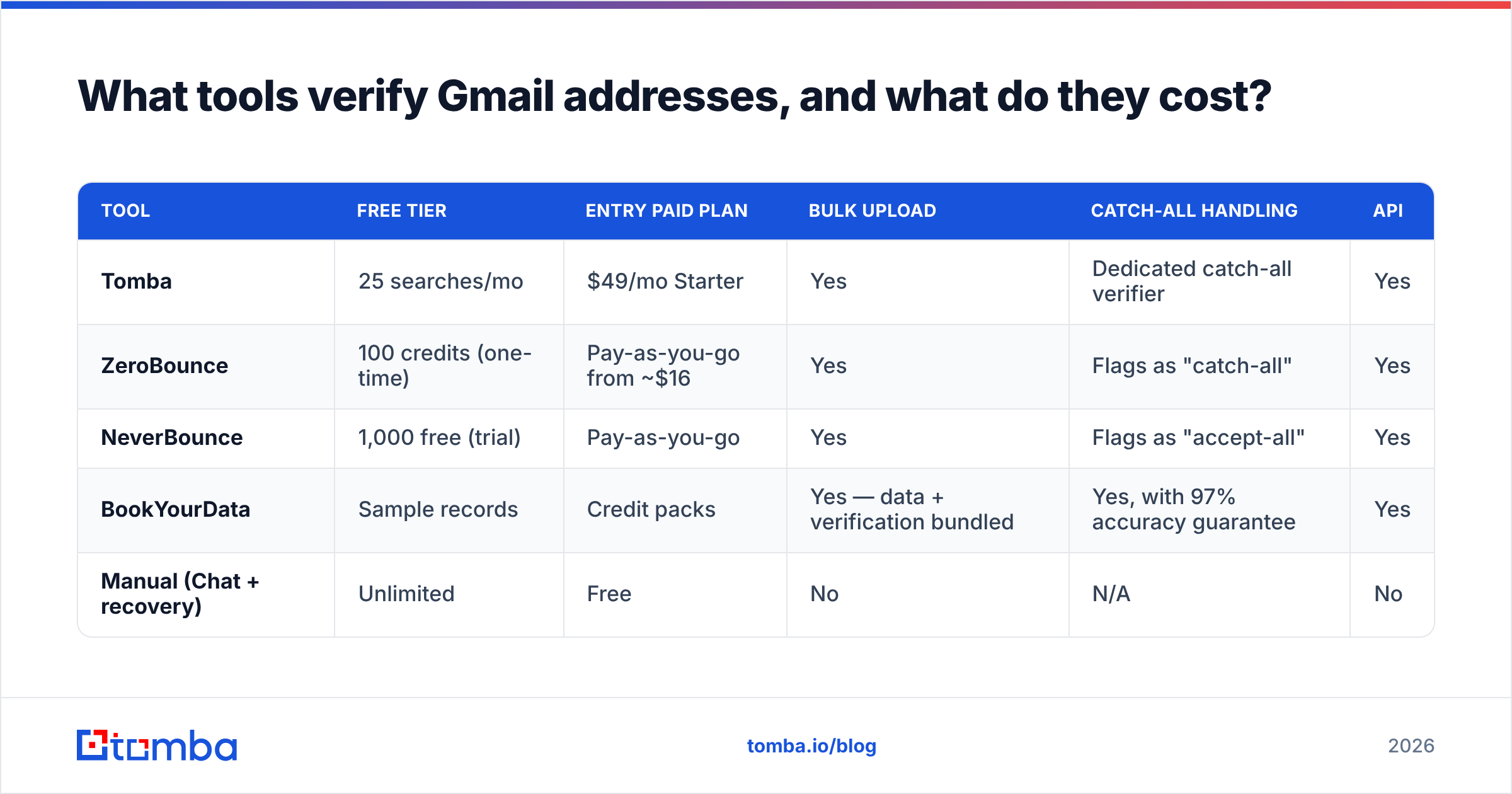
What tools verify Gmail addresses, and what do they cost?#
| Tool | Free tier | Entry paid plan | Bulk upload | Catch-all handling | API |
|---|---|---|---|---|---|
| Tomba | 25 searches/mo | $49/mo Starter | Yes | Dedicated catch-all verifier | Yes |
| ZeroBounce | 100 credits (one-time) | Pay-as-you-go from ~$16 | Yes | Flags as "catch-all" | Yes |
| NeverBounce | 1,000 free (trial) | Pay-as-you-go | Yes | Flags as "accept-all" | Yes |
| BookYourData | Sample records | Credit packs | Yes — data + verification bundled | Yes, with 97% accuracy guarantee | Yes |
| Manual (Chat + recovery) | Unlimited | Free | No | N/A | No |
BookYourData deserves a note. It sells verified contact data with the verification built in, which suits teams who would rather buy a clean list than clean their own. "I have no list" is a different problem from "I have a list and don't trust it." Both are fair starting points.
Tomba's pricing runs Free (25 searches/mo), Starter $49/mo, Growth $99/mo, Pro $249/mo, and Enterprise on request. For a one-off check, the free email checker needs no account. Paste an address, get a verdict.
Compare on three things and skip the rest. First, what one verification costs at your real volume, not the headline price. Second, how the tool reports catch-all, because a tool that calls catch-all "valid" is lying to you. Third, API speed, if you verify at signup rather than in batches.
How do you keep Gmail addresses clean over time?#
Learning how to verify an email address in Gmail is only half the job. Keeping the list clean is the other half. About 2–3% of any email list decays each month. People change jobs, drop accounts, and let mailboxes fill up. A list you cleaned in January is noticeably worse by June.
Four habits hold the line.
Verify at the point of capture. Wire a verification API into your signup form so bad addresses never get in. Fixing it there costs one call. Fixing it later costs a full re-verification, plus the damage from whatever you already sent.
Re-verify before every campaign over 1,000 recipients. The cost is small next to a spam-folder placement that sticks for weeks.
Suppress on the first hard bounce, forever. Never mail a hard bounce twice. Most reputation damage comes from sending again to addresses you already know are dead.
Segment by engagement, not just validity. An address that is valid but has not opened anything in 12 months hurts you almost as much as an invalid one. Sunset those contacts, or run a re-engagement sequence.
At real volume, wire this into your stack instead of exporting CSVs. Tomba connects to HubSpot, Google Sheets, Zapier, and others, and the Tomba API covers the point-of-capture case. If campaigns underperform despite a clean list, read up on email deliverability as a whole: authentication, warmup, engagement. That matters more than any single check. G2's email verification category is a fair place to test vendor claims against real reviews.
The bottom line#
Gmail made single-address checks hard on purpose. What survives is the directory lookup, the recovery flow, and reputation data. Everything else is theater: telnet, test sends, and "email verifier" extensions that only check syntax. All of it produces false confidence.
For one address, Google Chat plus the recovery flow takes a minute and costs nothing. For a list, stop hand-checking and let an API run the full cascade. That is how to verify an email address in Gmail without burning your sender reputation.
Start with the Tomba Email Finder. It finds and verifies work addresses by name, domain, or company, with catch-all detection built in and 25 free searches a month. Test it on 50 addresses whose status you already know before you trust it with 50,000 you do not.
Related guides#
// get started
Find, verify and enrich your first contacts today
Start on the free plan with 25 searches a month, then scale when your team is ready.
Free plan · No credit card required · GDPR & CCPA
// about the author