How to Verify Email Addresses in 2026: A Practical Guide
Bounce rates above 3% get your domain throttled. Here are five ways to verify email addresses — from free manual checks to bulk API verification — and when each one is actually worth your time.
TL;DR
- Verifying an email means confirming the mailbox exists and will accept mail — syntax checks alone catch maybe 15% of bad addresses.
- Five methods matter: manual syntax/MX inspection, free web checkers, SMTP handshake testing, bulk list verification, and API-level verification at the point of capture.
- Catch-all domains break naive SMTP checks. Roughly 15-20% of B2B domains are catch-all, and they accept everything, so they need a separate scoring approach.
- Keep bounce rate under 2%. Google and Microsoft both throttle senders who cross ~3%, and recovery takes weeks.
- For anything past 100 addresses a month, an automated verifier costs less than the deliverability damage of skipping it.
What does it actually mean to verify an email?#
Verifying an email address means confirming that a real mailbox sits behind it and will accept a message. That is a different question from "does this string look like an email."
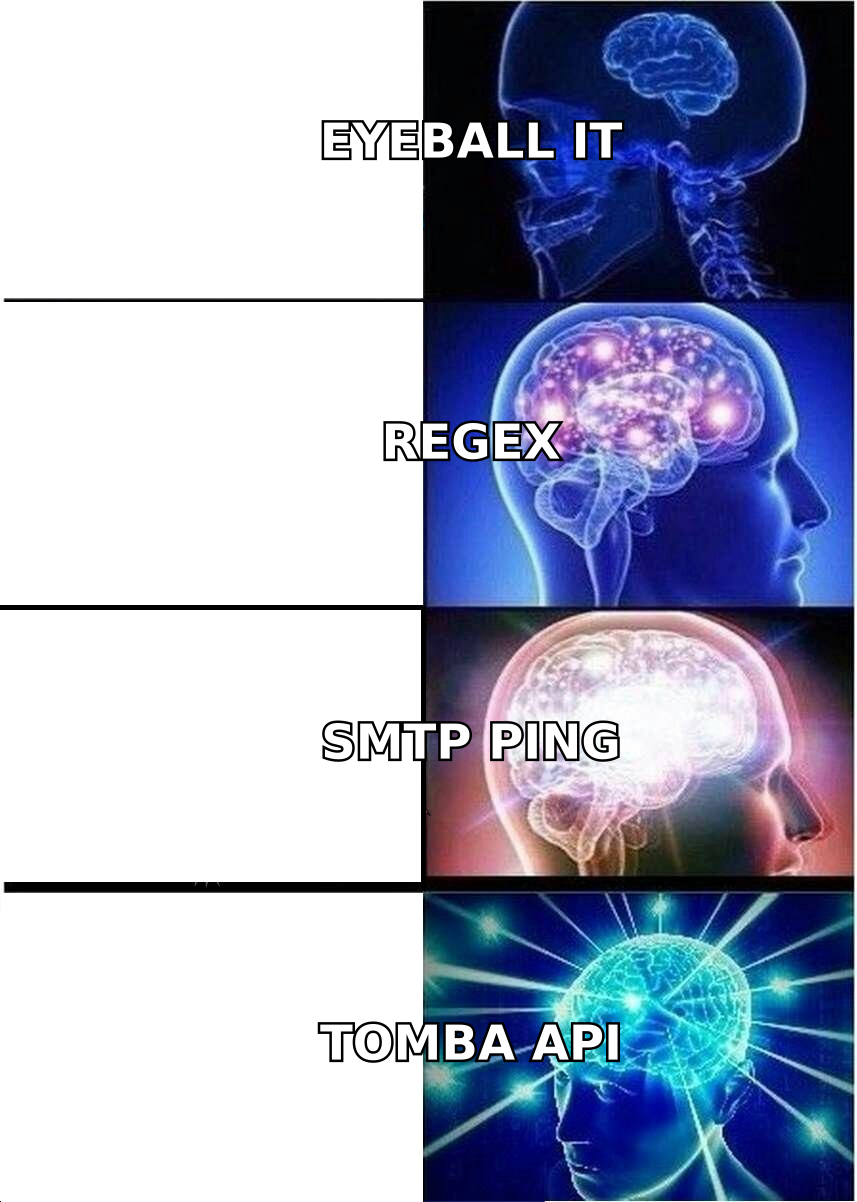
Think of it like checking whether a house exists before you mail a letter. Syntax validation confirms the address is formatted like a street address. DNS/MX lookup confirms the street exists in that city. SMTP verification is knocking on the door to see whether anyone answers. Most people stop at step one and wonder why 20% of their mail comes back.
Verification runs through four escalating layers:
- Syntax validation — Does the address conform to RFC 5322? Catches typos like
john@@acme.comandjohn@acme,com. Cheap, instant, and only catches obvious garbage. - Domain and MX record check — Does
acme.comresolve, and does it publish mail exchanger records? A domain with no MX record cannot receive mail, full stop. This kills dead companies and misspelled domains. - Mailbox-level SMTP check — Open a connection to the receiving mail server and issue
RCPT TOwithout sending a message. A 250 response usually means the mailbox exists; a 550 means it does not. - Risk and role scoring — Is this a disposable domain (
mailinator.com)? A role account (info@,sales@)? A catch-all that accepts everything? These are technically deliverable but strategically bad.
Each layer removes a different class of bad address. Skipping layer 3 and 4 is where most homegrown scripts fall down.
Why does bounce rate matter so much in 2026?#
Because mailbox providers now treat bounce rate as a primary reputation signal, not a secondary one.
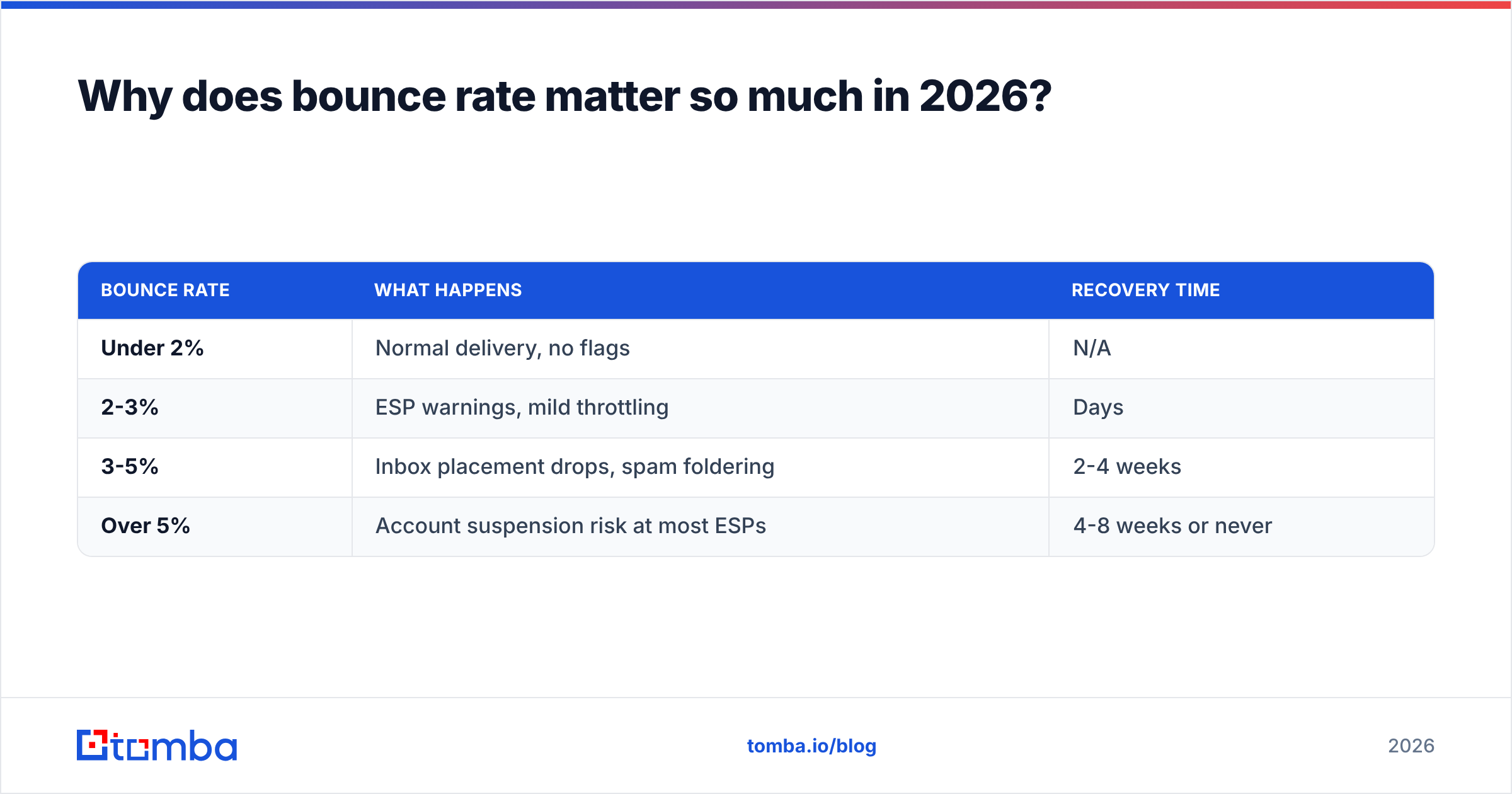
Google's bulk sender requirements and Microsoft's 2025 tightening of Outlook.com policy both codified what deliverability teams already knew: senders with high hard-bounce rates get throttled, foldered, or blocked. The practical thresholds most ESPs enforce:
| Bounce rate | What happens | Recovery time |
|---|---|---|
| Under 2% | Normal delivery, no flags | N/A |
| 2-3% | ESP warnings, mild throttling | Days |
| 3-5% | Inbox placement drops, spam foldering | 2-4 weeks |
| Over 5% | Account suspension risk at most ESPs | 4-8 weeks or never |
Here is the part that stings: reputation damage is asymmetric. You accumulate it in one bad send and repair it over six weeks of careful warmup. A single 5,000-address list with 22% dead addresses can undo a quarter of sender reputation work. That is why email deliverability practitioners treat verification as a pre-send gate, not a nice-to-have.
B2B lists decay at roughly 22-30% per year — people change jobs, companies get acquired, domains lapse. A list you verified in January is meaningfully different by September.
How do you verify an email address manually (free, no tools)?#
You can do a decent job by hand for a handful of addresses. Here is the sequence.
Step 1 — Check the syntax. No double @, no spaces, a valid TLD, no trailing punctuation. Sounds trivial; copy-paste from PDFs and LinkedIn bios introduces these constantly.
Step 2 — Look up the MX record. From a terminal:
dig MX acme.com +short
# 10 aspmx.l.google.com.
# 20 alt1.aspmx.l.google.com.
No output means no mail server. Delete the address and move on. This one command eliminates a surprising share of a stale list.
Step 3 — Confirm the email pattern. Most companies use one predictable format: first.last@, flast@, first@. If you know two real addresses at a domain, you know the pattern. A company email pattern lookup does this in a second, and an email permutator generates the likely variants when you only have a name and a domain.
Step 4 — Run an SMTP handshake. This is the real test:
telnet aspmx.l.google.com 25
HELO example.com
MAIL FROM: <you@yourdomain.com>
RCPT TO: <john.doe@acme.com>
# 250 2.1.5 OK  -> mailbox likely exists
# 550 5.1.1 User unknown -> does not exist
Step 5 — Interpret the result honestly. A 250 does not always mean the mailbox exists. Catch-all servers return 250 for every address, including asdkjfh@acme.com. Greylisting servers return a temporary 4xx that means "try later," not "invalid." Some providers deliberately return 250 to defeat exactly this technique.
Manual verification works fine for 5-20 addresses. Past that, the per-address time cost and the risk of getting your IP blocked for repeated SMTP probing make it a bad trade.
Which email verification method should you use?#
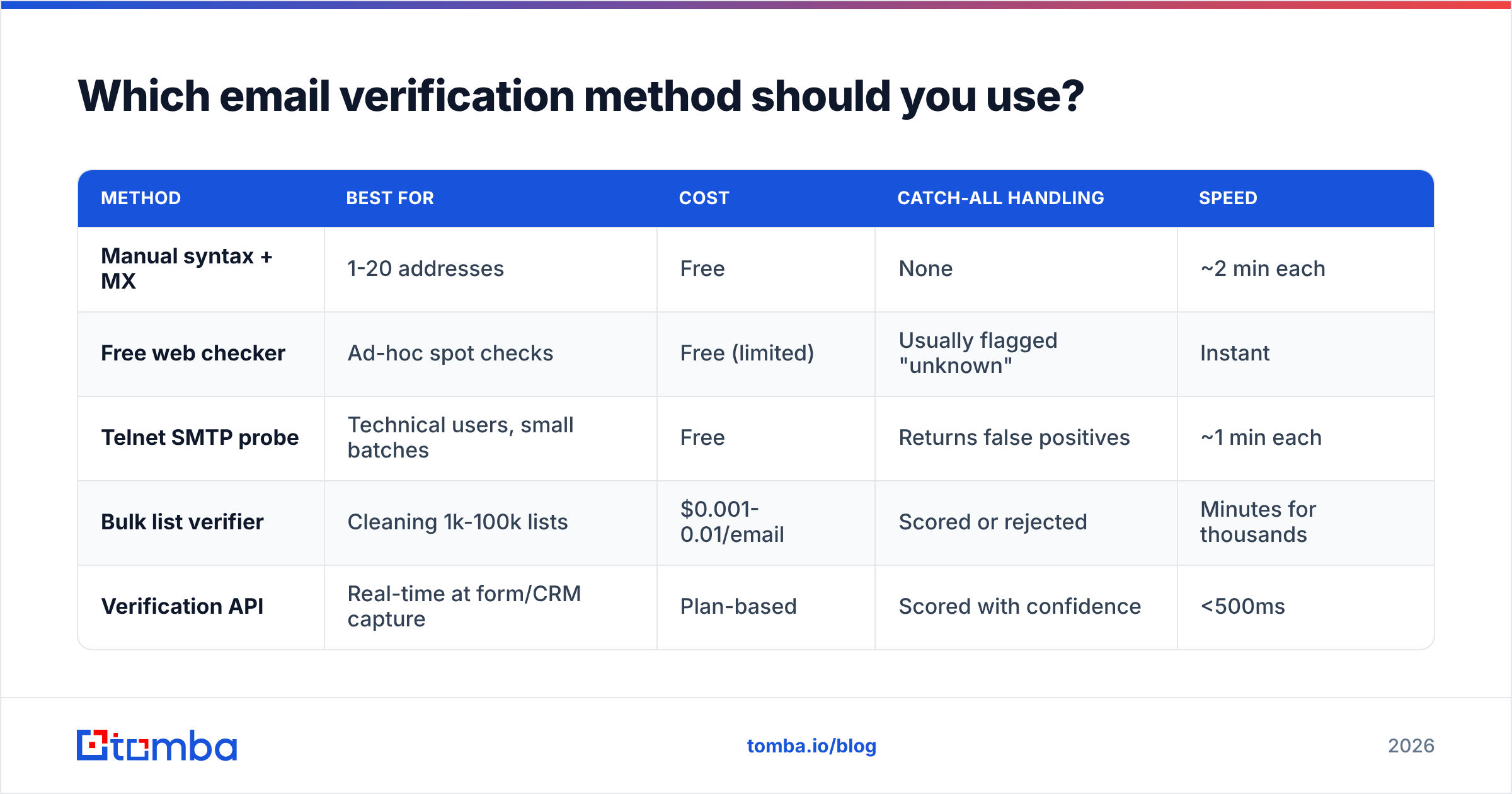
Depends on volume, budget, and how much you care about catch-alls. Here is the honest comparison.
| Method | Best for | Cost | Catch-all handling | Speed |
|---|---|---|---|---|
| Manual syntax + MX | 1-20 addresses | Free | None | ~2 min each |
| Free web checker | Ad-hoc spot checks | Free (limited) | Usually flagged "unknown" | Instant |
| Telnet SMTP probe | Technical users, small batches | Free | Returns false positives | ~1 min each |
| Bulk list verifier | Cleaning 1k-100k lists | $0.001-0.01/email | Scored or rejected | Minutes for thousands |
| Verification API | Real-time at form/CRM capture | Plan-based | Scored with confidence | <500ms |
The decision rule is simple. Under 100 addresses a month: manual plus a free email checker is fine. Between 100 and 5,000: bulk upload to a verifier. Above that, or if you capture emails on a form or into a CRM: use an API so bad addresses never enter your database in the first place.
Preventing bad data at capture is roughly ten times cheaper than cleaning it later, because a bad address in your CRM also pollutes lead scoring, routing, and every report built on top of it.
How do you handle catch-all domains?#
Catch-all domains are the hardest problem in verification, and any vendor claiming 100% accuracy is quietly ignoring them.
A catch-all (or "accept-all") server is configured to accept mail for every address at the domain, valid or not. ceo@acme.com and qwertyuiop@acme.com both return 250. The SMTP check tells you nothing. Roughly 15-20% of B2B domains run this way, and it skews heavily toward enterprises using Exchange or certain security gateways.
You have three options:
- Skip them entirely. Safest for deliverability, but you throw away a fifth of your enterprise TAM. Rarely the right call for B2B.
- Send anyway and monitor. You will bounce some, and those bounces count against you. Acceptable only if catch-alls are a small slice of a well-warmed sending domain.
- Score them with pattern and source data. This is what a proper catch-all verifier does — combine the domain's known email pattern, whether the address appeared in a crawled public source, employment signals, and historical send data to produce a confidence score rather than a binary verdict.
Practical rule: send to catch-all addresses that score high-confidence and match the domain's dominant pattern; suppress the rest or route them to a separate low-volume sending domain so any bounces stay quarantined.

What accuracy should you expect from a verifier?#
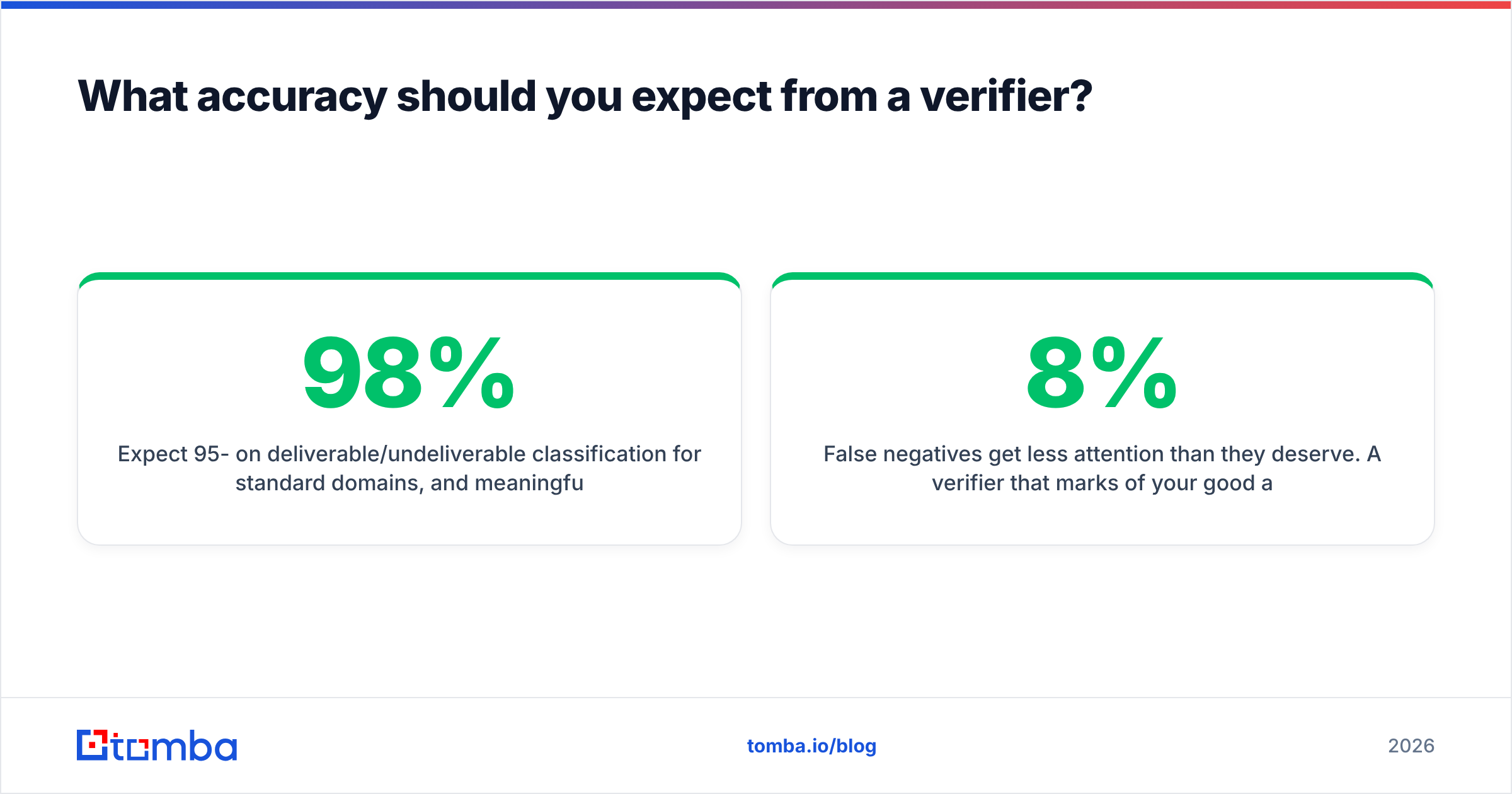
Expect 95-98% on deliverable/undeliverable classification for standard domains, and meaningfully lower on catch-alls. Anyone advertising 99%+ across all domain types is either measuring only easy addresses or counting "unknown" as a correct answer.
When you evaluate vendors, test with your own list rather than trusting a marketing page. Build a 200-address control set:
- 50 known-good addresses — colleagues, your own aliases, contacts who replied last week.
- 50 known-bad addresses — random strings at real domains, and addresses at domains you know are dead.
- 50 catch-all domain addresses — pick enterprise domains and check how each vendor labels them.
- 50 role and disposable addresses —
info@,support@, plus a fewmailinator.comthrowaways.
Then measure three things: false-positive rate (bad addresses marked valid — the expensive error), false-negative rate (good addresses marked invalid — the silent revenue leak), and unknown rate (how often the vendor punts).
False negatives get less attention than they deserve. A verifier that marks 8% of your good addresses invalid is quietly deleting 8% of your pipeline, and nothing in your dashboard will tell you.
Independent review sites like G2's email verification category are useful for spotting patterns in complaints — particularly around credit consumption and unknown rates — but no aggregate rating substitutes for testing against your own data.
What does verification cost, and is it worth it?#
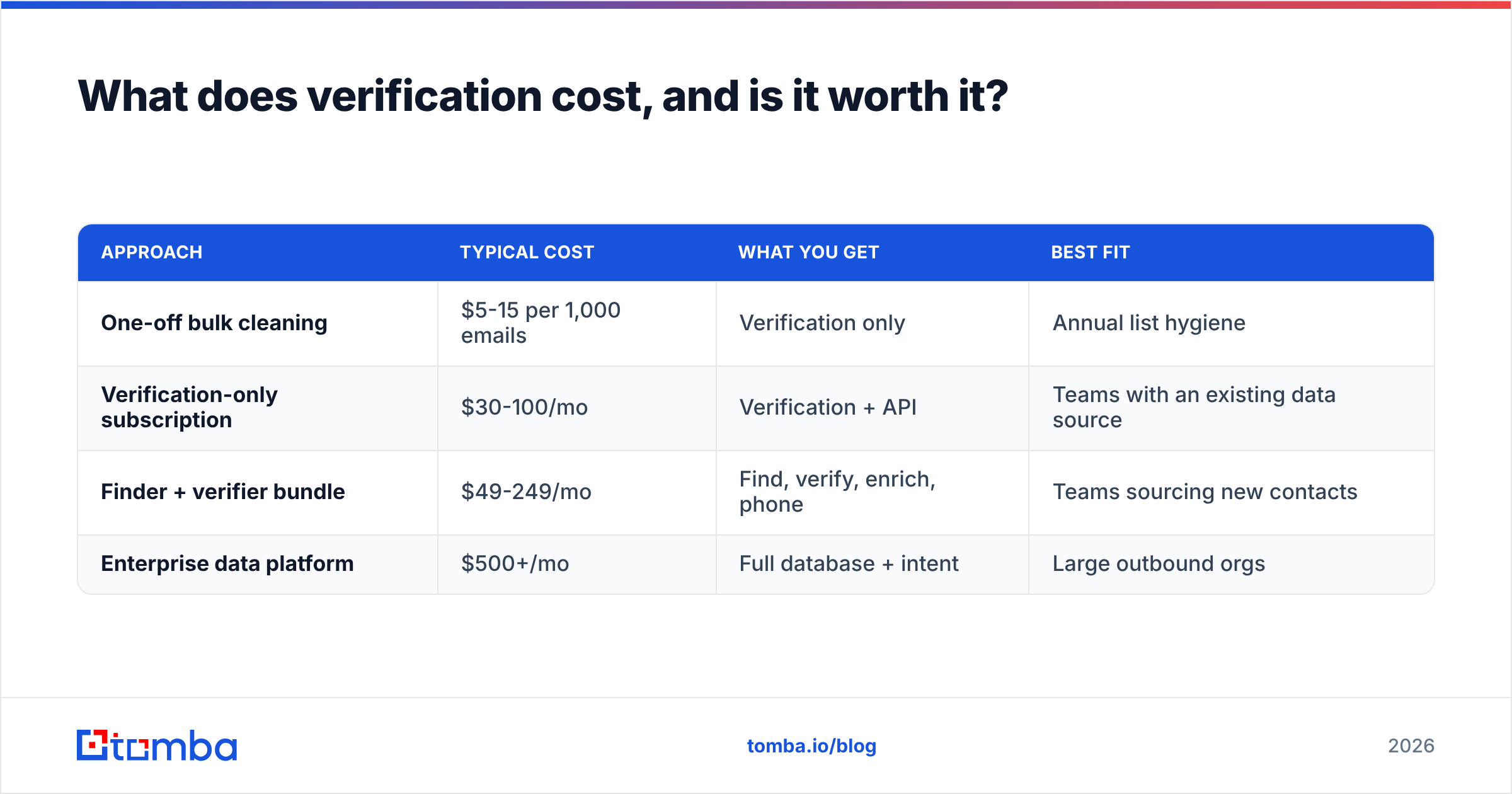
Verification pricing clusters into two models: pay-per-credit for one-off cleaning, and monthly subscriptions that bundle verification with finding and enrichment.
| Approach | Typical cost | What you get | Best fit |
|---|---|---|---|
| One-off bulk cleaning | $5-15 per 1,000 emails | Verification only | Annual list hygiene |
| Verification-only subscription | $30-100/mo | Verification + API | Teams with an existing data source |
| Finder + verifier bundle | $49-249/mo | Find, verify, enrich, phone | Teams sourcing new contacts |
| Enterprise data platform | $500+/mo | Full database + intent | Large outbound orgs |
Tomba's pricing sits in the bundled tier: a free plan with 25 searches a month, Starter at $49/mo, Growth at $99/mo, Pro at $249/mo, and custom Enterprise. Peers like BookYourData take a different and perfectly reasonable route — pay-as-you-go pre-verified B2B contacts with no subscription, which suits teams that buy lists in bursts rather than searching continuously. Match the model to your buying rhythm, not to a feature checklist.
The ROI math is unglamorous but decisive. Cleaning 10,000 addresses costs roughly $50-100. If that list has a 20% bounce rate and you send it raw, you burn 2,000 sends, tank your reputation for a month, and depress inbox placement on every subsequent campaign. The verification cost is smaller than one lost meeting.
How do you build verification into your workflow?#
Verify at three points, not one.
At capture. Wire an email verification API into your web forms and CRM inserts. Reject or flag invalid addresses before they are written. A single API call at submit time prevents a permanent data-quality problem.
Before every send. Even a list verified 60 days ago has drifted. Re-verify anything older than 30 days before a campaign — the marginal cost is pennies and the marginal benefit is your sender reputation.
On a schedule. Quarterly re-verification of your entire active database. Suppress hard bounces immediately and permanently; never let a bounced address back into rotation because someone re-imported an old CSV.
If you work in spreadsheets, a Google Sheets add-on keeps verification inside the tool you already use. If you push large batches, bulk verify handles list uploads without scripting. And if you are validating an address someone gave you verbally or from a business card, a reverse email lookup confirms the person behind it actually matches the company you think they work for.
One more habit worth adopting: log verification results as a field on the contact record, with a timestamp. When a campaign underperforms, "last verified 118 days ago" is the first thing you want to see, and most teams cannot answer it.
What mistakes should you avoid?#
- Treating syntax validation as verification. A regex confirms formatting and nothing else. It will happily approve
jane.smith@companythatclosedin2019.com. - Verifying once and never again. Contact data decays 22-30% annually. A one-time clean is a snapshot, not a process.
- Sending to every "valid" result. Role accounts (
info@,hr@) are deliverable and terrible for cold outreach — they route to shared inboxes and generate complaints. - Ignoring the unknown bucket. Unknowns are usually catch-alls. Decide a policy for them explicitly instead of letting them default into your main send.
- Probing SMTP servers at scale from your own IP. Repeated
RCPT TOprobing from one IP gets you rate-limited or blacklisted. Commercial verifiers distribute this across managed IP pools for exactly this reason. - Skipping authentication. Verification improves your list; it does not fix a missing SPF record or a broken DKIM setup. Both matter, and they solve different problems.
Ready to clean your list?#
If your bounce rate is above 2%, verification is the highest-leverage fix available to you — cheaper than new copy, faster than domain warmup, and it compounds across every campaign you run afterward.
Start with the Tomba Email Finder if you are sourcing new contacts, since verification runs automatically on every address it returns rather than as a separate step you have to remember. The free plan gives you 25 searches a month to test accuracy against your own control list before you commit to anything. Run the 200-address test described above, check the false-negative rate, and let the numbers decide.
Related guides#
// get started
Find, verify and enrich your first contacts today
Start on the free plan with 25 searches a month, then scale when your team is ready.
Free plan · No credit card required · GDPR & CCPA
// about the author