How To Verify That An Email Address Is Valid in 2026
Bounces are not bad luck. Here is the exact order to check an email address — syntax, domain, MX, SMTP, catch-all — and where free tools quietly guess instead of verify.
TL;DR
- "Valid" means four separate things: correct syntax, a real domain, live MX records, and a mailbox that actually accepts mail. Most tools stop at the first two and call it a day.
- The fast path for one address: syntax check, DNS/MX lookup, then an SMTP handshake that never sends a message. Under 10 seconds, zero risk to your domain.
- Catch-all domains (roughly 15-20% of B2B domains) accept everything at the SMTP layer, so a plain verifier returns "valid" for addresses that will still bounce. You need a dedicated catch-all check.
- Never "test" an address by sending a real email from your sending domain. That is how you buy a spam complaint and a reputation hit you cannot undo quickly.
- For lists over a few hundred rows, use a bulk verification API and keep bounce rate under 2%. Google and Microsoft both enforce that ceiling now.
What does "valid" actually mean for an email address?#
Think of an email address like a street address on a package. The postcode can be formatted correctly, the city can exist, the street can exist, and the house can still be empty. Four different failures, four different checks.
When somebody asks how to verify that an email address is valid, they usually mean one of these four levels:
- Syntax validity — does the string obey the format rules?
jane.doe@acme.compasses;jane.doe@@acmedoes not. This is pure pattern matching against RFC 5321 and it costs nothing. - Domain validity — does
acme.comresolve in DNS at all, or was it registered, parked, and abandoned? - Mail-server validity — does the domain publish MX records, meaning something is listening for mail? A domain with no MX record cannot receive email, full stop.
- Mailbox validity — does the specific inbox
jane.doe@exist on that server and accept mail? This is the only level that actually predicts a bounce, and it is the hardest one to test.
The gap between level 3 and level 4 is where almost every bad list comes from. A scraped address on a live corporate domain will sail through syntax, DNS, and MX checks and still hard-bounce because Jane left in 2023.
How do you verify that an email address is valid, step by step?#
Run these in order. Each step is cheaper than the one after it, so you filter the junk out before you spend an expensive check on it.
- Normalize and syntax-check. Trim whitespace, lowercase the domain, strip display names and stray angle brackets. Reject double dots, missing
@, missing TLD, and illegal characters. A free email checker does this instantly, but a regex in your own code is fine for this step. - Look up the domain in DNS. If there is no A record and no MX record, stop. If the domain is younger than a few weeks and has no web presence, treat it as suspicious even when it resolves.
- Fetch the MX records.
dig MX acme.comon a Mac or Linux box, ornslookup -type=mx acme.comon Windows. You get the mail hosts and their priorities. No MX records means no mail, and it also tells you the provider —aspmx.l.google.commeans Google Workspace,mail.protection.outlook.commeans Microsoft 365. Provider matters for the next step, because their behaviours differ. - Do an SMTP handshake, not a send. Open port 25 to the highest-priority MX host, say
HELO, issueMAIL FROM:<>, thenRCPT TO:<jane.doe@acme.com>, read the response code, and sendQUIT. You never issueDATA, so no message is ever delivered. A250suggests the mailbox exists;550means it does not. - Test for catch-all behaviour. Repeat the
RCPT TOstep with an address that cannot possibly exist, likezzq7x4-notreal@acme.com. If the server accepts that too, the domain is a catch-all and step 4 told you nothing about Jane specifically. - Score the risk, don't just label it. Role accounts (
info@,sales@), disposable domains, and known spam traps are syntactically perfect and technically deliverable, and you should still exclude most of them from cold outreach.
Can you verify an email address without sending anything?#
Yes, and you should. The SMTP handshake described above is a conversation that stops before delivery. The SMTP protocol was designed so a sending server can ask "will you accept mail for this recipient?" before it transmits a single byte of the message body.
Here is what a manual check looks like from a terminal, roughly:
telnet aspmx.l.google.com 25
HELO verify.example.com
MAIL FROM:<check@example.com>
RCPT TO:<jane.doe@acme.com>
QUIT
Three practical warnings before you try it:
- Most residential and cloud ISPs block outbound port 25. AWS, DigitalOcean, and virtually every home connection will simply hang. This is deliberate anti-spam policy, not a bug.
- Your IP gets rate-limited fast. Google and Microsoft throttle or greylist unknown IPs that make repeated recipient probes. After a few dozen checks you start getting ambiguous
450responses that mean "try again later", not "invalid". - Never run these probes from your sending IP or domain. Verification traffic and campaign traffic should never share reputation. This is the single biggest reason to use a service with dedicated verification infrastructure instead of rolling your own.
That is the honest case for a hosted email verifier: not that the logic is secret, but that it needs a rotating pool of clean IPs, provider-specific handling, and retry logic you do not want to maintain.
What do the SMTP response codes actually tell you?#
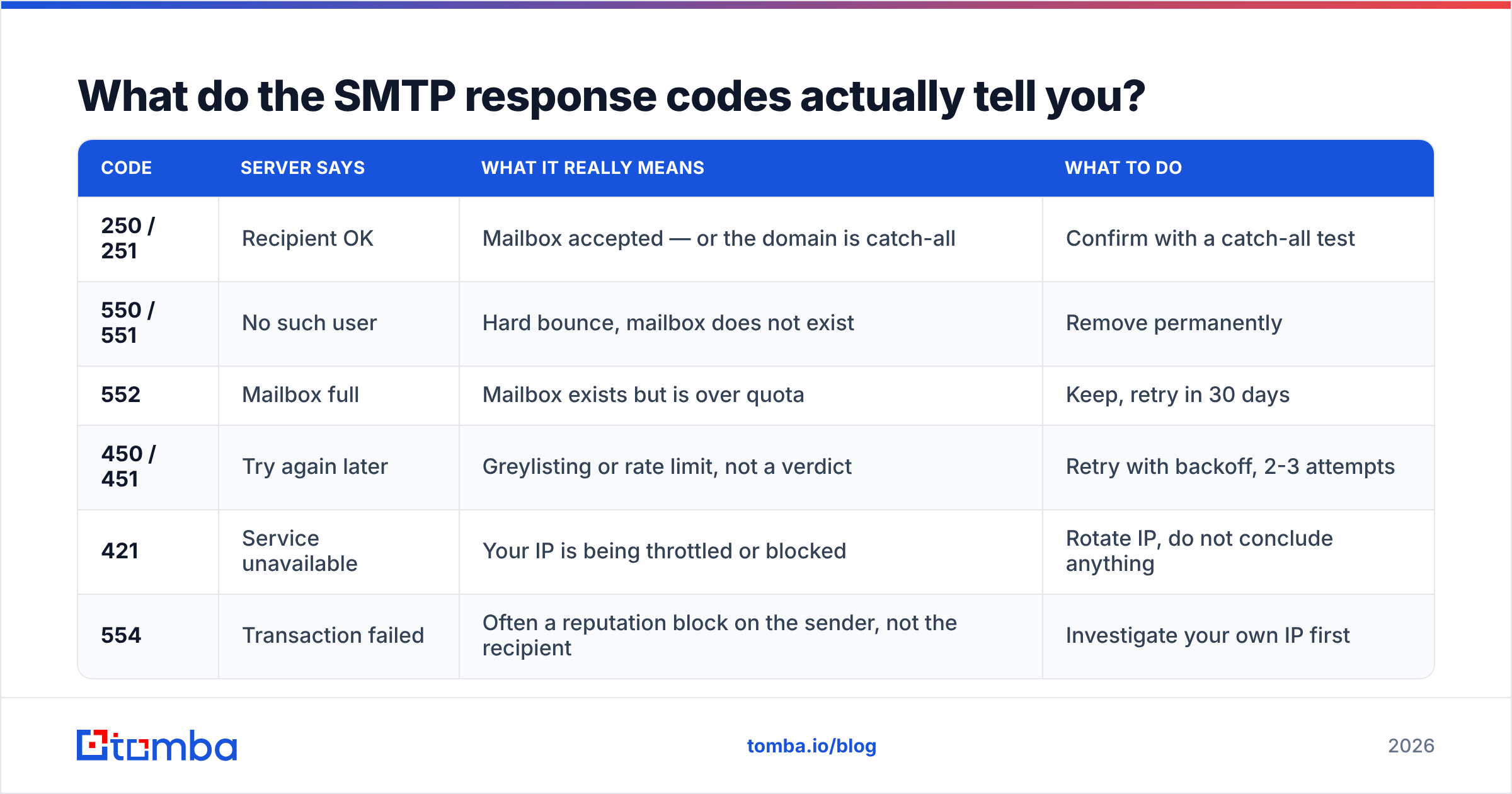
Response codes are where amateur verifiers go wrong. They map anything that is not 250 to "invalid" and torch good leads.
| Code | Server says | What it really means | What to do |
|---|---|---|---|
| 250 / 251 | Recipient OK | Mailbox accepted — or the domain is catch-all | Confirm with a catch-all test |
| 550 / 551 | No such user | Hard bounce, mailbox does not exist | Remove permanently |
| 552 | Mailbox full | Mailbox exists but is over quota | Keep, retry in 30 days |
| 450 / 451 | Try again later | Greylisting or rate limit, not a verdict | Retry with backoff, 2-3 attempts |
| 421 | Service unavailable | Your IP is being throttled or blocked | Rotate IP, do not conclude anything |
| 554 | Transaction failed | Often a reputation block on the sender, not the recipient | Investigate your own IP first |
Notice that only 550-class codes are actual evidence of an invalid mailbox. Everything else is either provisional or a statement about you rather than the recipient. If a tool reports a hard verdict on a 450, it is guessing.
Which email verification tool should you use in 2026?#
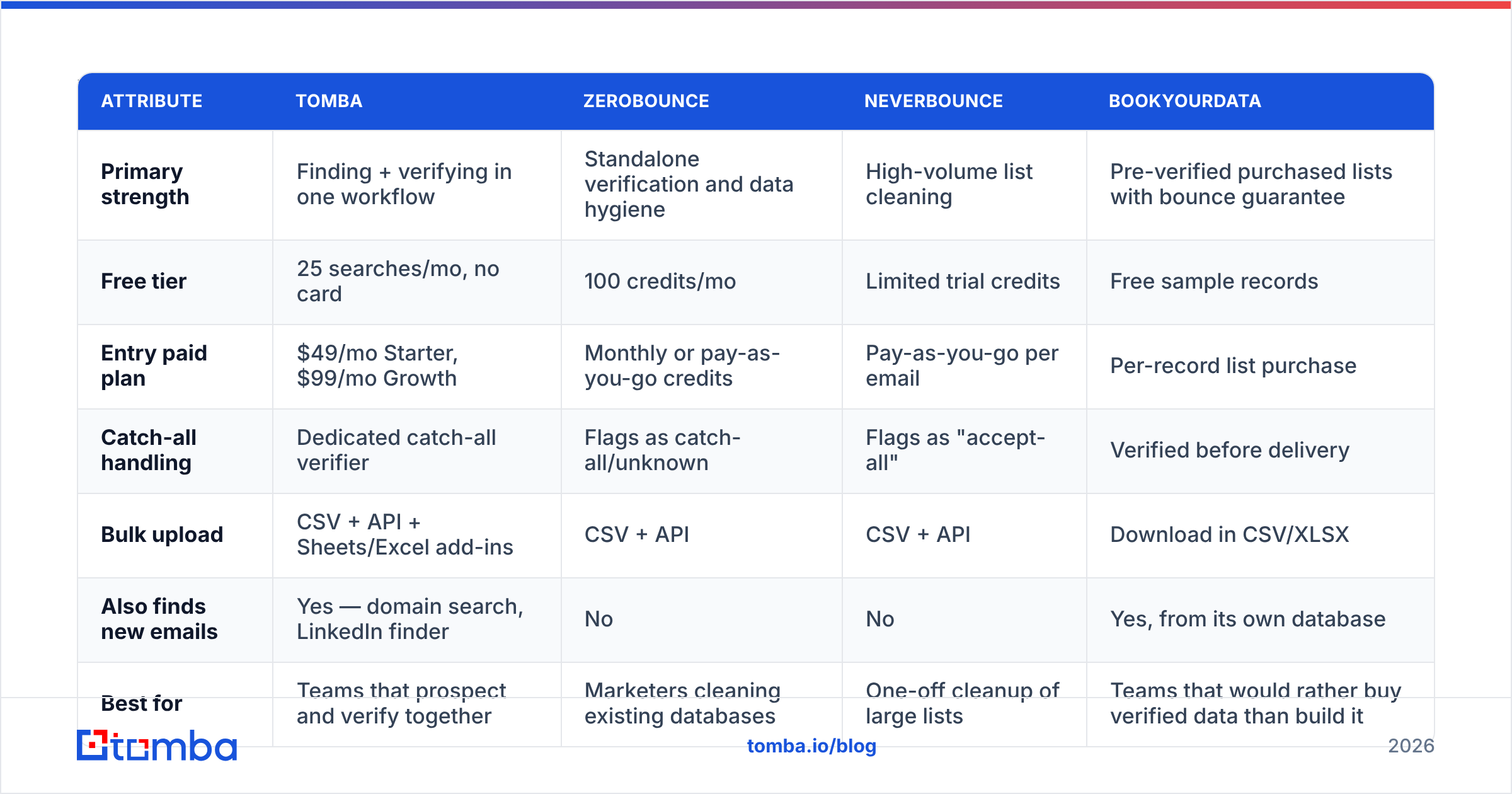
There is no universally best option, only a best fit for volume and workflow. Pricing below was checked at publication — always confirm on the vendor's own page before you commit, since credit bundles change often.
| Attribute | Tomba | ZeroBounce | NeverBounce | BookYourData |
|---|---|---|---|---|
| Primary strength | Finding + verifying in one workflow | Standalone verification and data hygiene | High-volume list cleaning | Pre-verified purchased lists with bounce guarantee |
| Free tier | 25 searches/mo, no card | 100 credits/mo | Limited trial credits | Free sample records |
| Entry paid plan | $49/mo Starter, $99/mo Growth | Monthly or pay-as-you-go credits | Pay-as-you-go per email | Per-record list purchase |
| Catch-all handling | Dedicated catch-all verifier | Flags as catch-all/unknown | Flags as "accept-all" | Verified before delivery |
| Bulk upload | CSV + API + Sheets/Excel add-ins | CSV + API | CSV + API | Download in CSV/XLSX |
| Also finds new emails | Yes — domain search, LinkedIn finder | No | No | Yes, from its own database |
| Best for | Teams that prospect and verify together | Marketers cleaning existing databases | One-off cleanup of large lists | Teams that would rather buy verified data than build it |
The practical split: if you already have a list and just need it clean, a pure verifier is the cheapest route. If you are building lists from domains and profiles, a combined finder-and-verifier saves you an export/import cycle every single time. And if your team would rather buy a pre-verified list than assemble one, BookYourData's bounce guarantee is a legitimate shortcut — different model, same goal of not emailing dead mailboxes.
Independent review data helps here too. Filter G2's email verification category by company size before you read scores; a tool that wins on enterprise reviews often loses on self-serve pricing, and vice versa.
Why do catch-all domains break most verifiers?#
A catch-all (or "accept-all") domain is configured to accept mail for every possible local part and sort it out later. Small companies enable it so that bob@ still reaches Robert. Around one in six B2B domains behaves this way, and it is more common at companies under 50 people.
For a verifier, this is a blindfold. The server says 250 to every RCPT TO, so a standard check cannot distinguish jane.doe@acme.com from asdfgh@acme.com. Tools that ignore this hand you a "valid" label with no evidence behind it, and your bounce rate finds out three days later.
Serious verification handles catch-alls with a separate layer:
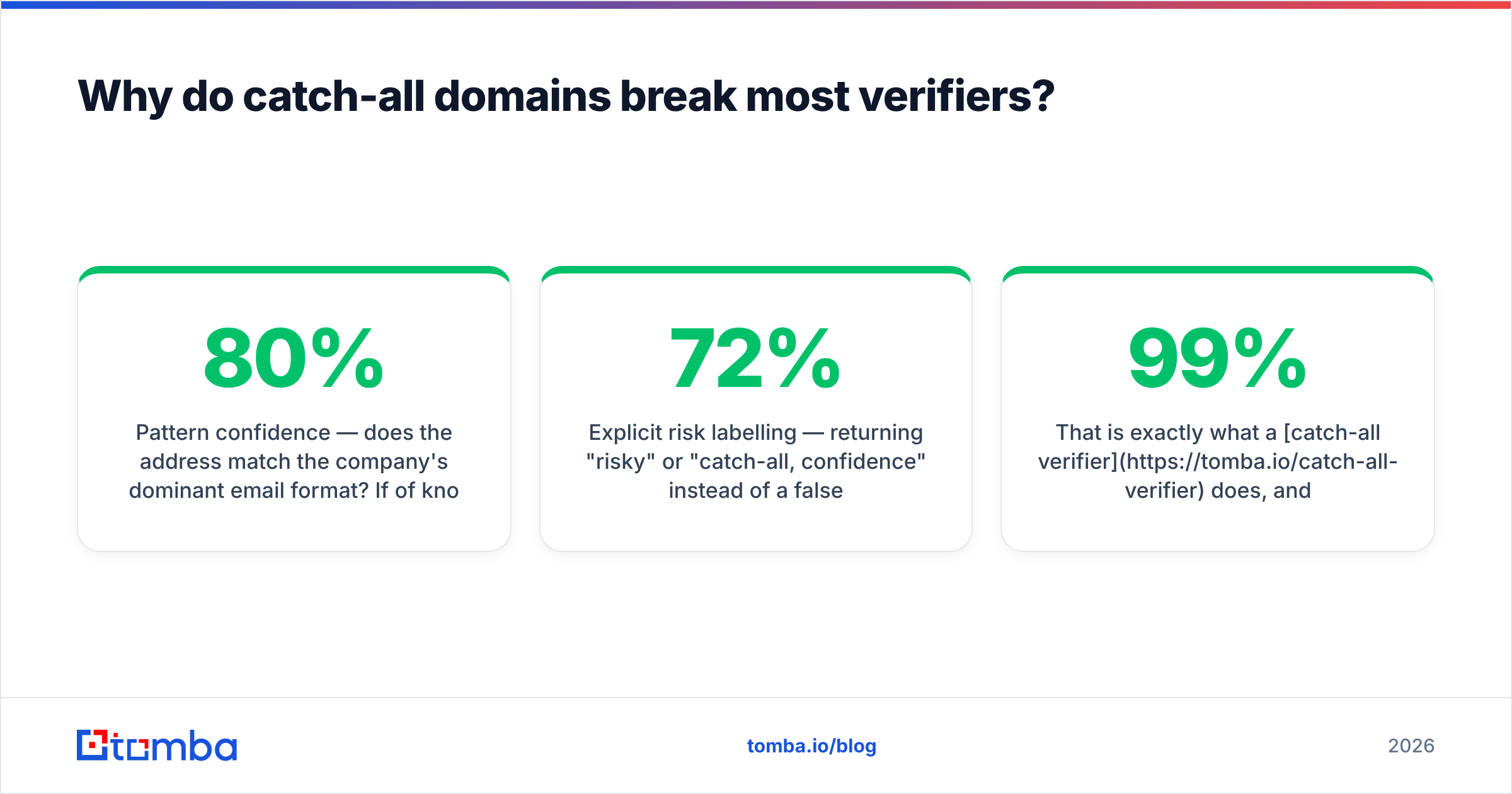
- Pattern confidence — does the address match the company's dominant email format? If 80% of known contacts at the domain use
first.last@, thenjdoe@is a weak candidate. - Corroborating sources — has the address appeared in public data, on the company site, in a signature, or in a byline?
- Historical engagement signals — has this exact address accepted mail before?
- Explicit risk labelling — returning "risky" or "catch-all, 72% confidence" instead of a false binary.
That is exactly what a catch-all verifier does, and why catch-all support is worth checking before you buy anything. A verifier that reports 99% valid on a list full of small-company domains is telling you about its own optimism, not your data.

How accurate is manual verification versus an API?#
For a single address, manual checks are fine and free. For anything past about 20 addresses, they fall apart on three axes:
- Throughput. A careful manual check takes two to four minutes including DNS lookups. A thousand addresses is a full work week.
- Consistency. You will interpret
450differently on a Friday afternoon than on a Monday morning. An API applies the same retry policy every time. - Infrastructure. Port 25 access, IP rotation, and provider-specific quirks are solved problems in a hosted service and expensive problems in-house.
The realistic accuracy comparison: a competent manual SMTP check gets you level-4 certainty on non-catch-all domains and nothing at all on catch-alls. A good API gets you the same on non-catch-alls plus a probabilistic score on catch-alls, at roughly 200 addresses per second. Where a manual check still wins is edge cases you care deeply about — one strategic account where you want to read the raw server response yourself before you email the CFO.
How do you verify a whole list without wrecking sender reputation?#
Bounce rate is the number that gets your domain throttled. Google's bulk sender requirements and Microsoft's equivalent policies both expect spam complaint rates under 0.3% and treat high bounce rates as a strong negative signal. Keep hard bounces under 2%, and ideally under 1%.
A workflow that holds up:
- Deduplicate first. Duplicates inflate your credit spend and double-count bounces. Strip them before verification, not after.
- Run bulk verification in one pass. Upload the CSV or hit the API — see bulk verify for the batch route — and keep the raw result column, including "risky" and "unknown".
- Segment by verdict, don't just delete. Valid goes to the main sequence. Catch-all/risky goes to a separate low-volume sequence sent from a secondary domain. Invalid gets suppressed permanently, not re-uploaded next quarter.
- Cap the risky segment. Never let unverified-but-plausible addresses exceed 10-15% of a day's send volume.
- Re-verify on a schedule. B2B email data decays at roughly 2-2.5% per month from job changes alone. Anything older than 90 days is a fresh verification job, and an email verification API call inside your CRM sync is cheaper than re-cleaning a stale export.
- Watch the bounce report, not the verifier's score. Your own bounce data is the only ground truth. If a vendor claims 99% accuracy and you see 6% bounces, believe the bounces.
What about role accounts, disposables, and typos?#
Three categories that are technically valid and strategically useless:
- Role accounts —
info@,support@,admin@,careers@. They exist, they accept mail, and they route to a shared queue where cold outreach dies. Exclude them from prospecting; keep them for support or legal contact. - Disposable domains — Mailinator, temp-mail clones, and thousands of rotating throwaways. Valid for ten minutes. Block by domain list, and re-check the list quarterly because new ones appear constantly.
- Typo domains —
gmial.com,hotmial.com,yaho.com. These often resolve because squatters register them. A verifier that only checks DNS will pass them. Good ones maintain a correction map and suggest the intended domain instead.
If you are verifying inbound form submissions rather than outbound lists, add a real-time check at the point of capture. Catching gmial.com while the user is still on the page saves the lead entirely, which no amount of post-hoc list cleaning can do.
Where should you start?#
If you have one address to check right now, do it manually: syntax, dig MX, then a single SMTP probe from a machine with port 25 open. Ten minutes of learning and you will read verifier output far more critically forever after.
If you have a list, or you are building lists from company domains and profiles, skip the manual route. Start with the Tomba Email Finder to source addresses from a domain, name, or LinkedIn profile, then let the built-in verifier and catch-all check score them before anything reaches your sequencer. The free tier gives you 25 searches a month with no card, Starter is $49/mo and Growth is $99/mo — see Tomba pricing for the full breakdown. Verify before you send, and the bounce report stops being the scariest tab in your dashboard.
Related guides#
// get started
Find, verify and enrich your first contacts today
Start on the free plan with 25 searches a month, then scale when your team is ready.
Free plan · No credit card required · GDPR & CCPA
// about the author