How To Warm Up A Cold Email List Without Burning Your Domain
A cold list plus a cold domain is how sending reputations die. Here is the 6-week ramp, the verification gate, and the volume math that keeps you in the inbox.

TL;DR
- Warming a cold email list is two jobs, not one: warming the sending infrastructure (domain, mailbox, IP) and warming the list (verifying, segmenting, and sending in graduated waves).
- Never point a fresh mailbox at a 5,000-contact CSV. Start at 10-20 sends/day per mailbox and ramp roughly 30% per week over 4-6 weeks.
- Verify before you send. A 4% bounce rate is where Google and Microsoft start throttling you; on an unverified two-year-old list you will clear 8-15% easily.
- Segment the list by data confidence — verified, catch-all, risky — and send to the safest tier first so your early reputation signals are clean.
- Watch four numbers weekly: bounce rate, spam complaint rate, reply rate, and inbox placement. Two bad weeks in a row means you stop and fix, not push harder.
What does "warming up a cold email list" actually mean?#
It means two separate processes that people constantly conflate.
Infrastructure warmup is teaching mailbox providers that your domain and mailbox belong to a real human who sends real mail that people read. This is about volume curves, authentication records, and engagement signals. It takes 3-6 weeks and has nothing to do with who is on your list.
List warmup is progressively proving that the addresses you own are deliverable and that the people behind them tolerate your mail. This is about verification, segmentation, and sequencing — sending to your highest-confidence contacts first so your earliest reputation data is your best data.
Do one without the other and you fail. A perfectly warmed domain blasting a rotten list gets blocked in a week. A pristine, freshly verified list sent from a two-day-old mailbox lands in spam anyway.
Think of it like a restaurant reopening after a two-year closure. You need the kitchen certified and running (infrastructure) and you need to re-invite the regulars before you advertise to strangers (list). Skip either one and the first Friday night is a disaster.
Why do cold lists decay so fast?#
B2B contact data rots at roughly 22-30% per year. People change jobs, companies rebrand domains, role accounts get retired, and mailbox providers convert dead addresses into spam traps. A list you scraped in early 2024 is, statistically, about half wrong by now.
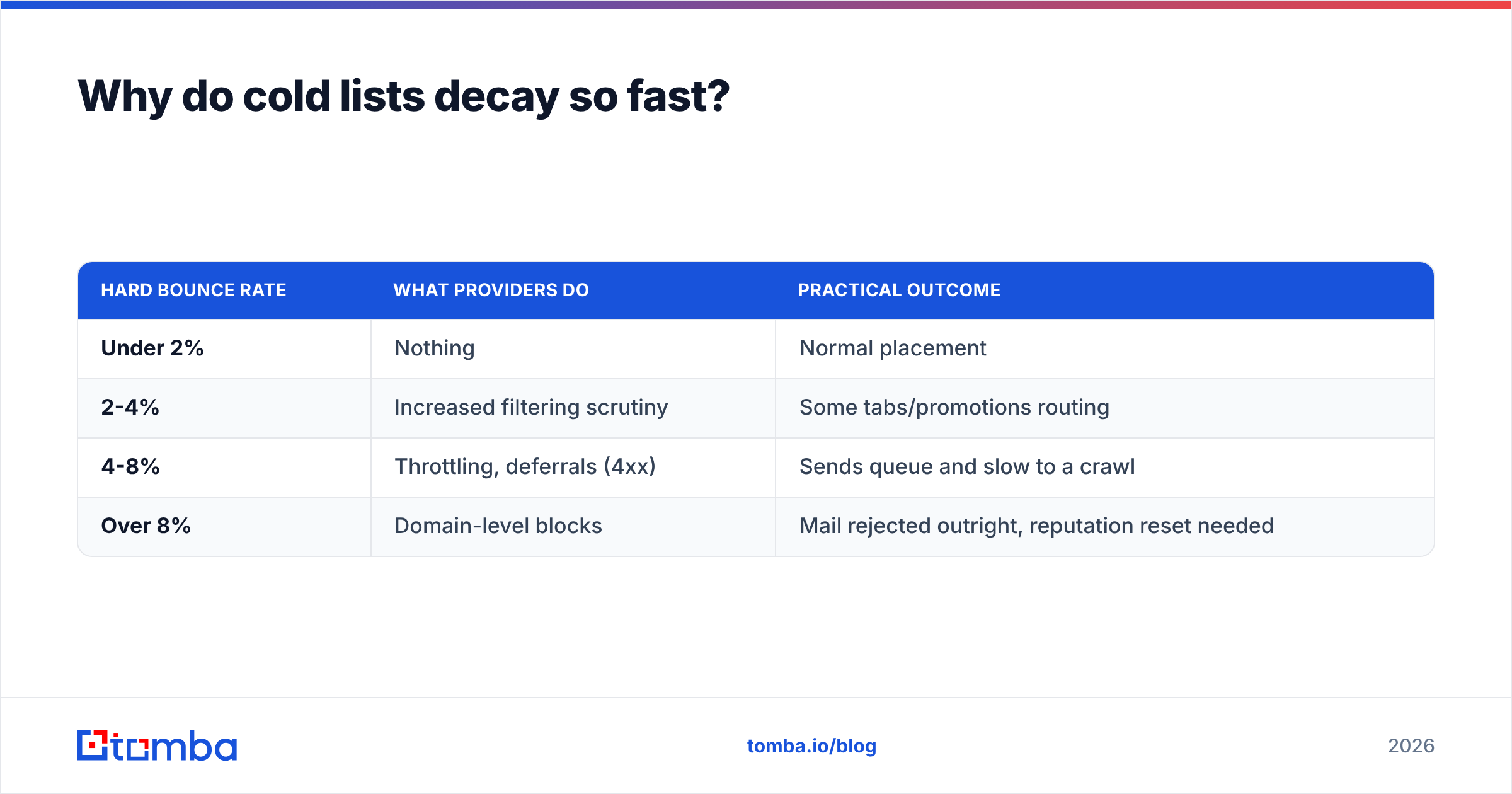
The damage is not linear. Bounce rate is a threshold metric:
| Hard bounce rate | What providers do | Practical outcome |
|---|---|---|
| Under 2% | Nothing | Normal placement |
| 2-4% | Increased filtering scrutiny | Some tabs/promotions routing |
| 4-8% | Throttling, deferrals (4xx) | Sends queue and slow to a crawl |
| Over 8% | Domain-level blocks | Mail rejected outright, reputation reset needed |
The other silent killer is spam traps. Recycled traps are old real addresses that providers reactivate as tripwires; pristine traps were never real at all and only appear on scraped or purchased lists. Hitting either one repeatedly does more damage than a hundred bounces, and no amount of infrastructure warmup rescues you from it.
This is why verification is not an optional polish step. Run the list through an email verifier before a single send, and treat anything you cannot confirm as a separate, later-stage segment.

How do you warm up the sending infrastructure first?#
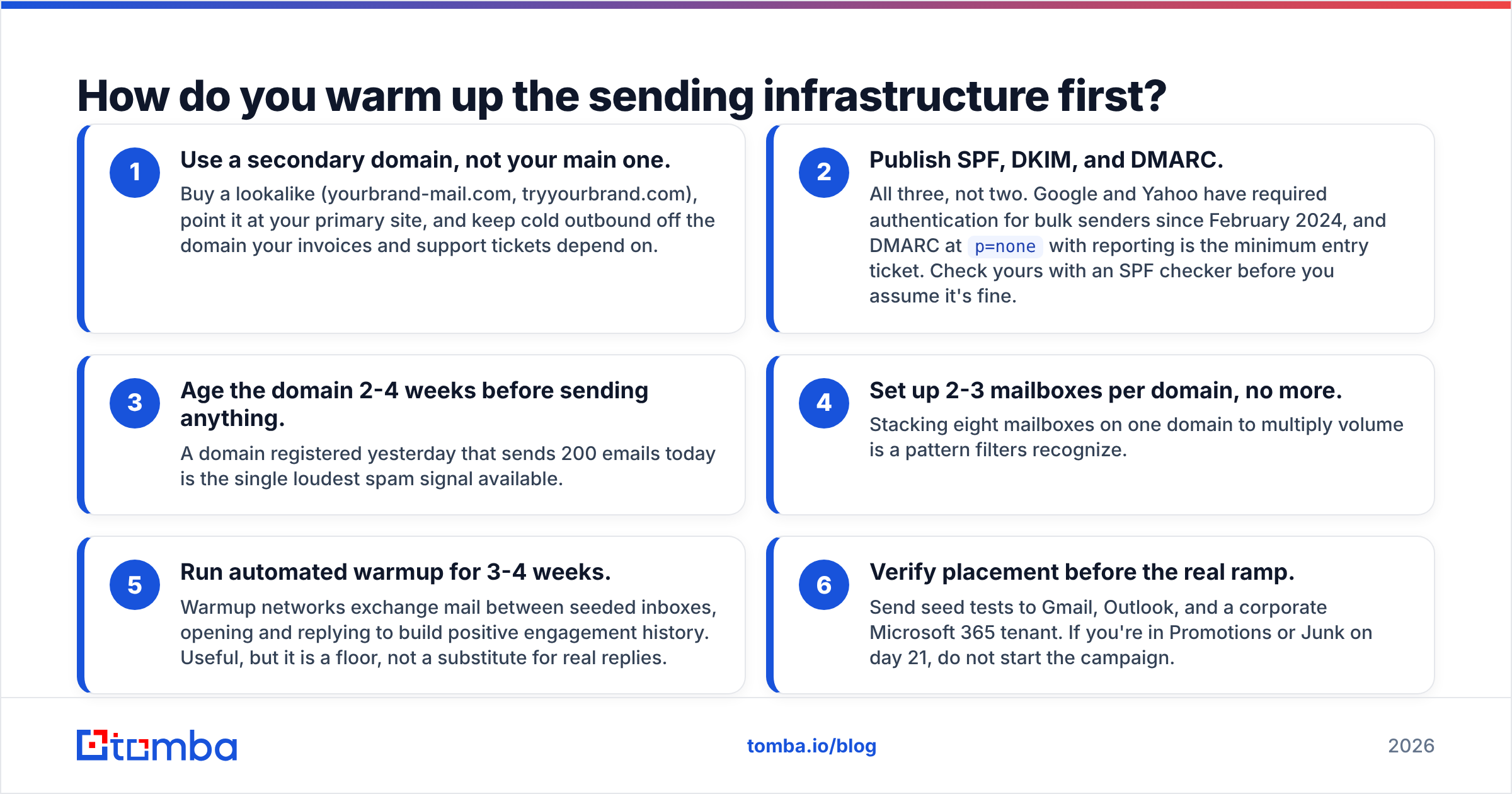
Get the plumbing right before volume matters. In order:
- Use a secondary domain, not your main one. Buy a lookalike (yourbrand-mail.com, tryyourbrand.com), point it at your primary site, and keep cold outbound off the domain your invoices and support tickets depend on.
- Publish SPF, DKIM, and DMARC. All three, not two. Google and Yahoo have required authentication for bulk senders since February 2024, and DMARC at
p=nonewith reporting is the minimum entry ticket. Check yours with an SPF checker before you assume it's fine. - Age the domain 2-4 weeks before sending anything. A domain registered yesterday that sends 200 emails today is the single loudest spam signal available.
- Set up 2-3 mailboxes per domain, no more. Stacking eight mailboxes on one domain to multiply volume is a pattern filters recognize.
- Run automated warmup for 3-4 weeks. Warmup networks exchange mail between seeded inboxes, opening and replying to build positive engagement history. Useful, but it is a floor, not a substitute for real replies.
- Verify placement before the real ramp. Send seed tests to Gmail, Outlook, and a corporate Microsoft 365 tenant. If you're in Promotions or Junk on day 21, do not start the campaign.
Google's own sender requirements documentation is the authoritative source here — it lists the spam complaint threshold (0.3%, with 0.1% as the target) that most guides paraphrase badly.
What is a realistic volume ramp schedule?#
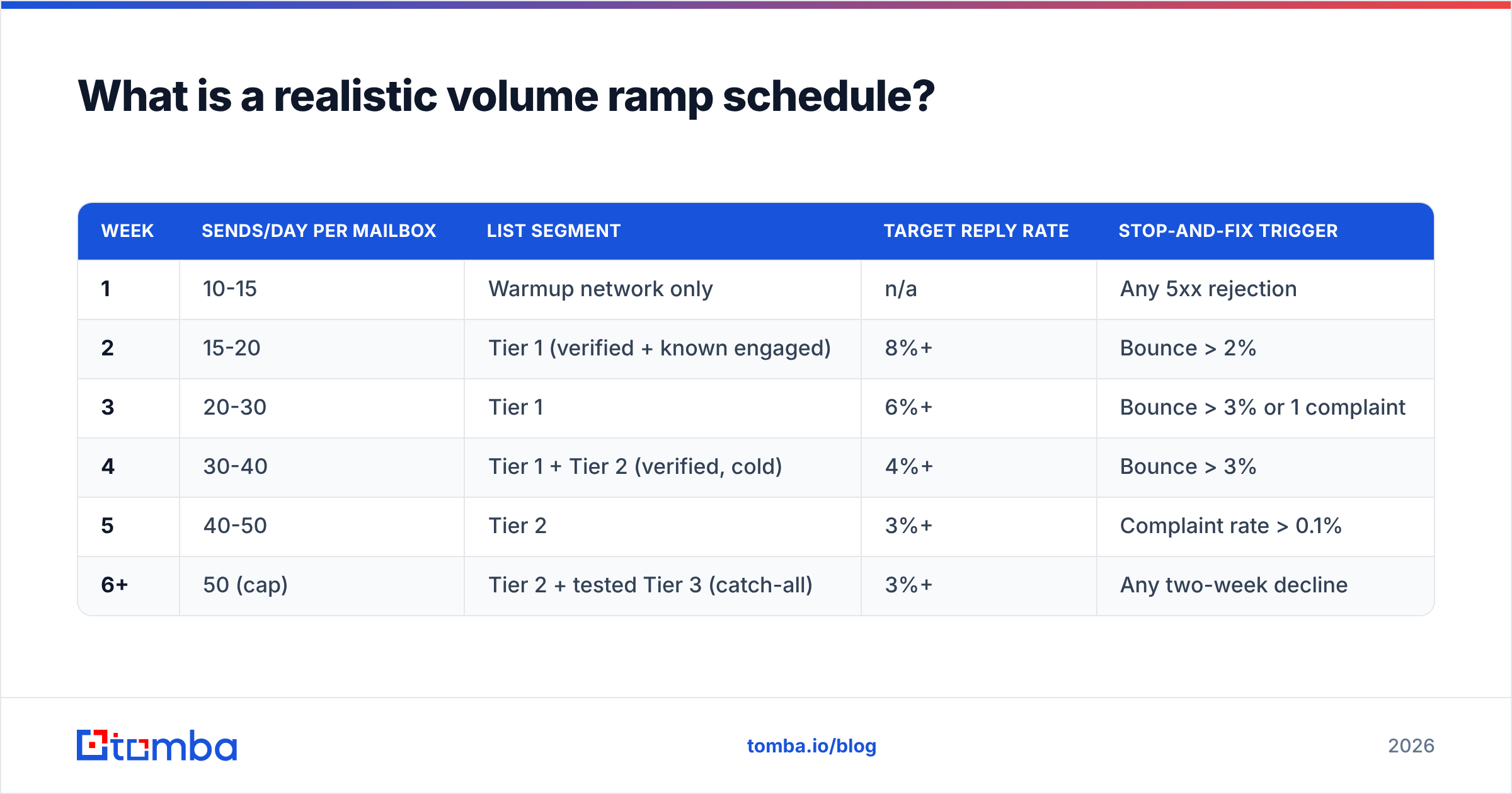
Per mailbox. Multiply by mailbox count for your total, and never exceed 50 cold sends/day per mailbox even at full maturity.
| Week | Sends/day per mailbox | List segment | Target reply rate | Stop-and-fix trigger |
|---|---|---|---|---|
| 1 | 10-15 | Warmup network only | n/a | Any 5xx rejection |
| 2 | 15-20 | Tier 1 (verified + known engaged) | 8%+ | Bounce > 2% |
| 3 | 20-30 | Tier 1 | 6%+ | Bounce > 3% or 1 complaint |
| 4 | 30-40 | Tier 1 + Tier 2 (verified, cold) | 4%+ | Bounce > 3% |
| 5 | 40-50 | Tier 2 | 3%+ | Complaint rate > 0.1% |
| 6+ | 50 (cap) | Tier 2 + tested Tier 3 (catch-all) | 3%+ | Any two-week decline |
Two rules that people break constantly:
Ramp by percentage, not by fixed jumps. Increasing 30-40% week over week keeps the curve smooth. Going 20 → 100 because you're impatient reads as a compromised account.
Send on a human schedule. Business hours in the recipient's timezone, randomized 60-180 second gaps, Tuesday through Thursday weighted heaviest. A machine-gun burst of 40 identical messages at 03:00 is trivially detectable.
How should you segment a cold list before sending?#
Sort by data confidence, then send in that order. This is the highest-leverage step in the entire process, because your week-2 and week-3 reputation data comes from your best contacts instead of your average ones.
- Tier 1 — Verified + prior touch. Addresses that pass SMTP verification and belong to people who have visited your site, downloaded something, or connected on LinkedIn. Highest reply probability, near-zero bounce. Send these first.
- Tier 2 — Verified, no prior touch. Confirmed deliverable, genuinely cold. This is the bulk of most lists and where the real campaign lives from week 4.
- Tier 3 — Catch-all domains. The server accepts everything, so verification returns "unknown." Roughly 15-20% of B2B domains. Test a 50-contact sample and measure the bounce rate before committing the segment; a catch-all verifier narrows the guesswork considerably.
- Tier 4 — Risky / role-based / unknown. info@, sales@, support@, plus anything flagged disposable or invalid. Delete these. Do not "try them at the end" — role accounts are complaint magnets and a common trap format.
- Tier 5 — Anything older than 18 months with no re-verification. Either re-verify it into Tier 1-3 or drop it. There is no third option that ends well.
If a large share of your list lands in Tiers 4 and 5, rebuilding beats rehabilitating. Sourcing fresh, pattern-validated addresses through a domain search on your target accounts usually produces a cleaner starting position than trying to salvage a scraped export.
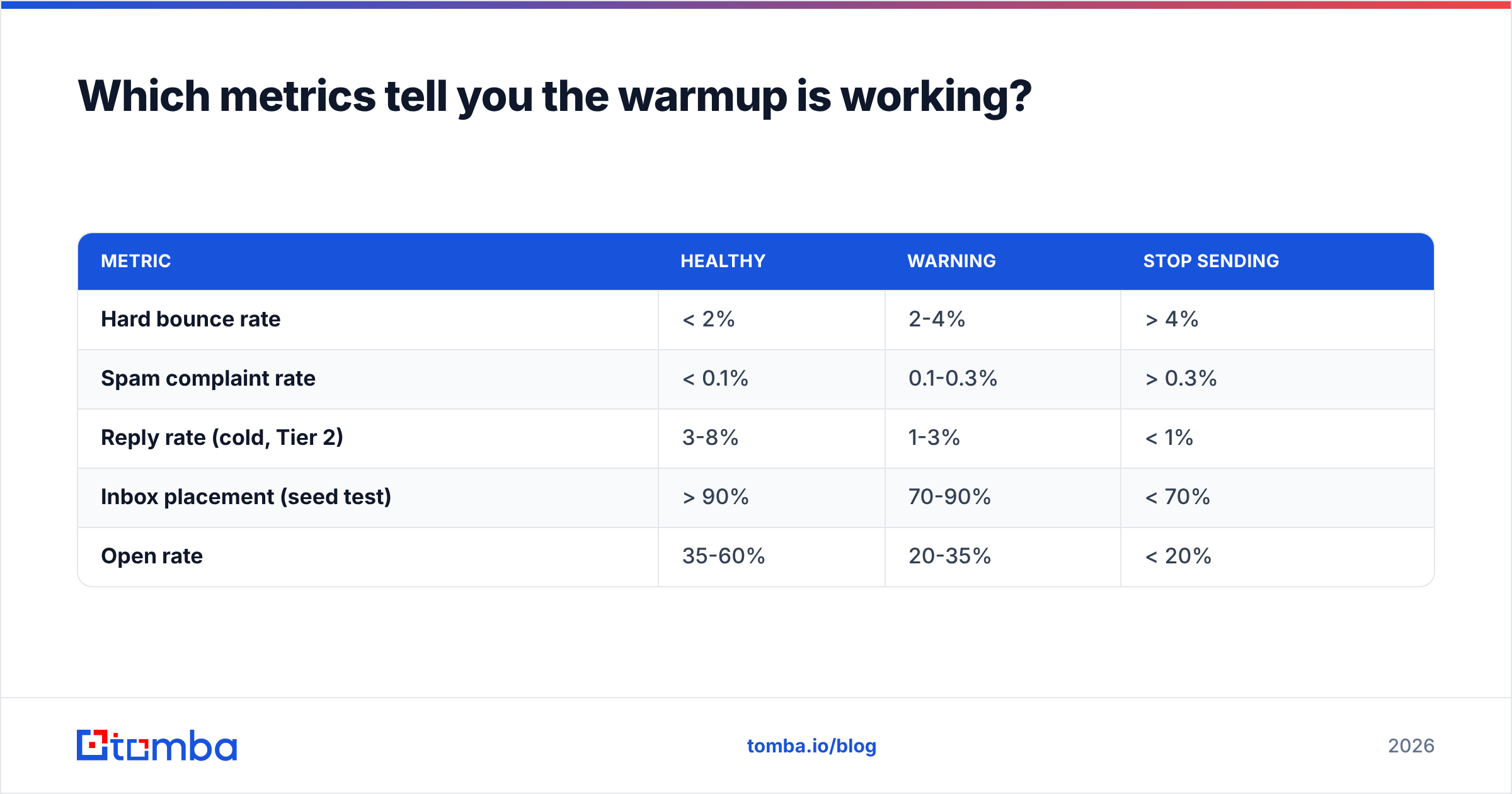
Which metrics tell you the warmup is working?#
Track these weekly in a spreadsheet. Absolute numbers matter less than direction.
| Metric | Healthy | Warning | Stop sending |
|---|---|---|---|
| Hard bounce rate | < 2% | 2-4% | > 4% |
| Spam complaint rate | < 0.1% | 0.1-0.3% | > 0.3% |
| Reply rate (cold, Tier 2) | 3-8% | 1-3% | < 1% |
| Inbox placement (seed test) | > 90% | 70-90% | < 70% |
| Open rate | 35-60% | 20-35% | < 20% |
Two caveats on that table. Open rates have been unreliable since Apple Mail Privacy Protection began pre-fetching images — treat them as a trend line, never as truth. And reply rate is the metric that actually correlates with placement, because mailbox providers weight replies far more heavily than opens.
The stop-and-fix rule: two consecutive weeks of decline in any metric means you cut volume by 50%, re-verify the remaining list, and rewrite the message. Pushing more volume through a degrading reputation is how a warmed domain becomes an unusable one in about ten days.
What ruins a warmup fastest?#
Ranked by damage, from experience:
- Sending to an unverified list. Single biggest cause of failed warmups. Nothing else on this list comes close.
- Volume spikes. Going from 30/day to 300/day after a good week. The curve must stay smooth even when results are good.
- Identical message bodies at scale. Filters cluster on body-hash similarity. Vary the first line, the value sentence, and the CTA phrasing across at least three variants.
- Links and images in the first email. One plain-text-looking message, no tracking pixel, no image, at most one link. Add richness after the domain has history.
- Ignoring unsubscribes. A missing opt-out on bulk cold mail is both a complaint driver and a legal problem under GDPR and CAN-SPAM.
- Reusing a burned domain. Once a domain carries a poor reputation, warmup does not reset it. Retire it and start fresh.
For a deeper treatment of the reputation side, email deliverability and sender reputation cover the underlying mechanics of how providers score you.
How long does the whole process take?#
Six weeks to full volume, assuming nothing goes wrong.
- Weeks -2 to 0: Buy domain, configure SPF/DKIM/DMARC, create mailboxes, let the domain age. No sending.
- Weeks 1-2: Warmup network only, then Tier 1 at 15-20/day. Verify the entire list during this window.
- Weeks 3-4: Tier 1 and early Tier 2, 20-40/day. First seed-test checkpoint at the end of week 3.
- Weeks 5-6: Tier 2 at 40-50/day. Sample-test Tier 3 catch-alls.
- Week 7+: Steady state at 50/day per mailbox. Add a new mailbox — not more volume per mailbox — when you need scale.
If you are working against a hard deadline, the only safe lever is more mailboxes started earlier, never a steeper curve on existing ones. Three mailboxes warmed properly give you 150 sends/day. One mailbox pushed to 150 gives you a blocked domain.
Peer comparisons like G2's email deliverability category are useful for picking a warmup tool, but note that none of them solve list quality — that problem sits entirely upstream of whatever tool you choose.
Warm the list, not just the domain#
The single highest-ROI action in this entire guide takes an afternoon: verify your list, drop Tiers 4 and 5, and sort the remainder by confidence before you send anything. Every downstream metric improves from that one step, and it costs less than a week of a blocked domain.
Tomba's Email Finder handles both halves of the problem — sourcing fresh, pattern-verified addresses for the accounts you actually want, and confirming deliverability before they enter your sequence. The free tier gives you 25 searches a month to test the data quality on your own target accounts, and paid plans start at $49/mo on Starter; full Tomba pricing is public. Run your existing list through it first, see how much of it survives, and ramp from there.
Related guides#
// get started
Find, verify and enrich your first contacts today
Start on the free plan with 25 searches a month, then scale when your team is ready.
Free plan · No credit card required · GDPR & CCPA
// about the author