How To Warm Up An Email Account: 2026 Step-By-Step Guide
A 6-week warmup schedule, the volume ramp numbers that actually keep you out of spam, and how to tell when your new domain is ready for real cold outreach.
TL;DR
- Warming up an email account means building sender reputation gradually — start at 5-10 sends per day on a new mailbox and ramp roughly 30-50% per week until you hit your target volume. Most accounts need 4-6 weeks.
- DNS comes first. SPF, DKIM, and DMARC must be live and passing before day one of warmup, or you're building reputation on a broken foundation.
- Warmup tools (Instantly, Warmup Inbox, Mailreach) automate the reciprocal-reply loop, but they only simulate engagement. Real replies from real prospects are what actually move the needle.
- Google's bulk-sender rules require spam complaints stay under 0.30%, with 0.10% as the working target. Blowing past that once can undo six weeks of ramp.
- List quality is half of deliverability. A verified list from a tool like the email verifier prevents the bounce spikes that kill new domains fastest.
What does it actually mean to warm up an email account?#
Warming up an email account means teaching mailbox providers that you're a legitimate sender — by sending small, gradually increasing volumes of mail that get opened, replied to, and never marked as spam.
Think of it like a credit score. A brand-new domain with no sending history is the equivalent of a 22-year-old with no credit file: not bad, just unknown. Banks don't hand unknown applicants a $50,000 limit on day one, and Gmail doesn't hand an unknown domain a 500-email-per-day allowance either. You start small, you demonstrate consistent good behavior, and the limit rises.
Technically, what you're building is a reputation profile across four dimensions that Gmail, Outlook, and Yahoo all track:
- Domain reputation — the aggregate history of mail sent from your sending domain, tracked independently of any single mailbox.
- IP reputation — the history of the sending IP. On shared infrastructure (Google Workspace, Microsoft 365) you inherit a pool reputation; on dedicated IPs you build it from zero.
- Engagement signals — opens, replies, forwards, "move to inbox," and adding you to contacts. Replies weigh heaviest.
- Negative signals — spam complaints, hard bounces, deletes-without-open, and unsubscribe spikes. These decay slowly and hurt disproportionately.
New domains sit in a probationary window that lasts roughly 30 days at Google and Microsoft. Send 300 cold emails on day three of that window and you don't get a warning — you get silently routed to spam, sometimes permanently for that domain.

What do you need in place before day one?#
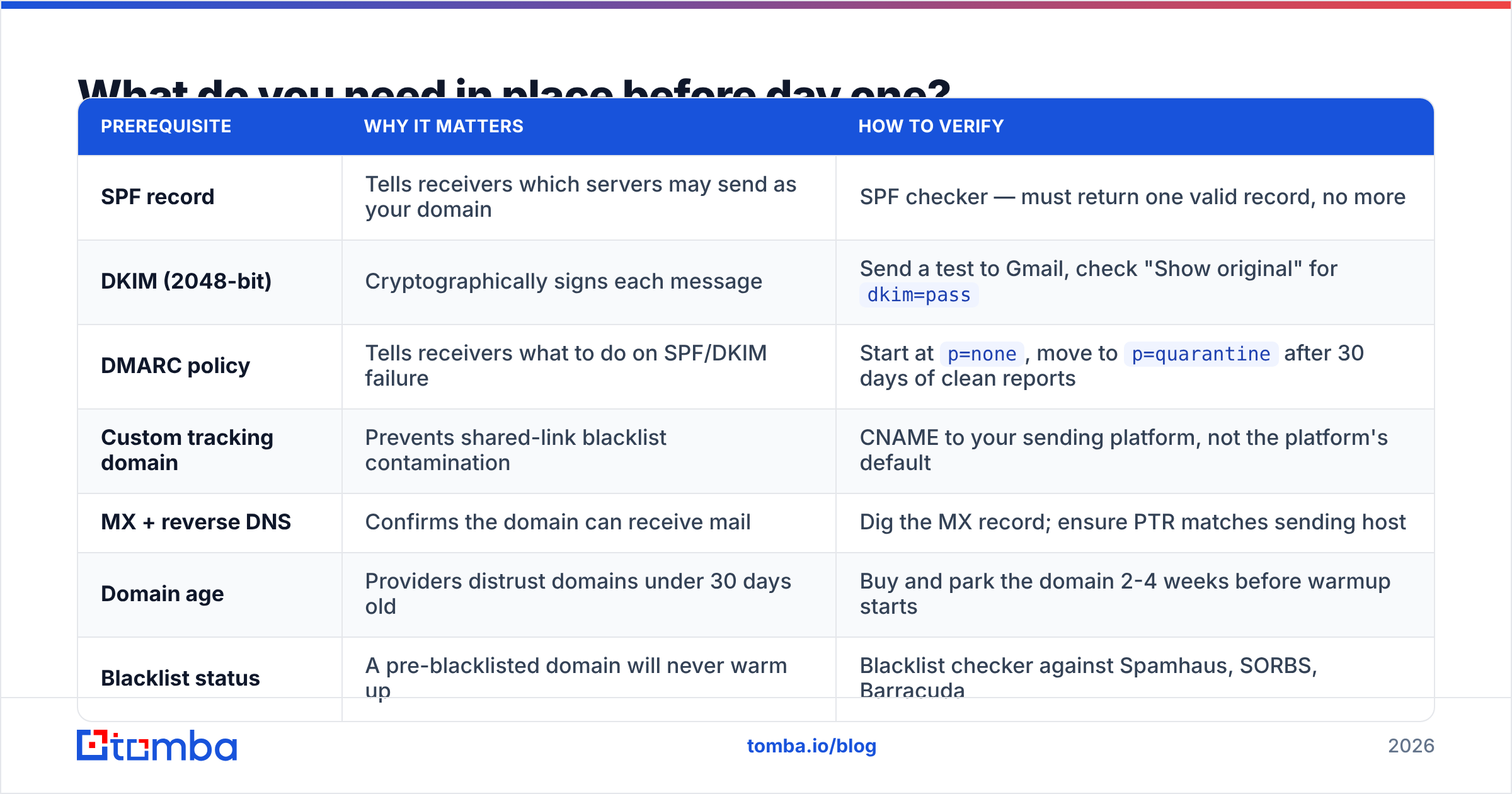
Do not start sending until every item below is done. Warmup on a misconfigured domain builds negative reputation faster than positive.
| Prerequisite | Why it matters | How to verify |
|---|---|---|
| SPF record | Tells receivers which servers may send as your domain | SPF checker — must return one valid record, no more |
| DKIM (2048-bit) | Cryptographically signs each message | Send a test to Gmail, check "Show original" for dkim=pass |
| DMARC policy | Tells receivers what to do on SPF/DKIM failure | Start at p=none, move to p=quarantine after 30 days of clean reports |
| Custom tracking domain | Prevents shared-link blacklist contamination | CNAME to your sending platform, not the platform's default |
| MX + reverse DNS | Confirms the domain can receive mail | Dig the MX record; ensure PTR matches sending host |
| Domain age | Providers distrust domains under 30 days old | Buy and park the domain 2-4 weeks before warmup starts |
| Blacklist status | A pre-blacklisted domain will never warm up | Blacklist checker against Spamhaus, SORBS, Barracuda |
Two additional structural decisions:
- Never warm up your primary domain. Buy sending domains —
getcompany.co,trycompany.io— and route cold outreach through those. If a sending domain burns, your corporate mail and your customers' invoices are unaffected. - Cap mailboxes per domain at three. Google's abuse detection flags domains with 8-10 new mailboxes all sending outbound simultaneously. Three inboxes per domain, ~30 sends each, gets you 90/day per domain safely.
What does the week-by-week warmup schedule look like?#
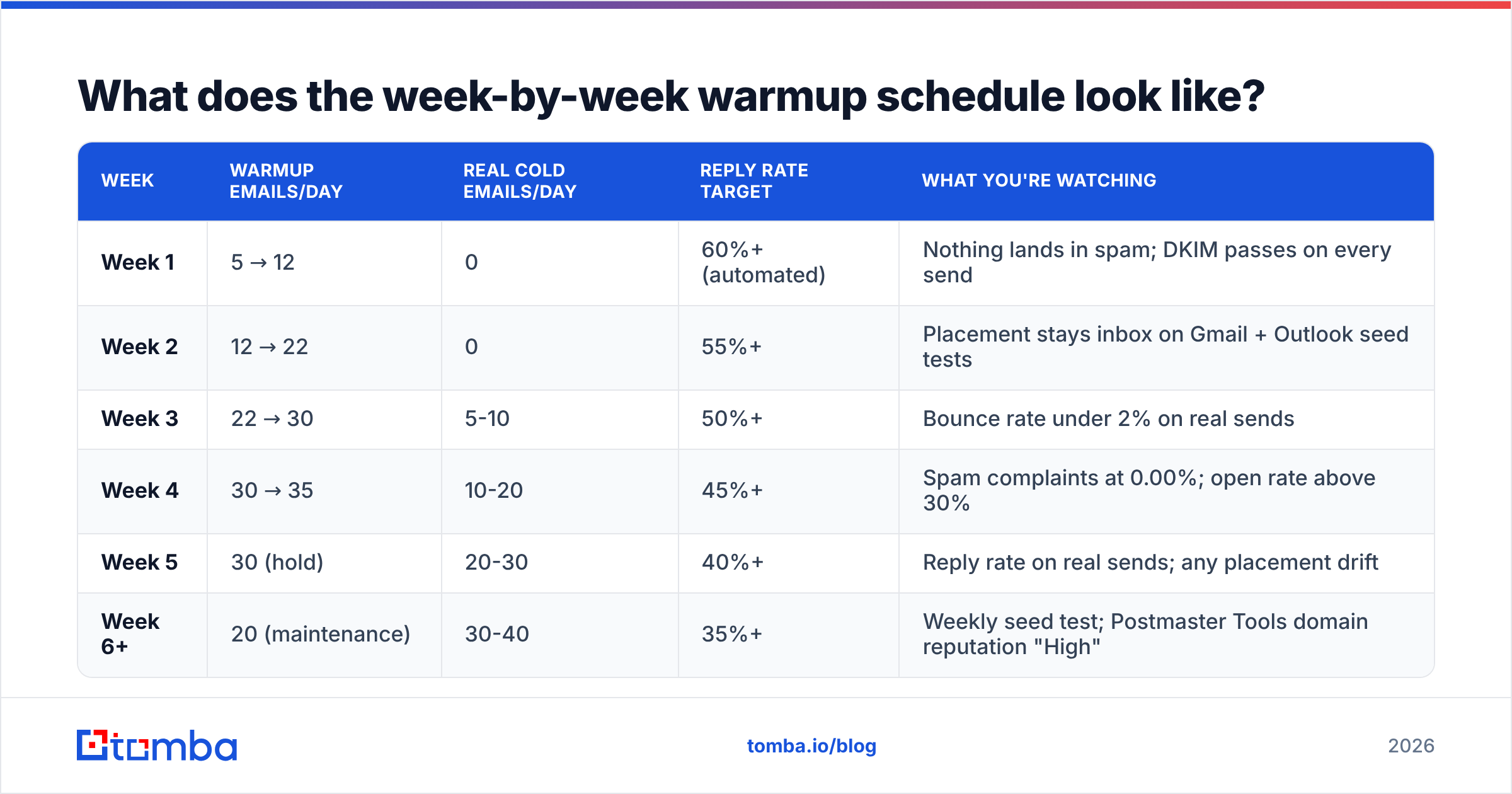
Here's the ramp that works for a Google Workspace or Microsoft 365 mailbox targeting ~40 cold sends per day at full speed. Volumes are per mailbox, per business day.
| Week | Warmup emails/day | Real cold emails/day | Reply rate target | What you're watching |
|---|---|---|---|---|
| Week 1 | 5 → 12 | 0 | 60%+ (automated) | Nothing lands in spam; DKIM passes on every send |
| Week 2 | 12 → 22 | 0 | 55%+ | Placement stays inbox on Gmail + Outlook seed tests |
| Week 3 | 22 → 30 | 5-10 | 50%+ | Bounce rate under 2% on real sends |
| Week 4 | 30 → 35 | 10-20 | 45%+ | Spam complaints at 0.00%; open rate above 30% |
| Week 5 | 30 (hold) | 20-30 | 40%+ | Reply rate on real sends; any placement drift |
| Week 6+ | 20 (maintenance) | 30-40 | 35%+ | Weekly seed test; Postmaster Tools domain reputation "High" |
Three rules that matter more than the exact numbers:
- Ramp by percentage, not by fixed increments. Increasing 30-50% week over week keeps growth proportional to your existing reputation. Doubling volume overnight is the single most common cause of a warmup failing in week 3.
- Never stop cold. If you pause sending for two weeks, reputation decays and you re-enter the probation window. Keep 15-20 maintenance warmup emails running indefinitely alongside live campaigns.
- Send on a human schedule. Business hours in the recipient's timezone, Tuesday through Thursday weighted heaviest, randomized 60-180 second gaps between sends. Perfectly uniform intervals are a bot fingerprint.
Should you use a warmup tool or warm up manually?#
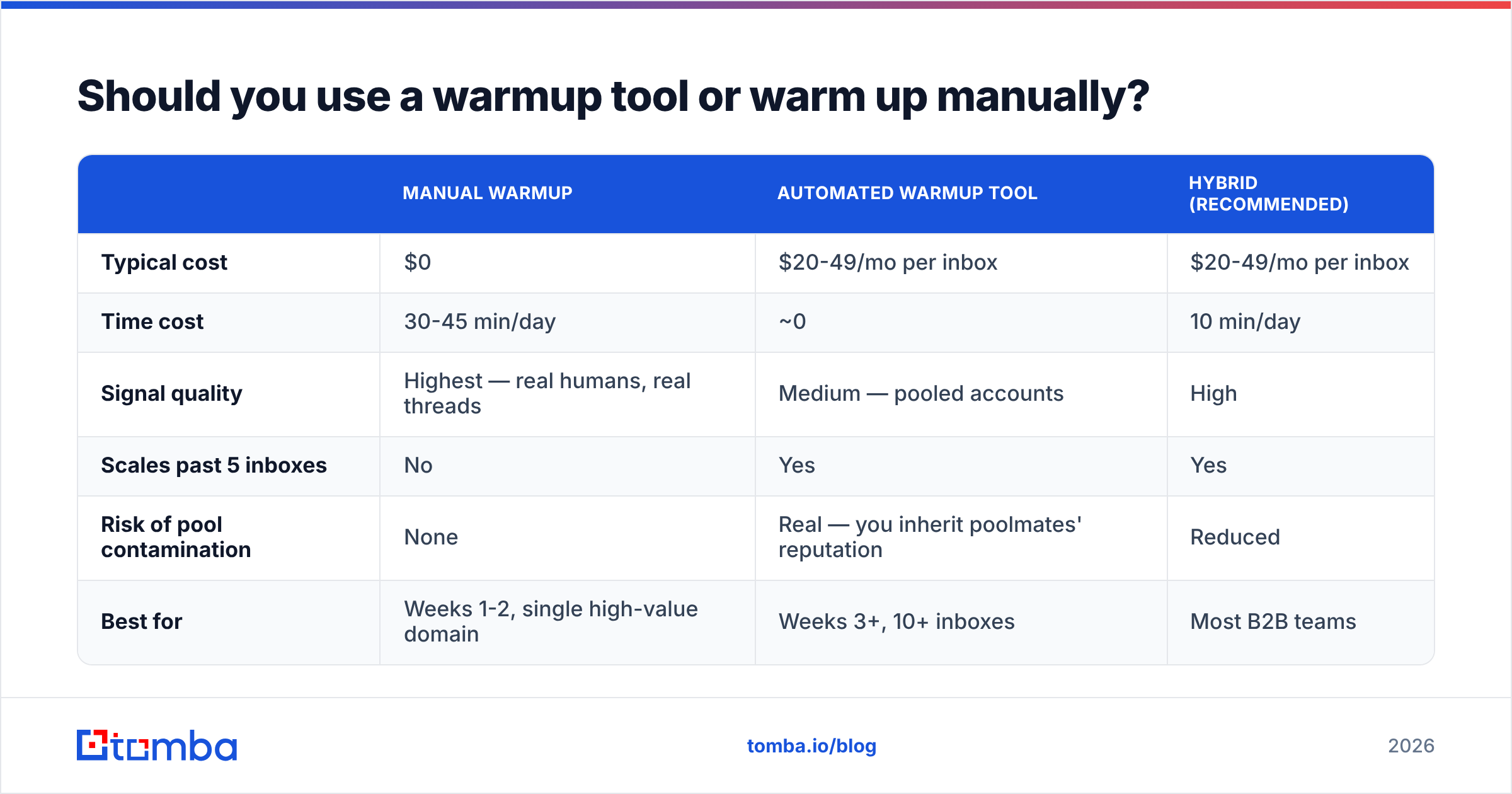
Use a tool for volume, but supplement it manually for the first two weeks. Automated warmup networks generate reciprocal replies between pooled accounts — useful for volume signals, but Gmail has gotten better at recognizing the pattern, and pool quality varies wildly.
| Manual warmup | Automated warmup tool | Hybrid (recommended) | |
|---|---|---|---|
| Typical cost | $0 | $20-49/mo per inbox | $20-49/mo per inbox |
| Time cost | 30-45 min/day | ~0 | 10 min/day |
| Signal quality | Highest — real humans, real threads | Medium — pooled accounts | High |
| Scales past 5 inboxes | No | Yes | Yes |
| Risk of pool contamination | None | Real — you inherit poolmates' reputation | Reduced |
| Best for | Weeks 1-2, single high-value domain | Weeks 3+, 10+ inboxes | Most B2B teams |
The manual portion is simple and worth doing: for the first 10 business days, email 5-10 real people you know — colleagues, past customers, your own secondary accounts on different providers — and ask them to reply, move the message to the primary tab, and add you to contacts. Those three actions are the strongest positive signals available to you, and no warmup pool replicates them.
If you're evaluating warmup platforms, look at pool size, whether they let you exclude free-mail-only poolmates, and whether they report placement (inbox vs. promotions vs. spam) per provider rather than a single aggregate score. Tools without per-provider placement reporting are guessing. Teams comparing sequencers often start with an Instantly alternative shortlist since warmup is usually bundled with the sending platform.
How do you know if warmup is actually working?#
Four instruments, checked weekly. Anything else is vibes.
- Google Postmaster Tools — the only first-party view of how Gmail rates you. Connect your sending domain on day one; data appears once you cross ~100 daily Gmail recipients. Watch Domain Reputation (target: High), Spam Rate (target: under 0.10%), and Authentication pass rates (target: 100%). Google's bulk sender guidelines are the authoritative spec here.
- Seed testing — send your actual campaign copy to a spread of seed inboxes (Gmail, Outlook, Yahoo, a corporate Exchange, an iCloud address) and record where it lands. Do this before every campaign launch, not just during warmup. Promotions-tab placement is a warning; spam-folder placement is a stop.
- Bounce rate on live sends — under 2% is healthy, 2-5% is a list-quality problem, above 5% and providers will start throttling you within days. This metric is about your data, not your warmup.
- Reply rate on real campaigns — the ultimate signal. If warmup went well and copy is decent, a targeted B2B list should see 3-8% replies. Under 1% with good copy usually means placement problems, not messaging problems.
One caveat about warmup-tool dashboards: a 98% "warmup score" inside a vendor's app means your reciprocal replies are working, not that Gmail trusts you. Postmaster Tools disagreeing with your warmup tool means Postmaster Tools is right.
Why does list quality decide whether warmup holds?#
Because bounces and complaints are the two fastest ways to erase six weeks of ramp — and both come from your data, not your sending behavior.
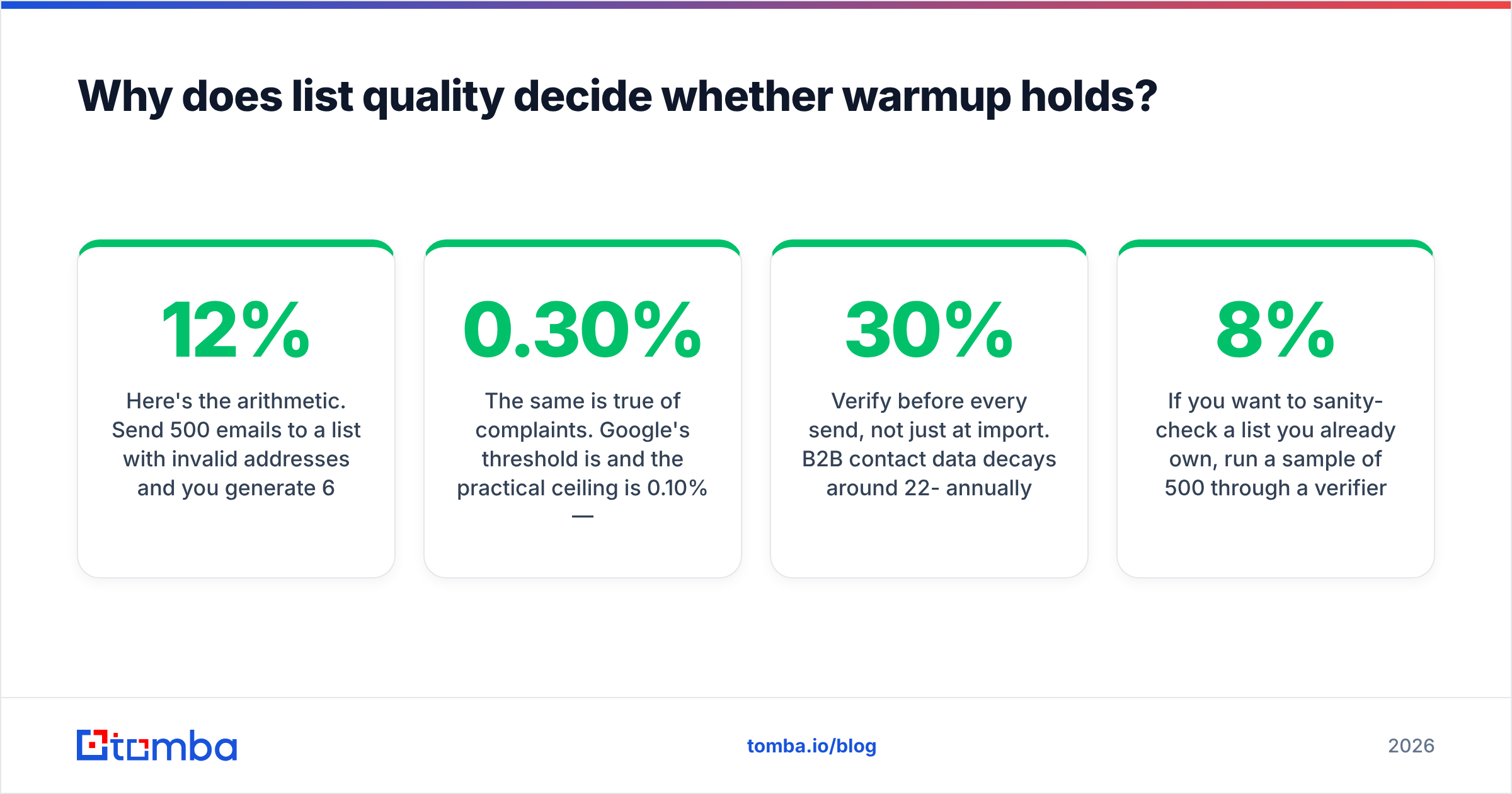
Here's the arithmetic. Send 500 emails to a list with 12% invalid addresses and you generate 60 hard bounces. Gmail and Outlook both read a bounce rate over 5% as a signal that you're sending to purchased or scraped data, and they respond by throttling delivery and increasing spam-folder placement. You did the warmup correctly; the list undid it.
The same is true of complaints. Google's threshold is 0.30% and the practical ceiling is 0.10% — that's three complaints per thousand sends, and one per thousand if you want headroom. Poorly targeted lists generate complaints at 5-10x the rate of well-targeted ones, regardless of how good your subject line is.
Practical sequence for keeping the list clean:
- Verify before every send, not just at import. B2B contact data decays around 22-30% annually as people change jobs. A list verified six months ago is not a verified list.
- Handle catch-all domains separately. Catch-all servers accept everything, so standard verification returns "unknown." A dedicated catch-all verifier applies pattern and header analysis to give you a usable confidence score instead of a shrug.
- Deduplicate across campaigns. The same person receiving your sequence twice from two mailboxes is a near-guaranteed complaint.
- Suppress role accounts.
info@,sales@,support@, andadmin@addresses generate disproportionate complaints and rarely convert. Strip them. - Source contacts individually rather than buying bulk. Finding a verified address per named prospect with an email finder or domain search yields far lower bounce rates than a purchased CSV — and the data comes with a confidence score you can filter on. Providers like BookYourData take a similar quality-first approach with pre-verified B2B records, which is a reasonable path if you'd rather buy a curated list than build one.
If you want to sanity-check a list you already own, run a sample of 500 through a verifier before committing the whole file. If the invalid rate is above 8%, the list needs cleaning before it touches a warmed domain.
What are the most common warmup mistakes?#
- Starting cold outreach in week 2. The volume looks small, so it feels safe. It isn't — you're introducing negative-signal risk before any positive history exists. Wait until week 3 minimum.
- Warming up on the primary domain. One bad campaign and your invoices go to spam. Always use dedicated sending domains.
- Using the sending platform's shared tracking domain. You inherit every other customer's link reputation. Set up a custom CNAME.
- Uniform send intervals. Exactly 120 seconds between every email is a signature no human produces. Randomize.
- Ignoring the reply side. An inbox that only sends and never receives looks like a broadcast tool. Real inbound mail — newsletters, vendor notifications, actual conversations — helps.
- Restarting after a pause without re-ramping. Two weeks dark means restarting at roughly 50% of your previous volume and rebuilding over 7-10 days.
- Optimizing warmup while ignoring copy. Perfect deliverability with a bad first line still gets you a 0.5% reply rate. Warmup buys you the chance to be read, nothing more. If email deliverability is solved and replies are still flat, the problem moved to the message.
- Over-personalizing with merge tags that break.
Hi {{first_name}},rendering literally is worse than no personalization. Test the render, not just the send.
How long until you can send at full volume?#
Six weeks to 40/day per mailbox is the realistic answer for a new domain on Google Workspace or Microsoft 365. Some accounts get there in four; domains with any prior negative history take eight or more.
Scaling past that is a horizontal problem, not a vertical one. Rather than pushing one mailbox to 100 sends per day — which is where Google's throttling gets aggressive regardless of reputation — add domains and mailboxes. Ten mailboxes across four domains at 40/day each gives you 400 daily sends with far less concentration risk than four mailboxes at 100/day. Warm each new mailbox on the same six-week schedule, staggered so you're not introducing five cold mailboxes in the same week.
Budget accordingly: each sending domain runs roughly $12-15/year, each Google Workspace seat is $6-7/month, and warmup tooling adds $20-49 per inbox per month. A 10-inbox setup lands around $300-500/month all-in before you've paid for data or a sequencer. That's the real cost of outbound at volume, and it's worth knowing before you commit to the ramp.
Ready to send to a list that won't undo your warmup?#
Six weeks of careful ramping gets erased by one campaign to a stale list. Before your first real send, put verified data behind it: Tomba Email Finder returns professional email addresses by name, domain, or company with a confidence score on every result, so you can filter to high-confidence contacts only and keep bounce rates under 2% from day one. The free tier includes 25 searches per month, Starter is $49/mo, and Growth is $99/mo — see full Tomba pricing for bulk and API limits. Pair it with the email verifier before every campaign, and the reputation you spent six weeks building stays built.
Related guides#
// get started
Find, verify and enrich your first contacts today
Start on the free plan with 25 searches a month, then scale when your team is ready.
Free plan · No credit card required · GDPR & CCPA
// about the author