How to Write a Follow-Up Email After a Meeting (2026 Guide)
Most meeting follow-ups die because they recap instead of advance. Here are the timing rules, the five-part structure, and seven copy-paste templates that turn a good conversation into a booked next step.
TL;DR
- Send within 24 hours. Reply rates fall off a cliff after the second business day, and by day five you are writing to someone who has already had eleven other meetings.
- A meeting follow-up email is not a transcript. It is a decision document: what we agreed, who owns what, when it happens next.
- Use the five-part structure — anchor, recap, value-add, single ask, easy exit. Anything else is padding.
- One clear next step beats three polite options. Give a specific date and time, not "let me know what works."
- Silence is not rejection. A three-touch sequence over 12 days recovers a meaningful share of stalled deals; a fourth "just bumping this" does not.
What Is a Meeting Follow-Up Email, and Why Do Most of Them Fail?#
A meeting follow-up email is the message you send after a call, demo, or in-person conversation that converts what was said into what happens next. That is the whole job. It is the difference between a pleasant conversation and a pipeline entry.
Most follow-ups fail for a boring reason: they are written to the sender's needs, not the recipient's. You want reassurance the meeting went well, so you write "Great speaking with you today!" and paste a summary nobody asked for. The recipient — who has forgotten roughly half the meeting by the next morning — needs something different. They need a document they can forward to a colleague, a decision they can make in ten seconds, and a calendar entry.
The other failure mode is volume without direction. Sales teams send more follow-ups than ever and get fewer replies, because a follow-up that adds no new information trains the recipient to ignore your name in the inbox. HubSpot's sales research has consistently found that persistence pays only when each touch carries something new — a resource, an answer, a relevant change in their world.
Here is the reframe that fixes most bad follow-ups: write the email as if the person who was not in the meeting will read it. Because they will. Your champion forwards it to their VP, and your email becomes the internal case for your deal whether you designed it that way or not.
How Fast Should You Send a Follow-Up After a Meeting?#
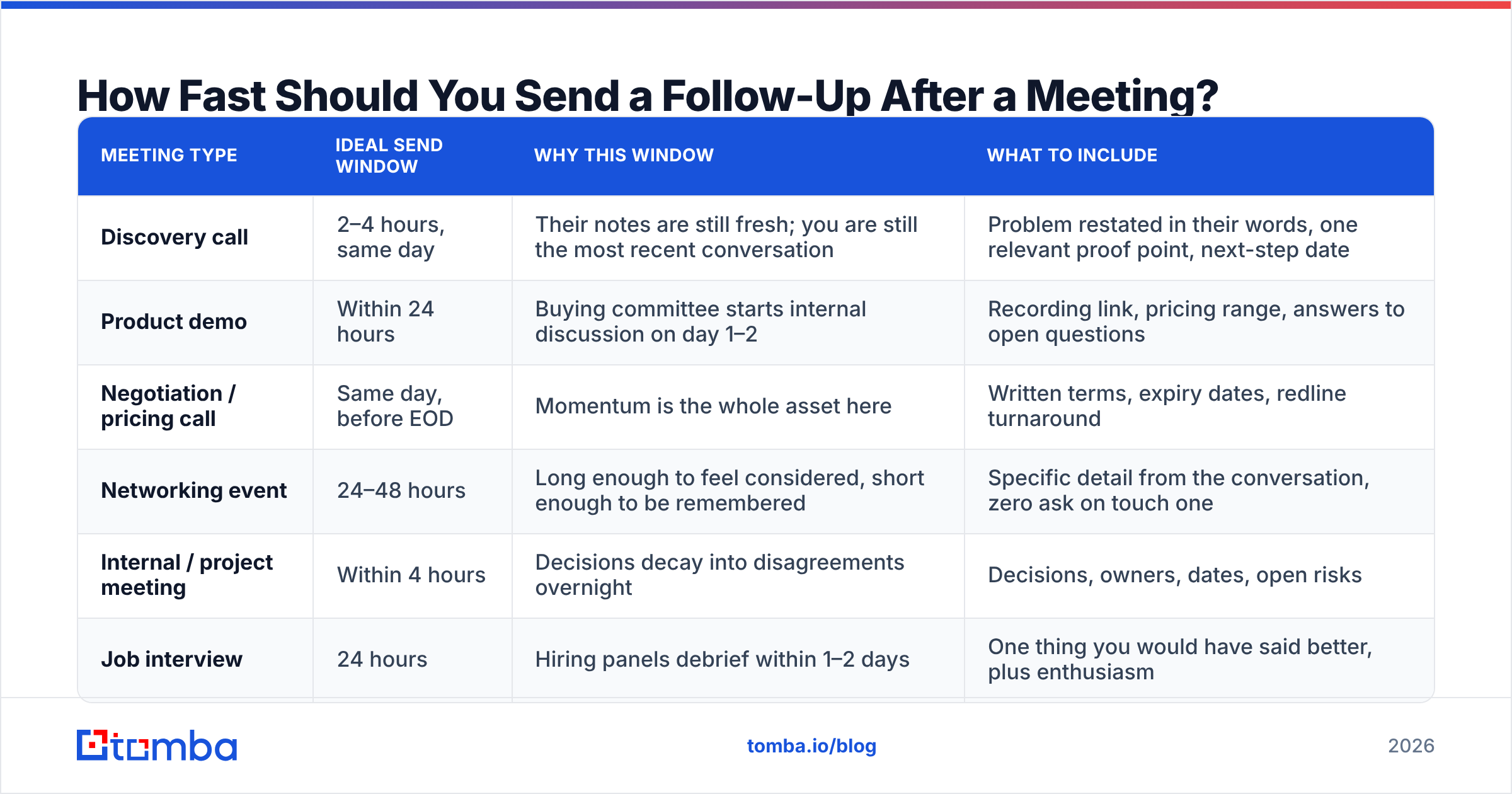
Fast, but not instant. Sending inside two minutes signals a template. Sending after three days signals you have other priorities.
| Meeting type | Ideal send window | Why this window | What to include |
|---|---|---|---|
| Discovery call | 2–4 hours, same day | Their notes are still fresh; you are still the most recent conversation | Problem restated in their words, one relevant proof point, next-step date |
| Product demo | Within 24 hours | Buying committee starts internal discussion on day 1–2 | Recording link, pricing range, answers to open questions |
| Negotiation / pricing call | Same day, before EOD | Momentum is the whole asset here | Written terms, expiry dates, redline turnaround |
| Networking event | 24–48 hours | Long enough to feel considered, short enough to be remembered | Specific detail from the conversation, zero ask on touch one |
| Internal / project meeting | Within 4 hours | Decisions decay into disagreements overnight | Decisions, owners, dates, open risks |
| Job interview | 24 hours | Hiring panels debrief within 1–2 days | One thing you would have said better, plus enthusiasm |
The pattern: the more money or memory involved, the faster you send. A negotiation follow-up written the next morning has already lost the room. A networking follow-up sent 90 seconds after you shake hands looks automated.
One practical note — if you are following up with someone whose email you captured from a badge scan, a business card, or a conference list, verify the address before you send. Event lists are notorious for typos and burner addresses, and a bounce on your first touch damages your domain reputation before the relationship starts. A quick pass through an email verifier costs you ten seconds and saves the hard bounce.
What Are the Five Parts of a Follow-Up Email That Actually Works?#
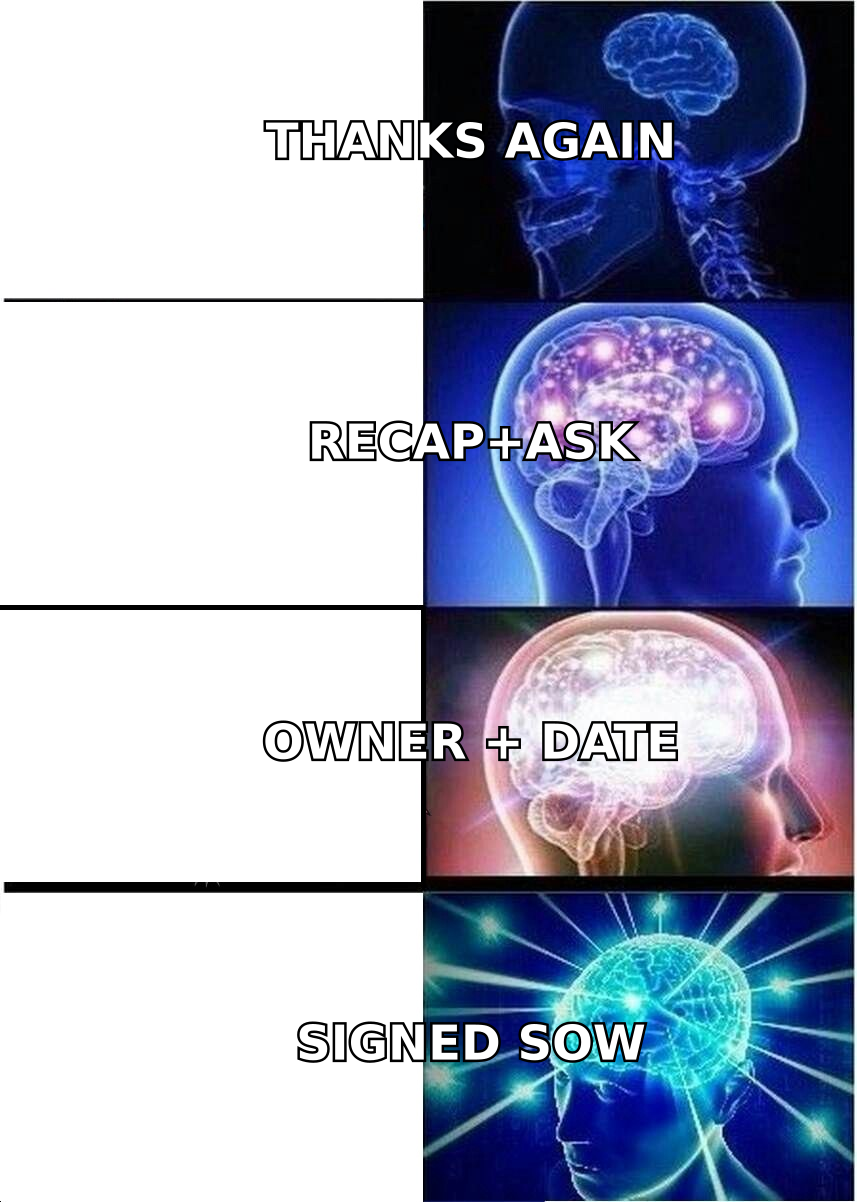
Every effective meeting follow-up email contains the same five components in the same order. Change the words, keep the skeleton.
- The anchor (one line). A specific detail that proves you were present and paying attention. Not "great to connect" — instead, "Your point about the Q3 renewal cliff stuck with me." Specificity is the cheapest credibility you can buy.
- The recap (three to five bullets max). What was agreed, in their language, not yours. If they said "leaky pipeline," do not write "funnel conversion inefficiency." Bullets, never paragraphs — this section exists to be skimmed and forwarded.
- The value-add (one item). A case study, a benchmark, a short answer to the question you could not answer live, an intro to someone useful. This is the part almost everyone skips, and it is the part that earns your next email the benefit of the doubt.
- The single ask (one sentence, one date). "Does Thursday the 14th at 10:00 ET work for the technical review?" Not "let me know if you'd like to continue the conversation." One option to accept or decline beats a menu.
- The easy exit (one line). "If this is not a priority this quarter, tell me and I will stop chasing." Counterintuitive, and it works — it lowers the cost of replying honestly, which is how you get real answers instead of ghosting.
Keep the whole thing under 150 words. If your recap needs more room than that, the meeting needed a shared doc, not an email.
What Should You Write After a Discovery Call?#
Discovery follow-ups are where deals are won quietly. The buyer is deciding whether you understood them, and the email is their evidence.
Subject: Recap + the renewal question you raised
Hi Dana,
Your Q3 renewal cliff is the thing I keep thinking about — 40% of ARR landing in one six-week window is a hard problem to staff for.
What I heard:
- Renewals are handled manually by three CSMs today
- No early warning on at-risk accounts until 30 days out
- You want a signal 90 days out, not a dashboard nobody opens
On your question about implementation time: our last customer with a similar setup was live in 11 working days. Short write-up attached.
Does Thursday the 14th at 10:00 ET work for a 30-minute session with your CS lead?
If the timing is wrong for this quarter, say so and I will follow up in January instead.
— Sam
Three things are doing the work there. The subject line references something only someone in the meeting would know. The recap uses her framing. And the ask names a person who needs to be in the room, which quietly advances the deal to the next stakeholder.
If you are unsure whether your subject line will survive the inbox, run it through a subject line tester before you send. Recap-style subjects consistently outperform "Following up" — they read as continuation, not solicitation.
What Should You Write After a Demo or a Pricing Conversation?#
Post-demo emails have one additional job: arm your champion. They are about to explain your product to people who did not watch it.
Include, in this order: the recording link, a three-bullet summary of what solves their specific problem (not your feature list), the pricing range you discussed in writing, and the open questions with owners attached. That last one matters — "You are checking with Legal on the DPA, I am confirming the SSO timeline by Friday" makes the deal a joint project.
For pricing follow-ups, put numbers in the email body. Not in an attachment, not "as discussed." Procurement teams forward text; they do not open PDFs on their phone. If there is a discount tied to a signing date, state the date explicitly. Vague urgency reads as pressure; specific urgency reads as a policy.
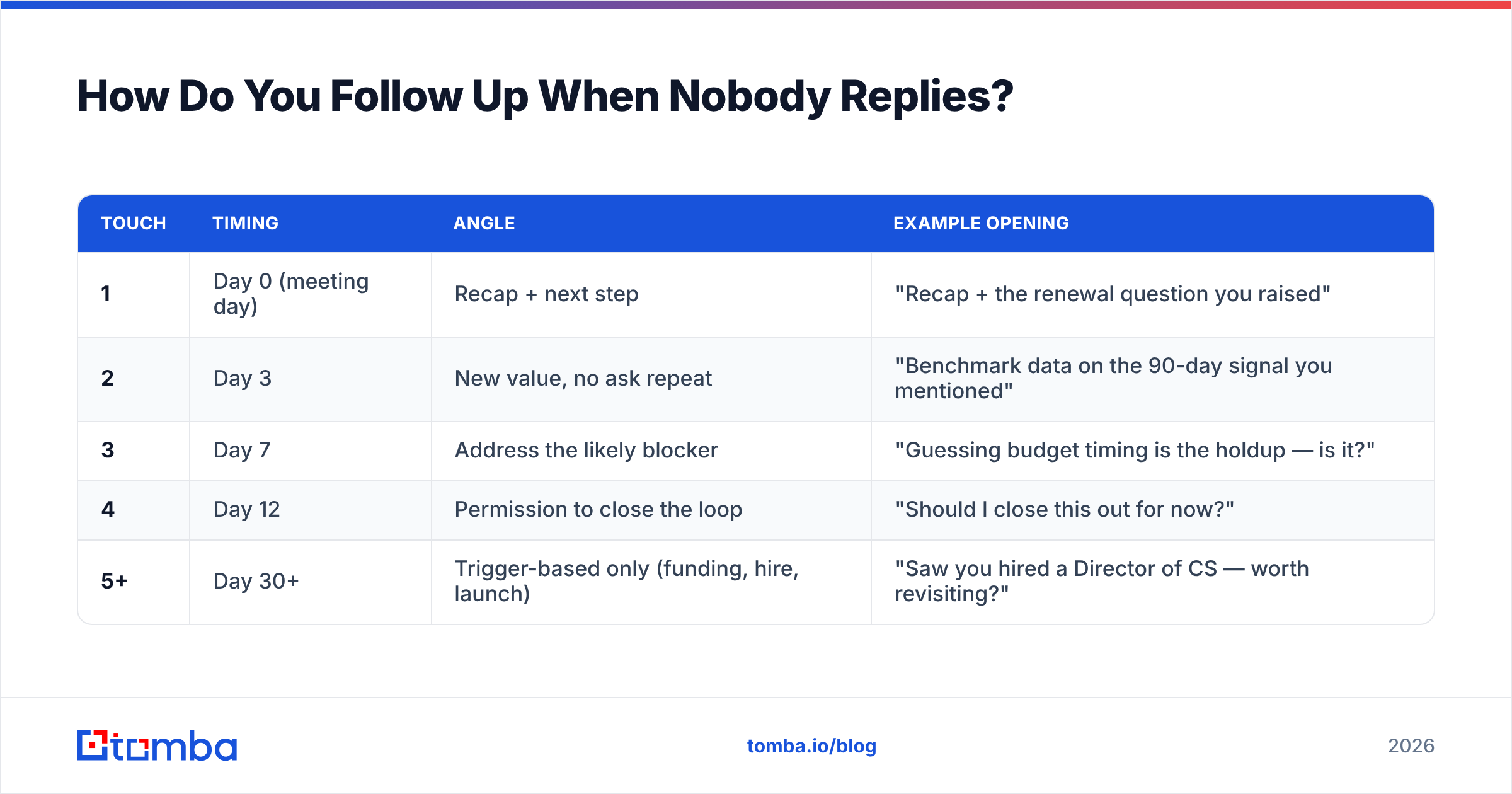
How Do You Follow Up When Nobody Replies?#
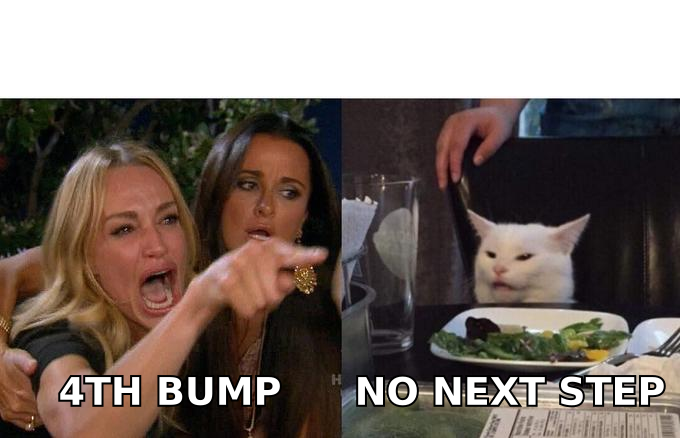
Design a sequence before you need it, then stop when the sequence ends. The failure mode is not too few touches — it is four identical touches that each say "just checking in."
| Touch | Timing | Angle | Example opening |
|---|---|---|---|
| 1 | Day 0 (meeting day) | Recap + next step | "Recap + the renewal question you raised" |
| 2 | Day 3 | New value, no ask repeat | "Benchmark data on the 90-day signal you mentioned" |
| 3 | Day 7 | Address the likely blocker | "Guessing budget timing is the holdup — is it?" |
| 4 | Day 12 | Permission to close the loop | "Should I close this out for now?" |
| 5+ | Day 30+ | Trigger-based only (funding, hire, launch) | "Saw you hired a Director of CS — worth revisiting?" |
Touch four does more work than people expect. A well-written breakup email frequently outperforms touches two and three combined, because it is the only message in the sequence that costs the recipient nothing to answer. "Yes, close it out" is easier to type than an apology.
What kills sequences is repetition without information. If your third email would still make sense with the second one deleted, it is not a follow-up — it is a bump. Track your response rate per touch and you will find the exact point where your sequence stops earning attention.
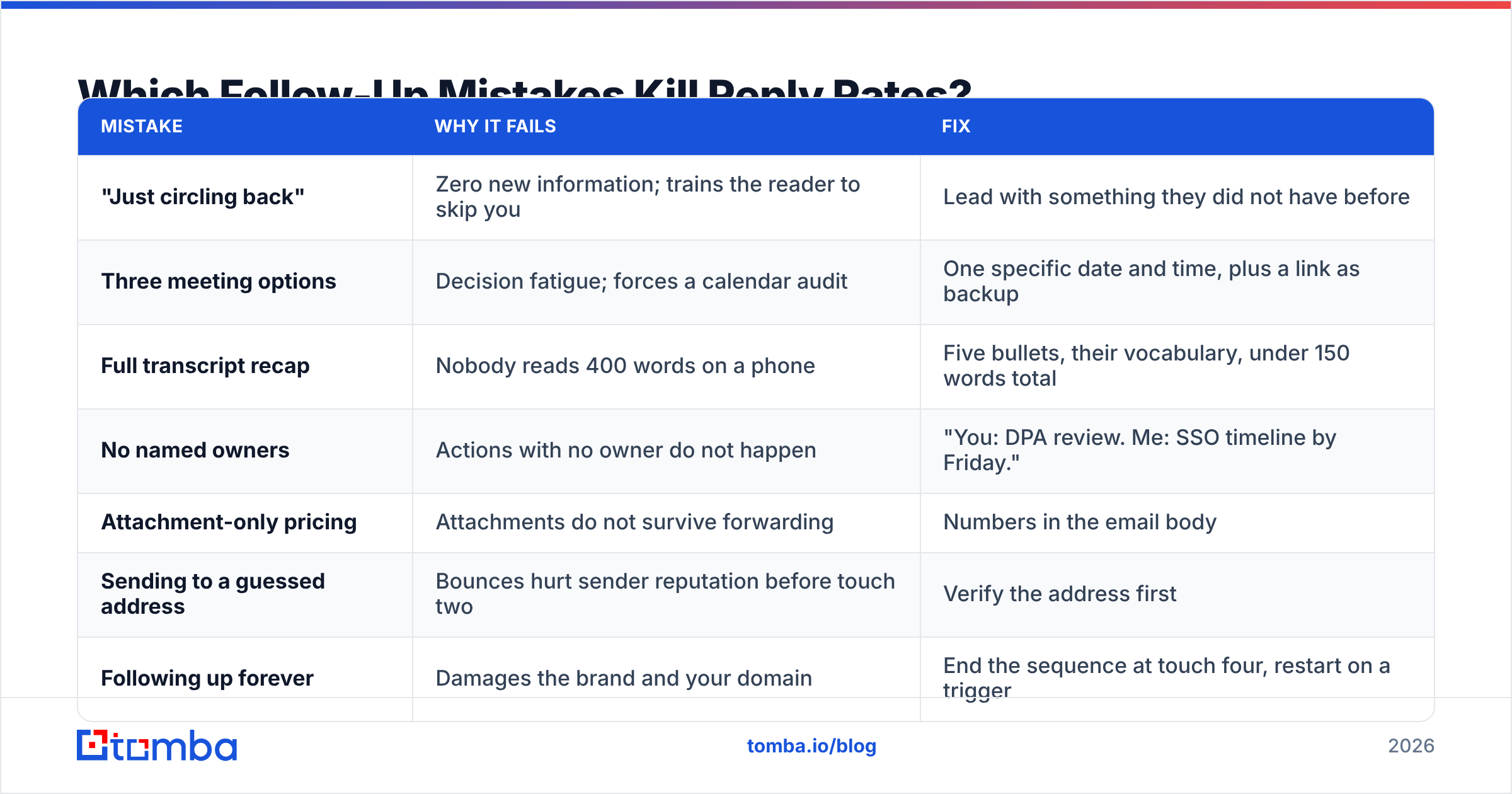
Which Follow-Up Mistakes Kill Reply Rates?#
| Mistake | Why it fails | Fix |
|---|---|---|
| "Just circling back" | Zero new information; trains the reader to skip you | Lead with something they did not have before |
| Three meeting options | Decision fatigue; forces a calendar audit | One specific date and time, plus a link as backup |
| Full transcript recap | Nobody reads 400 words on a phone | Five bullets, their vocabulary, under 150 words total |
| No named owners | Actions with no owner do not happen | "You: DPA review. Me: SSO timeline by Friday." |
| Attachment-only pricing | Attachments do not survive forwarding | Numbers in the email body |
| Sending to a guessed address | Bounces hurt sender reputation before touch two | Verify the address first |
| Following up forever | Damages the brand and your domain | End the sequence at touch four, restart on a trigger |
The sender reputation point deserves emphasis. Follow-up sequences amplify whatever your list quality already is. If 8% of your addresses are invalid, a five-touch sequence multiplies that damage across your whole sending domain, and your good emails start landing in Promotions. Salesforce's guidance on outbound hygiene makes the same point from the CRM side: dirty data does not stay contained to the records it lives in.
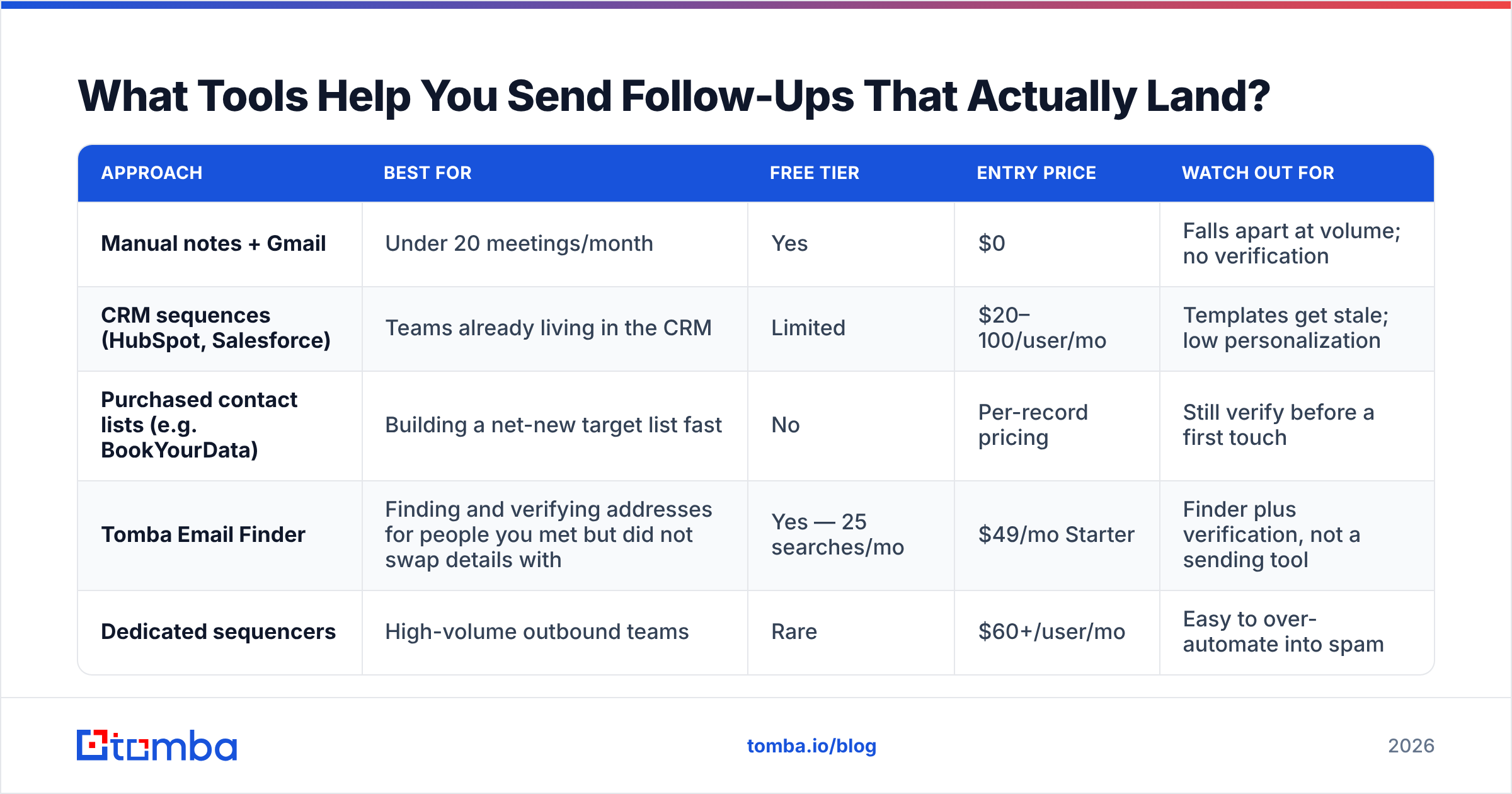
What Tools Help You Send Follow-Ups That Actually Land?#
Templates are the easy part. The hard part is having a correct address, a real name, and enough context to write the anchor line. Here is how the common approaches compare.
| Approach | Best for | Free tier | Entry price | Watch out for |
|---|---|---|---|---|
| Manual notes + Gmail | Under 20 meetings/month | Yes | $0 | Falls apart at volume; no verification |
| CRM sequences (HubSpot, Salesforce) | Teams already living in the CRM | Limited | $20–100/user/mo | Templates get stale; low personalization |
| Purchased contact lists (e.g. BookYourData) | Building a net-new target list fast | No | Per-record pricing | Still verify before a first touch |
| Tomba Email Finder | Finding and verifying addresses for people you met but did not swap details with | Yes — 25 searches/mo | $49/mo Starter | Finder plus verification, not a sending tool |
| Dedicated sequencers | High-volume outbound teams | Rare | $60+/user/mo | Easy to over-automate into spam |
Most teams end up combining two: something that gets the address right, and something that sends. Tomba sits in the first category — domain search for finding the right person at a company you just met, verification so your first touch does not bounce, and enrichment so the anchor line has something real to reference. Full Tomba pricing runs from a free tier at 25 searches per month through Starter at $49/mo and Growth at $99/mo.
Analyst coverage of sales engagement tooling — Gartner's peer-reviewed category pages are a reasonable starting point — consistently shows the same thing: the tools do not fix a weak follow-up. They just deliver it faster. Get the structure right first, then automate it.
How Do You Know Your Follow-Ups Are Working?#
Track three numbers, not ten:
- Reply rate by touch number. If touch three underperforms touch four, your middle touches are filler.
- Meeting-to-next-step conversion. The percentage of meetings that produce a scheduled next action within 48 hours. Below 40% means your asks are too vague.
- Bounce rate on first touch. Anything above 3% means your data hygiene is the bottleneck, not your copy.
Review those monthly against actual won deals. You will usually find one template quietly outperforming the rest — and that template becomes the house standard.
Start With a Correct Address#
The best-written meeting follow-up email in the world is worthless if it lands in a dead inbox. Before you invest in templates, sequences, and timing rules, make sure the addresses behind them are real.
Tomba Email Finder finds professional email addresses by name, company, or domain, and verifies them before you send — so your day-zero recap reaches the person who was actually in the meeting. Start free with 25 searches per month, and scale to Starter at $49/mo when your follow-up cadence outgrows manual work.
Related guides#
// get started
Find, verify and enrich your first contacts today
Start on the free plan with 25 searches a month, then scale when your team is ready.
Free plan · No credit card required · GDPR & CCPA
// about the author