How to Write Email Subject Lines That Get Opened in 2026
Most subject lines fail before the body is ever read. Here are the seven formulas, the character limits, and the testing loop that actually move open rates in cold B2B email.
TL;DR
- Subject lines are a filter, not a pitch. Their only job is to earn the next two seconds — the open — and nothing else.
- Short wins on mobile: 3-6 words (about 30-45 characters) survives the iOS preview pane, where the majority of B2B email is first triaged.
- The seven formulas below (question, name-drop, observation, number, one-word, referral, low-stakes ask) cover roughly every cold-email scenario you'll hit.
- Personalization beats cleverness. A subject line with a real, specific detail outperforms a witty one that could apply to anyone.
- None of it matters if the email lands in spam or bounces. Verify the address first, then optimize the words.
Why do most email subject lines fail?#
Because they're written as headlines when they should be written as hallway greetings.
Think about it like walking past someone's open office door. You don't lead with your full value proposition. You say their name, or you mention the thing you both saw this morning, and you wait to see if they look up. The subject line is that half-second of eye contact. If it feels like an announcement — "Transform Your Revenue Operations With AI-Powered Solutions" — the recipient's brain files it as broadcast, and broadcasts get archived without a click.
There's a second failure mode that has nothing to do with wording: the email never had a chance. If your domain has a bad sender reputation, or 18% of your list bounces, or your SPF record is broken, the subject line is irrelevant. You're optimizing the sign on a door nobody can find. Fix the plumbing first — we'll come back to that.
Assuming your plumbing is fine, the mechanics of a subject line come down to four variables you actually control: length, specificity, promise, and tension.
What are the four variables in every subject line?#
Every subject line, good or bad, is a mix of these four. Understanding which one you're leaning on tells you why a line works — and how to fix one that doesn't.
- Length — how much survives the preview. Desktop Gmail shows roughly 60-70 characters; the iPhone Mail app in portrait shows closer to 35-40. Write for the phone.
- Specificity — how obviously this email is about this recipient. "Question about your hiring page" beats "Quick question." Specificity is the single highest-leverage variable in cold email.
- Promise — what the reader gets by opening. Sometimes explicit ("3 ways your competitors handle X"), sometimes implied ("re: your Q3 numbers").
- Tension — the small unresolved gap that makes clicking easier than not clicking. Curiosity is tension. So is a question directed at them.
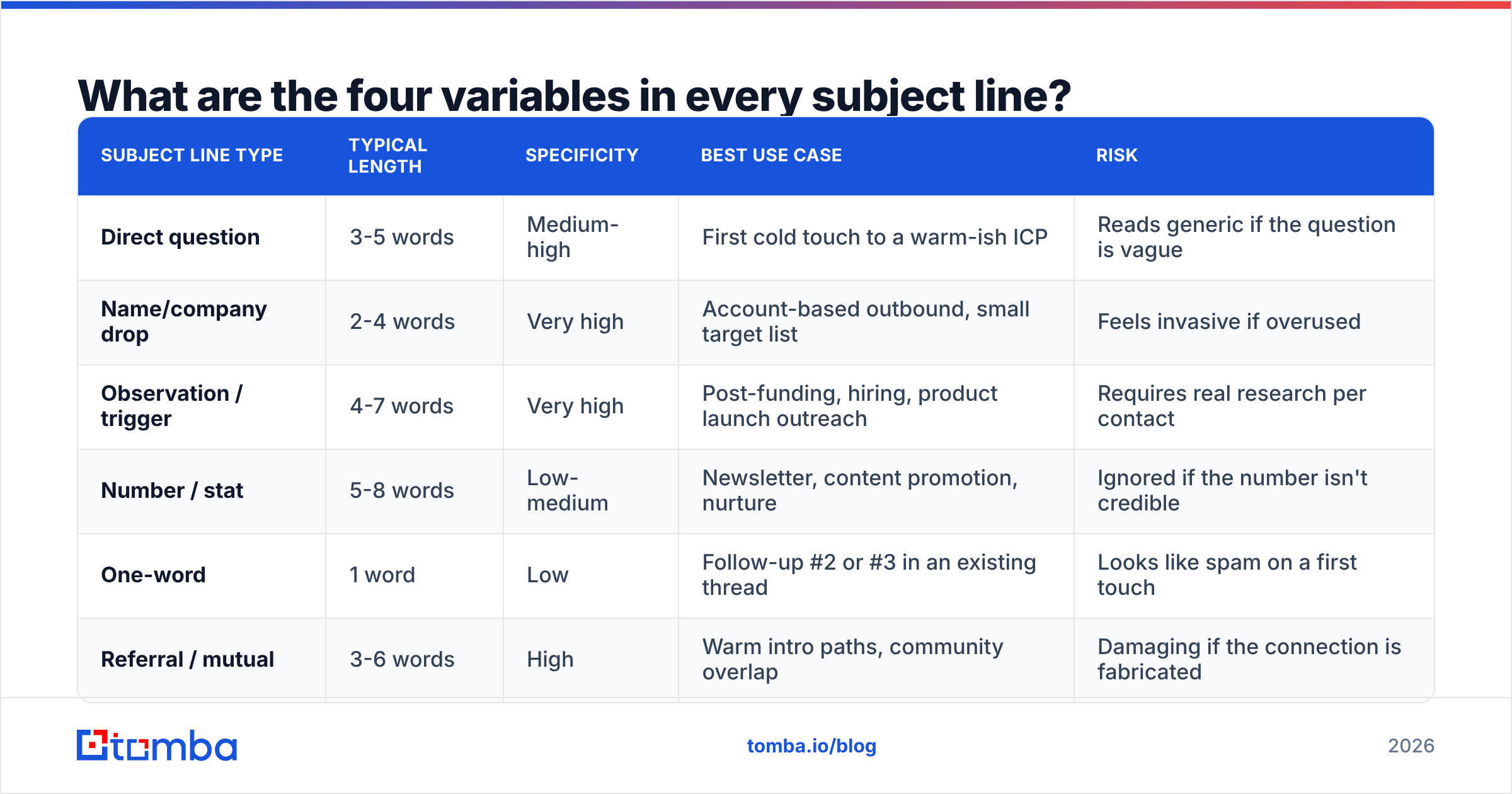
Balanced lines pull on two of these. Bad lines pull on none (generic) or all four at once (clickbait that reads as spam). Here's how the common line types stack up:
| Subject line type | Typical length | Specificity | Best use case | Risk |
|---|---|---|---|---|
| Direct question | 3-5 words | Medium-high | First cold touch to a warm-ish ICP | Reads generic if the question is vague |
| Name/company drop | 2-4 words | Very high | Account-based outbound, small target list | Feels invasive if overused |
| Observation / trigger | 4-7 words | Very high | Post-funding, hiring, product launch outreach | Requires real research per contact |
| Number / stat | 5-8 words | Low-medium | Newsletter, content promotion, nurture | Ignored if the number isn't credible |
| One-word | 1 word | Low | Follow-up #2 or #3 in an existing thread | Looks like spam on a first touch |
| Referral / mutual | 3-6 words | High | Warm intro paths, community overlap | Damaging if the connection is fabricated |
Notice that specificity, not cleverness, is the column doing the work. That's the whole game.

How long should an email subject line be in 2026?#
Short answer: aim for 30-45 characters, which lands around 4-6 words.
The reason is display, not psychology. Most B2B recipients triage on mobile first, then reopen on desktop to act. Apple Mail in portrait mode truncates aggressively, and Gmail's mobile app is similar. If your key word — the recipient's company name, the specific question — sits at character 55, it will be invisible during the moment of decision.
Practical rules that follow from that:
- Front-load the hook. Put the specific detail in the first three words. "Acme's careers page" not "A quick question about the careers page at Acme."
- Skip the greeting. "Hi Sarah —" burns nine characters before you've said anything.
- Kill filler adjectives. "Quick," "just," "simply," and "really" almost never add information.
- Use lowercase deliberately, not accidentally. A lowercase line reads like a colleague; an all-lowercase line with a typo reads like a bot. Pick one and be consistent.
- Avoid the exclamation point. It's one of the oldest spam-filter heuristics still in active use, and it doesn't help.
One nuance: length rules invert for newsletter and nurture email to opted-in lists. There, the reader already trusts the sender, and a longer, more descriptive line (8-12 words) can outperform, because the decision isn't "is this spam?" but "is this worth my time right now?"
What are the seven subject line formulas that actually work?#
These are patterns, not templates. Fill them with a real detail or they collapse into noise.
1. The direct question. [Specific thing]? — e.g. "hiring 4 SDRs?" or "still on HubSpot?" Works because a question addressed to you is hard to ignore, and because it implies the email is short.
2. The name-drop. [Company] + [noun] — e.g. "Acme + inbound routing." Reads like an internal thread subject. Very high open rates, but it can feel manipulative if the body doesn't immediately justify the specificity.
3. The observation. saw your [thing] — e.g. "saw your Series B" or "saw the Boston posting." This is the highest-performing family in cold outbound because it proves you did research before you asked for anything. It's also the most expensive to produce at scale, which is exactly why it works.
4. The number. [N] [things] for [outcome] — e.g. "3 fixes for your bounce rate." Best for content distribution and nurture, where the reader is evaluating utility rather than legitimacy.
5. The one-word. thoughts? / timing? / [Company]? Use only inside a thread you've already opened, typically on the second or third follow-up. As a first touch it looks like a compromised account.
6. The referral. [Name] suggested I reach out — the highest-converting line in B2B email, full stop, and the easiest to ruin. Never use it unless the referral is real and the person would confirm it.
7. The low-stakes ask. wrong person? / bad timing? This is a pattern interrupt that offers the reader an easy, honest exit. Counterintuitively, giving people permission to say no lifts reply rates, because replying costs them nothing.
Whichever formula you pick, keep the subject line and the first line of the body as a single unit. The preview text is real estate you already own — if your subject says "saw your Series B" and your first body line says "Hi there, I hope this email finds you well," you've wasted it. Make the first body line continue the thought.
How do you write subject lines at scale without going generic?#
You separate the research from the writing.
The trap teams fall into: they try to hand-craft 400 subject lines, burn out at 60, and ship the rest with a generic fallback. The fix is to define two or three variables you can populate programmatically, then write one formula per variable.
For example, if your variable is {recent_job_posting}, your formula is saw the {role} posting and it generates 400 specific lines from one pattern. If your variable is {tech_stack_item}, the formula is {company} + {tool}. Pull those variables from enrichment data rather than from guesswork — a data enrichment pass over your list can attach company size, tech stack, and role data that feeds directly into the merge field.
A concrete workflow:
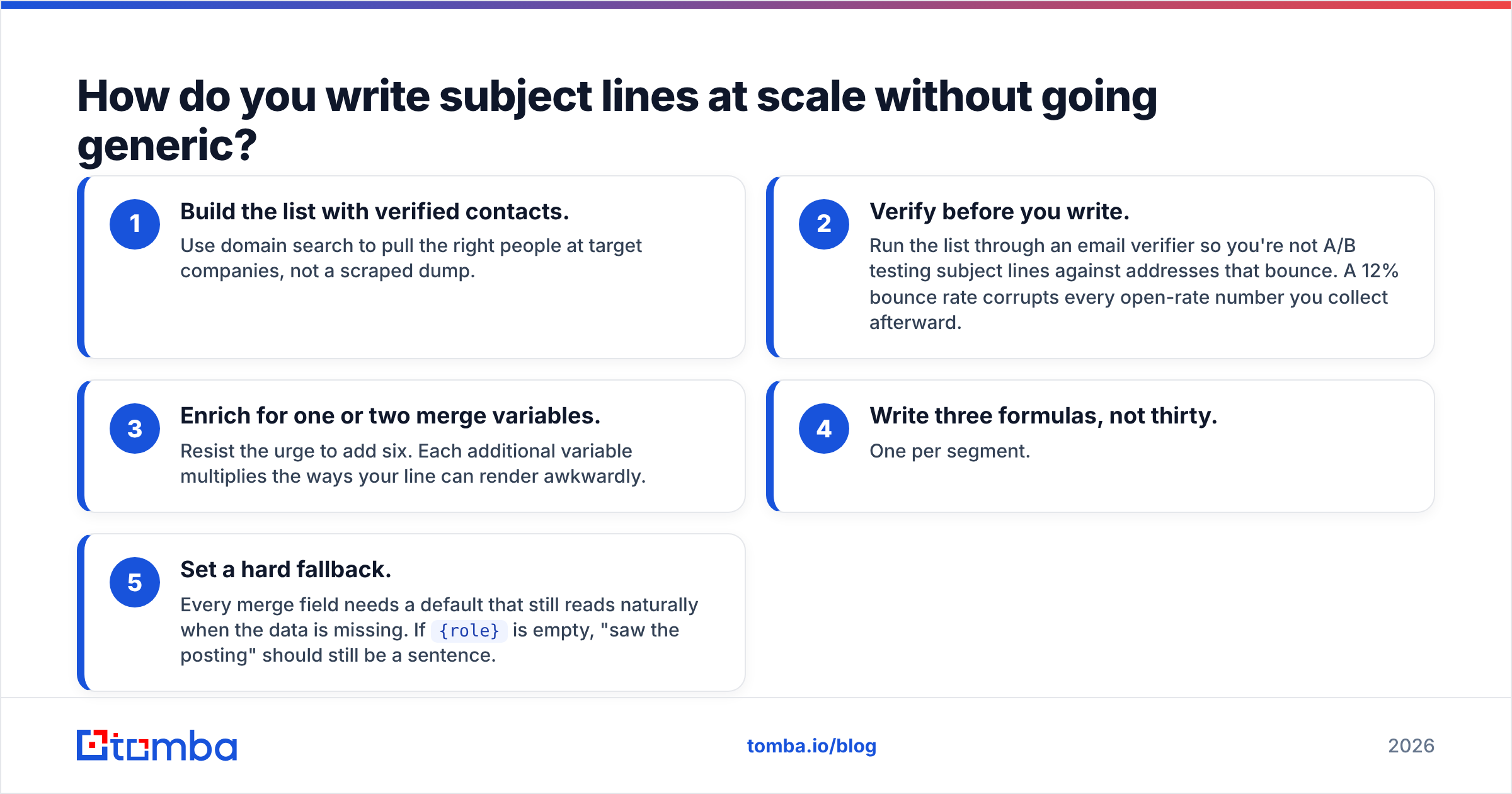
- Build the list with verified contacts. Use domain search to pull the right people at target companies, not a scraped dump.
- Verify before you write. Run the list through an email verifier so you're not A/B testing subject lines against addresses that bounce. A 12% bounce rate corrupts every open-rate number you collect afterward.
- Enrich for one or two merge variables. Resist the urge to add six. Each additional variable multiplies the ways your line can render awkwardly.
- Write three formulas, not thirty. One per segment.
- Set a hard fallback. Every merge field needs a default that still reads naturally when the data is missing. If
{role}is empty, "saw the posting" should still be a sentence.
That last point kills more campaigns than bad copy does. A line that renders as "saw the posting" — with the double space — tells the reader exactly how automated the email is.
How do you test subject lines properly?#
With a big enough sample and only one variable changed. Most subject line "tests" in B2B are statistically meaningless because the sample is 80 sends per variant.
Rough guidance: to detect a realistic lift (say, 28% open rate to 34%) with any confidence, you want several hundred sends per variant, not dozens. If your total list is 300 people, you are not running an A/B test — you're picking a line and learning from replies. That's fine. Just don't build strategy on the noise.
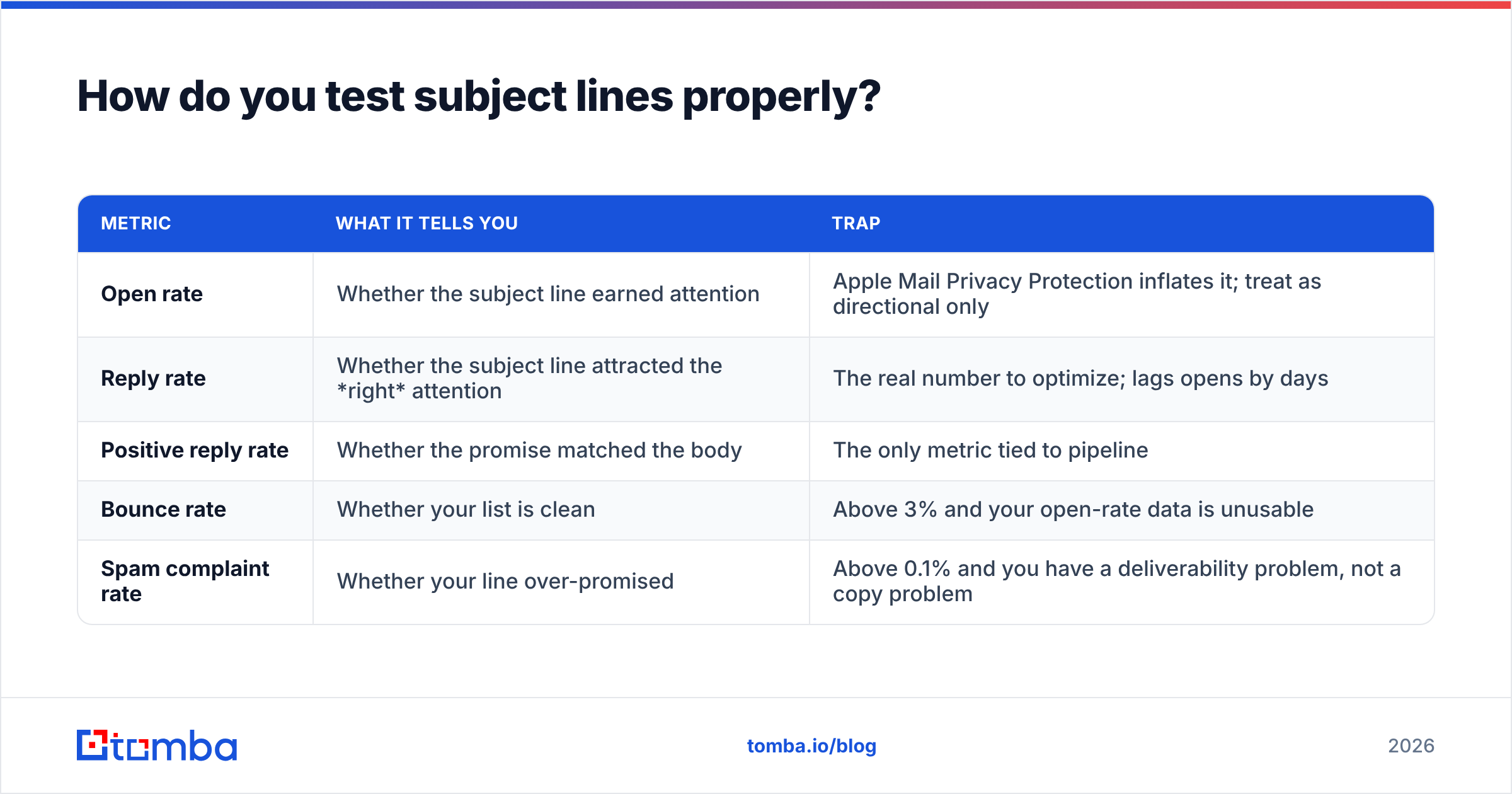
What to actually measure:
| Metric | What it tells you | Trap |
|---|---|---|
| Open rate | Whether the subject line earned attention | Apple Mail Privacy Protection inflates it; treat as directional only |
| Reply rate | Whether the subject line attracted the right attention | The real number to optimize; lags opens by days |
| Positive reply rate | Whether the promise matched the body | The only metric tied to pipeline |
| Bounce rate | Whether your list is clean | Above 3% and your open-rate data is unusable |
| Spam complaint rate | Whether your line over-promised | Above 0.1% and you have a deliverability problem, not a copy problem |
Since 2021, Apple's Mail Privacy Protection pre-fetches images and registers opens that never happened, which means open rate is a soft signal and has been for years. Google's own bulk sender guidelines push the same direction: engagement signals that matter are replies and non-complaints, not pixel loads. Optimize toward reply rate and treat opens as a tiebreaker.

What subject lines should you never send?#
A short blocklist, based on patterns that reliably trigger either spam filters or reflexive deletion:
- "Quick question" — the single most-used cold subject line in B2B. It is invisible.
- "Re:" or "Fwd:" on a first touch — faking a prior thread is a trust violation that people notice, and increasingly a filter signal.
- ALL CAPS anything — reads as a mailing list, not a person.
- "Free," "guarantee," "act now," "limited time" — classic filter triggers with no upside in B2B.
- Emoji in a cold B2B first touch — fine for consumer newsletters, out of place from a stranger to a VP of Ops.
- Anything over 12 words — it won't be read, it will be scanned as a paragraph and skipped.
- The false personalization tell — "I loved your post!" when you clearly didn't read it. Vague praise is worse than no praise.
There's also a category that isn't spammy but is simply lazy: describing your product in the subject line. "AI-powered sales intelligence platform" tells the reader what you sell and gives them everything they need to decide not to open. The subject line's job is to earn the open. The body's job is to earn the reply. Don't make the subject do both.
If you want an outside gut-check on wording, running a draft through a subject line tester will flag length, spam-trigger words, and truncation issues before you send. It won't tell you whether the idea is good — that's still on you — but it catches the mechanical mistakes.
What actually drives opens once the copy is right?#
Two things you can't fix with words: who the email is from, and whether it arrives at all.
Sender name matters more than most people assume. "Sarah from Tomba" versus "Tomba Sales Team" versus "sarah@tomba.io" produce measurably different behavior. A human first name plus a recognizable company is the safest default in B2B. Test it — it's one of the few variables that can shift open rate more than the subject line itself.
Deliverability is the ceiling. Everything in this post assumes the message reaches the primary inbox. If you're sending from a cold domain with no warmup, no DMARC alignment, and a list scraped six months ago, better subject lines will not save you. Warm the domain, authenticate it, clean the list, keep daily volume conservative, and only then start optimizing copy. Email deliverability is upstream of everything on this page.
The order of operations that actually works:
- Verified, current contact data
- Authenticated, warmed sending domain
- Sender name that reads as a person
- Subject line (this post)
- Body copy and offer
- Follow-up sequence
Teams reverse this constantly — they spend three weeks workshopping subject lines while sending to a list where a third of the addresses no longer exist. Industry reviews on G2 consistently show the same pattern in user feedback: data quality complaints outnumber copy complaints by a wide margin, because bad data is the failure people feel first.
Where should you start this week?#
Pick one segment of 200 contacts. Verify every address. Write three subject lines using formula 1 (direct question), formula 3 (observation), and formula 7 (low-stakes ask). Send roughly 65 of each. Track reply rate, not open rate. Whichever wins becomes your control, and you test the next challenger against it.
That loop, run weekly, will teach you more about your specific market than any subject line swipe file — including this one.
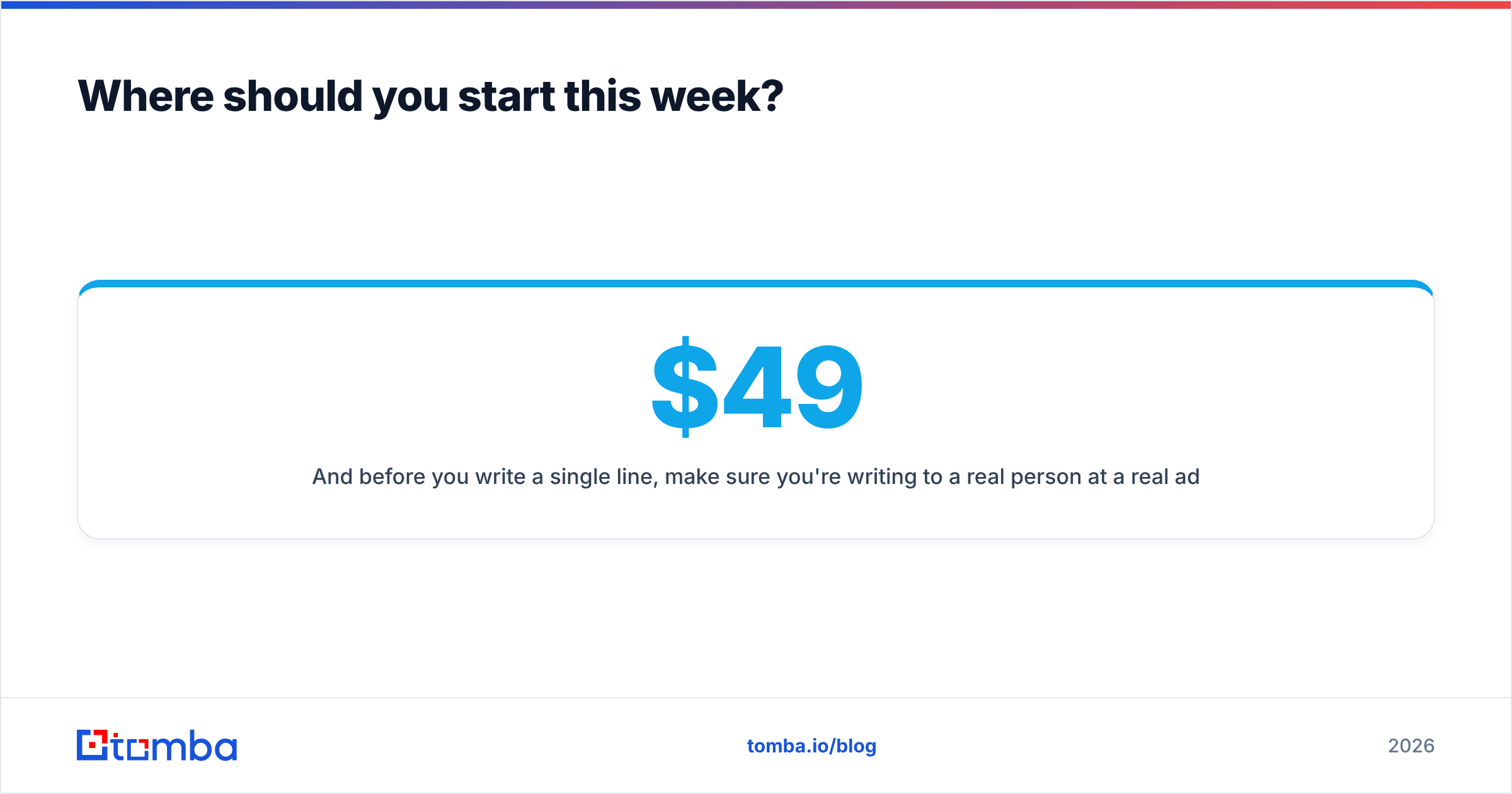
And before you write a single line, make sure you're writing to a real person at a real address. The Tomba Email Finder pulls verified professional emails by domain, name, or company, with a free tier of 25 searches per month to test it on your current list; paid plans start at $49/month on Starter and scale to $99 Growth and $249 Pro as volume grows. Clean data first, clever words second — see Tomba pricing for the full breakdown.
Related guides#
// get started
Find, verify and enrich your first contacts today
Start on the free plan with 25 searches a month, then scale when your team is ready.
Free plan · No credit card required · GDPR & CCPA
// about the author