How to Write Follow Up Email Template Sequences That Get Replies
Most follow-ups fail because they add pressure instead of value. Here is a repeatable framework, seven copy-paste templates, and the cadence data behind them.
TL;DR — how to write follow up email template sequences that get replies
- Most follow-ups fail because they ask again instead of adding something new. Every message in a sequence needs its own reason to exist.
- A reusable follow-up template has five parts: a context anchor, a new input, a single specific ask, a low-friction exit, and a subject line that stays in the original thread.
- Send 4–6 touches over 14–21 days. Roughly half of all replies to cold sequences arrive after the first message, so stopping at one email throws away most of your pipeline.
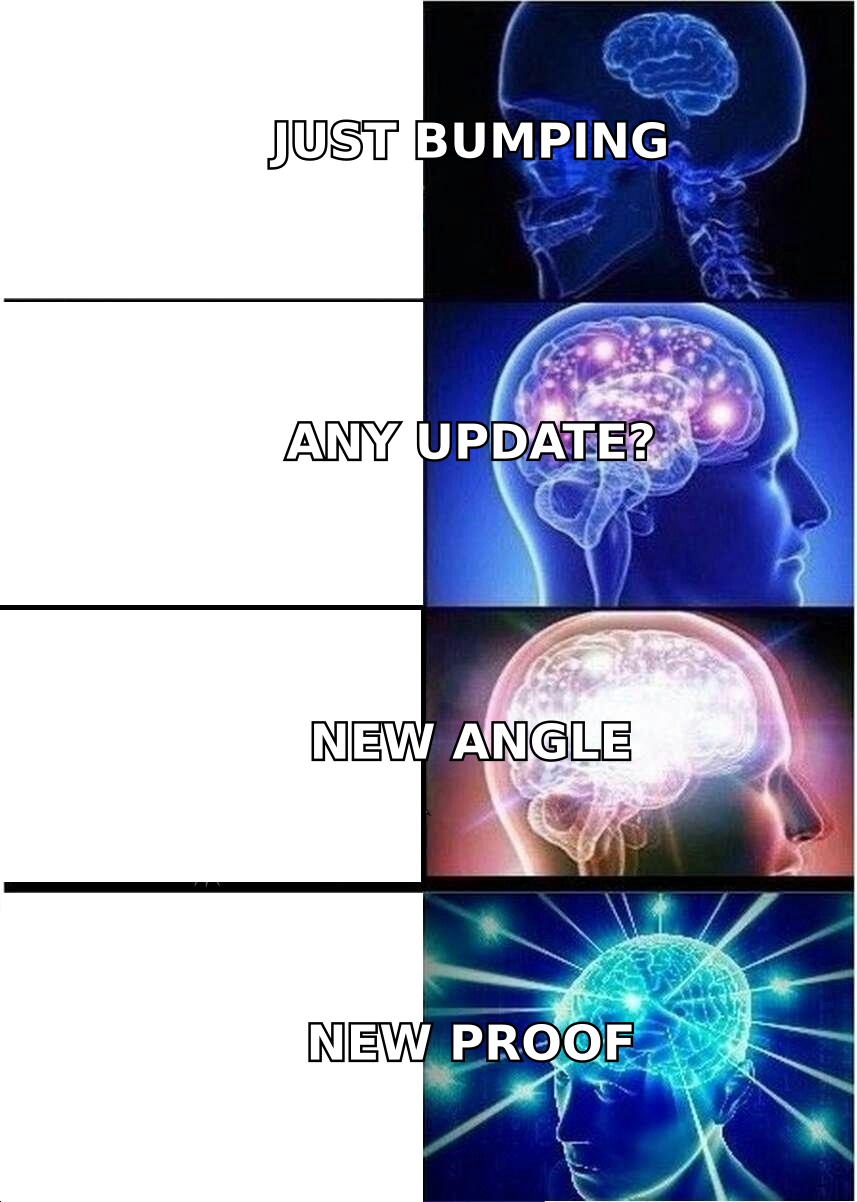
- "Just bumping this" and "circling back" are filler. Replace them with a trigger, a resource, a case study, or a direct breakup email.
- Templates only work on deliverable addresses. Verify your list before you send, or your carefully built cadence just teaches mailbox providers to distrust your domain.
How to write follow up email template drafts (and why most fail)#
A follow-up email template is a reusable skeleton for the second, third, and fourth messages you send to someone who did not reply to the first. It fixes the structure — context, new information, ask, exit — while leaving slots for the details that change per prospect.
Here is the problem. Most templates people copy from the internet are not templates at all. They are a single sentence ("Just following up on my last email — any thoughts?") dressed up as a system. That sentence contains zero new information. The recipient already decided not to reply once. Repeating yourself gives them nothing to reconsider.
Think of a follow-up sequence like a conversation at a conference. If you walk up to someone three times and say "so, what did you think?" you are annoying. If you come back with "I just saw the session on procurement cycles — that's the exact bottleneck you described," you are useful. Same person, same goal, completely different reception.
The mechanical version of that rule: every follow-up must carry a payload the previous email did not have. A statistic, a customer story, a relevant news trigger, a different angle on the problem, or — at the end — a clean goodbye.
What are the five parts of a follow-up email that actually works?#
Every high-performing follow-up template we've seen in the wild decomposes into the same five components. Build your own skeleton from these and you can generate a whole sequence in twenty minutes.
- Context anchor (1 line). Remind them who you are and what the original thread was about, without groveling. "Last week I sent over the note about your SDR team's manual list-building." Not "I know you're busy, sorry to bother you again."
- New input (1–3 lines). The reason this email exists. A benchmark, a competitor move, a customer result, a resource, a question you didn't ask before. This is the part 90% of templates skip.
- Single specific ask (1 line). One ask. Not "let me know if you'd like a demo, or a deck, or an intro to the team." Pick one: a 15-minute call, a yes/no, a pointer to the right person.
Parts 1 to 3 win the reply. The last two decide whether the email reads as human.
- Low-friction exit (1 line). Give them a socially cheap way out. "If this isn't a priority this quarter, just reply 'not now' and I'll stop." Counterintuitively, this raises reply rates because a two-word answer costs nothing.
- Thread + signature discipline. Reply in the original thread with
Re:preserved so the context loads visually. Keep the signature to two lines — no banners, no tracking-heavy images that trip spam filters.
That's the shape. Notice how short it is. A follow-up that runs longer than the original email signals desperation; the target is 50–90 words.
How many follow-ups should you send, and how far apart?#
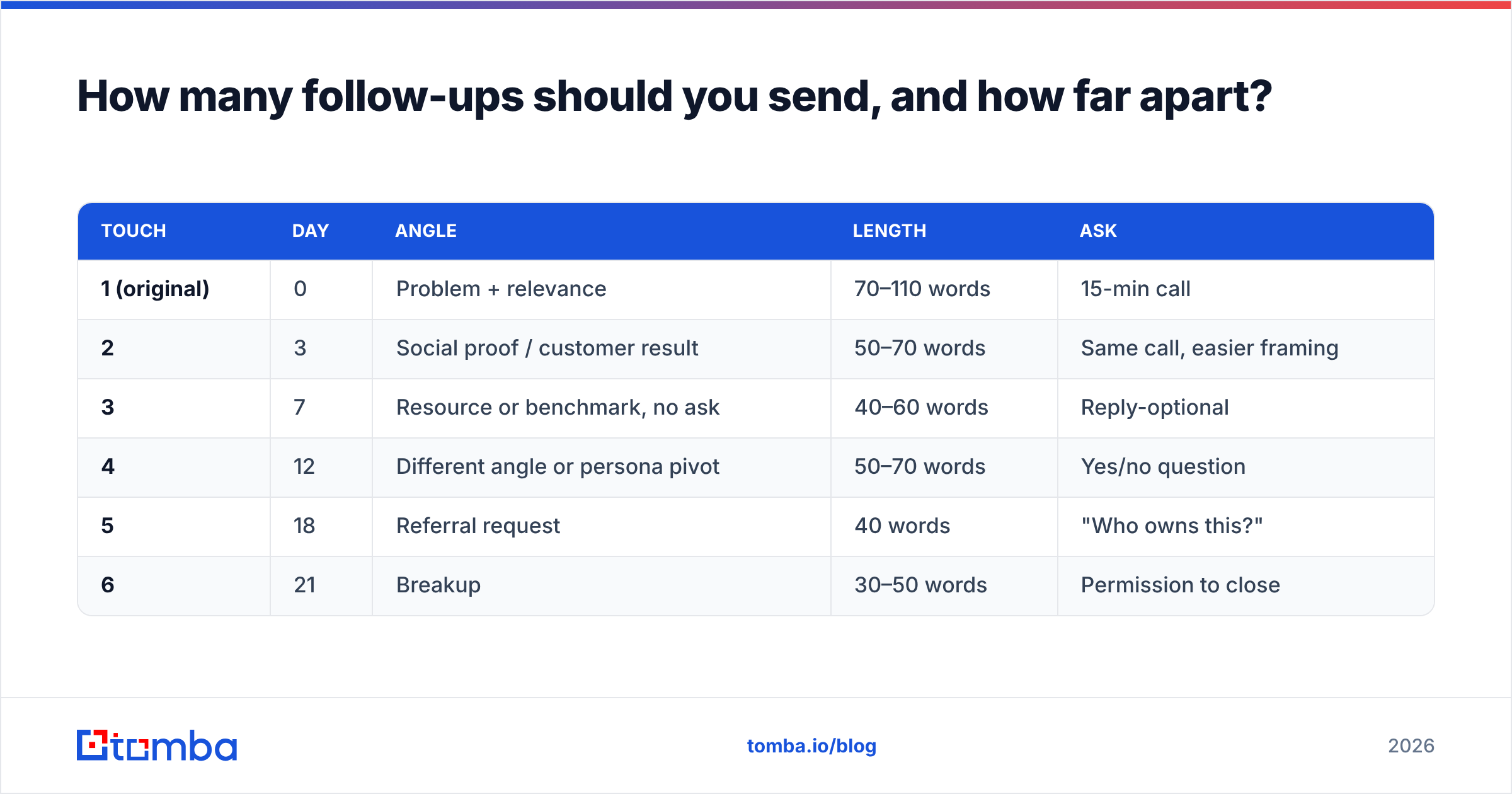
Send four to six touches spread over 14–21 days, with the gaps widening as you go. Front-loading is the most common cadence mistake — three emails in four days reads as a bot, not a person.
Here is the cadence structure that maps cleanly onto the five-part template:
| Touch | Day | Angle | Length | Ask |
|---|---|---|---|---|
| 1 (original) | 0 | Problem + relevance | 70–110 words | 15-min call |
| 2 | 3 | Social proof / customer result | 50–70 words | Same call, easier framing |
| 3 | 7 | Resource or benchmark, no ask | 40–60 words | Reply-optional |
| 4 | 12 | Different angle or persona pivot | 50–70 words | Yes/no question |
| 5 | 18 | Referral request | 40 words | "Who owns this?" |
| 6 | 21 | Breakup | 30–50 words | Permission to close |
Two things this table encodes that most sequences get wrong. First, touch 3 has no ask at all — it's a pure give, which resets the relationship from "salesperson chasing" to "person who sends useful things." Second, touch 5 asks for a referral rather than a meeting. People who won't buy will often forward you to whoever should, because it costs them ten seconds and makes them look helpful.
Widening intervals matter too. Day 0 → 3 → 7 → 12 → 18 → 21 respects the reality that inbox attention is bursty. Someone who ignored you on Tuesday may be triaging their backlog on Friday.
What do the seven templates look like?#
Copy these, then replace the bracketed slots. Each one implements the five-part structure above.
1. The social-proof bump (Day 3)
Subject: Re: [original subject]
Hi [Name] — following on from Tuesday's note.
[Similar Company] had the same issue with [specific problem]. They cut [metric] by [number]% in [timeframe] by [one-sentence approach].
Worth 15 minutes to see if the same play fits [Company]?
If not, "not now" is a fine answer.
2. The pure-value drop (Day 7)
Subject: Re: [original subject]
[Name] — no ask here. We benchmarked [N] [industry] teams on [metric] and the median came out at [number], which surprised us.
Two-page summary attached in case it's useful for your [planning cycle / board deck].
3. The angle pivot (Day 12)
Subject: Re: [original subject]
I may have framed this wrong. I pitched [original angle], but talking to other [job title]s at [company size] companies, the sharper pain is usually [second angle].
Is that closer to what you're dealing with — yes or no?
4. The trigger-event follow-up (any time)
Subject: Congrats on [funding round / launch / new hire]
Saw the [Series B / product launch] news. Usually that means [predictable downstream consequence] lands on your desk within a quarter.
That's the exact problem we handle for [Customer A] and [Customer B]. Worth a short call before it gets urgent?
5. The referral ask (Day 18)
Subject: Re: [original subject]
[Name], I don't think I'm reaching the right person — that's on me.
Who owns [specific process] at [Company]? Happy to take it there and leave you out of it.
6. The breakup (Day 21)
Subject: Closing the loop
I'll stop here. If [problem] moves up the list in Q[N], reply to this thread and I'll pick it back up — no re-pitch needed.
Either way, good luck with [specific initiative you mentioned].
7. The post-meeting follow-up (not cold)
Subject: [Topic] — next steps
Thanks for the time today. Recapping what I heard: [three bullets of their words, not yours].
Next step we agreed: [action] by [date]. Anything I got wrong?
Template 6 is the one people resist most and the one that performs. Breakup emails routinely outperform every other touch in a sequence because they trade pressure for closure. Loss aversion does the work you were trying to do with enthusiasm.
How should you personalize a template without wasting an hour per prospect?#
Personalize the first two lines and the new-input block. Leave everything else fixed. This is the 80/20 that keeps a sequence scalable.
Three tiers, ranked by cost:
- Tier 1 (10 seconds, works at volume): Company name, job title, industry benchmark. Pulled automatically from your enrichment source. Every email should have at least this.
- Tier 2 (60 seconds, use on your top 30%): A trigger event — funding, a hire, a new integration, a job posting. Job postings are underrated; a company hiring three SDRs is telling you exactly what it's about to spend money on.
- Tier 3 (5 minutes, use on named accounts only): Something they personally wrote or said — a LinkedIn post, a podcast quote, a conference talk. Reference the specific claim, not the fact that it exists. "You argued that inbound scoring is mostly noise" beats "loved your recent post."
The mistake is spending Tier 3 effort on a Tier 1 list. If you have 800 prospects, run Tier 1 on all of them, Tier 2 on the 240 that fit your ICP tightest, and Tier 3 on the 25 accounts that would change your quarter. HubSpot's sales research has found that relevance beats volume. That only holds when the underlying targeting is right. Personalizing a bad-fit email just makes it a well-written bad-fit email.
For Tier 2 and Tier 3 personalization, you need contact data that includes more than an address. A data enrichment pass that returns role, seniority, company size, and LinkedIn profile gives you the raw material for the "new input" line without manual research per prospect.
Which follow-up approach fits your team: manual, templated, or sequenced?#
| Approach | Best for | Emails/rep/day | Personalization depth | Main risk |
|---|---|---|---|---|
| Fully manual | Named enterprise accounts | 10–25 | Tier 3 on every touch | Doesn't scale; reps skip follow-ups |
| Template + manual send | SMB/mid-market, <200 prospects/mo | 40–80 | Tier 1–2, Tier 3 on top accounts | Inconsistent cadence, human forgetting |
| Sequenced automation | Volume outbound, 500+ prospects/mo | 100–250 | Tier 1 merge fields only | Robotic tone, deliverability damage |
| Hybrid (recommended) | Most B2B teams | 60–120 | Tier 1 automated, Tier 2–3 injected | Requires list hygiene discipline |
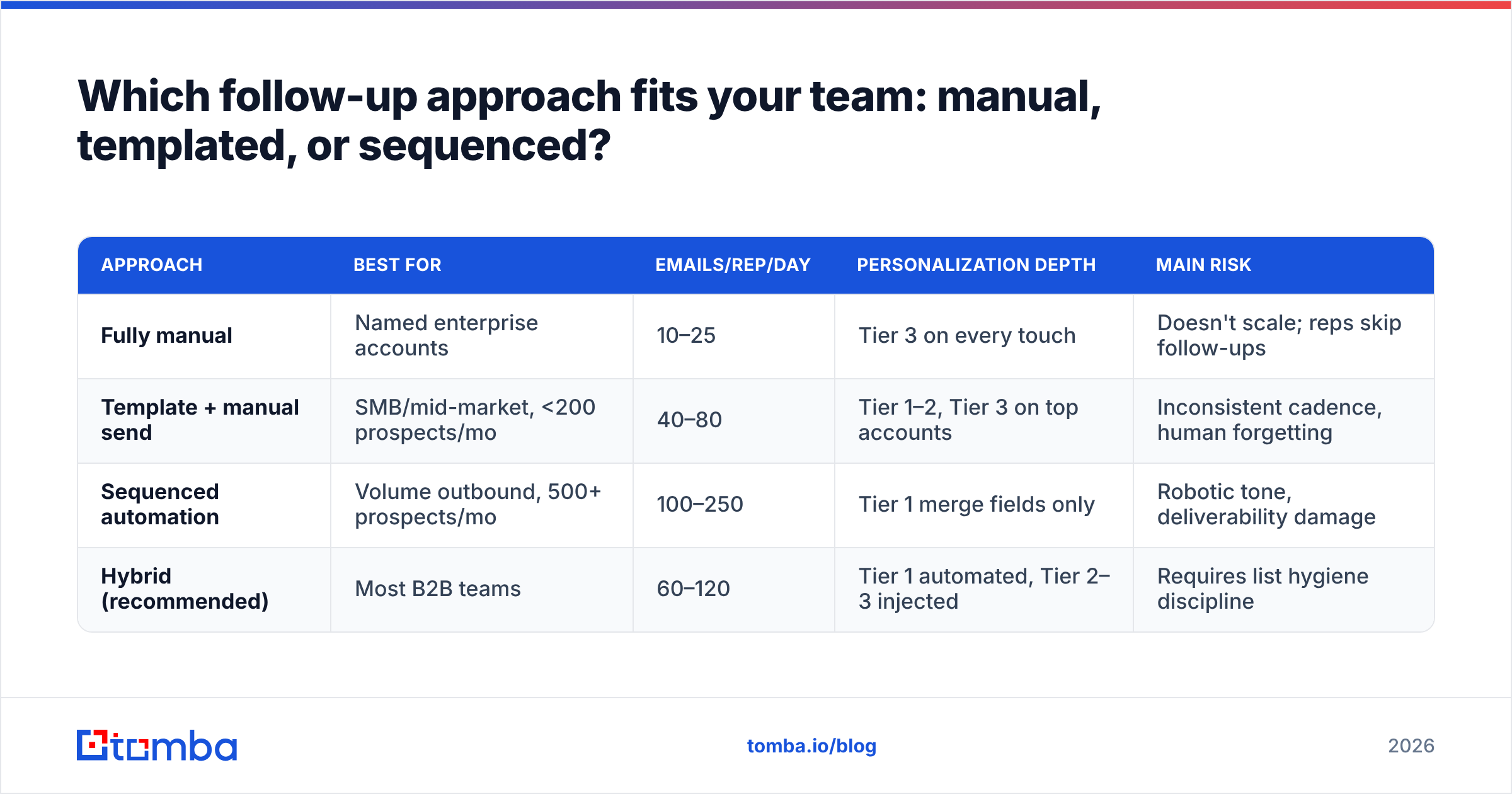
The hybrid model is where most teams land: automate the cadence and the fixed skeleton, but hand-write the new-input block for anyone above a revenue threshold. That keeps touch 2 through 6 from ever going out as pure boilerplate.
What kills follow-up performance even when the copy is good?#
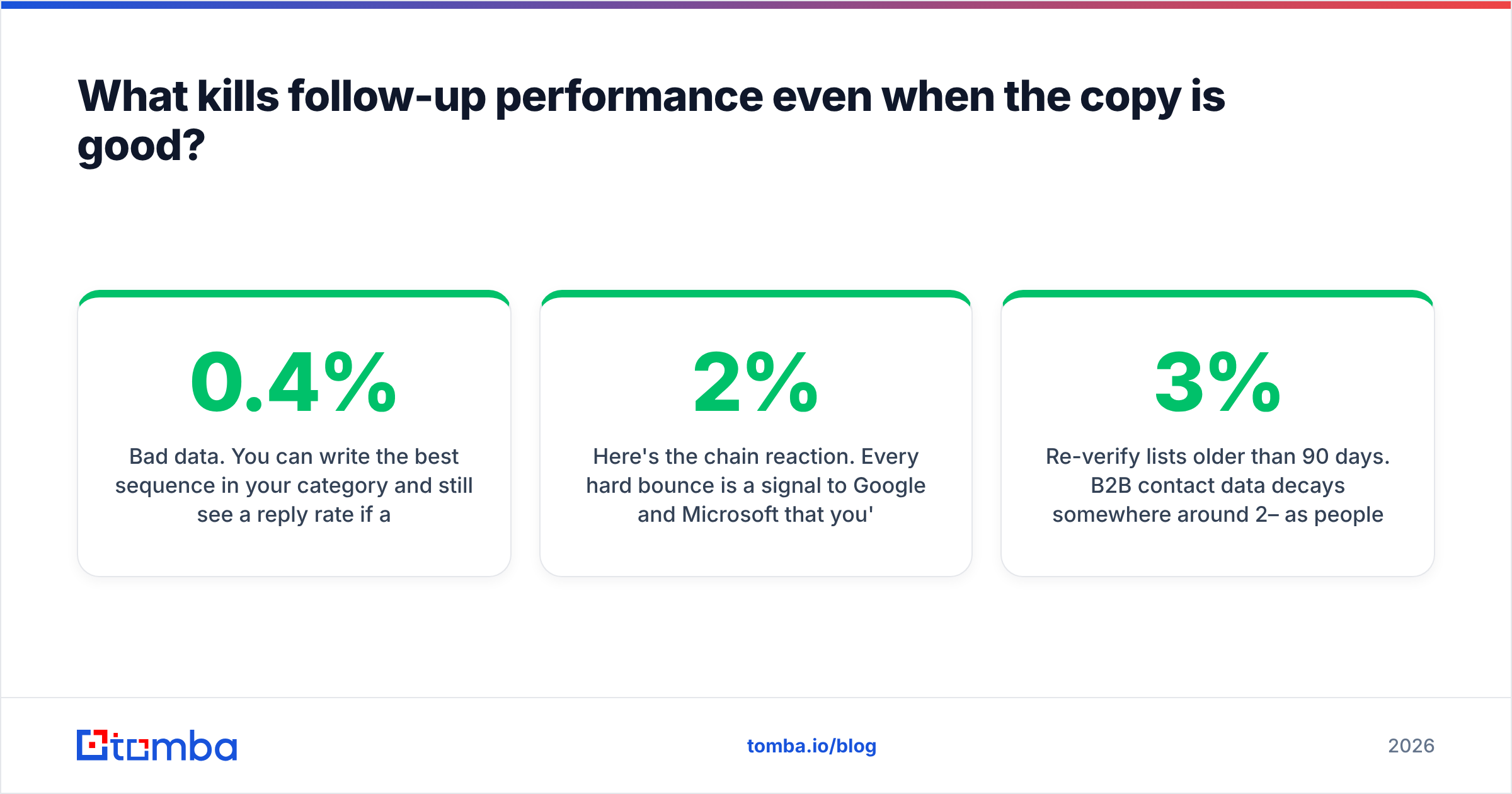
Bad data. You can write the best sequence in your category and still see a 0.4% reply rate if a fifth of your list bounces.
Here's the chain reaction. Every hard bounce is a signal to Google and Microsoft that you're mailing addresses you shouldn't have. Bounce rates above roughly 2% start dragging your sender reputation down. Once reputation slips, your deliverable emails start landing in spam. Touches 2 through 6 never get seen. Your reply rate then collapses for reasons that have nothing to do with your copy. You'll spend a month A/B testing subject lines to fix a problem that lives in your list.
Four hygiene rules that protect a sequence:
- Verify before the first send, not after the bounce. Run every address through an email verifier and drop anything that isn't valid. Catch-all domains need their own treatment — a catch-all verifier tells you whether the mailbox is real or the server is just accepting everything.
- Suppress on reply, bounce, and unsubscribe — immediately. Nothing burns goodwill faster than touch 4 arriving after someone already answered touch 2.
- Cap daily volume per mailbox. 30–50 cold sends per mailbox per day is the sane ceiling. Beyond that, split across domains rather than pushing one harder.
- Re-verify lists older than 90 days. B2B contact data decays somewhere around 2–3% per month as people change jobs; a list you bought in January is meaningfully worse by April.
If you want the vendor-side view of how mailbox providers evaluate senders, Google's Postmaster Tools documentation is the primary source and worth reading once in full rather than via secondhand blog summaries. Peer reviews on G2 are also useful for sanity-checking which verification vendors actually hold up under volume.
How do you measure whether your follow-up template is working?#
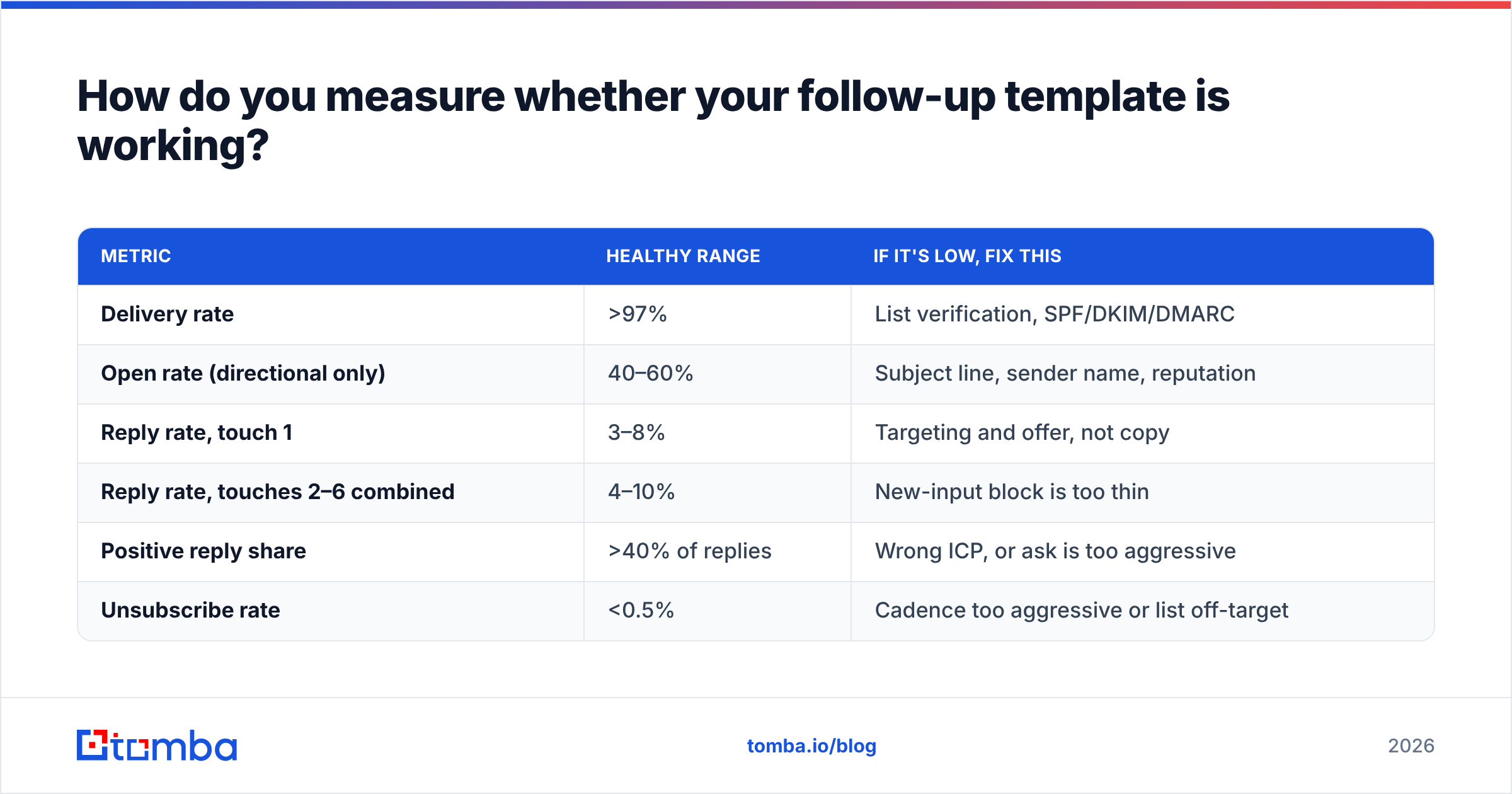
Track reply rate per touch, not per sequence. A blended 6% reply rate hides whether touch 2 is carrying the whole thing while touches 3–5 do nothing.
The diagnostic table:
| Metric | Healthy range | If it's low, fix this |
|---|---|---|
| Delivery rate | >97% | List verification, SPF/DKIM/DMARC |
| Open rate (directional only) | 40–60% | Subject line, sender name, reputation |
| Reply rate, touch 1 | 3–8% | Targeting and offer, not copy |
| Reply rate, touches 2–6 combined | 4–10% | New-input block is too thin |
| Positive reply share | >40% of replies | Wrong ICP, or ask is too aggressive |
| Unsubscribe rate | <0.5% | Cadence too aggressive or list off-target |
Two notes on reading these. Open rates have been unreliable since Apple Mail Privacy Protection started pre-fetching images, so treat them as a rough trend line, not truth. And positive reply share matters more than raw reply rate — a sequence pulling 12% replies where most are "please remove me" is worse than one pulling 5% that are all "tell me more."
Run one variable at a time. Change the touch-3 resource for two weeks, hold everything else, then compare. Changing subject lines, cadence, and copy simultaneously teaches you nothing.
Where do you get the addresses to send these templates to?#
Knowing how to write follow up email template sequences pays off only when the addresses are real. You can't follow up with someone you can't reach. The sequence, the templates, and the cadence table all assume a list of current, deliverable business addresses. They also assume the person still holds the role you think they hold.
That's the part Tomba Email Finder handles. Give it a name and a company domain and it returns the verified professional address, with confidence scoring and source attribution so you know why it believes the result. Need to build a list rather than look up one person? Domain search pulls every discoverable address at a company with role and department labels, which also tells you who to route the referral ask in template 5 toward.
Start on the free tier — 25 searches a month, no card — and check the Tomba pricing page when you're ready to scale; Starter runs $49/mo and Growth $99/mo. Build the list, verify it, then let the six-touch sequence do what one email never could.
Related guides#
// get started
Find, verify and enrich your first contacts today
Start on the free plan with 25 searches a month, then scale when your team is ready.
Free plan · No credit card required · GDPR & CCPA
// about the author