HubSpot Enrichment in 2026: A Practical Data Guide
Most HubSpot portals rot at about 25% per year. Here is how contact and company enrichment actually works, what Breeze Intelligence costs, and when an API-first enrichment stack beats the native option.

TL;DR
- HubSpot enrichment means filling the empty and stale fields on your contact and company records — job title, company size, industry, verified email, direct phone — automatically instead of by hand.
- HubSpot's native option is Breeze Intelligence, which runs on a separate credit pool. It is convenient and deeply integrated, but credits are consumed per enriched record and the coverage skews toward firmographics, not verified deliverable emails.
- B2B CRM data decays roughly 22–30% per year. Enrichment is not a one-time cleanup project; it is a recurring workflow tied to record creation and a scheduled re-check.
- The strongest setups in 2026 are hybrid: native enrichment for firmographics, a dedicated email finder and verifier for contactability, and a workflow that writes back on a schedule.
- Budget the whole stack, not the line item. A $99/mo enrichment API that stops 8% of your sends from bouncing is cheaper than the domain reputation you would have burned.
What Is HubSpot Enrichment?#
HubSpot enrichment is the process of automatically appending missing or outdated attributes to contact, company, and deal records in your HubSpot portal, using an external data source.
Think of your CRM like a library where half the books arrived with no spine label. You know something is on the shelf, but you cannot find it, sort it, or route it to the right reader. Enrichment is the volunteer who walks the aisles and writes the labels — continuously, because new books keep arriving unlabeled.
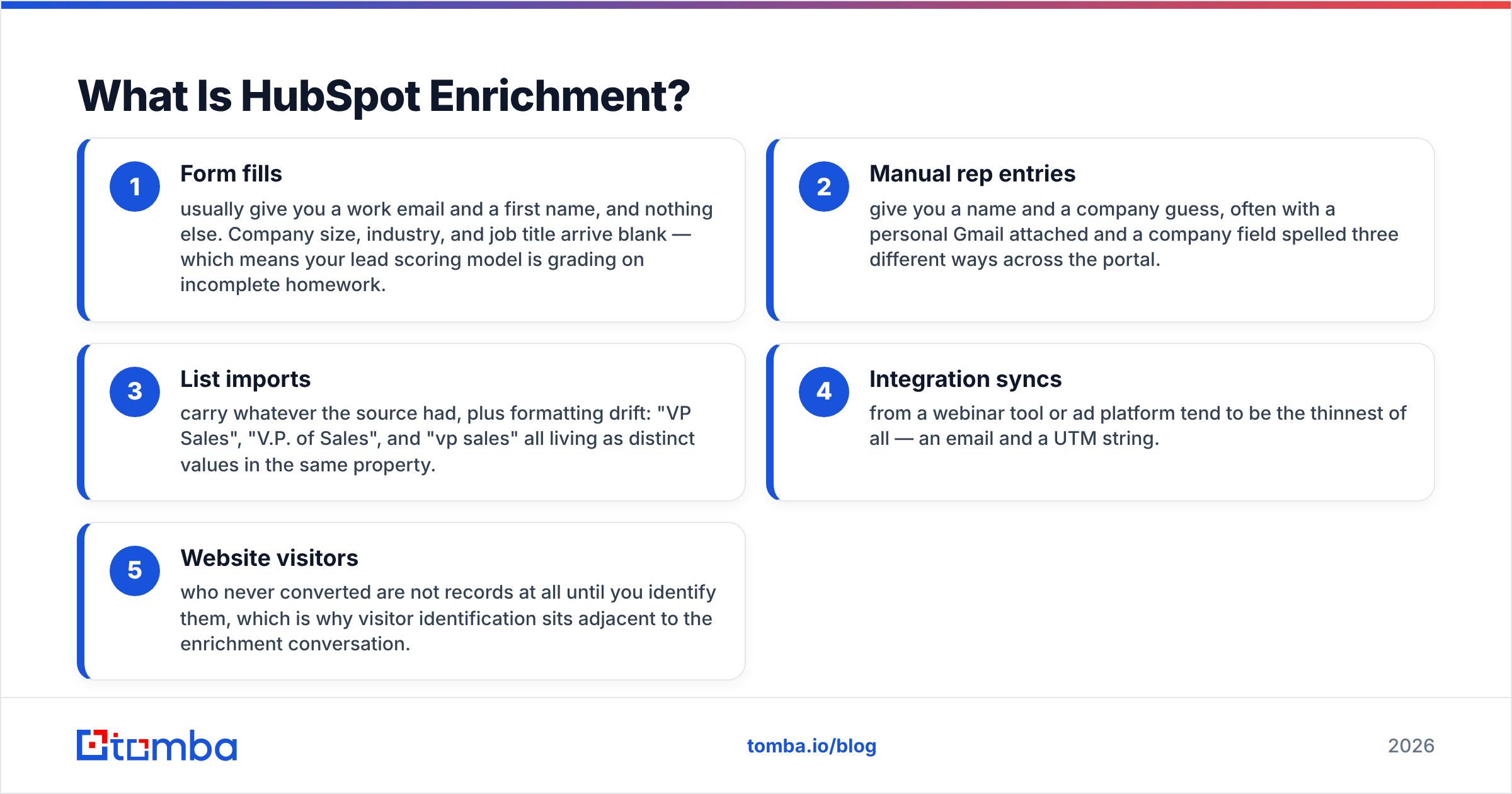
In practice, a record enters HubSpot through one of four doors: a form fill, a manual rep entry, a list import, or an API/integration sync. Each door leaks different fields.
- Form fills usually give you a work email and a first name, and nothing else. Company size, industry, and job title arrive blank — which means your lead scoring model is grading on incomplete homework.
- Manual rep entries give you a name and a company guess, often with a personal Gmail attached and a company field spelled three different ways across the portal.
- List imports carry whatever the source had, plus formatting drift: "VP Sales", "V.P. of Sales", and "vp sales" all living as distinct values in the same property.
- Integration syncs from a webinar tool or ad platform tend to be the thinnest of all — an email and a UTM string.
- Website visitors who never converted are not records at all until you identify them, which is why visitor identification sits adjacent to the enrichment conversation.
Enrichment closes those gaps at the moment of creation, then re-checks on a cadence. The second half matters more than most teams admit. A record enriched in January and never touched again is, by the following January, wrong about roughly a quarter of its fields.
Why Does CRM Data Decay So Fast?#
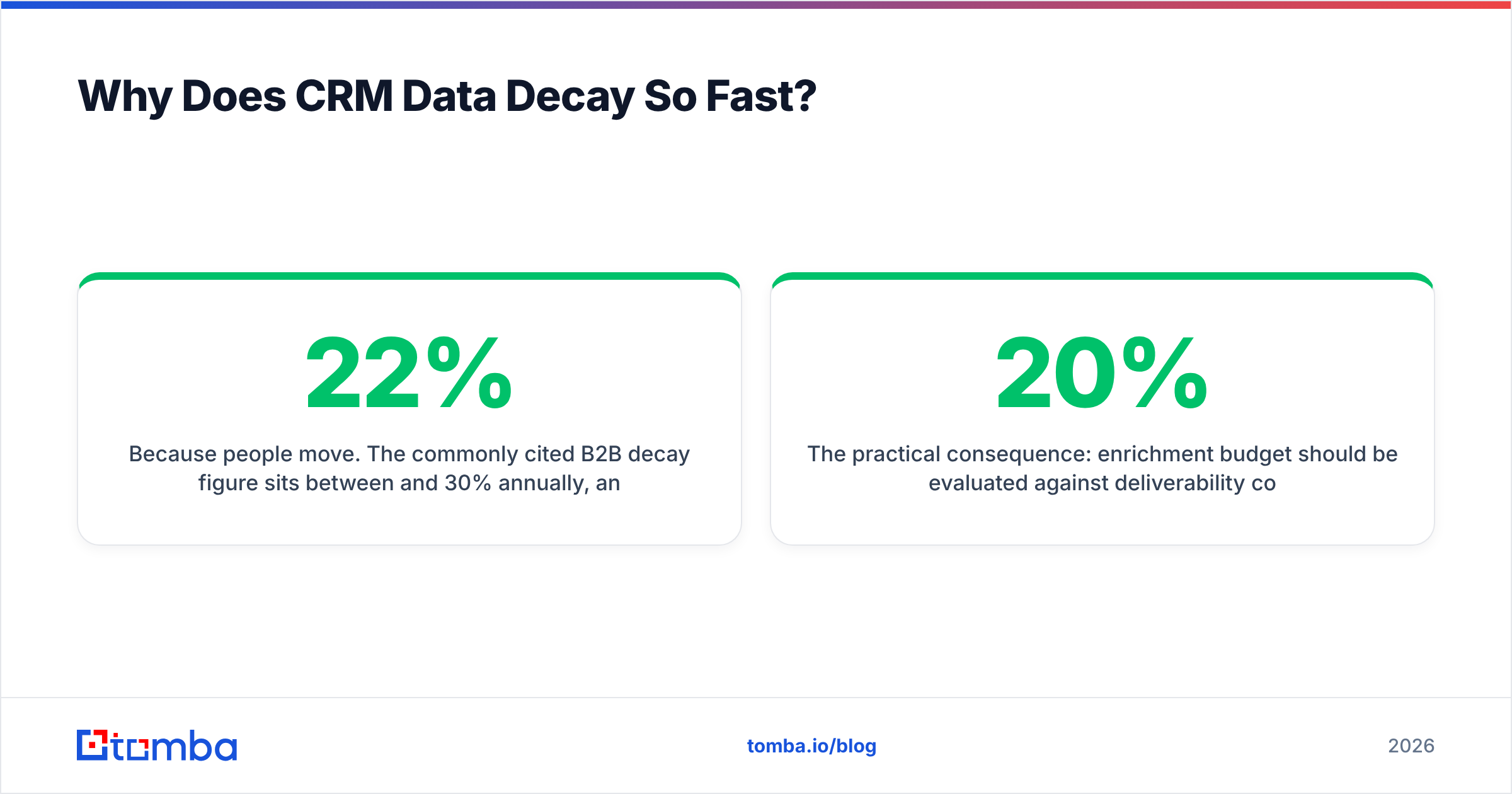
Because people move. The commonly cited B2B decay figure sits between 22% and 30% annually, and it is not evenly distributed — it clusters in exactly the fields you use to route and score.
Job title changes when someone gets promoted. Company changes when they leave. Email address changes with both, and also when IT migrates the domain or switches naming convention from first.last@ to flast@. Phone numbers churn when offices close and everyone moves to mobile-first. Company headcount and funding stage shift quarterly.
The compounding problem is that HubSpot will happily keep emailing the dead address. Your workflow does not know the contact left; it knows only that the property is populated. So you send, you bounce, and your sender reputation absorbs the hit. Three or four percent hard bounces is where inbox providers start throttling you, and a two-year-old unenriched list clears that bar easily.

The practical consequence: enrichment budget should be evaluated against deliverability cost, not against the price of a data subscription. A portal with 40,000 contacts and 20% rot is carrying 8,000 records that will actively damage your sending domain if you campaign against them.
What Does HubSpot's Native Enrichment Actually Give You?#
HubSpot's built-in answer is Breeze Intelligence, which absorbed the Clearbit acquisition. It is genuinely good at what it does: firmographic and technographic fill on company records, form shortening (progressive profiling that auto-fills known fields), and buyer intent signals.
What it is less good at is the contactability layer. Breeze is a company-data engine first. It will reliably tell you that Acme Corp has 340 employees, is in logistics software, and runs on AWS. It is far less reliable at telling you that sarah.chen@acme.com is a live, deliverable mailbox today.
That distinction drives most of the stack decisions below. You can read HubSpot's own documentation on data enrichment properties to see the field list they populate — it is heavily company-side.
The credit model is the other thing to internalize. Breeze runs on its own credit pool, separate from your marketing contact tier. Enriching a record spends a credit. Re-enriching that same record later spends another. If you have a high-volume inbound motion, model the annual credit burn before you commit, because the sticker price on the enrichment add-on is not the number you will actually pay in month nine.
Native Breeze vs API-First Enrichment: Which Should You Use?#
Here is the honest comparison. Neither column is wrong — they solve adjacent problems, and plenty of teams run both.
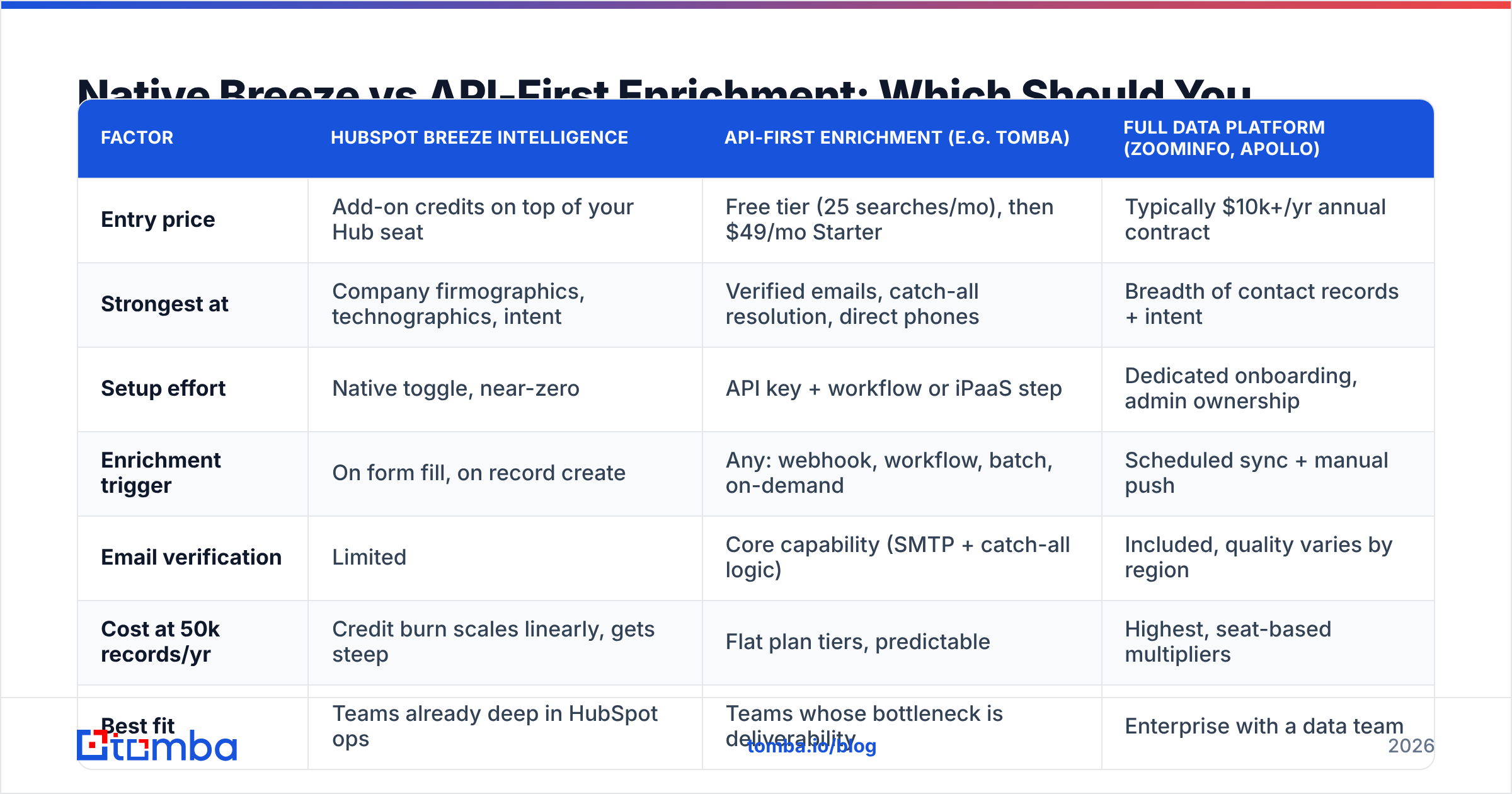
| Factor | HubSpot Breeze Intelligence | API-first enrichment (e.g. Tomba) | Full data platform (ZoomInfo, Apollo) |
|---|---|---|---|
| Entry price | Add-on credits on top of your Hub seat | Free tier (25 searches/mo), then $49/mo Starter | Typically $10k+/yr annual contract |
| Strongest at | Company firmographics, technographics, intent | Verified emails, catch-all resolution, direct phones | Breadth of contact records + intent |
| Setup effort | Native toggle, near-zero | API key + workflow or iPaaS step | Dedicated onboarding, admin ownership |
| Enrichment trigger | On form fill, on record create | Any: webhook, workflow, batch, on-demand | Scheduled sync + manual push |
| Email verification | Limited | Core capability (SMTP + catch-all logic) | Included, quality varies by region |
| Cost at 50k records/yr | Credit burn scales linearly, gets steep | Flat plan tiers, predictable | Highest, seat-based multipliers |
| Best fit | Teams already deep in HubSpot ops | Teams whose bottleneck is deliverability | Enterprise with a data team |
| Exit cost | Low — it is a toggle | Low — swap the API endpoint | High — annual lock-in |
The pattern I see repeatedly: mid-market teams turn on Breeze for company data, then discover six weeks later that their outbound bounce rate did not move. That is because their gap was never firmographic. It was that 30% of the email addresses in the portal were guesses a rep typed in.
How Do You Set Up an Enrichment Workflow That Does Not Break?#
Four stages. Do them in order; skipping stage one is why most enrichment projects produce garbage.
Stage 1 — Normalize before you enrich. Standardize your company name property, deduplicate on email domain, and fix the obvious junk (test records, personal Gmail addresses in the work email field, free-mail domains where you expect corporate). Enriching a duplicate creates two enriched duplicates. HubSpot's native dedupe tool handles the exact matches; the fuzzy ones need a manual pass or a script.
Stage 2 — Enrich on creation. Wire a workflow that fires when a contact or company record is created. Native Breeze can do this with a toggle. For an API-first source, use the HubSpot workflow's webhook action or a middleware step — the HubSpot integration handles the field mapping, or you can route it through Zapier or Make if you want visible logs and retry logic. Enriching at creation means the record is complete before it ever hits a lead score or a routing rule.
Stage 3 — Verify the email separately. This is the step teams skip. Enrichment tells you an email exists in a database. Verification tells you it accepts mail today. Those are different claims with different failure modes. Run every enriched address through an email verifier before it enters a sequence, and treat catch-all domains as their own bucket rather than lumping them with "valid" — that is what a catch-all verifier is for.
Stage 4 — Re-enrich on a cadence. Build a HubSpot active list of records whose last_enriched_date is older than 180 days, and run a scheduled batch against it. Quarterly is ideal for high-value segments; twice a year is the floor for everything else. Use a bulk email finder for the batch pass rather than one-at-a-time API calls.

One HubSpot-specific gotcha: be deliberate about property overwrite rules. If your enrichment source and a rep both write to jobtitle, decide which wins. The default of "last write wins" means a stale batch job can overwrite a rep's fresh, hand-verified note. Route enrichment output into a separate enriched_jobtitle property and use a calculated property or a workflow to promote it only when the human-entered field is empty.
What Should You Actually Measure?#
Enrichment projects get funded on vibes and cancelled on vibes. Instrument them instead.
- Fill rate by property. What percentage of records have a non-null value for each field you care about? Track before and after. If
jobtitlegoes from 34% to 81%, that is a number you can defend in a budget review. - Bounce rate on enriched vs unenriched cohorts. Split a campaign and compare. This is the single metric that converts enrichment from a nice-to-have into a deliverability line item.
- Cost per usable record. Total spend divided by records that ended up with a verified email and a correct title — not divided by records touched. Credits spent on a record that came back empty still cost you.
- Routing accuracy. How often does a lead land with the wrong rep because the company-size or territory field was wrong? Ask your reps; they keep an informal tally whether you ask or not.
- Time-to-first-touch. Enriched-at-creation records should be sequenceable within minutes. If your enrichment step adds a two-hour delay, you have traded speed for completeness — sometimes worth it, but know that you did it.
For a broader framing on how this rolls into pipeline metrics, G2's CRM data quality category has a reasonable vendor-neutral survey of what teams report.
When Is Native Enrichment Enough?#
Genuinely often. Do not over-engineer.
Native Breeze alone is sufficient if: your motion is primarily inbound, your contacts self-report their email via forms (so deliverability is already high), you need firmographics mainly for scoring and routing rather than for outbound, and your volume is low enough that credit burn stays predictable.
Add a dedicated finder and verifier when: you run outbound at any meaningful volume, you buy or scrape lists, your bounce rate exceeds 2%, you sell into regions where the native coverage is thin (non-US/EU coverage varies a lot across every vendor), or you need direct dials — phone data is a separate coverage problem from email entirely.
Consider a full platform like ZoomInfo when you have a dedicated RevOps headcount to own it, a defined territory model that needs consistent firmographic ground truth, and budget that clears five figures annually without a fight. Below that threshold the TCO rarely justifies it against a Breeze-plus-API-finder combination.
Worth noting for teams evaluating list sources alongside enrichment: providers like BookYourData occupy a different slot — prebuilt, filterable contact lists you buy outright rather than an enrichment API you call. Some teams pair a purchased list with an enrichment and verification pass before import, which is a sensible use of both.
What Does a Realistic 2026 Stack Look Like?#
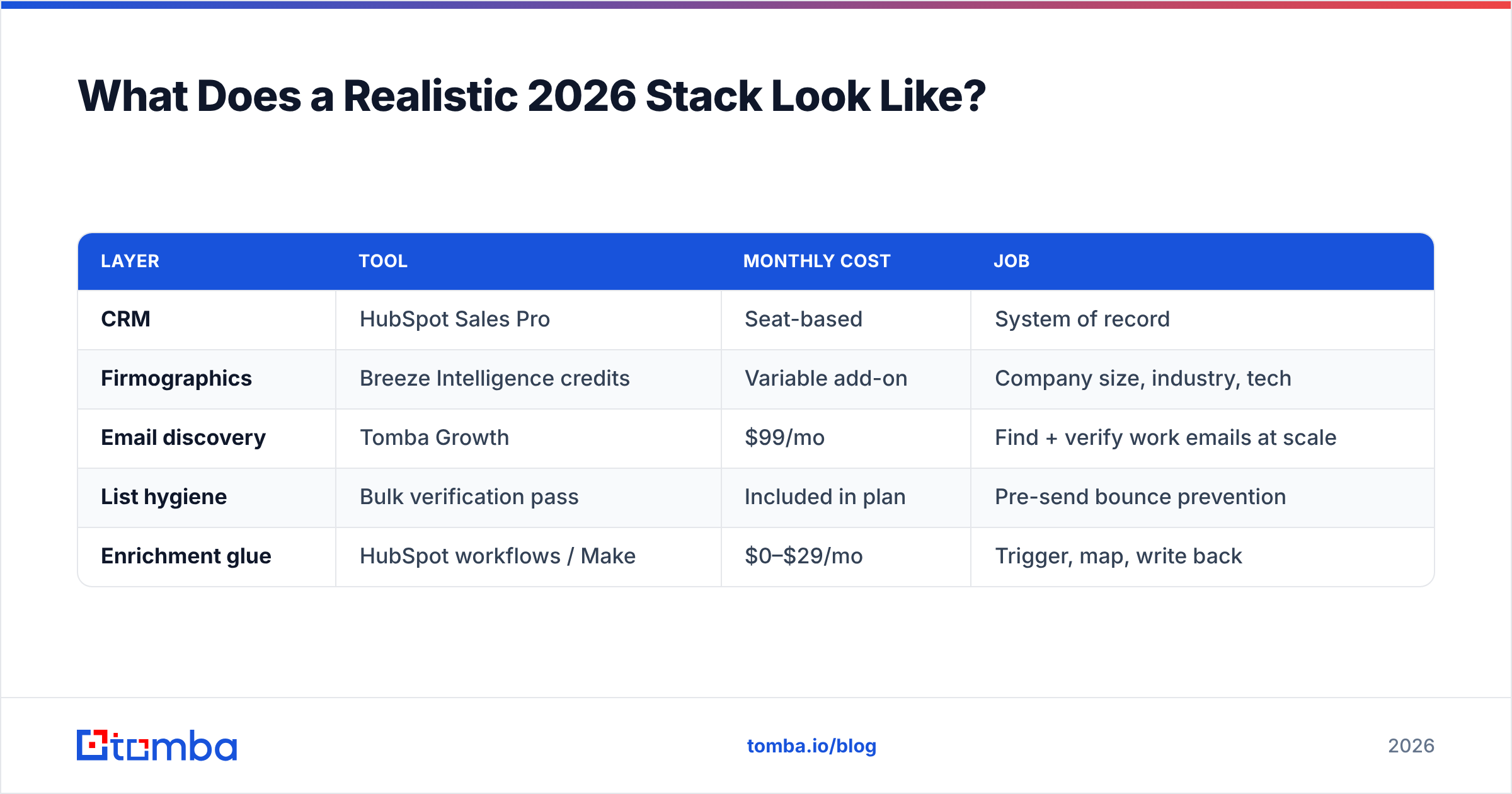
For a 15-person revenue team running both inbound and outbound out of HubSpot:
| Layer | Tool | Monthly cost | Job |
|---|---|---|---|
| CRM | HubSpot Sales Pro | Seat-based | System of record |
| Firmographics | Breeze Intelligence credits | Variable add-on | Company size, industry, tech |
| Email discovery | Tomba Growth | $99/mo | Find + verify work emails at scale |
| List hygiene | Bulk verification pass | Included in plan | Pre-send bounce prevention |
| Enrichment glue | HubSpot workflows / Make | $0–$29/mo | Trigger, map, write back |
The total lands well under what a single ZoomInfo seat costs, and each layer is independently replaceable. That last property is underrated — the enrichment vendor landscape churns, and a stack where swapping one component is a config change rather than a migration is a stack you can maintain.
If you want to sanity-check pricing across tiers before committing, the Tomba pricing page lists the credit allocations per plan, and the Tomba API docs show the exact response shape you would be mapping into HubSpot properties.
Frequently Asked Questions#
Does enrichment violate GDPR? Enrichment of business contact data is generally permissible under legitimate interest in the EU, but you must be able to document the source, honor deletion requests across enriched fields, and disclose enrichment in your privacy policy. Talk to counsel about your specific setup — this is not legal advice.
How often should I re-enrich? Quarterly for records in an active sequence or open deal. Every six months for the general database. Annually is too slow given a 25% decay rate.
Will enrichment fix my bounce rate on its own? No. Enrichment finds addresses; verification confirms they accept mail. You need both. A record enriched from a database that has not been re-verified in eighteen months bounces just as hard as a guessed address.
Can I enrich company records without contact records? Yes, and it is often the cheaper starting point. Company-level enrichment via domain search fills firmographics and surfaces the email pattern for the domain, which then makes contact-level finding far more accurate and cheaper per lookup.
Start With the Field That Actually Blocks Revenue#
If you only fix one thing in your HubSpot portal this quarter, make it the email property. Firmographics improve your scoring model at the margin; a wrong email address means the message never arrives at all, and enough of them means your next message does not arrive either.
The Tomba Email Finder finds and verifies professional email addresses by domain, name, or company, with a free tier at 25 searches per month so you can test coverage against a sample of your own portal before spending anything. Pull 100 of your oldest HubSpot contacts, run them through, and compare the verified result against what is sitting in the record today. Whatever the gap turns out to be, that number is your enrichment business case — and it will be more persuasive than any vendor deck.
Related guides#
// get started
Find, verify and enrich your first contacts today
Start on the free plan with 25 searches a month, then scale when your team is ready.
Free plan · No credit card required · GDPR & CCPA
// about the author