HubSpot Go-To-Market Strategy: How It Actually Works in 2026
HubSpot built a $2.6B business on freemium, inbound content, and a partner channel most SaaS founders ignore. Here's the GTM machine underneath — and which parts you can copy without a HubSpot-sized budget.
TL;DR
- HubSpot's go-to-market engine rests on four load-bearing pillars: freemium as a distribution channel, content as a demand source, a product-led-to-sales-led handoff, and a solutions-partner channel that supplies roughly 40% of revenue-generating activity.
- The famous "inbound" story is only half the picture. HubSpot runs a large outbound and partner motion underneath the content layer — most teams copy the blog and skip the machine.
- Freemium works for HubSpot because the free CRM stores your data. Switching costs compound quietly. If your product has no data gravity, copying freemium will just cost you money.
- Their multi-hub bundling (Marketing, Sales, Service, Content, Operations, Commerce) turns one land into five expansion paths — net revenue retention is the real growth lever, not new logos.
- What you can copy at any size: the segment-first ICP, the free-tool-as-lead-magnet play, and the tiered pricing ladder that makes the next tier feel inevitable.
What is the HubSpot go to market strategy?#
The HubSpot go to market strategy is a product-led acquisition engine wrapped in a content distribution layer and monetized through tiered expansion plus a partner channel. That is the whole thing in one sentence, and almost every article about it gets stuck on the "inbound marketing" part while ignoring the three pillars that actually convert attention into ARR.
Here is the practical version. HubSpot gives away a genuinely useful CRM for free. It publishes an enormous volume of educational content and free tools that rank for the problems its buyers search. Free users store contacts, deals, and email history inside HubSpot until leaving becomes expensive. Then pricing tiers, seat expansion, and cross-hub attach do the revenue work — assisted by a partner ecosystem that implements, customizes, and resells.
The company crossed $2.6 billion in annual revenue with over 250,000 customers across 130+ countries. Most of that came from expanding existing accounts, not from winning new ones.
Why did freemium work for HubSpot when it fails for most SaaS?#
Freemium worked because the free tier creates data gravity, not because free is a magic acquisition word.
Think of the free HubSpot CRM like a free storage unit. The unit costs you nothing. But six months later it holds your furniture, and moving out means renting a truck, packing boxes, and losing a weekend. HubSpot's free CRM holds your contacts, your email threads, your deal history, and your team's muscle memory. The migration cost is the moat.
Compare that to a free tier for a stateless tool — a screenshot utility, a one-off calculator, an image compressor. Users churn out with zero friction because there is nothing to leave behind. Freemium there is pure marketing spend with a server bill attached.
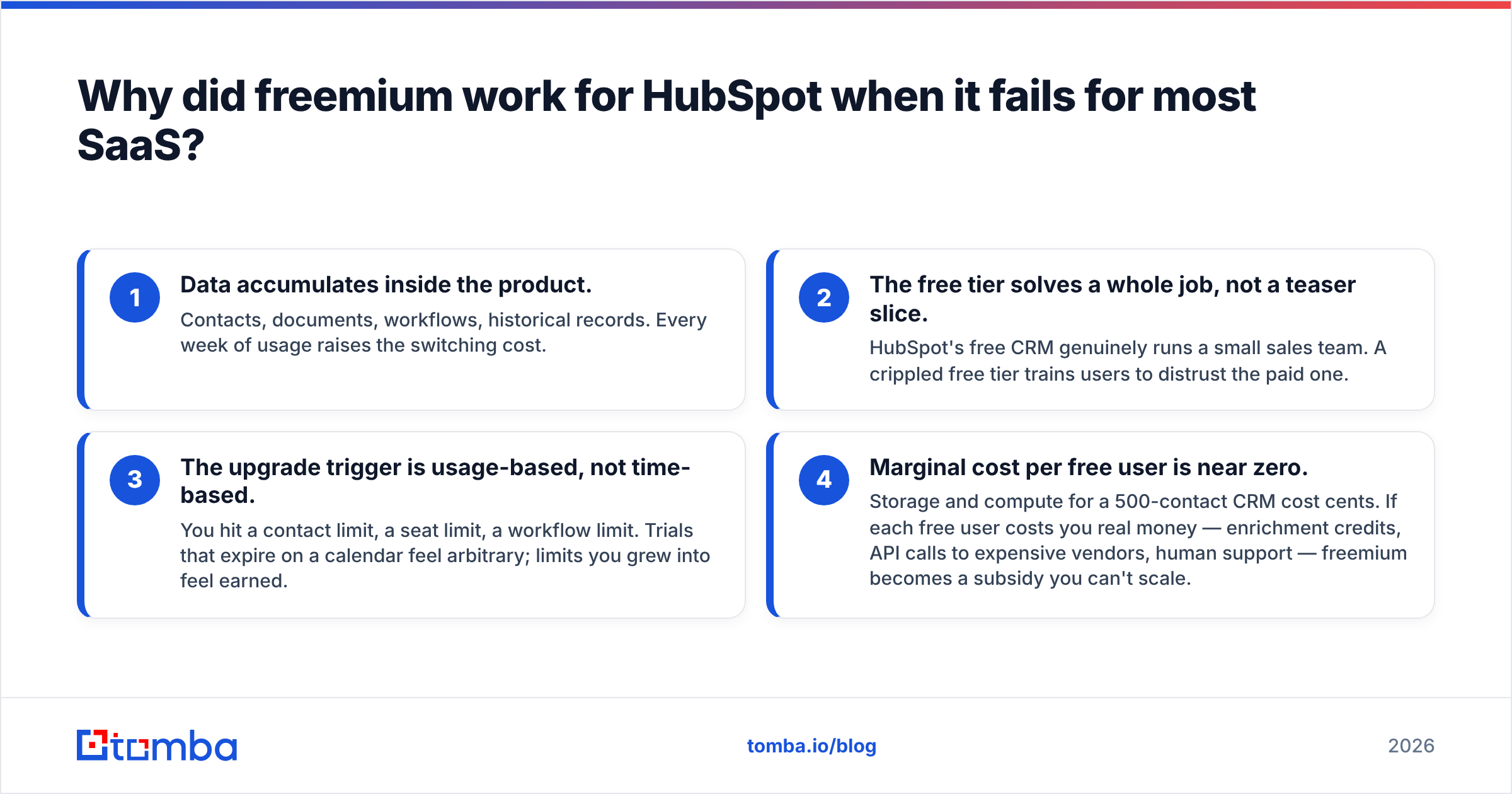
Four conditions that make freemium a real GTM channel rather than a discount:
- Data accumulates inside the product. Contacts, documents, workflows, historical records. Every week of usage raises the switching cost.
- The free tier solves a whole job, not a teaser slice. HubSpot's free CRM genuinely runs a small sales team. A crippled free tier trains users to distrust the paid one.
- The upgrade trigger is usage-based, not time-based. You hit a contact limit, a seat limit, a workflow limit. Trials that expire on a calendar feel arbitrary; limits you grew into feel earned.
- Marginal cost per free user is near zero. Storage and compute for a 500-contact CRM cost cents. If each free user costs you real money — enrichment credits, API calls to expensive vendors, human support — freemium becomes a subsidy you can't scale.
That fourth point is where most B2B data companies get burned. If your product's unit economics involve paying a third party per lookup, unlimited free is a bill, not a funnel. Tools in that category — including email-finding platforms — cap the free tier deliberately. Tomba's free tier is 25 searches per month for exactly this reason, and paid plans start at $49/mo. That's not stinginess, it's the shape of the cost curve.
How does HubSpot's inbound engine actually generate pipeline?#
Content is the top of the funnel, but the conversion machinery sits underneath it in three layers most people never inventory.
Layer one: ranking content. HubSpot publishes across blog, academy, research reports, and templates. The strategic choice is that they target problem-aware queries ("how to write a sales email") rather than product-aware ones ("best CRM"). Problem-aware traffic is ten times the volume, converts at a lower rate, and fills the top of a very wide funnel.
Layer two: free tools as lead magnets. Email signature generators, website graders, invoice templates, persona builders. Each one ranks for a transactional keyword, requires an email to use, and produces a lead with demonstrated intent. This is the single most copyable play in the entire HubSpot playbook and it is dramatically underused. A free tool that solves one narrow job outperforms a gated PDF by a wide margin because the user gets value before the form, not after it.
Layer three: the handoff. Product-qualified leads — free users hitting limits, tool users returning repeatedly — get routed to sales. High-intent, self-serve buyers never touch a rep. Enterprise-shaped accounts get a human within hours.
The layer everyone forgets: HubSpot also runs conventional outbound. Their SDR org prospects, sequences, and cold-calls into accounts that never downloaded anything. Inbound is the brand story; outbound is a large share of the enterprise pipeline. If you copy only the content, you build an audience and wonder why the pipeline is thin.
Building that outbound layer requires contact data, which is where the modern stack diverges from HubSpot's own 2010s build. You need verified addresses at the account level before a sequence is worth sending. A domain search pulls the reachable contacts at a target company, and an email verifier strips the bounces before they touch your sender reputation.
How do the HubSpot hubs create expansion revenue?#
The multi-hub structure converts one customer into five upsell paths. Land in Marketing Hub, attach Sales Hub next quarter, add Service Hub when support volume grows, layer Operations Hub when the data gets messy.
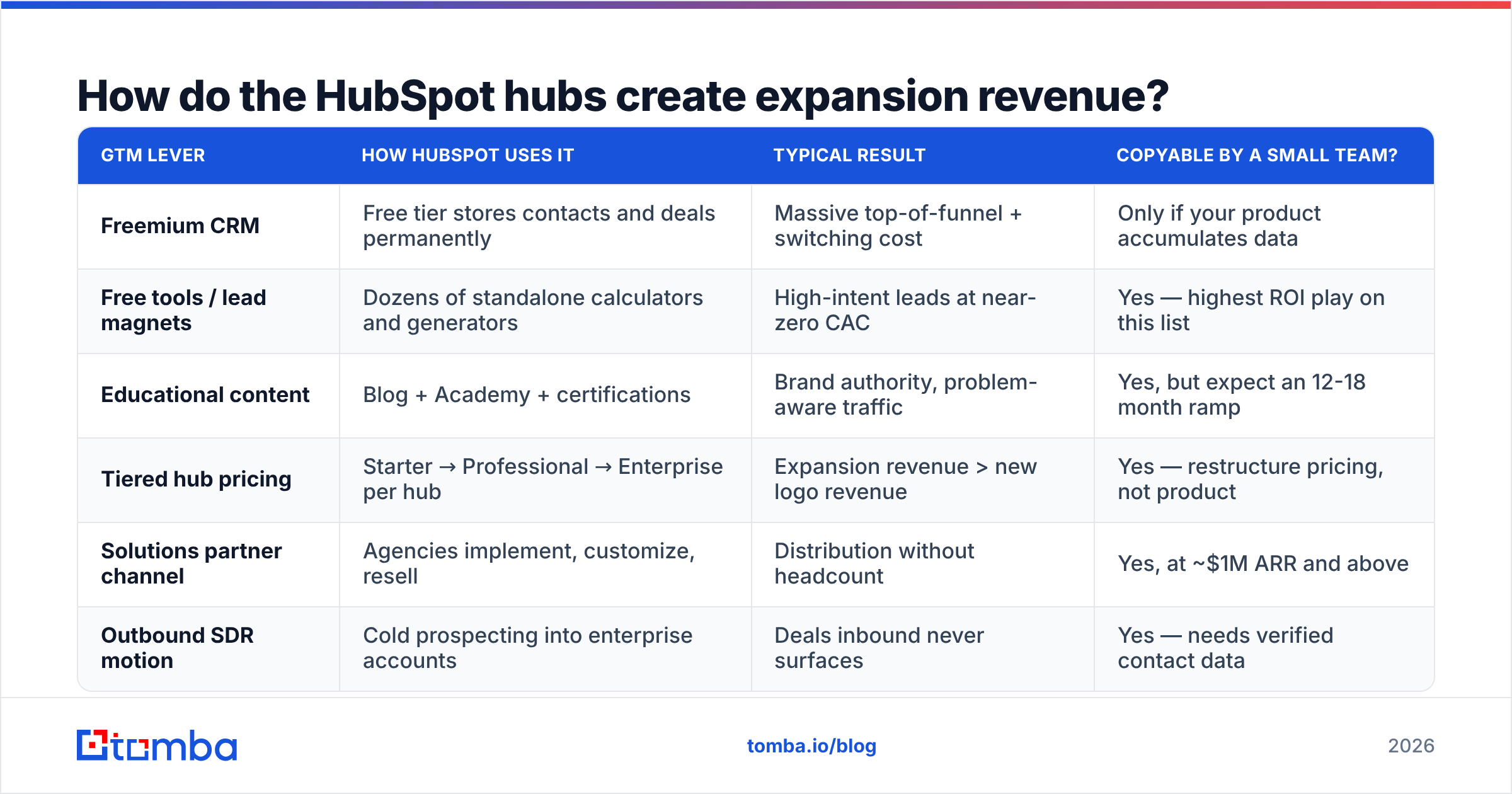
| GTM lever | How HubSpot uses it | Typical result | Copyable by a small team? |
|---|---|---|---|
| Freemium CRM | Free tier stores contacts and deals permanently | Massive top-of-funnel + switching cost | Only if your product accumulates data |
| Free tools / lead magnets | Dozens of standalone calculators and generators | High-intent leads at near-zero CAC | Yes — highest ROI play on this list |
| Educational content | Blog + Academy + certifications | Brand authority, problem-aware traffic | Yes, but expect an 12-18 month ramp |
| Tiered hub pricing | Starter → Professional → Enterprise per hub | Expansion revenue > new logo revenue | Yes — restructure pricing, not product |
| Solutions partner channel | Agencies implement, customize, resell | Distribution without headcount | Yes, at ~$1M ARR and above |
| Outbound SDR motion | Cold prospecting into enterprise accounts | Deals inbound never surfaces | Yes — needs verified contact data |
The pricing ladder is the quiet engine. Each tier removes a specific friction the previous tier created on purpose — a contact cap, a missing automation, an absent reporting view. Customers don't upgrade because they were sold; they upgrade because they outgrew a limit they can feel. That's a design decision, and it's replicable at any company size without building six product lines.
Worth noting: this same ladder logic is why HubSpot's list price looks reasonable and the real bill often isn't. Contact-tier pricing on Marketing Hub scales with your database size, and onboarding fees on Professional and Enterprise are separate line items. Buyers routinely underestimate year-one cost by 30-50%. Check the published tiers on hubspot.com against your projected contact count before committing.
What role does the partner ecosystem play?#
The solutions partner program is distribution HubSpot doesn't pay salary for.
Thousands of agencies implement, migrate, and manage HubSpot for clients. They get referral commissions and recurring revenue share; HubSpot gets a sales force with existing client trust and no headcount cost. Partner-sourced and partner-influenced deals account for a substantial share of new business, and partner-managed accounts churn less because someone is contractually responsible for the customer succeeding.
The strategic insight worth stealing: your partners' economic incentive has to be recurring, not one-time. A flat referral bounty produces a spike of low-quality leads. A revenue share produces partners who care whether the customer renews. Compare with how Salesforce structured its AppExchange and consulting ecosystem — same principle, larger scale, decades earlier.
For a small team, the partner play doesn't start at scale. It starts with three or four agencies who already serve your ICP, a simple revenue share, and enough documentation that they can onboard a client without asking you questions.
How does HubSpot's GTM compare to competing approaches?#
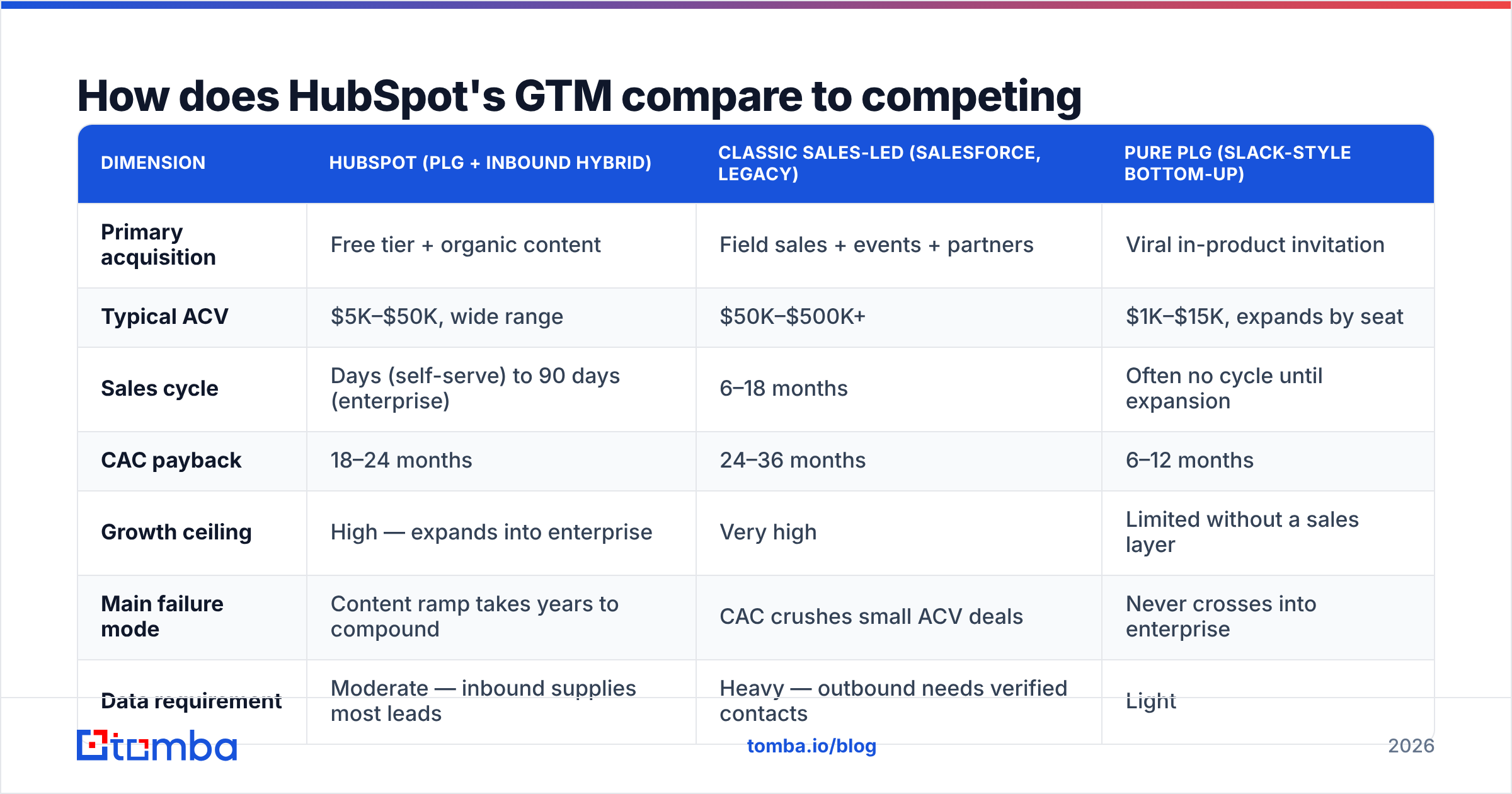
Three broad GTM archetypes compete in B2B software, and the HubSpot model is a hybrid that borrows from all of them.
| Dimension | HubSpot (PLG + inbound hybrid) | Classic sales-led (Salesforce, legacy) | Pure PLG (Slack-style bottom-up) |
|---|---|---|---|
| Primary acquisition | Free tier + organic content | Field sales + events + partners | Viral in-product invitation |
| Typical ACV | $5K–$50K, wide range | $50K–$500K+ | $1K–$15K, expands by seat |
| Sales cycle | Days (self-serve) to 90 days (enterprise) | 6–18 months | Often no cycle until expansion |
| CAC payback | 18–24 months | 24–36 months | 6–12 months |
| Growth ceiling | High — expands into enterprise | Very high | Limited without a sales layer |
| Main failure mode | Content ramp takes years to compound | CAC crushes small ACV deals | Never crosses into enterprise |
| Data requirement | Moderate — inbound supplies most leads | Heavy — outbound needs verified contacts | Light |
The honest read: HubSpot's model is expensive to start and cheap to run at scale. The content engine took roughly a decade to reach compounding returns. A company starting today cannot outspend that head start on the same keywords, which is why newer entrants win on narrow, specific queries the incumbent's broad content doesn't serve well.
If you're building a GTM motion in 2026 without a decade of content behind you, the sequence inverts. Outbound funds the early quarters while content compounds in the background. That means your contact data quality is a revenue-critical input from day one, not a nice-to-have. Enriching a target account list with verified emails and direct dials through data enrichment is the practical version of "we don't have inbound yet."
What can a small team actually copy from HubSpot?#
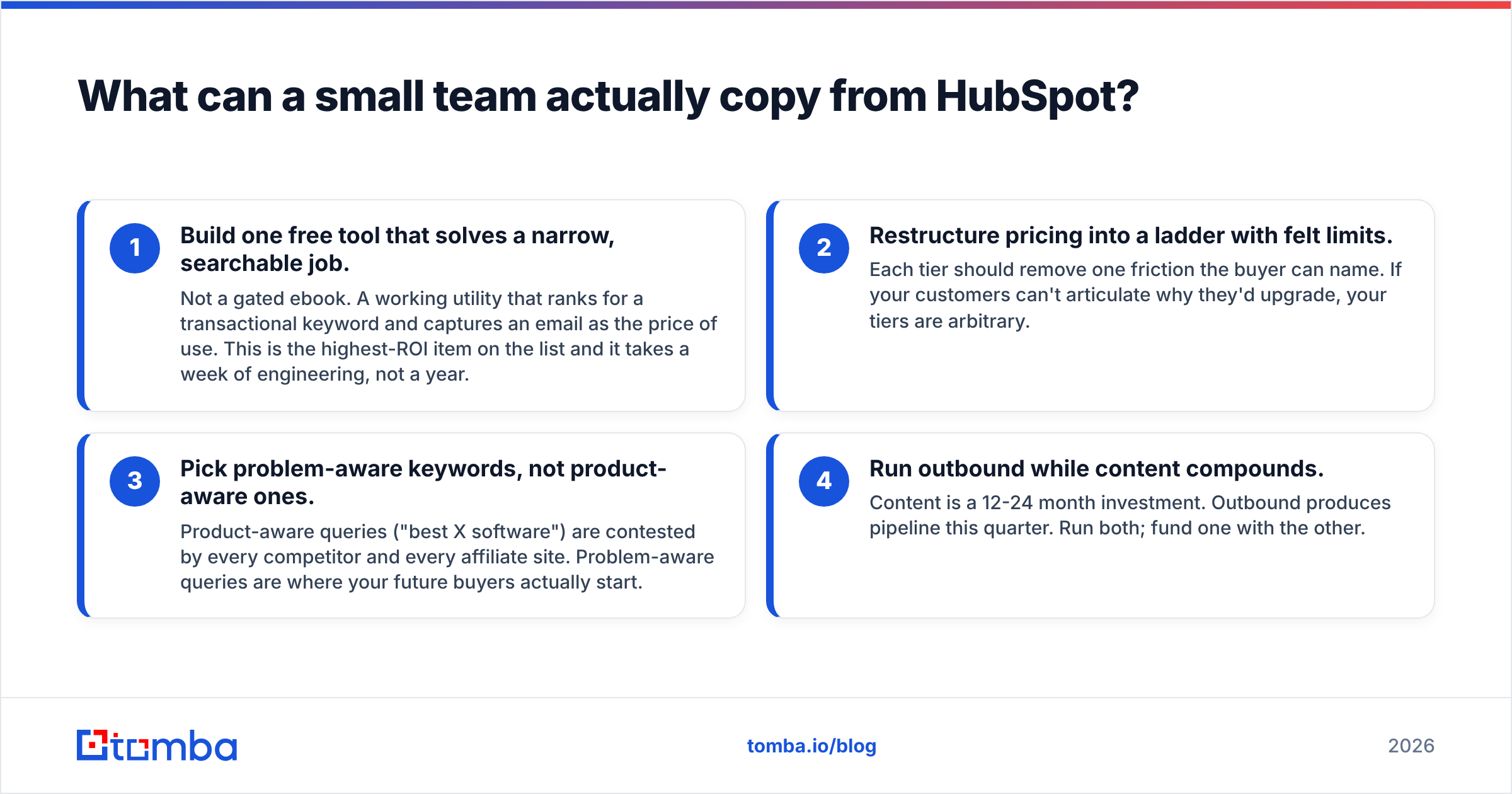
Four plays, ranked by ratio of impact to effort.
- Build one free tool that solves a narrow, searchable job. Not a gated ebook. A working utility that ranks for a transactional keyword and captures an email as the price of use. This is the highest-ROI item on the list and it takes a week of engineering, not a year.
- Restructure pricing into a ladder with felt limits. Each tier should remove one friction the buyer can name. If your customers can't articulate why they'd upgrade, your tiers are arbitrary.
- Pick problem-aware keywords, not product-aware ones. Product-aware queries ("best X software") are contested by every competitor and every affiliate site. Problem-aware queries are where your future buyers actually start.
- Run outbound while content compounds. Content is a 12-24 month investment. Outbound produces pipeline this quarter. Run both; fund one with the other.
A caveat on the fourth point: outbound in 2026 is unforgiving of bad data. Bounce rates above 3% damage domain reputation fast, and Google and Microsoft both tightened bulk-sender requirements. Verify before you send, always. The sender reputation you're protecting takes months to rebuild once it's damaged.
What are the weaknesses in the HubSpot model?#
Three, and they're worth naming because copying a strategy without its failure modes is how teams lose a year.
The content moat has thinned. AI-generated summaries and answer engines intercept a large share of informational queries before a user clicks. Broad, problem-aware content — HubSpot's core asset — is exactly the category most exposed to this. The strategy that built the company is not the strategy that would build it today.
Freemium creates a large, expensive, non-converting user base. Free users cost support and infrastructure. If the free-to-paid conversion rate slips even a point, the economics get uncomfortable fast.
Multi-hub bundling invites best-of-breed competition. Buyers who want the best sales engagement tool, the best support desk, and the best data platform will assemble a stack rather than accept a suite. Every hub competes with a specialist that does one thing better.
None of these makes the model wrong. They make it context-dependent, which is the actual lesson: HubSpot's GTM worked because it fit HubSpot's product, timing, and market. Copy the reasoning, not the artifacts.
How should you sequence your own GTM in 2026?#
Start with the segment, not the channel. HubSpot's early bet was small and mid-market businesses that couldn't afford Salesforce — a specific, underserved segment with a shared, articulable pain. Everything downstream (pricing, content topics, product simplicity, partner profile) followed from that one choice.
Then sequence: outbound for immediate pipeline and market feedback, a free tool for compounding organic capture, content for authority, partners once you have proof the product retains. Freemium last, and only if your product accumulates data. Reversing that order is the most common expensive mistake — teams launch a free tier before they know who it's for, and end up supporting thousands of users who were never going to pay.
Your first constraint will be contact data. You cannot run outbound to a segment you can't reach, and scraped or purchased lists fail verification at rates that will hurt your domain. Build the target account list first, find the right people at those accounts, verify before sending.
That's where Tomba Email Finder fits into the sequence — find verified professional emails by domain, name, or company, so your outbound layer has real addresses behind it while your content engine spends the next eighteen months compounding. Start on the free tier at 25 searches a month to test your ICP hypothesis, and check Tomba pricing when the list outgrows it. The GTM strategy is yours to design; the data underneath it just has to be right.
Related guides#
// get started
Find, verify and enrich your first contacts today
Start on the free plan with 25 searches a month, then scale when your team is ready.
Free plan · No credit card required · GDPR & CCPA
// about the author