HubSpot Lead Generation: The Complete 2026 Playbook
HubSpot gives you forms, workflows, and a CRM — but not contact data. Here's how HubSpot lead generation actually works in 2026, what it costs, and where you still need outside tools.
TL;DR
- HubSpot lead generation is strong at capturing, routing, and nurturing leads that already found you — forms, CTAs, live chat, workflows, lead scoring, and attribution all live in one CRM.
- It is weak at sourcing leads. HubSpot has no native email finder, and Breeze Intelligence enrichment credits run out fast on outbound-heavy teams.
- The free CRM is genuinely usable. Costs jump at Marketing Hub Professional ($890/mo, plus a one-time onboarding fee) and again when contact tiers escalate.
- The practical 2026 stack: HubSpot as the system of record, a dedicated data tool for contact discovery and verification, and a clean sync between them.
- Budget realistically: most teams under 10 reps get further with Starter + an external data source than with Professional and no data pipeline.
What is HubSpot lead generation, exactly?#
HubSpot lead generation is the set of tools inside HubSpot's Marketing Hub and Sales Hub that turn anonymous interest into a contact record you can work. Think of HubSpot as a restaurant's front-of-house system: it seats guests, tracks what they ordered, remembers their allergies, and tells the kitchen when to fire the next course. What it does not do is go outside and find people walking down the street.
That distinction matters more than any feature list. HubSpot's lead generation engine is fundamentally inbound-shaped. Every core primitive assumes someone arrived at your property first:
- Forms and pop-up CTAs — capture the visitor who already landed on your pricing page.
- Live chat and Breeze chatbots — qualify the visitor mid-session and book a meeting.
- Landing pages and lead flows — gate content, collect the email, drop the contact into a list.
- Lead scoring — rank captured contacts by fit and behaviour so reps work the top of the list first.
- Workflows and sequences — nurture captured contacts automatically until they're sales-ready.
- Attribution reporting — tell you which channel produced the pipeline.
Notice what's missing from that list: a way to build a list of 500 target-account decision-makers who have never heard of you. HubSpot added prospecting features (Breeze Intelligence, the Prospecting Agent, buyer intent signals) but they sit on top of a database that is not built the way a dedicated B2B contact provider's is, and they are metered by credits.
How do HubSpot's lead generation tools actually break down by tier?#
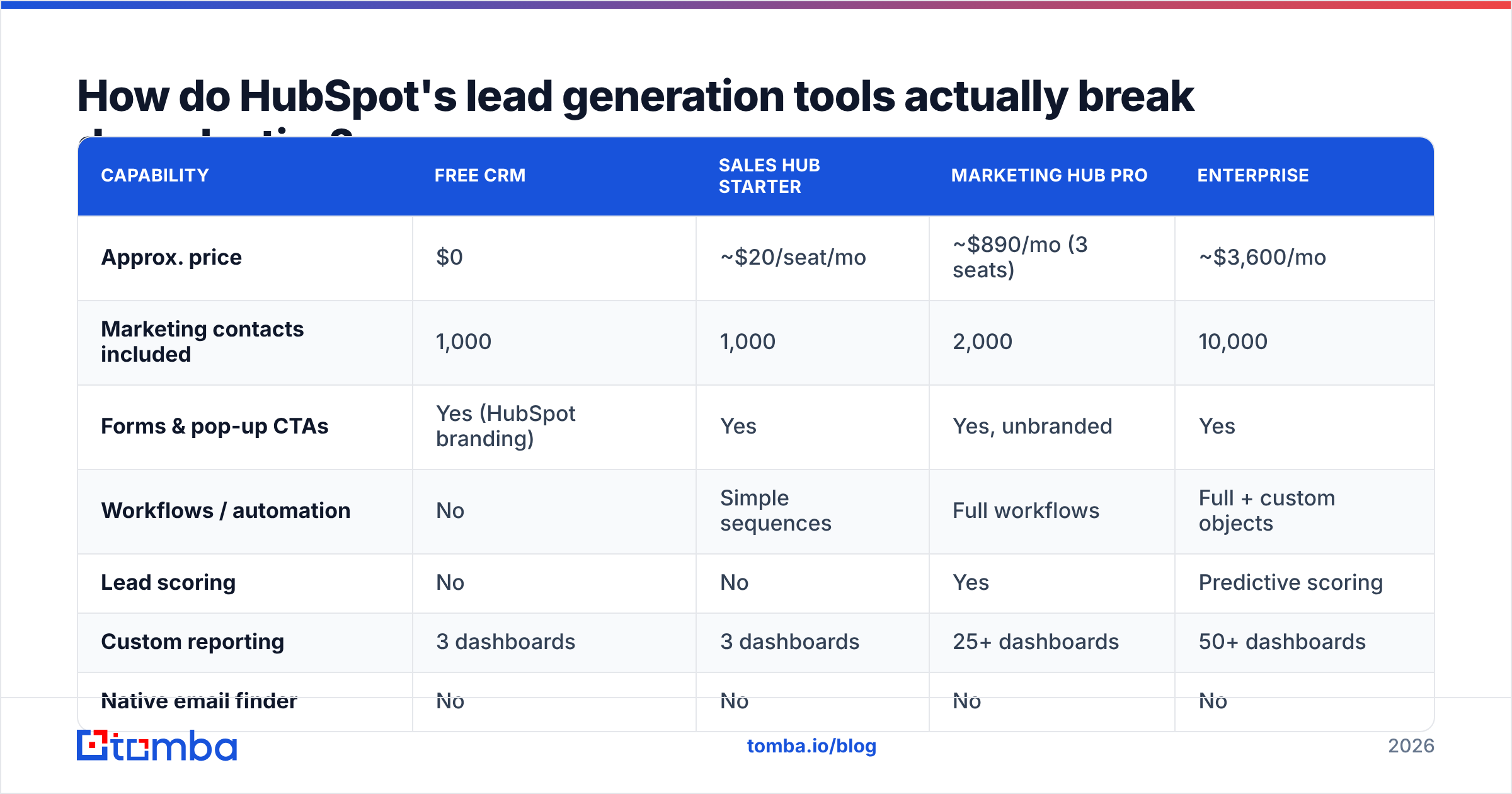
Here's where most evaluations go sideways: people compare "HubSpot" to a point solution, when HubSpot is five products with wildly different price steps. This table reflects list pricing as of 2026 — always confirm on hubspot.com/pricing before you sign, because HubSpot revises tiers frequently and seat models changed in the last two years.
| Capability | Free CRM | Sales Hub Starter | Marketing Hub Pro | Enterprise |
|---|---|---|---|---|
| Approx. price | $0 | ~$20/seat/mo | ~$890/mo (3 seats) | ~$3,600/mo |
| Marketing contacts included | 1,000 | 1,000 | 2,000 | 10,000 |
| Forms & pop-up CTAs | Yes (HubSpot branding) | Yes | Yes, unbranded | Yes |
| Workflows / automation | No | Simple sequences | Full workflows | Full + custom objects |
| Lead scoring | No | No | Yes | Predictive scoring |
| Custom reporting | 3 dashboards | 3 dashboards | 25+ dashboards | 50+ dashboards |
| Native email finder | No | No | No | No |
| Enrichment | No | Breeze credits (limited) | Breeze credits | Breeze credits |
| Onboarding fee | None | None | One-time (~$3,000) | One-time (~$7,000) |
Two lines in that table drive almost every budget surprise. The first is marketing contacts: HubSpot bills on how many contacts you actively market to, and teams routinely blow through their tier because they imported a raw list instead of marking cold records as non-marketing. The second is the onboarding fee on Professional and Enterprise, which is not optional and not always front-and-center in a first quote.

The honest read: the Free CRM and Sales Hub Starter are excellent value. The jump to Professional is where you need a real business case, because you're committing roughly $14,000 in year one before a single email is sent.
Is HubSpot enough on its own for lead generation?#
No — not if any part of your motion is outbound. HubSpot handles the management of leads brilliantly and the sourcing of them barely at all.
Run the thought experiment. Your ICP is Series B fintech companies in North America with 50-200 employees, and you want the VP of Engineering at each. HubSpot can:
- Store those contacts once you have them.
- Score, route, and sequence them.
- Report on what they did after you emailed them.
HubSpot cannot reliably tell you that the VP of Engineering at a given domain is named Priya Raman and reachable at priya.raman@company.com. Breeze Intelligence will enrich a record you already partially have — firmographics, technographics, sometimes a work email — but it's an enrichment layer priced in credits, not a discovery engine you can run 5,000 lookups through in a week without blowing the budget.
This is the structural gap. You need three things that HubSpot doesn't ship:
- Discovery — given a company domain and a role, produce candidate contacts. This is what a domain search does: point it at
stripe.com, get back the people and the email pattern the company uses. - Verification — confirm the address will actually accept mail before you send. An email verifier does SMTP-level checking, catch-all detection, and syntax/MX validation.
- Enrichment at scale — fill in missing fields across thousands of records without per-credit anxiety.
Skip verification and you'll learn about it via your bounce rate. Google and Yahoo's bulk sender requirements hold you to a spam complaint rate under 0.3%, and hard bounces above roughly 2% start damaging sender reputation in ways that take months to unwind. HubSpot will happily send to a bad list; it will not stop you.
How do you build the HubSpot inbound engine properly?#
Assuming inbound is your primary motion, here's the sequence that actually works — in the order that compounds.
1. Fix your form strategy before you build more forms. Fewer fields converts better on top-of-funnel, more fields converts better on demo requests. The common mistake is a seven-field form on an ebook. Ask for email plus one qualifying field, then enrich the rest programmatically.
2. Use progressive profiling instead of long forms. HubSpot's queued fields let a returning visitor see new questions rather than the same ones. Over three interactions you collect what a single long form would have cost you 40% of conversions to get.
3. Set up lead scoring with negative points. Most teams only score positives — pricing page visit +10, demo request +25. Add negatives: free email domain -15, student job title -20, competitor domain -50. Scoring without subtraction just ranks noisy contacts higher.
4. Route on fit, not speed alone. Speed-to-lead matters (Harvard Business Review's classic study found response within an hour makes qualification ~7x more likely), but routing every inbound to the fastest-clicking rep destroys territory logic. Use HubSpot's rotation with fit criteria as the primary filter.
5. Separate marketing contacts from everything else. Set the "non-marketing" flag by default on imports and only promote records when they enter an active nurture. This single setting is the difference between a $890 and a $2,000 monthly invoice at scale.
6. Instrument attribution before you scale spend. Multi-touch attribution is Professional-and-up. If you're on Starter and spending on paid, at minimum tag every source with consistent UTMs so the first-touch data isn't garbage when you upgrade.
What's the right stack around HubSpot in 2026?#
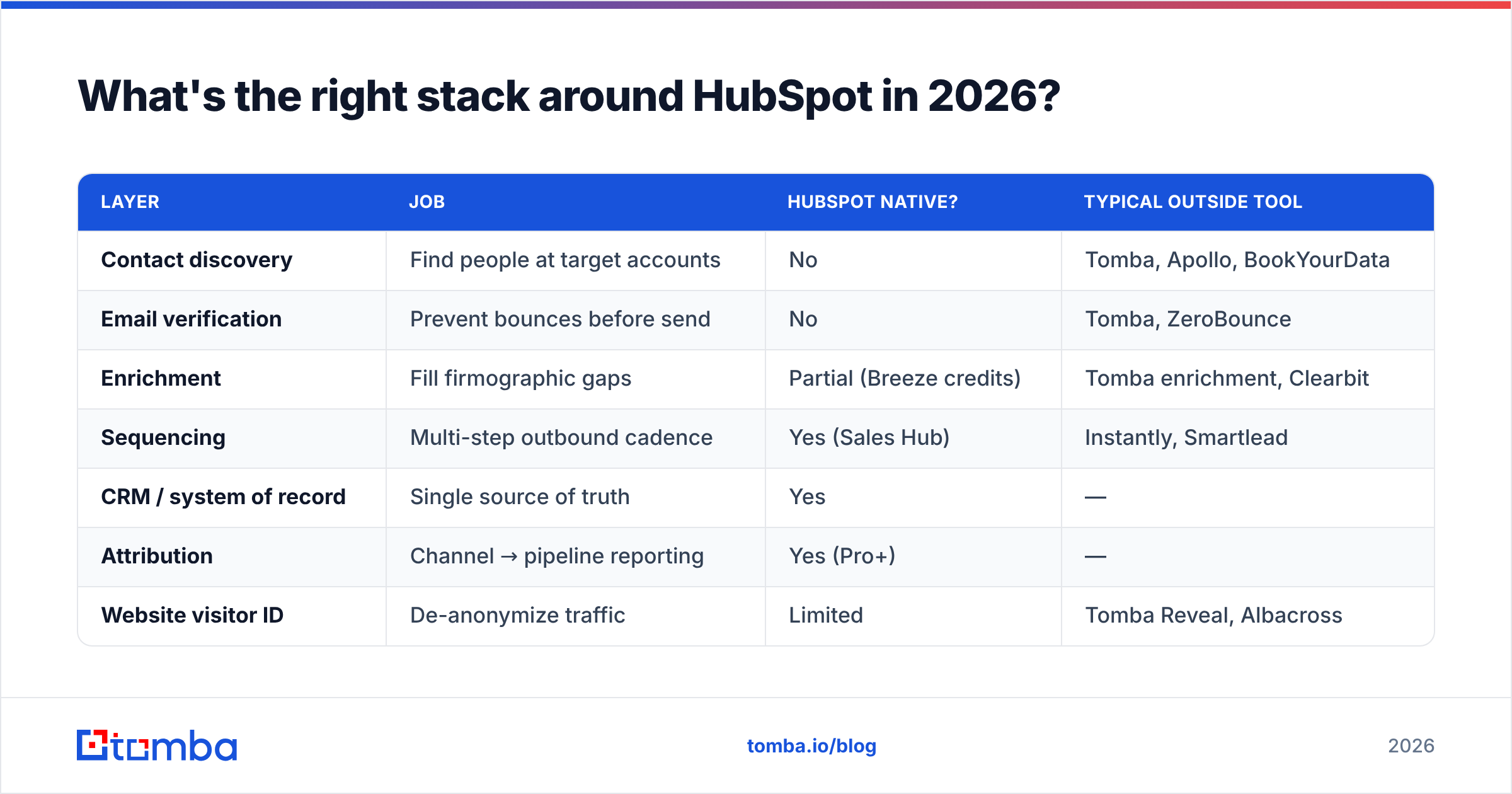
The pattern that shows up across well-run revenue teams: HubSpot is the system of record, and specialist tools feed it. Nobody serious runs HubSpot as a monolith.
| Layer | Job | HubSpot native? | Typical outside tool |
|---|---|---|---|
| Contact discovery | Find people at target accounts | No | Tomba, Apollo, BookYourData |
| Email verification | Prevent bounces before send | No | Tomba, ZeroBounce |
| Enrichment | Fill firmographic gaps | Partial (Breeze credits) | Tomba enrichment, Clearbit |
| Sequencing | Multi-step outbound cadence | Yes (Sales Hub) | Instantly, Smartlead |
| CRM / system of record | Single source of truth | Yes | — |
| Attribution | Channel → pipeline reporting | Yes (Pro+) | — |
| Website visitor ID | De-anonymize traffic | Limited | Tomba Reveal, Albacross |
A few notes on choosing within the discovery row, since that's the decision with the most money attached. Apollo bundles a database with sequencing, which is convenient but means you're paying for a sequencer you may already have in Sales Hub. BookYourData sells prepaid, pay-as-you-go B2B lists with a bounce guarantee — a genuinely good fit if you want a one-time list purchase rather than a subscription, and their per-record model avoids the "unused credits expire" problem. Tomba sits at the API-and-verification end: find emails by domain or name, verify them, and push clean records into HubSpot without renting a second CRM.

Cost-wise, the discovery layer is cheap relative to HubSpot itself. Tomba pricing starts free at 25 searches/month, with Starter at $49/mo, Growth at $99/mo, and Pro at $249/mo. Against a $890/mo Marketing Hub Professional bill, adding a proper data layer for $49-$99 is not the line item to agonize over — the agonizing should happen over whether you need Professional at all.
How do you connect outside data to HubSpot cleanly?#
Three approaches, in increasing order of effort and control.
Native integration. The HubSpot integration route is the fastest path: authenticate once, map fields, and found contacts land as HubSpot records with source attribution intact. Good for teams without engineering time.
Automation middleware. Zapier or Make sit between your data tool and HubSpot, letting you add conditional logic — only create the contact if verification status is valid, only assign to a rep if company size exceeds 50. Slower per record, far more control.
Direct API. For volume, hit the Tomba API and HubSpot's CRM API in your own job. This is the only approach that scales cleanly past ~10,000 records/month and the only one where you control retry logic and dedupe.
Whichever you pick, enforce three rules at the boundary:
- Verify before insert. Never write an unverified address into HubSpot. Bad records pollute your lists forever and quietly cost you money at every contact-tier renewal.
- Deduplicate on email, not name. HubSpot dedupes on email by default, but if you're inserting via API with a company-record hop, name-based matching will create doubles.
- Set lifecycle stage explicitly. Contacts arriving via outbound should not enter as MQLs. Mislabelling breaks your funnel reporting and your marketing qualified lead definitions within a quarter.
What do the numbers actually look like?#
Benchmarks vary wildly by segment, so treat these as directional rather than targets. Across B2B SaaS, a well-optimised landing page converts visitors to leads in the 2-5% range; gated content sits higher at 10-25% but produces far lower-intent contacts. Demo request forms convert at 1-2% of total traffic but produce leads worth 10-20x a content download.
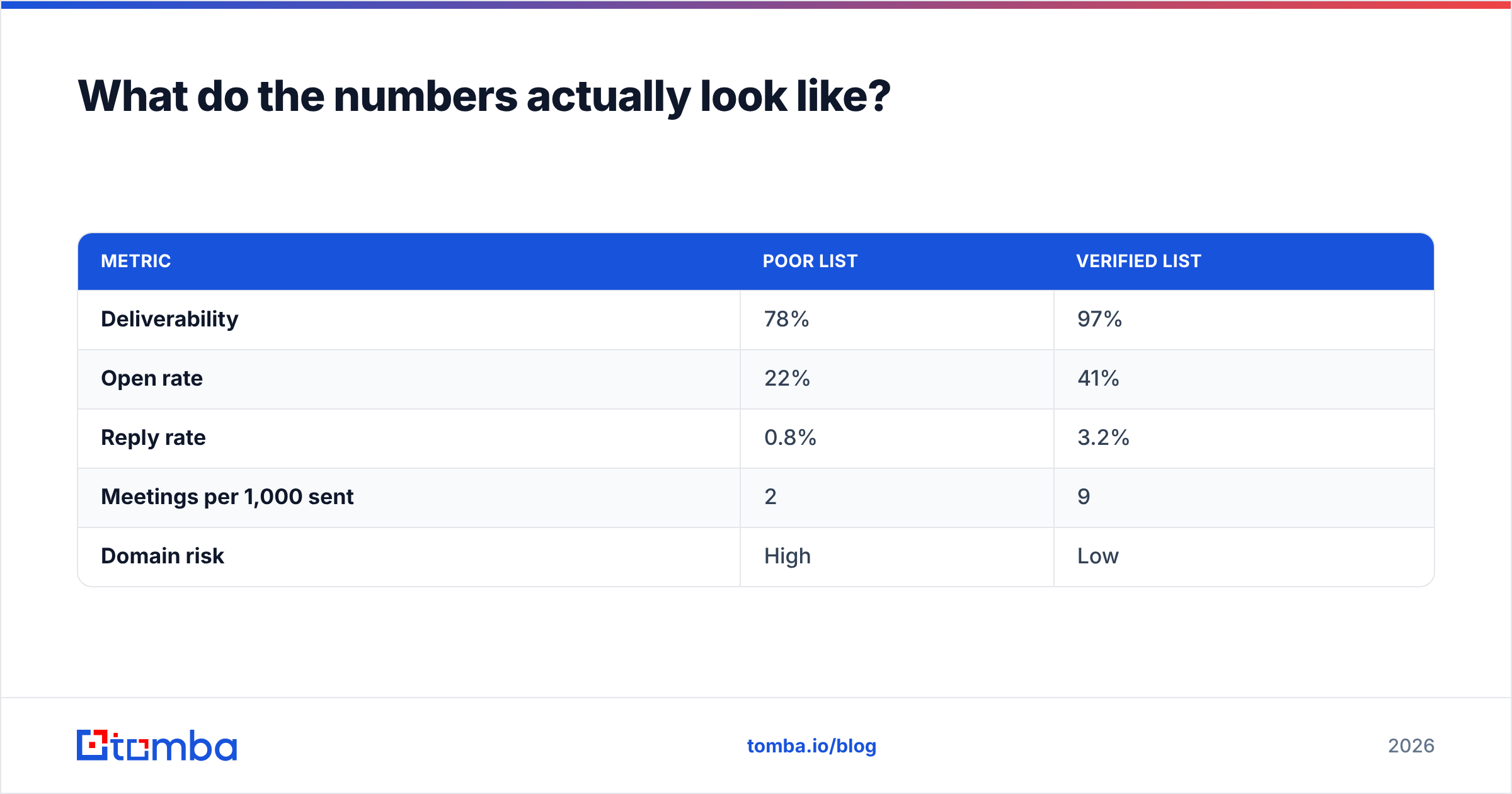
On the outbound side, the arithmetic is brutal and worth writing down before you buy anything:
| Metric | Poor list | Verified list |
|---|---|---|
| Deliverability | 78% | 97% |
| Open rate | 22% | 41% |
| Reply rate | 0.8% | 3.2% |
| Meetings per 1,000 sent | 2 | 9 |
| Domain risk | High | Low |
The delta between those columns is almost entirely data quality, not copy. Teams spend weeks A/B testing subject lines while sending to a list where one in five addresses doesn't exist. Fix the denominator first.
For a sanity check on whether your current list is the problem, run a sample of 200 addresses through a free email checker before your next campaign. If more than 10% come back invalid or risky, no amount of HubSpot workflow tuning will save the campaign.
When should you not use HubSpot for lead generation?#
Three honest cases where HubSpot is the wrong anchor:
- Pure outbound, small team. If 90% of your pipeline comes from cold outreach and you have four reps, HubSpot Free CRM plus a dedicated data tool and a sending platform beats paying for Marketing Hub features you'll never open.
- Product-led growth with heavy in-app data. If your best signals live in product usage, a warehouse-native stack often serves you better than pushing everything into HubSpot's contact properties.
- You're at Salesforce scale already. Migrating a mature Salesforce org to HubSpot for lead gen features rarely pencils out. Check independent reviews on G2 for how those migrations actually go — the pattern is that teams underestimate the custom-object work by a factor of two or three.
Where HubSpot genuinely wins: mid-market teams running real content marketing, with 5-50 people who need marketing and sales looking at the same record, and who value one login over best-of-breed everything. That's a large and legitimate group. Just don't buy it expecting a contact database.
The bottom line#
HubSpot lead generation is a capture-and-nurture system, not a sourcing system. Buy it for the CRM, the workflows, and the reporting — then accept that the top of your funnel needs its own tool.
Start where the leverage is highest: get your contact data clean before you scale spend on anything else. The Tomba Email Finder finds and verifies professional email addresses by domain, name, or company, and pushes them into HubSpot with verification status attached — so what lands in your CRM is worth marketing to. The free tier gives you 25 searches a month to test it against your own target list before you commit to anything.
Run a hundred of your target accounts through it, compare the result to what Breeze Intelligence returns on the same set, and let the hit rate decide.
Related guides#
// get started
Find, verify and enrich your first contacts today
Start on the free plan with 25 searches a month, then scale when your team is ready.
Free plan · No credit card required · GDPR & CCPA
// about the author