HubSpot vs Insightly (2026): Which CRM Actually Wins?
HubSpot and Insightly solve different problems at wildly different prices. We break down pricing traps, project management, reporting depth, and which CRM fits your revenue team in 2026.
HubSpot vs Insightly is a choice between two very different tools. One is built to run marketing. The other is built to deliver client work. This guide compares pricing, pipeline, project tracking, and reporting for 2026, then names a pick for each team size.
TL;DR
- HubSpot wins on marketing depth and ecosystem. If you grow through content, forms, and lifecycle email, Insightly has no answer to HubSpot Marketing Hub.
- Insightly wins on project delivery and price predictability. It adds a real project module to the CRM. Closed-won deals become tracked projects, with no second tool.
- The pricing gap is huge at the top and narrow at the bottom. Insightly Plus starts at $29/user/mo. HubSpot Sales Hub Professional starts at $100/seat/mo, plus a required onboarding fee that has run $1,500 for years.
- Neither tool finds you contacts. Both are systems of record. You still need a separate source for verified emails, phone numbers, and enrichment.
- Our pick: under 20 seats with services delivery → Insightly. Marketing-led B2B SaaS with a content engine → HubSpot. Everything else: pick on reporting needs, not feature lists.
What are HubSpot and Insightly, actually?#
They started at opposite ends of the revenue process. It still shows.
HubSpot launched as an inbound marketing platform in 2006 and grew a CRM underneath it. The CRM existed to give the marketing tools somewhere to write. That history explains the product. The data model is contact-centric. Lifecycle stages sit in the core object. The free tier is genuinely usable because it feeds HubSpot's own funnel.
Insightly began as a CRM for small firms that deliver work after the sale: agencies, consultancies, IT services, construction, professional services. Marketing polish was never the point. The Projects module is. Mark an opportunity won and it becomes a project with milestones, tasks, and assignees inside the same record graph.
Think of it like buying a vehicle. HubSpot is a loaded sedan with a dealer on every corner. It drives well, costs a lot to option up, and any shop can service it. Insightly is a work truck with the flatbed already welded on. If you haul things, the flatbed beats the leather seats.
Both sit in the same CRM category on G2. They get compared often because they overlap in the 10–100 employee band. Outside that range, the comparison mostly dissolves.
HubSpot vs Insightly pricing: what does each CRM cost in 2026?#
Price is where most teams actually decide, so start here.
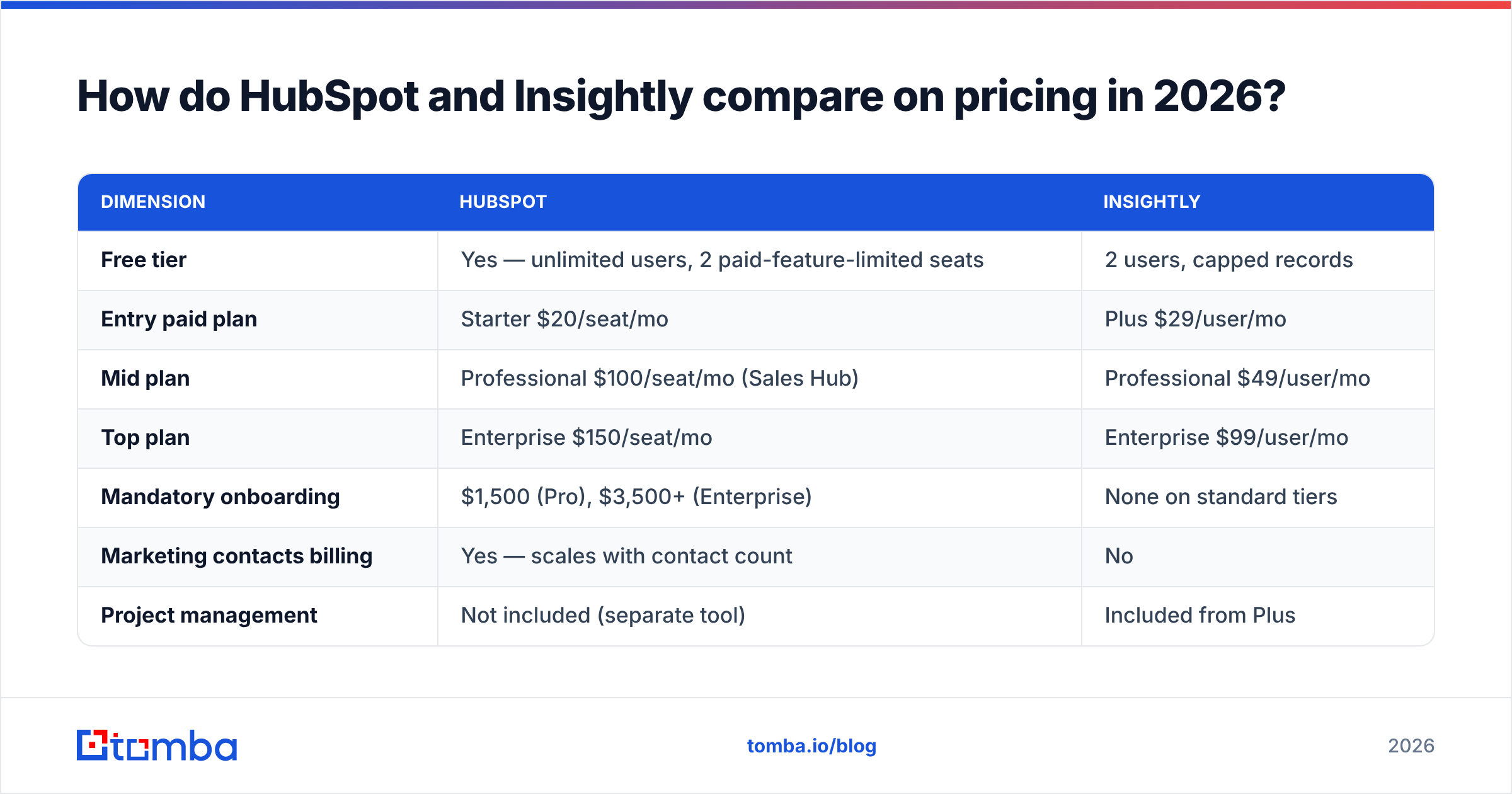
| Dimension | HubSpot | Insightly |
|---|---|---|
| Free tier | Yes — unlimited users, 2 paid-feature-limited seats | 2 users, capped records |
| Entry paid plan | Starter $20/seat/mo | Plus $29/user/mo |
| Mid plan | Professional $100/seat/mo (Sales Hub) | Professional $49/user/mo |
| Top plan | Enterprise $150/seat/mo | Enterprise $99/user/mo |
| Mandatory onboarding | $1,500 (Pro), $3,500+ (Enterprise) | None on standard tiers |
| Marketing contacts billing | Yes — scales with contact count | No |
| Project management | Not included (separate tool) | Included from Plus |
| Custom objects | Enterprise only | Professional and up |
| Workflow automation | Professional and up | Plus and up |
| Annual commitment discount | ~10% | ~10–15% |
The numbers hide the real trap. HubSpot bills marketing contacts separately from seats. Five reps on Sales Hub Professional pay $500/mo for seats. Attach Marketing Hub Professional, cross 10,000 marketing contacts, and you add several hundred dollars a month on top. Teams budget for the seat line. The contact line surprises them eight months later.
Insightly's pricing is boring in the good way. Per user, per month, with the project module included from the first paid tier. A 12-person services firm on Insightly Professional pays $588/mo and gets CRM plus project delivery. The same setup on HubSpot, Sales Hub Pro plus a project tool like Asana, lands near $1,400/mo before onboarding.
HubSpot earns the premium in one case. If you run paid ads, gated content, and nurture sequences, its marketing automation replaces two or three other subscriptions. If you do not, you are paying for an engine you never start.
Which CRM handles sales pipeline better?#
HubSpot, by a clear margin. But the gap is narrower than the price difference suggests.
HubSpot's deal pipeline is the more polished object. You get multiple pipelines per team, stage automation that fires on entry and exit, required fields per stage, and a forecast view with weighted probability. Sequences (Professional and up) handle multi-step outreach with task reminders. The meeting scheduler is the best of any mid-market CRM.
Insightly's opportunity object is competent and plain. Pipelines, stages, probability, and a decent Kanban view. What it lacks is automation. Workflow rules exist, but they are simpler and slower to set up than HubSpot's visual builder. There is no native sequencing engine of the same caliber. Most Insightly teams run outreach from a dedicated tool and sync back.
Here is what neither tool does: fill your pipeline. Both are containers. If your reps hunt contacts on LinkedIn and type addresses into records by hand, the CRM choice is the least of your problems. A dedicated email finder feeding verified contacts into either system moves more revenue than any pipeline-stage setup.
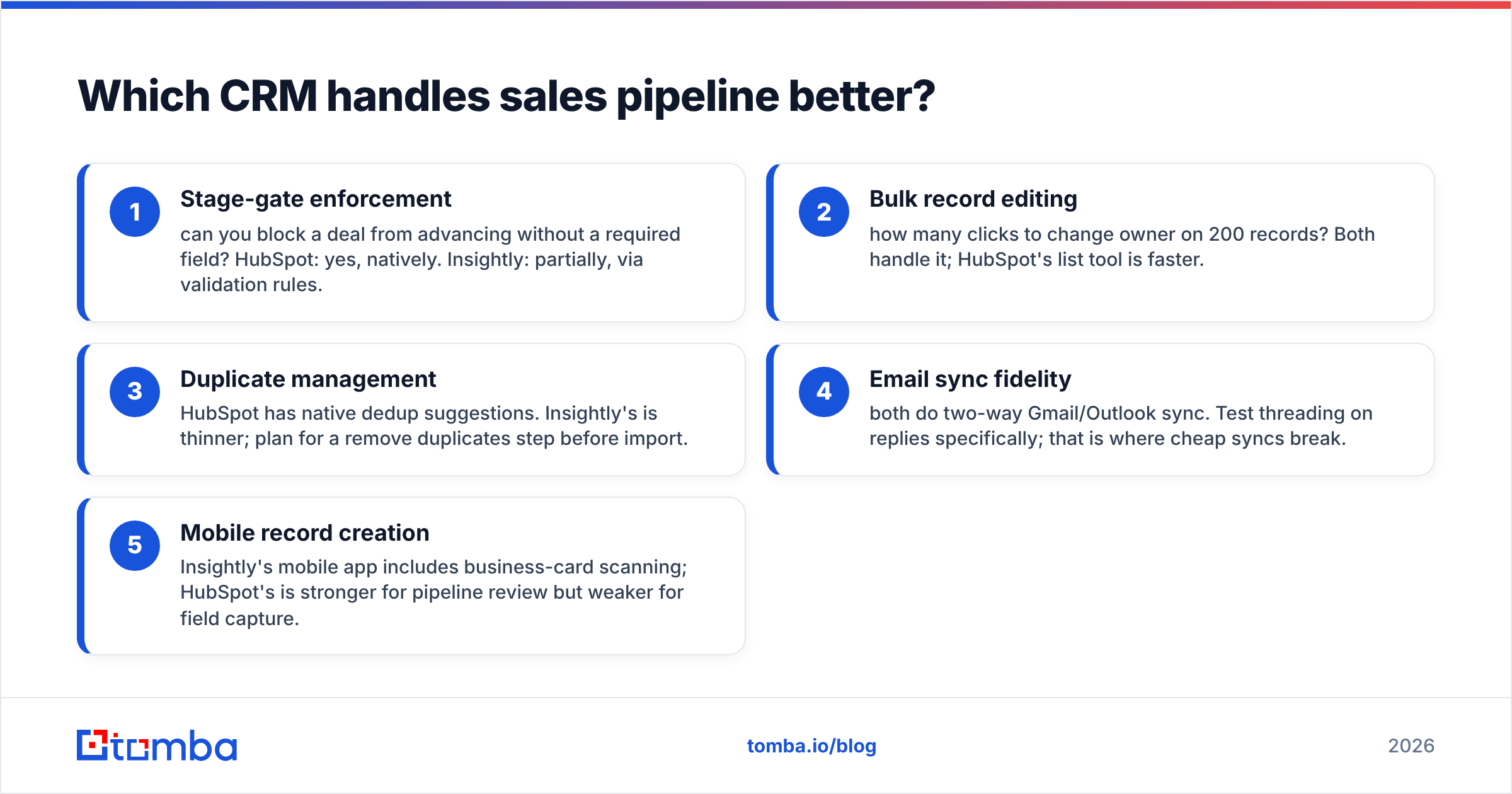
Five things to test in a trial, in priority order:
- Stage-gate enforcement — can you block a deal from advancing without a required field? HubSpot: yes, natively. Insightly: partly, through validation rules.
- Bulk record editing — how many clicks to change the owner on 200 records? Both handle it. HubSpot's list tool is faster.
- Duplicate management — HubSpot suggests duplicates natively. Insightly's tooling is thinner, so plan a remove duplicates step before import.
- Email sync fidelity — both do two-way Gmail and Outlook sync. Test threading on replies. That is where cheap syncs break.
- Mobile record creation — Insightly's app scans business cards. HubSpot's app is stronger for pipeline review and weaker for field capture.
Is Insightly's project management worth switching for?#
If you deliver work after the sale, yes. If you sell self-serve software, no.
This is Insightly's single strongest argument. It is why the product survives against a rival with 40x the marketing budget. When an opportunity closes, Insightly turns it into a Project that inherits the contact, organization, and opportunity links. You then get milestones, task dependencies, assignees, and a delivery pipeline that mirrors the sales one.
For an agency, the account manager sees the Acme Corp website redesign in one record. The $45,000 closed deal and the 34 delivery tasks sit together. No Zapier bridge. No duplicate client list. No standup argument about which system holds the real contact.
HubSpot has no equivalent. Its Projects feature inside Marketing Hub is a checklist for campaign launches, not a delivery system. HubSpot teams doing client work run Asana, Monday, ClickUp, or Jira alongside it. That works, but it is another subscription, another sync, and another home for your client data.
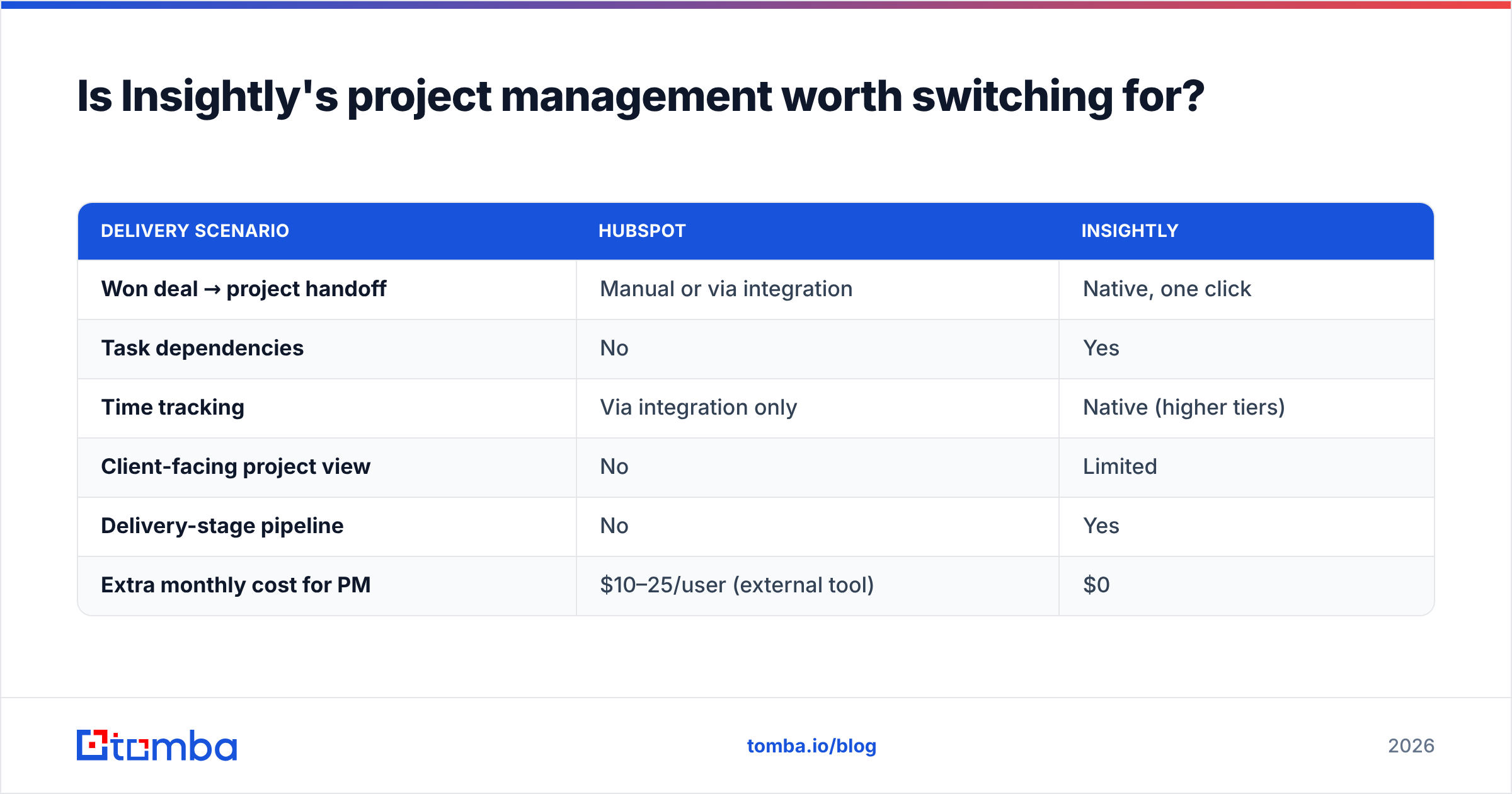
| Delivery scenario | HubSpot | Insightly |
|---|---|---|
| Won deal → project handoff | Manual or via integration | Native, one click |
| Task dependencies | No | Yes |
| Time tracking | Via integration only | Native (higher tiers) |
| Client-facing project view | No | Limited |
| Delivery-stage pipeline | No | Yes |
| Extra monthly cost for PM | $10–25/user (external tool) | $0 |
One honest caveat. Insightly's project module is adequate, not excellent. If your delivery process needs Gantt charts, resource capacity planning, or sprint boards, you will outgrow it. At that point its main advantage is gone and you should re-evaluate.
Which one reports better on revenue?#
HubSpot, decisively. At the Enterprise tier it is not close.
HubSpot's custom report builder joins across objects: contacts, companies, deals, tickets, custom objects, and marketing events. You also get calculated properties and cross-object filters. Attribution reporting in Marketing Hub Enterprise ties closed revenue back to first touch, last touch, and multi-touch models. Ask which channel produced last quarter's closed pipeline, and HubSpot answers it in the UI.
Insightly's reporting is fine for operational questions and thin for strategic ones. You get dashboards, pipeline reports, activity summaries, and a report builder that handles single-object queries well. Cross-object analysis means exporting, or paying for the Insightly BI add-on on a separate analytics layer.
For a revenue operations team that lives in dashboards, this alone justifies HubSpot's price. For a 15-person firm where the owner just wants to know what closes this month, Insightly's reports are enough. They also load faster.

What about data quality and contact enrichment?#
Both platforms decay the same way. It is the failure mode nobody budgets for.
CRMs rot from the edges. In B2B, roughly 20–30% of contacts change jobs each year. Email addresses go dead. Phone numbers get reassigned. Company records go stale after acquisitions. Neither HubSpot nor Insightly fixes this on its own. HubSpot sells Breeze Intelligence (formerly Clearbit) enrichment as a credit-based add-on. Insightly has no first-party enrichment and leans on integrations.
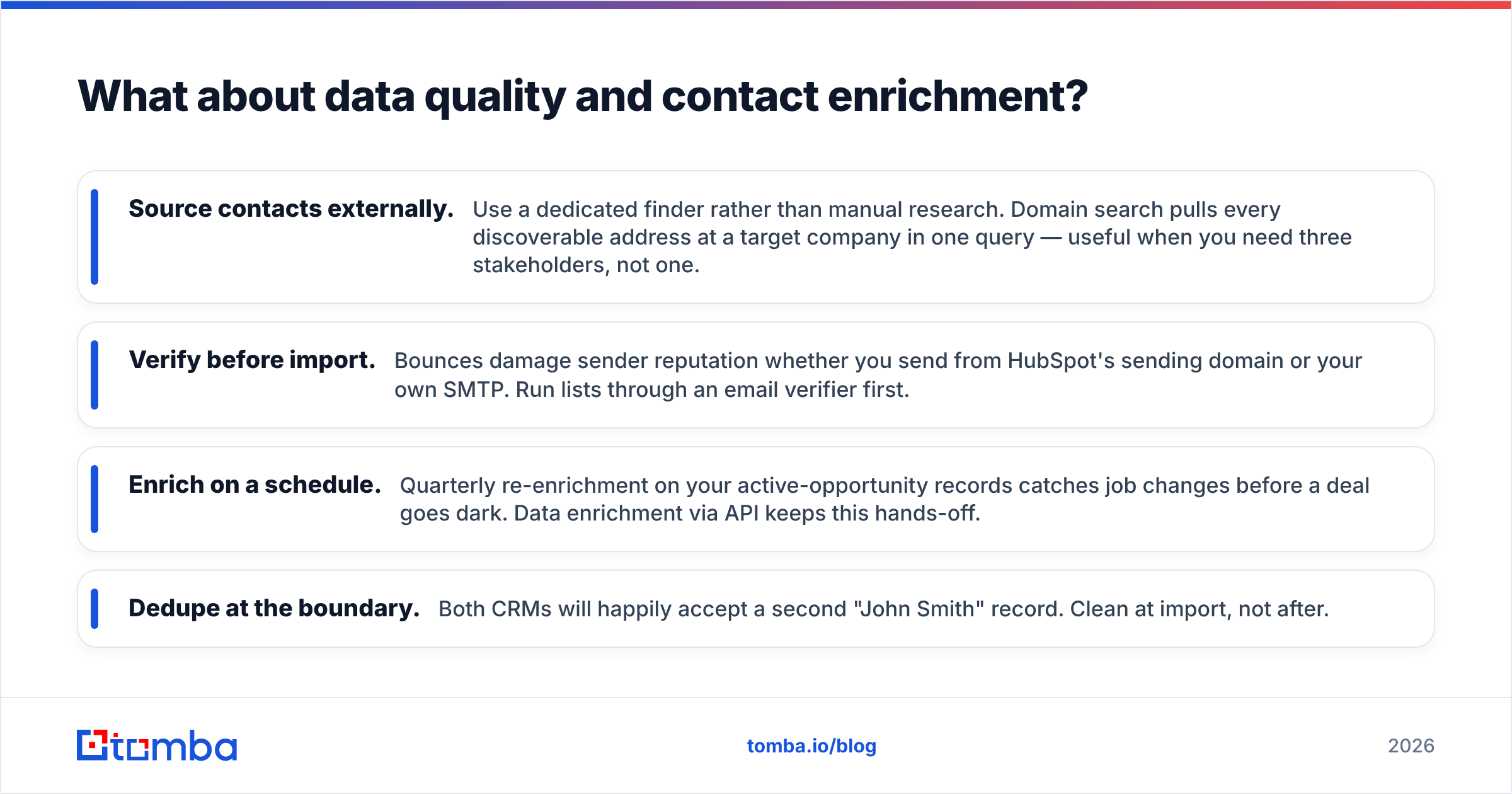
The practical setup for either CRM:
- Source contacts externally. Use a dedicated finder instead of manual research. Domain search pulls every discoverable address at a target company in one query. That helps when you need three stakeholders, not one.
- Verify before import. Bounces damage your sender reputation, whether you send from HubSpot's domain or your own SMTP. Run lists through an email verifier first.
- Enrich on a schedule. Re-enrich your open opportunities each quarter. You catch job changes before a deal goes dark. Data enrichment via API keeps this hands-off.
- Dedupe at the boundary. Both CRMs will happily accept a second John Smith record. Clean at import, not after.
HubSpot's edge here is that enrichment is native and billed in-platform. The downside is cost. Per-credit CRM enrichment usually runs higher than a standalone provider at the same volume, and you are locked to one data source. Insightly forces you to bring your own. That is more setup work, but it is usually cheaper and more accurate.
Which should you choose in 2026?#
Match the tool to the shape of your revenue motion, not the feature count. The HubSpot vs Insightly call gets easy once you name your bottleneck.
Choose HubSpot if:
- Marketing generates most of your pipeline through content, ads, or events
- You need attribution reporting that survives board scrutiny
- You have budget for the seat cost and the marketing-contacts line
- Your team is 20+ and you want an admin-friendly platform with a large partner ecosystem
- You want one vendor for marketing, sales, service, and CMS
Choose Insightly if:
- You sell projects or retainers and need delivery tracked against the deal
- Predictable per-user pricing matters more than automation depth
- Your team is under 25 people and does not need cross-object reporting
- You already have an outbound tool and a marketing platform you like
- The mandatory HubSpot onboarding fee is a genuine blocker
Choose neither if: your real problem is an empty pipeline. A better CRM does not create prospects. Fix sourcing first. Then the CRM debate becomes a preference question instead of a survival one.
One more factor: migration cost runs in both directions. HubSpot's import tooling and partner network make moving in easy. Moving out is tedious, because workflows, custom properties, and marketing assets do not port. Insightly's data model is simpler and exports cleanly. If you expect to reassess in two years, price that in.
Check current pricing on each vendor's own page before you commit. Both change tiers more often than review sites update. Then read Capterra reviews for the complaints that sales demos skip. HubSpot's contact-tier surprises and Insightly's reporting ceiling both show up there consistently.
How do you fill either CRM with contacts that actually convert?#
Whichever CRM you land on, it starts empty. What you feed it decides everything downstream.
Tomba's Email Finder returns verified professional email addresses by name, company, or domain. Every result carries a confidence score, so you know what you are importing before it hits your CRM. Pull a full company roster with domain search, verify in bulk, then push clean records into HubSpot or Insightly through the API or a Sheets export. The free tier gives you 25 searches a month, so you can test accuracy against contacts you already trust. Paid plans start at $49/mo. See Tomba pricing for volume tiers, or start free and check the data against your existing list before you spend anything.
Related guides#
// get started
Find, verify and enrich your first contacts today
Start on the free plan with 25 searches a month, then scale when your team is ready.
Free plan · No credit card required · GDPR & CCPA
// about the author