HubSpot vs Nimble: Which CRM Actually Fits Your Sales Team
HubSpot is a full GTM platform that gets expensive fast. Nimble is a relationship CRM that stays cheap and simple. Here is which one wins for small B2B sales teams in 2026 — and where both leave gaps.
TL;DR
- HubSpot is a full go-to-market platform (CRM + marketing + service + quotes + reporting). It is free to start and expensive to scale, because almost everything meaningful sits behind per-seat Professional tiers.
- Nimble is a relationship-first CRM built around your inbox, calendar, and social profiles. One plan, one price, no tier ladder — but it stops short of deep automation and pipeline reporting.
- Pick HubSpot if you plan to run marketing and sales on one system and you can absorb $100+/seat/month within 18 months. Pick Nimble if you are a 1–10 person team whose deals come from relationships, not from sequences.
- Neither tool is a data vendor. Both start with an empty database, and both charge you for enrichment credits you will burn faster than you expect.
- The cheapest reliable setup for most small B2B teams: a lean CRM + a dedicated email finder feeding it verified contacts.
What are HubSpot and Nimble, actually?#
Think of it like buying a vehicle. HubSpot is a cargo van — it hauls everything (marketing emails, ticketing, quotes, forecasting), and you pay for the fuel whether the back is full or not. Nimble is a well-made compact car — it does the daily commute cleanly, costs a fraction to run, and will never move a pallet.
Technically:
- HubSpot started as inbound marketing software and grew into a five-hub platform. The CRM object model (contacts, companies, deals, tickets, custom objects) is genuinely good, and the free tier is the most generous in the category. Revenue comes from seat upgrades on Sales Hub and Marketing Hub.
- Nimble started as a social CRM from Jon Ferrara, the co-founder of GoldMine. Its core idea is that a contact record should assemble itself from your email, calendar, and public web profiles instead of being typed in by hand.
- HubSpot's center of gravity is the pipeline and the campaign. You live in deal stages, workflows, and dashboards.
- Nimble's center of gravity is the person. You live in the contact record, the "Today" page, and the browser extension that overlays profile data while you browse LinkedIn or a company site.
- Both are "CRM + light enrichment" — neither is a prospecting database. Data still has to come from somewhere.
That last point is where most comparison posts stop and where most buying mistakes start.
How do HubSpot and Nimble compare feature by feature?#
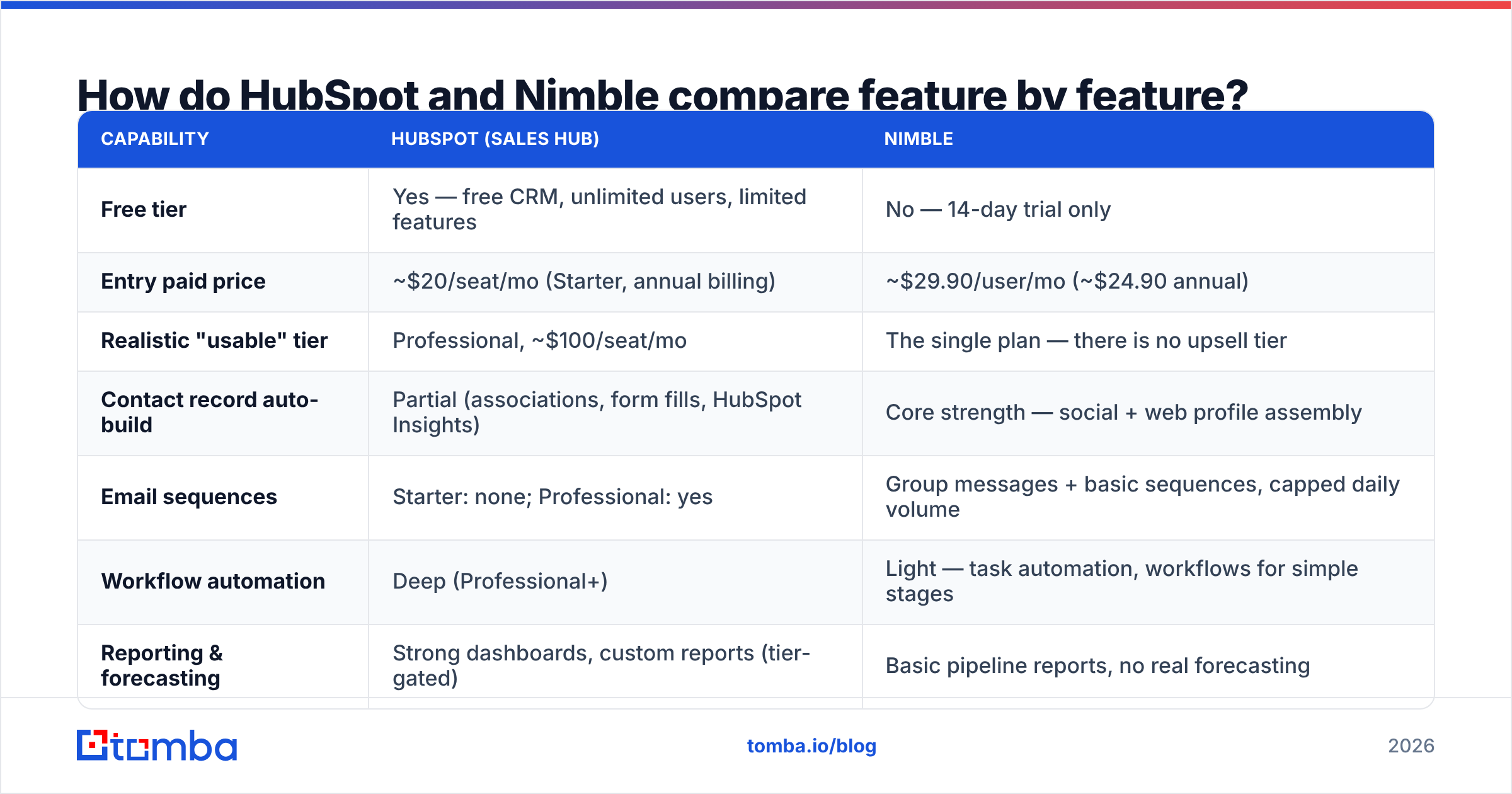
| Capability | HubSpot (Sales Hub) | Nimble |
|---|---|---|
| Free tier | Yes — free CRM, unlimited users, limited features | No — 14-day trial only |
| Entry paid price | ~$20/seat/mo (Starter, annual billing) | |
| Realistic "usable" tier | Professional, ~$100/seat/mo | The single plan — there is no upsell tier |
| Contact record auto-build | Partial (associations, form fills, HubSpot Insights) | Core strength — social + web profile assembly |
| Email sequences | Starter: none; Professional: yes | Group messages + basic sequences, capped daily volume |
| Workflow automation | Deep (Professional+) | Light — task automation, workflows for simple stages |
| Reporting & forecasting | Strong dashboards, custom reports (tier-gated) | Basic pipeline reports, no real forecasting |
| Native marketing suite | Yes (Marketing Hub, separate cost) | No |
| Browser extension | Yes | Yes — arguably the best part of the product |
| Storage / attachments | Generous | 2 GB/user typical |
| API + integrations | 1,500+ app marketplace, well-documented API | ~100 integrations plus Zapier |
| Best for | Teams running marketing + sales on one platform | Solo founders, consultancies, relationship-led sellers |
Prices and packaging change; check both vendors' pricing pages before you sign. The shape of the difference is stable though: HubSpot sells you a platform and charges by seat and by tier, Nimble sells you one product at one price.
Is HubSpot worth it if you only need a CRM?#
Short answer: no, unless you use the free tier or you know marketing is coming.
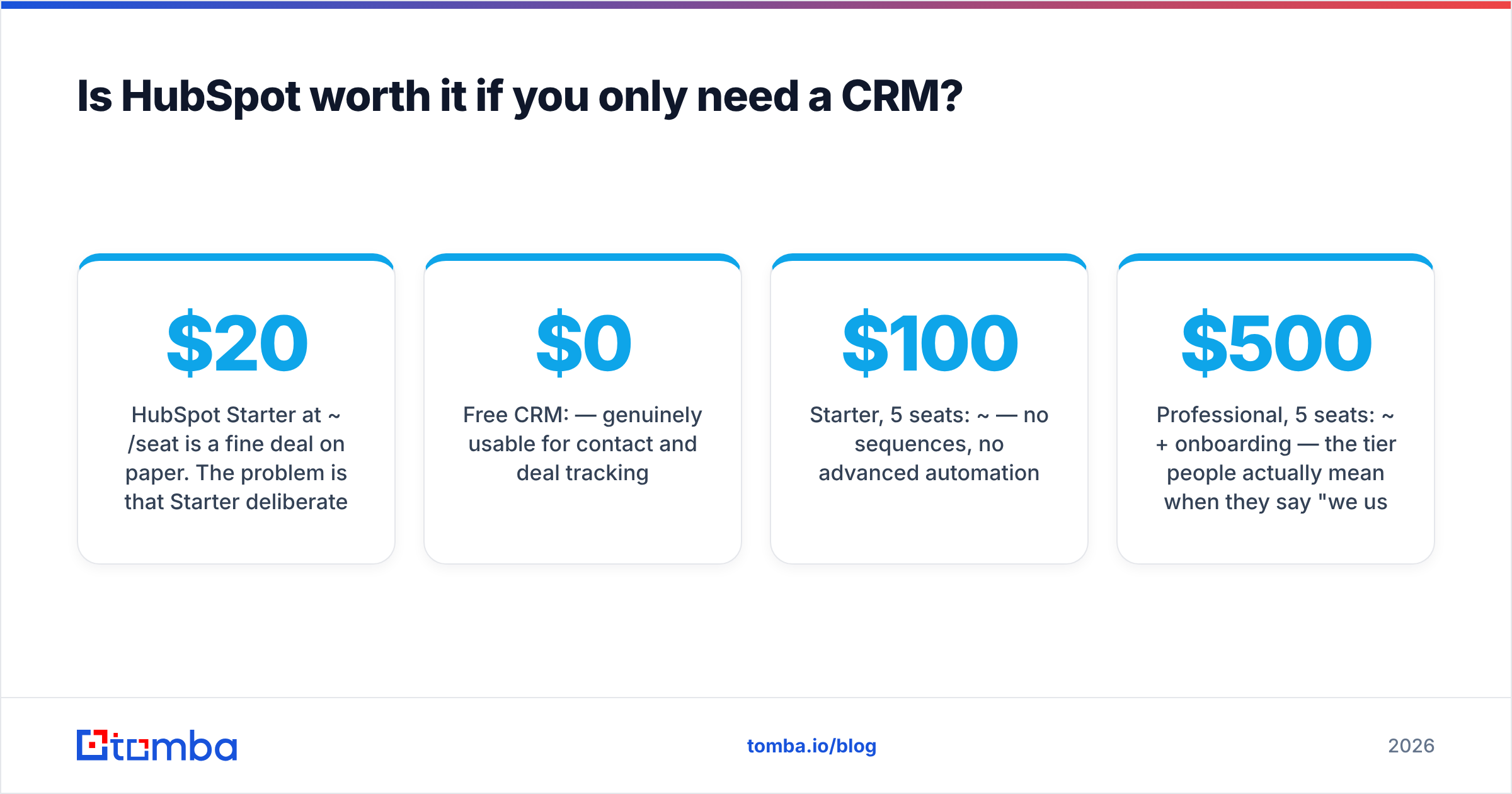
HubSpot Starter at ~$20/seat is a fine deal on paper. The problem is that Starter deliberately omits the things sales teams ask for within the first quarter: sequences, custom reporting, deal stage automation, required fields, and multiple pipelines. The upgrade path from Starter to Professional is roughly a 5x price jump, and Professional has a minimum seat commitment plus a one-time onboarding fee in most regions.
Run the math for a five-person team:
- Free CRM: $0 — genuinely usable for contact and deal tracking.
- Starter, 5 seats: ~$100/mo — no sequences, no advanced automation.
- Professional, 5 seats: ~$500/mo + onboarding — the tier people actually mean when they say "we use HubSpot."
- Add Marketing Hub Professional: another ~$800+/mo depending on contact tier.
That is not a criticism of the product. HubSpot at Professional is excellent, and its G2 category standing reflects that. It is a criticism of buying HubSpot as just a CRM. If you are not going to use workflows, campaigns, and attribution reporting, you are paying platform prices for an address book.
The honest counter-argument: HubSpot's free tier is the best free CRM available, full stop. If you are pre-revenue or pre-process, starting free at HubSpot and never upgrading is a completely rational strategy.
Is Nimble better than HubSpot for small teams?#
For a specific kind of small team, yes.
Nimble wins when your revenue comes from a few hundred relationships rather than a few thousand cold leads. Agencies, consultancies, boutique recruiters, solo B2B founders, and advisory firms all fit this profile. The product's whole design assumes you already know the person, or you are one intro away.
Where Nimble clearly beats HubSpot:
- Price predictability. One plan. No moment where a feature you rely on suddenly requires a tier upgrade.
- Contact enrichment inside the record. Nimble stitches together email history, calendar events, and public social data automatically. HubSpot's equivalent depth requires Breeze Intelligence credits or a third-party enrichment tool.
- Time to value. A Nimble workspace is useful the same afternoon. A HubSpot Professional implementation is usually a two-to-six week project.
- Inbox-native workflow. The Nimble Prospector sidebar works inside Gmail and Outlook well enough that reps actually use it, which is more than most CRMs can claim.
Where Nimble loses:
- Volume outbound. Daily send caps and light sequencing make it a poor fit for a team running 500+ touches a week. If that is your motion, look at dedicated sequencers instead — we cover the trade-offs in our Nimble alternative breakdown.
- Reporting. If your board wants weighted pipeline by segment by rep by month, Nimble will not produce it.
- Scaling past ~15 reps. Permissions, territory management, and approval workflows are thin.
- Ecosystem gravity. HubSpot integrates with essentially everything. Nimble integrates with the popular things.
What do both CRMs get wrong about data?#
Both start empty, and both make you pay for the fix.
This is the part buyers consistently underestimate. You can run a flawless HubSpot vs Nimble evaluation, pick correctly, and still have a CRM that produces zero pipeline — because a CRM stores relationships, it does not create them. Contacts have to come from somewhere, and the built-in enrichment credits in both platforms are metered, shallow, and priced as an upsell.
HubSpot's Breeze Intelligence credits are consumed per enriched record and reset monthly. Nimble's enrichment is generous for social profiles but thin on verified work emails, especially outside the US and outside consumer-facing companies. In both cases you hit the same wall: you have a company name and a person's name, and you need a deliverable email address.
B2B email data also decays roughly 25–30% per year as people change jobs. A CRM does not know that. It happily keeps a bounced address on the record forever, and your sender reputation absorbs the damage.
The practical fix is unglamorous:
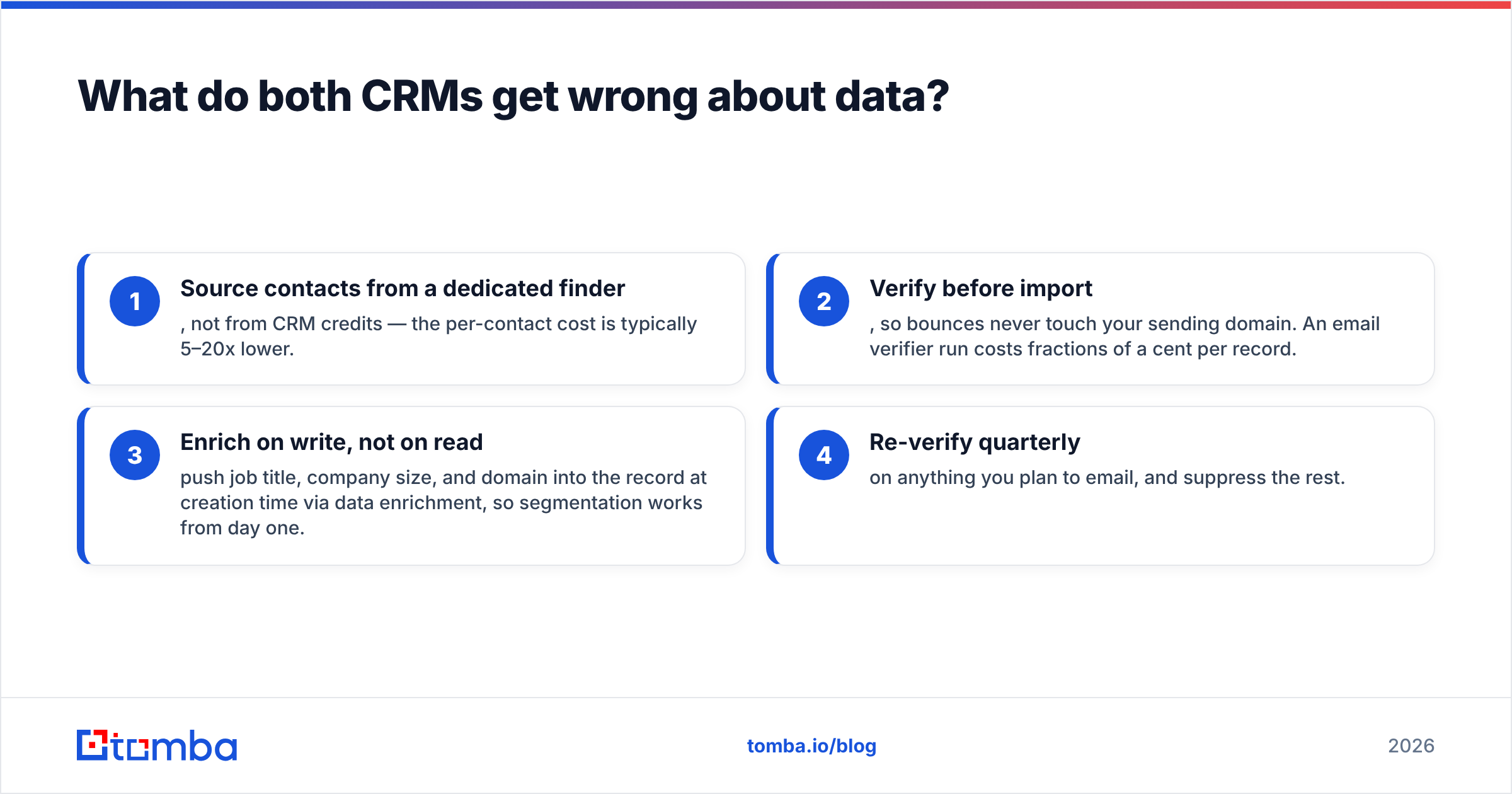
- Source contacts from a dedicated finder, not from CRM credits — the per-contact cost is typically 5–20x lower.
- Verify before import, so bounces never touch your sending domain. An email verifier run costs fractions of a cent per record.
- Enrich on write, not on read — push job title, company size, and domain into the record at creation time via data enrichment, so segmentation works from day one.
- Re-verify quarterly on anything you plan to email, and suppress the rest.

How do the two stacks look in practice?#
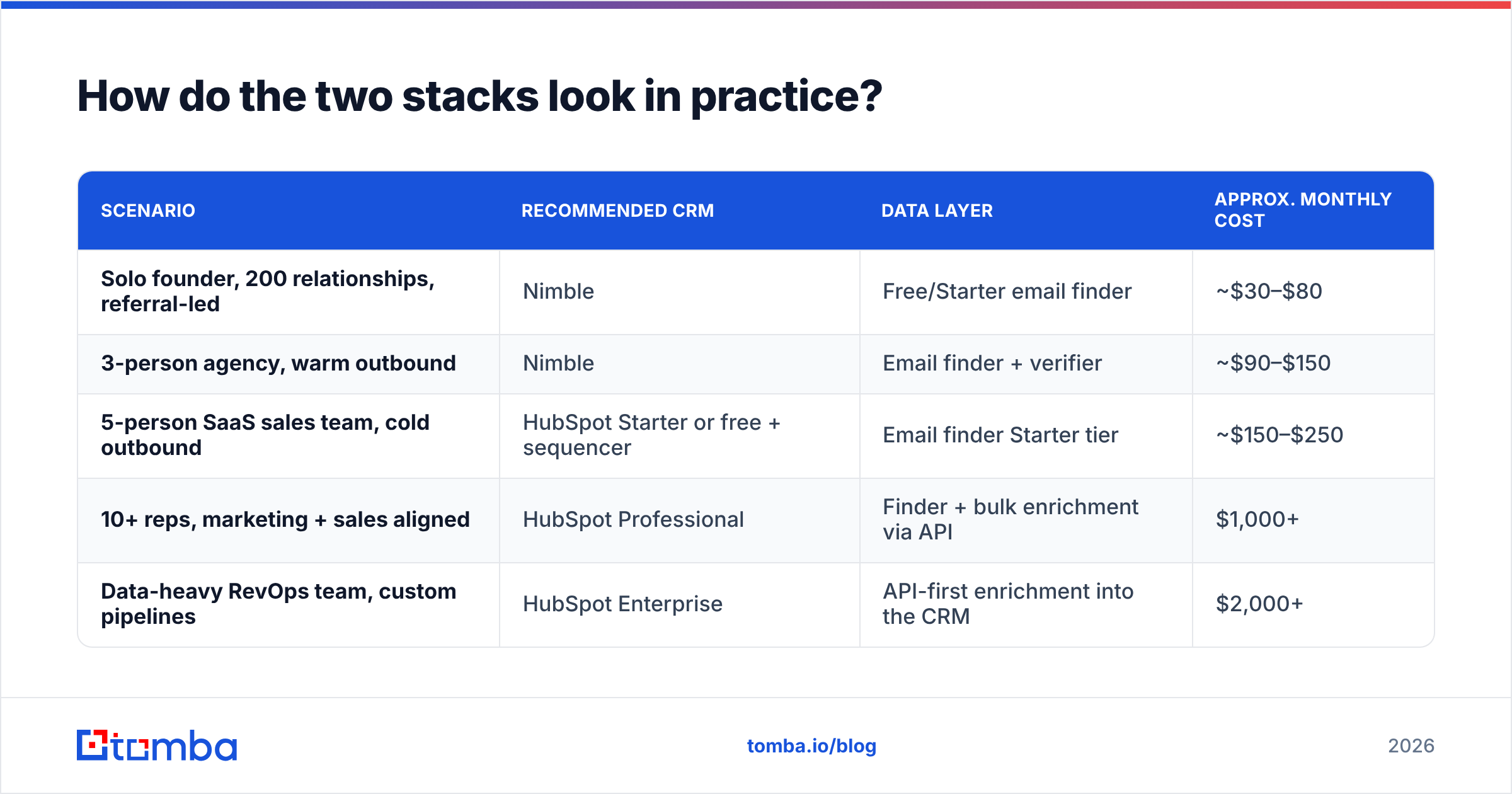
| Scenario | Recommended CRM | Data layer | Approx. monthly cost |
|---|---|---|---|
| Solo founder, 200 relationships, referral-led | Nimble | Free/Starter email finder | ~$30–$80 |
| 3-person agency, warm outbound | Nimble | Email finder + verifier | ~$90–$150 |
| 5-person SaaS sales team, cold outbound | HubSpot Starter or free + sequencer | Email finder Starter tier | ~$150–$250 |
| 10+ reps, marketing + sales aligned | HubSpot Professional | Finder + bulk enrichment via API | $1,000+ |
| Data-heavy RevOps team, custom pipelines | HubSpot Enterprise | API-first enrichment into the CRM | $2,000+ |
The pattern: the CRM decision matters less than most teams assume, and the data decision matters more. A $30/month CRM with clean, verified contacts outperforms a $1,000/month platform full of stale records every single time.
If you go the HubSpot route, the practical move is to wire contact sourcing directly into the CRM rather than importing CSVs by hand — our HubSpot integration does exactly that, creating and enriching contacts as you find them.
Which should you choose — HubSpot or Nimble?#
Answer these five questions honestly:
- Will you run marketing campaigns from the same system within 12 months? Yes → HubSpot. No → Nimble.
- Does anyone need weighted forecasting or custom multi-object reports? Yes → HubSpot Professional. No → Nimble.
- Is your motion relationship-led or volume-led? Relationships → Nimble. Volume → HubSpot (or a dedicated sequencer alongside a cheap CRM).
- Can you commit to $500+/month within 18 months without pain? No → Nimble, or HubSpot's free tier with a hard rule that you will not upgrade.
- Who administers it? No dedicated ops person → Nimble. Someone owns RevOps → HubSpot.
Score four or more toward one side and the decision is made. A split result usually means the real answer is HubSpot free tier now, revisit in two quarters — the migration cost from free HubSpot to paid HubSpot is zero, while the migration cost from Nimble to HubSpot is a week of someone's life.
One caveat worth stating plainly: do not choose based on feature checklists alone. Both products have long, credible reviews on G2 and both have real users who are happy. The failure mode is not "picked the wrong CRM," it is "bought a CRM tier nobody needed and had no contacts to put in it."
What is the fastest way to fill either CRM with real contacts?#
Whichever platform you land on, the workflow that produces pipeline looks the same:
- Build a target account list (50–300 companies, not 5,000).
- Run a domain-level search to pull every relevant contact and the company's email pattern.
- Verify every address, including catch-all domains, before it enters the CRM.
- Push the verified record into HubSpot or Nimble with title, company, and source attached.
- Re-verify on a schedule and suppress anything that decays.
That first step — turning a company domain and a person's name into a deliverable address — is exactly what the Tomba Email Finder does. Free tier covers 25 searches a month if you want to test it against your existing CRM records, Starter is $49/mo, and Growth is $99/mo when your volume grows. Run 20 known-good contacts through it first, check the match rate, then decide. That is a better use of an evaluation afternoon than another feature-comparison spreadsheet.
Related guides#
// get started
Find, verify and enrich your first contacts today
Start on the free plan with 25 searches a month, then scale when your team is ready.
Free plan · No credit card required · GDPR & CCPA
// about the author