HubSpot vs Nutshell: Which CRM Wins for B2B Sales in 2026?
HubSpot and Nutshell solve the same problem at wildly different prices. We compared pricing, pipeline tools, automation, and data quality to show which CRM fits small B2B sales teams in 2026.
TL;DR
- Nutshell wins on price predictability. Flat per-user pricing starting around $19/user/month with unlimited contacts, no forced annual jump, and no separate charge for the pipeline features most B2B teams actually use.
- HubSpot wins on ecosystem depth. Marketing automation, CMS, service desk, reporting, and 1,700+ integrations in one account — if you can absorb the pricing curve past the free tier.
- The real cost gap shows up at seats 5–20. HubSpot Sales Hub Professional is billed per seat with a mandatory onboarding fee; Nutshell has no onboarding fee and no seat minimum.
- Neither tool finds contact data for you. Both CRMs store contacts; they don't source or verify them. That gap is what kills pipeline, not the CRM choice.
- Pick HubSpot if marketing and sales share a funnel. Pick Nutshell if you're a 2–20 person outbound sales team that wants a pipeline, sequences, and reporting without a quote call.
Most "HubSpot vs Nutshell" comparisons read like feature checklists written by someone who has never had to justify a CRM renewal. This one is built around the three questions that actually decide it: what will this cost at your headcount in 18 months, which one matches how your team sells, and what happens to your data quality either way.
What is HubSpot and who is it built for?#
HubSpot started as a marketing automation platform and grew a CRM around it. That origin story explains everything about the product today.
The free CRM tier is genuinely generous — unlimited users, contact management, deal pipelines, email tracking, meeting scheduling. It is the best free CRM on the market and HubSpot knows it. The free tier is a customer acquisition engine, and the product is engineered so that the moments you outgrow it are frequent and obvious.
HubSpot is built for companies where marketing and sales operate as one motion: inbound leads land in forms, get scored, route to reps, and progress through deals with attribution tracked end to end. If your pipeline is fed by content, ads, and website conversions, HubSpot's shared contact record between Marketing Hub and Sales Hub is a real structural advantage that Nutshell doesn't try to match.
Where it gets uncomfortable is the pricing ladder. Sales Hub Starter is affordable. Professional jumps significantly and adds a mandatory onboarding fee. Marketing Hub prices on marketing contacts, so your bill grows as your list grows — independent of how many salespeople you have. Teams that budget for "the CRM" and end up paying for four Hubs are the most common source of HubSpot buyer's remorse. You can review the current tiers on HubSpot's own pricing page before you commit to anything.
What is Nutshell and who is it built for?#
Nutshell is a sales-first CRM for small and mid-sized B2B teams — the segment that finds Salesforce absurd and HubSpot's upgrade path exhausting.
The product philosophy is narrower and more honest about it: pipelines, contacts, activity tracking, email sequences, and reporting, priced flat per user with unlimited contacts and unlimited data storage on every plan. There is no marketing-contact meter. There is no onboarding fee. There is no minimum seat count, so a two-person team pays for two seats.
Nutshell's pipeline UI is its strongest asset. Board view, list view, chart view, and map view of the same deals, with per-pipeline stage automation that triggers tasks and emails as deals move. For a team running a repeatable outbound motion — prospect, book, demo, propose, close — it does the job with less configuration overhead than HubSpot requires.
The trade-offs are real. Nutshell's integration library is a fraction of HubSpot's. Its reporting is solid for pipeline and activity metrics but thin on multi-touch attribution. And its marketing features (Nutshell Campaigns) are competent email marketing, not a marketing automation platform. If you need lifecycle-stage-driven nurture across channels, you'll feel the ceiling. Check Nutshell's plan breakdown for the current tier structure.
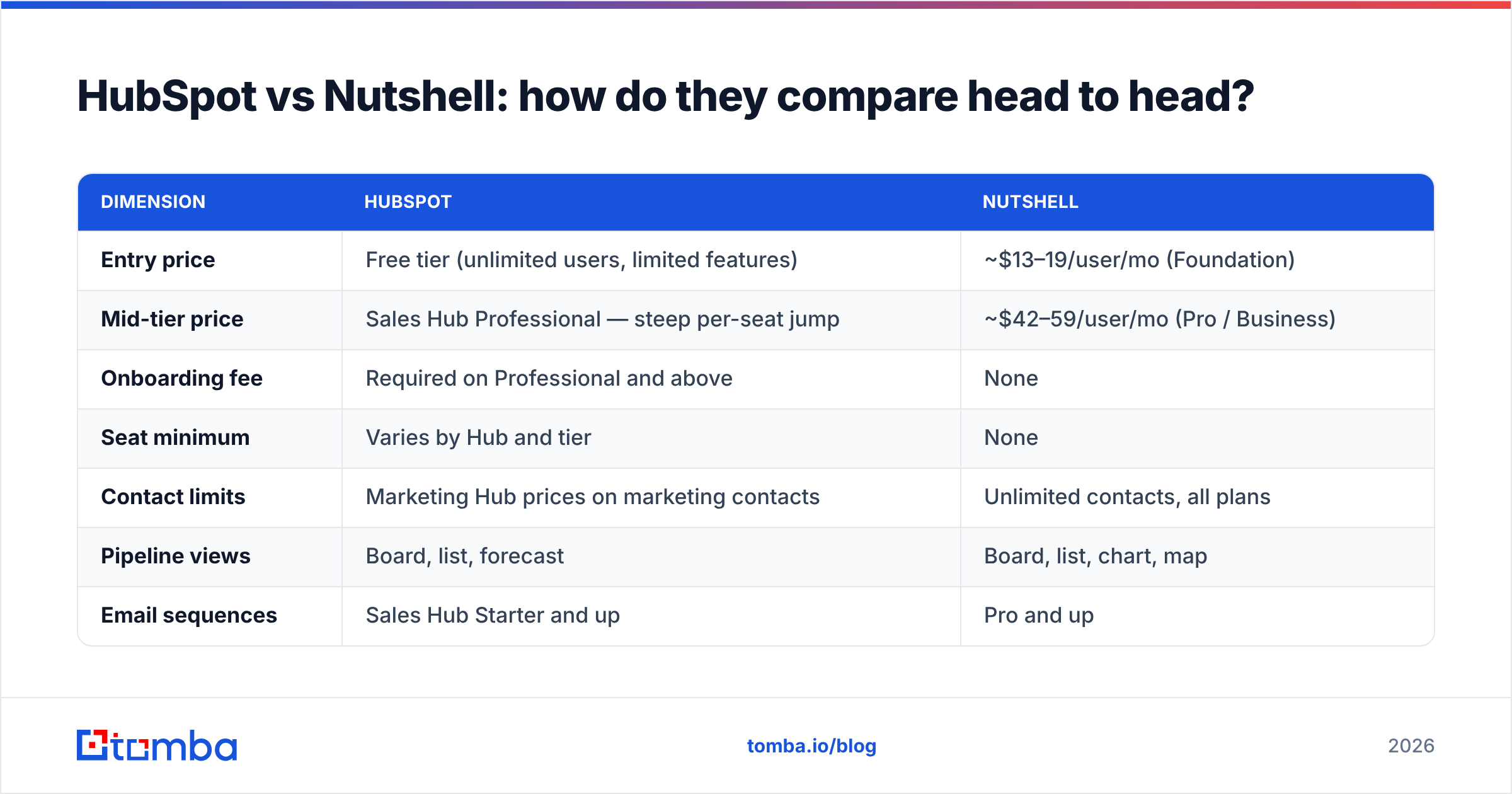
HubSpot vs Nutshell: how do they compare head to head?#
| Dimension | HubSpot | Nutshell |
|---|---|---|
| Entry price | Free tier (unlimited users, limited features) | ~$13–19/user/mo (Foundation) |
| Mid-tier price | Sales Hub Professional — steep per-seat jump | ~$42–59/user/mo (Pro / Business) |
| Onboarding fee | Required on Professional and above | None |
| Seat minimum | Varies by Hub and tier | None |
| Contact limits | Marketing Hub prices on marketing contacts | Unlimited contacts, all plans |
| Pipeline views | Board, list, forecast | Board, list, chart, map |
| Email sequences | Sales Hub Starter and up | Pro and up |
| Native integrations | 1,700+ App Marketplace | ~100, plus Zapier |
| Marketing automation | Full platform (Marketing Hub) | Email campaigns only |
| Reporting depth | Custom report builder, attribution | Pipeline, activity, forecast reports |
| Best for | Marketing-led orgs, 20+ seats, inbound funnels | Outbound B2B teams, 2–20 seats |
| Support | Tiered — paid plans get faster response | Included live support on all plans |
Read that table with one filter: which column's weaknesses can you live with? HubSpot's weakness is cost escalation and configuration overhead. Nutshell's weakness is ceiling — you will eventually want a report it can't build.
Which CRM actually costs less at your team size?#
Run the math at three headcounts, because the answer flips.
At 2–4 seats: HubSpot's free tier wins outright if you only need contact management and basic deal tracking. Nutshell costs money from day one. But the moment you need email sequences, HubSpot Sales Hub Starter kicks in per seat and the gap narrows to near-parity.
At 5–15 seats: Nutshell wins clearly. Flat per-user pricing with no onboarding fee versus HubSpot Sales Hub Professional plus the required onboarding investment produces a first-year difference in the thousands. This is Nutshell's sweet spot and where most of its customers land.
At 20+ seats with a marketing team: HubSpot wins on consolidation. Paying for Nutshell plus a separate marketing automation platform plus a separate reporting layer usually costs more than one HubSpot bundle — and creates data-sync problems that eat RevOps time. If your revenue operations function is already a real job at your company, HubSpot's single-database model earns its price.
The variable nobody models correctly is admin time. HubSpot's flexibility means someone owns workflow configuration, property hygiene, and report building — often a fractional ops hire. Nutshell's constraints mean less to configure and less to break. Factor 5–10 hours/month of admin labor into the HubSpot column and re-run your comparison.
Why does CRM choice matter less than data quality?#
Here's the part every CRM comparison skips: neither HubSpot nor Nutshell will improve your pipeline if the contacts inside are wrong.
A CRM is a filing cabinet with automation bolted on. It stores what you put in it. If your reps are pulling emails from LinkedIn guesses, scraped lists, or a three-year-old export, both platforms will faithfully record your bounces, your unanswered sequences, and your inflated "contacted" counts. The response rate problem in most B2B teams is a data problem wearing a CRM costume.
Concretely, here's what breaks when contact data is bad, regardless of which CRM you picked:
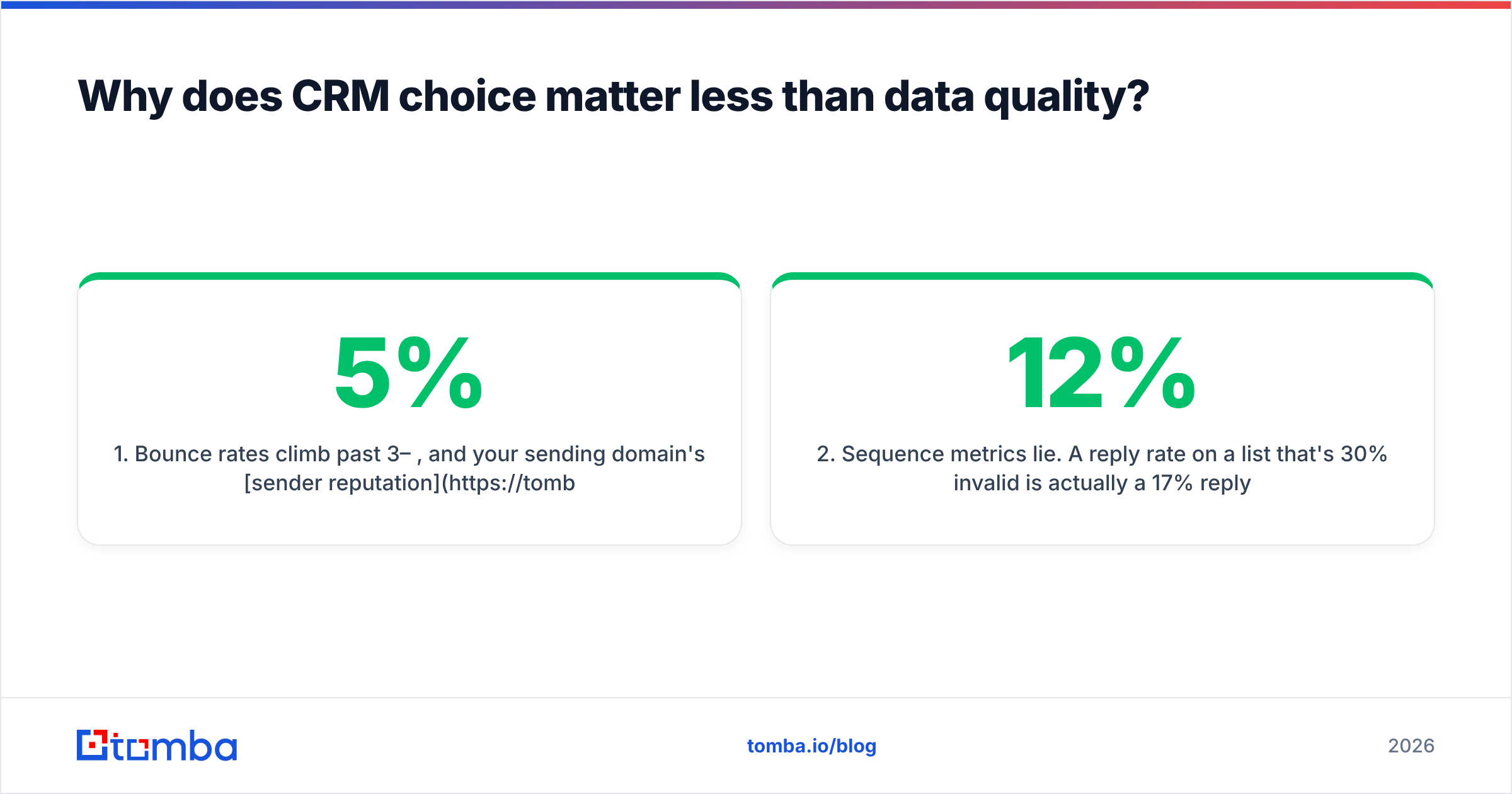
- Bounce rates climb past 3–5%, and your sending domain's sender reputation degrades. Google and Microsoft start filtering your legitimate mail.
- Sequence metrics lie. A 12% reply rate on a list that's 30% invalid is actually a 17% reply rate on the deliverable portion — you'll kill working copy because the denominator is wrong.
- Forecasting breaks. Deals attached to contacts who left the company sit in the pipeline inflating your number until quarter-end reveals them.
- Rep time evaporates. Manual research to fix a bad record costs 4–7 minutes per contact. At 200 contacts/month per rep, that's a full workday lost to cleanup.
- Duplicate records multiply. Two spellings of the same person create split activity histories and blind spots in account coverage.
The fix is upstream of the CRM. Source verified contacts before they enter the system, and re-verify on a schedule. A dedicated email verifier catches invalid addresses before they hit your sequencing tool, and data enrichment fills the job title, company size, and phone fields that both HubSpot and Nutshell leave empty on import.
How do HubSpot and Nutshell handle sales automation?#
Both automate. They automate different layers of the stack.
HubSpot's automation is workflow-based and cross-object. You can trigger actions off contact properties, deal stages, form submissions, page views, email engagement, and custom objects. Branching logic is genuinely powerful. On Professional and above, you can build a workflow that scores a lead, rotates it to a rep, creates a task, sends an internal Slack alert, and enrolls the contact in a nurture sequence — one canvas, no code. That's real sales automation infrastructure.
The cost is complexity. HubSpot workflows are easy to build and hard to audit. Teams accumulate dozens of overlapping workflows, and eighteen months later nobody can explain why a contact got three emails on Tuesday.
Nutshell's automation is pipeline-based. Each pipeline has stages, and each stage can trigger tasks, assign owners, and send emails. It's linear and legible — you can look at a pipeline definition and understand exactly what happens at every stage. For a team running one or two defined sales processes, that legibility is a feature, not a limitation.
Where Nutshell falls short is triggering off non-deal events. Website behavior, form logic, and lifecycle-stage transitions are HubSpot territory. If your motion depends on inbound signals, Nutshell will feel deaf.
Both integrate with the outbound stack most B2B teams already run. Nutshell connects through Zapier to almost anything; HubSpot has native connectors. If you're pushing enriched contacts into either one, Tomba's HubSpot integration writes verified emails directly to contact records, and the Zapier integration covers Nutshell and everything else.
Which one is better for outbound B2B sales teams?#
Nutshell, in most cases — with one important caveat.
For a pure outbound team, the CRM's job is narrow: hold the account list, track touches, show the pipeline honestly, and get out of the way. Nutshell does that at a price that doesn't punish you for hiring. Its per-stage automation maps cleanly to a defined outbound process, its map view is unusually useful for territory-based selling, and support is included rather than tiered.
The caveat: if your outbound motion feeds a marketing-run nurture program for the 80% who say "not now," HubSpot's shared database means those contacts stay warm without a sync integration. Building that with Nutshell plus a separate email platform is possible but adds a failure point.
A practical split many teams land on: Nutshell as the CRM, a dedicated sequencing tool for outbound sends, and a data layer that keeps contacts verified. That stack costs less than HubSpot Professional and each component is best-in-class. The trade is that you own the integrations.
If you go that route, the data layer matters most. Use domain search to map every contactable person at a target account, then push only verified addresses into the CRM. Contacts that never enter your CRM can never pollute it.
What do real users say about each platform?#
Both platforms score well, but for different reasons — and the review patterns are consistent enough to be useful.
HubSpot reviewers on G2 consistently praise the interface, the free tier, and the breadth of the ecosystem. The recurring complaints are equally consistent: pricing surprises at renewal, the cost of adding seats mid-contract, and the difficulty of downgrading once you're deep in the platform.
Nutshell reviewers praise support responsiveness, ease of setup, and the absence of pricing games. The recurring complaints are reporting limitations, a smaller integration catalog, and a mobile app that lags HubSpot's. Notably, very few Nutshell reviews mention unexpected costs — which tells you something about how the company prices.
Neither review pattern should surprise you. You're choosing between a platform that does more and charges accordingly, and a focused tool that does less and charges predictably.
Which CRM should you choose in 2026?#
Choose HubSpot if:
- Marketing and sales share a funnel and need one contact database
- You're above 20 seats and can absorb the pricing curve
- You need custom reporting and multi-touch attribution
- You have someone who owns CRM administration
Choose Nutshell if:
- You're a 2–20 person B2B sales team
- Predictable per-seat pricing matters more than feature breadth
- Your process is outbound-led with a defined pipeline
- You don't want to staff a CRM admin
Choose neither yet if you haven't fixed your data. A CRM you populate with unverified contacts is an expensive way to track failure. Sort the input before you argue about the container.
Getting the contact data right, whichever CRM you pick#
The CRM decision is reversible. Bad data compounds.
Whichever platform you land on, the contacts flowing into it should be verified before they arrive — correct addresses, real job titles, current companies. That's the difference between a pipeline you can forecast against and a database that quietly rots.
Start with Tomba's Email Finder to source verified professional emails by name, domain, or company, then push them into HubSpot or Nutshell with clean fields already populated. The free tier gives you 25 searches a month to test it against your own target accounts; paid plans start at $49/month with bulk lookups and API access. Check Tomba pricing for the full breakdown — then spend the CRM budget argument on something that actually moves your number.
Related guides#
// get started
Find, verify and enrich your first contacts today
Start on the free plan with 25 searches a month, then scale when your team is ready.
Free plan · No credit card required · GDPR & CCPA
// about the author