HubSpot vs Pipedrive 2026: Which CRM Is Right for You?
HubSpot and Pipedrive solve the same problem in opposite ways: one is a platform you grow into, the other is a pipeline you work in. Here is the honest cost, setup, and data-quality comparison for 2026.
TL;DR
- Pipedrive wins on price and time-to-value. Entry seats start around $14/user/month billed annually, setup takes an afternoon, and reps understand the drag-and-drop pipeline without training.
- HubSpot wins on breadth. A genuinely usable free CRM, native marketing and service hubs, and the deepest app ecosystem in the category — but Professional tiers jump to roughly $100/seat/month plus a one-time onboarding fee.
- The real cost driver is seats × tier, not the sticker price. A 10-rep team on HubSpot Sales Hub Professional lands near $1,000/month before onboarding; the same team on Pipedrive Advanced sits closer to $340/month.
- Neither tool finds contacts for you. Both are systems of record. Pipeline quality depends on whatever data you push in, which is where an email finder and verifier sit upstream of the CRM.
- Rule of thumb: if marketing and sales share one funnel, pick HubSpot. If a sales team just needs to move deals through stages without a platform migration project, pick Pipedrive.
What are HubSpot and Pipedrive, actually?#
They are not the same category of product, even though they compete for the same budget line.
HubSpot started as a marketing automation company and grew a CRM underneath it. Today it sells "Hubs" — Sales, Marketing, Service, Content, Operations — that share one contact database. The pitch is consolidation: one record for a lead from first blog visit through renewal, with no sync jobs between systems.
Pipedrive started from the opposite end. It was built by salespeople who wanted a visual pipeline and refused to add anything that did not help close a deal. It is activity-based selling in software form: every deal has a next action, and the interface nags you until you schedule one. Marketing features exist but are clearly secondary.
That origin difference explains almost every trade-off below. HubSpot asks you to adopt a platform. Pipedrive asks you to adopt a workflow.
How do HubSpot and Pipedrive compare at a glance?#
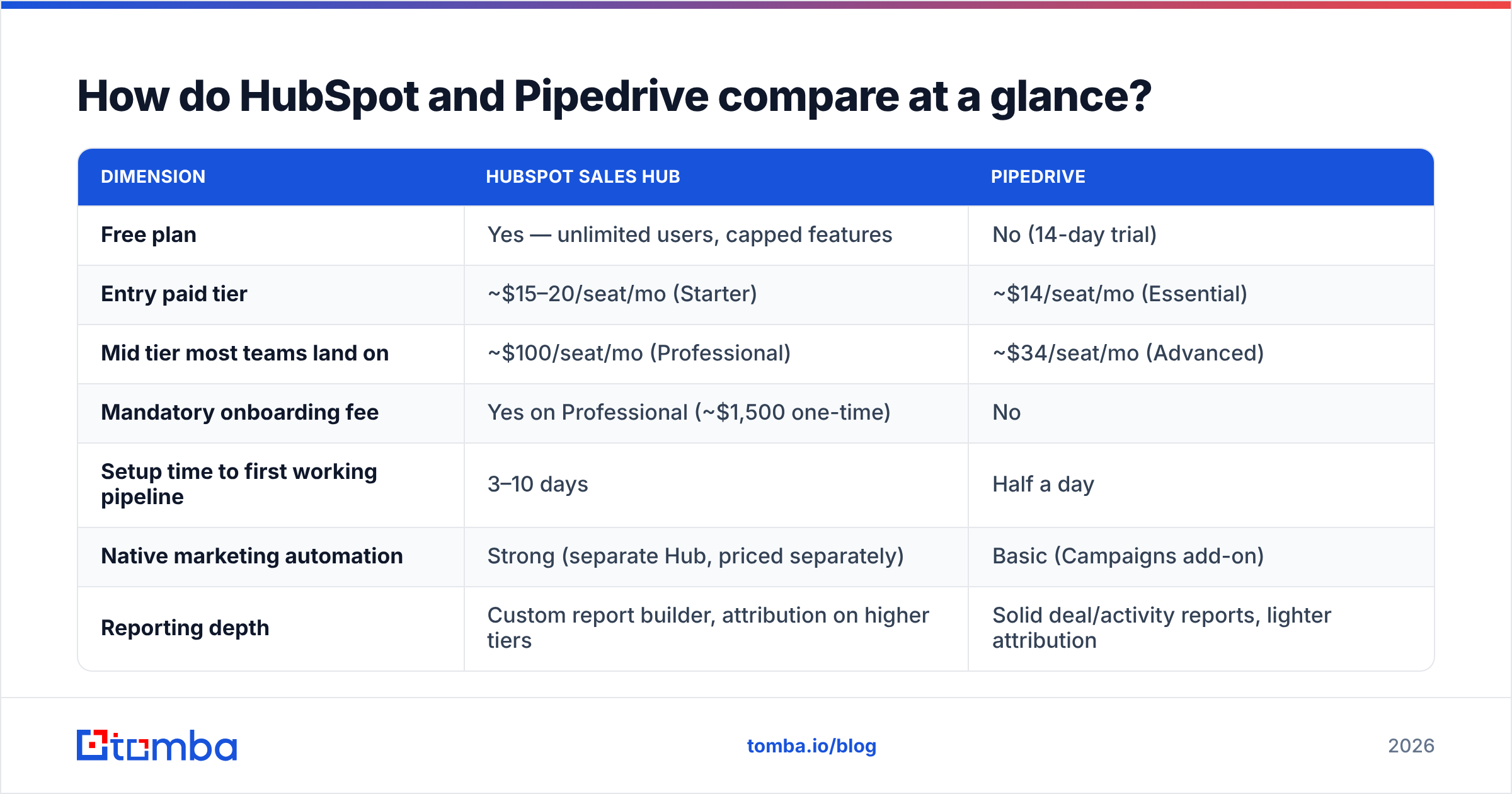
| Dimension | HubSpot Sales Hub | Pipedrive |
|---|---|---|
| Free plan | Yes — unlimited users, capped features | No (14-day trial) |
| Entry paid tier | ~$15–20/seat/mo (Starter) | ~$14/seat/mo (Essential) |
| Mid tier most teams land on | ~$100/seat/mo (Professional) | ~$34/seat/mo (Advanced) |
| Mandatory onboarding fee | Yes on Professional (~$1,500 one-time) | No |
| Setup time to first working pipeline | 3–10 days | Half a day |
| Native marketing automation | Strong (separate Hub, priced separately) | Basic (Campaigns add-on) |
| Reporting depth | Custom report builder, attribution on higher tiers | Solid deal/activity reports, lighter attribution |
| App marketplace size | 1,500+ integrations | 400+ integrations |
| Best fit | Marketing + sales sharing one funnel | Sales teams of 3–50 who live in the pipeline |
| Worst fit | Small teams who only need deal tracking | Content-led companies needing attribution |
The table already tells you the shape of the decision. HubSpot is a wider surface at a higher price. Pipedrive is a narrower surface at a lower price. The interesting question is which surface you actually use.

What does each CRM really cost in 2026?#
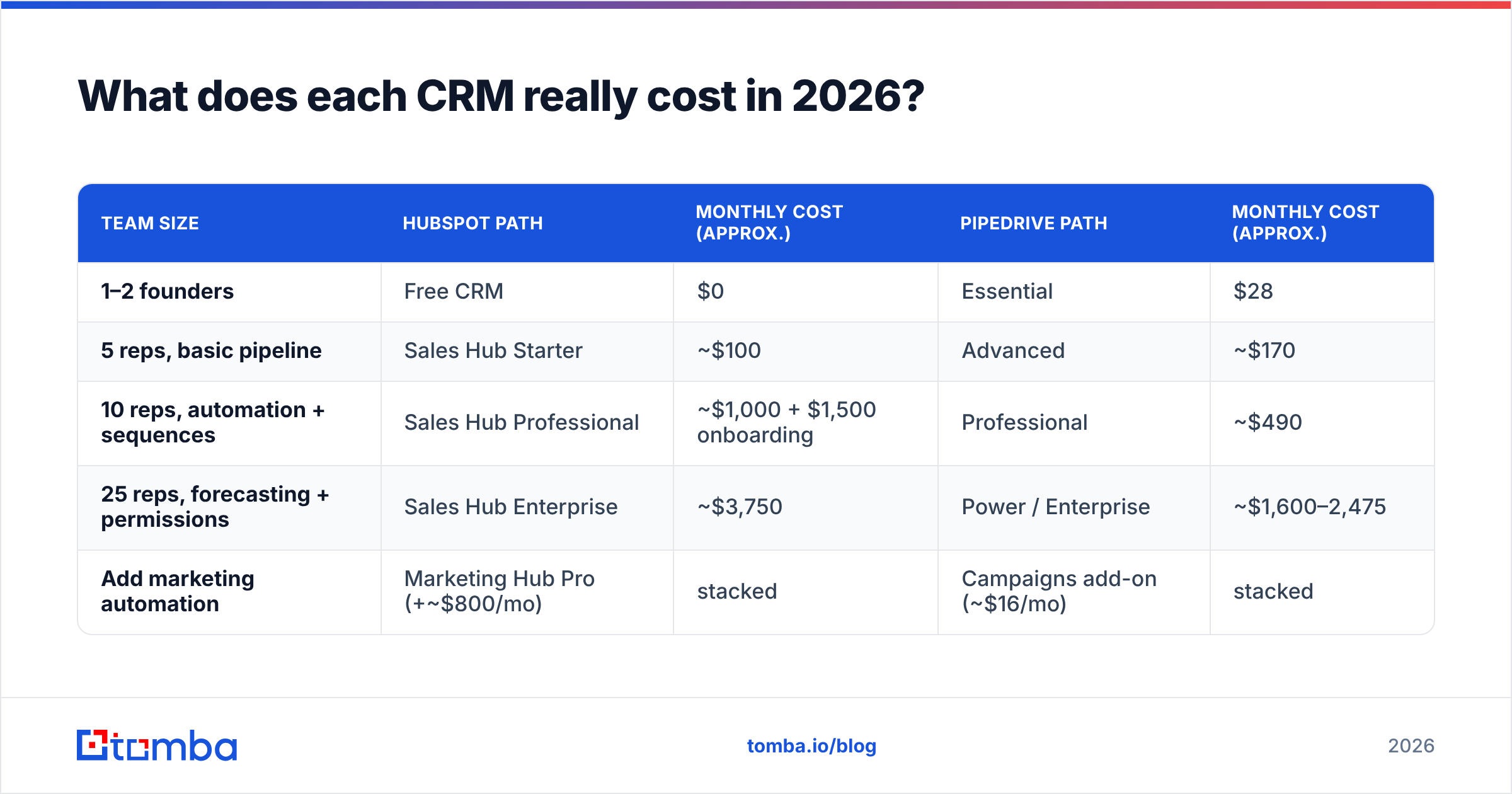
List prices move, so treat these as directional and confirm on the HubSpot pricing page and Pipedrive pricing page before you sign. Both vendors discount annual commitments and both have moved to per-seat pricing that makes small teams cheap and mid-size teams expensive.
| Team size | HubSpot path | Monthly cost (approx.) | Pipedrive path | Monthly cost (approx.) |
|---|---|---|---|---|
| 1–2 founders | Free CRM | $0 | Essential | $28 |
| 5 reps, basic pipeline | Sales Hub Starter | ~$100 | Advanced | ~$170 |
| 10 reps, automation + sequences | Sales Hub Professional | ~$1,000 + $1,500 onboarding | Professional | ~$490 |
| 25 reps, forecasting + permissions | Sales Hub Enterprise | ~$3,750 | Power / Enterprise | ~$1,600–2,475 |
| Add marketing automation | Marketing Hub Pro (+~$800/mo) | stacked | Campaigns add-on (~$16/mo) | stacked |
Three cost traps worth naming:
- HubSpot's Professional cliff. The jump from Starter to Professional is roughly 5x per seat, and it is the tier where sequences, custom reporting, and meaningful workflow automation live. Most teams that "just need HubSpot Starter" end up on Professional within a year.
- HubSpot's onboarding fee. Professional carries a one-time mandatory onboarding charge in the low four figures. It is negotiable in a competitive deal, but budget for it.
- Pipedrive's add-on stack. LeadBooster, Campaigns, Projects, and Smart Docs are billed separately. A "cheap" Pipedrive plan with three add-ons on 10 seats can quietly reach $700/month.
Marketing contact tiers are the other silent multiplier on HubSpot: Marketing Hub prices scale with the number of contacts you can market to, so a bloated database costs real money every month. That is a strong argument for verifying your list before it lands in the CRM rather than after.
Which CRM is easier to set up and use day to day?#
Pipedrive, decisively — and the gap is bigger than review scores suggest. Both tools score in the same band on G2, but the ratings average very different populations: HubSpot reviewers often have an admin or an agency behind them; Pipedrive reviewers usually set it up themselves.
Here is what the difference feels like in practice:
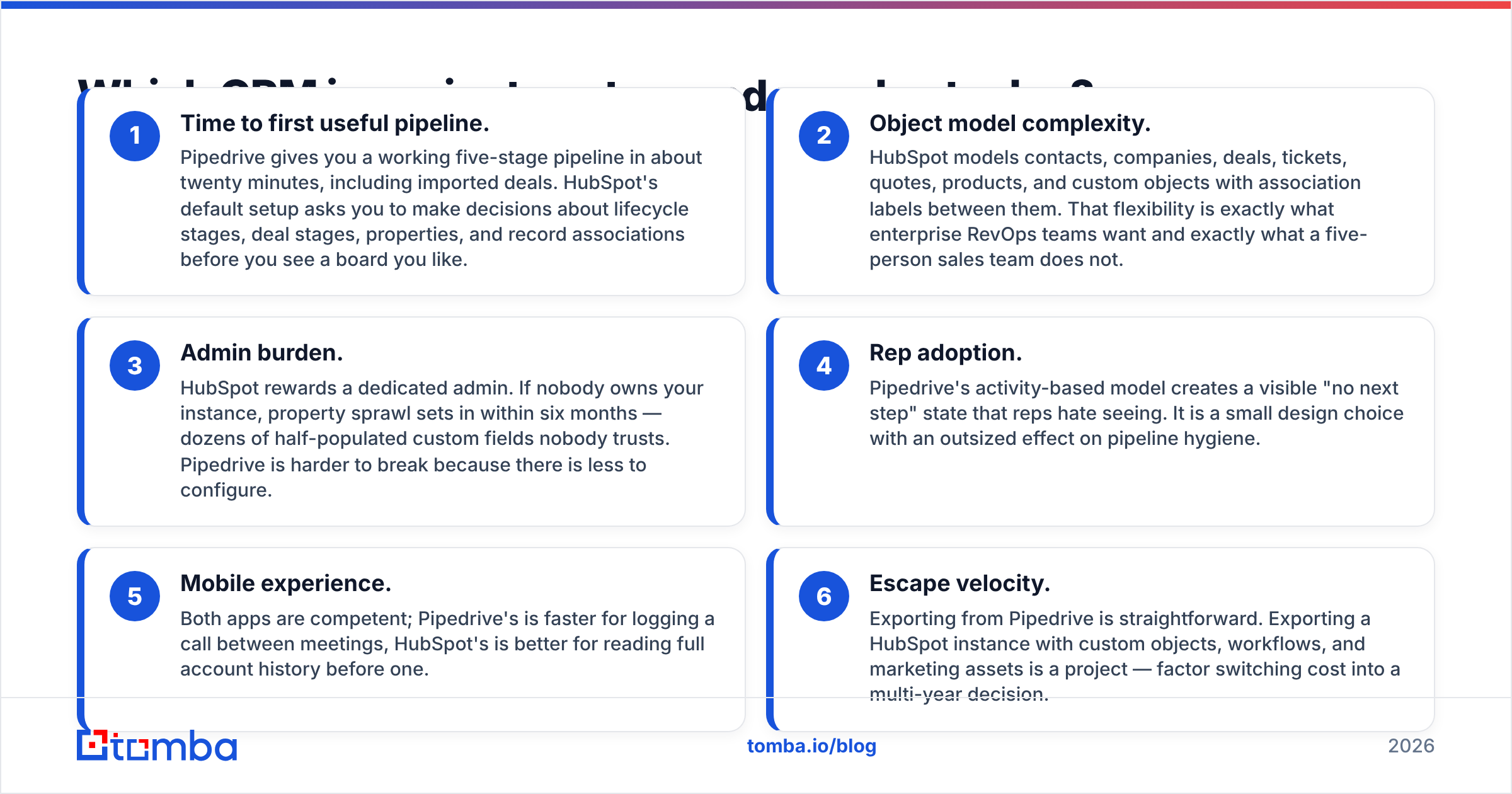
- Time to first useful pipeline. Pipedrive gives you a working five-stage pipeline in about twenty minutes, including imported deals. HubSpot's default setup asks you to make decisions about lifecycle stages, deal stages, properties, and record associations before you see a board you like.
- Object model complexity. HubSpot models contacts, companies, deals, tickets, quotes, products, and custom objects with association labels between them. That flexibility is exactly what enterprise RevOps teams want and exactly what a five-person sales team does not.
- Admin burden. HubSpot rewards a dedicated admin. If nobody owns your instance, property sprawl sets in within six months — dozens of half-populated custom fields nobody trusts. Pipedrive is harder to break because there is less to configure.
- Rep adoption. Pipedrive's activity-based model creates a visible "no next step" state that reps hate seeing. It is a small design choice with an outsized effect on pipeline hygiene.
- Mobile experience. Both apps are competent; Pipedrive's is faster for logging a call between meetings, HubSpot's is better for reading full account history before one.
- Escape velocity. Exporting from Pipedrive is straightforward. Exporting a HubSpot instance with custom objects, workflows, and marketing assets is a project — factor switching cost into a multi-year decision.
How do pipeline management and reporting differ?#
Pipedrive's pipeline is the product. Multiple pipelines, drag-and-drop stages, rotting-deal indicators, weighted forecasts, and a clean deal detail view. Reporting covers what a sales manager asks on a Monday: conversion by stage, activity volume by rep, deal velocity, and forecast against quota. It stops short of multi-touch attribution or complex cross-object analysis.
HubSpot's reporting is where the price difference earns its keep — on Professional and above. The custom report builder joins contacts, deals, activities, and marketing events in the same query, so you can answer questions like "which content topic sourced the deals we closed above $50k last quarter." Sequences, playbooks, forecasting, and conversation intelligence are all first-party rather than bolted on.
If your revenue questions are about the pipeline, Pipedrive answers them for a fraction of the cost. If your questions cross from marketing into sales, HubSpot is the only one of the two that answers them without a BI tool in the middle.
Which one handles automation and marketing better?#
HubSpot, and it is not close — but read the pricing footnote.
HubSpot's workflow engine runs on any object with branching logic, delays, enrollment triggers, and cross-hub actions. Combined with Marketing Hub you get landing pages, forms, email nurture, ad audience sync, and lead scoring in one place. For a content-led or inbound-heavy company, that consolidation is the entire reason to pay HubSpot's rate.
Pipedrive's Workflow Automation covers the sales-side essentials: create an activity when a deal enters a stage, notify an owner, update a field, trigger a webhook. Campaigns handles simple email blasts and basic nurture. It is enough for outbound teams whose "marketing" is a cold sequence and a follow-up cadence — and most outbound teams run sequences in a dedicated tool anyway.
Be honest about which company you are. Buying HubSpot's marketing depth and then only using deal stages is the single most common way teams overpay for CRM.
Where do the contacts actually come from?#
Neither. This is the part comparison posts skip.
Both HubSpot and Pipedrive are systems of record. They store, route, and report on contacts — they do not source them. HubSpot's free tools capture inbound form fills and Pipedrive's LeadBooster add-on captures chat and web forms, but if your motion is outbound, the CRM starts empty and stays empty until you fill it.
That upstream gap is worth more than the feature deltas above, because CRM value collapses when the data inside is wrong. Bounced sends damage sender reputation, duplicate records break forecasting, and on HubSpot specifically, every unusable marketing contact still counts toward your billing tier.
A practical upstream stack looks like this:
- Source the contact. Use a domain search to pull the decision-makers at a target account, or a pattern-based finder when you already have a name and company.
- Verify before import. Run addresses through an email verifier so invalid and risky addresses never reach the CRM. Cleaning after import means paying to store bad data first.
- Enrich the record. Data enrichment fills job title, company size, and social profiles so your segmentation and lead scoring have something to work with.
- Push it in. Tomba's HubSpot integration and Pipedrive integration write verified contacts straight into the CRM, so reps never paste addresses by hand.

The order matters. Find, verify, enrich, then import. Teams that reverse it end up paying HubSpot marketing-contact pricing on addresses that bounce.
What do the integration ecosystems look like?#
HubSpot's marketplace is larger and its API is the one most B2B vendors build against first. If you use a niche tool — a specific quoting product, a vertical-specific data provider, a regional payment processor — the odds of a maintained native HubSpot connector are meaningfully higher.
Pipedrive's marketplace is smaller but covers the mainstream stack: Slack, Google Workspace, Microsoft 365, Zoom, QuickBooks, Zapier, Make, and the major sequencing tools. Its API is clean and well documented, which matters if you plan to build.
For anything not natively supported, both connect through Zapier or Make, and both expose webhooks. Integration breadth is a real HubSpot advantage, but for most sub-50-person teams it is a theoretical one — you will use eight integrations, and both platforms have all eight.
Who should choose HubSpot, and who should choose Pipedrive?#
Choose HubSpot if:
- Marketing and sales report into the same revenue number and need shared attribution.
- You are inbound- or content-led and want landing pages, nurture, and CRM in one system.
- You have — or will hire — someone who owns the instance.
- You expect to grow past 50 seats and want the object model to hold up.
- You want to start at zero cost; the free CRM is the best free tier in the category and there is no real competitor to it.
Choose Pipedrive if:
- You run an outbound or relationship-led sales motion and need deals moved, not funnels modeled.
- Your team is 3–50 reps and nobody wants to be a CRM admin.
- Budget predictability matters and a 5x tier jump would be a problem.
- Adoption is your risk, not analytics depth. Reps use Pipedrive because it is fast.
- You already run marketing elsewhere and have no interest in consolidating it.
Consider neither if: you need heavy quote-to-cash, complex territory management, or CPQ at enterprise scale. That is Salesforce territory, and both of these tools will feel thin.
What is the verdict on HubSpot vs Pipedrive?#
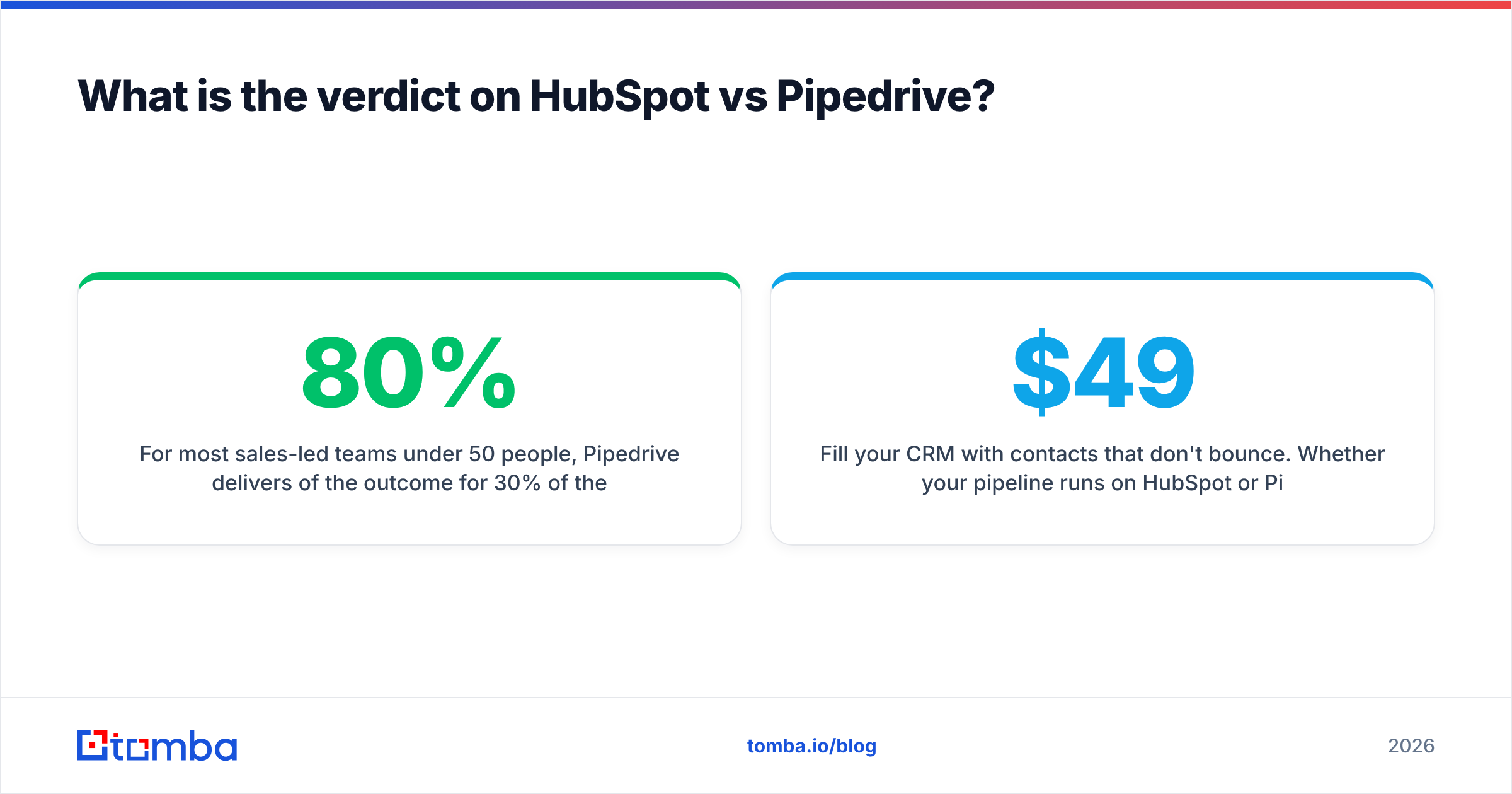
For most sales-led teams under 50 people, Pipedrive delivers 80% of the outcome for 30% of the cost, and reps actually use it. That is the default recommendation.
HubSpot is the right answer when the CRM is not really the purchase — the platform is. If you are consolidating marketing, sales, and service onto one contact record, HubSpot's price stops looking like CRM spend and starts looking like the replacement for three tools. Just enter that decision with your eyes open about the Professional cliff and the onboarding fee.
And whichever way you go, remember that the comparison above only decides where your data lives. It does not decide whether that data is any good.
Fill your CRM with contacts that don't bounce. Whether your pipeline runs on HubSpot or Pipedrive, Tomba's Email Finder sources verified professional email addresses by name, domain, or company, then pushes them straight into your CRM through native integrations. Start free with 25 searches a month, or check Tomba pricing — Starter is $49/mo, Growth $99/mo, Pro $249/mo — and stop paying your CRM to store addresses that were never valid.
Related guides#
// get started
Find, verify and enrich your first contacts today
Start on the free plan with 25 searches a month, then scale when your team is ready.
Free plan · No credit card required · GDPR & CCPA
// about the author