HubSpot vs Salesloft: Which Sales Platform Wins in 2026?
HubSpot Sales Hub and Salesloft solve overlapping problems from opposite ends. Here is an honest breakdown of seat costs, sequencing depth, forecasting and data quality — plus which one your team should actually buy.
The HubSpot vs Salesloft question is really one question: do you need a CRM, or an engagement layer to sit on top of one? Answer that and the rest of the evaluation gets short.
TL;DR
- HubSpot Sales Hub is a CRM first, an engagement layer second. Salesloft is an engagement platform first that assumes you already own a CRM. That single difference decides most evaluations.
- Salesloft wins on cadence depth, dialer quality and rep discipline. HubSpot wins on total cost of ownership, marketing alignment and time-to-value.
- Price gap is real. HubSpot Sales Hub Professional lists publicly around $100/seat/month; Salesloft is quote-only and commonly lands in the $125–$165/user/month range with platform fees and seat minimums.
- Neither tool finds contact data for you. Both consume contacts; neither reliably sources verified work emails or direct dials at scale.
- Running both is normal at 50+ reps — HubSpot as the system of record, Salesloft as the execution layer — but it is a stack decision, not a shortcut.
What are HubSpot and Salesloft, actually?#
They are not the same category, even though buyers constantly compare them. Most HubSpot vs Salesloft shortlists put a CRM next to an execution tool and ask which one wins.
HubSpot Sales Hub is the sales module of the wider HubSpot platform. You get a full CRM, deal pipelines, quotes, meeting links, email templates, sequences, a light dialer, forecasting and reporting. All of it sits on the same contact record your marketing team already uses. The pitch is one database, one bill, one admin. HubSpot's own Sales Hub product page leans hard into that.
Salesloft is a sales engagement platform. It exists to keep outbound and follow-up moving: multi-step cadences, a strong dialer with local presence and call recording, conversation intelligence and deal inspection. The rep workspace tells people exactly what to do next. Salesloft expects Salesforce (or HubSpot) to be the system of record and syncs into it. Salesloft's site calls the product a revenue orchestration layer, not a CRM replacement.
Think of it like a kitchen. HubSpot is the whole kitchen — fridge, counters, stove, all in one room, decent at each job. Salesloft is a professional range that does one thing exceptionally well. It still needs the rest of the kitchen to exist.
That framing answers most of the "which is better" question before you look at a single feature.

How do HubSpot Sales Hub and Salesloft compare feature by feature?#
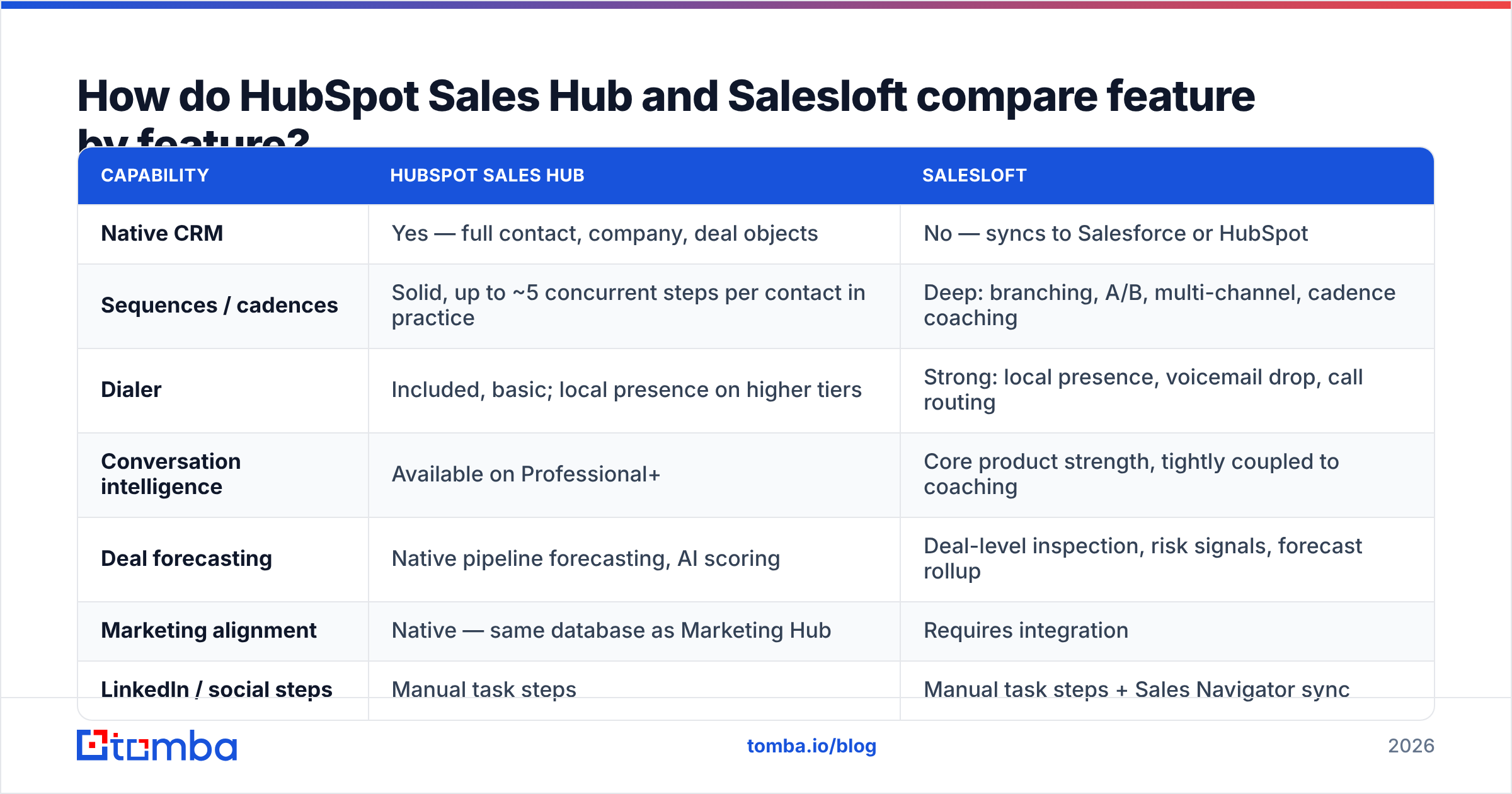
Here is the head-to-head on the capabilities buyers actually argue about in evaluations.
| Capability | HubSpot Sales Hub | Salesloft |
|---|---|---|
| Native CRM | Yes — full contact, company, deal objects | No — syncs to Salesforce or HubSpot |
| Sequences / cadences | Solid, up to ~5 concurrent steps per contact in practice | Deep: branching, A/B, multi-channel, cadence coaching |
| Dialer | Included, basic; local presence on higher tiers | Strong: local presence, voicemail drop, call routing |
| Conversation intelligence | Available on Professional+ | Core product strength, tightly coupled to coaching |
| Deal forecasting | Native pipeline forecasting, AI scoring | Deal-level inspection, risk signals, forecast rollup |
| Marketing alignment | Native — same database as Marketing Hub | Requires integration |
| LinkedIn / social steps | Manual task steps | Manual task steps + Sales Navigator sync |
| Admin overhead | Low — one platform, one admin | Medium — two systems to keep in sync |
| Pricing transparency | Public, self-serve | Quote-only, annual contracts |
| Best-fit team size | 1–150 reps | 20–500+ reps with a dedicated ops function |
The pattern is consistent. HubSpot is broader and cheaper to own; Salesloft is deeper on the twenty minutes a rep spends actually working a call block.
Where it gets uncomfortable is the middle. HubSpot's sequences have improved a lot since 2023 — branching logic, better task queues, AI-drafted follow-ups. For a team sending 40 touches a day per rep, the gap is now closer to "good enough" than it was three years ago. Salesloft still wins at 150 touches a day per rep with a manager coaching off call recordings. Volume and coaching intensity are the real dividing lines, not the feature checklists.
How much do HubSpot and Salesloft really cost in 2026?#
Most HubSpot vs Salesloft debates end at the invoice. HubSpot publishes pricing. Salesloft does not, and that alone tells you something about deal structure.
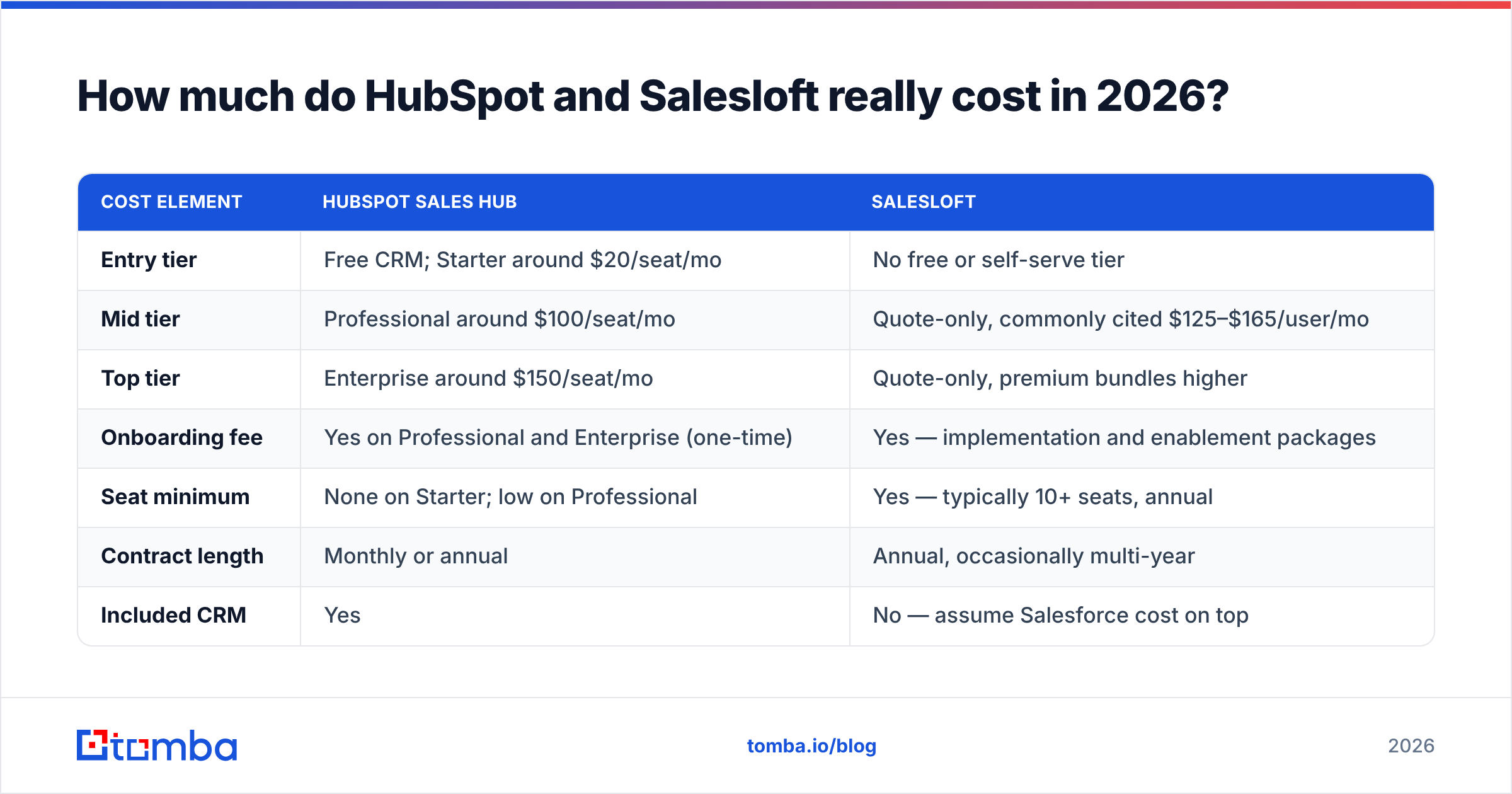
| Cost element | HubSpot Sales Hub | Salesloft |
|---|---|---|
| Entry tier | Free CRM; Starter around $20/seat/mo | No free or self-serve tier |
| Mid tier | Professional around $100/seat/mo | Quote-only, commonly cited $125–$165/user/mo |
| Top tier | Enterprise around $150/seat/mo | Quote-only, premium bundles higher |
| Onboarding fee | Yes on Professional and Enterprise (one-time) | Yes — implementation and enablement packages |
| Seat minimum | None on Starter; low on Professional | Yes — typically 10+ seats, annual |
| Contract length | Monthly or annual | Annual, occasionally multi-year |
| Included CRM | Yes | No — assume Salesforce cost on top |
Do the arithmetic before you fall in love with a demo. Twenty reps on HubSpot Professional is roughly $2,000/month plus onboarding, and that number includes the CRM. Twenty reps on Salesloft at a mid-range quote is roughly $2,800/month. You still owe Salesforce for the CRM underneath it. Call it $3,800–$4,500/month all-in for the same twenty people.
That is not an argument against Salesloft. It is an argument for being honest about what the extra $20K–$30K a year has to produce. If Salesloft lifts connect rates and call volume enough to close two extra deals a year at a $25K ACV, it pays for itself twice over. If your reps average eleven dials a day, it will not.

Which platform is better for outbound sequencing?#
Salesloft, and it is not especially close at high volume.
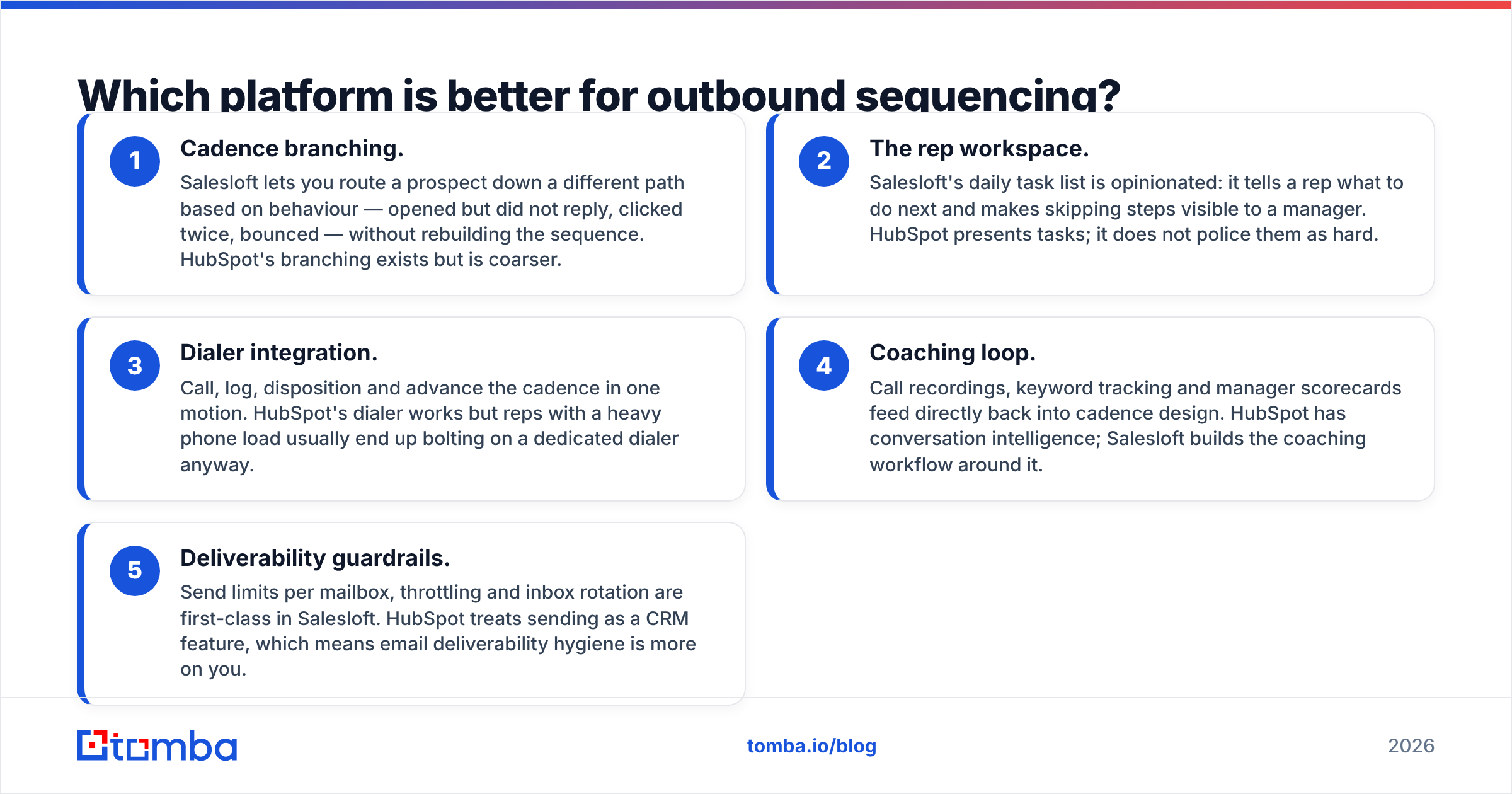
The difference shows up in five places:
- Cadence branching. Salesloft routes a prospect down a different path based on behaviour — opened but never replied, clicked twice, bounced. No sequence rebuild needed. HubSpot branches too, but coarsely.
- The rep workspace. Salesloft's daily task list is opinionated. It tells a rep what to do next, and skipped steps show up for the manager. HubSpot presents tasks but does not police them.
- Dialer integration. Call, log, disposition and advance the cadence in one motion. HubSpot's dialer works. Reps with a heavy phone load still tend to bolt on a dedicated one.
- Coaching loop. Call recordings, keyword tracking and manager scorecards feed back into cadence design. HubSpot has conversation intelligence; Salesloft builds the coaching workflow around it.
- Deliverability guardrails. Send limits, throttling and inbox rotation are first-class in Salesloft. HubSpot treats sending as a CRM feature, so email deliverability hygiene is more on you.
If your outbound motion is one SDR sending 300 emails a week alongside inbound follow-up, HubSpot handles it. If you run a pod of eight SDRs on a strict cadence with a manager reviewing calls every Friday, Salesloft is built for that room.
Which platform is better for pipeline, forecasting and reporting?#
Split decision, and it depends on whether marketing sits in the same tool.
HubSpot's advantage is that everything lives on one object graph. A lead's first ad click, the nurture email she opened, the demo she booked and the deal she closed sit on the same record with no sync lag. Attribution reports that take a data engineer to build elsewhere are a dropdown in HubSpot. For companies where marketing generates most of the pipeline, that is worth more than any cadence feature.
Salesloft's advantage is deal inspection. It reads engagement signals — who is on the thread, when the last touch happened, whether the champion went quiet — and flags deals that are drifting. Forecast calls then run off evidence rather than rep optimism. For a VP of Sales who has been burned by a 90% commit that closed at 40%, that is the whole product.
Neither is a replacement for the other. HubSpot tells you where pipeline came from. Salesloft tells you which pipeline is lying to you.
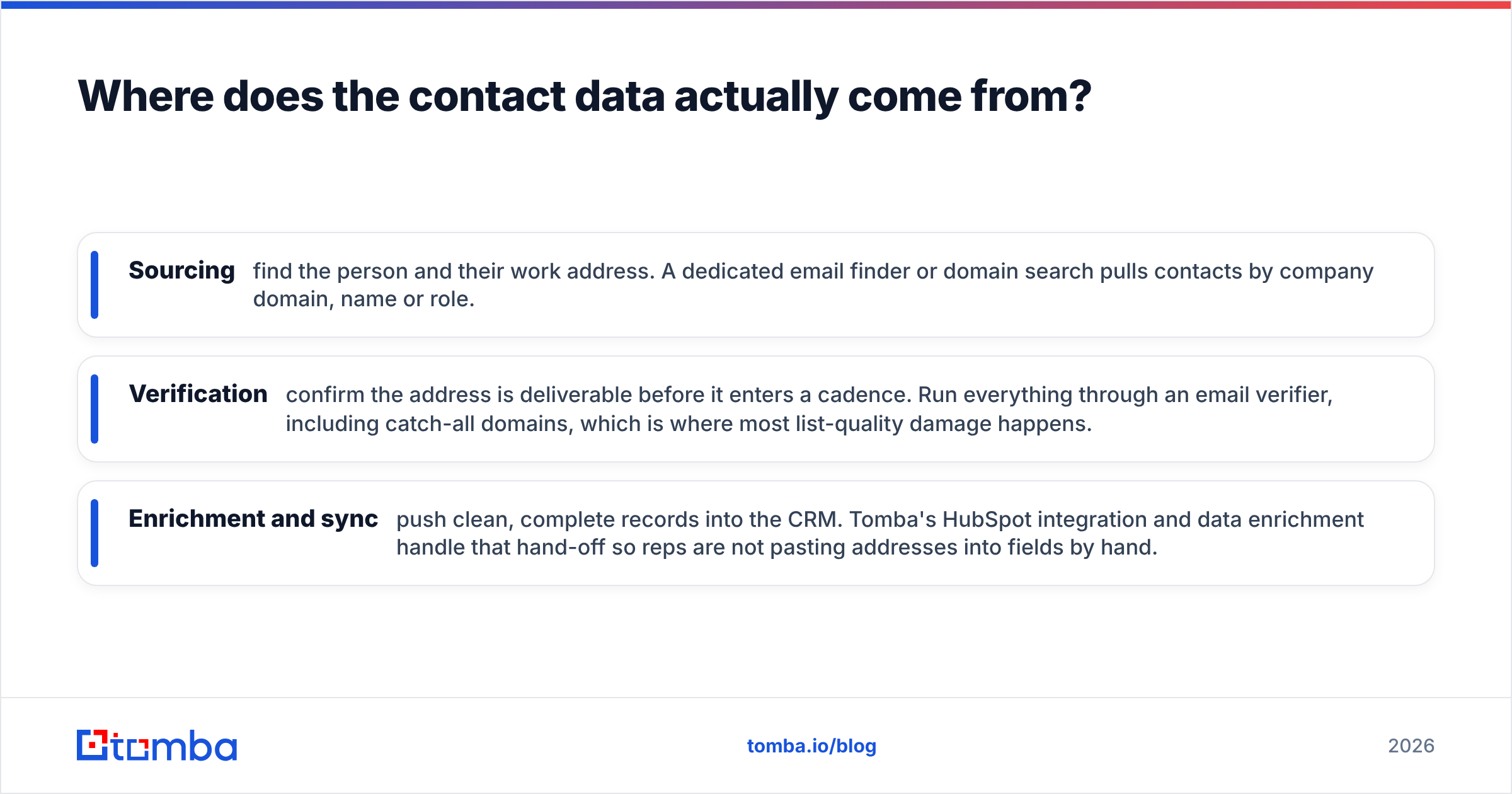
Where does the contact data actually come from?#
Neither tool. This is the part most comparison posts skip, and it is usually where outbound programs quietly fail.
HubSpot has some enrichment via Breeze Intelligence, and Salesloft integrates with data vendors. Neither is a serious source of verified work emails and direct dials for net-new prospecting. You bring the contacts. If those contacts are stale, your beautifully branched cadence sends 400 emails to addresses that bounce. Your domain reputation drops. The sequence looks broken when the data was the problem.
A practical stack separates the three jobs:
- Sourcing — find the person and their work address. A dedicated email finder or domain search pulls contacts by company domain, name or role.
- Verification — confirm the address is deliverable before it enters a cadence. Run everything through an email verifier, including catch-all domains, which is where most list-quality damage happens.
- Enrichment and sync — push clean, complete records into the CRM. Tomba's HubSpot integration and data enrichment handle that hand-off so reps are not pasting addresses into fields by hand.
Vendors in this space vary widely on accuracy claims. G2's sales engagement category is a fair place to sanity-check reviews before you trust anyone's marketing number, including ours. The point is structural: sourcing, verification and engagement are three different jobs. Buying a great engagement platform does not solve the first two.
Who should choose HubSpot Sales Hub?#
Pick HubSpot if most of these are true:
- You have fewer than about 100 reps and no dedicated RevOps team.
- Marketing already runs on HubSpot, or you are choosing both at once.
- Inbound and warm follow-up drive more revenue than cold outbound.
- You want public pricing, monthly billing and no procurement cycle.
- Admin bandwidth is scarce and one platform beats two integrated ones.
The honest downside: at very high outbound volume you will feel the ceiling — sending limits, cadence rigidity, a dialer that is fine rather than great. Teams that hit that ceiling usually add a dedicated engagement layer rather than migrating off HubSpot.
Who should choose Salesloft?#
Pick Salesloft if most of these are true:
- Outbound is a primary revenue channel, not a supplement.
- You have 20+ reps and a manager whose job is coaching call quality.
- Salesforce is already your system of record and is not moving.
- Phone is a serious channel, not a checkbox.
- You can absorb an annual contract and a real implementation project.
The honest downside: cost, contract rigidity and the fact that you now maintain two systems. Field mappings drift. Someone has to own that. If nobody owns it, the sync becomes the source of every data argument in your QBR.
Can you run HubSpot and Salesloft together?#
Yes, and plenty of companies do. A HubSpot vs Salesloft choice is not always either/or. The standard architecture puts HubSpot (or Salesforce) at the centre as the system of record. Salesloft becomes the execution surface for SDRs and AEs. A data layer feeds verified contacts into both.
Three rules make it work:
- One system owns each field. Decide whether HubSpot or Salesloft wins on lifecycle stage, owner and last-activity before go-live. Ambiguity here creates months of cleanup.
- Verify before sync, not after. Bad records that reach two systems have to be fixed twice. Run bulk verification at the point of import.
- Report from one place. Pick the CRM for board-level numbers and the engagement platform for activity metrics. Two forecasts is worse than one imperfect forecast.
If that sounds like overhead, it is — roughly a quarter-time ops person at 50 reps. Budget for it or skip the two-tool stack.
HubSpot vs Salesloft: what is the verdict?#
If you are under 100 reps, marketing-led, and want one platform that does 85% of everything: HubSpot Sales Hub. The total cost is lower, the CRM is included, and the sequencing gap has narrowed enough that most teams never hit its limits.
If outbound volume and call coaching are how you make your number, and Salesforce is already installed: Salesloft. You are paying a premium for execution discipline, and for high-activity teams that premium is defensible.
And whichever you buy, fix the data layer first. The best cadence in the world sent to unverified addresses is just an expensive way to damage your sender reputation.
Start there: use the Tomba Email Finder to source verified work emails by domain, name or company. Push clean records straight into HubSpot or Salesloft. The free tier gives you 25 searches a month to test accuracy on your own target accounts, and paid plans start at $49/month — see Tomba pricing for the full breakdown. Get the contacts right, and the engagement platform argument becomes a much cheaper decision.
Related guides#
// get started
Find, verify and enrich your first contacts today
Start on the free plan with 25 searches a month, then scale when your team is ready.
Free plan · No credit card required · GDPR & CCPA
// about the author