HubSpot vs Streak: Which CRM Fits Your Sales Team in 2026?
Streak lives inside Gmail. HubSpot wants to run your entire go-to-market. This 2026 comparison breaks down pricing, automation, reporting, and the exact team size where each one stops making sense.
TL;DR#
- Streak is a Gmail-native CRM. Your pipeline lives in the inbox sidebar, deals look like spreadsheet rows, and setup takes an afternoon. Best for solo founders, agencies, recruiters, and teams under roughly 10 people who run everything through email.
- HubSpot is a go-to-market platform that happens to include a CRM. Free tier is genuinely usable, but the value shows up once you pay for Sales Hub automation, sequences, custom reporting, and shared objects across marketing and support.
- Price crossover happens fast. Streak's per-seat cost is flat and predictable. HubSpot's is cheap at Starter and expensive at Professional, where a mandatory onboarding fee and seat minimums change the math entirely.
- The real deciding factor is not features — it's whether your process leaves Gmail. If deals close over email threads, Streak wins on friction. If deals involve forms, ads, handoffs, and lifecycle reporting, Streak will hit a wall inside a year.
- Neither tool finds contacts for you. Both assume you already have verified emails. That gap is where a dedicated email finder sits in front of whichever CRM you pick.
What is Streak, and what is HubSpot?#
They solve overlapping problems from opposite directions.
Streak is a CRM built as a Gmail extension. Install it, and Gmail grows a sidebar. Emails become "boxes," boxes sit in "pipelines," and pipelines look and behave like a spreadsheet with stages, custom columns, and formulas. Mail merge, send-later, view tracking, and shareable snippets ship in the same interface. You never leave the inbox, which is the entire pitch.
HubSpot started as marketing automation and expanded into a suite: Sales Hub, Marketing Hub, Service Hub, Content Hub, Operations Hub, all sharing one contact record. The free CRM gives you unlimited contacts, deal pipelines, email templates, meeting links, and light reporting. Everything that makes teams stay — sequences, workflows, custom reports, forecasting — sits behind paid tiers.
The mental model: Streak is a pipeline layer bolted onto the tool you already use. HubSpot is a system of record that expects other tools to bolt onto it.
That distinction predicts almost every trade-off below.
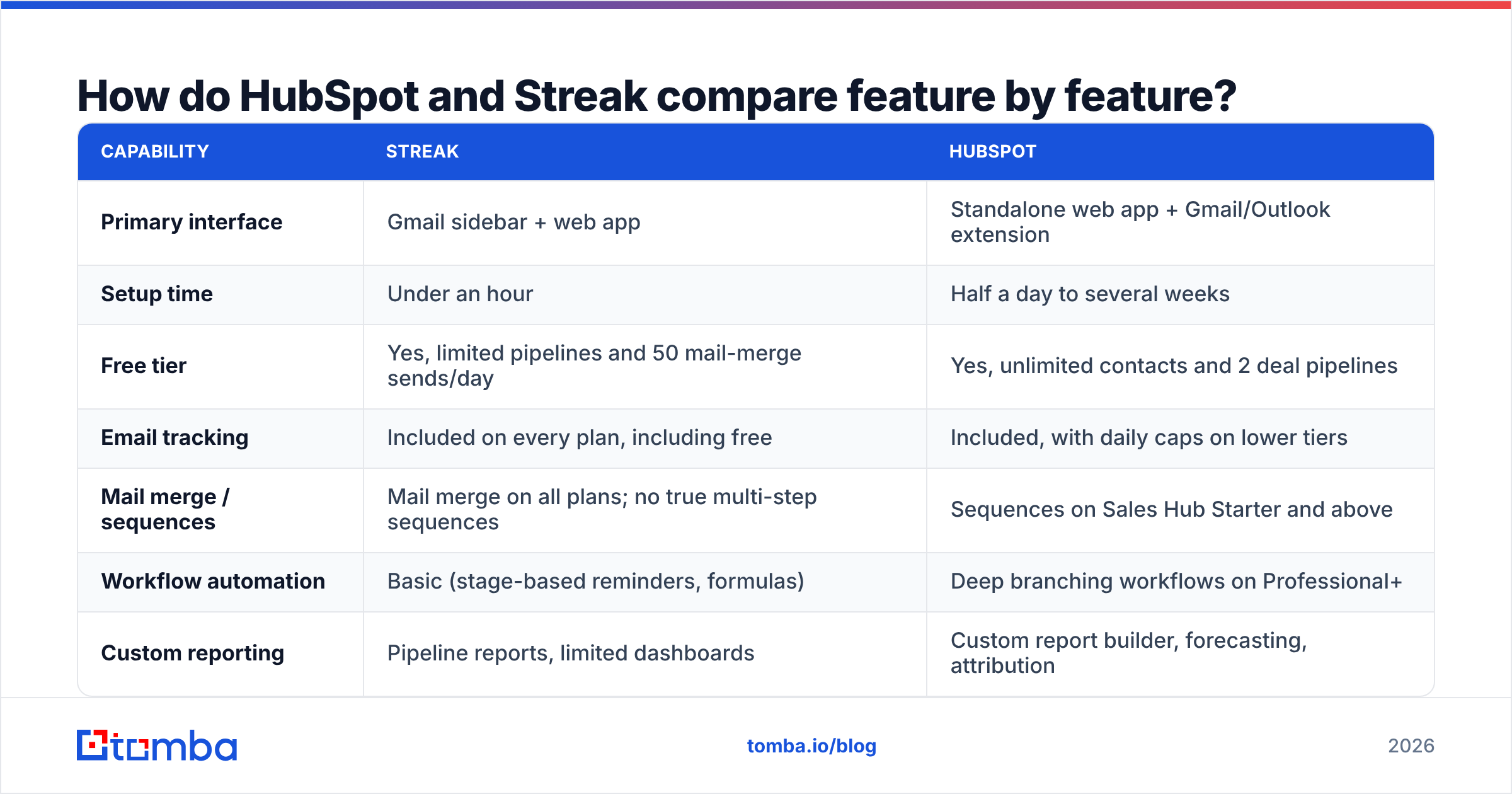
How do HubSpot and Streak compare feature by feature?#
| Capability | Streak | HubSpot |
|---|---|---|
| Primary interface | Gmail sidebar + web app | Standalone web app + Gmail/Outlook extension |
| Setup time | Under an hour | Half a day to several weeks |
| Free tier | Yes, limited pipelines and 50 mail-merge sends/day | Yes, unlimited contacts and 2 deal pipelines |
| Email tracking | Included on every plan, including free | Included, with daily caps on lower tiers |
| Mail merge / sequences | Mail merge on all plans; no true multi-step sequences | Sequences on Sales Hub Starter and above |
| Workflow automation | Basic (stage-based reminders, formulas) | Deep branching workflows on Professional+ |
| Custom reporting | Pipeline reports, limited dashboards | Custom report builder, forecasting, attribution |
| Marketing features | None | Full Marketing Hub (ads, forms, landing pages, nurture) |
| Native integrations | Small library, heavy Zapier reliance | 1,700+ app marketplace |
| Mobile app | iOS and Android | iOS and Android, more mature |
| API | REST API, modest rate limits | Extensive API, webhooks, custom objects |
| Best fit team size | 1–10 | 5–5,000 |
Two rows deserve expansion.
Sequences vs mail merge. Streak's mail merge sends one templated email to a list. It does not automatically send follow-up two on day four if nobody replies. HubSpot sequences do, and they enroll and unenroll based on reply detection. If your outbound motion depends on multi-touch cadences, this single row often ends the comparison.
Reporting. Streak reports on what is in the pipeline. HubSpot reports on how contacts moved through the pipeline, which sources produced them, and what your rep-level conversion rates look like by stage. Teams that need a weekly forecast meeting outgrow Streak's reporting well before they outgrow its pipeline.
Which one actually costs more at 5, 20, and 50 seats?#
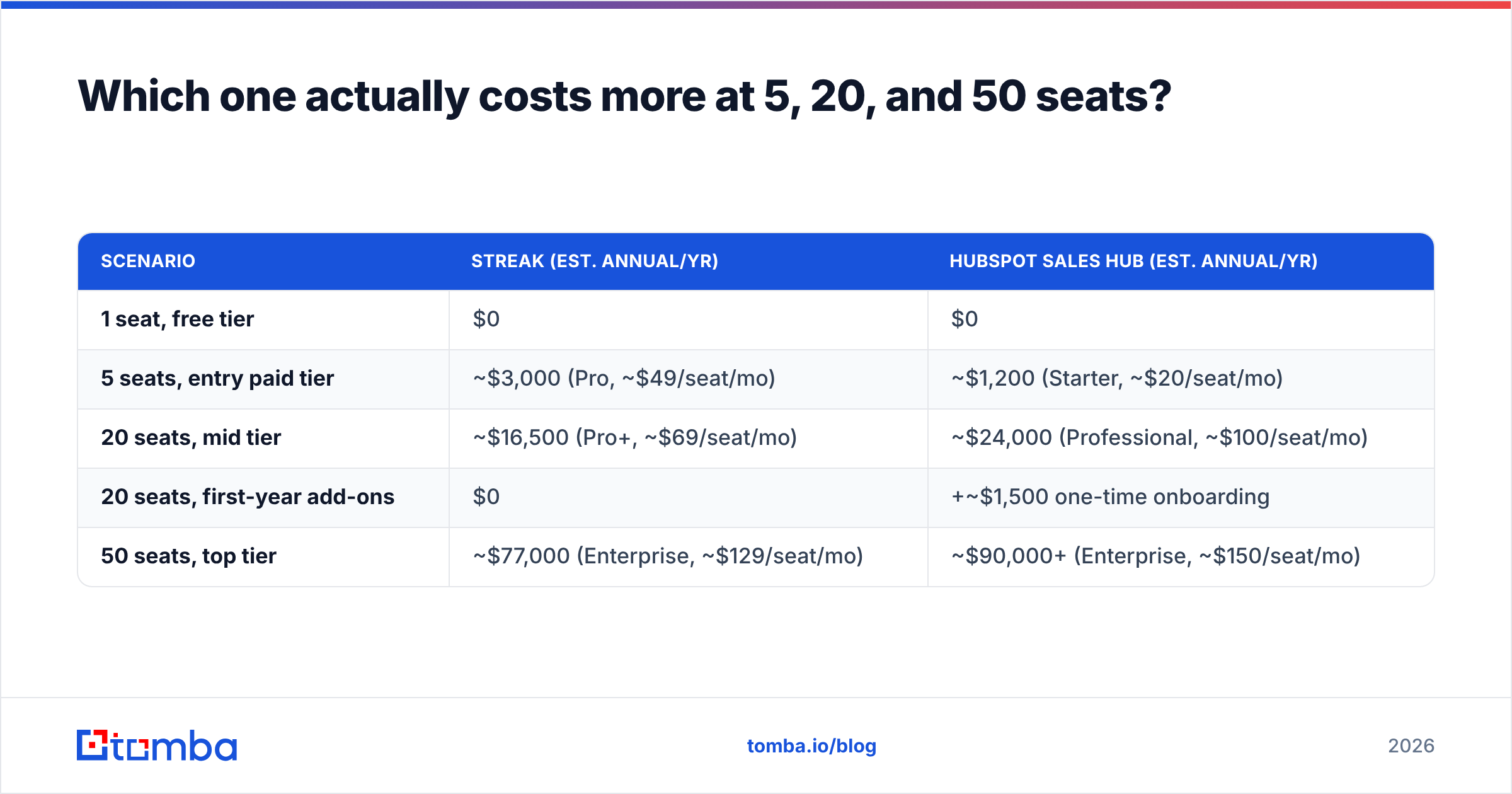
Published list prices move, so treat these as directional and confirm on each vendor's pricing page before you sign. As of early 2026, the annual-billing shape looks roughly like this:
| Scenario | Streak (est. annual/yr) | HubSpot Sales Hub (est. annual/yr) |
|---|---|---|
| 1 seat, free tier | $0 | $0 |
| 5 seats, entry paid tier | ~$3,000 (Pro, ~$49/seat/mo) | ~$1,200 (Starter, ~$20/seat/mo) |
| 20 seats, mid tier | ~$16,500 (Pro+, ~$69/seat/mo) | ~$24,000 (Professional, ~$100/seat/mo) |
| 20 seats, first-year add-ons | $0 | +~$1,500 one-time onboarding |
| 50 seats, top tier | ~$77,000 (Enterprise, ~$129/seat/mo) | ~$90,000+ (Enterprise, ~$150/seat/mo) |
Three things this table hides, and they matter more than the numbers:
- HubSpot is cheaper to start and steeper to grow. Starter at roughly $20 per seat undercuts Streak badly. Professional roughly quintuples that and adds a one-time onboarding fee. That jump is where most churn conversations happen.
- Streak's pricing is boring in a good way. Flat per-seat, no mandatory onboarding, no marketing-contact tier that inflates when your list grows. Finance teams can forecast it.
- HubSpot's marketing-contact pricing is a separate meter. If you also run Marketing Hub, cost scales with contacts stored for marketing, not just seats. Plenty of teams discover this in month nine.
- Neither price includes data. A CRM with 400 stale records is not cheaper than a CRM with 4,000 accurate ones. Budget for data enrichment and verification separately, or the seat cost is money spent on empty rows.
Is Streak enough if your whole process lives in Gmail?#
Often, yes — and that is not a consolation prize.
Streak wins on a metric most CRM comparisons ignore: adoption. The most common reason a CRM fails is not missing features, it is reps not updating it. Streak sidesteps that because updating a deal happens in the same tab where the deal is being worked. There is no context switch to punish.
Concrete situations where Streak is the correct answer:
- Agencies and studios tracking 20–60 active client conversations, where the "deal" genuinely is an email thread.
- Recruiters running candidate pipelines with stage columns, notes, and mail merge to sourced candidates.
- Solo founders and two-person sales teams who need pipeline visibility this week, not a Q3 implementation project.
- Anyone with a Google Workspace-only stack, since Streak's permissions, sharing, and search all inherit Gmail behavior.
Where it stops working: the day you need lead scoring, a marketing team asking about attribution, a support team needing ticket context on the same contact record, or a VP asking for stage-conversion trends over four quarters. Streak's answer to most of those is Zapier plus a spreadsheet, which is a fine answer right up until it is not.
When does HubSpot become worth the overhead?#
HubSpot earns its price when at least two of these are true:
- You have more than one team touching the same contact. Marketing nurtures, sales works, support resolves. One shared record with lifecycle stages is worth real money and Streak has no equivalent.
- You run multi-touch outbound. Sequences, task queues, and enrollment logic replace a person manually remembering follow-up four.
- You need reporting a board will accept. Custom report builder, forecast categories, and pipeline snapshots over time.
- You are integrating heavily. The app marketplace and API depth make HubSpot the default hub in most modern GTM stacks, which is why a HubSpot integration is table stakes for data vendors.
- You expect to double headcount. Migrating off a CRM at 40 seats is a quarter-long project. Choosing the one you will still be on is worth overpaying for early.
The honest counterweight: HubSpot Professional is a commitment. Annual contract, onboarding fee, and enough configuration surface that most teams either hire a partner or lose a month. If you cannot name the workflows you will build in the first 30 days, you are buying capability you will not use.
What do reviewers actually say about each one?#
Patterns across public review sites like G2's CRM category are fairly consistent, and worth reading with the sample bias in mind — Streak reviewers skew small-team, HubSpot reviewers skew mid-market.
Streak, recurring praise: speed of setup, zero training required, Gmail integration quality, fair free tier. Streak, recurring complaints: Gmail performance drag with large pipelines, limited reporting, thin native integrations, and pricing that feels high relative to feature depth once you compare it to HubSpot Starter.
HubSpot, recurring praise: free tier generosity, ecosystem, reporting, support quality on paid tiers. HubSpot, recurring complaints: price escalation between tiers, contract inflexibility, marketing-contact billing surprises, and feature gating that puts obvious things (like more than a couple of pipelines) behind upgrades.
Notice that neither list mentions contact data quality. That is because CRMs do not supply it, and reviewers correctly do not blame them for it.
Which CRM should you pick?#
Use this as a decision list rather than a scorecard:
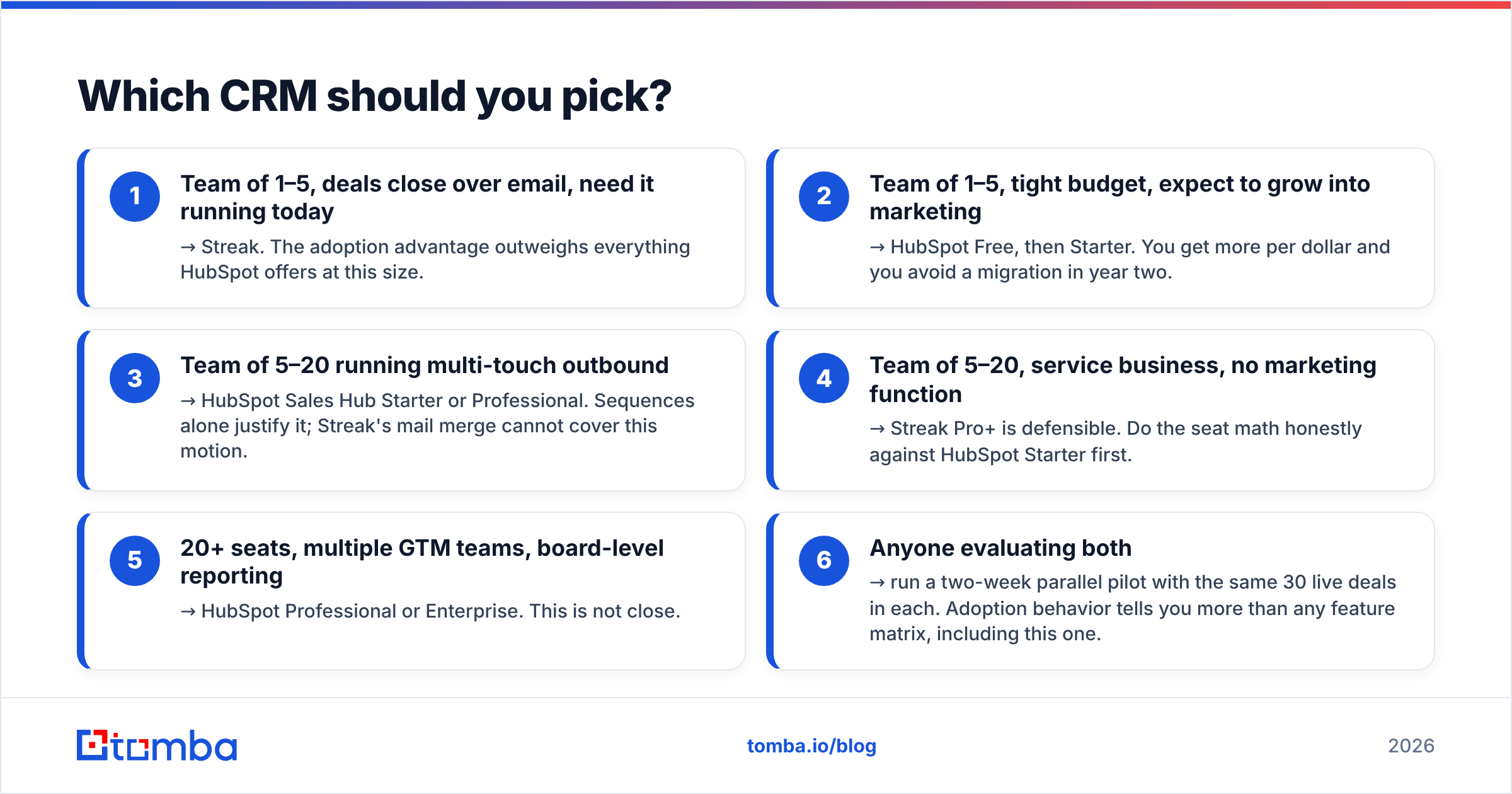
- Team of 1–5, deals close over email, need it running today → Streak. The adoption advantage outweighs everything HubSpot offers at this size.
- Team of 1–5, tight budget, expect to grow into marketing → HubSpot Free, then Starter. You get more per dollar and you avoid a migration in year two.
- Team of 5–20 running multi-touch outbound → HubSpot Sales Hub Starter or Professional. Sequences alone justify it; Streak's mail merge cannot cover this motion.
- Team of 5–20, service business, no marketing function → Streak Pro+ is defensible. Do the seat math honestly against HubSpot Starter first.
- 20+ seats, multiple GTM teams, board-level reporting → HubSpot Professional or Enterprise. This is not close.
- Anyone evaluating both → run a two-week parallel pilot with the same 30 live deals in each. Adoption behavior tells you more than any feature matrix, including this one.

What do both CRMs assume you already have?#
Contacts. Accurate, deliverable, current contacts.
This is the blind spot in every HubSpot vs Streak comparison. Both tools are containers. Fill them with guessed addresses scraped from a website footer and you get the same outcome in either: bounced sends, a damaged sending domain, and pipeline reports built on records that were never real.
A workable sequence, whichever CRM you choose:
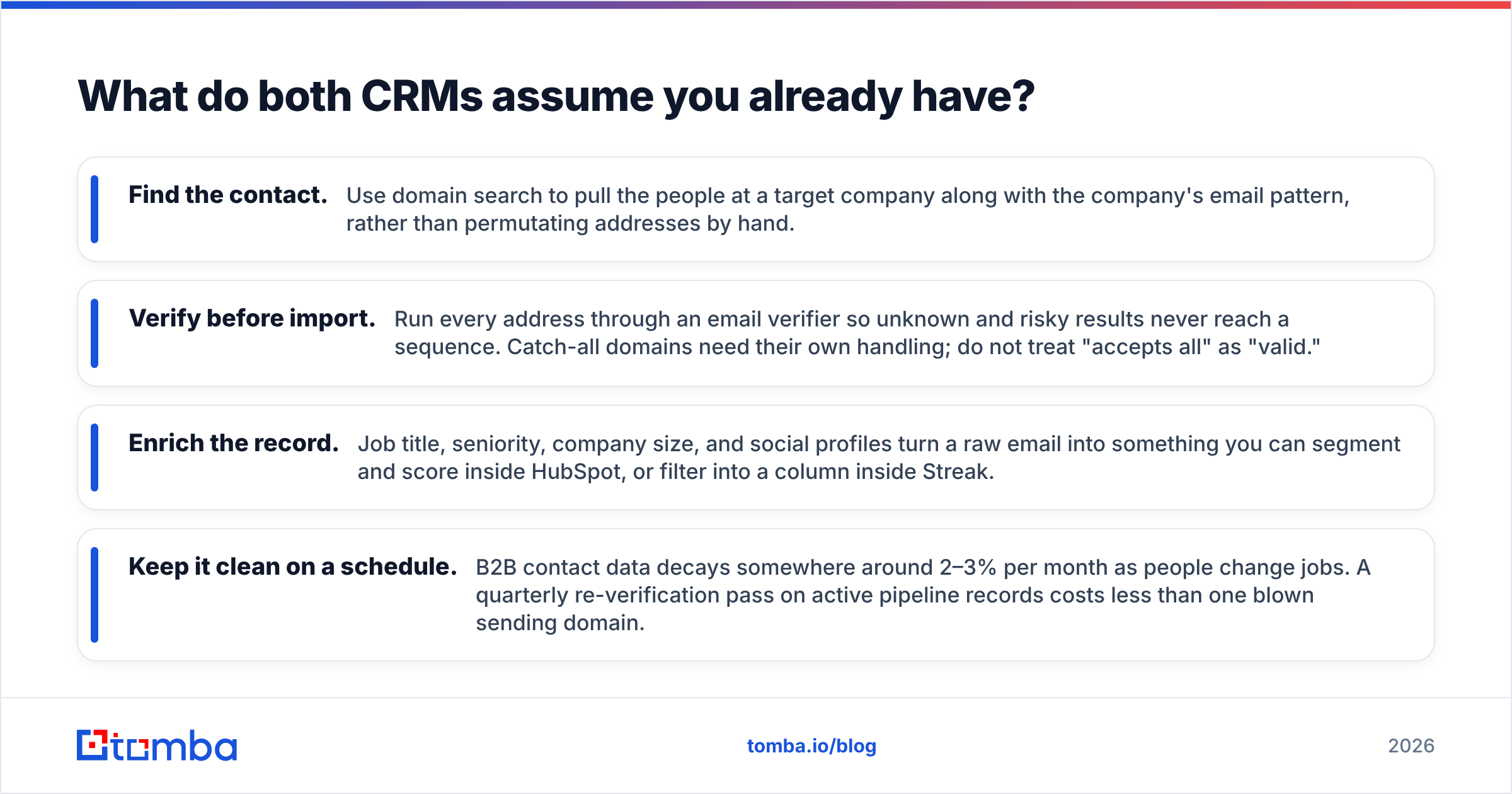
- Find the contact. Use domain search to pull the people at a target company along with the company's email pattern, rather than permutating addresses by hand.
- Verify before import. Run every address through an email verifier so unknown and risky results never reach a sequence. Catch-all domains need their own handling; do not treat "accepts all" as "valid."
- Enrich the record. Job title, seniority, company size, and social profiles turn a raw email into something you can segment and score inside HubSpot, or filter into a column inside Streak.
- Keep it clean on a schedule. B2B contact data decays somewhere around 2–3% per month as people change jobs. A quarterly re-verification pass on active pipeline records costs less than one blown sending domain.
Do this and the CRM decision gets less consequential, because the expensive part of the stack — the data — travels with you when you migrate.
Final verdict: HubSpot vs Streak in 2026#
Pick Streak if your sales process is email and you want it working before lunch. It is the best Gmail-native CRM available, the adoption rate is unmatched, and pricing is predictable. Accept that reporting and automation are shallow, and plan to revisit the decision when you pass roughly ten seats.
Pick HubSpot if you are building a GTM function rather than tracking deals. The free tier costs nothing to try, Starter is cheaper per seat than Streak, and the platform will still fit at 50 seats. Go in clear-eyed about the Professional price jump and the onboarding fee.
There is no wrong answer for a five-person team. There is a clearly wrong answer for a fifty-person team, and it is not HubSpot.
Whichever container you choose, fill it properly. Tomba's Email Finder locates verified professional addresses by name, domain, or company and pushes them into your CRM already checked, so your pipeline reports describe real people. Start free with 25 searches a month, or move to the $49/mo Starter plan when your outbound volume justifies it — see Tomba pricing for the full breakdown.
Related guides#
// get started
Find, verify and enrich your first contacts today
Start on the free plan with 25 searches a month, then scale when your team is ready.
Free plan · No credit card required · GDPR & CCPA
// about the author