HubSpot vs Teamleader: Which CRM Wins for SMB Sales in 2026?
HubSpot and Teamleader solve different problems under the same CRM label. One scales marketing and sales into an enterprise suite; the other runs an agency's quotes, projects, and invoices. Here's which one fits your team — and what each really costs.
TL;DR
- HubSpot is a full go-to-market suite — CRM, marketing automation, service desk, CMS — that scales from free to enterprise. It wins when marketing and sales need to run on one record.
- Teamleader is a Belgian SMB ops platform built around quotes, projects, time tracking, and invoicing. It wins when your "CRM problem" is actually a quote-to-cash problem.
- Price divergence is brutal at scale: Teamleader stays in the €50–€150/month band for small teams; HubSpot Professional starts around $890/month plus a mandatory onboarding fee.
- Neither tool finds contact data for you. Both are containers — you still need a source of verified emails and phone numbers to fill them.
- Pick Teamleader if you bill projects and send quotes. Pick HubSpot if you run demand gen, multi-touch attribution, and a real pipeline of inbound leads.
What is the actual difference between HubSpot and Teamleader?#
They are not competing for the same job, even though both call themselves CRM.
HubSpot started as an inbound marketing platform and bolted a CRM onto it. The center of gravity is the contact record, and everything — email sequences, landing pages, forms, chat, ticketing, reporting — orbits that record. It is built for companies where marketing generates leads and sales works them through a pipeline.
Teamleader (originally Teamleader Focus, now with Teamleader Orbit for larger service firms) started as an operations tool for agencies and small service businesses in the Benelux region. The center of gravity is the deal-to-invoice flow: you create a company, send a quotation, win it, log time against the project, and invoice it. CRM is one module among several, not the whole product.
Here's the practical test. Ask yourself which sentence describes your pain:
- "I don't know which marketing channel produced this closed deal." → HubSpot.
- "My quotes live in Word, my time sheets in Excel, and my invoices in a separate accounting tool." → Teamleader.
- "My reps have no idea who to contact at target accounts." → Neither. That's a data problem, and you fix it upstream with an email finder before the CRM matters at all.
That third case is more common than vendors admit. Teams buy a CRM expecting it to produce pipeline, then discover they've bought an expensive, empty filing cabinet.
How do HubSpot and Teamleader compare on features and price?#
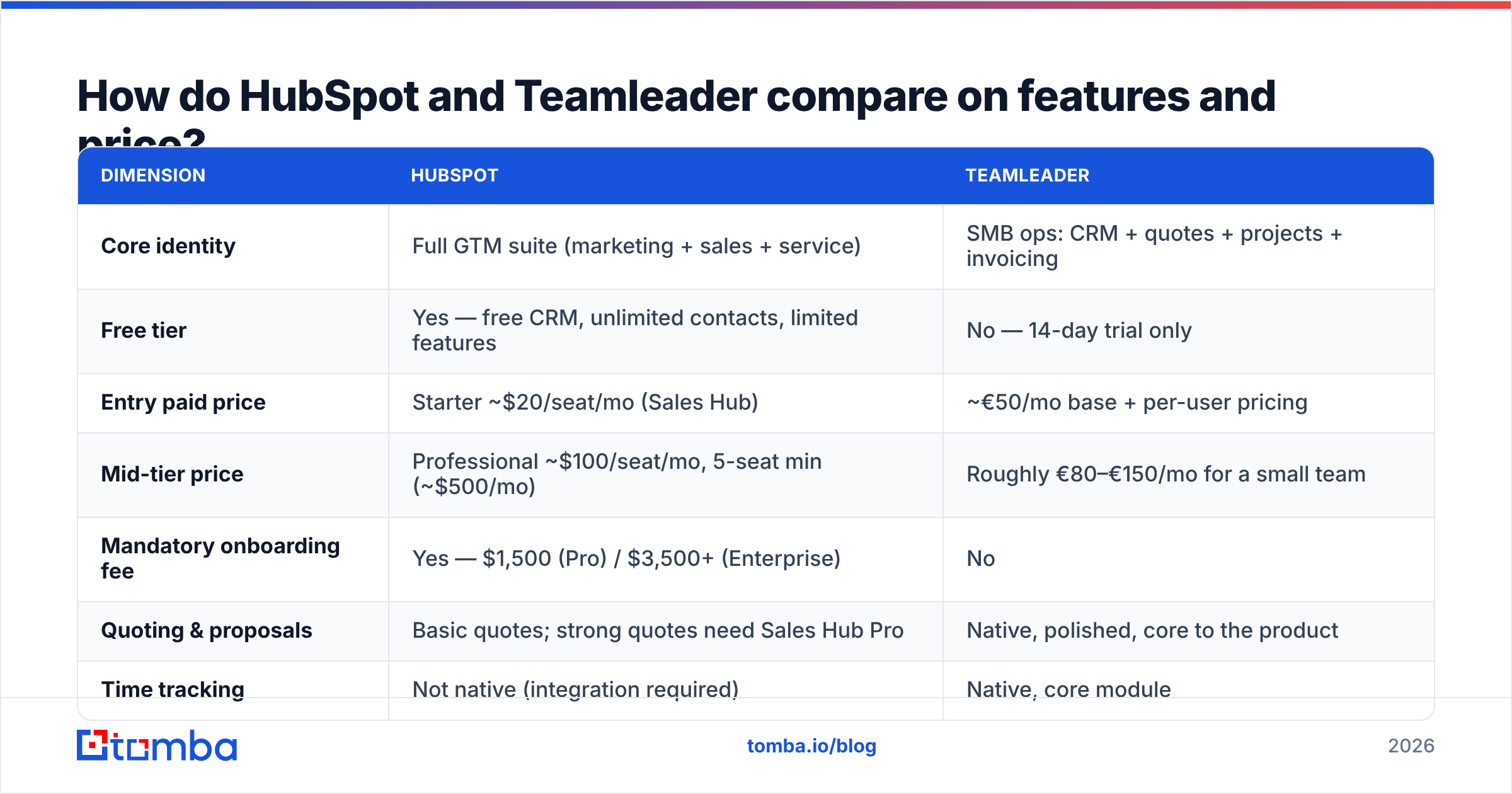
| Dimension | HubSpot | Teamleader |
|---|---|---|
| Core identity | Full GTM suite (marketing + sales + service) | SMB ops: CRM + quotes + projects + invoicing |
| Free tier | Yes — free CRM, unlimited contacts, limited features | No — 14-day trial only |
| Entry paid price | Starter ~$20/seat/mo (Sales Hub) | ~€50/mo base + per-user pricing |
| Mid-tier price | Professional |
Roughly €80–€150/mo for a small team |
| Mandatory onboarding fee | Yes — $1,500 (Pro) / $3,500+ (Enterprise) | No |
| Quoting & proposals | Basic quotes; strong quotes need Sales Hub Pro | Native, polished, core to the product |
| Time tracking | Not native (integration required) | Native, core module |
| Invoicing | Not native (Stripe/QuickBooks integrations) | Native, with accounting integrations |
| Marketing automation | Best-in-class (workflows, attribution, A/B) | Basic email; not a marketing platform |
| Service desk / tickets | Native (Service Hub) | Native ticketing in Focus |
| Reporting depth | Custom report builder, revenue attribution | Solid operational reports, limited attribution |
| App marketplace | 1,700+ integrations | ~200 integrations, Benelux-heavy |
| Primary market | Global, all segments | Benelux/DACH SMB, expanding EU |
| Best for | 10–500 person companies with inbound motion | 2–50 person agencies and service firms |
The number most teams miss is the onboarding fee. HubSpot's Professional tier carries a one-time mandatory onboarding charge, and annual contracts are the default. That turns a "$500/month" decision into a first-year commitment north of $7,500 before a single deal closes. Check the current numbers on HubSpot's pricing page — they change every year, and the seat-minimum rules change with them.
Teamleader's pricing model is simpler: a base platform fee plus per-user seats, and you add modules (Projects, Invoicing, Ticketing) as needed. No forced onboarding. The trade-off is ceiling — once you need multi-touch attribution or a 12-step nurture workflow, you'll be duct-taping third-party tools onto it.
Which one should a small agency actually pick?#
Teamleader, almost always — if the agency is under about 30 people and revenue comes from projects rather than product.
The reason is workflow continuity. In Teamleader you send a quotation, the client accepts it, and that quote becomes a project with a budget. Your team logs hours against project phases. At month end you invoice the logged hours or the fixed fee. Nothing leaves the system, and nothing gets re-keyed.
Replicating that in HubSpot means Sales Hub Professional for quotes, plus a time-tracking app, plus an invoicing integration, plus someone to maintain the connections. You'd spend more and get a worse fit.
The exception: agencies that generate leads through content and paid ads at real volume. If you're running a blog, gated assets, retargeting, and webinars, HubSpot's attribution reporting is worth the premium — you'll actually know which asset produced which retainer.
When is HubSpot worth the price jump?#
Four conditions. If three or more apply, HubSpot pays for itself.
- You have a dedicated marketing function. Not "the founder posts on LinkedIn" — an actual person or agency running campaigns whose ROI needs measuring.
- Your sales cycle has multiple touches across channels. Email, ads, webinars, a demo, then a proposal. HubSpot stitches those into one timeline; Teamleader does not try to.
- You need reporting your board will read. Custom dashboards, pipeline velocity, forecast categories, and revenue attribution are native. Teamleader's reporting is operational, not strategic.
- You expect to grow past 50 seats within two years. Migrating a CRM at 80 people is a quarter-long project. Choosing the platform with more headroom now avoids that.
The counter-argument is real, though: HubSpot's price curve is steep and mostly one-directional. Companies routinely land on Professional, use maybe 40% of it, and cannot justify downgrading because their workflows have already grown into the expensive features. If you can't articulate which Professional-only feature you need, start on Starter or the free CRM and let usage prove the case.
For teams looking at Apollo alternatives or other all-in-one stacks alongside this decision, the same logic applies — suite pricing is priced for the features you might use, not the ones you do.
What do reviewers actually say about each?#
Independent review sites are useful here because both products have thousands of ratings, and the complaint patterns are consistent.
For HubSpot, the recurring criticisms on G2 are cost escalation, the marketing contact billing model (you get charged for contacts you're marketing to, and cleanup is manual), and the fact that useful features sit one tier above wherever you currently are. The praise is consistent too: onboarding into the product itself is genuinely easy, the UI holds up as data grows, and the integration ecosystem means almost nothing is a dead end.
For Teamleader, praise centers on the quote-to-invoice flow and on customer support responsiveness. Criticism centers on reporting depth, the mobile app, and limited integrations outside the Benelux ecosystem — if your stack is US-centric SaaS, expect a few gaps. Check current listings on Capterra for the specific integrations your finance team needs before committing.
One thing neither vendor's reviews resolve: data quality. A CRM's reporting is only as honest as the records inside it, and both platforms happily store a contact whose email bounced eight months ago.
How do you keep either CRM from filling up with dead data?#
Verify on the way in, and re-verify on a schedule. This is the single highest-leverage habit for CRM hygiene, and it's independent of which platform you choose.
The failure mode looks like this. A rep exports a list from LinkedIn or buys a scraped file. They import 4,000 rows. Roughly 20–30% of those emails are stale — people changed jobs, domains got consolidated, addresses were guessed by a permutation tool and never checked. The rep sends a campaign. Bounces spike, the sending domain's sender reputation takes a hit, and the next three campaigns underperform for reasons nobody traces back to the import.
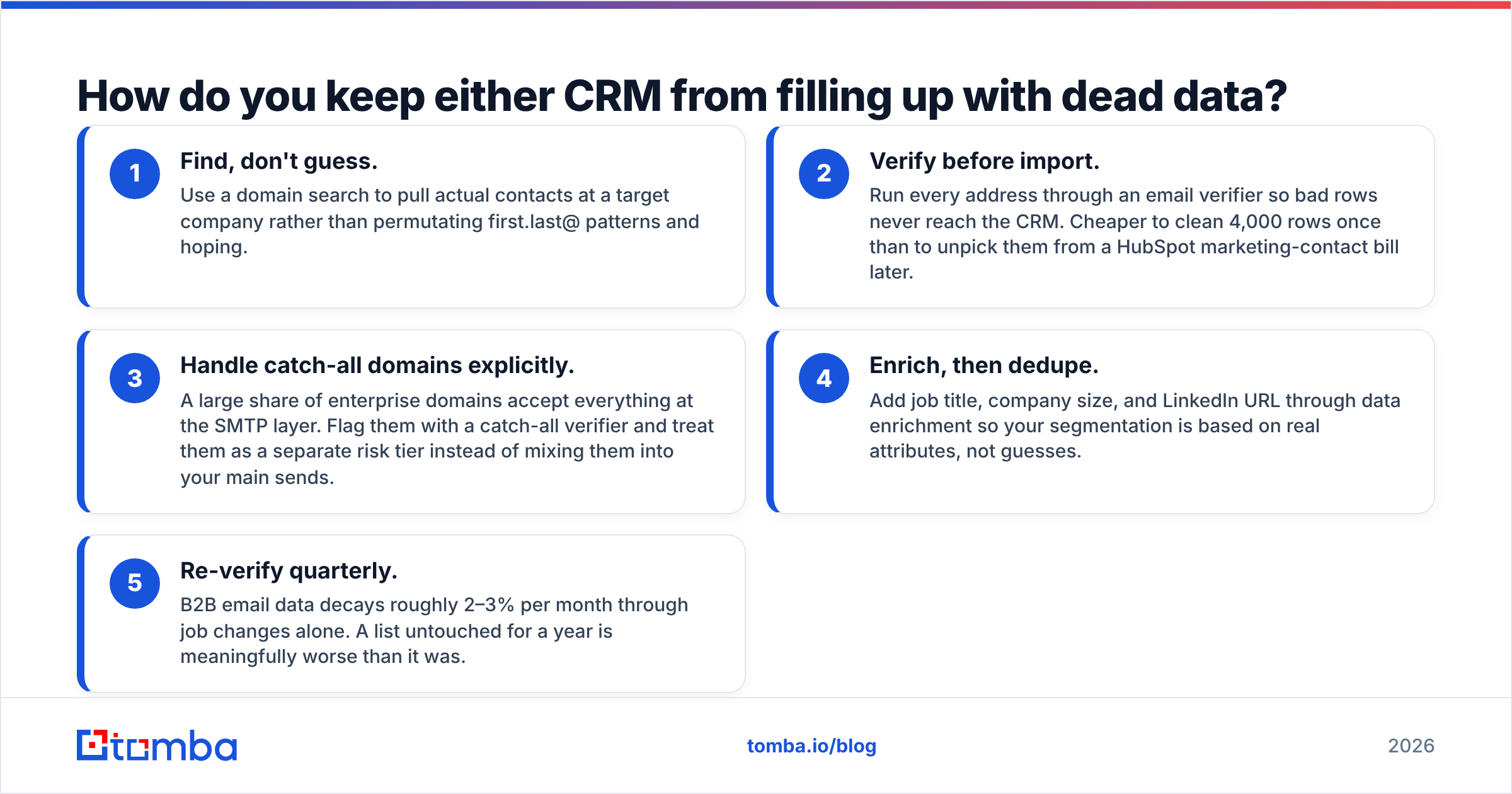
A practical hygiene loop:
- Find, don't guess. Use a domain search to pull actual contacts at a target company rather than permutating first.last@ patterns and hoping.
- Verify before import. Run every address through an email verifier so bad rows never reach the CRM. Cheaper to clean 4,000 rows once than to unpick them from a HubSpot marketing-contact bill later.
- Handle catch-all domains explicitly. A large share of enterprise domains accept everything at the SMTP layer. Flag them with a catch-all verifier and treat them as a separate risk tier instead of mixing them into your main sends.
- Enrich, then dedupe. Add job title, company size, and LinkedIn URL through data enrichment so your segmentation is based on real attributes, not guesses.
- Re-verify quarterly. B2B email data decays roughly 2–3% per month through job changes alone. A list untouched for a year is meaningfully worse than it was.

Both HubSpot and Teamleader expose APIs, so this loop can be automated. Push verified contacts in via the Tomba API, or use the HubSpot integration to enrich records without leaving the CRM. If your team lives in spreadsheets before the CRM, the Google Sheets add-on handles the same job at the pre-import stage.
Can you run both, or is that overkill?#
You can, and a handful of companies do — but only in one specific shape.
The workable pattern: HubSpot as the marketing and top-of-funnel system, Teamleader as the delivery and billing system, with a sync between them on the company object. Marketing qualifies, sales closes in HubSpot, and won deals push into Teamleader as projects. This works if you have someone who owns the integration and if the volume justifies it.
The unworkable pattern: two systems, both with contacts, no clear source of truth. Within a quarter you'll have divergent company names, duplicate contacts, and two conflicting revenue numbers. If nobody owns the sync, don't run both.
For most teams under 50 people, pick one. The cost of a slightly imperfect fit is far lower than the cost of maintaining two overlapping databases.
What's the decision framework?#
Run through these in order and stop at the first clear answer.
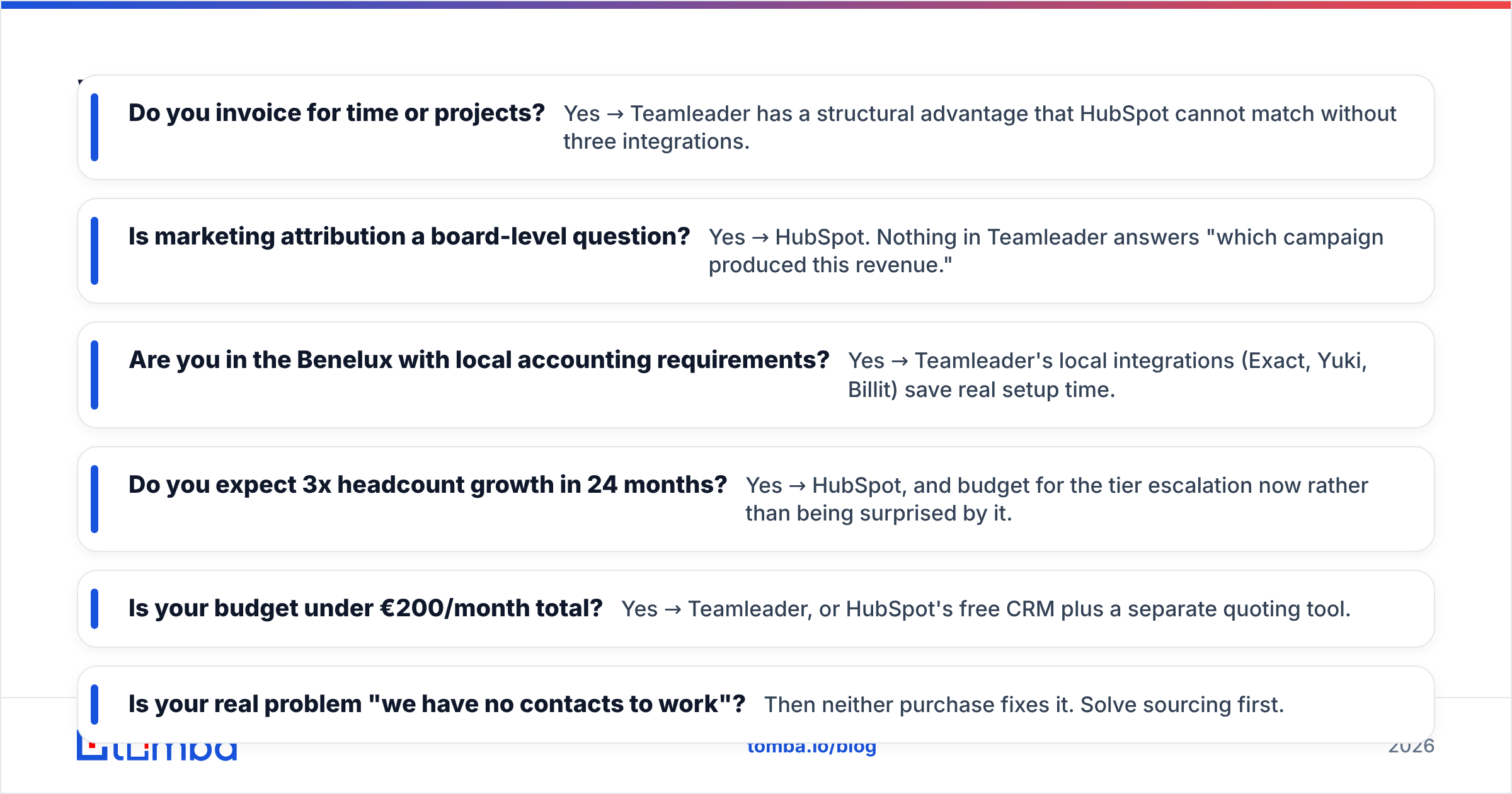
- Do you invoice for time or projects? Yes → Teamleader has a structural advantage that HubSpot cannot match without three integrations.
- Is marketing attribution a board-level question? Yes → HubSpot. Nothing in Teamleader answers "which campaign produced this revenue."
- Are you in the Benelux with local accounting requirements? Yes → Teamleader's local integrations (Exact, Yuki, Billit) save real setup time.
- Do you expect 3x headcount growth in 24 months? Yes → HubSpot, and budget for the tier escalation now rather than being surprised by it.
- Is your budget under €200/month total? Yes → Teamleader, or HubSpot's free CRM plus a separate quoting tool.
- Is your real problem "we have no contacts to work"? Then neither purchase fixes it. Solve sourcing first.
That last bullet deserves emphasis because it's the most expensive mistake in this category. A CRM is infrastructure — it organizes work that already exists. It doesn't create pipeline. Teams that buy HubSpot Professional hoping it will generate leads are paying suite prices for a database, and they'd have been better served putting that budget into data and outbound execution first.
The bottom line#
Teamleader is the better operations tool for small service businesses. HubSpot is the better growth platform for companies with a real marketing function. The overlap in their names is much bigger than the overlap in what they're good at.
Whichever you choose, the CRM only performs as well as the contact data inside it. Before you migrate a single record, make sure the emails in your list are real, current, and safe to send to.
Start with the Tomba Email Finder — find verified professional email addresses by domain, name, or company, then push clean records straight into HubSpot or Teamleader. The free tier gives you 25 searches a month to test the accuracy on your own target accounts; Tomba pricing starts at $49/month for Starter when you're ready to scale. Fill the CRM you're paying for with data that actually converts.
Related guides#
// get started
Find, verify and enrich your first contacts today
Start on the free plan with 25 searches a month, then scale when your team is ready.
Free plan · No credit card required · GDPR & CCPA
// about the author