HubSpot vs Yesware: Which Sales Email Tool Wins in 2026?
HubSpot Sales Hub and Yesware both track emails and run sequences, but they solve different problems at wildly different prices. Here is the honest breakdown of which one fits your team.
TL;DR
- Yesware wins on price and simplicity. It starts around $19/user/month, lives inside Gmail and Outlook, and takes about ten minutes to learn. If you need email tracking plus light sequences and nothing else, it's the cheaper answer.
- HubSpot wins on depth. Sales Hub sits on top of a full CRM with deal pipelines, forecasting, workflows, and reporting that Yesware simply doesn't attempt. That depth starts free and gets expensive fast — Sales Hub Professional is $100/user/month with a mandatory onboarding fee.
- The real question isn't features, it's your CRM. If you already run HubSpot CRM, adding Sales Hub is obvious. If you run Salesforce or Pipedrive, Yesware is the lighter layer that won't fight your system of record.
- Neither tool finds you contacts. Both assume you already have verified email addresses. That's a separate line item in your stack, and it's where most outbound programs actually break.
- Team size is the cleanest dividing line. Under 10 reps with no CRM ambitions: Yesware. Over 15 reps with pipeline reporting requirements: HubSpot.
Sales email tools all look the same on a feature grid. Open tracking, click tracking, templates, sequences, a Gmail sidebar — every vendor ticks those boxes. The difference between HubSpot Sales Hub and Yesware isn't what they do, it's what they are. One is a CRM that grew an email layer. The other is an email layer that reluctantly talks to CRMs.
Get that distinction wrong and you'll either pay for a platform you use 15% of, or outgrow a tool in six months and migrate under pressure.
What is HubSpot Sales Hub?#
HubSpot Sales Hub is the sales-facing module of the HubSpot platform. It bundles email tracking, templates, sequences, meeting links, call logging, quotes, deal pipelines, and forecasting on top of HubSpot's CRM — which is free and unlimited on contacts up to a point.
The critical architectural fact: Sales Hub is not standalone. Everything it records writes into HubSpot's contact and deal objects. Open an email, and that activity lands on the contact timeline. Book a meeting, and it creates an engagement. Move a deal, and forecasting updates. This is genuinely powerful when HubSpot is your system of record, and genuinely awkward when it isn't — you end up with two CRMs quietly disagreeing about reality.
Sales Hub tiers in 2026:
- Free tools — email tracking with 200 notifications/month, 5 templates, 1 meeting link, basic CRM. Real, not a trial.
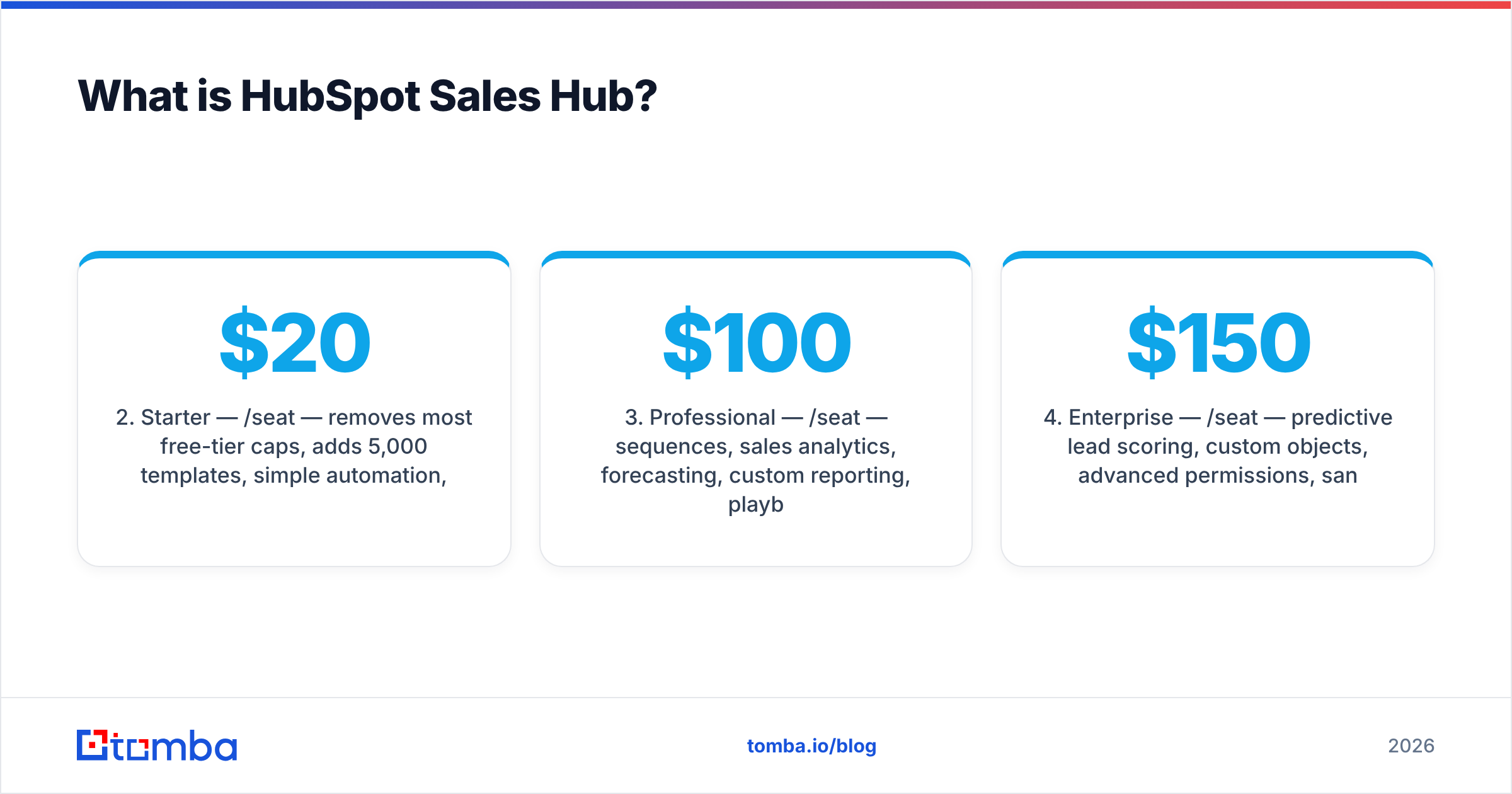
- Starter — $20/seat/month — removes most free-tier caps, adds 5,000 templates, simple automation, no onboarding fee.
- Professional — $100/seat/month — sequences, sales analytics, forecasting, custom reporting, playbooks. Requires a one-time onboarding fee (currently $1,500).
- Enterprise — $150/seat/month — predictive lead scoring, custom objects, advanced permissions, sandboxes. Higher onboarding fee.
Sequences — the feature most people actually buy a sales email tool for — are locked behind Professional. That's the single biggest pricing gotcha in this comparison.
What is Yesware?#
Yesware is an email productivity add-in for Gmail and Outlook, founded in 2010 and now owned by Vendasta. It installs as a browser extension or Outlook add-in and layers tracking, templates, multi-touch campaigns, meeting scheduling, and a Salesforce sync directly into the inbox you already use.
The design philosophy is the opposite of HubSpot's. Yesware doesn't want to be your system of record. It wants to make the 40 emails you send today measurable, then push the results into whatever CRM you already run. Reps never leave the inbox, which is why adoption rates tend to be high — there's no "log into the sales tool" step to forget.
Yesware tiers in 2026:
- Free forever — 10 tracking events/month, basic templates, meeting scheduler. Genuinely limited, useful for evaluation.
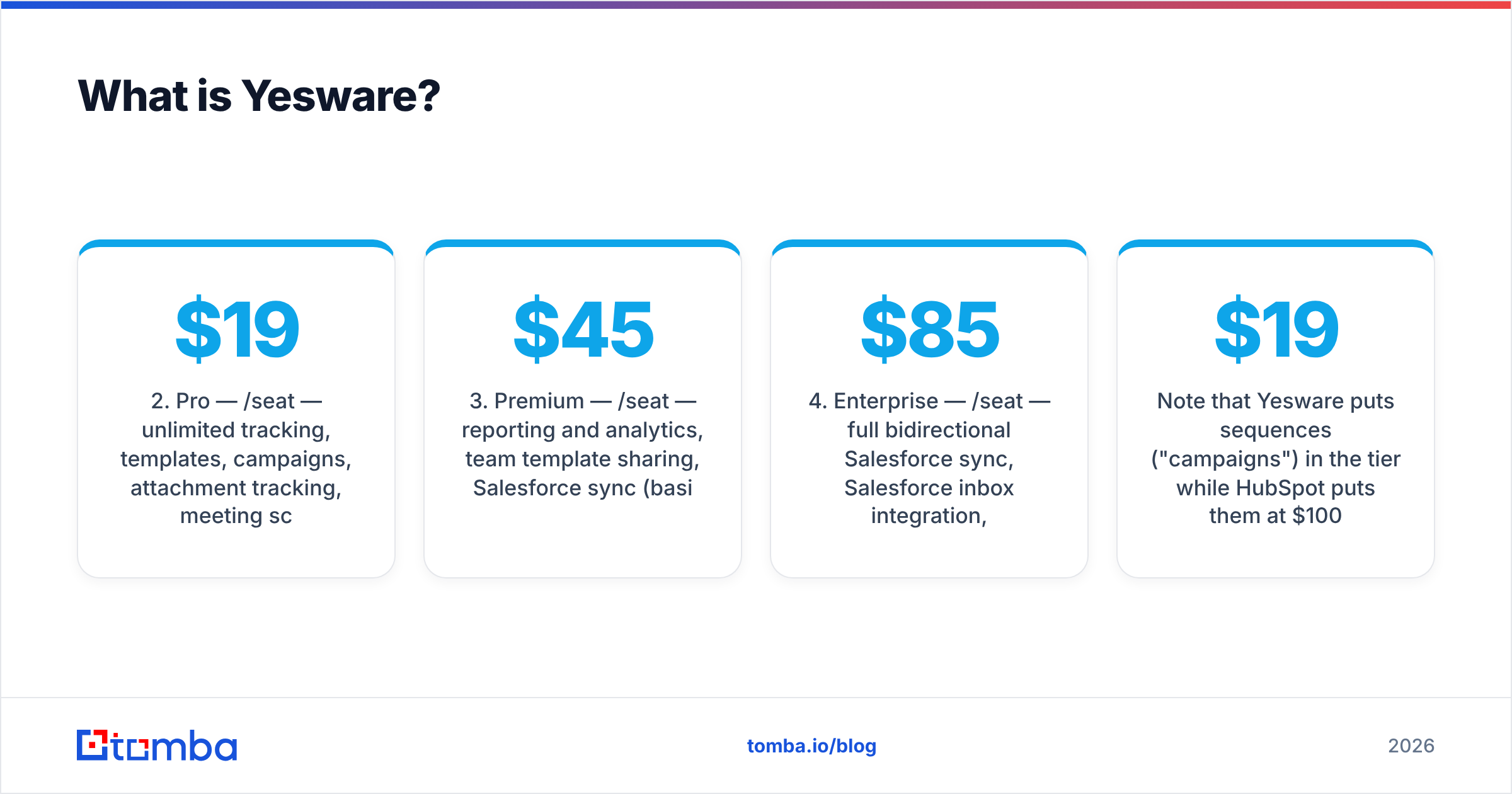
- Pro — $19/seat/month — unlimited tracking, templates, campaigns, attachment tracking, meeting scheduler.
- Premium — $45/seat/month — reporting and analytics, team template sharing, Salesforce sync (basic).
- Enterprise — $85/seat/month — full bidirectional Salesforce sync, Salesforce inbox integration, dedicated CSM.
Note that Yesware puts sequences ("campaigns") in the $19 tier while HubSpot puts them at $100. For a 5-person team sending outbound, that's $1,140/year versus $6,000/year plus onboarding.
HubSpot vs Yesware: how do they compare feature by feature?#
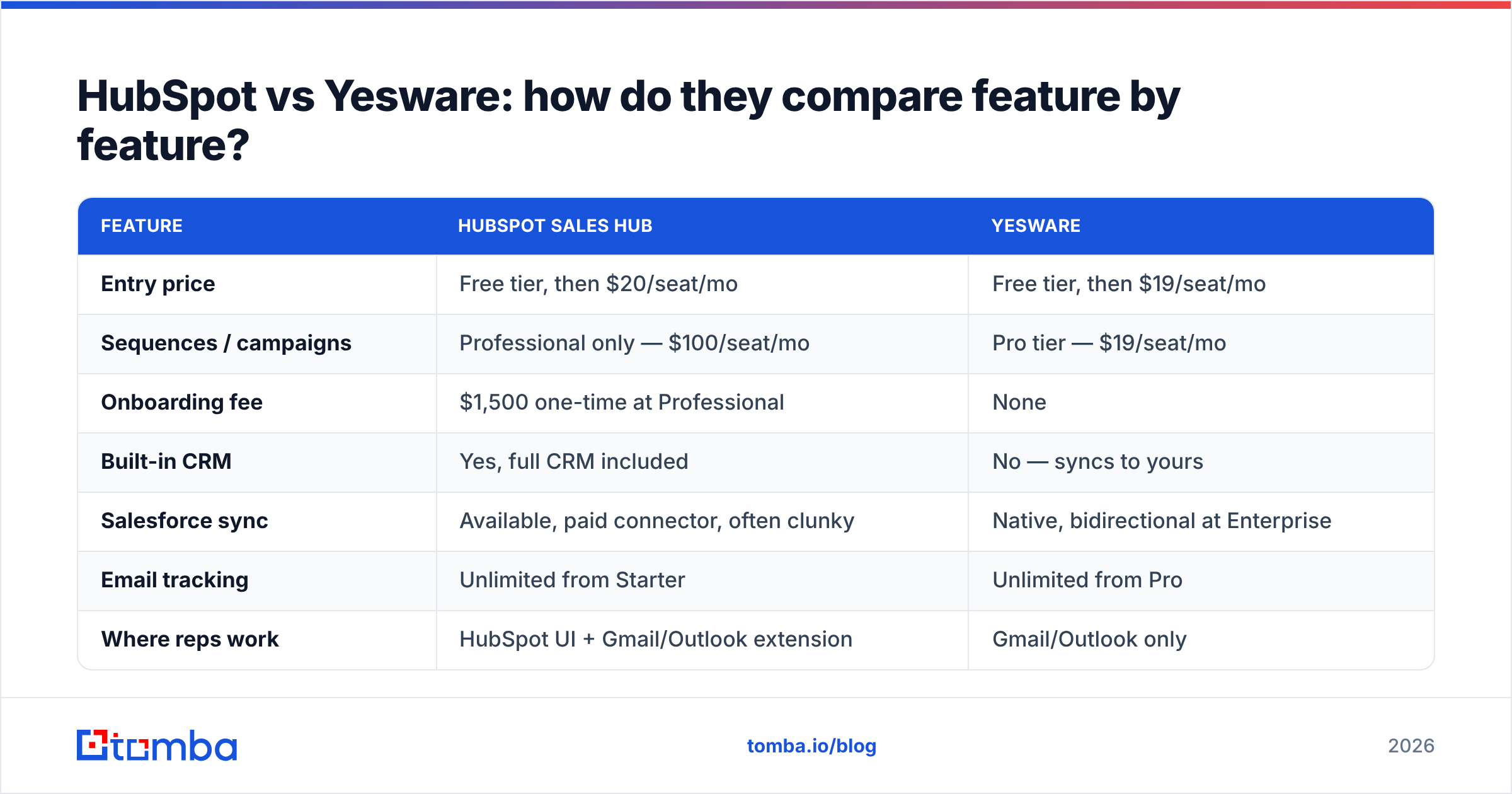
| Feature | HubSpot Sales Hub | Yesware |
|---|---|---|
| Entry price | Free tier, then $20/seat/mo | Free tier, then $19/seat/mo |
| Sequences / campaigns | Professional only — $100/seat/mo | Pro tier — $19/seat/mo |
| Onboarding fee | $1,500 one-time at Professional | None |
| Built-in CRM | Yes, full CRM included | No — syncs to yours |
| Salesforce sync | Available, paid connector, often clunky | Native, bidirectional at Enterprise |
| Email tracking | Unlimited from Starter | Unlimited from Pro |
| Where reps work | HubSpot UI + Gmail/Outlook extension | Gmail/Outlook only |
| Deal pipelines & forecasting | Yes, strong | No |
| Custom reporting | Professional and above | Basic reporting at Premium |
| Meeting scheduler | Yes, with round-robin at Pro | Yes, included from Pro |
| Call recording / dialer | Yes, Professional+ | No native dialer |
| Learning curve | Days to weeks | Under an hour |
| Best-fit team size | 15–500 reps | 1–25 reps |
The table makes the trade explicit. Yesware is a scalpel. HubSpot is an operating room. Both are correct purchases — for different patients.
Which one is better for a small team?#
Yesware, in almost every case under 10 reps. Three reasons.
First, cost. A 5-rep team on Yesware Pro pays $95/month. The same team on HubSpot Professional — the only tier with sequences — pays $500/month plus $1,500 onboarding. Year one: $1,140 versus $7,500. That gap buys a lot of data, a lot of ad spend, or another rep.
Second, adoption. Small teams don't have a RevOps person to maintain HubSpot properties, workflows, and lifecycle stages. Yesware demands roughly zero administration. You install it, you send email, it tracks.
Third, reversibility. Yesware is a layer, not a foundation. If it doesn't work out, you uninstall an extension. Leaving HubSpot means migrating your contact database, your deal history, your workflows, and your reporting — a project measured in weeks.
The counter-argument: if you have no CRM at all and expect to need one within a year, HubSpot's free CRM plus Starter Sales Hub at $20/seat is a reasonable on-ramp. You just have to accept that sequences aren't included and plan around it.
Which one is better for a scaling sales org?#
HubSpot, once you cross roughly 15 reps and need pipeline visibility.
At that size, the questions your VP of Sales asks change. It's no longer "did they open the email?" — it's "what's our stage-to-stage conversion, which sequence produces the highest win rate, and what's the forecast for Q3?" Yesware can't answer those. It was never built to.
HubSpot can, and does it well. Custom reports, revenue attribution, sequence-level analytics, deal-stage automation, and territory routing all live in Sales Hub Professional and Enterprise. G2's category data consistently places HubSpot in the leader quadrant for sales engagement partly on the strength of that reporting layer.
The honest caveat: HubSpot's power is only real if someone owns configuration. An unmaintained HubSpot instance produces confidently wrong dashboards, which is worse than no dashboards. Budget for a part-time RevOps owner or a certified partner. That cost is invisible on the pricing page and very visible in month three.
There's also a middle path teams miss: keep Yesware in the inbox for rep-level speed and run HubSpot or Salesforce underneath as the system of record. Yesware's Enterprise Salesforce sync exists precisely for this. It costs more than picking one, but it stops reps from fighting a heavy CRM UI all day.
What do both tools fail to solve?#
Neither one finds or verifies contact data. This is the gap that sinks more outbound programs than any feature difference between these two products.
HubSpot Sales Hub sends to whatever's in your CRM. Yesware sends to whatever's in your inbox draft. Neither validates that first.last@company.com is the right pattern, that the person still works there, or that the mailbox accepts mail. Send to a list with 20% invalid addresses and your bounce rate torpedoes your sender reputation — at which point your beautifully sequenced emails land in spam and both tools report a sequence performing at 0.4% reply rate for reasons neither can diagnose.
The fix is a separate data layer ahead of whichever tool you pick:
- Find the address — use an email finder against a name and domain, or a domain search to pull every public address at a target company.
- Verify before send — run the list through an email verifier so invalid and risky addresses never reach the sequence.
- Handle catch-alls separately — catch-all domains accept everything and verify as "unknown." A dedicated catch-all verifier resolves a meaningful share of them instead of forcing a guess.
- Enrich for personalization — job title, company size, and tech stack are what make a sequence read like a human wrote it. Data enrichment fills those merge fields.
Do this and both HubSpot and Yesware perform dramatically better, because the variable that dominates cold email outcomes is list quality, not template cleverness.
How do they compare on integrations and workflow?#
Yesware's integration story is narrow but deep: Gmail, Outlook, Salesforce, LinkedIn Sales Navigator, and a handful of scheduling tools. If you're on that stack, it's seamless. If you're not — say you run Pipedrive or Close — Yesware's sync options thin out considerably and you'll be exporting CSVs.
HubSpot's integration story is the inverse: enormous marketplace (1,500+ apps), but everything routes through HubSpot as the hub. That's a strength if HubSpot is your center of gravity and a liability if it isn't. Two-way Salesforce sync in particular has a reputation for field-mapping headaches at scale, and most teams running both end up with a dedicated integration owner.
For either tool, the practical move is to wire contact data in via automation rather than manual entry. A Zapier integration or the HubSpot integration can push verified contacts straight into the CRM, so reps start their day with clean records instead of a research tab.
One more workflow note that gets overlooked: neither tool manages sending domains or warmup. If you're running true cold outbound at volume, you need separate infrastructure — dedicated sending domains, gradual volume ramp, SPF/DKIM/DMARC properly configured. Both HubSpot and Yesware are designed primarily for warm and semi-warm email from your primary mailbox. Blasting 500 cold emails a day through either from your main domain is how companies end up with a burned domain and a very quiet Q4.
Is there a cheaper alternative to both?#
Yes, and it's worth naming honestly because the HubSpot-vs-Yesware framing assumes you need a heavyweight sequencer at all.
If your outbound is under a few hundred emails a week and highly targeted, a lightweight sequencer plus a strong data layer beats both on cost and often on results. Tools like Instantly, Saleshandy, and Lemlist occupy that space at $30–60/month for the whole team rather than per seat. The trade is reporting depth and CRM integration — you're back to manual logging.
Conversely, if your bottleneck is contacts rather than sending, spending on data beats spending on a sequencer. Providers like BookYourData offer pay-as-you-go verified B2B lists that suit teams doing periodic campaigns rather than continuous outbound, while API-first providers fit teams building enrichment into their own workflow. A $49/month data tool that doubles your deliverable contact count moves more pipeline than upgrading from Yesware Pro to HubSpot Professional.
Run the math on your actual constraint before you run it on feature checklists.
What's the verdict?#
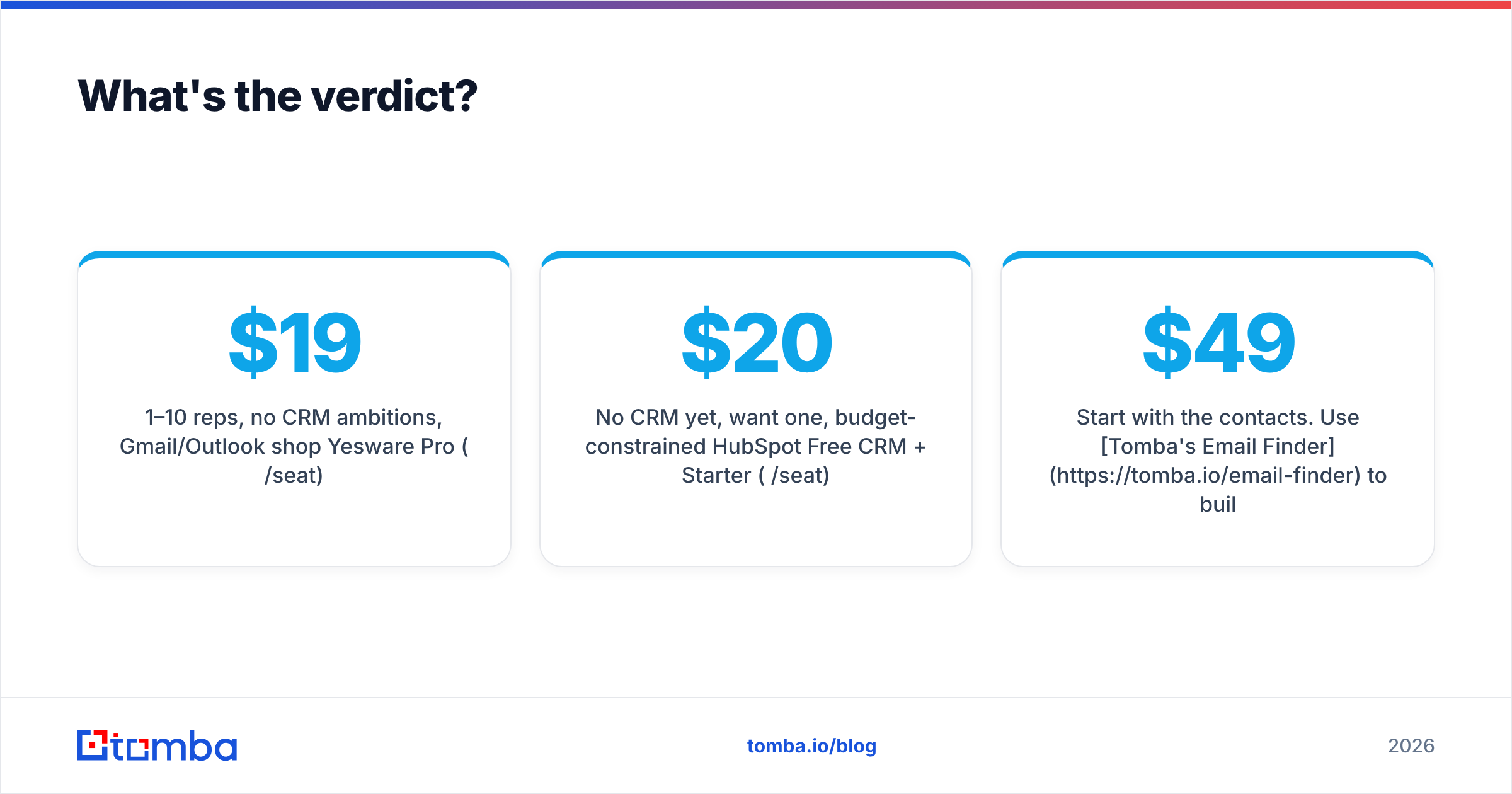
| Your situation | Pick |
|---|---|
| 1–10 reps, no CRM ambitions, Gmail/Outlook shop | Yesware Pro ($19/seat) |
| 1–10 reps, already on Salesforce | Yesware Premium or Enterprise |
| No CRM yet, want one, budget-constrained | HubSpot Free CRM + Starter ($20/seat) |
| 15+ reps, need forecasting and custom reports | HubSpot Sales Hub Professional |
| 50+ reps, complex territories and permissions | HubSpot Sales Hub Enterprise |
| High-volume pure cold outbound | Neither — dedicated cold email infra + data layer |
Strip away the marketing and the choice is structural. Yesware optimizes the individual rep's inbox. HubSpot optimizes the organization's visibility. Buying HubSpot for a 4-person team is buying reporting nobody reads. Buying Yesware for a 40-person team is asking your VP to forecast from a spreadsheet.
Whichever side you land on, the same prerequisite applies: both tools are amplifiers. They multiply whatever list you feed them. A great sequence sent to stale, unverified contacts produces stale, unverified results — just faster and with better dashboards.
Start with the contacts. Use Tomba's Email Finder to build verified, deliverable prospect lists from a company domain or a first-and-last-name, then push them straight into HubSpot or Yesware. The free tier gives you 25 searches a month to test the accuracy on your own target accounts, and paid plans start at $49/month — see Tomba pricing for the full breakdown. Get the data right, and the sequencer argument matters a lot less than the vendors would like you to believe.
Related guides#
// get started
Find, verify and enrich your first contacts today
Start on the free plan with 25 searches a month, then scale when your team is ready.
Free plan · No credit card required · GDPR & CCPA
// about the author