HubSpot vs Zoho CRM (2026): Which CRM Should You Pick?
HubSpot and Zoho CRM sit at opposite ends of the price-to-polish curve. Here is an honest breakdown of pricing, data limits, automation, and which one fits your team in 2026.
HubSpot vs Zoho CRM is a budget question with a usability twist. One costs about four times more per seat. The other asks you to build more of it yourself. This guide compares price, ease of use, automation, reporting, data quality, and migration, so you can decide fast.
TL;DR
- HubSpot wins on usability, ecosystem, and marketing depth. Zoho CRM wins on price, configurability, and bundled apps. Neither is universally "better."
- The cost gap is real, but narrower than the sticker price suggests. Zoho's paid tiers start near $14/user/month. HubSpot's Sales Hub Professional sits near $100/user/month, plus a required onboarding fee.
- Pick HubSpot if marketing and sales share one funnel, if you want adoption without training, or if your ops team is small.
- Pick Zoho CRM if you have 20+ seats, want per-module control, already use Zoho apps, or are cost-constrained.
- Both are only as good as the contact data you feed them. A CRM does not find emails or verify them. That job belongs upstream.
What are HubSpot and Zoho CRM, really?#
Think of a CRM like a kitchen. HubSpot sells you a fully fitted kitchen. The drawers close softly and the appliances match. Zoho CRM sells you a very good set of cabinets, tools, and a wiring diagram. You assemble the layout yourself, and it costs a fraction of the price.
HubSpot started as an inbound-marketing platform and grew a CRM around it. That heritage still shows. The contact timeline, forms, landing pages, email marketing, and attribution reports are all first-class. The customer relationship management record is really a marketing-and-sales record.
Zoho CRM started as a sales automation tool inside a much larger suite. Zoho One now bundles 45+ apps. The CRM itself is deeply configurable: custom modules, layout rules, blueprints (visual process enforcement), and a scripting language called Deluge. With Deluge you can build behavior that HubSpot would push you to buy an app for.
The strategic difference in one line: HubSpot optimizes for speed to value, Zoho optimizes for cost per capability.
HubSpot vs Zoho CRM: how do the prices compare?#
Pricing is where most evaluations die. Both vendors publish per-seat numbers that hide the real bill. Here is the honest shape of it for a 10-person sales team.
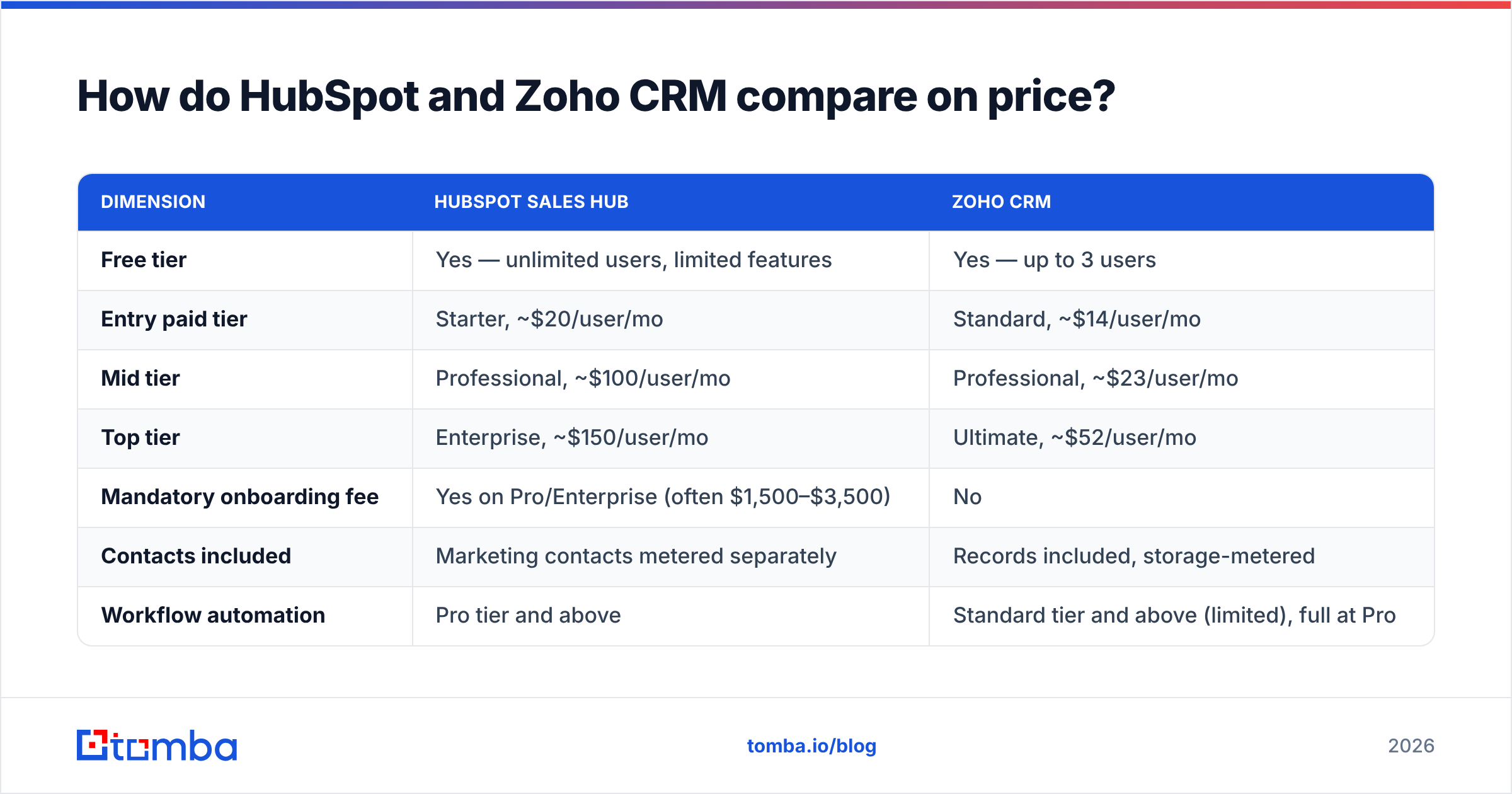
| Dimension | HubSpot Sales Hub | Zoho CRM |
|---|---|---|
| Free tier | Yes — unlimited users, limited features | Yes — up to 3 users |
| Entry paid tier | Starter, ~$20/user/mo | Standard, ~$14/user/mo |
| Mid tier | Professional, ~$100/user/mo | Professional, ~$23/user/mo |
| Top tier | Enterprise, ~$150/user/mo | Ultimate, ~$52/user/mo |
| Mandatory onboarding fee | Yes on Pro/Enterprise (often $1,500–$3,500) | No |
| Contacts included | Marketing contacts metered separately | Records included, storage-metered |
| Workflow automation | Pro tier and above | Standard tier and above (limited), full at Pro |
| App marketplace size | ~1,700 integrations | ~1,000 integrations + 45 native Zoho apps |
| Native email/marketing suite | Deep (Marketing Hub) | Present but lighter (Zoho Campaigns, separate) |
Read that table twice. A 10-seat HubSpot Professional deployment lands near $12,000/year plus onboarding. The same team on Zoho CRM Professional is closer to $2,800/year with no onboarding fee. That is a 4x gap. It is also the most common reason teams leave HubSpot for Zoho.
But the gap narrows in practice. HubSpot's Professional tier includes marketing-grade email sending, sequences, forms, and reporting. Zoho splits those across Zoho Campaigns, Zoho Forms, and Zoho Analytics. Buy the Zoho equivalents one by one and you close maybe 40% of the difference. Buy Zoho One instead (~$37/user/mo for everything) and you close most of it. You also get 40 more apps you may never open.

Which one is easier to actually use?#
HubSpot, decisively. It is not close.
The HubSpot interface is the reason companies overpay for it. Reps who have never seen a CRM can log a call, create a deal, and start a sequence within an hour. Adoption is the metric that really decides CRM payback, and it tends to be high here without a mandate. G2 reviews show the same gap in ease-of-use scores.
Zoho CRM's interface has improved a lot in the last three years. It still feels like a suite built by engineers for admins. There are more settings screens, more nested menus, and more places where one concept has two names. A Zoho setup usually needs one person who owns it. A HubSpot setup often survives without one.
So budget for an admin. If nobody on your team wants to own the setup, Zoho's price advantage turns into consulting hours or internal time.
Suggested visual: side-by-side screenshot of the HubSpot deal record vs the Zoho CRM deal record, same fields, showing click-depth difference.
Is HubSpot's automation better than Zoho's?#
It is different, not strictly better. Here is how the two break down:
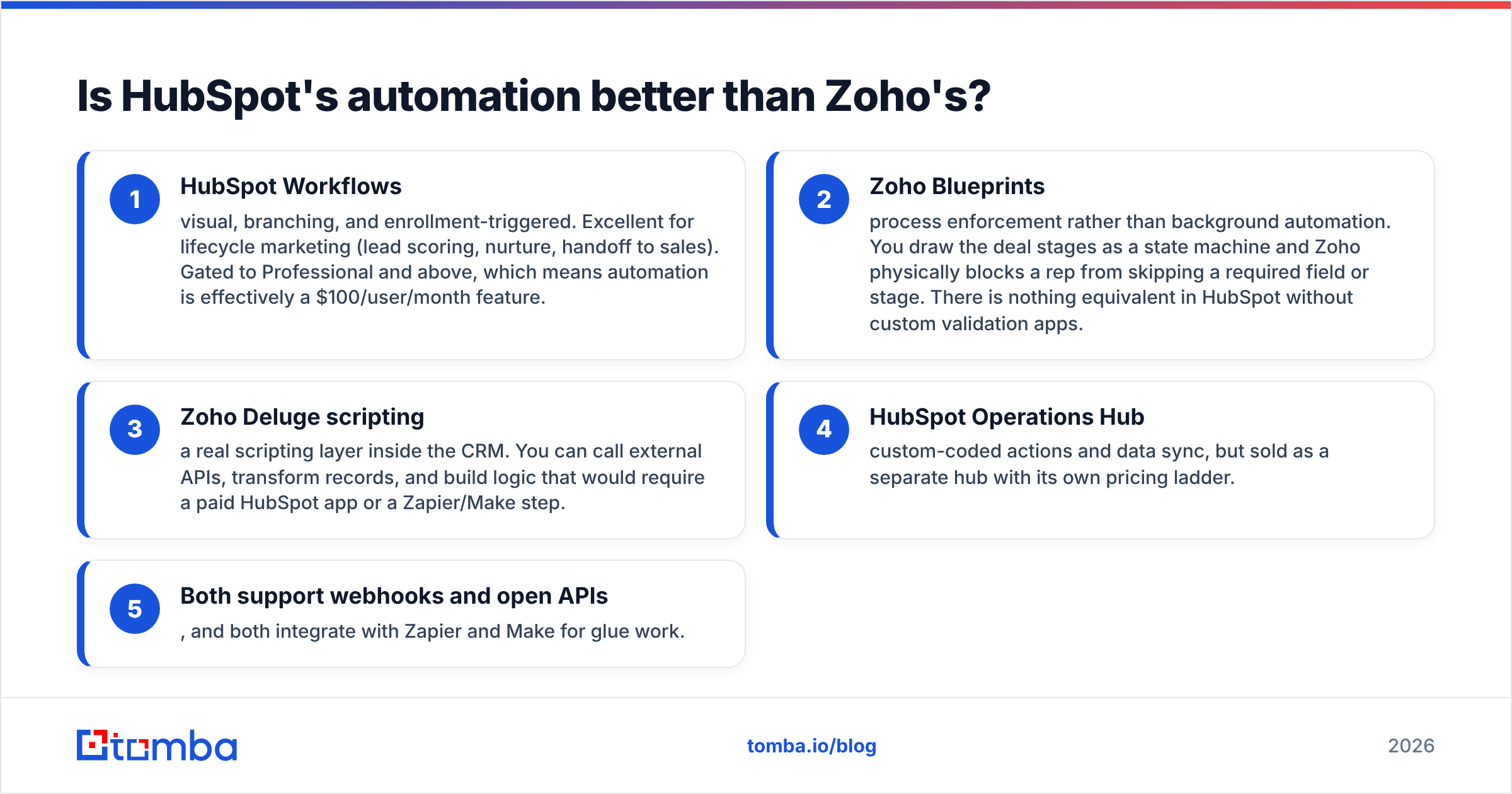
- HubSpot Workflows — visual, branching, and triggered by enrollment. Great for lifecycle marketing: lead scoring, nurture, and handoff to sales. Gated to Professional and above, so automation is really a $100/user/month feature.
- Zoho Blueprints — process enforcement rather than background automation. You draw the deal stages as a flow, and Zoho blocks a rep from skipping a required field or stage. HubSpot has no equal without custom validation apps.
- Zoho Deluge scripting — a real scripting layer inside the CRM. You can call outside APIs, reshape records, and build logic that would need a paid HubSpot app or a Zapier/Make step.
- HubSpot Operations Hub — custom-coded actions and data sync. It is sold as a separate hub with its own price ladder.
- Both support webhooks and open APIs. Both connect to Zapier and Make for glue work.
The honest verdict is simple. If your automation is marketing-shaped (nurture, scoring, attribution), HubSpot is stronger out of the box. If it is process-shaped (approvals, territory rules, quoting, field validation), Zoho gives you more control for less money.
What about reporting, forecasting, and RevOps?#
Both cover the basics: pipeline by stage, activity by rep, win rate, and forecast categories. They split at the edges.
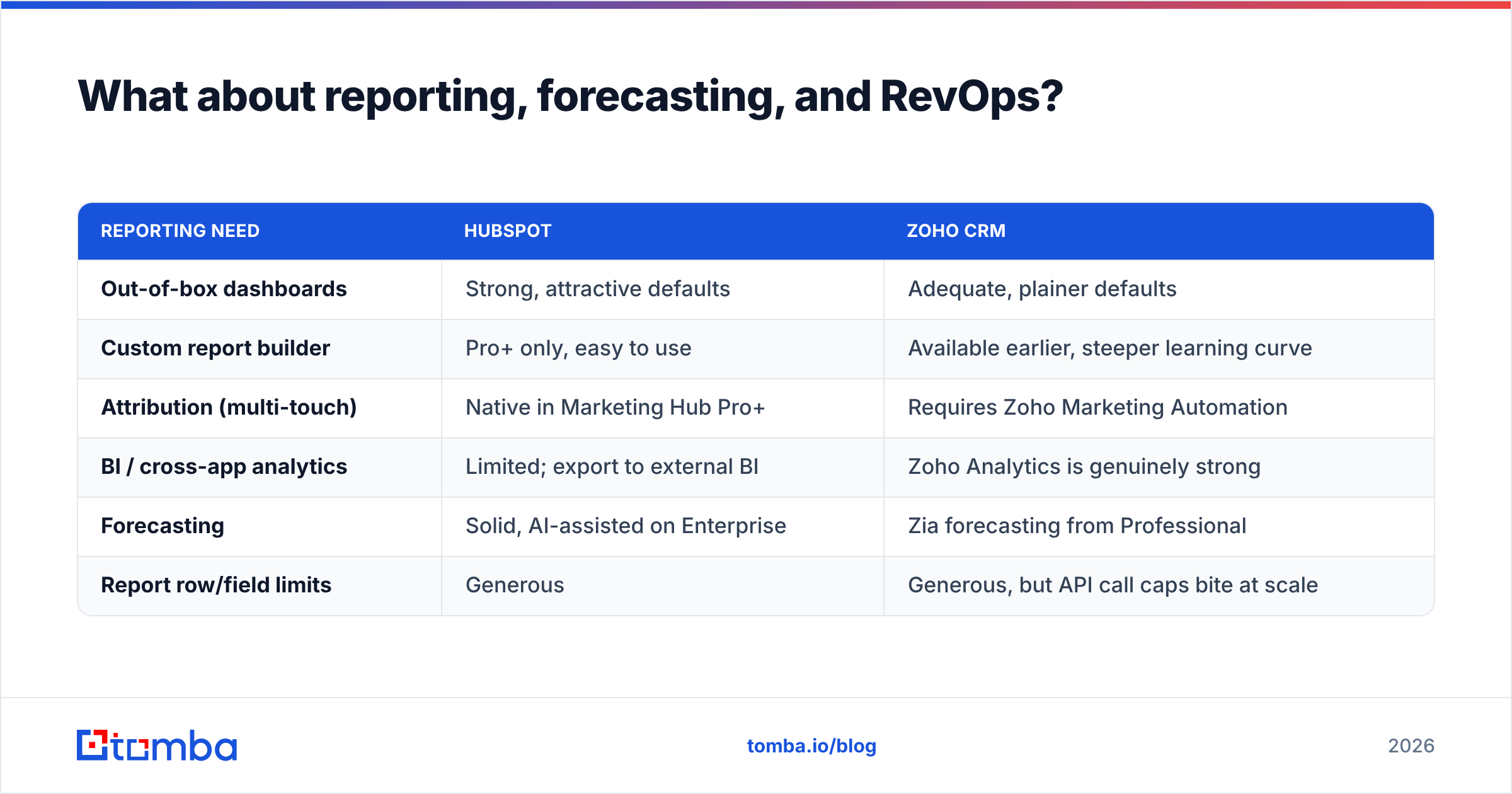
| Reporting need | HubSpot | Zoho CRM |
|---|---|---|
| Out-of-box dashboards | Strong, attractive defaults | Adequate, plainer defaults |
| Custom report builder | Pro+ only, easy to use | Available earlier, steeper learning curve |
| Attribution (multi-touch) | Native in Marketing Hub Pro+ | Requires Zoho Marketing Automation |
| BI / cross-app analytics | Limited; export to external BI | Zoho Analytics is genuinely strong |
| Forecasting | Solid, AI-assisted on Enterprise | Zia forecasting from Professional |
| Report row/field limits | Generous | Generous, but API call caps bite at scale |
Say your revenue operations team is mature. It wants to blend CRM data with support tickets, finance, and product usage. Zoho Analytics inside Zoho One is an underrated advantage there. If you just want dashboards a CRO will look at without complaining, HubSpot's defaults win.
Which CRM handles data quality better?#
Neither one solves it. Most comparison posts skip this section. It is the one that decides whether either CRM works.
Both platforms remove duplicates by email address. Both let you make fields required. Neither one finds a prospect's work email, checks it before send, or warns you that a domain is catch-all. HubSpot's Breeze Intelligence and Zoho's Zia can enrich some records from public sources. Coverage drops fast outside large US and EU companies, and both meter enrichment credits tightly.
Here is what actually happens in most rollouts:
- Reps paste guessed email formats into the CRM. Bounce rates climb. Sender reputation drops, and the domain behind your CRM email gets throttled.
- Bought lists get imported whole. Duplicates, role accounts, and dead addresses pollute reporting forever. Providers like BookYourData do solid work on list quality if buying is your route. Even then, a purchased list needs verification at import time.
- Enrichment runs after the fact. Scoring and routing then fire on incomplete records.
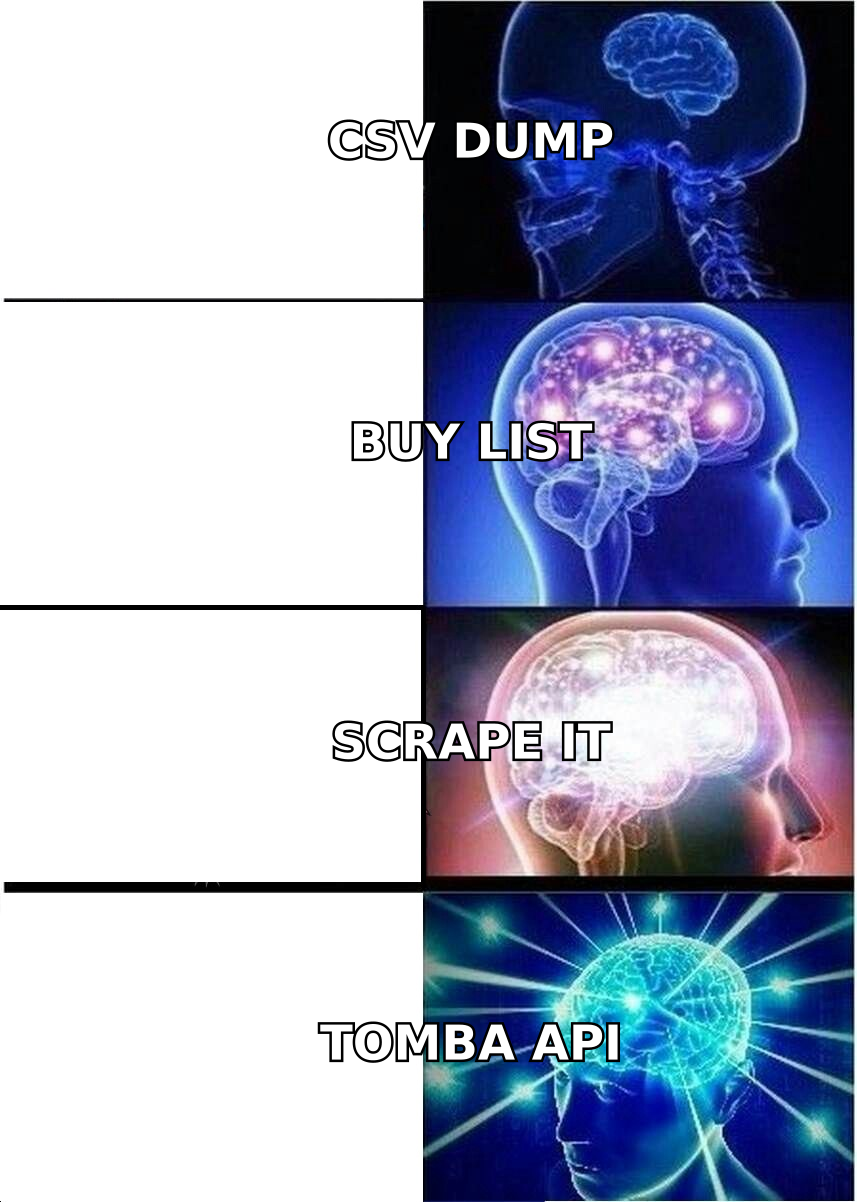
The fix is structural, not a CRM setting. Verify and enrich the record before it lands in the CRM. Run domains through a domain search to get real contacts and email patterns. Validate every address with an email verifier. Then push clean records in through the HubSpot integration or the API. A record that enters clean stays clean. A dirty one gets copied into five reports before anyone notices.
HubSpot vs Zoho CRM: which should you pick in 2026?#
Match the tool to your constraint, not to the feature list.
Choose HubSpot if:
- Marketing and sales work from one funnel and one contact record.
- You have fewer than 20 reps and no dedicated CRM admin.
- Speed to first value matters more than five-year cost.
- You rely on inbound content, forms, and lifecycle nurture.
- Your budget can absorb the Professional tier. Starter alone is thin for real sales teams.
Choose Zoho CRM if:
- You have 20+ seats, so the per-seat gap adds up to real money.
- Your sales process needs enforcement (blueprints), not just tracking.
- You already run Zoho Books, Desk, or Projects. The native links are tight.
- You have someone willing to own the setup.
- You want a real scripting escape hatch without paying for a platform tier.
Choose neither if your problem is pipeline volume rather than pipeline management. A CRM organizes deals that already exist. If the top of your funnel is empty, a better CRM is just redecorating an empty room. Fix sourcing first with prospecting and verified contact data. Then pick whichever CRM your team will actually open.
What does migration between them actually cost?#
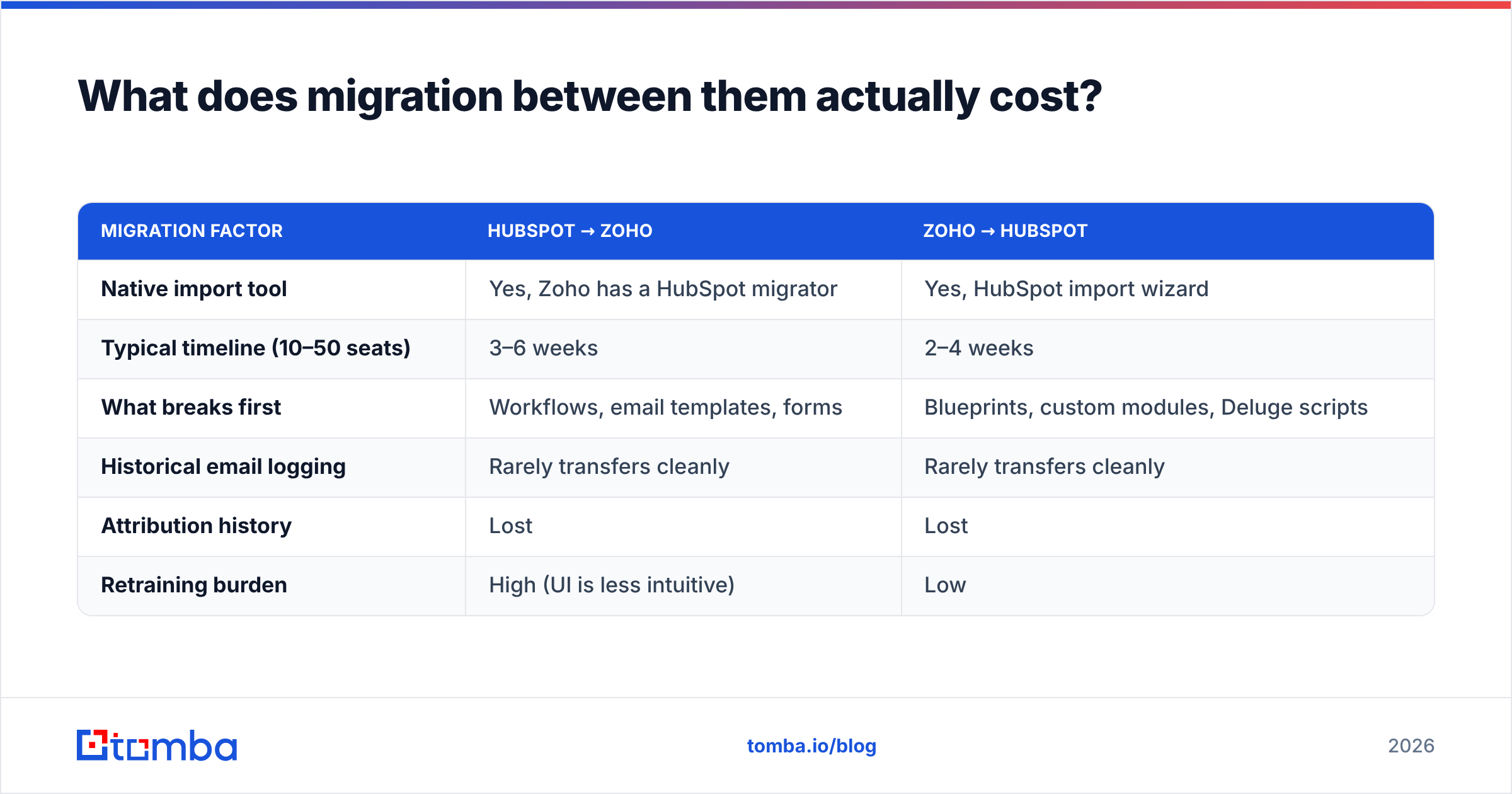
Both directions happen. Both hurt in predictable ways.
| Migration factor | HubSpot → Zoho | Zoho → HubSpot |
|---|---|---|
| Native import tool | Yes, Zoho has a HubSpot migrator | Yes, HubSpot import wizard |
| Typical timeline (10–50 seats) | 3–6 weeks | 2–4 weeks |
| What breaks first | Workflows, email templates, forms | Blueprints, custom modules, Deluge scripts |
| Historical email logging | Rarely transfers cleanly | Rarely transfers cleanly |
| Attribution history | Lost | Lost |
| Retraining burden | High (UI is less intuitive) | Low |
Two rules save these projects. Freeze the pipeline before you cut over. And re-verify your whole contact database during the move. Migration is the one moment when touching every record is already on the schedule, so use it. A bulk verify pass usually removes 8–20% of an aging database. That cuts your per-record costs and lifts deliverability on day one in the new system.
Common questions#
Is HubSpot's free CRM good enough to start? Yes, for under five reps with simple pipelines. It has unlimited users and real contact management. You will hit a wall on sequences, reporting, and automation. The jump to Professional is steep, so plan for it.
Is Zoho CRM's free tier usable? Three users, basic modules. In practice it is a trial, not a plan.
Which has better AI in 2026? HubSpot's Breeze feels more polished for writing and summaries. Zoho's Zia is stronger on prediction and anomaly detection for the price. Neither should drive your decision, since AI features change faster than contracts.
Do they both integrate with cold email tools? Yes, both connect to the major sequencing platforms. Remember that the sequencer inherits your CRM's data quality. Email deliverability problems usually trace back to the import, not the sender.
Can I run both? Some companies run HubSpot for marketing and Zoho for sales ops. It works. But you now own a sync problem and two sources of truth. Do it only with a dedicated ops owner.
Get the contact data right before you pick a CRM#
The CRM choice matters less than most teams believe. What matters more is whether the records inside it are real. Verified emails mean accurate reporting, clean deduplication, healthy sender reputation, and reps who trust the system enough to use it.
Start upstream. Use the Tomba Email Finder to source verified work emails by domain, name, or company. Then push clean, deduplicated records into HubSpot or Zoho through the API. The free tier gives you 25 searches a month, so you can test coverage on your own target accounts first. Paid plans start at $49/month — see the full Tomba pricing breakdown. Whichever side of the HubSpot vs Zoho CRM debate wins your evaluation, feed it data that does not bounce.
Related guides#
// get started
Find, verify and enrich your first contacts today
Start on the free plan with 25 searches a month, then scale when your team is ready.
Free plan · No credit card required · GDPR & CCPA
// about the author