Hunter Pros and Cons: An Honest 2026 Review of Hunter.io
Hunter.io is the default email finder for most B2B teams — but defaults get expensive. Here's an honest breakdown of Hunter's strengths, its real limits, and when a cheaper tool wins.
TL;DR
- The short answer on Hunter pros and cons: Hunter.io is the most recognized email finder on the market, and its domain search plus free-tier generosity (25 searches/month) are genuinely good. The brand is not hype.
- The biggest cons are credit mechanics and coverage gaps. A "found" email still burns a credit. Catch-all domains return low-confidence guesses, and non-US or non-tech coverage thins out fast.
- Pricing scales steeply. Hunter's Starter plan lands around $49/month for 500 monthly searches. Heavy prospecting teams hit that ceiling and pay for the next tier long before they need its other features.
- Verification is bundled but conservative. Hunter marks catch-all addresses "accept-all" and leaves the call to you. That is honest, but not actionable on its own.
- If you mostly need volume email finding plus a clean API, alternatives like Tomba, Findymail, or BookYourData cover the same job at similar or lower cost. If you want a polished all-in-one with campaigns attached, Hunter still earns its place.
Hunter.io has been around long enough that most B2B teams treat it as the default. That is exactly why it deserves a skeptical read. Being the industry standard tells you a tool was early and marketed well. It does not tell you whether it fits your list, your geography, or your budget in 2026.
This is a working breakdown of Hunter pros and cons, based on how the product behaves in real prospecting workflows. What it does better than almost anyone. Where it quietly costs you money. And which rivals close the gap.
What is Hunter.io and what does it actually do?#
Start the Hunter pros and cons review with the basics. Hunter is an email finding and verification platform built on one core mechanic. It crawls the public web, indexes email addresses tied to domains, and works out the pattern a company uses (first.last@, finitial+last@, and so on). Feed it a domain and a name, and it returns the most likely address with a confidence score.
Think of it like a phone book built from every business card ever photographed and posted online. It is remarkably complete for companies with a big public footprint. It is thin for the ones that don't blog, hire publicly, or publish a team page.
The product surface has grown well beyond that core:
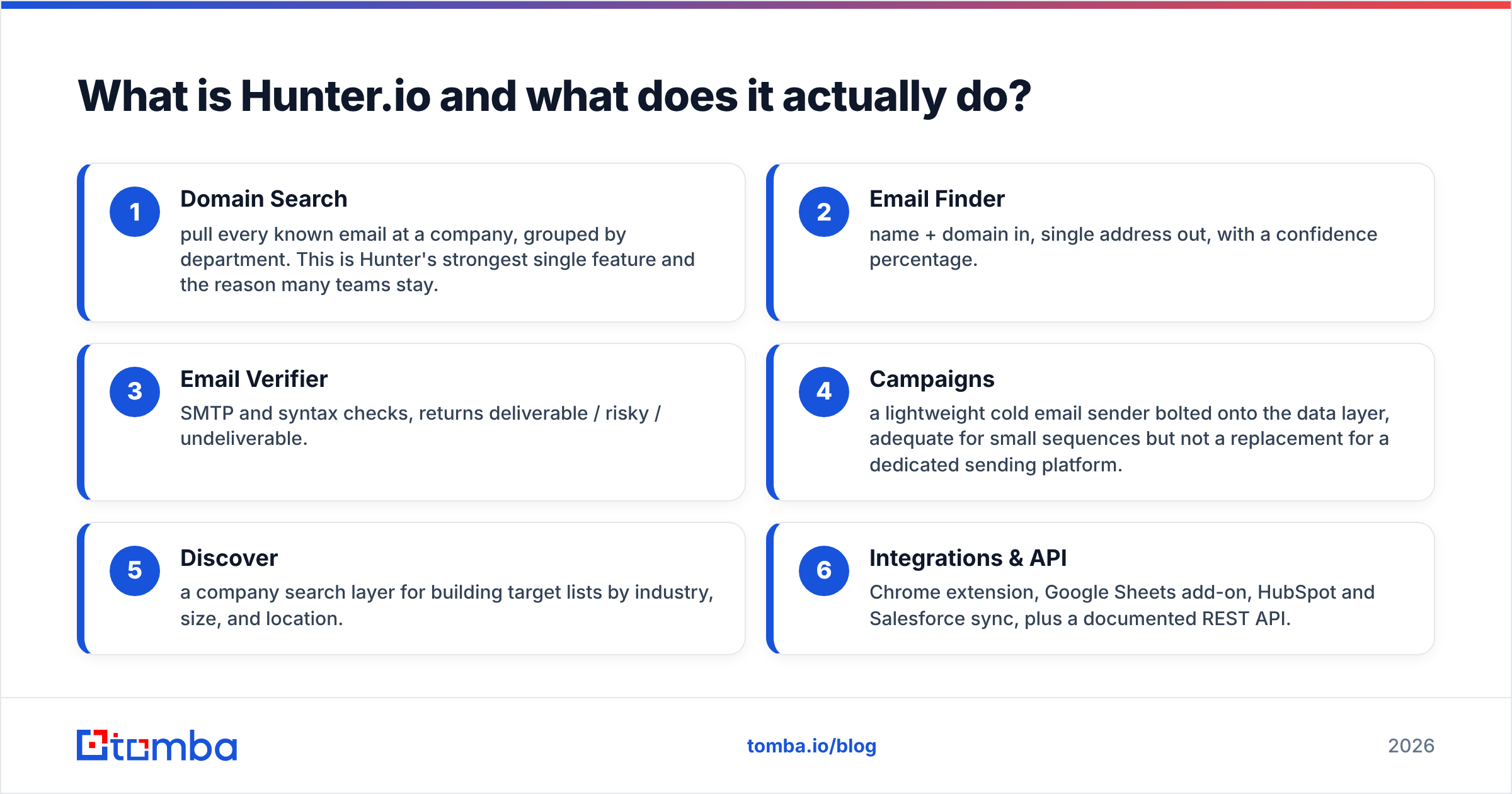
- Domain Search — pull every known email at a company, grouped by department. This is Hunter's strongest single feature, and the reason many teams stay.
- Email Finder — name plus domain in, one address out, with a confidence percentage.
- Email Verifier — SMTP and syntax checks that return deliverable, risky, or undeliverable.
- Campaigns — a light cold email sender bolted onto the data layer. Fine for small sequences, but not a replacement for a dedicated sending platform.
- Discover — a company search layer for building target lists by industry, size, and location.
- Integrations & API — Chrome extension, Google Sheets add-on, HubSpot and Salesforce sync, plus a documented REST API.
That bundle is the honest pro. For a two-person team that wants one login instead of four, Hunter is a reasonable place to stop looking.

What are Hunter's biggest strengths?#
The pro side of the Hunter pros and cons ledger is easy to state.
Domain-level coverage on public companies is excellent. If you prospect into SaaS, agencies, media, or any category where people publish under their own name, Hunter's index is deep. Ask it for everyone at a 200-person software company and you will often get 40 to 80 addresses with departments attached.
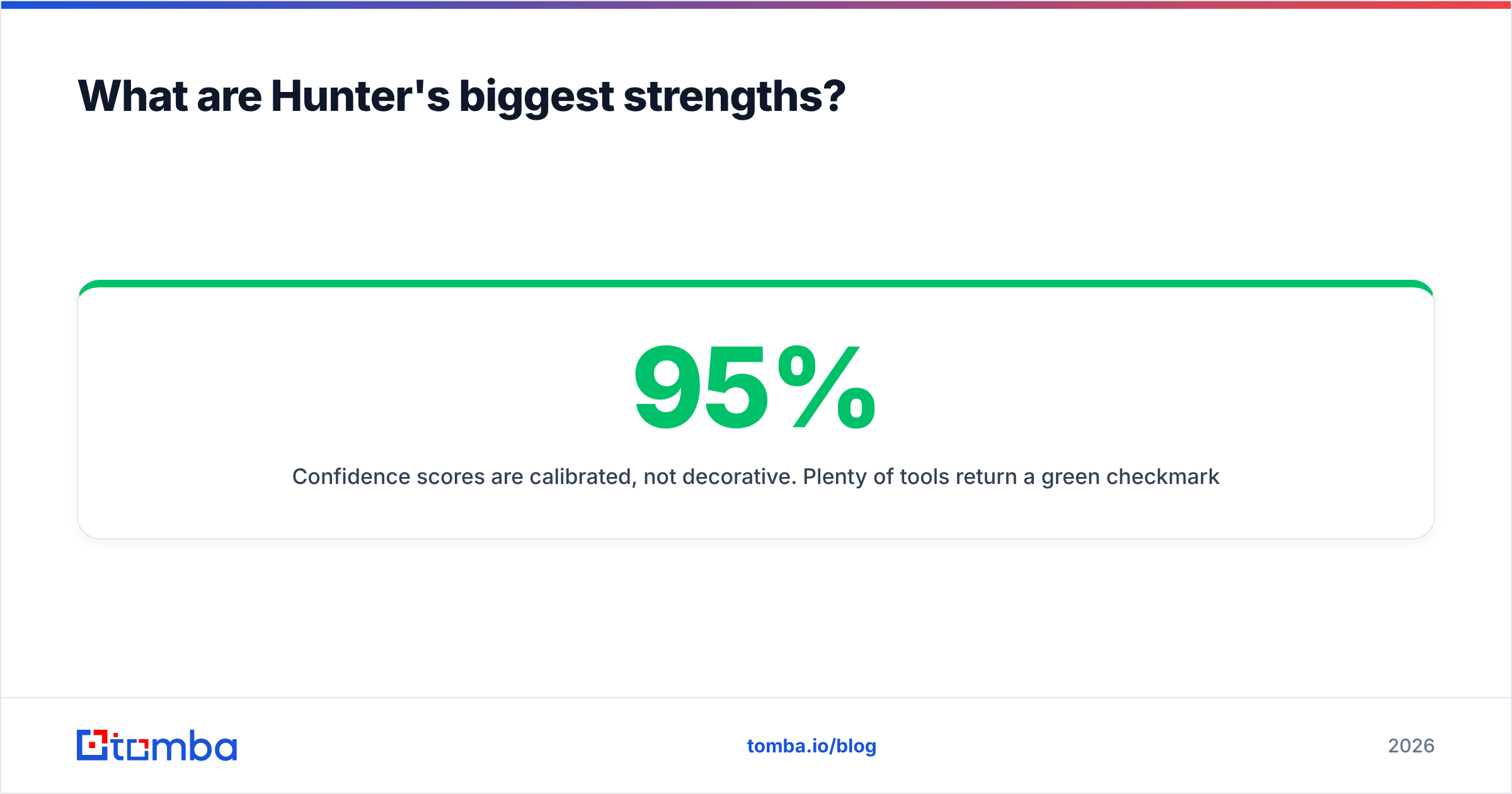
Confidence scores are honest, not decorative. Plenty of tools return a green checkmark on a guess. Hunter's percentage roughly tracks reality. Results at 95% and up are reliable. Results in the 70 to 90% band are pattern guesses worth checking separately. Anything under 60% is a hypothesis, not a contact.
The free tier is real. You get 25 searches and 50 verifications a month, with no card. That is enough to test the tool on your own target accounts instead of a demo dataset.
Documentation and API stability. Hunter's public API docs are clear, versioned, and rarely break. If you are wiring an email finder into an internal enrichment pipeline, that reliability is worth more than a small accuracy edge.
Compliance posture. Hunter publishes its data sources, honors deletion requests, and has taken GDPR seriously longer than most of the category. If your legal team asks questions, you have answers.
What are the real cons of Hunter.io?#
Here is where the other half of the Hunter pros and cons story earns its keep.
Credits burn on results you can't use. A search that returns a 62% confidence guess costs the same credit as one that returns a verified 98% address. On messy target lists — small businesses, non-English domains, companies with privacy-focused sites — a real share of your credit spend buys addresses you will never send to.
Catch-all domains are a dead end. Hunter marks these "accept-all" and stops there. That is technically correct and practically unhelpful. A large slice of mid-market and enterprise domains are catch-all, so this is not an edge case.
You then have two options. Send blind and risk your sender reputation, or buy a second tool that resolves catch-alls properly. That second job is exactly what a dedicated catch-all verifier exists for.
Coverage skews English-speaking and tech-forward. Prospecting into DACH manufacturing, Japanese enterprises, LATAM mid-market, or MENA companies? Hit rates drop a lot compared with US SaaS. This is not unique to Hunter. But the gap is wide enough to change your tool choice if your ICP sits outside English-speaking markets.
Campaigns are a feature, not a product. Deliverability controls, inbox rotation, warmup, and reply detection are all thinner than in a purpose-built sender. Teams that start on Hunter Campaigns usually migrate out within a year. At that point they are paying for a module they no longer use.
Cost per usable lead climbs at scale. The plan ladder is steep, and lower tiers have no real credit rollover. If your volume sits between two plans — say 1,200 searches a month — you pay for the higher tier's headroom every single month.

How does Hunter compare to the main alternatives?#
The useful question is not "which tool is best." It is "which tool matches your list shape and volume." Here is how the main contenders line up.
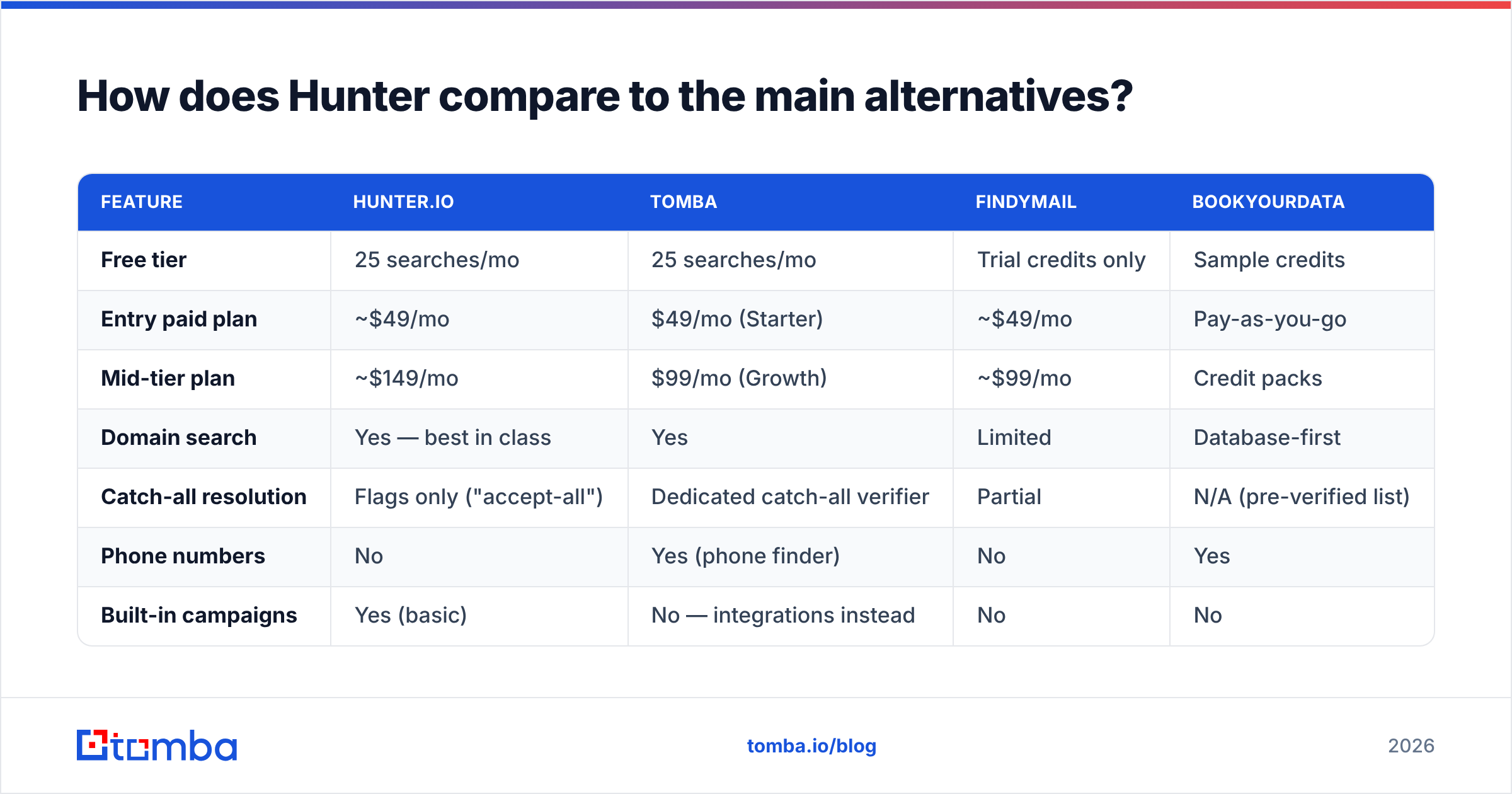
| Feature | Hunter.io | Tomba | Findymail | BookYourData |
|---|---|---|---|---|
| Free tier | 25 searches/mo | 25 searches/mo | Trial credits only | Sample credits |
| Entry paid plan | ~$49/mo | $49/mo (Starter) | ~$49/mo | Pay-as-you-go |
| Mid-tier plan | ~$149/mo | $99/mo (Growth) | ~$99/mo | Credit packs |
| Domain search | Yes — best in class | Yes | Limited | Database-first |
| Catch-all resolution | Flags only ("accept-all") | Dedicated catch-all verifier | Partial | N/A (pre-verified list) |
| Phone numbers | No | Yes (phone finder) | No | Yes |
| Built-in campaigns | Yes (basic) | No — integrations instead | No | No |
| API quality | Excellent, stable | Excellent, REST + CLI + MCP | Good | Good |
| Best fit | Small teams wanting one login | Volume finding + enrichment API | Verified-only workflows | Pre-built list buying |
A few notes so this table isn't read as a scoreboard.
BookYourData solves a different problem. It sells pre-verified contact lists instead of searching live. That is the right shape when you know which segment you want and don't want to run enrichment infrastructure at all.
Its accuracy guarantee is credible, and pay-as-you-go avoids the subscription ceiling that Hunter has. Compare the two only if "buy a list" and "find emails on demand" are truly interchangeable for your motion. Usually they aren't.
Findymail is narrower and proud of it. It only returns addresses it is confident in, so your credit efficiency is better even though the raw hit rate looks lower. Good fit for teams whose deliverability is already fragile.
Tomba overlaps Hunter most directly on the finding and verifying job, with a wider tool surface around it: domain search, data enrichment, phone finder, and bulk processing on one credit pool. The Tomba pricing ladder (Free 25/mo, Starter $49, Growth $99, Pro $249) is flatter in the middle. That is exactly where Hunter's gets expensive.

Is Hunter's accuracy good enough for cold outreach?#
Mostly yes, with one caveat that decides everything: you must separate finding from verifying.
Hunter's finder returns a probability. Your email service provider does not care about probabilities. It cares about bounces. A 5% bounce rate will get you throttled at Google and Microsoft, no matter how confident your data vendor was.
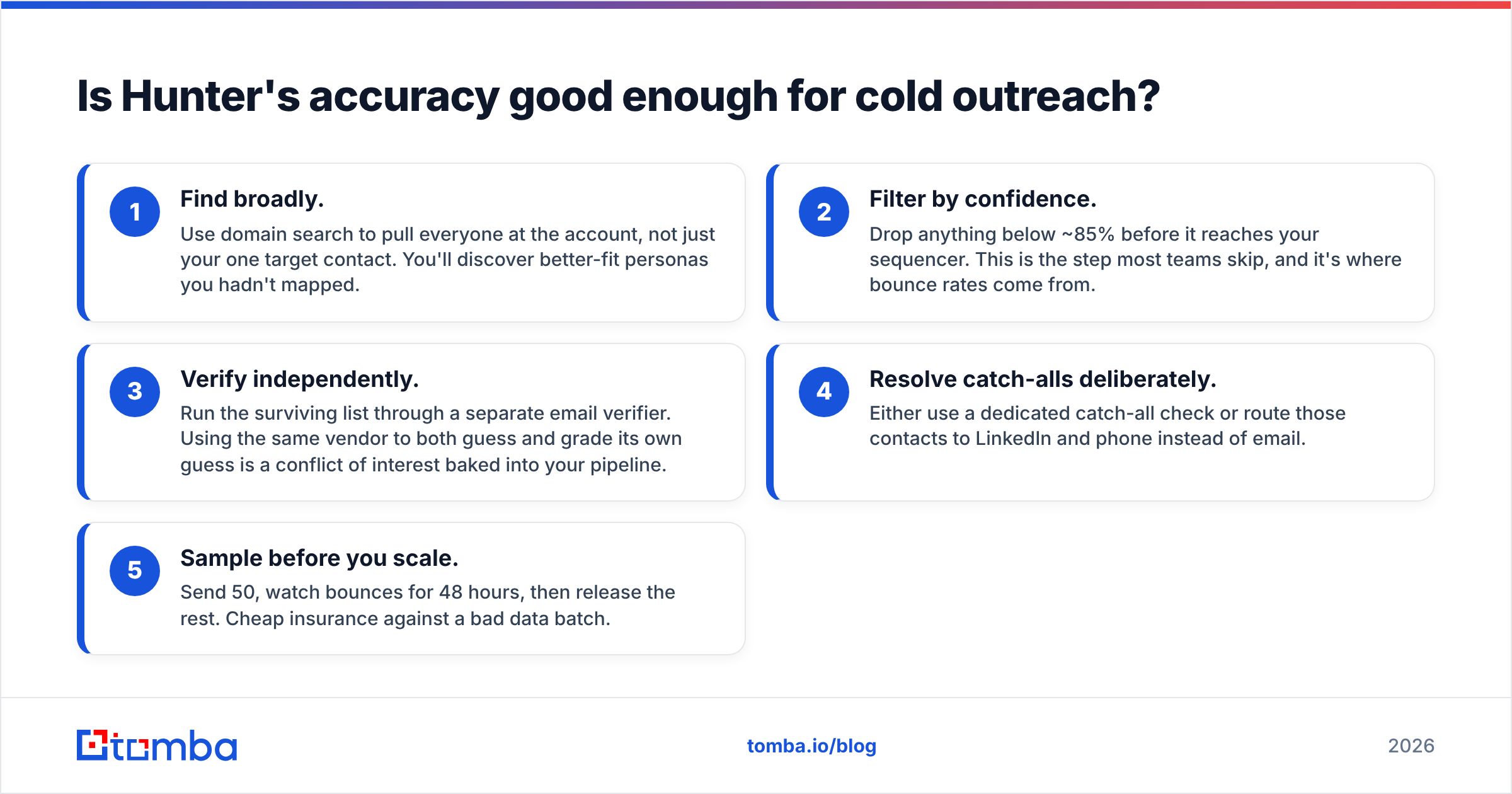
Here is the workflow that actually holds up:
- Find broadly. Use domain search to pull everyone at the account, not just your one target contact. You will find better-fit personas you had not mapped.
- Filter by confidence. Drop anything below about 85% before it reaches your sequencer. Most teams skip this step. It is where bounce rates come from.
- Verify independently. Run the surviving list through a separate email verifier. Using one vendor to both guess and grade its own guess is a conflict of interest baked into your pipeline.
- Resolve catch-alls on purpose. Use a dedicated catch-all check, or route those contacts to LinkedIn and phone instead of email.
- Sample before you scale. Send 50, watch bounces for 48 hours, then release the rest. Cheap insurance against a bad data batch.
Buyer reviews on G2 show the same pattern. Hunter scores well on ease of use and integrations. The recurring complaint is credits spent on results that never became deliverable contacts.
Who should use Hunter — and who should skip it?#
Use Hunter if:
- Your ICP is US, UK, or EU tech, agencies, or media, where its index is densest.
- You value one clean interface over squeezing maximum value per dollar.
- You need Google Sheets and CRM integrations that just work, with zero setup.
- Your monthly volume is genuinely low — under a few hundred lookups — and the free or entry tier covers you.
Skip Hunter if:
- Your volume is high enough that credit efficiency drives your cost structure.
- You target non-English or non-tech markets where Hunter's coverage thins.
- Catch-all domains make up a large share of your target accounts.
- You need phone numbers alongside emails and don't want a second vendor.
- You are building an internal enrichment pipeline and want a broader API surface — bulk endpoints, reverse email lookup, and enrichment in one contract.
What should you check before committing to any plan?#
Run this before you enter a card, on Hunter or any competitor:
- Test on 50 of your real accounts, not the vendor's demo domains. Hit rate on your ICP is the only number that matters.
- Count usable results, not returned results. Divide plan cost by contacts above 85% confidence that also pass independent verification. That is your true cost per lead, and it is usually 2 to 4x the headline rate.
- Check the credit rollover policy. Most tools in this category don't roll over. Unused credits at month-end are pure waste, and lumpy prospecting months make it worse than it looks.
- Test the API before you build on it. Rate limits, error shapes, and bulk endpoint behavior differ a lot between vendors, and they are almost never in the marketing copy.
- Confirm your exit. Can you export your data? Are contacts portable? Lock-in in the data category is usually soft, but verify rather than assume.
The honest verdict on Hunter pros and cons#
Hunter is a good product that is often the wrong product. Not because it is weak, but because teams buy it by default rather than by fit. Its domain search is best in class, its confidence scoring is honest, and its API will not wake you up at 3am. Those are real advantages, and they justify the price for the right team.
The cons are structural, not fixable. Credits are charged on unusable results. Catch-all handling stops where you need it to start. Coverage assumes an English-speaking tech ICP. None of those are bugs. They follow from how the product is designed, and they either match your situation or they don't. That is the whole Hunter pros and cons trade in one line.
If your bottleneck is finding and verifying B2B emails at volume — with catch-all resolution, phone numbers, and enrichment on one credit pool — start with the Tomba Email Finder. The free tier gives you 25 searches a month with no card. That is enough to run the 50-account test above and compare hit rates on your own list instead of someone else's benchmark. Run both, count usable contacts, and let your own data decide.
Related guides#
// get started
Find, verify and enrich your first contacts today
Start on the free plan with 25 searches a month, then scale when your team is ready.
Free plan · No credit card required · GDPR & CCPA
// about the author