Hunter vs Leadsforge (2026): Which Email Finder Wins?
Hunter is the veteran domain-search tool. Leadsforge is the AI chat list builder. We break down accuracy, credits, pricing and workflow fit — plus where a third option quietly beats both.
TL;DR
- Hunter is the incumbent: domain search, a public email-pattern index, a well-documented API, and the deepest integration ecosystem of the two. It is a finder, not a list builder.
- Leadsforge is the newer AI-chat approach: you describe your ICP in plain English and it returns a built list with verified emails. Faster to a first list, thinner on lookup depth and API control.
- Pick Hunter if you already know your target accounts and need per-domain lookup, bulk enrichment, and an API you can wire into a pipeline. Pick Leadsforge if you have no list yet and want the tool to do the targeting for you.
- Credits are the real price. Both charge per lookup, and both count a "found" result you never send to. Compare cost per verified, deliverable address, not cost per search.
- If you want domain search plus catch-all handling plus a real API on a $49/mo starter tier, evaluate a third option before you commit — the two-horse framing costs teams money.
What are Hunter and Leadsforge, exactly?#
They solve the same end problem from opposite directions.
Hunter has been indexing public email patterns since 2015. You give it a domain — stripe.com — and it returns the addresses it has seen, the pattern it inferred ({first}@stripe.com), and a confidence score per address. You can also go the other way: give it a name and a company, get a single address. Around that core sit a verifier, a bulk uploader, a Chrome extension, a Sheets add-on, and a mature API. Hunter assumes you already know who you want to reach.
Leadsforge inverts that assumption. Instead of a search bar, you get a chat box. You type something like "heads of RevOps at Series B SaaS companies in Germany, 50–200 employees" and it assembles the list, runs verification, and hands you a CSV. The pitch is that list-building and contact-finding collapse into one step, which is genuinely useful when you are starting from a blank page rather than a target-account spreadsheet.
That difference drives everything else — pricing model, accuracy profile, and who each tool is actually for.

How do Hunter and Leadsforge compare head-to-head?#
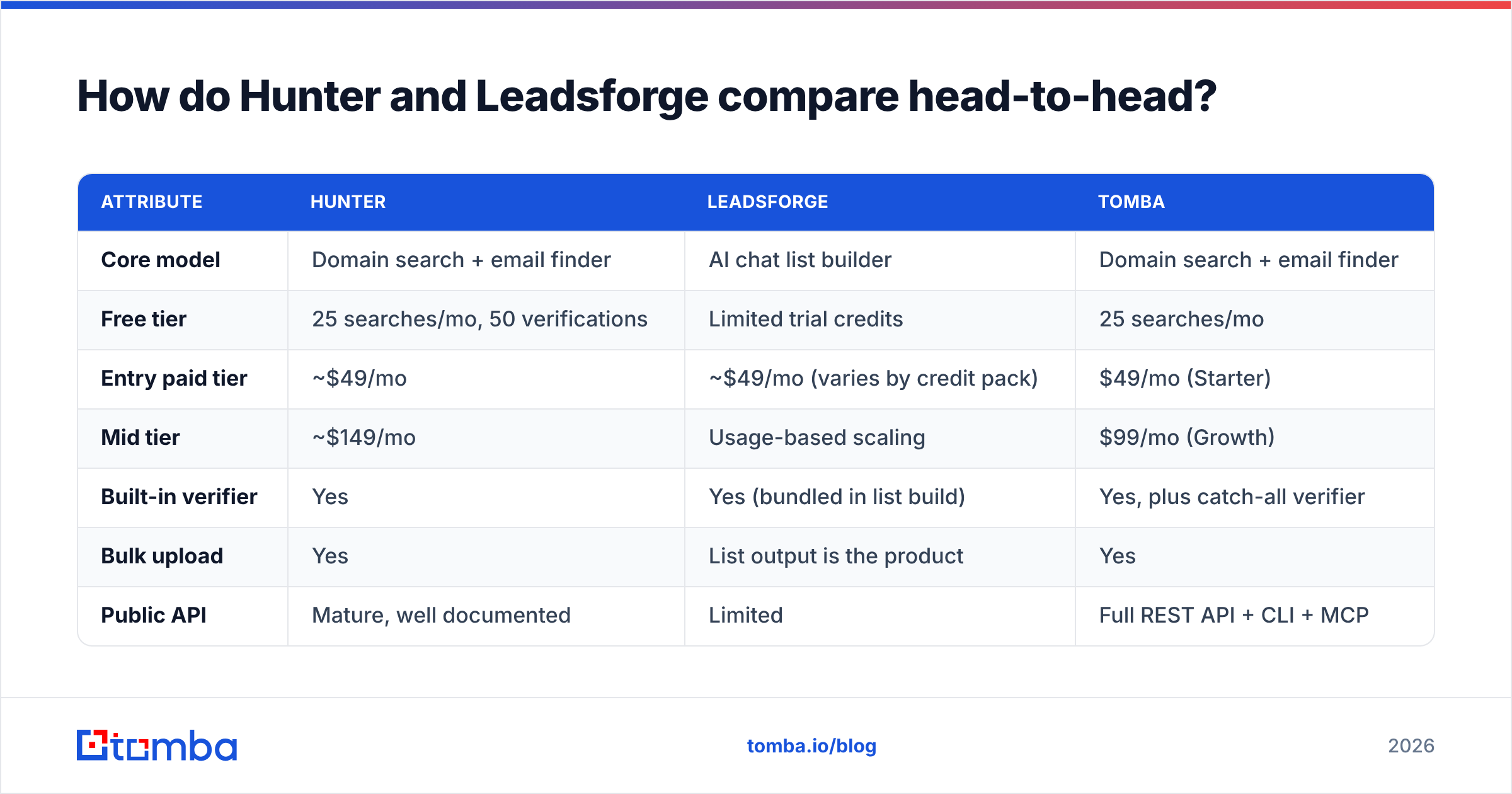
Here is the practical comparison. Vendor pricing moves; treat the figures as "as published at time of writing" and confirm on each vendor's page before you buy.
| Attribute | Hunter | Leadsforge | Tomba |
|---|---|---|---|
| Core model | Domain search + email finder | AI chat list builder | Domain search + email finder |
| Free tier | 25 searches/mo, 50 verifications | Limited trial credits | 25 searches/mo |
| Entry paid tier | ~$49/mo | ~$49/mo (varies by credit pack) | $49/mo (Starter) |
| Mid tier | ~$149/mo | Usage-based scaling | $99/mo (Growth) |
| Built-in verifier | Yes | Yes (bundled in list build) | Yes, plus catch-all verifier |
| Bulk upload | Yes | List output is the product | Yes |
| Public API | Mature, well documented | Limited | Full REST API + CLI + MCP |
| Best for | Known target accounts | Building an ICP list from scratch | Both, with catch-all coverage |
| Weak spot | No native list building | Less control over per-domain lookup | Smaller brand recognition |
Two rows deserve a footnote.
"Free tier" is where Hunter has historically been generous and where Leadsforge is deliberately stingy — a chat-built list is expensive to produce, so trials are capped tightly. If you want to sanity-check output quality before paying, Hunter and Tomba both let you do it on a real domain without a card.
"Public API" is the row that decides the tool for engineering-adjacent teams. Hunter's API is the reason it survived a decade of competitors: rate limits are legible, the docs are complete, and every RevOps consultant has already built against it. Leadsforge's product surface is the chat interface; if your plan is to call a lookup endpoint from a Clay table or an internal enrichment job, that is a real constraint.
Which one finds more valid emails?#
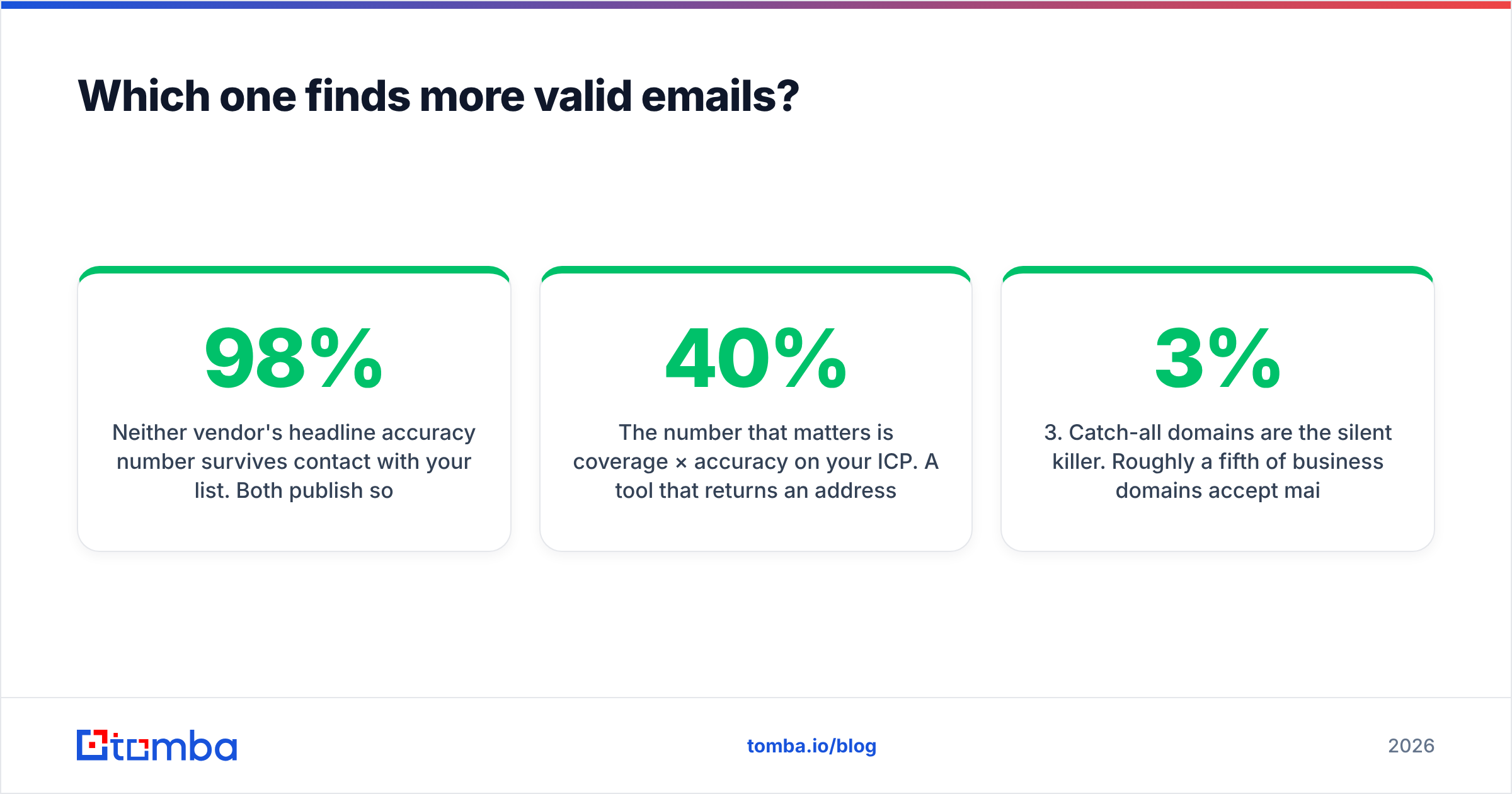
Neither vendor's headline accuracy number survives contact with your list. Both publish something in the 95–98% range, and both are measuring the subset of results they chose to return.

The number that matters is coverage × accuracy on your ICP. A tool that returns an address for 40% of your list at 98% accuracy delivers fewer usable contacts than one that returns 70% at 94%. Vendors quote the second number and stay quiet about the first, because coverage is where the real variance lives — and coverage is entirely a function of whether the vendor has good data on your segment.
Three patterns hold up across most head-to-head tests:
- Large, well-indexed domains favour Hunter. If your targets have public team pages, press mentions, and open-source contributors, Hunter's pattern index has almost certainly seen the format already. Confidence scores in the 90s are reliable there.
- Long-tail and non-US domains are a coin flip. A 40-person manufacturer in Lyon or a regional MSP in Ohio is where both tools thin out. This is the single best thing to test in a trial: pull 50 domains from the unglamorous end of your pipeline, not your dream accounts.
- Catch-all domains are the silent killer. Roughly a fifth of business domains accept mail at any address, so SMTP verification returns "accept" for
asdf@company.com. Most tools mark these "risky" and hand the decision back to you. If a meaningful chunk of your ICP runs catch-all (common in enterprise and in Microsoft 365 estates), a dedicated catch-all verifier is not a nice-to-have — it is the difference between a 3% bounce rate and a 15% one.
Before you accept any vendor's accuracy claim, run the same 100 rows through both tools and count deliverable addresses at the end, after your own email verification pass. That is your real number.
How does the pricing actually work?#
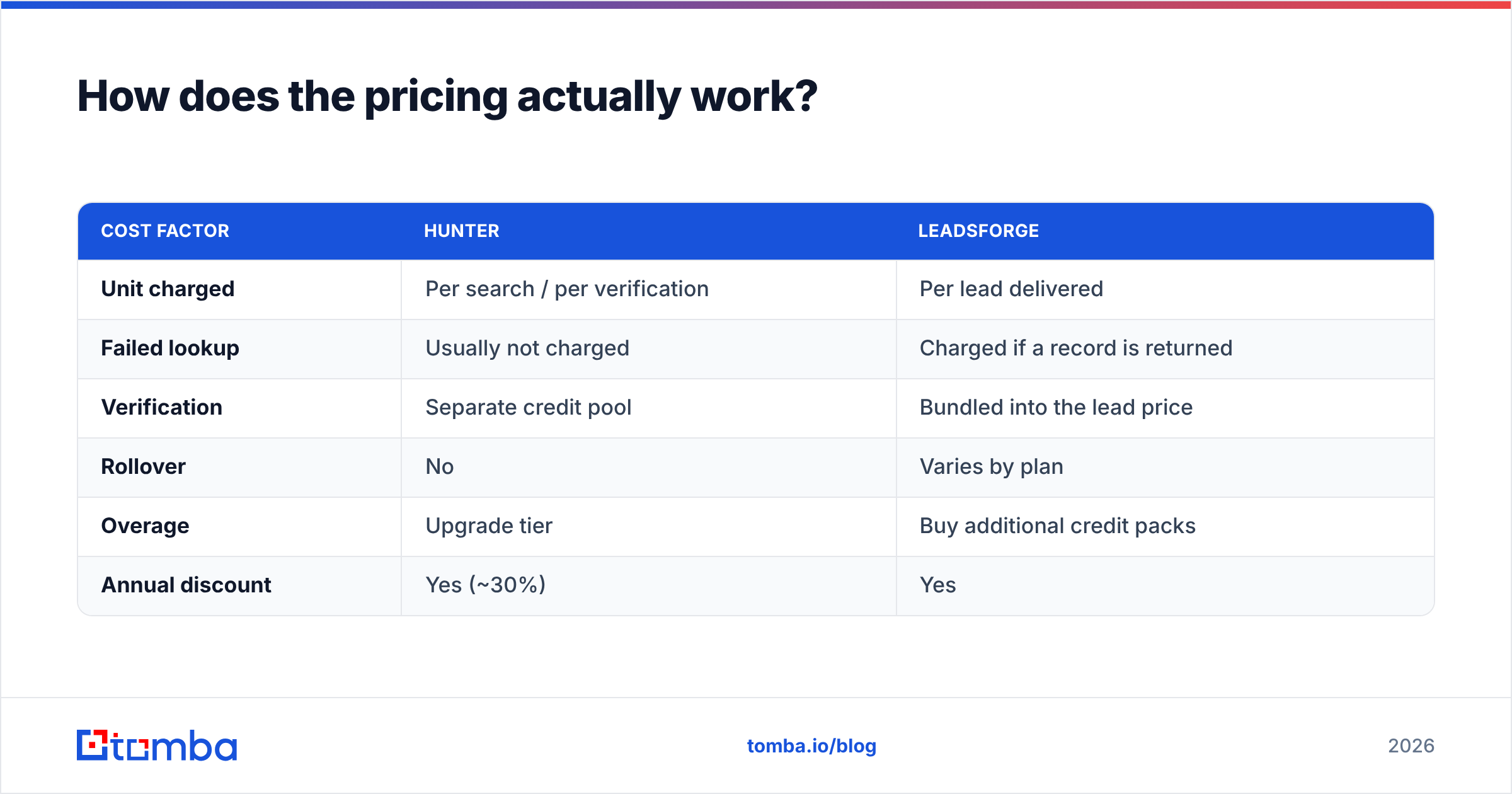
Both tools sell credits, and both define "credit" in a way that favours the vendor. Read the definitions.
| Cost factor | Hunter | Leadsforge |
|---|---|---|
| Unit charged | Per search / per verification | Per lead delivered |
| Failed lookup | Usually not charged | Charged if a record is returned |
| Verification | Separate credit pool | Bundled into the lead price |
| Rollover | No | Varies by plan |
| Overage | Upgrade tier | Buy additional credit packs |
| Annual discount | Yes (~30%) | Yes |
The trap is the same in both cases: a returned result is not a deliverable contact. A "risky" catch-all address, a shared info@ inbox, and a contact who left the company eight months ago all consume a credit and all produce zero replies. When you model cost, divide the monthly price by the number of addresses that actually cleared verification — not by the credit allowance on the pricing page.
Do that arithmetic and the tiers compress dramatically. A $49 plan with 500 credits at 55% deliverable coverage costs $0.18 per usable contact. A $99 plan with 2,000 credits at 70% coverage costs $0.07. The cheaper plan is frequently the more expensive one.
Which workflow fits your team?#
Match the tool to how your pipeline actually starts, not to the feature grid.
- You have a target-account list already. ABM motions, partner-sourced lists, conference attendee exports. You need per-domain lookup and bulk enrichment. Hunter is built for exactly this, and its domain search equivalent is the workhorse. Leadsforge's list-building strength is wasted here.
- You have an ICP but no list. Early-stage GTM, a new segment, a new geography. Describing the segment in a chat box and getting a built list back is a legitimate time saver — this is Leadsforge's strongest case, and it is a real one.
- You are enriching inbound signups or CRM records. You have names and domains and need addresses appended at volume. This is an API job. Hunter handles it; Leadsforge largely does not.
- You are running a programmatic pipeline. Scrapers, Clay tables, internal enrichment services, agent-driven workflows. You need documented endpoints, sane rate limits, and predictable error handling. Evaluate on API docs first and UI second — most teams do this backwards.
- Your ICP is catch-all heavy. Enterprise, healthcare, government-adjacent, European mid-market. Prioritise catch-all handling over raw find rate. A tool that says "risky, here's why" beats one that says "valid" and burns your domain.
- You are cost-constrained and volume-light. Under ~200 lookups a month, free tiers and a bulk email finder run occasionally will carry you further than any subscription.
What do reviewers actually say?#
Check G2 and Capterra before you buy, but read the one-star and three-star reviews rather than the fives.
For Hunter, the recurring complaints are predictable for a mature product: coverage gaps on smaller and non-English domains, credit consumption that outpaces expectations, and a verifier that flags too many results "risky" without resolving them. The praise is equally consistent — reliability, API stability, and support that answers.
For Leadsforge, the reviews are thinner simply because the product is younger, so weight them accordingly. The consistent positive is speed to a first usable list. The consistent caution is control: when the AI's interpretation of your ICP drifts from your intent, the fix is another prompt rather than a filter you can pin down. Teams with precise, well-documented segments tend to find that frustrating; teams exploring a new market tend to find it liberating.
Neither pattern is disqualifying. Both are worth knowing before your trial rather than after.
Where does Tomba fit in this comparison?#
Honestly: as the option that removes the tradeoff you are being asked to make.

The Hunter-vs-Leadsforge choice is really "lookup depth versus list-building convenience." Tomba's email finder sits on the lookup-depth side, but bundles the pieces that usually cost extra elsewhere: verification, catch-all checks, phone lookup, and enrichment on the same credit pool, with a documented API, a CLI, and an MCP server for agent workflows.
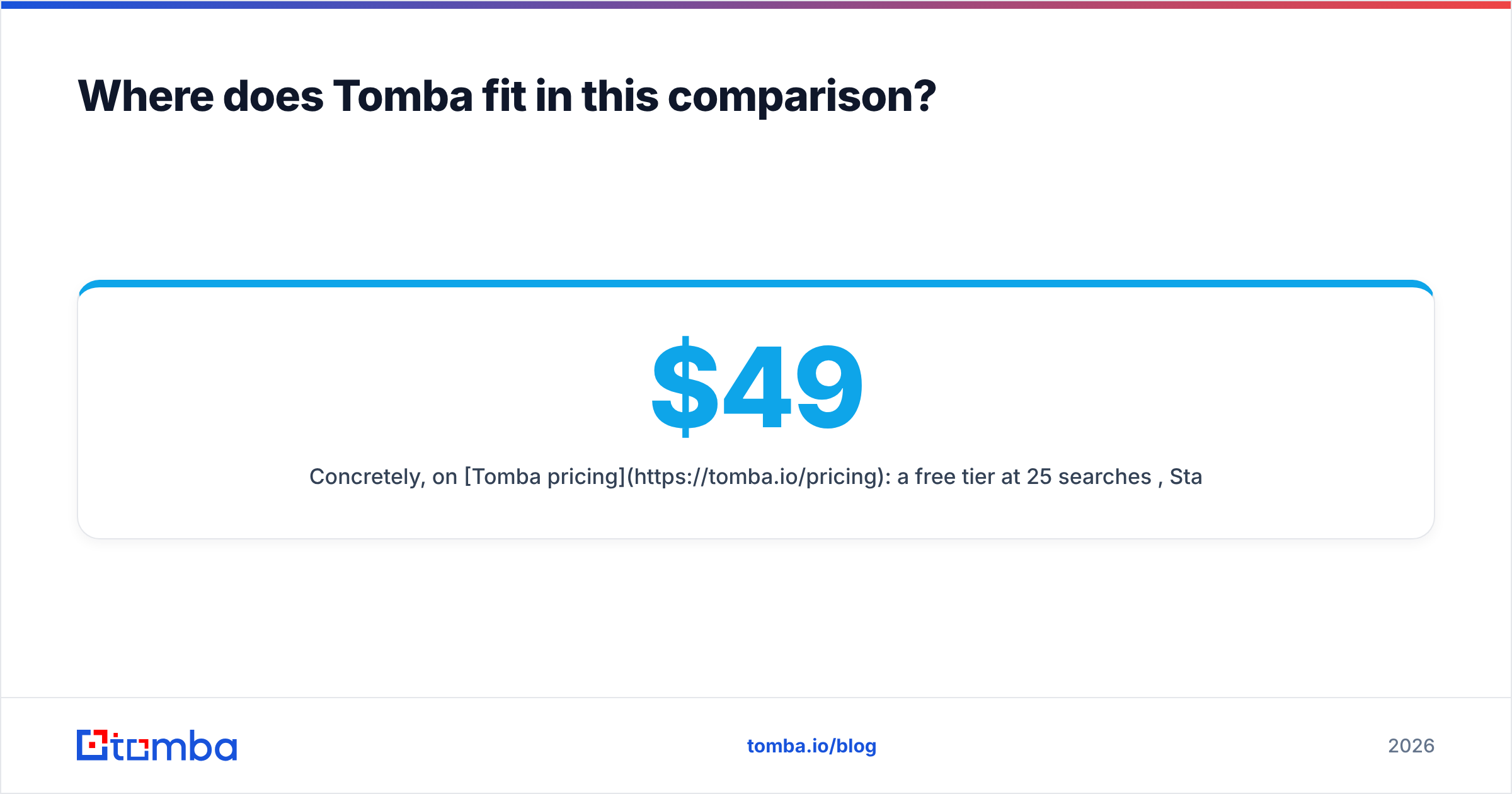
Concretely, on Tomba pricing: a free tier at 25 searches/month, Starter at $49/mo, Growth at $99/mo, Pro at $249/mo, and custom Enterprise. The Growth tier is where the comparison gets interesting — it lands below Hunter's equivalent mid tier while including catch-all verification that most competitors sell separately or skip entirely.
What Tomba does not do is build your list from a chat prompt. If that is the capability you are shopping for, Leadsforge is answering a question Tomba is not trying to answer, and you should weigh it accordingly. Tools that claim to be best at everything are usually best at nothing.
Which should you choose in 2026?#
Choose Hunter if you have target accounts, need a battle-tested API, and value ecosystem integrations over price. It is the safe institutional choice and it has earned that.
Choose Leadsforge if list-building is the bottleneck — you know your ICP, you have no contacts, and describing the segment beats sourcing it manually. Trial it against a segment you understand well so you can judge whether its interpretation matches yours.
Choose Tomba if you want lookup depth plus verification plus catch-all handling on one bill, with an API you can build against from the $49 tier. Which, for most outbound teams running a known account list, is the actual requirement.
Whatever you pick, run the same 100 domains through your shortlist during trials and score on deliverable addresses after verification. Every other metric on every pricing page is downstream of that one.
Ready to test it on your own list? Start with the Tomba Email Finder free tier — 25 searches a month, no card, with verification and catch-all checks included so the number you get back is the number you can actually send to.
Related guides#
// get started
Find, verify and enrich your first contacts today
Start on the free plan with 25 searches a month, then scale when your team is ready.
Free plan · No credit card required · GDPR & CCPA
// about the author